Recommended Text-to-Speech Software Summary: 7 Selections for Commercial Use [Free and Paid]
Can't you use VOICEVOX on a smartphone? Recommended alternative text-to-speech apps [iPhone/Android compatible]
Jan. 26, 2026
![Can't you use VOICEVOX on a smartphone? Recommended alternative text-to-speech apps [iPhone/Android compatible]](https://storage.googleapis.com/ondoku3/image/voicevox_alternative_tmb_930.webp)
Can't I use VOICEVOX on a smartphone? I want to know an alternative method!

Are you having trouble because you can't use VOICEVOX on your smartphone?
In this article, for those of you in that situation, we will introduce **alternative solutions** in an easy-to-understand way for when **VOICEVOX cannot be used on iPhone (iOS) or Android smartphones**!
VOICEVOX, a high-performance speech synthesis software that can be used for free, is very popular, isn't it?
Many of those thinking about starting video production might want to use VOICEVOX on their own smartphones.
However, **VOICEVOX is software exclusively for PC, and there is no official smartphone app.**
Therefore, it is not possible to run the original VOICEVOX on an iPhone (iOS) or Android smartphone alone.
So this time, for those who wanted to use VOICEVOX on a smartphone, we will introduce the best alternative method!
In this article, we will thoroughly explain:
- Reasons why VOICEVOX cannot be used on iPhone/Android smartphones
- Recommended alternative options for reading text aloud on smartphones
- How to use alternative apps that don't require installation (text-to-speech methods)
Using this article as a guide, why not try making videos on your iPhone (iOS) or Android smartphone?
Can VOICEVOX be used on iPhone or Android smartphones? Alternative apps explained

First, we will explain the reasons why the official VOICEVOX app cannot be used on iPhone (iOS) or Android smartphones, and alternative methods.
Conclusion: There is no official VOICEVOX smartphone app
In conclusion, **even if you search for "VOICEVOX" or "Zundamon" on the iPhone (iOS) App Store or Android Google Play, you cannot download the official VOICEVOX app.**
This is because VOICEVOX is an **app developed for PC** such as Windows, Mac, and Linux.
VOICEVOX is an app that can synthesize easy-to-listen-to audio, but it requires a certain level of specs.
Also, the voice adjustment functions for reading text are designed based on the assumption of operation on a PC.
In this way, a **PC is required** to use the voices of Zundamon, Shikoku Metan, or Kasukabe Tsumugi to read aloud in VOICEVOX.
I don't have a PC~


It would be more convenient to use a smartphone for posting to TikTok, though
But there are many cases where you want to create audio on an iPhone or Android smartphone instead of a PC, right?
It's okay!
In such cases, there is a recommended **alternative method that doesn't require installation and allows you to easily synthesize audio using only your smartphone.**
Ondoku is recommended as a VOICEVOX alternative! [Free, No Installation Required]
We definitely want you to try a text-to-speech app that can serve as an alternative to VOICEVOX.
The recommended one is the AI text-to-speech app "Ondoku"!
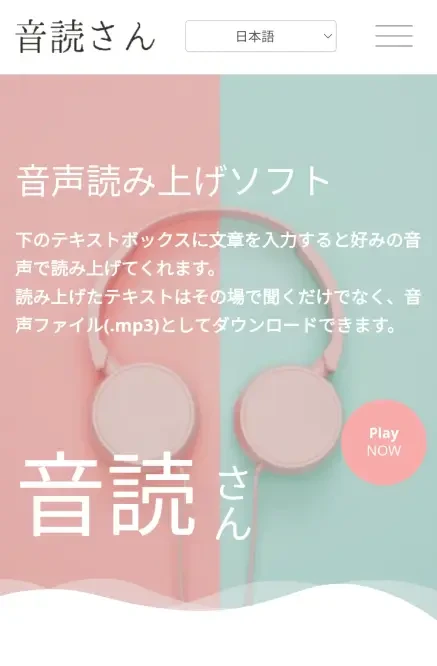
Ondoku is a web app that can be used from a browser.
**No smartphone app installation is required**; you can easily read text aloud and download it **just by accessing the website from your browser.**
Furthermore, it **supports reading long texts**, and you can read up to 5,000 characters of text for free!
Using very high-quality AI voices, you can create attractive videos using only your smartphone.
When you want to post videos to YouTube or TikTok using only your smartphone, why not start by using **Ondoku**, which is **free and requires no installation**?
Thorough comparison of VOICEVOX and Ondoku! Can it be used on a smartphone instead?

Here, let's compare the PC version of VOICEVOX and **Ondoku**, which can be used in a smartphone browser, in detail!
By understanding the characteristics of each, you will clearly see which one is more suitable for your purposes.
[PC, iPhone, Android] Supported devices and installation methods?
First, supported devices.
VOICEVOX is basically for PC use only.
In contrast, **Ondoku** can be used on any device that runs a browser, including PCs, **iPhones, iPads (iOS), Android smartphones, and tablets.**
Also, **VOICEVOX requires downloading and installing the software.**
Since the file size is large, especially the data capacity for each character, it is recommended to download it using a high-speed connection.
In some cases, installation may take some time.
In contrast, **Ondoku requires no installation!**
Since you can use it just by accessing the site in your browser, you can **start creating immediately** when you want audio.
Types of voices? Character nature and practicality are key
**Ondoku** and VOICEVOX also have differences in their voices.
VOICEVOX is characterized by its ability to use voices with strong character personalities, such as "Zundamon," "Shikoku Metan," and "Kasukabe Tsumugi."
Detailed intonation adjustments, known as voice tuning, are also possible.
In contrast, **Ondoku** offers a wide choice from **calm and trustworthy voices** suitable for narration and reading to **cute and friendly voices**.
Its greatest appeal is its high versatility, not depending on specific characters.
Among those looking for a VOICEVOX alternative, some may want to use character voices, while others may be looking for a free, high-quality reading tool.
If your goal is "it doesn't absolutely have to be Zundamon's voice" or "I want to easily create easy-to-understand commentary videos on my smartphone," **Ondoku is the best choice**!
[English/Foreign Languages] Create videos for foreign audiences with multilingual support!
Furthermore, **Ondoku** is equipped with **features that VOICEVOX does not have**!
That is the **multilingual reading function for English and other foreign languages.**
While VOICEVOX is an app specialized for Japanese, **Ondoku allows text-to-speech reading and downloading in languages from around the world, including English, French, Spanish, Chinese, and Korean.**
Even if you want to create videos or short videos for overseas audiences, you can easily create voice narrations using the same tool.
![[Ondoku] Listen to types of voices and sample audio for supported languages | Text-to-speech software Ondoku](https://storage.googleapis.com/ondoku3/image/%E5%A4%9A%E6%A7%98%E6%80%A7_930.webp)
[Ondoku] Listen to types of voices and sample audio for supported languages | Text-to-speech software Ondoku
Here, we will introduce the supported languages and sample voices of Ondoku.
In this way, VOICEVOX and **Ondoku** each have different characteristics and strengths.
When you want to create high-quality audio on an iPhone or Android smartphone, you can easily create your ideal audio by using **Ondoku** instead of VOICEVOX.
[iPhone/Android] Procedures and usage for creating audio with Ondoku
I want to try using Ondoku on my smartphone!

Now, we will **explain the steps to actually create and download audio using Ondoku on an iPhone or Android smartphone**!
Usage is very simple.
You can create audio right now as a substitute for VOICEVOX.
1. Access Ondoku via a browser on your iPhone or Android smartphone
First, open the **Ondoku page** in your smartphone's browser (Safari, Chrome, etc.).
When you open the site, a text input box is displayed immediately.
You can enter text and start reading aloud right away.
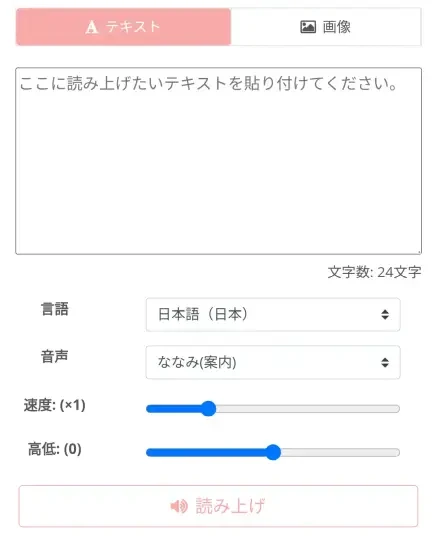
Register as a free member to read up to 5,000 characters!
To use **Ondoku** even more conveniently, **free registration** is recommended!
Even if you are not registered or logged in, you can read up to 1,000 characters, but if you register an account, you will be able to read up to 5,000 characters for free.
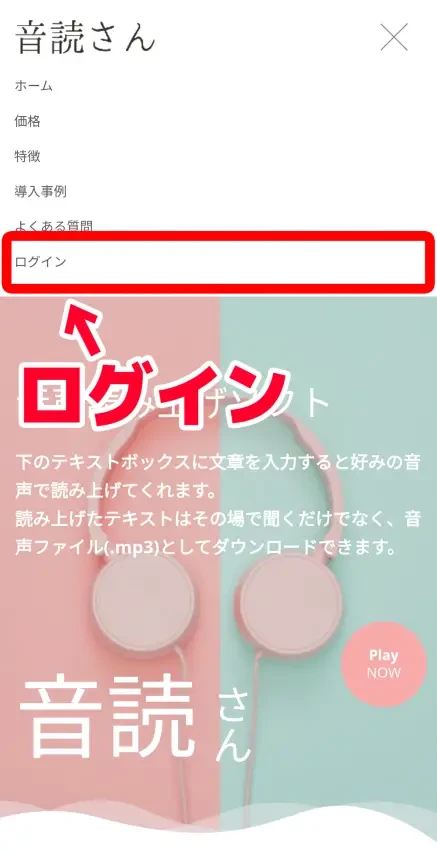
To register, tap "Login" in the menu.
Tap "Free Registration" on the login screen.
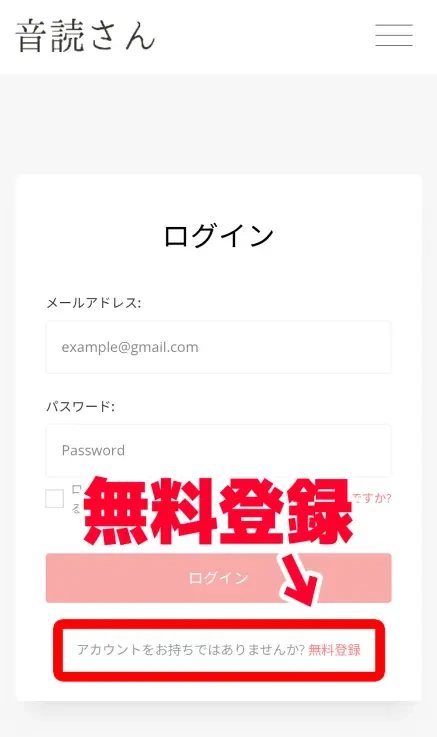
Then, just enter your email address and password to register your account!
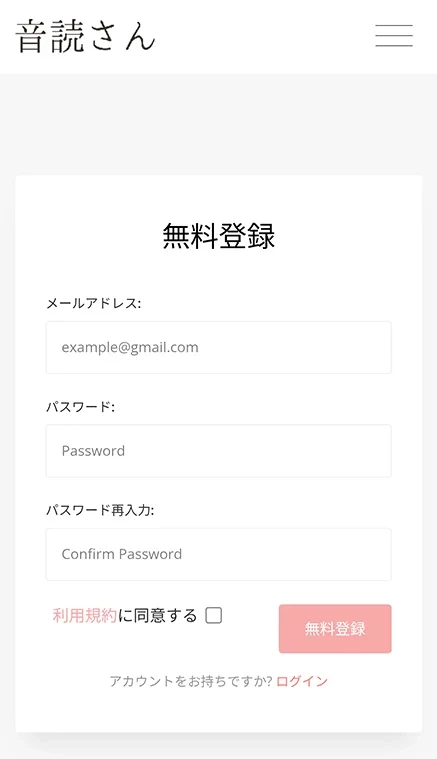
No tedious input of personal information is required.
With this, you have increased the number of free reading characters to **5,000**!
2. Enter text and start AI text-to-speech
Enter the content you want to read in the browser's text box.
Once you have entered the text, select the language and the type of voice (speaker).
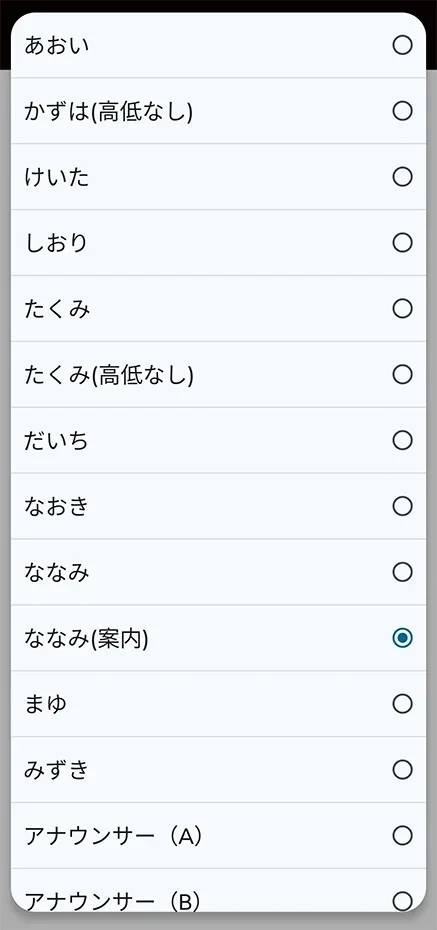
You can listen to **Ondoku**'s Japanese voices on this page, so please take a look.

Preparation is now complete.
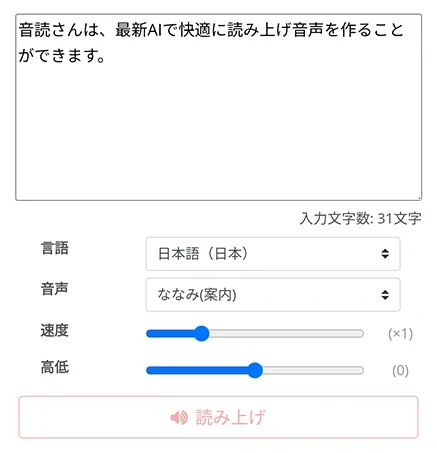
Press "Read aloud" to start the speech synthesis.
3. Reading complete! Download the file
Text reading is completed quickly.
The screen switches and an audio player is displayed.
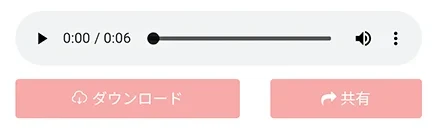
The audio will play, so check it to see if there are any issues.
If it's okay, press "Download" to download the MP3 file.
**Since audio files created with Ondoku are in the lightweight MP3 format**, they can be downloaded immediately even if you read text aloud using a mobile connection outside.
*If you have registered an account, it is also possible to download WAV files from the reading history page.
**With this, you were able to read text aloud using only an iPhone (iOS) or Android smartphone as a substitute for VOICEVOX!**
If you log in to the **Ondoku** page from another smartphone or PC browser, you can also download the reading results to other devices.
In this way, if you want to create audio on an iPhone or Android smartphone instead of VOICEVOX, **Ondoku** is recommended!
**Anytime, anywhere**, you can **create voice narrations** as a **VOICEVOX alternative**!
Why not start by using **Ondoku** for **free** yourself?
There are also unofficial apps and unofficial tools compatible with iPhone and Android smartphones
So far, we have introduced recommended VOICEVOX alternative tools and how to use them.
Besides those, there are unofficial alternative tools and unofficial apps that allow reading aloud in the voices of Zundamon, Shikoku Metan, and Kasukabe Tsumugi from iPhone (iOS) or Android smartphones.
Zunda Voice: Smartphone app for iPhone (with limitations)
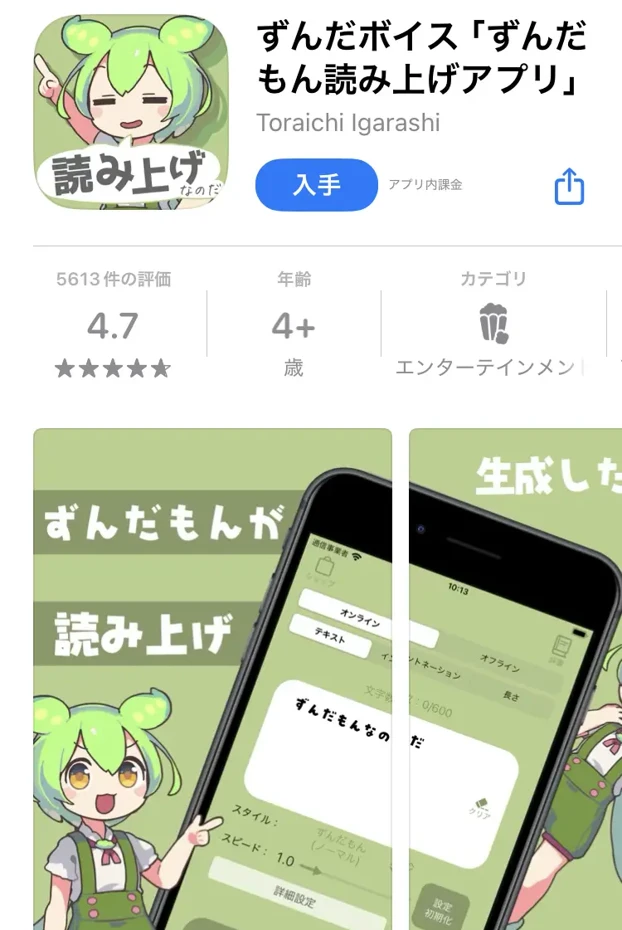
Zunda Voice is a reading app used by installing it on an iPhone (there is no Android version).
It can be installed for free, but you can also pay for the paid version to use it even more conveniently.
While it is possible to read aloud with voices used in VOICEVOX such as Zundamon, being a smartphone app, it also has many limitations.
- Character limit: Up to 200 characters at a time for the free version, and up to 600 characters at a time for the paid version
- Free version requires using a "Gacha" function to increase the types of voices (all types unlocked in the paid version)
In this way, because it is a smartphone app for iPhone, its **functionality is limited** compared to the official VOICEVOX for PC.
Also, for commercial use, it is necessary to follow the terms of use for characters such as Zundamon, Shikoku Metan, and Kasukabe Tsumugi.
Web Version VOICEVOX: Reading aloud via VOICEVOX from a browser (with limitations)
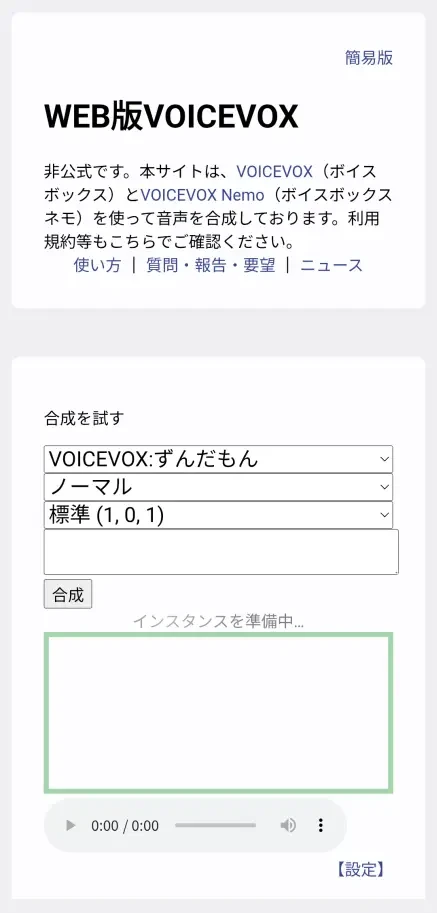
Web Version VOICEVOX is a web app for browsers created unofficially by volunteers.
It is a tool that reads aloud by using VOICEVOX running on a computer prepared by an individual from a website, and the created audio can be downloaded.
It can be used as a substitute from an iPhone or Android smartphone browser.
However, **there are limits on reading long texts** required for video creation.
Also, there are **many difficult parts for advanced users in terms of usage**, such as the need to save a "Project Key" in the browser to save progress.
As a simple tool developed by an individual, there is also the disadvantage that it is unknown when it might become unusable.
Furthermore, when using it, it is necessary to follow the terms of use for the VOICEVOX software itself and for characters such as Zundamon, Shikoku Metan, and Kasukabe Tsumugi.
Apps and alternative tools for VOICEVOX have many limitations
In this way, alternative apps and software for using VOICEVOX on iPhone (iOS) or Android smartphones have functional limitations.
For conveniently reading text aloud with simple operations on an iPhone (iOS) or Android smartphone, the AI text-to-speech service Ondoku is recommended.
[Free] Recommended text-to-speech app as a VOICEVOX alternative
If you want to read text aloud on an iPhone (iOS) or Android smartphone, "Ondoku" is recommended!
**Ondoku** is a web app that can **smoothly read aloud and download** using the **latest AI speech synthesis engine.**
**No installation is required**, and it can be easily used just by opening it in a browser like Safari on iPhone (iOS) or Chrome on Android smartphones!
**And Ondoku is free!**
By registering and logging in, you can read up to 5,000 characters, allowing you to smoothly create video narrations.
When looking for a VOICEVOX alternative for iPhone or Android smartphones, why not try **Ondoku** first?
Ondoku is the best VOICEVOX alternative for iPhone and Android smartphones!
This time, for those thinking about using VOICEVOX on an iPhone (iOS) or Android smartphone, we explained the usage of alternative methods in detail.
In conclusion, Ondoku is the recommended VOICEVOX alternative!
**Since VOICEVOX does not have an official app for iPhone or Android smartphones**, it cannot be used on a smartphone alone.
There are alternative apps and services used via browsers created by volunteers, but there are limitations on the text-to-speech function.
But it's okay.
By using **Ondoku**, which **requires no installation**, anyone can easily create high-quality narration audio just by accessing it from a browser.
**If you are making videos for TikTok, YouTube Shorts, or Instagram, using Ondoku instead of VOICEVOX is best.**
Why not open **Ondoku** in your iPhone or Android smartphone's browser and experience speech synthesis for yourself?
■ AI voice synthesis software "Ondoku"
"Ondoku" is an online text-to-speech tool that can be used with no initial costs.
- Supports approximately 50 languages, including Japanese, English, Chinese, Korean, Spanish, French, and German
- Available from both PC and smartphone
- Suitable for business, education, entertainment, etc.
- No installation required, can be used immediately from your browser
- Supports reading from images
To use it, simply enter text or upload a file on the site. A natural-sounding audio file will be generated within seconds. You can use voice synthesis up to 5,000 characters for free, so please give it a try.

Text-to-speech software "Ondoku" can read out 5000 characters every month with AI voice for free.
You can easily download MP3s and commercial use is also possible.
If you sign up for free, you can convert up to 5,000 characters per month for free from text to speech.
Try Ondoku now.
HP:
ondoku3.com
Email: ondoku3.com@gmail.com
Email: ondoku3.com@gmail.com
Related posts
"Ondoku" is a Text-to-Speech service that anyone can use for free without installation. If you register for free, you can get up to 5000 characters for free each month. Register now for free
- What is Ondoku
- Start text-to-speech conversion
- Free registration
- Pricing
- Posts
- Try other free services









