Recommended Text-to-Speech Software Summary: 7 Selections for Commercial Use [Free and Paid]
Master AI Voice Styles: Create Human-like Emotions & Acting for Free
Feb. 26, 2026
Thank you for using Ondoku.
With the newly launched AI voice "Ondoku Beta", which reads text aloud in a more human-like way, you can now freely write your own reading style to achieve a wide range of expressions, including emotions, acting, age, and dialects.
In this article, we'll introduce tips, techniques, and how-tos for using the "voice styling" feature of Ondoku's new AI voice on the AI text-to-speech site Ondoku.
With voice styling, the expressive possibilities are virtually endless—why not give it a try?
[Free] New AI Voice with Voice Styling: "Ondoku Beta"
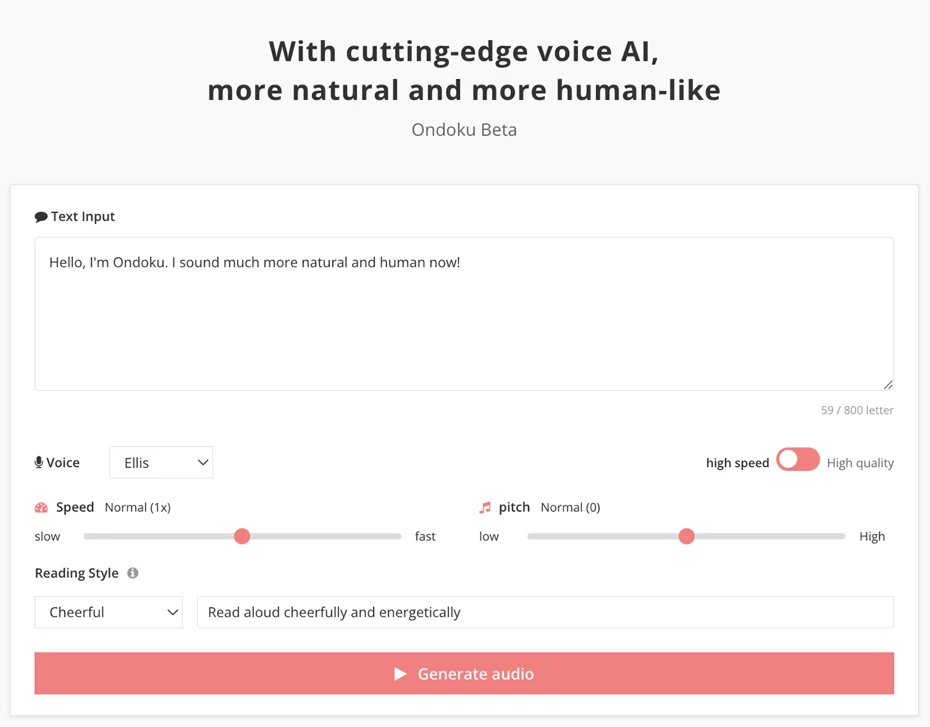
You can try the AI text-to-speech site "Ondoku Beta" here.
Just like the original Ondoku, it's free to use!
It's approved for commercial use, so you can use it for YouTube explainer videos, creative projects, and even monetized content! (Learn more about commercial use here)
With such a wide range of expressive possibilities, why not experience Ondoku's new AI voice with voice styling for free?
How to Use the Style (Voice Styling) Feature on Ondoku's New AI Text-to-Speech Site
The AI text-to-speech site "Ondoku Beta" uses a cutting-edge AI speech synthesis engine that allows you to freely write your own reading style.
It's easy to use!
Open the site from this link, then enter the text you want read aloud in the text box.
In the "Reading Style" field, type the reading style you want to apply.

Press the "Generate Audio" button, and the new AI engine will synthesize your speech right away.
For a detailed guide on how to use Ondoku's new AI voice, check out this article.

Listen to the Style Feature in Action! Tips and Techniques for Voice Styling
Now let's explore what kinds of expressions you can create with the new AI voice's style feature, along with tips and techniques!
It's very easy to do, so give it a try yourself.
1. Emotional Expression Samples & Voice Styling Tips
Let's start with emotional expressions: joy, anger, sadness, and delight.
Adding emotional expression is very easy.
Simply write a style like "Read in a happy tone" or "Read in a sad tone"—that's all it takes.
The sample audio uses the voice "Ellis."
Audio sample with the style instruction "Please read in a happy tone."
I'm so happy! Thank you so much!
Audio sample with the style instruction "Please read in an angry voice."
Do you even understand why I'm angry?
Audio sample with the style instruction "Please read in a sad tone."
That's... that's so cruel.
Audio sample with the style instruction "Please read in a cheerful tone."
Come on! Let's go ride that rollercoaster next! It's going to be amazing!
2. Acting & Voice Character Samples & Voice Styling Tips
Ondoku's new AI voice can do more than just basic emotions—it can deliver nuanced, human-like performances!
Depending on how you write your style instructions, you can shape the voice into a variety of different characters.
Audio sample with the style instruction "Please read in an authoritative voice."
Hello, this is Ondoku. The voices are now more natural and more human-like!
Voice: Ellis
Voice: Ash
Audio sample with the style instruction "Please read in a whispering voice."
Hello, this is Ondoku. The voices are now more natural and more human-like!
Voice: Ellis
Voice: Ash
Audio sample with the style instruction "Please read in a confident and bright voice."
Hey there, I'm Ondoku! I've got the most natural, most human-like voice in the universe!
Voice: Ellis
Audio sample with the style instruction "Please read in an unconfident, hesitant voice."
Hello, I'm Ondoku. I sound more natural and more human-like now... I think...
Voice: Ellis
3. Using a Female Voice to Create a "Young Boy's Voice"—A Voice Styling Technique
One unique technique made possible by Ondoku's more natural-sounding AI voice is creating a "young boy's voice."
In animation, pre-adolescent boy characters are often voiced by female voice actors.
With Ondoku's new AI voice, you can do the same—select a female voice and give it a style instruction to produce a boy's voice.
The sample audio uses the voice "Ellis."
Audio sample with the style instruction "Please read in the voice of an energetic young boy."
Hello, this is Ondoku. The voices are now more natural and more human-like!
Additionally, the tone of the written text itself also affects how the voice sounds.
Audio sample with the style instruction "Please read in the voice of an energetic young boy."
Hey! I'm Ondoku! I sound way more natural and totally human now!
4. Age Styling Isn't Just for Kids—Tips for Reading in an Elderly Voice
Of course, you're not limited to children's voices—you can also have the AI read in an aged, elderly voice.
Audio sample with the style instruction "Please read in a grandmother's voice."
Hello, this is Ondoku. The voices are now more natural and more human-like!
Voice: Ellis
Audio sample with the style instruction "Please read in a grandfather's voice."
Hello, this is Ondoku. The voices are now more natural and more human-like!
Voice: Ash
Beyond descriptions like "grandmother" or "grandfather," you can also specify a particular age for the performance.
Audio sample with the style instruction "Please read as if you were 60 years old."
Hello, this is Ondoku. The voices are now more natural and more human-like!
Voice: Ellis
Audio sample with the style instruction "Please read as if you were 80 years old."
Hello, this is Ondoku. The voices are now more natural and more human-like!
Voice: Ellis
5. Tips for Creating Character Voices—Techniques for Creative Projects
What's more:
By getting creative with how you write the style instructions, you can produce even more advanced character performances.
Audio sample with the style instruction "Please read in a Valley girl voice."
Like, hi there! I'm Ondoku! My voice is, like, totally natural and super human-like now!
Voice: Ellis
Audio sample with the style instruction "Please read in the tone of a distinguished professor."
Today, we will discuss the complexities of quantum mechanics and the nature of time.
Voice: Ash
Audio sample with the style instruction "Please read in the tone of a police officer."
You have the right to remain silent. Anything you say can and will be used against you in a court of law.
Voice: Ash
6. Combine Acting, Age, and Character Styles—Of Course You Can Mix and Match!
Of course, you can also combine the different styling options we've introduced so far:
- Emotions
- Acting
- Age
- Character
You can combine these styling instructions for even more expressive results!
The sample audio uses the voice "Ellis."
Audio sample with the style instruction "Please read in the voice of an energetic young boy, sounding happy."
Yes! I won! I actually won!
Audio sample with the style instruction "Please read in the voice of an energetic young boy, sounding sad."
Aww man, I've had enough of this...
Audio sample with the style instruction "Please read in a Valley girl voice, sounding happy."
You're not so bad after all. Thanks!
Audio sample with the style instruction "Please read in a Valley girl voice, sounding angry."
You are, like... seriously the worst.
Audio sample with the style instruction "Please read in the voice of an 80-year-old, sounding happy."
It was all worth it, living this long.
Audio sample with the style instruction "Please read in the voice of an 80-year-old, sounding sad."
I see. That is truly unfortunate.
7. Reading with Accents and Dialects Using the Style Feature
In addition to acting, age, and character expressions, Ondoku's more human-like new AI voice can also read with regional accents and dialects!
The sample audio uses the voice "Ellis."
Audio sample with the style instruction "Read cheerfully with a British English accent."
Hello, I'm Ondoku. I sound absolutely brilliant and much more natural now!
8. The Style Feature Makes Foreign Language Reading Easy Too!
Ondoku's new AI voice can naturally read aloud not only in English but also in languages from around the world.
An important tip: when reading in a foreign language, write the style instructions in that language as well. For example, when reading in Spanish, write the style in Spanish.
Here's an example of speech synthesized in Latin American Spanish and European Spanish.
The sample audio uses the voice "Ellis."
Audio sample with the style instruction "Habla alegremente con acento latinoamericano."
Hola, soy Ondoku. Mi voz ahora suena mucho más natural y humana.
Audio sample with the style instruction "Habla alegremente con acento castellano."
Hola, soy Ondoku. Mi voz ahora suena mucho más natural y humana.
Of course, even when reading in a foreign language, you can specify accents and dialects.
For example, here's how it sounds when reading in Parisian French versus Quebec French.
The sample audio uses the voice "Ellis."
Audio sample with the style instruction "Parlez joyeusement avec un accent parisien."
Bonjour, je suis Ondoku. Ma voix est devenue beaucoup plus naturelle et humaine.
Audio sample with the style instruction "Parlez joyeusement avec un accent québécois."
Bonjour, je suis Ondoku. Ma voix est devenue beaucoup plus naturelle et humaine.
As you can see, the cutting-edge AI speech synthesis engine lets you read in many languages with ease!
Try experimenting with different voice styling techniques in languages other than English, too.
Experience the Expressive Power of Our More Human-Like AI Voice—For Free
The possibilities with Ondoku's new AI voice are endless!
With the right style instructions, you can achieve a wide range of voice styling—from emotions and acting to age and character voices.
Whether it's for video narration or creative projects, why not experience Ondoku's more human-like new AI voice for free?
■ AI voice synthesis software "Ondoku"
"Ondoku" is an online text-to-speech tool that can be used with no initial costs.
- Supports approximately 50 languages, including Japanese, English, Chinese, Korean, Spanish, French, and German
- Available from both PC and smartphone
- Suitable for business, education, entertainment, etc.
- No installation required, can be used immediately from your browser
- Supports reading from images
To use it, simply enter text or upload a file on the site. A natural-sounding audio file will be generated within seconds. You can use voice synthesis up to 5,000 characters for free, so please give it a try.

Text-to-speech software "Ondoku" can read out 5000 characters every month with AI voice for free.
You can easily download MP3s and commercial use is also possible.
If you sign up for free, you can convert up to 5,000 characters per month for free from text to speech.
Try Ondoku now.
HP:
ondoku3.com
Email: ondoku3.com@gmail.com
Email: ondoku3.com@gmail.com
Related posts
"Ondoku" is a Text-to-Speech service that anyone can use for free without installation. If you register for free, you can get up to 5000 characters for free each month. Register now for free
- What is Ondoku
- Start text-to-speech conversion
- Free registration
- Pricing
- Posts
- Try other free services














