Recommended Text-to-Speech Software Summary: 7 Selections for Commercial Use [Free and Paid]
[2026 Version] How to use English text-to-speech features & samples! Free AI sites are recommended for native-pronunciation speech synthesis
Jan. 26, 2026
![[2026 Version] How to use English text-to-speech features & samples! Free AI sites are recommended for native-pronunciation speech synthesis](https://storage.googleapis.com/ondoku3/image/english_tts_feature_tmb_930.webp)

How do you use the English reading function? I want to know about websites and apps!
Have you ever wanted to turn English sentences into audio?
An English reading function is very convenient when you want to create listening materials for English learning or narration for YouTube videos.
In this article, for those who are wondering:
- How should I use the English reading function?
- Can I use the English reading function on iPhone iOS or Android smartphones?
- Are there websites or apps where I can use the English reading function for free?
We will explain everything in detail, from basic knowledge to specific usage!
We will introduce methods that can be used from any device, including iPhone iOS, Android smartphones, tablets, and computers, so please take a look.
Ondoku is recommended for free English reading! [Supports iPhone, Android, and PC]

When you want to use the English reading function, Ondoku is recommended!
Ondoku is an AI reading app that can be used for free.
Since it is a web app that reads from your browser, it works in any environment, whether it's an iPhone (iOS), Android smartphone, or computer!
It can be used easily right now with no installation required.
Its biggest feature is the ability to perform free reading with native pronunciation!
It is possible to synthesize speech from English text using over 67 types of native voices, including female, male, and children's voices.
Moreover, it supports a wide range of pronunciations, including American English, British English, Australian English, and Indian English.
If you are creating English narration for YouTube videos or audio for English learning materials, Ondoku is recommended!
Since it's available for free, why not experience the English reading function of Ondoku for yourself first?
[iPhone, Android, PC Compatible] How to use the free English reading function of Ondoku
Please tell me how to use the English reading function!

Now, let's explain how to use the English reading function of Ondoku.
1. Open the Ondoku site and paste English text
Ondoku is a web app that can be used for free.
To use the English reading function, first open the Ondoku site in your smartphone or computer browser.
- Safari, standard on iPhone iOS and Mac OS
- Google Chrome, standard on Android smartphones
- Edge, Google Chrome, Firefox on Windows computers
Any browser is fine.
Paste the English text onto the top page of the Ondoku site.

2. Configure the English reading settings on the Ondoku site
Configure the reading function settings on the Ondoku site.
First, set the language to English.
- English (Australia): Australian pronunciation English
- English (India): Indian pronunciation English
- English (USA): American pronunciation English
- English (United Kingdom): British pronunciation English
You can select from these (in the order displayed on the Ondoku site).
This time, we selected "English (USA)" (American English).

Select the type of voice to use for reading.
With the English reading function on the Ondoku site, you can choose from:
- Female
- Male
- Genderless
- Girl
- Boy
This time, we chose the female voice "Sara."
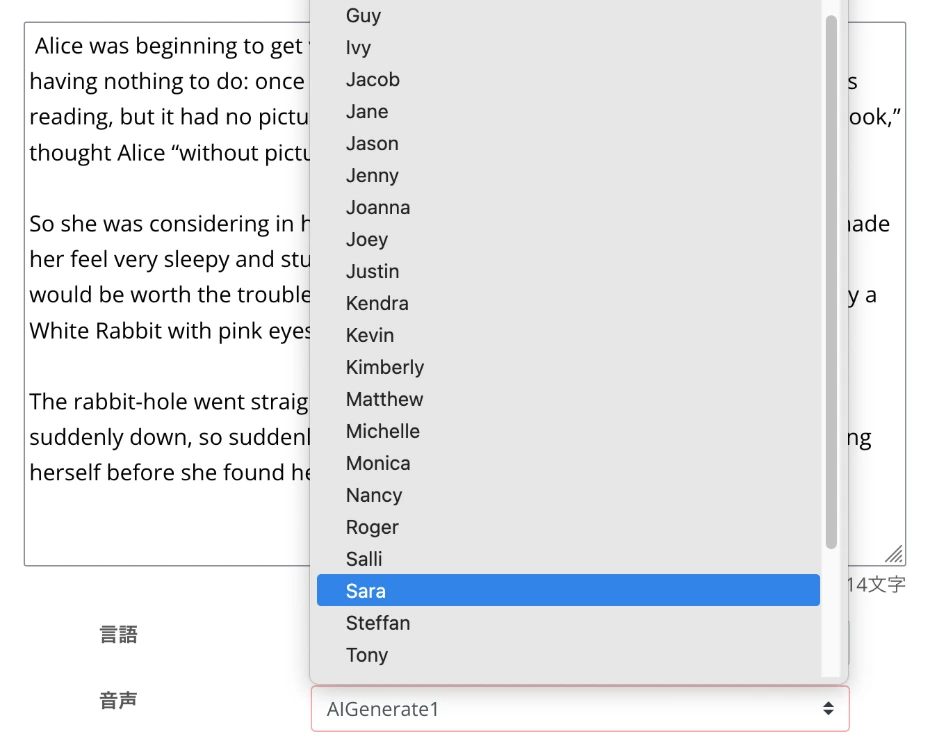
You can listen to samples of the voices by scrolling down this article, so please take a look.
With the Ondoku reading function, you can also adjust the pitch and speed of the voice, but the default settings are fine for the first time.
This time, we will also read using the default settings.

This completes the configuration for the reading function.
3. Read the English audio and check the content
After finishing the reading function settings, press "Read" to start speech synthesis.
The process is completed in just a few seconds.
When the reading is complete, the screen changes and an audio player is displayed.

For example, by reading this text, we were able to create audio like this.
With this, you have successfully read English text on the Ondoku site and created an audio file.
When you want to check English pronunciation, you can just play and listen on this page.
When using it for YouTube video narration, you can press "Download" to save it as an MP3 file.
By opening the history page from the menu, downloading as a WAV file is also possible.
In this way, the English reading function of Ondoku is very easy to use!
Since you can synthesize speech for free, why not start using the reading function of Ondoku yourself?
Listen to English audio samples from the AI reading site Ondoku
What kind of voices can Ondoku use to read English?

With the English reading function of the AI reading site Ondoku, you can read using as many as 67 types of voices from:
- American English
- British English
- Australian English
- Indian English
For those of you who want to know what kind of voices can be used, we will introduce audio samples.
(You can listen to them in any environment, whether it's iPhone iOS, Android smartphone, or computer)
There are 67 types of English voices in the Ondoku reading function

With the English audio of Ondoku, you can perform speech synthesis using many voices (speakers) like this.
- USA (American English): 38 speakers
16 Males
16 Females
1 Genderless
2 Boys (Children)
1 Girl (Child) - UK (British): 12 speakers
11 Males
11 Females
2 Girls (Children) - Australia (Aussie English): 9 speakers
8 Males
9 Females
2 Girls (Children)
1 Boy (Child) - India (Indian English): 8 speakers
3 Males
5 Females
From YouTube video narration audio to English listening and pronunciation study materials, you can create reading audio exactly as you imagine.
Now, we will introduce listening samples of English voices (speakers) available in the Ondoku reading function.
The sample sentence is:
Hello, I'm Ondoku. Let's enjoy studying English together.
Here it is.
American English Audio Samples
Speaker
Audio
AIGenerate1: Male
AIGenerate2: Male
Amber: Female
Ana: Girl
Aria: Female
Ashley: Female
Blue: Genderless
Brandon: Male
Christopher: Male
Cora: Female
Davis: Male
Elizabeth: Female
Eric: Male
Guy: Male
Ivy: Girl
Jacob: Male
Jane: Female
Jason: Male
Jenny: Female
Jenny Multilingual: Female
Jenny Multilingual V2: Female
Joanna: Female
Joey: Male
Justin: Boy
Kendra: Female
Kimberly: Female
Kevin: Boy
Matthew: Male
Michelle: Female
Monica: Female
Nancy: Female
Roger: Male
Ryan Multilingual: Male
Salli: Female
Sara: Female
Steffan: Male
Tony: Male
en-US-A: Male
en-US-B: Male
en-US-C: Female
en-US-D: Male
en-US-E: Female
en-US-F: Female
Sally: Female
British English Audio Samples
Abbi: Female
Alfie: Male
Amy: Female
Bella: Female
Brian: Male
Elliot: Male
Emma: Girl
Ethan: Male
Geraint: Male
Hollie: Female
Libby: Female
Maisie: Girl
Mia: Female
Noah: Male
Oliver: Male
Olivia: Female
Ryan: Male
Sonia: Female
Thomas: Male
en-GB-A: Female
en-GB-B: Male
en-GB-C: Female
en-GB-D: Male
en-GB-F: Female
Australian English Audio Samples
Annetta: Female
Carly: Girl
Darren: Male
Duncan: Male
Elsie: Female
Freya: Female
Joanne: Female
Ken: Male
Kim: Female
Natasha: Female
Neil: Male
Nicole: Boy
Olivia: Girl
Russell: Male
Tim: Male
Tina: Female
William: Male
en-AU-A: Female
en-AU-B: Male
en-AU-C: Female
Indian English Audio Samples
Aditi: Female
Neerja: Female
Prabhat: Male
Raveena: Female
en-IN-A: Female
en-IN-B: Male
en-IN-C: Male
en-IN-D: Female
As you can see, with the AI reading site Ondoku, you can read English text with native pronunciation!
Why not use the English reading function of Ondoku for free for your YouTube video narrations or English learning materials?
What is the English reading function? Explaining convenient free sites and apps you can use right now

By utilizing the English reading function, you can easily convert text into audio just by inputting English text.
With the appearance of AI reading sites and apps that can be used for free, anyone can now easily create English audio.
We will explain the features and basic mechanism of the English reading function available on AI reading sites.
Turn English sentences into audio for free! What is the mechanism of an AI reading site?
If you are creating audio for YouTube video narrations or English learning materials, using the English reading function is recommended.
The English reading function can be used on AI reading sites that utilize the latest AI.
AI reading sites turn text into audio using a technology called Text-to-Speech (TTS).
In text-to-speech technology, AI analyzes the entered English sentences and converts them into natural audio.
Previously, text-to-speech functions could only read in unnatural, robot-like voices.
But current AI reading sites are different!
With advancements in AI technology, it is now possible to create English audio so natural that you can't tell the difference even when compared to a native speaker.
With an AI reading site, any environment like iPhone, Android, or PC is fine!
If you are going to read English text with an AI reading function, web app-type AI reading sites are recommended.
Web app-type AI reading sites can be used from the browsers of iPhone (iOS), Android smartphones, and computers, so there is no need to install an app.
Whether it's iPhone iOS, Android smartphone, or computer, you can use it immediately as long as you are connected to the internet.
With an AI reading site, you can create YouTube video narrations or English learning materials anytime, anywhere.
Furthermore, the latest AI reading sites support not only English but also various other languages such as Chinese, Korean, French, German, and Spanish.
You can use it even more broadly to create YouTube videos that appeal to viewers worldwide or to learn languages other than English.
[Free] Ondoku is recommended for English reading on iPhone, Android, and PC!
If you are going to use the English reading function, Ondoku is recommended!
Ondoku is a convenient reading site that can be used from any device, including iPhone (iOS), Android smartphones, and computers.
Since it's available for free, you can create English audio right away.
With Ondoku's English reading function, you can create audio with native pronunciation
The feature of Ondoku is that it can create high-quality audio with native pronunciation.
Utilizing the latest AI, it can generate natural English audio that sounds just like a real native speaker is talking.
Since it can realistically reproduce even intonation and rhythm, it can be utilized in a wide range of scenes, from YouTube video narrations to English learning materials.
Moreover, Ondoku supports:
- American English
- British English
- Australian English
- Indian English
You can create audio that matches the region where your YouTube video viewers live or the English accent you want to learn.
Also, the ability to choose from a rich variety of voices, such as female voices, male voices, and children's voices, is another feature of Ondoku.
Since you can also listen to English audio samples in the first half of this article, why not find the English voice that is perfect for your needs?
The AI web app Ondoku is best for reading English audio!
Ondoku is a web app-type reading service that can be used from a web browser.
The biggest advantage of the web app type is that there is no need to install an app.
- Safari on iPhone (iOS) and Mac OS
- Chrome on Android smartphones
- Edge, Chrome, Firefox on Windows computers
You can use it in any environment just by accessing it from your browser.
Since no installation is required, you don't have to worry about the storage capacity of your iPhone or Android smartphone.
Unlike installation-type apps, another advantage unique to the web app type is that you can always use the latest AI reading engine.
Usage patterns such as:
- Create audio on an iPhone or Android smartphone while out, then edit it on a computer when you get home
- Create audio on a computer at home, then listen to it on an iPhone or Android smartphone while out
are also possible.
You can read English for free with Ondoku!
Moreover, Ondoku can be used for free!
Among English reading sites, there are many where the functions are limited if it's free, right?
But with Ondoku, you can perform free reading for as many as 5,000 characters!
Since you can turn even quite long English texts into audio, it is also perfect for creating English video narrations for YouTube.
Of course, whether you use it from an iPhone iOS, Android smartphone, or computer, you can similarly read up to 5,000 characters for free.
Commercial use is also OK, so it is safe even when using it for a company or organization (click here for more details about commercial use).
When you want to use the English reading function, Ondoku is recommended.
Why not use Ondoku for free to create YouTube video narrations or English learning materials?
[Free] What are the ways to utilize AI reading sites? Practical uses of the English reading function

AI reading sites can be utilized in various situations, starting with YouTube video narrations and English learning.
We will introduce specific utilization scenes and tips for use, showing how the English reading function can be utilized on iPhone iOS, Android smartphones, and computers.
Create narrations for YouTube videos for free using the English reading function
A recommended way to use AI reading sites is creating narrations for YouTube videos and short videos.
When you want to increase the number of YouTube subscribers or viewers, creating videos with English narration audio is recommended.
However, for someone whose native language is not English, it is very difficult to create YouTube narration audio in English.
Hiring a professional narrator for YouTube video English narration would be very expensive.
That's where utilizing an AI reading site comes in!
By using the English reading function of an AI reading site, you can produce high-quality narration audio for free!
Unlike hiring a narrator, the narration audio is completed in just a few seconds after entering the script text, so you can create English videos very smoothly.
It's also possible to add English narration later to video materials filmed on an iPhone, iPad, or Android smartphone, so it's also recommended when posting videos to short video apps like TikTok from a smartphone.
When editing YouTube videos on a computer, creating English narration audio on an AI reading site is ideal.
![[2025 Latest] How to add English narration to YouTube videos? Easy production with AI speech synthesis | Text-to-speech software Ondoku](https://storage.googleapis.com/ondoku3/image/youtube_english_narration_tmb_930.webp)
The AI reading function is recommended for making English learning materials for free
You can also utilize AI reading sites and apps for English learning and study.
Create original English listening materials for free
The most recommended use is creating original listening materials for free.
Commercial listening materials often don't match your English level or are about topics you're not interested in, right?
In such cases, by using the reading function of an AI reading site/app, you can create materials with the English sentences you want to read.
- A passage from a favorite novel
- An interesting news article
- Technical terms used at work
Any English text is fine!
By using materials with content that suits you, you can increase your motivation for English learning.
Study by turning textbooks and reference books into audio
Turning the text of English textbooks and reference books into audio to study during your commute is also recommended.
With the AI reading site Ondoku, you can easily turn the content of English textbooks and reference books into audio.
If you save the created audio to your iPhone or Android smartphone, it is possible to use your travel time effectively to study English.
Improve your English skills by creating shadowing materials for free
AI reading sites are also recommended for the particularly effective English learning method "shadowing"!
By using the reading function of the AI reading web app Ondoku, you can easily create shadowing materials!
Shadowing is an English learning method where you listen to audio and pronounce the words in the same way with a slight delay.
You can simultaneously train your listening skills, speaking skills, and pronunciation.
However, finding shadowing materials is unexpectedly difficult.
It's very hard to find material audio that matches your level and interest, isn't it?
That's where English reading sites and apps utilizing the latest AI play an active role.
By using an AI reading site, you can freely create materials that match your level.
- Simple daily conversation English
- News articles
- Technical English papers
You can create shadowing materials using content that suits you.
Moreover, with the AI reading web app Ondoku, you can create material audio that matches your English level using the speed adjustment function.
The Ondoku reading function can lower the speed to as low as 0.3x.
Even if you have just started English learning, you can start shadowing practice without overstretching by lowering the reading speed.
By gradually increasing the speed, you can smoothly acquire English pronunciation and rhythm.
If you create materials on a computer and save the audio to an iPhone, iPad, or Android smartphone, you can perform shadowing practice anytime, anywhere.
Of course, not just on a computer, you can also open the Ondoku site from the browser of an iPhone, iPad, or Android smartphone and create materials on the spot.
Regarding English shadowing, it is explained in detail in this article.
![[Complete Guide] What is the way to do English shadowing? Also explaining how to create materials for free! | Text-to-speech software Ondoku](https://storage.googleapis.com/ondoku3/image/20250522_shadowing_tmb_02_930.webp)
In this way, if you want to learn English more effectively, the AI reading web app Ondoku is recommended.
Utilize the English reading function in corporate business scenes as well
Of course, you can also utilize the English reading function of AI reading sites in corporate and organizational business scenes.
For example, if you are creating audio materials for corporate training, the English reading function is ideal.
The content of English training materials needs to be custom-made for each company or organization, right?
With a web app-type reading site, you can create original training materials with native pronunciation, so you can conduct effective training according to actual work details.
Also, if you are operating a store or facility, the reading function of an AI reading web app is recommended.
You can easily create announcement audio for the rapidly increasing number of inbound tourists with the AI reading web app Ondoku.
Furthermore, with Ondoku, you can create announcement broadcasts not only in English but in multiple languages such as Chinese and Korean.
![[Tourism Facilities, Stores, Transport] How to create announcement audio for inbound tourists! What is the effective recommended multilingual guide method? | Text-to-speech software Ondoku](https://storage.googleapis.com/ondoku3/image/20240926_inbound_guide_announcement_010_930.webp)
Of course, when creating YouTube videos or short videos on official corporate or organizational channels, creating narrations with the English reading function of Ondoku is recommended.
In this way, you can conveniently utilize AI reading sites even in corporate and organizational business scenes.
From training to store broadcasts, why not try creating English audio with the AI reading web app Ondoku?
Why not try using the English reading function of Ondoku for free?
As you can see, the English reading function can be utilized in a wide range of situations, from YouTube video/short video narrations and English learning materials to corporate and organizational business uses.
With the AI reading web app Ondoku, it is possible to generate English audio with native pronunciation, including American English, British English, Australian English, and Indian English.
Moreover, you can use the English reading function of Ondoku for free!
Why not try creating English audio yourself with the AI reading web app Ondoku?
■ AI voice synthesis software "Ondoku"
"Ondoku" is an online text-to-speech tool that can be used with no initial costs.
- Supports approximately 50 languages, including Japanese, English, Chinese, Korean, Spanish, French, and German
- Available from both PC and smartphone
- Suitable for business, education, entertainment, etc.
- No installation required, can be used immediately from your browser
- Supports reading from images
To use it, simply enter text or upload a file on the site. A natural-sounding audio file will be generated within seconds. You can use voice synthesis up to 5,000 characters for free, so please give it a try.

Text-to-speech software "Ondoku" can read out 5000 characters every month with AI voice for free.
You can easily download MP3s and commercial use is also possible.
If you sign up for free, you can convert up to 5,000 characters per month for free from text to speech.
Try Ondoku now.
HP:
ondoku3.com
Email: ondoku3.com@gmail.com
Email: ondoku3.com@gmail.com
Related posts
"Ondoku" is a Text-to-Speech service that anyone can use for free without installation. If you register for free, you can get up to 5000 characters for free each month. Register now for free
- What is Ondoku
- Start text-to-speech conversion
- Free registration
- Pricing
- Posts
- Try other free services









