Best Text-to-Speech Software: 7 Free & Paid Tools for Commercial Use
YouTube English Narration: How to Create Foreign Voiceovers with AI
Sept. 9, 2026

It's tough to get a narrator to record English video audio!

When creating English YouTube videos, it is necessary to have a narrator record the audio.
Situations requiring English or foreign language narration are increasing, such as YouTube videos for overseas audiences, guidance videos for inbound tourists, and company product introductions.
But,
- How should I prepare it?
- How much will it cost?
Many people must be wondering about these questions.
Until now, the only way was to rely on professional narrators, but recently, using AI voice has become common.
In this article, we will introduce in detail how to add English and foreign language narrator voices to YouTube videos.
Why not try making English or foreign language YouTube videos using a new method with the latest AI?
[Free] Recommended AI text-to-speech services for English and foreign language narrators in YouTube videos

For those looking for an English or foreign language video narrator, we recommend Ondoku.
Ondoku is a text-to-speech service that allows anyone to easily generate English or foreign language narration audio with the latest AI.
Simply by entering text, you can produce English narrator audio with native pronunciation in just a few seconds.
In addition to English (audio samples here), it supports 81 languages and regions, including Chinese, Korean, French, Spanish, Portuguese, and German.
By synthesizing narration audio with the latest AI, you can promote your YouTube channel to the entire world.
Of course, commercial use is OK, so it is perfect for corporate product promotion videos and videos for inbound tourists! (Click here for details on commercial use)
Moreover, Ondoku is free!
Paid plans are also available starting from 1,078 yen per month (tax included), so you can produce English and foreign language videos at a much lower cost than hiring a narrator for recording.
It can be used for free without registration or login, so why not start by actually producing English or foreign language narration audio with Ondoku?
How to prepare English/foreign language YouTube video audio? Comparing narrators & the latest AI

There are two ways to prepare English or foreign language narration audio for YouTube videos.
- Request a narrator to record English audio
- Produce audio with an AI text-to-speech service
These are the options.
Since the cost and production period vary greatly depending on which method you choose, it is recommended to select the one that suits you best.
How to request a professional narrator to record English audio
What has been common until now is requesting a professional narrator to record English or foreign language narration.
You request a recording from a narrator specializing in foreign languages such as English through a narrator agency or production company.
By hiring an experienced native-speaking narrator, you can have audio recorded with accurate pronunciation and natural intonation.
However, there are also problems with hiring a narrator.
First, the production cost is very high.
Requesting a professional narrator requires a very high fee, ranging from 50,000 to 80,000 yen per hour.
Because foreign language narrators require high skills, the cost tends to be especially high compared to narrators in your native language, such as Japanese.
Also, if you include studio usage fees, the cost increases even further.
The production period also tends to be long, and coordinating the narrator's schedule and securing recording dates takes time.
The fact that additional recording fees are required when narration corrections are needed is also a disadvantage.
Depending on the language, it may be difficult to find a native narrator in the first place, which is another drawback.
[Recommended] Produce narration audio with AI text-to-speech services
A new recommended way to create audio going forward is producing English or foreign language narration audio with an AI text-to-speech service.
By using an AI text-to-speech service, you can solve all the problems of English narration production.
With the latest AI speech synthesis engines, you can generate natural and easy-to-understand English audio that is indistinguishable from a native speaker!
As AI technology has advanced, the quality of narrator voices has improved dramatically.
It is now possible to produce narration audio just as you imagine, from American English and British English to Australian English and Indian English.
[Comparison with Narrators] What are the benefits of creating English narration with an AI text-to-speech service?
![[Comparison with Narrators] What are the benefits of creating English narration with an AI text-to-speech service?](https://storage.googleapis.com/ondoku3/image/english_narrator_002_930.webp)
The appeal of AI text-to-speech services is that you can create narration audio at a much lower cost than hiring a narrator.
Since it can be used for free, it is also possible to add English or foreign language narrator voices to YouTube videos at zero cost.
Simply enter the text and press the read-aloud button, and the foreign language narrator's voice is completed in just a few seconds.
Since you can produce and revise anytime 24 hours a day, it can also accommodate urgent video creation.
When you want to make corrections, you just need to fix the script and read it aloud again, so unlike hiring a narrator, no additional fees are charged.
Latest AI text-to-speech services support a wide range of foreign languages other than English
Multilingual support is also a major advantage of AI voice services.
For languages other than those with many speakers like English or Chinese, it is often difficult to find a native speaker narrator in the first place.
In the case of minor languages, the fee for requesting a narrator can become very high...
In such cases, just use an AI voice service!
In addition to common foreign languages such as English, Chinese, Korean, French, German, and Spanish,
even for languages where it's hard to find a native speaker narrator, you can easily produce narration audio for YouTube videos!
Which should I choose: a narrator or the latest AI?
For uses such as TV commercials for large companies with abundant budgets, professional narrators are still often chosen.
However, if you are going to make YouTube videos or general corporate product introduction videos from now on, AI text-to-speech services are ideal!
By using the latest AI text-to-speech services, you can produce narration faster and at a lower cost than hiring a narrator.
The more long-form audio you create, the more cost-effective it becomes compared to hiring a narrator, so it is especially recommended for YouTube video channels that need to produce many videos continuously.
If you want to save both money and time, an AI text-to-speech service is more suitable than a narrator.
From personal YouTube channels to official corporate videos, why not try creating English or foreign language voice narration with the AI text-to-speech service Ondoku?
[Free] Ondoku is recommended for English & foreign language YouTube video narration!
For those looking for a narrator to create English or foreign language YouTube videos, we recommend the AI service Ondoku.
Ondoku is an AI text-to-speech service ideal for video production.
It is a service that supports multiple languages in 81 languages and regions, and can synthesize audio with native speaker pronunciation for every language.
English reading supports
- American English
- British English
- Australian English
- Indian English
!
Besides those, you can create video narration in languages from all over the world, including French, German, Spanish, Chinese, and Korean.

【Ondoku】Types of voices for supported languages and listen to sample audio
Here we will introduce Ondoku's supported languages and sample audio.
Moreover, Ondoku is free!
Commercial use is also OK, so you can feel secure when monetizing videos or using it for business in companies or stores.
*Please include credit notation when using for free as an individual.
*A paid plan contract is required when used by a company. Click here for details on commercial use.
With Ondoku, you can read up to 5,000 characters for free, so you can create English narration for YouTube videos for free right now.
If you are having trouble finding an English or foreign language narrator, why not try creating English narration with the free-to-use Ondoku?
[No Narrator Needed] How to create English narration for YouTube videos with Ondoku

I want to try making English or foreign language narration with Ondoku!
Instead of hiring a narrator, we will introduce in detail the process of creating English or foreign language YouTube video narration with Ondoku!
1. Create a script text for English/foreign language video narration

First, create a narration script text for your YouTube video in English or a foreign language.
When creating the narration script text, it's convenient to use an AI service for translation.
We recommend using
- ChatGPT
- Claude
- Gemini
generative AI services such as these.
Upload the source script text file to a generative AI service and
Please translate this script into English. Please translate it in a style suitable for YouTube video narration.
If you give instructions like this, it will translate it into natural English with a native style.
For text about the length of one video, translation is possible even with the free plan of generative AI services.
Depending on the service, you might not be able to upload files on the free plan, but in that case, just copy the script, paste it into the input field, and give the instructions.
Once the video narration script text is completed, be sure to check the content.
We recommend back-translating to check.
Translate it back into the original language using translation services like DeepL or Google Translate to check for any translation errors.
By using a different service for translating and back-translating, it becomes easier to find translation errors.
2. [Free] Read aloud English/foreign language video narration with Ondoku
Once the English narration script text is completed, read it aloud with Ondoku to create the audio.
Open the Ondoku top page.
Paste the content of the script text into the text box.

Select a language.
This time, we chose "English (USA)" (American English).

Select a voice, such as female or male.
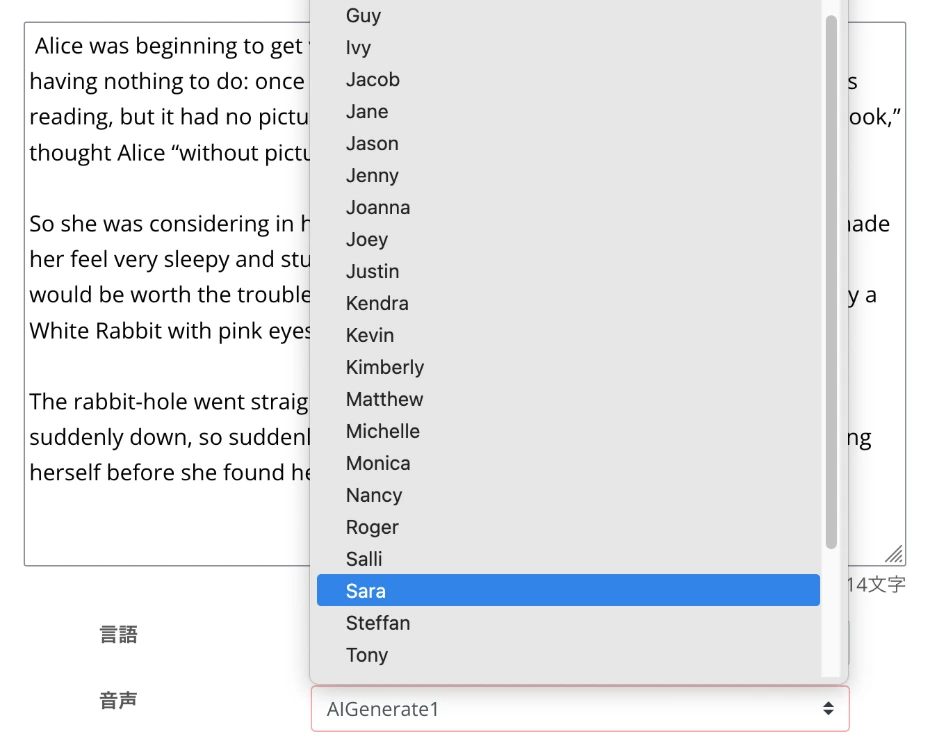
Voices available for English reading can be previewed in this article, so please take a look.

For English learning listening! Listen to native pronunciation from 92 speakers; including female, male, girl, and boy voices!
Ondoku is a text-to-speech service that can pronounce words from all over the world. You can listen to 92 types of English voices on Ondoku.
In Ondoku, you can also adjust the reading speed and pitch.

When using it for the first time, the default settings are fine.
Preparation is now complete.
Press the "Read" button to start synthesizing the audio.
The speech synthesis process is completed in just a few seconds.
When the process is finished, the screen changes and an audio player is displayed.

Listen to the narration audio, and if there are no problems, press the download button to save the MP3 file.
(WAV files can also be saved from the history page)
With this, you have successfully created an English narration for a YouTube video for free using Ondoku.
3. Edit the YouTube video using the English narration audio

Once the audio is finished, edit the video using the created audio file.
Adobe Premiere Pro and DaVinci Resolve are standard video editing software.
Any software can directly import MP3 or WAV files downloaded from Ondoku.
Once the video editing is finished, export it in a format suitable for YouTube.
4. Upload the English or foreign language video to YouTube
Now, just upload the video to video sites like YouTube!
A key point when uploading the video is to enter the video title and video description in the same language as the narration.
Enter them in a foreign language, such as English if it's English, French if it's French, or Chinese if it's Chinese.
It is recommended to also create the content for the video title and video description using generative AI services.
Specifically, have the generative AI service read the video script text file and
I created a YouTube video based on this script. Please come up with an English video title and video description.
If you give instructions like this, it will create the content in native English sentences.
Also, setting the language on the YouTube upload screen is important.
There is a field to set the language on the video details screen.
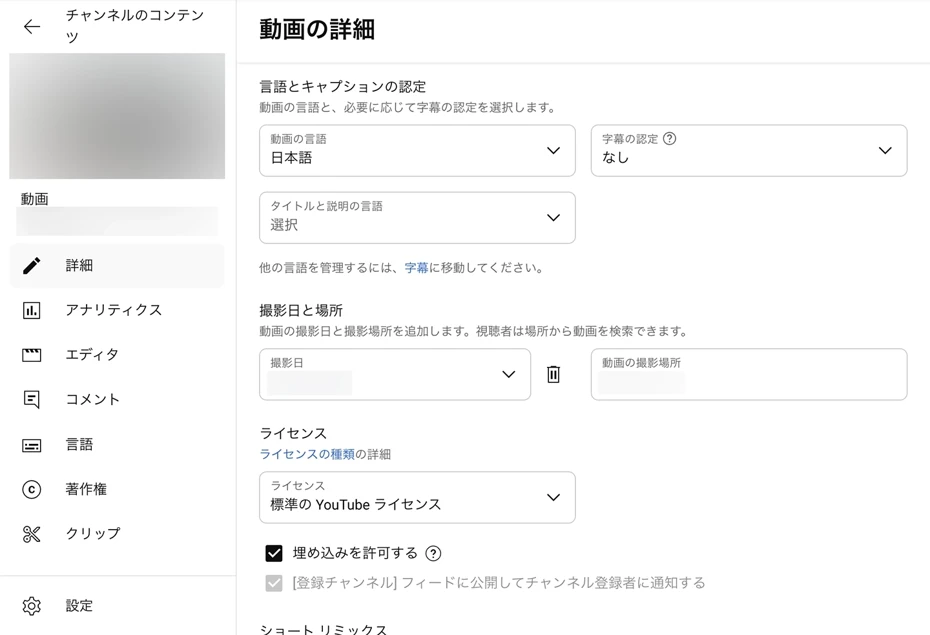
By setting the language to a foreign language like English, it becomes easier for it to be displayed to users speaking that language.
Furthermore, we recommend adding subtitles to the video.
You can create subtitles based on the script text, but creating a subtitle file yourself is very difficult.
In such cases, if you use the AI transcription service Mojiokoshi-san, it will automatically recognize the video content and create a subtitle file (SRT file) for you.
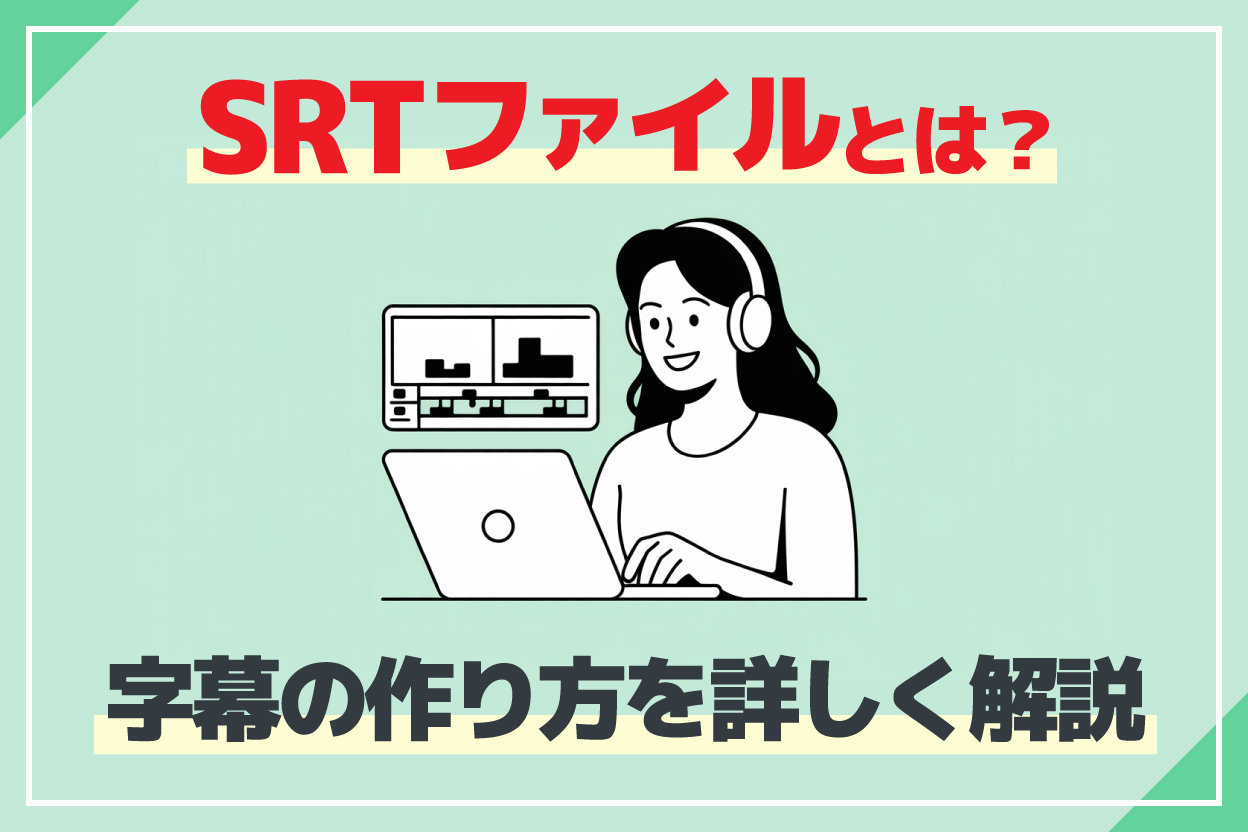
Since you can significantly increase the number of video views and channel subscribers, we recommend adding subtitles to YouTube videos.
This completes the process of creating a YouTube video with English or foreign language narration using Ondoku.
With Ondoku, you can create English or foreign language videos much more easily and at a lower cost than hiring a narrator.
When you are hesitating about finding an English or foreign language narrator, why not create a YouTube video narration with the AI text-to-speech service Ondoku?
In what situations are English/foreign language video narrators & narration recommended?

When producing videos, situations requiring English or foreign language narrators and narration are rapidly increasing.
By creating videos with English or foreign language narration, even individual video creators can gather many viewers and channel subscribers.
Also, for companies, posting English or foreign language videos is essential for product promotion and branding in overseas markets.
We will briefly explain the situations where English or foreign language video narration & narrators are recommended.
If you want to increase overseas viewers on YouTube or SNS, English & foreign language narration is recommended!
By adding English or foreign language narration audio to YouTube videos, you can increase the number of views and channel subscribers.
With videos in Japanese only, viewers are limited to those who can understand Japanese.
But if you add English narration to your video, it can be watched not only by English-speaking viewers but also by viewers around the world who use English as a second language.
When viewers can't find videos in their native language even after searching, they choose English videos, right?
You can gather viewers from all over the world and increase your channel revenue all at once.
Until now, since it was not possible to record high-quality narration without requesting a professional narrator, it was difficult for individual creators to make English or foreign language videos.
But now it is different.
Using the latest AI text-to-speech services, you can create high-quality English and foreign language narration without hiring a narrator.
Anyone can now easily expand their YouTube channel to the whole world!
With the commercial-use-OK AI text-to-speech service Ondoku, you can feel secure when you want to monetize your YouTube channel.
English narration is also ideal for product promotion and branding
Foreign language narrators and narration are also essential for videos introducing corporate products and services.
By adding English or foreign language narration to product promotion videos or branding videos, you can accurately convey product features to overseas consumers and business partners.
What is important in official corporate videos is that the quality of the narration is directly linked to the product's brand image.
Until now, since the only way to create high-quality narration was to hire a professional narrator, high costs were necessary.
But now, you can create high-quality English and foreign language narration at a low cost using the latest AI services.
AI text-to-speech services can be used not only for promotion and branding videos but also for company profiles, recruitment videos, and audio played at overseas exhibitions.
With the latest AI services, it is possible to create not only English but also Chinese, Korean, French, Spanish, and other foreign language voices from around the world.
AI text-to-speech services are ideal for overseas product promotion and overseas branding.
Why not utilize the AI text-to-speech service Ondoku for official YouTube video narration?

【2026 Latest】Success methods for overseas product promotion | Increase sales with YouTube videos and AI voice
Explains how to make overseas product promotion successful. Introduces in detail the multilingual video production procedures using YouTube videos and AI text-to-speech, as well as effective overseas marketing strategies.
English audio is also recommended for guidance in tourist and commercial facilities
English and foreign language narration audio is also useful in tourist and commercial facilities.
Using the latest AI text-to-speech services, you can easily create video narration and in-store broadcasts for tourist and commercial facilities.
Narration for videos aimed at inbound tourists from abroad is especially recommended.
By uploading English or foreign language videos to the official channels of tourist or commercial facilities, you can appeal to tourists from overseas.
Of course, the latest AI text-to-speech services can also be used for playing in-store broadcasts in English.
By playing English or foreign language broadcasts at tourist facilities, hotels, and transportation, you can help tourists enjoy their sightseeing comfortably.
When troubled by overtourism, we also recommend playing broadcasts in multiple languages such as English, Chinese, and Korean.

【Archive Edition】Solving Inbound x Overtourism problems! Methods for creating multilingual guidance with the latest AI tools
Are you troubled by overtourism due to the increase in inbound tourists? In this article, we thoroughly explain how to create free multilingual guidance using AI technology and specific countermeasures for tourist spots. We present a practical guide you can start right away.
Also, you can provide audio guides for museums and art galleries in multiple languages.

How to create a free museum audio guide! Recommendation for AI voice guidance even for small museums and permanent exhibitions
Don't you want to easily introduce museum audio guides? With the AI text-to-speech 'Ondoku', you can create high-quality audio for free! Supporting Japanese and foreign languages, it is ideal even for small-scale and private museums. Click here for more!
With the increase in inbound tourists, foreign language support has changed from something that's "nice to have" to something that is "essential."
Using an AI text-to-speech service, anyone can easily create easy-to-understand English and foreign language audio.
Why not use Ondoku for free to create narration for tourist and commercial facilities?
AI text-to-speech services are recommended when you have trouble finding an English or foreign language narrator
By adding English or foreign language narration audio to YouTube videos, you can appeal to overseas viewers and increase the number of views and subscribers.
However, hiring a narrator requires very high costs, and it takes a long time until the audio is finished.
Finding a narrator who is a native speaker of English or a foreign language is also very difficult.
In such cases, we recommend utilizing AI text-to-speech services.
With an AI text-to-speech service, anyone can easily create high-quality narration audio with native pronunciation.
We recommend actually experiencing the latest AI first!
Why not start by using the free AI text-to-speech service Ondoku to create English or foreign language YouTube video narration audio?
■ AI voice synthesis software "Ondoku"
"Ondoku" is an online text-to-speech tool that can be used with no initial costs.
- Supports 81 languages and regions, including Japanese, English, Chinese, Korean, Spanish, French, and German
- Available from both PC and smartphone
- Suitable for business, education, entertainment, etc.
- No installation required, can be used immediately from your browser
- Supports reading from images
To use it, simply enter text or upload a file on the site. A natural-sounding audio file will be generated within seconds. You can use voice synthesis up to 5,000 characters for free, so please give it a try.

Text-to-speech software "Ondoku" can read out 5000 characters every month with AI voice for free.
You can easily download MP3s and commercial use is also possible.
If you sign up for free, you can convert up to 5,000 characters per month for free from text to speech.
Try Ondoku now.
HP:
ondoku3.com
Email: ondoku3.com@gmail.com
Email: ondoku3.com@gmail.com
Related posts
"Ondoku" is a Text-to-Speech service that anyone can use for free without installation. If you register for free, you can get up to 5000 characters for free each month. Register now for free
- What is Ondoku
- Start text-to-speech conversion
- Free registration
- Pricing
- Posts
- Try other free services














