For English Learning and Pronunciation! How to Use the Free Text-to-Speech Service "Ondoku"
For Chinese Language Learning and Pronunciation Checks! How to Use "Ondoku," a Free Text-to-Speech Service
April 1, 2026

Hello, thank you for always using Ondoku.

Chinese is an "ideographic script," so you can understand the meaning just by looking at the characters, but it's difficult to imagine the pronunciation.
Since English uses "phonetic characters" that represent pronunciation, you can generally imagine how it sounds, but that is not the case with Chinese.
Furthermore, even if Chinese uses the same characters as Japanese, the pronunciation is different. Also, since Chinese is a tonal language, the "four tones" can result in completely different meanings and words.
Hearing this might make the language seem extremely difficult...
However, since Japanese people already know kanji, they can understand the meaning through text-based communication alone.
If you leverage this advantage, Japanese people have an overwhelming advantage in learning Chinese compared to people from other countries.
That's exactly why you want to master the pronunciation and talk to Chinese people in Chinese.
A common pitfall for Japanese people when having a conversation in Chinese is that "their pronunciation is poor, and the meaning is not conveyed."
A site that reads Chinese aloud can help you overcome these issues!

Related Articles on Free Chinese Text-to-Speech
Chinese text-to-speech is also explained in detail in these new articles!
Please take a look.
![[2025 Edition] Chinese Reading Aloud Study Method! Thorough Explanation of Recommended Sites, Apps, Example Texts, and Usage | Text-to-Speech Software Ondoku](https://storage.googleapis.com/ondoku3/image/20250129_chinese_ondoku_tmb_930.webp)
![[2025 Edition] Complete Guide to Chinese Text-to-Speech | Detailed Explanation from Pronunciation Practice to Inbound Support | Text-to-Speech Software Ondoku](https://storage.googleapis.com/ondoku3/image/20250111chinese_text_to_speech_tmb_930.webp)
Recommended Method to Check Chinese Pronunciation
What kind of method do you use when checking Chinese pronunciation?
In the past, one common way was to use the CDs that came with textbooks or reference books.
But now, there is a much more convenient method!
A service that reads word and sentence audio aloud can be a powerful ally for anyone studying Chinese.
- Want to check the pronunciation of words
- Want to check the pronunciation of sentences
- Supports both Simplified and Traditional characters
There is an attractive text-to-speech site that meets these various needs of Chinese language learners!
It is "Ondoku".
Let me introduce "Ondoku," a very convenient service for checking Chinese pronunciation.
Ondoku: A Service for Easy Chinese Text-to-Speech

"Ondoku" is a text-to-speech service that uses the latest AI. It is simple and easy to operate.
It is used by people who want to read text aloud for various purposes, not just individuals but many corporations as well.
- Narration for YouTube and other platforms
- Creating teaching materials for schools and cram schools
- Utilization for internal corporate training
It also supports commercial use for these purposes.
Besides these uses, Ondoku is perfect for checking the pronunciation of people studying Chinese!
It supports both Simplified and Traditional characters, and with multiple speakers including females and males, you can choose your favorite voice.
Types of Chinese Voices in Ondoku
Voices include those of women, men, girls, and boys.
- Mandarin (Mainland China)
Male: 10 types
Female: 16 types
Boy: 3 types
Girl: 3 types - Cantonese (Hong Kong)
Male: 1 type
Female: 2 types - Mandarin (Taiwan)
Male: 3 types
Female: 3 types
Each speaker has their own unique pronunciation, allowing you to hear realistic Chinese.
- Function to make speaking faster or slower
- Function to make the voice higher or lower
It is also equipped with these features. Changing the settings can change the impression and ease of listening.
When I let a Chinese friend listen to the audio, they said, "Amazing! It sounds native!"

Please try a free trial listening through this article.

In addition to this, many other languages are supported, so you can use it for language learning other than Chinese as well.
![[Ondoku] Sample Audio and Voice Types for Supported Languages | Text-to-Speech Software Ondoku](https://storage.googleapis.com/ondoku3/image/%E5%A4%9A%E6%A7%98%E6%80%A7_930.webp)
[Ondoku] Sample Audio and Voice Types for Supported Languages | Text-to-Speech Software Ondoku
Here we introduce the supported languages and sample audio for Ondoku.
It can be used basically for free, and with a paid plan, you can increase the number of characters read aloud.
However, if you are just checking Chinese pronunciation, the free range is quite sufficient.
How to Use Ondoku
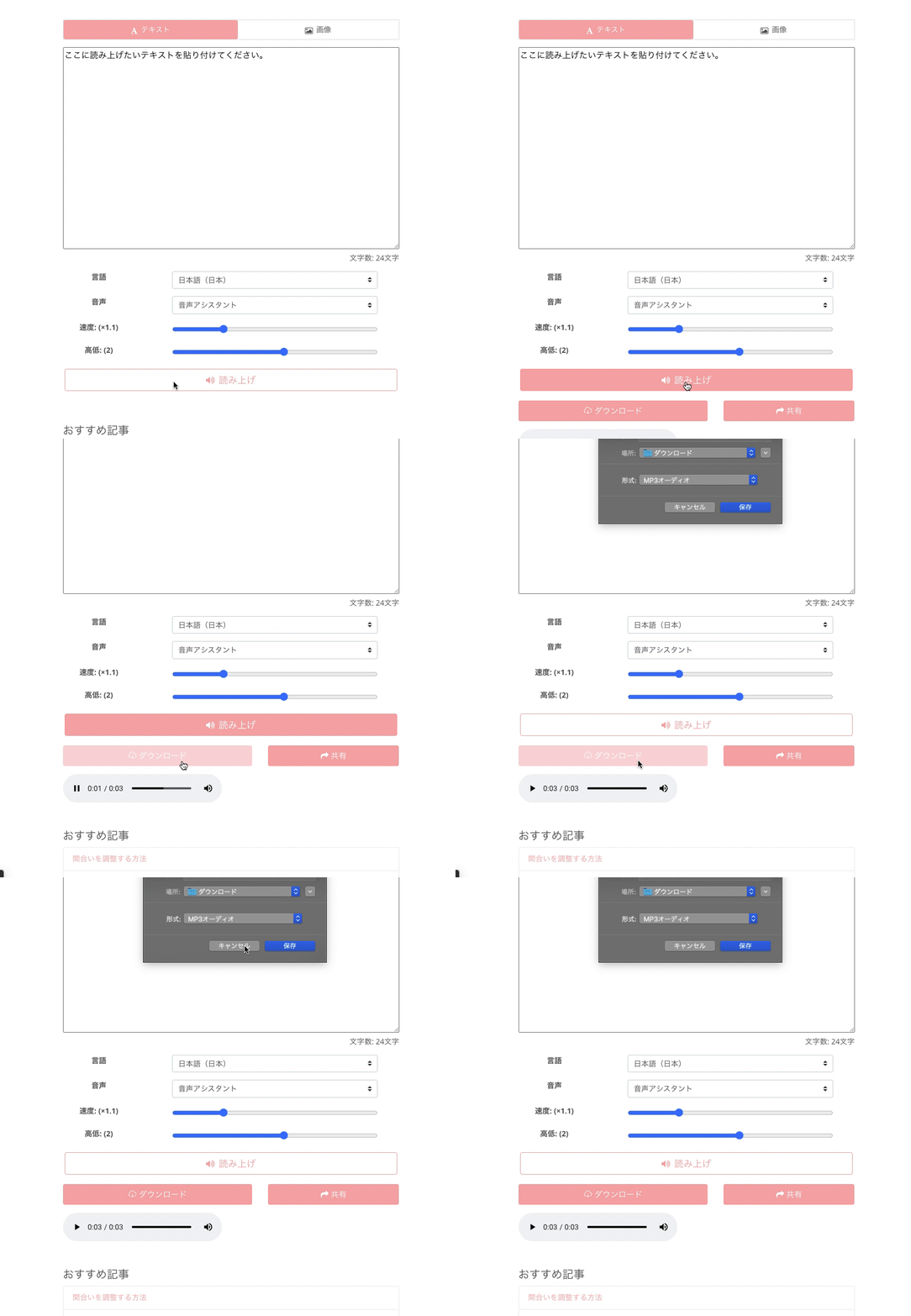
Using Ondoku for free is very simple.
There is no need to download apps or software. One of the attractions is that everything can be operated in a web browser.
The usage is:
- Access the Ondoku site
- Enter the characters you want read aloud in the text box (copy-pasting is also OK)
- Adjust to your preferred settings such as language, voice type, and voice speed
- Click "Read aloud"
That's all it takes.
Since the site supports Japanese, you don't have to worry about wondering, "What is written here?"
With overseas sites, people often tend to be hesitant until they understand how to use them, but a Japanese site provides peace of mind!
Furthermore, audio can be downloaded in MP3 format.
Textbooks and Printouts Can Also Be Read Aloud
Ondoku has other convenient features as well.
It is the "function to read text aloud when you upload an image."
You can read aloud images taken with a smartphone or other devices.

You can take photos of picture books, books, or textbooks and have them read aloud by Ondoku.
Chinese includes characters that normally cannot be entered from a Japanese smartphone or PC, so this is very convenient!
This feature solves at once the problems of not knowing how to read when teaching Chinese to children at home or reading Chinese textbooks.
Moreover, since you don't have to input words one by one yourself, it saves time and is very convenient.
[How to use the Image-to-Text Read Aloud function]
- Access the top page of Ondoku
- There are "Text" and "Image" tabs above the text box
- Click the "Image" tab
- Click on image upload and select your preferred image
*In the case of a smartphone, it is also possible to start the camera here and take a photo directly. - After selecting the image, adjust the speed and pitch of the reading.
- Click the read aloud button
Then, the image will be analyzed in a few seconds and the audio can be read aloud.
After loading the image, the recognized characters will be displayed in the text box.
If there are recognition errors and you want to correct the reading, you can edit it here.
Detailed usage is introduced here.
![[Turn Images into Audio for Free] How to use the function that reads characters from images and speaks them aloud [Image Read Aloud] | Text-to-Speech Software Ondoku](https://storage.googleapis.com/ondoku3/image/%E9%9F%B3%E5%A3%B0%E8%AA%AD%E3%81%BF%E4%B8%8A%E3%81%91%E3%82%BD%E3%83%95%E3%83%88%E3%82%92%E4%BD%BF%E3%81%86%E4%BA%BA_930.webp)
Ondoku is Perfect for Chinese Language Study
Checking Chinese pronunciation and reading Chinese sentences aloud. Furthermore, it can even recognize characters from images and read them aloud in Chinese...!
Ondoku is so convenient that it can be used for free despite having so many features!
Because it's free to use, you can try it out right now!
We hope that the excellent Ondoku, which reads aloud with Chinese pronunciation, will help you in your Chinese language studies.
Please give it a try.
![Daily Chinese Conversation Phrases for Immediate Use & How to Create Original Audio Teaching Materials [with Pronunciation Audio] | Text-to-Speech Software Ondoku](https://storage.googleapis.com/ondoku3/image/chinese_930.webp)
![The Ultimate Site to Read Aloud and Download Pinyin Pronunciation [A Must-See for Chinese Learners] | Text-to-Speech Software Ondoku](https://storage.googleapis.com/ondoku3/image/superb-site-for-pinyin-speech_930.webp)
■ AI voice synthesis software "Ondoku"
"Ondoku" is an online text-to-speech tool that can be used with no initial costs.
- Supports approximately 50 languages, including Japanese, English, Chinese, Korean, Spanish, French, and German
- Available from both PC and smartphone
- Suitable for business, education, entertainment, etc.
- No installation required, can be used immediately from your browser
- Supports reading from images
To use it, simply enter text or upload a file on the site. A natural-sounding audio file will be generated within seconds. You can use voice synthesis up to 5,000 characters for free, so please give it a try.

Text-to-speech software "Ondoku" can read out 5000 characters every month with AI voice for free.
You can easily download MP3s and commercial use is also possible.
If you sign up for free, you can convert up to 5,000 characters per month for free from text to speech.
Try Ondoku now.
HP:
ondoku3.com
Email: ondoku3.com@gmail.com
Email: ondoku3.com@gmail.com
Related posts
For Chinese language learning pronunciation checks and listening! Sample native pronunciation from …
Perfect for Checking and Studying English Pronunciation! How to Effectively Use Free Text-to-Speech…
[Free] Introducing free services to read aloud English text with native pronunciation and download …
"Ondoku" is a Text-to-Speech service that anyone can use for free without installation. If you register for free, you can get up to 5000 characters for free each month. Register now for free
- What is Ondoku
- Start text-to-speech conversion
- Free registration
- Pricing
- Posts
- Try other free services














