

Recommended Text-to-Speech Software Summary: 7 Selections for Commercial Use [Free and Paid]
Free AI Voice Samples: 25 Next-Gen English TTS Voices. Multilingual Support.
Feb. 26, 2026
Thank you for using Ondoku.
We are excited to announce the release of "Ondoku Beta," a new next-generation AI voice that reads aloud more naturally and more human-like!
By adopting cutting-edge speech synthesis AI, the new voices offer:
- Richer emotional expression
- Customizable voice styles such as "cheerful" or "narration"
- Multilingual support for all voices, including English and other languages
With these improvements, you can now create even more convenient and high-quality text-to-speech audio.
In this article, we will explain the new voice samples and how to use the latest features of our next-generation AI voices.
[Free] Introducing Next-Generation AI Voice "Ondoku Beta"!
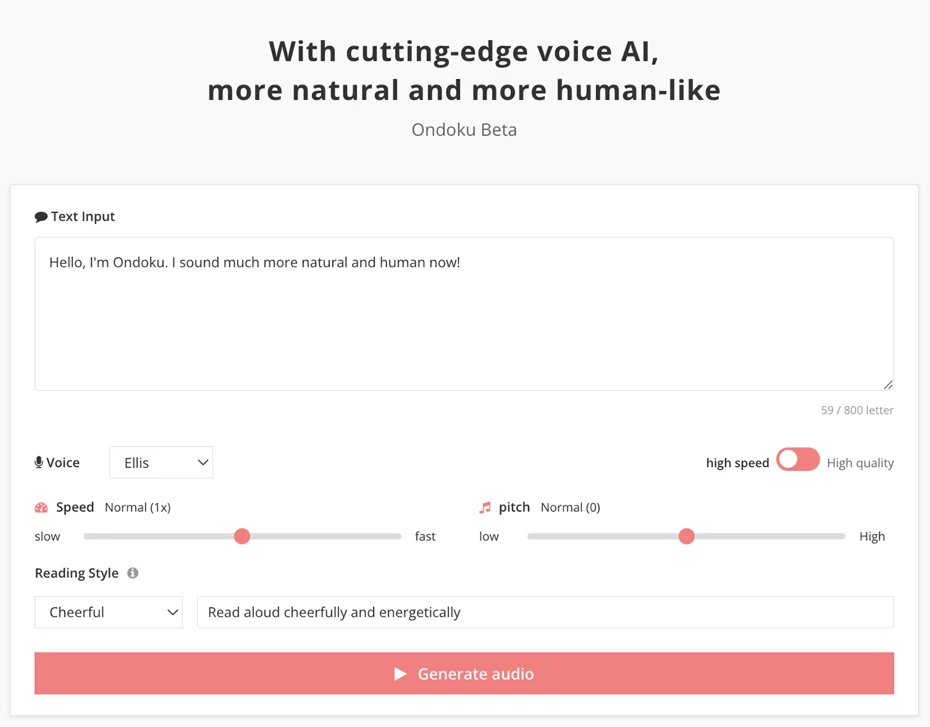
Ondoku's new AI text-to-speech voice "Ondoku Beta" is available here.
Would you like to experience our next-generation AI text-to-speech with rich emotional expression in English and other languages?
Types of Next-Generation Text-to-Speech Voices (English and Multilingual Support)
Ondoku's new AI text-to-speech voices include both female and male voices.
- Female: 12 types
- Male: 13 types
All voices have their own unique reading styles and can read aloud with rich emotional expression, sounding just like a real human.

Additionally, all voice types support multilingual text-to-speech!
You can create multilingual audio in languages from around the world, including English and many others.
Listen to Voice Samples of Ondoku's Next-Generation AI Voices
Let's take a look at the voice samples of Ondoku's new AI voices.
The sample text we used is:
Hello, this is Ondoku. The voices are now more natural and more human-like!
This is an English sample sentence.
The reading settings are:
- Speed: Normal (1x)
- Pitch: Normal (0)
- Reading Style: Cheerful
These are the settings used to create the audio.
The reading is more natural and human-like than ever before, so please give it a listen!
New AI Voice Samples (25 Types)
12 Female Voices Reading English Sample Text
Anna: Female
Chloe: Female
Ellis: Female
Emma: Female
Flora: Female
Iris: Female
Lena: Female
Luna: Female
Misa: Female
Ruby: Female
Sophie: Female
Tina: Female
13 Male Voices Reading English Sample Text
Ash: Male
Chris: Male
Eden: Male
Gray: Male
Hope: Male
Hugo: Male
Kai: Male
Leo: Male
Noah: Male
Reid: Male
Roy: Male
Sam: Male
Yann: Male
[Emotional Expression] Next-Generation AI Voice Settings (Reading Style, Quality, Speed, Pitch)
Ondoku's new AI voices allow you to freely adjust the text-to-speech output to match your preferences and purposes!
The settings you can configure and adjust include:
- Reading Style
- Speed
- Pitch
Let's explain each setting.
Reading Style | You Can Now Freely Specify Styles and Emotional Expression!
The biggest update in these next-generation AI voices is the ability to freely specify reading styles!
You can specify the reading style in this section of the new voice reading page.
Styles can be specified in two ways: pre-registered options and a free-text input box.
How to Specify Style from Pre-Registered Options
First, let's look at how to select a reading style from pre-registered options.
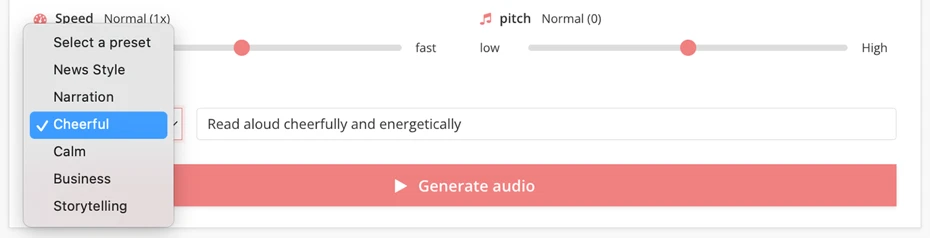
There are 6 options registered in the dropdown menu:
- News Style
- Narration
- Cheerful
- Calm
- Business
- Storytelling
When you need to quickly generate audio for video production, language learning materials, or in-store narration, simply select a reading style from these options.
Voice Samples for Each Reading Style (English)
The voice used is "Ellis."
Voice sample read in "News Style"
Voice sample read in "Narration"
Voice sample read in "Cheerful"
Voice sample read in "Calm"
Voice sample read in "Business"
Voice sample read in "Storytelling"
How to Specify Style and Emotional Expression with Free-Text Instructions
What's more!
You can now freely describe and specify reading styles to match your purpose and content.

To specify a reading style, write your instructions in the "Reading Style (Optional)" text box.
For example, you can have text read aloud with rich emotional expression like this.
All samples are read using the "Ellis" voice.
Voice sample with instruction "Please read in a whispering voice."
Hello, this is Ondoku. The voices are now more natural and more human-like!
Voice sample with instruction "Please read as if you were 80 years old."
Hello, this is Ondoku. The voices are now more natural and more human-like!
Voice sample with instruction "Please read with a British accent."
Hello, this is Ondoku. The voices are now more natural and more human-like!
As you can see, you can now read aloud in a much wider range of styles than ever before!
Why not try using the new AI voices to synthesize speech in any style you like?
For more detailed examples of reading styles, please see the following article.
It explains more practical uses such as emotional expression, age settings, and character voices, so be sure to check it out!
Adjusting Reading Speed and Pitch (Voice Height)
On Ondoku's new reading page, you can also adjust reading speed and pitch (voice height).

Reading speed can be adjusted in 5 levels:
- Very Slow (0.5x)
- Slightly Slow (0.75x)
- Normal (1x)
- Slightly Fast (1.25x)
- Very Fast (1.5x)
This allows for various expressions, such as using slower audio for language learning and shadowing, or faster audio for entertainment videos.
Also, pitch (voice height) can be adjusted in 5 levels:
- Very Low (-1)
- Slightly Low (-0.5)
- Normal (0)
- Slightly High (0.5)
- Very High (1)
*The reading speed and pitch adjustment features are currently being fine-tuned. The adjustment range and settings may change in the future.
Ondoku's New AI Voices Support Multiple Languages! Multilingual Text-to-Speech Available
Ondoku's new AI voices can read aloud in languages other than English as-is!
All voices support multiple languages including English and other foreign languages!
For example, here's what it sounds like when reading in French, Spanish, Korean, and Chinese.
All samples are read using the "Ellis" voice.
French
Instruction: "Lisez à haute voix joyeusement et avec énergie"Bonjour, je suis Ondoku. Ma voix est devenue plus naturelle et plus humaine !
Italian
Instruction: "Leggi ad alta voce con allegria ed energia"Ciao, sono Ondoku. La mia voce è diventata più naturale e più umana!
German
Instruction: "Lesen Sie laut vor, fröhlich und energiegeladen"Hallo, ich bin Ondoku. Meine Stimme ist jetzt noch natürlicher und menschlicher geworden!
Spanish
Instruction: "Lea en voz alta con alegría y energía"Hola, soy Ondoku. ¡Ahora mi voz suena más natural y más humana!
Japanese
Instruction: "明るく元気に読み上げてください"こんにちは、音読さんです。より自然で、より人間らしい声になりました!
Chinese (Simplified)
Instruction: "请开朗活泼地朗读"你好,我是Ondoku。声音变得更自然、更人性化了!
Chinese (Traditional)
Instruction: "請開朗活潑地朗讀"你好,我是Ondoku。聲音變得更自然、更逼真了!
Korean
Instruction: "밝고 활기차게 소리 내어 읽어주세요"안녕하세요, Ondoku입니다. 목소리가 더 자연스럽고, 실제 사람처럼 변했습니다!
Important Notes for Multilingual Text-to-Speech with Next-Generation AI Voices
When using the new AI voices for multilingual text-to-speech in foreign languages, you need to specify the reading style in the language you want to use for reading.
In these samples, we have given the reading style instructions in each respective language.
If you give instructions in English like "Please read cheerfully and energetically" when reading other languages, it may result in unnatural pronunciation.
Support for Reading with Multiple Languages!
Unlike Ondoku's previous multilingual voices which required SSML tags, the new AI voices also support complex multilingual text-to-speech using multiple languages!
For example, this sample text can be read with proper pronunciation for each language—such as French or Spanish—by specifying the languages in the reading style field.
The voice used is "Ellis."
"Thank you" is Merci in French, Gracias in Spanish, and Danke in German.
*For instructions like this, you can write the reading style in English.
Frequently Asked Questions About Ondoku's Next-Generation AI Text-to-Speech Voices
Finally, let's answer some common questions about using the new text-to-speech voice "Ondoku Beta" in a Q&A format.
Q. What is the maximum character limit per reading?
A. You can read up to 500 characters at a time.
Q. How are characters counted?
A. Characters are counted the same way as before. The character count is combined with the characters read using previous text-to-speech voices.
Q. Can I check my past reading history?
A. Yes, you can check it on the "History" page, just like with previous text-to-speech voices.
Q. Is it free to use?
A. Yes, it is available for free use. As with previous voices, credit attribution is required when using it for free.
For information on how to provide credit attribution, please see the page linked below.
Please take a look.
Q. Can I use it for commercial purposes (business use)?
A. Yes, commercial use (business use) is available, just like with previous text-to-speech voices.
For more details about free use and commercial use (business use), please see the page linked below.
Why Not Try Using Ondoku's New AI Voices?
As you can see, with Ondoku's new AI voices, you can easily generate audio that is more intelligible and higher quality than ever before!
Why not experience Ondoku's AI voices that have become more natural and more human-like?
■ AI voice synthesis software "Ondoku"
"Ondoku" is an online text-to-speech tool that can be used with no initial costs.
- Supports approximately 50 languages, including Japanese, English, Chinese, Korean, Spanish, French, and German
- Available from both PC and smartphone
- Suitable for business, education, entertainment, etc.
- No installation required, can be used immediately from your browser
- Supports reading from images
To use it, simply enter text or upload a file on the site. A natural-sounding audio file will be generated within seconds. You can use voice synthesis up to 5,000 characters for free, so please give it a try.

Text-to-speech software "Ondoku" can read out 5000 characters every month with AI voice for free.
You can easily download MP3s and commercial use is also possible.
If you sign up for free, you can convert up to 5,000 characters per month for free from text to speech.
Try Ondoku now.
HP:
ondoku3.com
Email: ondoku3.com@gmail.com
Email: ondoku3.com@gmail.com
Related posts
"Ondoku" is a Text-to-Speech service that anyone can use for free without installation. If you register for free, you can get up to 5000 characters for free each month. Register now for free
- What is Ondoku
- Start text-to-speech conversion
- Free registration
- Pricing
- Posts
- Try other free services














