Recommended Text-to-Speech Software Summary: 7 Selections for Commercial Use [Free and Paid]
[2026 Latest] How to Add English Narration to YouTube Videos? Easy Production with AI Voice Synthesis
Jan. 26, 2026
![[2026 Latest] How to Add English Narration to YouTube Videos? Easy Production with AI Voice Synthesis](https://storage.googleapis.com/ondoku3/image/youtube_english_narration_tmb_930.webp)
I want to add English narration to my YouTube videos!

When creating videos for an overseas audience on YouTube or SNS, narration is crucial.
By adding narration in English or other foreign languages, you can more effectively increase your international viewership.
However, producing English narration might seem difficult.
Hiring a professional narrator can be expensive, and recording foreign languages yourself is a significant challenge.
In such cases, we recommend utilizing the latest AI text-to-speech services!
In fact, anyone can easily produce high-quality English narration by using an AI text-to-speech service.
Moreover, compared to traditional methods, it is possible to produce narration in a short time at an overwhelmingly low cost.
In this article, we will explain in detail how to add effective English and foreign language narration to YouTube videos and Shorts.
- You want to reach overseas viewers on YouTube, Instagram, or TikTok.
- You want to promote corporate products in a foreign language.
- You want to create videos for inbound tourists.
If any of these apply, why not use this article as a guide to create narration for your YouTube videos?
【Free】Recommended AI Text-to-Speech Service for YouTube English Narration

If you want to add English narration to your YouTube videos or Shorts, Ondoku is highly recommended!
Ondoku is a text-to-speech service that uses the latest AI to allow anyone to easily generate English audio.
Simply by entering text, you can produce English narration with native pronunciation in as little as 10 seconds.
In addition to English, it supports more than 48 languages, including Chinese, Korean, French, Spanish, and German.
You can promote your YouTube channel to the entire world.
It is also perfect for corporate product promotion videos and videos for inbound tourists.
Furthermore, Ondoku is free!
It can be used without registration or login, so why not try producing actual English narration using Ondoku first?
Why is English/Foreign Language Narration Recommended for YouTube Videos?

If you want to increase the number of views and subscribers for your YouTube channel, adding narration in English or other foreign languages is highly recommended!
By including English or other foreign language narration, you can promote your YouTube channel to billions of viewers worldwide.
Moreover, nowadays, you can easily produce clear and realistic narration that rivals professional narrators using AI text-to-speech services.
What are the Effects of English/Foreign Language Narration in YouTube Videos?
What kind of effects can you expect from posting videos with English narration on your YouTube channel?
The biggest effect is the ability to reach overseas viewers you couldn't reach before.
Just by adding English narration to your YouTube videos, you can approach not only English-speaking viewers but also people worldwide who use English as a second language.
When viewers cannot find videos in their native language, they are more likely to open English videos from the search results.
By creating YouTube videos with English narration, you can increase views and channel subscriptions from non-English speaking regions as well as English-speaking ones.
Also, the effect on search engine rankings cannot be ignored.
On Google Search, your video is more likely to appear in search results for English keywords.
In this way, English narration is highly effective for increasing YouTube views and subscribers.
From business purposes such as product promotion and branding to personal hobby channels, why not use AI text-to-speech services to create videos with English narration?
Original English/Foreign Language Narration is Better Than Auto-Dubbing
As of 2026, YouTube's official features allow for the insertion of auto-dubbed narration in English and other languages.
However, as before, to better promote your videos to overseas viewers, it is recommended to create your own original English/foreign language narration.
This is because YouTube's official auto-dubbing feature often has low accuracy in recognizing original audio, leading to many mistranslations.
Additionally, YouTube's official voices tend to give an inorganic and low-quality impression.
By creating and editing original English/foreign language narration, you can create a higher-quality impression by matching the audio with background music.
What Kind of YouTube Videos Especially Benefit from English/Foreign Language Narration?
You might wonder, "In what situations is English narration necessary?"
Here, we introduce the types of YouTube videos where English and foreign language narration are particularly effective.
English Narration is Highly Recommended for Corporate Product Promotion Videos

First, corporate product promotion videos.
When you want to convey a product's appeal to an overseas audience, English narration in the video is an essential element.
Especially for global promotion and branding via YouTube, high-quality English narration can determine the marketing results.
Furthermore, since international promotion needs to be tailored to specific countries, narration in languages other than English is also very important.
"But my company isn't that big, so it might not be relevant..." you might think.
That is not the case!
Recently, it has become common even for small and medium-sized enterprises to utilize AI narration for overseas promotion.
We recommend using the methods introduced in this article to add English and foreign language narration to your YouTube videos.

English Narration is Also Recommended for YouTube Videos Targeting Inbound Tourists

The increase in inbound tourists has also raised the importance of English narration in YouTube videos.
At tourist attractions and cultural facilities, audio guide videos in foreign languages have become a standard service.
By producing videos that introduce museums, galleries, and tourist spots, it is possible to appeal to inbound tourists and increase visitor numbers.
For individual video creators, videos introducing tourist spots are a staple content type that generates many views.
By adding narration in English and other languages to create videos for inbound tourists, you can boost views and subscribers at once.

English/Foreign Language Narration is Perfect for Educational Videos

English and foreign language narration is also useful in the educational field.
e-Learning content and language learning materials require narration with native pronunciation.
However, depending on the language, it can be difficult to find a native narrator.
In such cases, you can easily create video narration by using an AI text-to-speech service.
Language learning content tends to grow in view count, so it is also recommended for individual video creators.
In online training and corporate education, there is also an increasing demand for content with foreign language narration for global human resource development.
Beyond YouTube videos, it is recommended to utilize AI text-to-speech services when producing internal corporate video materials.

Recommended Methods for English Narration Production 【Narrator vs. AI Voice Synthesis】

There are two main methods for producing English narration.
Which method you choose will significantly change the production cost, duration, and the final quality of the video.
Outsourcing English/Foreign Language Narration to a Narrator
The traditional method was to outsource English narration to a professional narrator.
You would request a recording from a narrator specializing in English or other foreign languages through a talent agency or production company.
Professional narrators deeply understand the script's content and can read it with appropriate emotion.
Since direction on the recording site is possible, fine adjustments and corrections can be handled on the spot.
However, this method also has several major issues.
First, the production cost is very high.
The market rate for a professional narrator is about 50,000 to 80,000 yen per hour, and including studio fees and editing costs makes it even more expensive.
Production periods also tend to be long, as time is needed for schedule coordination and securing recording dates.
If corrections are needed, additional recording costs will be incurred.
Creating English/Foreign Language Narration with AI Text-to-Speech 【Recommended】
The other method is to produce English/foreign language narration using an AI text-to-speech service.
This is the recommended method that solves all previous challenges at once!
You might worry, "Won't AI result in a robotic voice?" but don't worry!
By using the latest AI text-to-speech services, you can generate natural English narration that is indistinguishable from a native speaker.
Using an AI text-to-speech service allows you to create narration at a much lower cost than hiring a narrator!
Since some services can be used for free, you can add English narration to your YouTube videos at zero cost.
Furthermore, because production and corrections can be made 24 hours a day, it can also handle urgent video creation!
AI Text-to-Speech Services Support Foreign Languages Other Than English
Multilingual support is another major advantage of AI text-to-speech services.
When requesting recordings from a narrator, for languages other than those with many speakers like English or Chinese, it can be difficult even to find a native speaker narrator in the first place.
Depending on the language, the fee for the narrator can become extremely high...
In such cases, simply use an AI text-to-speech service!
Not only English, but various foreign language narrations like French, German, Spanish, Chinese, and Korean can be produced with a single service, allowing you to expand your YouTube videos across many languages at once.

【Ondoku】Listen to Sample Audio and Voice Types for Supported Languages | Text-to-Speech Software Ondoku
Here, we introduce the supported languages and sample voices of Ondoku.
In this way, AI text-to-speech services are recommended for adding English and foreign language narration to YouTube videos.
From personally managed YouTube channels to business uses such as product promotion and branding, why not try producing narration using an AI text-to-speech service?
【Free Options Available】3 Recommended Services for English Narration Production

So, what kind of service should I use to create English narration?
Here are some recommended services for English narration production!
We will introduce the features of everything from AI text-to-speech services to narrator outsourcing services, so please find the one that fits you best.
1. Ondoku | Multilingual Support for English and More! Recommended AI Text-to-Speech Service
Ondoku is the ideal AI text-to-speech service for YouTube video English narration.
If you are looking for a method to produce English or foreign language narration audio, we recommend choosing Ondoku first.
Multilingual Support for English and Languages Around the World!
The greatest feature of Ondoku is its support for an overwhelmingly large number of languages.
Ondoku supports more than 48 languages worldwide, including English, Chinese, Korean, French, Spanish, and German.
Moreover, you can select regional pronunciations such as American English, British English, Australian English, and Indian English.
Since you can produce YouTube videos targeted at specific regions, it is also ideal for business uses such as product promotion.
Create Natural Narration Audio with Native Pronunciation
The ability to synthesize natural, easy-to-hear audio with native pronunciation is also a hallmark of Ondoku.
With cutting-edge AI reading technology, you can produce English narration so natural that it's hard to distinguish from a native speaker.
You can listen to English voice samples on this page, so please take a look!

Commercial Use is OK, so Monetization and Business Use are Safe
Ondoku allows commercial use.
Even when using it for free, you can use it commercially just by displaying credit.
It's safe for monetizing personally managed channels or for business use in corporate product promotion.
*Commercial use of Ondoku is explained on this page. Please take a look.

Create YouTube Video Narration Now with the Free Service Ondoku!
Ondoku is a web service that can be used without installation.
Access Ondoku from your browser and simply enter text to create high-quality English narration.
It's easy to use from any environment, including Windows, Mac, and smartphones!
Moreover, Ondoku is free!
Just by registering an account, you can read up to 5,000 characters, so for short YouTube videos, you can complete English narration production entirely for free!
Audio files can be downloaded in MP3 format, so they can be used with any video editing software.
For English and other foreign language narration production, the AI text-to-speech service Ondoku is recommended.
Why not try adding English/foreign language narration to your YouTube videos using Ondoku?
2. Editage | Narration Production Service Supporting Specialized Uses Such as Academic Fields

Editage is a production service where you can request English narration recording from native narrators.
As it is a service from a company providing professional English proofreading and academic translation, it is possible to produce narration for highly specialized academic conferences, lectures, and seminars.
While the only supported language is English, you can select between American English and British English.
There are also optional services available for recording synchronized with timecodes in a video.
The price is determined by the number of words.
An estimate is required before actual use.
This service is recommended when you want to request highly specialized English narration from a narrator.
3. Voice Mart | A Service to Outsource Recording to Narrators via Two Methods

Voice Mart is a service where you can outsource narration in English and other foreign languages to narrators.
It supports narration recording in American English, Chinese (Mandarin), and Korean.
A feature of Voice Mart is that it offers two types of recording methods.
In addition to regular studio recording, a plan for recording at the narrator's home (home recording) is available.
With the home recording plan, it is possible to request a narrator at a relatively reasonable price.
This service is recommended when you want to request narration recording in English, Chinese, or Korean from a narrator.
Basic Workflow of English Narration Production Using Ondoku
For those who want to use Ondoku but wonder "How do I use it?", we'll explain the specific production steps in detail!
By using Ondoku, anyone can easily produce videos with professional-level English narration!
1. Produce an English Narration Script Using AI Services for Translation

The first step in English narration production is to prepare a high-quality script.
When creating an English narration script, it is recommended to translate using AI services.
Even if you are confident in your English skills, mastering native-specific expressions preferred in YouTube videos can be very difficult.
By translating using AI services, you can create a script that sounds natural even to native speakers, rather than one that sounds like a literal translation.
Currently, the highest accuracy for English translation comes from generative AI services such as ChatGPT, Claude, and Gemini.
This script is for a video for ○○ (e.g., product promotion, introducing a tourist spot to tourists). Please translate this script from Japanese into American English.
By giving instructions like this, it will produce a script with the perfect tone according to the content.
Always check the translation result using back-translation.
For this, it's recommended to use dedicated translation services such as DeepL or Google Translate.
By using a different service for translation and back-translation, you can more reliably discover translation errors.
Points to Keep in Mind When Producing English Narration Scripts for YouTube
The key to script creation is being conscious of the balance between video length and character count.
In the case of English, 100 words per minute is considered a standard guideline.
For the original script, if it's in Japanese, for example, 300 characters per minute is just the right amount.
For YouTube videos, another point is to create a structure that conveys important content in the first 15 seconds to keep the viewers' attention.
2. Produce English Narration Audio with Ondoku
Once the script is ready, it's finally time to generate the English narration with Ondoku!
First, access the Ondoku official website in your browser.
Paste the translated English script into the text box on the top page.

Next, select "English" in the language settings.

In Ondoku, you can select from:
- American English
- British English
- Australian English
- Indian English
This allows you to read it out with the most suitable pronunciation according to the video's target region.
If you're unsure, American English is the most versatile and recommended.
Next, select a voice.
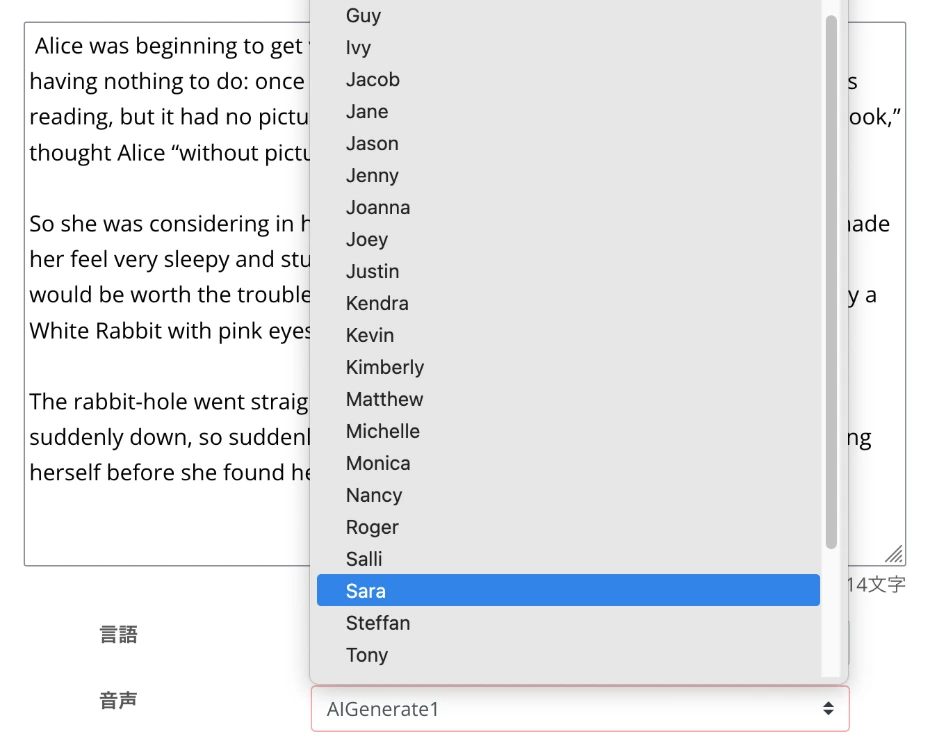
Ondoku has many voices available, including female and male voices.
Choose according to the video content, such as a friendly female voice for product introductions or a trustworthy male voice for corporate introductions.
For more details, please also see the voice samples on this page.
Ondoku also allows you to adjust reading speed and pitch.
Usually, the default settings are fine, but it's also recommended to set it slightly slower for parts you want to emphasize.
Once the settings are complete, click the "Read" button to start generating the English narration.
The audio will be generated in a few seconds.

When the generation is finished, the screen display will switch and an audio player will appear.
The audio will start playing automatically, so check the content and, if there are no problems, download it as an MP3 file.
With this, you have prepared the English narration audio using Ondoku.
3. Edit the English Video with Video Editing Software
After downloading the English narration file generated with Ondoku, edit it in combination with your video materials.
Standard video editing software includes:
- Adobe Premiere: Widely used professional editing software. Subscription required.
- DaVinci Resolve: Professional editing software that can be used for free. Developed by a video equipment manufacturer.
Since Ondoku audio files are in MP3 format, they can be imported into either without issue.
In editing videos with English narration, the timing adjustment between audio and visual is very important.
Adjust the timing of cuts so that the narration content matches the information displayed on the screen.
When editing is complete, export the video in a format suitable for YouTube.
4. Upload the Video with English Narration to YouTube

Once the video is complete, upload it to your YouTube channel.
A point when uploading the video is to input the title and description using English expressions for native speakers.
These can also be generated by generative AI services like ChatGPT, Claude, or Gemini.
Specifically, you can just give instructions to the generative AI service after loading the English narration script file, like so:
Based on this script, please think of a title and description for uploading a video to YouTube.
Another point is to set subtitles for the YouTube video.
By setting English subtitles, they can also be used as a source for auto-translation into other foreign languages.
While you can enter subtitles yourself, using the AI transcription service Mojiokoshi-san allows you to easily create subtitle files (SRT files) from audio files.
How to create subtitles is explained in detail in this article, so please take a look!

With this, the workflow for creating videos with English narration using the AI text-to-speech service Ondoku is complete.
Of course, the flow is the same when creating videos in other foreign languages like Chinese, Korean, French, Spanish, or German.
Using Ondoku, anyone can easily produce English and foreign language narration.
Why not start by actually creating Ondoku AI voices yourself?
Why Not Try Producing English/Foreign Language Narration Using the Latest AI Yourself?
English narration is indispensable for the global expansion of YouTube videos and the production of foreign language content.
Traditional English narration required hiring a narrator, necessitating high costs and long production periods.
However, with the advancement of AI reading technology, anyone can now easily produce English and foreign language narration.
For the global expansion of YouTube videos and the production of foreign language content, we recommend first trying to create English narration for free with Ondoku!
Why not experience the future of English and foreign language narration production yourself?
■ AI voice synthesis software "Ondoku"
"Ondoku" is an online text-to-speech tool that can be used with no initial costs.
- Supports approximately 50 languages, including Japanese, English, Chinese, Korean, Spanish, French, and German
- Available from both PC and smartphone
- Suitable for business, education, entertainment, etc.
- No installation required, can be used immediately from your browser
- Supports reading from images
To use it, simply enter text or upload a file on the site. A natural-sounding audio file will be generated within seconds. You can use voice synthesis up to 5,000 characters for free, so please give it a try.

Text-to-speech software "Ondoku" can read out 5000 characters every month with AI voice for free.
You can easily download MP3s and commercial use is also possible.
If you sign up for free, you can convert up to 5,000 characters per month for free from text to speech.
Try Ondoku now.
HP:
ondoku3.com
Email: ondoku3.com@gmail.com
Email: ondoku3.com@gmail.com
Related posts
"Ondoku" is a Text-to-Speech service that anyone can use for free without installation. If you register for free, you can get up to 5000 characters for free each month. Register now for free
- What is Ondoku
- Start text-to-speech conversion
- Free registration
- Pricing
- Posts
- Try other free services
![[2026 Latest] How to Add English Narration to YouTube Videos? Easy Production with AI Voice Synthesis](https://storage.googleapis.com/ondoku3/image/recommend-site-for-studying-spanish_tmb_140.webp)
![[2026 Latest] How to Add English Narration to YouTube Videos? Easy Production with AI Voice Synthesis](https://storage.googleapis.com/ondoku3/image/recommend-site-for-studying-german_tmb_140.webp)
![[2026 Latest] How to Add English Narration to YouTube Videos? Easy Production with AI Voice Synthesis](https://storage.googleapis.com/ondoku3/image/recommend-site-for-studying-french_tmb_140.webp)
![[2026 Latest] How to Add English Narration to YouTube Videos? Easy Production with AI Voice Synthesis](https://storage.googleapis.com/ondoku3/image/recommend-site-for-studying-italian_tmb_140.webp)
![[2026 Latest] How to Add English Narration to YouTube Videos? Easy Production with AI Voice Synthesis](https://storage.googleapis.com/ondoku3/image/recommend-site-for-studying-korean_tmb_140.webp)









