![How to adjust pauses and blank time in Ondoku reading [2 types] | Text-to-speech software Ondoku](https://storage.googleapis.com/ondoku3/image/Line_930.webp)
Recommended Text-to-Speech Software Summary: 7 Selections for Commercial Use [Free and Paid]
[2026 Latest] Voicemail Greeting Message Samples & Examples | Detailed Explanation on How to Create Audio with Company Names Using AI Voice!
Jan. 26, 2026
![[2026 Latest] Voicemail Greeting Message Samples & Examples | Detailed Explanation on How to Create Audio with Company Names Using AI Voice!](https://storage.googleapis.com/ondoku3/image/answering_machine_message_sample_tmb_930.webp)
I want to change my answering machine response message! I want to know some samples and examples!

"We are currently unable to come to the phone. After the beep..."
Are you using generic audio found on the internet or the mechanical response message that came pre-installed on your phone for your company's answering machine?
In fact, it is highly recommended to include your company or store name in your answering machine response message.
If the company or store name is not included, it may cause customers to feel uneasy, wondering, "Did I really call the right number?"
Therefore, in this article, we will introduce carefully selected answering machine response message examples (samples) that can be used immediately in business scenes, categorized by situation!
Furthermore, we will explain how to use sample sentences to create and download original audio containing your company name or specific dates immediately using an AI text-to-speech service.
Why not introduce a high-quality answering machine response message with your company or store name at your office or shop?
[Commercial Use OK] Recommended AI Text-to-Speech Web App for Creating Answering Machine Messages

If you want to create answering machine response messages, "Ondoku" is recommended!
"Ondoku" is an AI text-to-speech app that is OK for commercial use.
With the latest AI, you can create easy-to-hear answering machine response messages that sound like they were recorded by a professional narrator.
Since it is a web app used through a browser, one of its features is that it can be used in any environment, including PC, iPhone (iOS), and Android smartphones.
It is easy to use: simply enter text on the top page and press the "Read" button!
Why don't you try creating an original answering machine response message for your company or store with Ondoku?
Why is it recommended to include the company name in the answering machine message? (Comparison of audio samples)
The reason why it is recommended to include the company or store name in the answering machine response message is that it gives the calling customer peace of mind that they have definitely reached your company or store.
Let's compare the contents of the following two audio samples.
Example A: A common generic message
Thank you for calling. Our business hours for today have ended. Please call back during our business hours.
Example B: Original message with company name
Thank you for calling. This is XX Co., Ltd. Our business hours for today have ended. Please call back between 9:00 AM and 6:00 PM on weekdays.
What do you think?
Example A makes you feel anxious because you don't know which company you called, but Example B gives you the peace of mind that you are definitely connected.
In this way, by including the company or store name in the answering machine response message, you can provide more attentive service to your customers.
All the sample sentences introduced in this article can be rewritten with your company or store name like this example, and can be read aloud and downloaded with Ondoku!
Would you like to use the samples in this article to create your own original answering machine response message?
[Basic] Example sentences for answering machine messages outside business hours or on regular holidays
Now, let's look at specific sample sentences for answering machine messages!
First are the most frequently used sample sentences that can be used for daily after-hours or regular holidays.
Please try using them by changing the company or store name part.
1. Example sample of answering machine message for after business hours (Standard/Polite)
This is a simple and polite standard answering machine response message for companies and stores.
Thank you for calling. This is XX Co., Ltd.
We are very sorry, but our business hours for today have ended.
Our business hours are from 9:00 AM to 6:00 PM on weekdays.
We apologize for the inconvenience, but please call back during business hours.
2. Example sample of answering machine message for after business hours (With recording function)
If you don't want to miss a customer's inquiry, it is recommended to use an answering machine response message that encourages recording.
Thank you for calling. This is XX Co., Ltd.
We are currently outside of business hours.
Please state your name and the nature of your business after the beep.
A representative will call you back later.
3. Example sample of answering machine message for lunch breaks or temporary absence
This is a sample answering machine response message recommended for small offices or stores when they are temporarily unable to answer the phone.
Thank you for calling. This is XX Co., Ltd.
We are currently on our lunch break. We will resume business from 1:00 PM.
We apologize for the inconvenience, but please call back after 1:00 PM.
[Seasonal/Long Holidays] Example messages for Year-end/New Year, GW, and Obon
The most important things for messages during long holidays are:
- From when to when you will be closed
- The specific date when business will resume
It is important to convey these specific dates.
By using an AI text-to-speech service, you don't need to re-record in your own voice every time the date changes each year.
By simply rewriting the date part of the text, you can always create an answering machine response message with the same clear voice quality.
4. Example sample of answering machine message for Year-end and New Year holidays
Thank you for calling. This is XX Co., Ltd.
We will be closed for the Year-end and New Year holidays from December 29th to January 3rd.
We will resume normal business hours from 9:00 AM on January 4th.
We apologize for any inconvenience and thank you for your understanding.
5. Example sample of answering machine message for Golden Week (GW)
Thank you for calling. This is XX Co., Ltd.
We will be closed for the Golden Week holidays from May 3rd to May 5th.
We apologize for any inconvenience and thank you for your understanding.
6. Generic example sample for answering machine messages such as summer vacation
Thank you for calling. This is XX Co., Ltd.
We will be closed from August 13th to August 16th.
We apologize for any inconvenience and thank you for your understanding.
[By Industry] Example messages for Clinics, Restaurants, and Real Estate
Depending on the industry, there is specific information you want to emphasize to customers.
Next, we will introduce samples for answering machine response messages by industry:
- Clinics, Hospitals, Dental Clinics
- Restaurants, Diners, Salons
- Real Estate Management Companies (Emergency Response)
7. Example sample of answering machine message for Clinics, Hospitals, and Dental Clinics
First is a sample answering machine response message for medical industries such as clinics, hospitals, and dental clinics.
The key is to include not only consultation hours but also closed days and guidance for online reservations.
Thank you for calling. This is XX Clinic.
Consultation for today has ended.
Our consultation hours are from 9:00 AM to 6:00 PM on weekdays, excluding Thursdays.
Appointments for first-time patients are also accepted through our website.
Thank you for calling.
8. Example sample of answering machine message for Restaurants, Diners, and Salons
This is a sample answering machine response message for industries where reservation calls from customers are important, such as restaurants and salons.
The key is to guide them to online reservations to prevent missing out on bookings.
Thank you for calling. This is XX Restaurant.
We are very sorry, but we are currently unable to take your call as we are serving customers.
Reservations are accepted 24 hours a day through our website or reservation portal.
We look forward to seeing you.
9. Example sample of answering machine message for Real Estate Management Companies (Emergency Response)
This is a sample answering machine response message for real estate management companies.
This is an example of guiding residents to an emergency contact point.
Thank you for calling. This is XX Real Estate Management.
Our business hours for today have ended.
For customers with emergency matters such as water leaks or lost keys,
please contact our 24-hour support center at 03-1234-5678.
*In this audio, "SSML tags" are used to read out the phone number. How to read out phone numbers is explained later in this article here.
[Emergencies/Troubles] Example messages for Temporary Closure and Disasters
Here are examples of answering machine response messages for when you are unable to come to work due to typhoons, disasters, or sudden infectious disease responses.
By using an AI text-to-speech service, you can create answering machine response messages immediately even in emergencies.
10. Example sample of answering machine message for temporary closure (Typhoon, Disaster, etc.)
Thank you for calling. This is XX Co., Ltd.
We are temporarily closed today due to the impact of the typhoon.
We apologize for the inconvenience and appreciate your understanding.
11. Example sample of answering machine message for remote work (Staff absent)
Thank you for calling. This is XX Co., Ltd.
We are currently working remotely and have reduced our over-the-phone support.
Please contact the person in charge directly or use the inquiry form on our website.
[Multilingual/Inbound Support] English Answering Machine Response Message Examples
These are examples of answering machine response messages for stores with inbound demand or companies with overseas transactions.
Even for foreign language audio, which can be expensive to commission from a professional, you can easily create them with native pronunciation at no additional cost using an AI text-to-speech service.
12. Example sample of English answering machine message for after business hours
Thank you for calling ABC Corporation.
Our office is currently closed.
Our business hours are from 9 am to 6 pm, Monday through Friday.
Please call back during our business hours. Thank you.Translation
Thank you for calling ABC Corporation. The office is currently closed (business hours for today have ended). Our business hours are from 9:00 AM to 6:00 PM, Monday through Friday. Please call back during business hours.
Flow for creating answering machine response messages with an AI text-to-speech app

I want to try making an answering machine message using the sample sentences!
From here, we will introduce how to actually create an answering machine response message using the introduced examples.
"Ondoku" can be used easily right now in any environment, including PC, iPhone (iOS), and Android smartphones.
Simply replace the company name in the sample sentence with your company or store name, and you can easily create an original response message!
How to create an answering machine response message with Ondoku
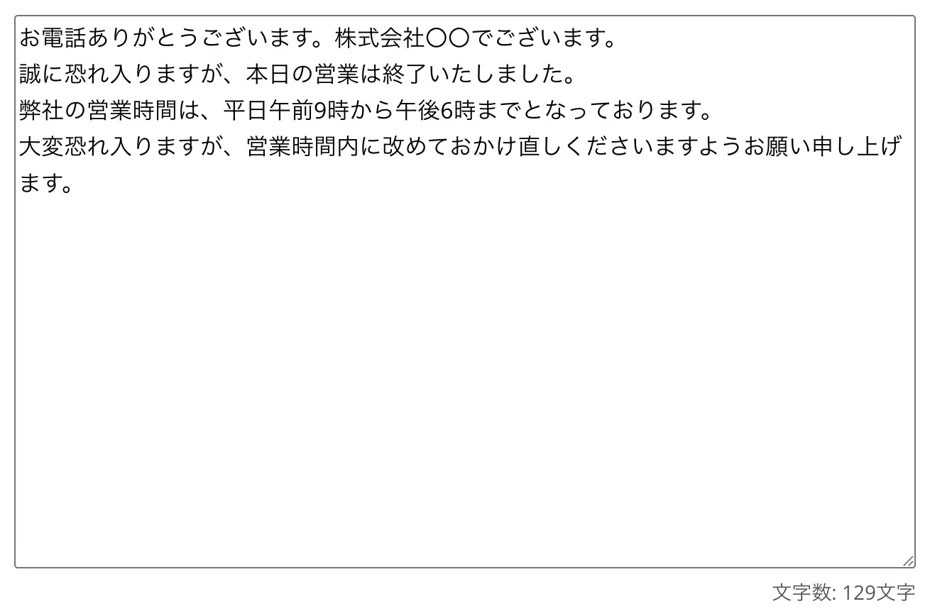
To create an answering machine response message, first open the Ondoku web app page.
Enter the example sentence introduced in this article into the Ondoku page.
We will explain using the sample sentence for after business hours.
Thank you for calling. This is XX Co., Ltd.
We are very sorry, but our business hours for today have ended.
Our business hours are from 9:00 AM to 6:00 PM on weekdays.
We apologize for the inconvenience, but please call back during business hours.
*Please replace the XX Co., Ltd. part with your company or store name.
In this way, I pasted and entered the sample sentence.
[Commercial Use] Precautions when creating answering machine response messages
When using Ondoku for free, please provide credit notation.
Since credit notation is not possible when using it for answering machine response messages, please subscribe to a paid plan during the period you use that audio.
Details about credit notation and commercial use (business use) of Ondoku are explained in this article.
Please take a look.

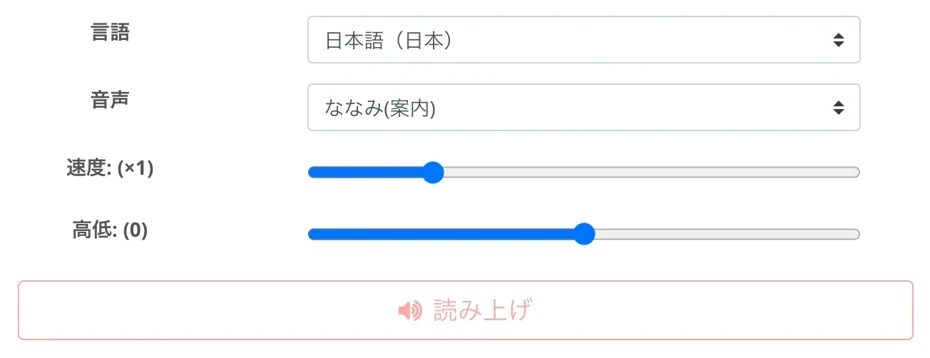
Set language and voice and start reading
If the language is set to another language, set the language according to the text from the "Language" menu.
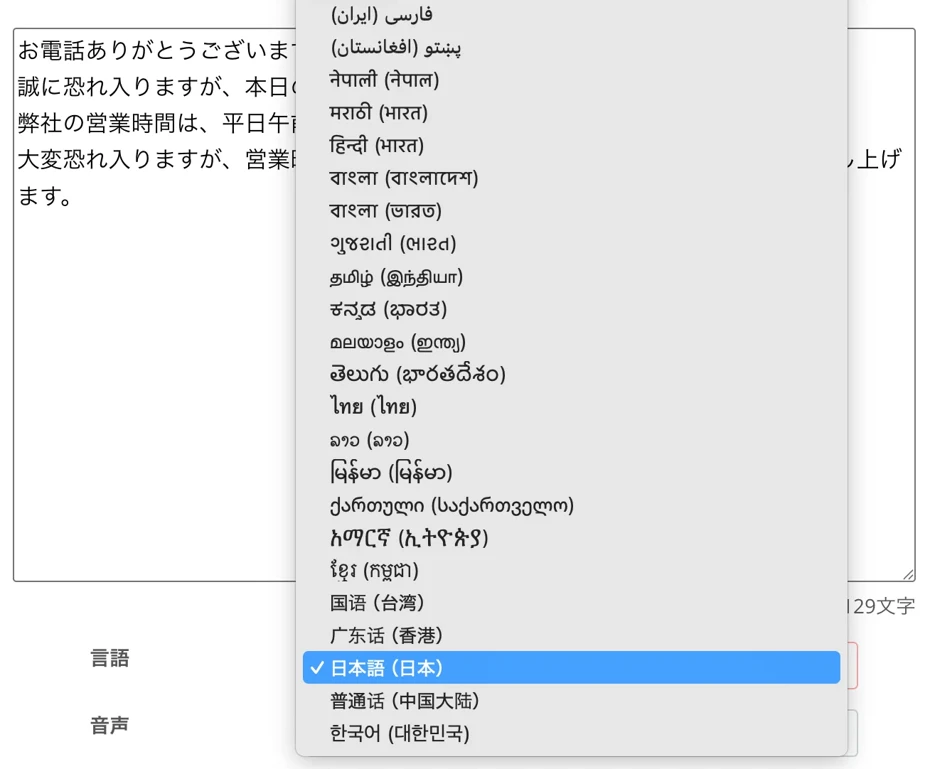
Reading in foreign languages is also possible, such as for inbound tourists!
Select the voice.
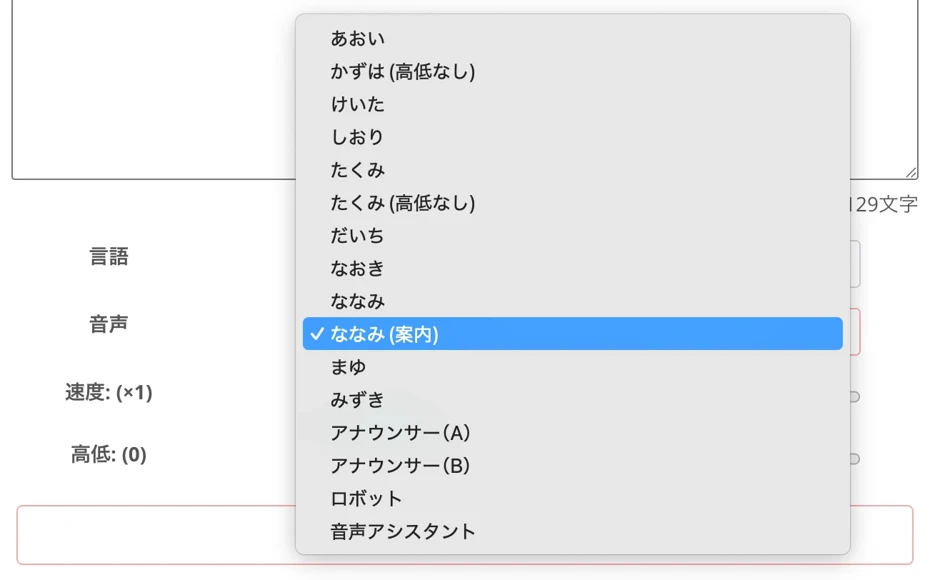
For Japanese, you can choose from over 16 types of voices.
You can listen to Japanese voice samples here.
Now the preparation is complete!
Press "Read" to start generating audio.
Voice synthesis is completed immediately.
The screen will switch and the audio player will be displayed.
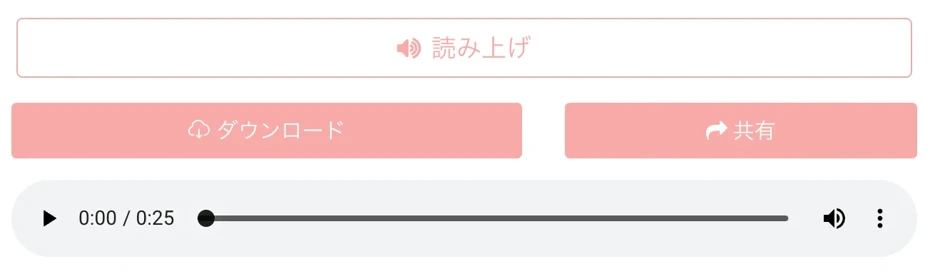
The audio will play, so listen and check it.
If there are no problems, press "Download" to save the audio file in MP3 format.
*Saving in WAV format is also possible from the "History" page.
With this, you have created an original answering machine response message with your company or store name!
As you can hear in this audio sample, it is read in a very natural voice.
Thank you for calling. This is XX Co., Ltd.
We are very sorry, but our business hours for today have ended.
Our business hours are from 9:00 AM to 6:00 PM on weekdays.
We apologize for the inconvenience, but please call back during business hours.
All you have to do is change the answering machine response message!
After that, simply load the created audio file into your telephone, business phone, or cloud PBX.
If you want to change the audio on a business phone, either upload it from the management screen or connect the audio input terminal and the computer with a cable to record it directly.
When changing the audio using a cloud PBX, it can be easily set up by simply uploading the file to the management screen on your browser.
In this way, by using the AI text-to-speech service Ondoku, you can very easily create and change original answering machine response messages!
Why don't you try creating an original audio file using Ondoku's AI text-to-speech right now?
4 Tips for Creating Easy-to-Hear Answering Machine Messages with an AI App
So far, we have introduced recommended answering machine response message examples and how to create them.
Using an AI text-to-speech app allows you to easily create high-quality answering machine response messages, but depending on the industry or content, it is recommended to add a little more ingenuity when reading the text!
Here are some tips for creating more natural and easy-to-hear response message audio from a customer perspective using an AI text-to-speech app!
1. If you have many elderly customers, it is recommended to adjust/change the speed setting
Basically, Ondoku audio can be read aloud at the default speed (1.0x) without changing the settings.
However, for industries that receive many calls from elderly customers, such as clinics and nursing care facilities, it is also recommended to intentionally slow down the speaking speed a little.
When adjusting, try testing with the speed setting set to around 0.8 first.
By doing this, you can provide kind and polite guidance over the answering machine even for those who are hard of hearing or prefer slower conversation.
2. How to adjust/set the "pauses" in the reading voice with SSML tags?
When reading out phone numbers or dates in an answering machine response message, it is recommended to intentionally create silence so that the other party can take notes.
With Ondoku, you can insert pauses of any length into your sentences using a feature called SSML tags.
It's very easy to use.
Just write a short tag where you want to insert a pause.
SSML tag <break> to insert a 1-second pause in reading audio
To insert a 1-second pause,
<break time="1s"/>
insert this tag.
By changing the 1s part to another number, you can adjust the length freely.
For example, if you write <break time="2s"/>, you can take a 2-second pause.
You can specify not only in seconds (s) but also in milliseconds (ms).
For example, writing <break time="500ms"/> inserts a 0.5-second pause, and writing <break time="200ms"/> inserts a short 0.2-second pause, allowing for even finer adjustments.
Details on how to insert pauses into Ondoku's reading voice are explained in this article.
Please take a look.
3. How to read out phone numbers with Ondoku?
When creating an answering machine response message, you may want to read out a phone number in the audio.
Even in this sample, we read out the phone number in this example sentence.
Thank you for calling. This is XX Real Estate Management.
Our business hours for today have ended.
For customers with emergency matters such as water leaks or lost keys,
please contact our 24-hour support center at 03-1234-5678.
When reading out phone numbers with Ondoku, it is recommended to use these 4 types of voices.
- Announcer (A)
- Announcer (B)
- Robot
- Voice Assistant
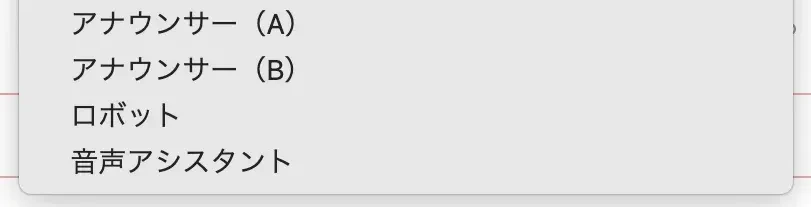
If you use an SSML tag like <break time="1s"/> to create a pause so that customers can easily take notes, other voices might read "1234" as "one thousand two hundred thirty-four."
By using these 4 types of voices, you can successfully read out the "1234" part of the phone number as "one two three four" instead of "one thousand two hundred thirty-four."
4. It is also recommended to change the type of voice and the pitch setting according to the industry
Ondoku has multiple voices (speakers) available.
The image of the answering machine response message changes significantly depending on which voice you choose.
For general companies and clinics, a calm female voice with a sense of trust or a lower male voice is optimal.
Also, for industries such as hair salons, apparel, and classes for children, it is recommended to choose a bright and energetic high-toned voice.
Furthermore, when reading apology messages for temporary closures or troubles, choosing a lower-toned voice than usual can express feelings of regret and sincerity more deeply.
Since Ondoku allows you to adjust the pitch of the voice, it is recommended to actually generate audio with different heights.
Why not try creating a custom-made answering machine message with an AI app right now?
Answering machines are an important point of contact between customers and companies.
Because it's a phone call where you can't see faces, using an easy-to-hear voice that includes the company name is a shortcut to gaining customer trust.
By using the AI text-to-speech web app Ondoku, you can easily create professional-quality audio announcements simply by copying the example sentences introduced this time and rewriting the company name part.
Why don't you actually try creating audio with your company name in Ondoku first?
■ AI voice synthesis software "Ondoku"
"Ondoku" is an online text-to-speech tool that can be used with no initial costs.
- Supports approximately 50 languages, including Japanese, English, Chinese, Korean, Spanish, French, and German
- Available from both PC and smartphone
- Suitable for business, education, entertainment, etc.
- No installation required, can be used immediately from your browser
- Supports reading from images
To use it, simply enter text or upload a file on the site. A natural-sounding audio file will be generated within seconds. You can use voice synthesis up to 5,000 characters for free, so please give it a try.

Text-to-speech software "Ondoku" can read out 5000 characters every month with AI voice for free.
You can easily download MP3s and commercial use is also possible.
If you sign up for free, you can convert up to 5,000 characters per month for free from text to speech.
Try Ondoku now.
HP:
ondoku3.com
Email: ondoku3.com@gmail.com
Email: ondoku3.com@gmail.com
Related posts
"Ondoku" is a Text-to-Speech service that anyone can use for free without installation. If you register for free, you can get up to 5000 characters for free each month. Register now for free
- What is Ondoku
- Start text-to-speech conversion
- Free registration
- Pricing
- Posts
- Try other free services
![[2026 Latest] Voicemail Greeting Message Samples & Examples | Detailed Explanation on How to Create Audio with Company Names Using AI Voice!](https://storage.googleapis.com/ondoku3/image/recommend-site-for-studying-spanish_tmb_140.webp)
![[2026 Latest] Voicemail Greeting Message Samples & Examples | Detailed Explanation on How to Create Audio with Company Names Using AI Voice!](https://storage.googleapis.com/ondoku3/image/recommend-site-for-studying-german_tmb_140.webp)
![[2026 Latest] Voicemail Greeting Message Samples & Examples | Detailed Explanation on How to Create Audio with Company Names Using AI Voice!](https://storage.googleapis.com/ondoku3/image/recommend-site-for-studying-french_tmb_140.webp)
![[2026 Latest] Voicemail Greeting Message Samples & Examples | Detailed Explanation on How to Create Audio with Company Names Using AI Voice!](https://storage.googleapis.com/ondoku3/image/recommend-site-for-studying-italian_tmb_140.webp)
![[2026 Latest] Voicemail Greeting Message Samples & Examples | Detailed Explanation on How to Create Audio with Company Names Using AI Voice!](https://storage.googleapis.com/ondoku3/image/recommend-site-for-studying-korean_tmb_140.webp)









