Best Text-to-Speech Software: 7 Free & Paid Tools for Commercial Use
[2026 Latest] Master Ondoku Multilingual SSML Tags for Foreign Language Listening!
Sept. 9, 2026
![[2026 Latest] Master Ondoku Multilingual SSML Tags for Foreign Language Listening!](https://storage.googleapis.com/ondoku3/image/multilingual_ssml_tmb_930.webp)
I want to know how to read aloud multilingual text well!

Are you having trouble with Multilingual reading (multilingual text-to-speech) in Ondoku because it cannot correctly identify the language?
- When English words are mixed into Japanese sentences, they somehow end up being pronounced like Katakana-English.
- Even though it's a Japanese sentence, it sounds unnatural because it's influenced by English pronunciation.
- The language cannot be identified in sentences that use three or more languages.
In those cases, using "SSML tags" is the solution!
In this article, we will explain in detail how to use SSML tags for Multilingual reading in Ondoku, as well as recommended usage scenes such as English and foreign language listening audio and announcements for inbound tourists.
[Listening Material Support] How to Read Multilingual Text Well?

The Multilingual feature allows you to conveniently read aloud text using multiple languages, such as Japanese and English, or English and Spanish.
Unlike reading them separately, you can use the same voice (speaker), so the voice doesn't change depending on the language, allowing for a natural reading without any sense of incongruity.
However, depending on the content of the multilingual text, it may not be read aloud correctly.
First, we will explain the features of the Multilingual function in Ondoku and the scenarios it struggles with.
What is the Multilingual (multilingual reading) feature?
By using the Multilingual feature of Ondoku, you can read aloud multiple languages with a single type of voice (speaker).
Previously, when reading in multiple languages, the voice (speaker) usually changed whenever the language changed.
For example,
- The Japanese part is "Japanese Person A"
- The English part is "American Person B"
That was the kind of image.
If it's like this, there is a "patchwork feeling" when the audio is connected.
But with Ondoku's Multilingual feature, it's okay!
The Multilingual feature can read aloud multiple languages such as Japanese, English, French, and Chinese with one type of voice.
Because the language switches smoothly without the voice quality or atmosphere changing, you can create audio with a sense of unity.
What are the scenarios where Ondoku's Multilingual feature struggles?
However, there are scenarios that the Multilingual feature struggles with.
The Multilingual feature of Ondoku works by having the AI analyze the input text and automatically judge whether "this is Japanese" or "this is English" to read it aloud.
Since it is analyzed by the latest high-performance AI, it can basically read multilingual text without problems, but there are limits to automatic identification.
It especially struggles with short words or sentences where the language switches frequently.
For example, when making English listening audio.
This sentence contains the word "Apple" in the alphabet within a Japanese sentence.
りんごは英語で「 Apple」 です。
Even if you want to read this part with English pronunciation, the AI judges it as Japanese based on the surrounding context and reads it with Japanese Katakana pronunciation like "Appuru" instead of native pronunciation.
This cannot be used as teaching material for English listening or pronunciation.
Also, sentences where many languages are used, such as "Japanese and English and French and Spanish and German," may not be read correctly because the AI cannot identify the languages.
For example, this text is a sentence where it is difficult for AI to identify the language.
ありがとうは、英語で Thank you 、フランス語で Merci 、スペイン語で Gracias 、ドイツ語で Danke といいます。
"SSML": The solution when English or foreign languages are not read correctly in Multilingual mode
In those cases, there is a solution!
If the AI gets confused, a human just needs to clearly specify, "Read this part in English."
The tool for that is "SSML tags."
By using SSML tags, you can perfectly create reading audio in the intended language, even in cases where the AI cannot automatically identify it well in Multilingual reading.
How to specify the language with SSML tags? [English/Foreign Language Support]
![How to specify the language with SSML tags? [English/Foreign Language Support]](https://storage.googleapis.com/ondoku3/image/multilingual_ssml_002_930.webp)

I want to know how to use SSML tags!
Now, we will specifically explain how to use SSML tags with the Multilingual feature (multilingual reading feature) of Ondoku.
By using SSML tags, you can easily create listening audio for English and other foreign languages!
Simple way to write SSML tags for multilingual reading
When using SSML tags with the Multilingual feature of Ondoku, you use two types of tags.
- <speak>
- <lang>
These are the ones.
1. Wrap the entire text in <speak> tags
First, wrap the entire text to be read aloud in <speak> tags.
りんごは英語で「Apple」です。
ありがとうは、英語で Thank you 、フランス語で Merci 、スペイン語で Gracias 、ドイツ語で Danke といいます。
2. Wrap each language in <lang> tags
Next, wrap the text for each language in <lang> tags.
When writing the <lang> tag, you specify the "language code" within the tag.
For example, when reading "Apple" with American English pronunciation:
Apple
Write it like this.
This en-US part is the language code.
Main Language Code List
| Language | Language Code |
|---|---|
| Japanese | ja-JP |
| English (US) | en-US |
| English (UK) | en-GB |
| French | fr-FR |
| German | de-DE |
| Spanish | es-ES |
| Italian | it-IT |
| Russian | ru-RU |
| Chinese (Simplified) | zh-CN |
| Korean | ko-KR |
Just Copy and Paste! List of <lang> Tags for Main Languages
However, writing tags and language codes yourself is hard work.
Therefore, we have prepared a list of <lang> tags for the main languages.
Just copy and paste, and replace the "text here" part.
| Language | SSML Tag for Copying |
|---|---|
| Japanese | |
| English (US) | |
| English (UK) | |
| French | |
| German | |
| Spanish | |
| Italian | |
| Russian | |
| Chinese (Simplified) | |
| Korean |
Adding SSML tags using generative AI services is also recommended!
Actually, there is a method to add SSML tags even more easily!
That is using generative AI services such as ChatGPT, Gemini, or Claude.
Please add SSML lang tags for each language.
(The text you want to read aloud here)
By simply giving instructions like this, you can easily add SSML tags.
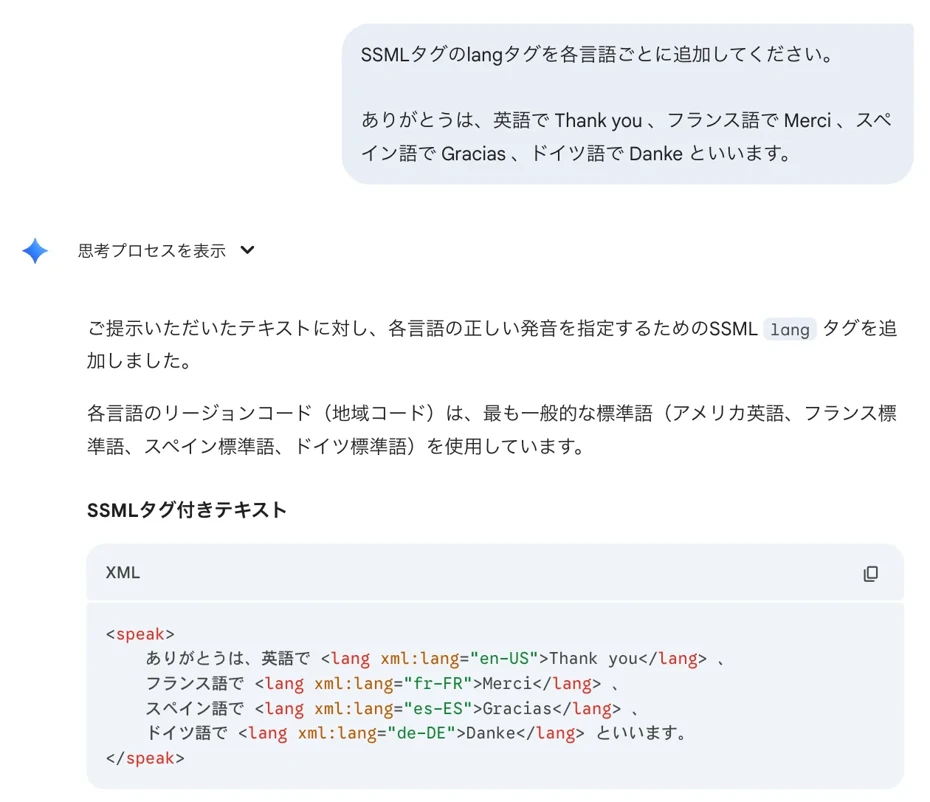
Since ChatGPT and Gemini can be used for free, this is a recommended method when you want to add SSML tags easily.
3. Reading multilingual text using SSML tags with Ondoku
After adding the <speak> and <lang> tags to the text, it looks like this.
りんごは英語で「Apple 」です。
ありがとうは、英語でThank you 、
フランス語でMerci 、
スペイン語でGracias 、
ドイツ語でDanke といいます。
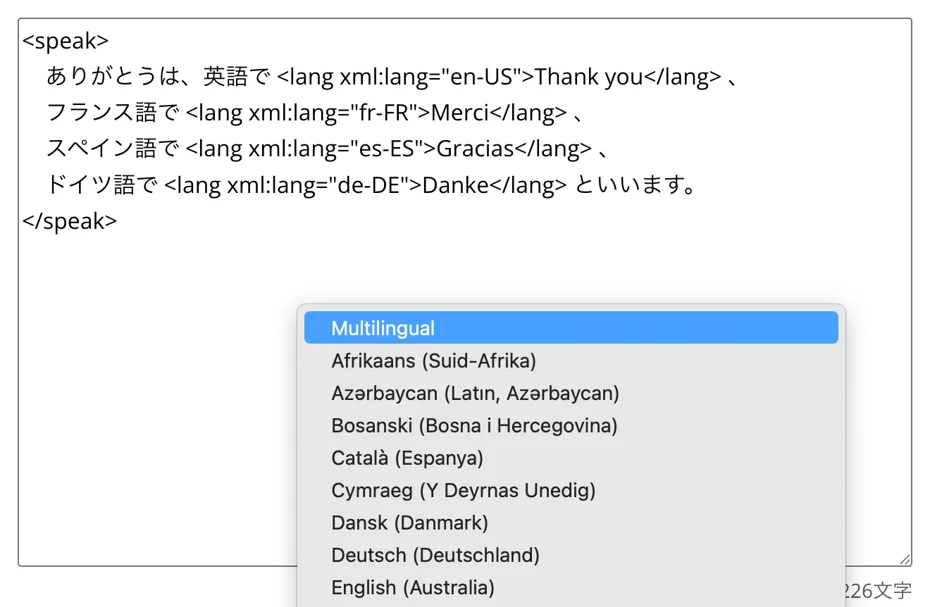
Now, all you have to do is paste this text onto the Ondoku top page and read it aloud!
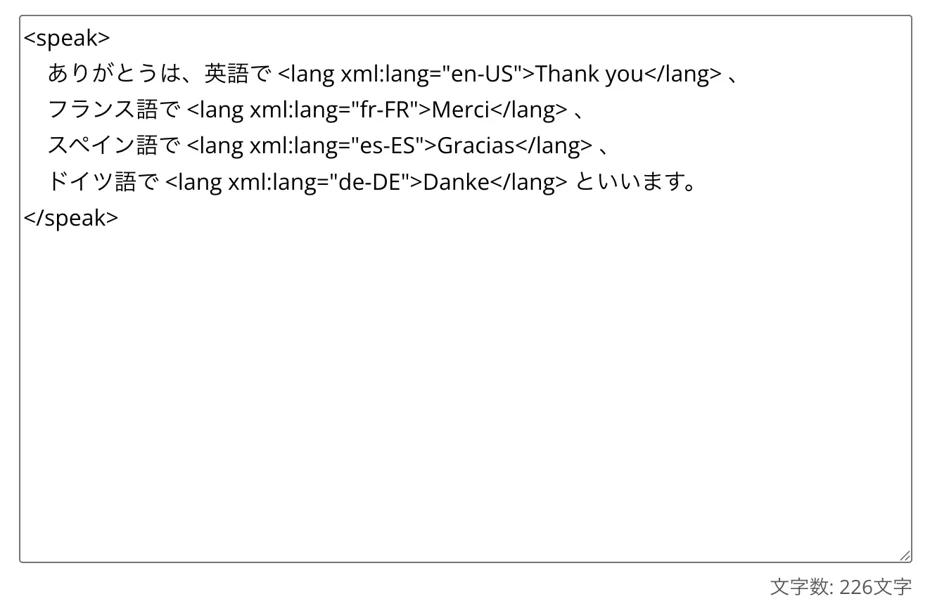
Select "Multilingual" for the language.
Select the voice (speaker).
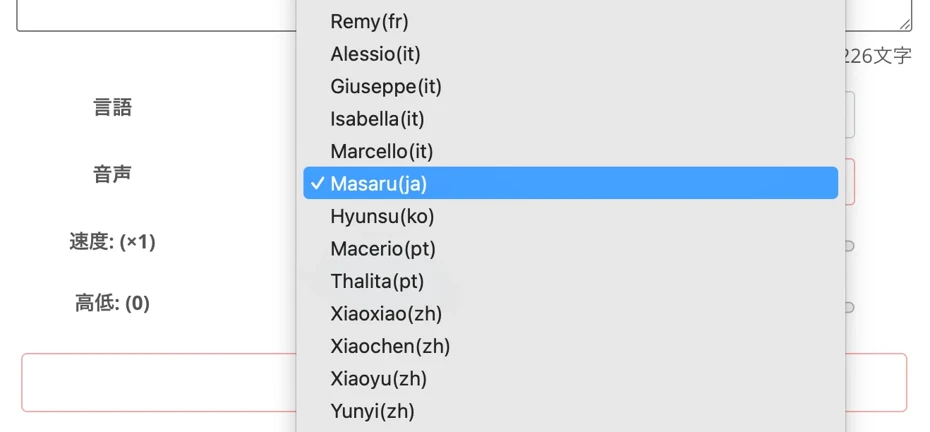
You can choose from many types, such as voices that can read multiple languages based on Japanese, or voices that can read multiple languages based on English.
You can listen to sample voices of the Multilingual feature in this article. Please take a look.

Multilingual AI Voice Listening Page, Useful Tips and Cautions
A single speaker can now speak various languages. This time, we will introduce useful ways to use and points to note regarding Multilingual AI voices.
Now the preparation is complete.

Click "Read" to read the multilingual text aloud.
When you actually read it aloud, you can generate audio like this.
りんごは英語で「Apple 」です。
ありがとうは、英語でThank you 、
フランス語でMerci 、
スペイン語でGracias 、
ドイツ語でDanke といいます。
In this way, the languages used in the text were identified and read aloud with correct pronunciation.
As you can see, by using SSML tags, you can further utilize the Multilingual feature of Ondoku!
Why don't you try reading multilingual text even more conveniently with Ondoku?
Related articles on how to read aloud in multiple languages with SSML tags
In this article, we explain in more detail how to use SSML tags with the Multilingual feature of Ondoku.
Please take a look at it as well.

What is the method to use SSML tags in Ondoku's multilingual reading? How to use the <lang> tag for multilingual voices
Explanation on how to use SSML tags with Ondoku's Multilingual feature. Includes templates that can be used by copying and pasting. Ideal for YouTube videos and language learning material production!
What are the recommended ways to use Multilingual reading & SSML tags? [Easily create listening audio!]
By using SSML tags, we can read aloud even more conveniently with Ondoku!
I want to know the recommended ways to use it!
From here, we will introduce recommended scenes where you can utilize SSML tags with the Multilingual feature of Ondoku!
Create listening audio or wordbooks for English and foreign languages

SSML tags are perfect for listening material audio for English and foreign languages.
For example:
次の対話を聞いて、質問に答えてください。
Excuse me, how much is this blue sweater? I'd like to buy it if you have it in size medium.
You can easily create audio like this as a single file, where Japanese narration is followed by English or foreign language text.
Also, teaching materials for learning English or foreign language words can be easily created.
Even when reading aloud Japanese and English alternately for a word pronunciation listening material, such as "Apple りんご," "Banana バナナ," or "Orange みかん," if you specify the language with SSML tags, the pronunciations will not get mixed up.
If you are making English or foreign language listening audio, we recommend utilizing SSML tags!
Utilize SSML tags for in-store broadcasts for inbound tourists from abroad

SSML tags are also ideal for announcements in shops and facilities!
Even when you want to follow the Japanese "Irasshaimase" with "Welcome" or "Nihao" for inbound tourists from overseas, you can use SSML tags to read them aloud naturally in each language.
Unlike editing separate audio files, you can read everything aloud with the same voice (speaker) regardless of the language, so you can play announcements with a unified atmosphere.
For more details on broadcasts for inbound tourists, please see this article.
Please take a look.
![[Tourist Facilities, Shops, Transportation] How to make information broadcast audio for inbound tourists! What are the effective recommended multilingual guide methods?](https://storage.googleapis.com/ondoku3/image/20240926_inbound_guide_announcement_010_930.webp)
[Tourist Facilities, Shops, Transportation] How to make information broadcast audio for inbound tourists! What are the effective recommended multilingual guide methods?
Cost reduction for inbound tourist support! Easily create multilingual guidance broadcasts for free with AI voice. Ondoku supports 81 languages and regions, making it ideal for tourist facilities, shops, and transportation. Streamline guidance operations and improve customer satisfaction! Click here for details.
Why not try creating listening audio or announcements with SSML tags for multilingual text?
The Multilingual feature of Ondoku is very convenient.
However, when you want to be "more particular" or have it "read aloud more accurately," using SSML tags allows for even more convenient multilingual reading!
Even when you feel that automatic identification doesn't work well, you can just use SSML tags!
Even in sentences where multiple languages coexist, you can read them aloud with fluent pronunciation that rivals a native speaker.
Why not utilize Multilingual reading with SSML tags for creating listening materials or announcements?
We sincerely hope that you can create the audio you desire with the SSML feature of Ondoku.
■ AI voice synthesis software "Ondoku"
"Ondoku" is an online text-to-speech tool that can be used with no initial costs.
- Supports 81 languages and regions, including Japanese, English, Chinese, Korean, Spanish, French, and German
- Available from both PC and smartphone
- Suitable for business, education, entertainment, etc.
- No installation required, can be used immediately from your browser
- Supports reading from images
To use it, simply enter text or upload a file on the site. A natural-sounding audio file will be generated within seconds. You can use voice synthesis up to 5,000 characters for free, so please give it a try.

Text-to-speech software "Ondoku" can read out 5000 characters every month with AI voice for free.
You can easily download MP3s and commercial use is also possible.
If you sign up for free, you can convert up to 5,000 characters per month for free from text to speech.
Try Ondoku now.
HP:
ondoku3.com
Email: ondoku3.com@gmail.com
Email: ondoku3.com@gmail.com
Related posts
"Ondoku" is a Text-to-Speech service that anyone can use for free without installation. If you register for free, you can get up to 5000 characters for free each month. Register now for free
- What is Ondoku
- Start text-to-speech conversion
- Free registration
- Pricing
- Posts
- Try other free services
![[2026 Latest] Master Ondoku Multilingual SSML Tags for Foreign Language Listening!](https://storage.googleapis.com/ondoku3/image/irodori-tts_tmb_140.webp)
![[2026 Latest] Master Ondoku Multilingual SSML Tags for Foreign Language Listening!](https://storage.googleapis.com/ondoku3/image/tategaki-image-yomiage_howto_tmb_140.webp)
![[2026 Latest] Master Ondoku Multilingual SSML Tags for Foreign Language Listening!](https://storage.googleapis.com/ondoku3/image/iphone-video-narration_tmb_140.webp)
![[2026 Latest] Master Ondoku Multilingual SSML Tags for Foreign Language Listening!](https://storage.googleapis.com/ondoku3/image/chrome-reading-mode-pc_tmb_140.webp)
![[2026 Latest] Master Ondoku Multilingual SSML Tags for Foreign Language Listening!](https://storage.googleapis.com/ondoku3/image/pdf-to-mp3-howto_tmb_140.webp)









