Recommended Text-to-Speech Software Summary: 7 Selections for Commercial Use [Free and Paid]
[2025 Latest] Free English Pronunciation Check Sites & Apps Complete Guide! Dramatic Improvement with Speaking Practice
Jan. 26, 2026
![[2025 Latest] Free English Pronunciation Check Sites & Apps Complete Guide! Dramatic Improvement with Speaking Practice](https://storage.googleapis.com/ondoku3/image/english_pronunciation_check_tmb_930.webp)
Is my English pronunciation really being understood?


I'm worried about the cost of attending English conversation classes, and I don't have any native-speaker friends...
There are surely many people studying English while harboring such anxieties.
In such cases, we recommend free English pronunciation check sites!
With the latest AI services, you can easily check your pronunciation for free while listening to native English pronunciation.
In this article, we will explain the latest English learning methods in detail, from free pronunciation check sites and apps to specific speaking practice methods!
Recommended Free AI Site for English Pronunciation Checking: "Ondoku"

For English pronunciation checks and speaking practice, we recommend "Ondoku"!
"Ondoku" is an AI text-to-speech service that can be used for free.
Anyone can easily check their English pronunciation using native-pronunciation audio in American English or British English.
You can use it immediately from the website on your smartphone or computer without needing to register or log in.
Why not try using "Ondoku" for free for your English pronunciation checks?
Why is English Pronunciation Checking Important? Learning Methods You Can Do with Free Sites

First, we will briefly explain why English pronunciation checking is important and recommend free learning methods!
The reason why Japanese people can't break away from Katakana English
Checking your pronunciation is essential for improving your English smoothly.
There is actually a reason why Japanese people struggle with English pronunciation.
That is, English has many more sounds than Japanese.
For example, the difference between "L" and "R."
"Light" and "Right" both become "ライト" when written in Japanese, but they are completely different sounds in English.
There are many other sounds that do not exist in Japanese, such as the difference between "B" and "V," or the "TH" sound where the tongue is placed between the teeth.
Many people may have learned a lot of grammar and vocabulary in school English classes but have hardly ever done pronunciation checks.
That is why many people are unable to break the habit of Katakana English.
To break away from Katakana English, we recommend performing regular English pronunciation checks.
By using free sites to check your English pronunciation, you can understand your weaknesses and improve efficiently.
Pronunciation checking is recommended for studying English enjoyably!
To make English learning more enjoyable, we recommend incorporating pronunciation checks into your studies.
When your pronunciation improves, conversations with foreigners become smoother.
By being able to pronounce accurately, what you want to say is properly conveyed, and the number of times you are asked "What?" will decrease.
Even those who previously felt they were bad at English conversation will find themselves wanting to use English more and more.
Additionally, your listening skills will improve as well.
This is because sounds you can pronounce correctly are easier to hear when someone else speaks them.
If you use English for work, you will be able to speak with confidence in meetings and presentations.
Of course, it is also effective for exam preparation such as TOEIC and Eiken.
Particularly in listening sections, knowing accurate pronunciation can help increase your score.
By making pronunciation checks a habit, you can improve your overall English skills.
To surely upgrade your English proficiency, speaking practice using free sites and apps is ideal.
Solve previous pronunciation learning problems with free sites and apps!
Traditional English pronunciation learning had many hurdles.
When attending an English conversation school, it is not uncommon for the monthly tuition alone to cost tens of thousands of yen.
Private lessons are even more expensive.
Time constraints are also a major issue.
Having to go to a classroom at a fixed time can make it difficult for busy working adults or students to continue.
Many people may have been unable to actively participate in speaking practice in group lessons because they were embarrassed to make mistakes in front of other students.
That's where free pronunciation check sites come in.
By using sites and apps, you can check your pronunciation anytime, anywhere, whenever you like.
Of course, there is no need to be embarrassed if you make a mistake.
Using free sites and apps can significantly lower the hurdles to English learning.
What is the new method for English pronunciation checking using the latest AI technology?

Easy pronunciation checks with the latest AI featuring native pronunciation
Currently, AI technology that can be used for English learning is developing rapidly.
One technology that has become particularly convenient is "text-to-speech technology."
By using the latest AI text-to-speech services, it is now possible to convert input text into natural audio that sounds just like a human is speaking.
It is so natural that it can even express emotions and intonation, reaching a level where it is indistinguishable from a native speaker's voice.
Moreover, it supports pronunciations from various countries such as American English, British English, and Australian English.
By utilizing native-pronunciation AI text-to-speech services for English learning, you can listen to model pronunciations at any time.
For checking pronunciation for free, AI text-to-speech services are ideal!
They can also be used for speaking practice such as shadowing.
For future English learning, using AI text-to-speech services is recommended.
What are the benefits of pronunciation checking using the latest AI?
Compared to previous learning methods, pronunciation checking methods using the latest AI have many benefits.
The biggest benefit is that it can be used for free!
Previously, authentic pronunciation checks and speaking practice required attending English conversation schools, which cost a lot of money.
Since the latest AI services are free, you can study English at zero cost!
The absence of time constraints is also an important point.
Whether it's early morning or late at night, you can practice speaking at your own convenience.
Privacy is also completely protected, so you can practice as many times as you want without fear of mistakes.
Being able to progress with your learning at your own pace without worrying about others is very mentally relaxing.
Also, another big advantage is that you can adjust the practice content to suit your individual level.
Beginners can choose simple words, and advanced learners can freely choose complex sentences.
By using free pronunciation check sites and apps, the threshold for English learning becomes much lower.
3 Recommended Free Sites and Apps for English Pronunciation Checking
I want to know about sites and apps recommended for pronunciation checking!

Next, we will specifically introduce sites and apps that you should definitely use for English pronunciation checking!
1. Ondoku: A Recommended AI Service for Free Pronunciation Checks
"Ondoku" is an AI text-to-speech service that allows you to check your pronunciation with natural native English.
Anyone can easily create English audio for pronunciation checks and speaking practice.
The biggest feature of "Ondoku" is that it can be used for free!
You can use up to 1,000 characters without registering as a member, and up to 5,000 characters if you register your email address.
This is more than enough for daily pronunciation checks and speaking practice.
Usage is very simple: just enter the English text you want to practice.
In just a few seconds, it will create natural audio that sounds like a native speaker is talking.
It supports both American English and British English, and you can choose the voice according to your preference, such as male or female voices.

Whether on a smartphone or a computer, you can use it immediately from the website as long as you are connected to the internet.
There is no need to download or install any software.
Another attractive feature is that you can practice freely according to your level, from short words to long sentences.
It is a free site particularly recommended for daily pronunciation checks and speaking practice.
Why not experience the new future of English learning with the free AI text-to-speech site "Ondoku"?
2. Cambridge Dictionary: A Free English Dictionary Operated by the University of Cambridge

Cambridge Dictionary is a free English dictionary operated by the University of Cambridge.
Although it is a site operated by the University of Cambridge in the UK, pronunciations for both American English and British English are listed.
It is very convenient when you want to compare and study American and British word pronunciations.
Phonetic symbols are also displayed, allowing you to acquire accurate pronunciation while learning how to read the symbols.
Since it is a university-operated website, it can be used for free.
It is a recommended free site when you want to check the pronunciation of English words from a reliable source.
3. BBC Learning English: A Recommended Free Learning Site for Studying British English

BBC Learning English is a free English learning site operated by the British public broadcaster BBC.
In the pronunciation practice section, you can learn the correct pronunciation of British English with audio.
What is particularly interesting is that you can use real BBC news and program audio as teaching materials for speaking practice.
Through the natural speech of news anchors and drama actors, you can acquire practical pronunciation skills.
As a free site, it provides materials tailored to all levels from beginners to advanced learners.
New content is added regularly, so you can continue without getting bored.
It is a recommended free site for those who want to "acquire British English" or "be exposed to natural English used in actual broadcasts."
Create English teaching materials for free with "Ondoku"
First, create English audio teaching materials with "Ondoku".
After accessing the "Ondoku" website, first enter the text in the text box.

Any English text is OK, whether it's travel English or business English!
Select English in the language settings.
"Ondoku" can read out American English, British English, Australian English, and Indian English.
Select the English pronunciation you want to study.

Select the type of voice, such as female or male.
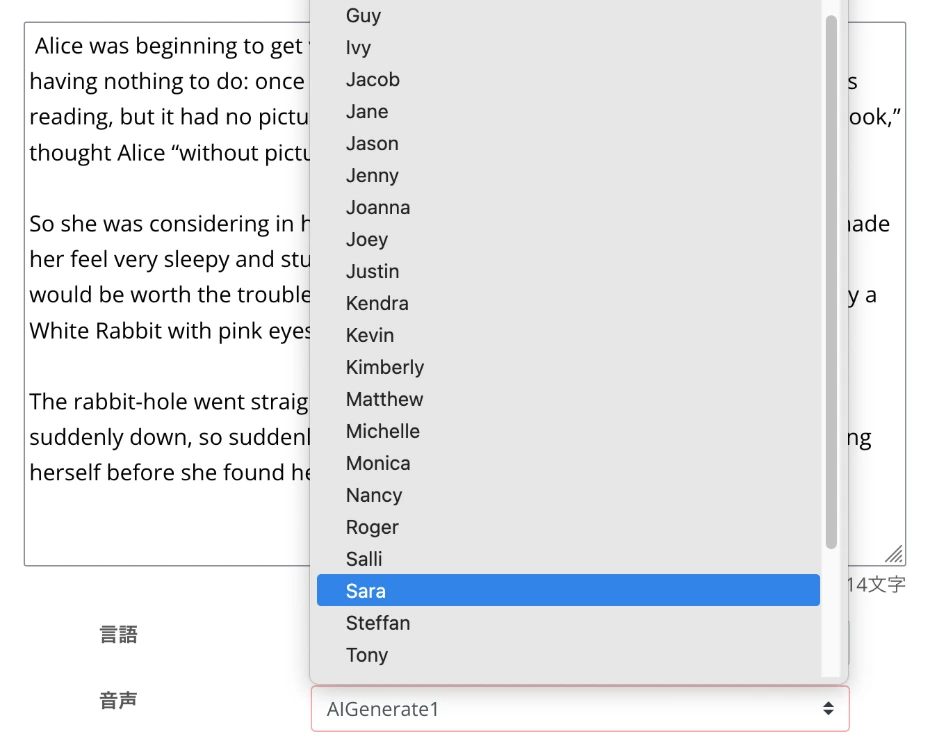
There are many choices, but we recommend choosing a voice that you find easy to hear at first.
You can listen to voice samples on this page, so please check it out!
"Ondoku" also allows you to change the reading speed and voice pitch.

When you have just started studying, we recommend setting it to a slower speed.
Now you are ready!
Press the read button to generate the audio.
Generation is completed in a few seconds, and the audio will play.

You have now generated audio for pronunciation checks and speaking practice.
Since you can download the audio files in MP3 or WAV format, we also recommend saving them to your smartphone or PC.
Why not try making audio teaching materials with "Ondoku" first?
Recommended Settings for Pronunciation Checks and Speaking Practice
When performing English pronunciation checks or speaking practice, settings for playing audio in apps on your smartphone or PC are also important.
First, adjust the volume so that the audio can be heard clearly.
If possible, we recommend using earphones or headphones.
You will be able to hear finer differences in sounds.
Preparation for recording is also important.
Using a recording app on your smartphone is sufficient, but checking how to use it beforehand will make your speaking practice smoother.
By setting up your environment in advance, you can proceed with your English learning efficiently.
Check word pronunciation first with sites and apps

It is effective to start English pronunciation practice at the word level.
Try starting your pronunciation checks and speaking practice with words containing sounds that Japanese people are particularly bad at.
To practice the difference between "R" and "L," words like "right" and "light" are recommended.
Have "Ondoku" read out the words and listen carefully to the generated audio.
It is important to listen many times while being conscious of the position of your tongue and the shape of your mouth.
For the "TH" sound, you can practice with words like "think," "thanks," and "through."
The key is to remember the sensation of letting the tip of your tongue lightly touch your teeth.
For the difference between "V" and "B," try practicing with "very" and "berry."
Learn physically the difference between the "V" sound, where the lower lip lightly touches the upper teeth, and the "B" sound, where both lips are pressed together.
When recording your own pronunciation, the trick is to pronounce the same word several times in a row and compare your best pronunciation with the model.
By checking pronunciation at the word level, you can solidify the foundation of your English pronunciation.
We recommend practicing a little every day utilizing free sites and apps.
Challenge yourself with speaking practice of phrases and sentences
Once you get used to word pronunciation, next challenge yourself with speaking practice of short phrases and sentences!
We recommend starting with short sentences of about 5 to 8 words.
- "How are you today?"
- "What time is it?"
Common expressions used in daily life are perfect for practice.
In sentence-level practice, intonation (the rise and fall of sound) is very important.
Use "Ondoku" audio to check basic patterns, such as the voice rising at the end of a question and falling at the end of a normal sentence.
Also, in English, words are often pronounced as if they are connected.
For example, "pick it up" sounds like "pi-ki-tap," or "want to" is pronounced as "wanna."
If you cannot pronounce it well, try lowering the audio speed.
Since "Ondoku" allows you to easily adjust the playback speed, you can acquire accurate pronunciation at a slow speed at first, and gradually move closer to natural speed.
Practical English conversation speaking practice with "Ondoku"
Once you get used to it, try speaking practice that is close to actual conversation.
Use "Ondoku" to read out dialogues assuming situations you might actually encounter, such as ordering at a restaurant, giving directions, or talking on the phone.
For example, for a conversation at a restaurant:
A: "Good evening. Do you have a reservation?"
B: "Yes, under the name Smith."
Create teaching materials by having "Ondoku" read out sentences like these.
By practicing speaking while checking the pronunciation of both sentences A and B, you can acquire practical conversational pronunciation.
In speaking practice, it is also important to practice expressions with emotion.
By practicing various emotional expressions, such as when you are happy, surprised, or disappointed, you can acquire more natural and rich English expressions.
Pronunciation checks in a dialogue format are ideal for improving actual communication skills.
Why not try conversation practice in various situations utilizing "Ondoku"?
Points for Effectively Proceeding with English Pronunciation Checks and Speaking Practice

How to effectively check pronunciation with free sites and apps?
The key to more effective pronunciation checking is to objectively evaluate your own pronunciation.
Record your own pronunciation and check if you can pronounce it well and how different it is from the model audio.
Specifically, focus on these four points:
- Accuracy of sound
- Intonation
- Rhythm
- Fluency
Try scoring and recording each on a 10-point scale.
By keeping records continuously, you can confirm your improvement progress numerically.
When checking your pronunciation, play the audio created with "Ondoku" and your recorded audio alternately to see where the differences are.
Make specific notes on which sounds are different and where the rhythm breaks down, then concentrate on practicing those parts next time.
By regularly recording and comparing, you can steadily improve your English pronunciation.
Common mistakes in English pronunciation and how to fix them
There are common patterns in pronunciation mistakes often seen in Japanese learners.
The first is adding extra vowels.
For example, it is common to pronounce "student" as "su-tu-den-to" or "Christmas" as "ku-ri-su-ma-su."
In such cases, listen to accurate audio and focus your speaking practice on being conscious of consonant-only sounds.
Also, it is common to be unable to pronounce the final sound of a word well.
Make an effort to clearly pronounce the final "d" in "good" or the final "k" in "make."
The distinction between long and short sounds is also a difficult point for Japanese people.
There are many words where the meaning changes depending on the length of the vowel, such as "sheep" and "ship."
We recommend practicing pronunciation intensively using English audio created with "Ondoku".
Pronunciation checks along with shadowing practice
Shadowing is a speaking practice method where you speak the same content slightly after listening to the audio.
It is a very effective English learning method that can train pronunciation and listening at the same time.
With "Ondoku", you can create high-quality audio materials for shadowing.
In shadowing, you perform speaking practice in stages while listening to the audio.
First, listen only to the audio to grasp the content and rhythm.
Next, pronounce along with the audio while looking at the text.
Finally, shadow without looking at the text, relying only on the audio.
The key is also to start with short sentences first and gradually challenge yourself with longer sentences or complex content.
Since "Ondoku" allows you to adjust the playback speed, you can start shadowing at a slow speed according to your level.
Once you can do it smoothly at normal conversation speed, try challenging yourself with a slightly faster setting!
By recording your shadowing voice and performing pronunciation checks, synergistic effects can be expected.
Shadowing is also effective for acquiring a sense of rhythm in English.
Why not start shadowing using "Ondoku" English reading audio?
![[Complete Guide] What is English Shadowing? How to make free materials! | Text-to-Speech Software Ondoku](https://storage.googleapis.com/ondoku3/image/20250522_shadowing_tmb_02_930.webp)
Why not try pronunciation checking using the free site "Ondoku"?
For effective English learning, we recommend free pronunciation checks and speaking practice using "Ondoku"!
Anyone can easily start speaking practice without having to attend English conversation schools.
With native-level pronunciation from the latest AI text-to-speech services, you can use high-quality audio as a model and advance your English learning at your own pace, anytime, anywhere.
Acquiring accurate pronunciation is an important skill that leads not only to improved communication skills in English but also to better listening skills and increased overall learning motivation.
By using "Ondoku" to practice English pronunciation and speaking, you can escape from Katakana English and become able to speak English with confidence.
Why don't you also start a new English learning method utilizing "Ondoku"?
■ AI voice synthesis software "Ondoku"
"Ondoku" is an online text-to-speech tool that can be used with no initial costs.
- Supports approximately 50 languages, including Japanese, English, Chinese, Korean, Spanish, French, and German
- Available from both PC and smartphone
- Suitable for business, education, entertainment, etc.
- No installation required, can be used immediately from your browser
- Supports reading from images
To use it, simply enter text or upload a file on the site. A natural-sounding audio file will be generated within seconds. You can use voice synthesis up to 5,000 characters for free, so please give it a try.

Text-to-speech software "Ondoku" can read out 5000 characters every month with AI voice for free.
You can easily download MP3s and commercial use is also possible.
If you sign up for free, you can convert up to 5,000 characters per month for free from text to speech.
Try Ondoku now.
HP:
ondoku3.com
Email: ondoku3.com@gmail.com
Email: ondoku3.com@gmail.com
Related posts
"Ondoku" is a Text-to-Speech service that anyone can use for free without installation. If you register for free, you can get up to 5000 characters for free each month. Register now for free
- What is Ondoku
- Start text-to-speech conversion
- Free registration
- Pricing
- Posts
- Try other free services
![[2025 Latest] Free English Pronunciation Check Sites & Apps Complete Guide! Dramatic Improvement with Speaking Practice](https://storage.googleapis.com/ondoku3/image/recommend-site-for-studying-spanish_tmb_140.webp)
![[2025 Latest] Free English Pronunciation Check Sites & Apps Complete Guide! Dramatic Improvement with Speaking Practice](https://storage.googleapis.com/ondoku3/image/recommend-site-for-studying-german_tmb_140.webp)
![[2025 Latest] Free English Pronunciation Check Sites & Apps Complete Guide! Dramatic Improvement with Speaking Practice](https://storage.googleapis.com/ondoku3/image/recommend-site-for-studying-french_tmb_140.webp)
![[2025 Latest] Free English Pronunciation Check Sites & Apps Complete Guide! Dramatic Improvement with Speaking Practice](https://storage.googleapis.com/ondoku3/image/recommend-site-for-studying-italian_tmb_140.webp)
![[2025 Latest] Free English Pronunciation Check Sites & Apps Complete Guide! Dramatic Improvement with Speaking Practice](https://storage.googleapis.com/ondoku3/image/recommend-site-for-studying-korean_tmb_140.webp)









