How to credit Ondoku: Examples and points to note.
How to renew your Ondoku annual contract. Inquiry templates, points to note, and guidance for non-renewal.
April 1, 2026

Ondoku annual contracts are not automatically renewed.
If you wish to renew your contract, you must complete the renewal procedure yourself.
In this article, we will introduce the "renewal method" for annual contracts and "what happens if you do not renew."
How to Renew Your Ondoku Annual Contract
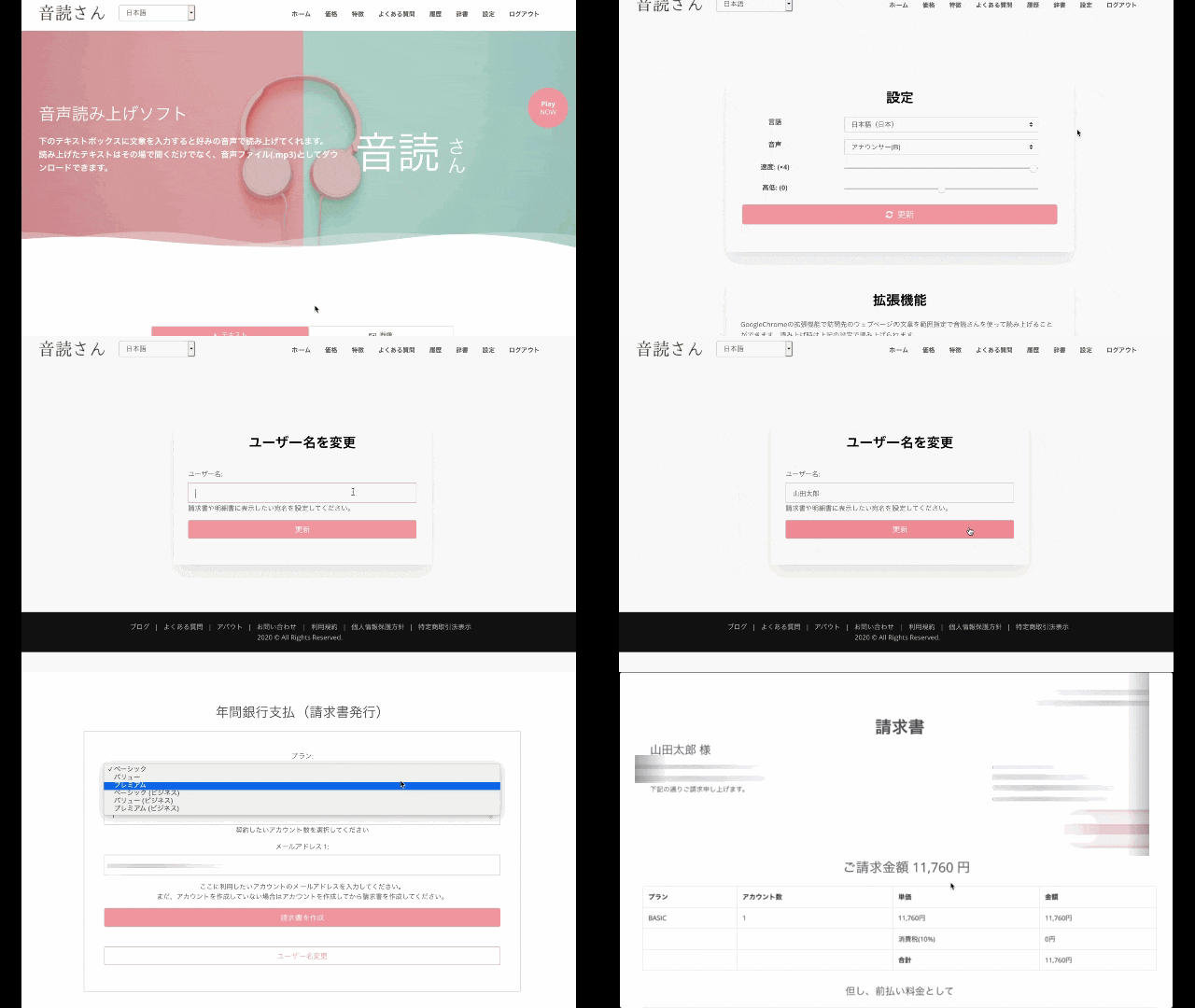
- Log in to Ondoku
- From the Ondoku Settings, issue a quotation/invoice via "Payment → Annual Bank Payment."
Quotations and invoices are issued simultaneously. You cannot renew your contract without issuing an invoice. - Contact Ondoku via the Inquiry form with your "Desired Start Date."
If payment is received without notification of a start date → The one-year plan will be applied on the day payment is confirmed. - After reviewing the invoice, please transfer the billed amount to the designated account.
* The bank transfer fee is to be borne by the customer.
* If your desired start date is after the payment date, please notify us by email at least 3 business days in advance. We cannot accommodate requests if the notification and payment are out of sequence.
(Example) Payment on March 20 → Desired start date: April 1
Please notify us by email 3 business days before March 20.
We cannot accommodate requests even if notified on the day of March 20.
Template for "Desired Start Date" Inquiries
Subject: Annual Contract Renewal Request
I would like to request the renewal of my Ondoku annual contract.
Invoice Number:
Desired Renewal Date: [Year/Month/Day]
(Example: Expiration date)Scheduled Payment Date: [Year/Month/Day]
* Normally, the plan starts after payment is confirmed, but if you inform us of the scheduled payment date, you can use the service in advance from your desired date before the payment.
Points to Note Regarding Ondoku Annual Contracts
- Normally, the plan is activated within 24 hours after payment confirmation.
- If the username and the name of the remitter are different, the plan will not be activated unless you contact us.
- There are no special discounts for annual payments.
- Refunds for mid-term cancellations are not available.
- Plan changes cannot be made mid-term.
- Quotations and invoices without payment or contact for more than 3 months will be deleted as expired.
- Bank transfers are not automatically renewed.
If you wish to continue from the following year, please issue a new invoice and make a payment.
In this case as well, the plan will be activated within 24 hours after payment confirmation. Please note that it is not an automatic renewal on the expiration date.
If you wish to renew on the expiration date or a specific date, please contact us in advance via the Inquiry form.
About Annual Contract Pricing
[Standard Paid Plan Prices]
- Basic Plan: 980 yen x 12 months = 11,760 yen
Annual characters: 2.4 million characters - Value Plan: 1,980 yen x 12 months = 23,760 yen
Annual characters: 5.4 million characters - Premium Plan: 2,980 yen x 12 months = 35,760 yen
Annual characters: 12 million characters
For more details on annual contracts, please see here.

[Business Plan Prices]
- 2.4 million characters per year → 120,000 yen
- 5.4 million characters per year → 240,000 yen
- 12 million characters per year → 360,000 yen
For more details on the Business Plan, please see here.

The Username is the Addressee
The username will be the addressee on the invoice.
If you have registered an incorrect username:
- Click Change Username
- Enter the desired username
- Click Register
You can change the username this way.
A quotation is issued at the same time as the invoice, so it is very easy to download even if you need a quotation for internal approval.
If You Have Created Multiple Invoices by Mistake
Invoices can be created easily with a single button.
Because of this, you may accidentally create unnecessary invoices.
Deleting or canceling invoices cannot be done by the customer.
If you have accidentally created multiple invoices, please contact us via the inquiry form to request deletion.
Quotations and invoices without payment or contact for more than 3 months will be deleted as expired.
If Payment is Made While Multiple Invoices Exist
If payment is received while multiple invoices exist and no invoice number is specified, the plan for the invoice with the most recent date will be activated.
Bank Account
The designated bank for transfers is SBI Shinsei Net Bank.
Other accounts are currently being prepared.
Since there is a branch name and account number, you can make transfers from other banks. Of course, transfers between SBI Shinsei Net Bank accounts are also easy.
Accounts other than SBI Shinsei Net Bank are currently being prepared. Thank you for your understanding.
Timing of Plan Activation
In principle, the plan is activated within 24 hours after confirming the transfer.
If the username and the name of the remitter are different, we cannot confirm the payment. Please be sure to notify us via the inquiry form.
* If you are in a hurry, we can accommodate plan activation if you inform us of the approximate payment date even before the funds arrive.
In that case, please contact us via the inquiry form after issuing the invoice.
Furthermore, if payment cannot be confirmed even after 7 days have passed since the notified payment date, the account plan will be suspended.
What is Status?
Status represents the payment situation after the invoice has been issued.
- Waiting for Payment: The invoice has been issued and payment has not yet been made.
- Unpaid: The payment date has been notified and the plan is activated, but payment is still pending.
- Paid: Payment has been confirmed and the plan is active.
Once the status becomes Paid, you can download the receipt.
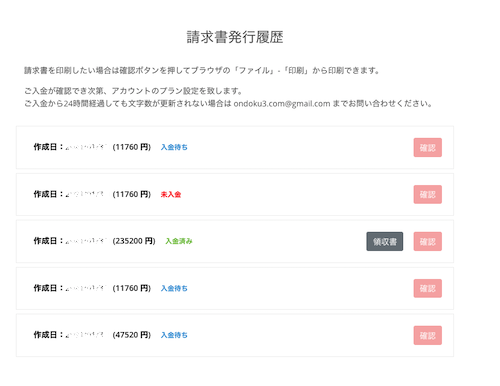
After the plan is activated, you can download the receipt from the Invoice Issuance History.
If You Do Not Renew the Annual Contract
If you do not renew your annual contract, what happens to your Ondoku account and the audio you created?
Account
Once the expiration date passes, it will automatically revert to a Free Plan (5,000 characters/month).
Deletion of Created Data
When you transition to a Free Plan, history and data will be automatically deleted after 30 days.
Once deleted, the data is also removed from the server. Please note that once data is deleted, it cannot be restored.
If you wish to delete data immediately, please use the deletion function or bulk deletion function.

How to Use Ondoku's Deletion and Bulk Deletion Functions and Points to Note. Deleting Text and Data from History and Servers | Text-to-Speech Software Ondoku
With the newly introduced "Deletion" function, you can now easily delete your previous spoken data yourself! We will introduce how to use the Deletion function and Bulk Deletion function, as well as points to note.
Usage of Data Created and Downloaded During the Annual Contract
It is a **prohibited act** to use audio created while using a paid account after transitioning to a free account without credit notation.
If you continue to use it, credit notation is mandatory. If you cannot provide credit notation, please stop using it.
If it was a Business Plan, this is an exempt item, and audio created during your contract can continue to be used.
■ AI voice synthesis software "Ondoku"
"Ondoku" is an online text-to-speech tool that can be used with no initial costs.
- Supports approximately 50 languages, including Japanese, English, Chinese, Korean, Spanish, French, and German
- Available from both PC and smartphone
- Suitable for business, education, entertainment, etc.
- No installation required, can be used immediately from your browser
- Supports reading from images
To use it, simply enter text or upload a file on the site. A natural-sounding audio file will be generated within seconds. You can use voice synthesis up to 5,000 characters for free, so please give it a try.

Text-to-speech software "Ondoku" can read out 5000 characters every month with AI voice for free.
You can easily download MP3s and commercial use is also possible.
If you sign up for free, you can convert up to 5,000 characters per month for free from text to speech.
Try Ondoku now.
HP:
ondoku3.com
Email: ondoku3.com@gmail.com
Email: ondoku3.com@gmail.com
Related posts
"Ondoku" is a Text-to-Speech service that anyone can use for free without installation. If you register for free, you can get up to 5000 characters for free each month. Register now for free
- What is Ondoku
- Start text-to-speech conversion
- Free registration
- Pricing
- Posts
- Try other free services