
How to purchase Ondoku paid plans (Basic, Value, Premium, Business).
How to cancel the Ondoku paid plan
July 22, 2026

We will explain how to cancel your Ondoku paid plan with images.
【Target Plans】
- Basic Plan
- Value Plan
- Premium Plan
- Business Plan (Basic)
- Business Plan (Value)
- Business Plan (Premium)
- Credit card and debit card payments are recurring payments with automatic renewal. You cannot cancel only the automatic renewal. If you do not wish to continue, please complete the cancellation procedure.
Please check this article for payment timing and how to change plans.
⇒ About Ondoku's paid plan payment timing, plan changes, and precautions - For bank transfers using invoices for annual contracts, it is not an automatic renewal. If you wish to renew, please issue an invoice again and make the transfer.
- Business plan payments by credit/debit card are recurring payments with automatic renewal. You cannot cancel only the automatic renewal. If you do not wish to continue, please complete the cancellation procedure.
※※Precautions when canceling※※
- If you cancel a paid plan, you will become a free member.
- After canceling a paid plan, you can use the remaining characters purchased under the paid plan until the next renewal date.
- If you continue to use audio created while subscribed to a paid plan (from when you joined until the next renewal date after cancellation), the same rules as free members will apply, and credit notation will be required.
- The history of audio created while subscribed to a paid plan will also be automatically deleted 30 days after becoming a free member.
- Deleted history cannot be restored.
Click here for more details about the automatic deletion and history deletion functions.

If you wish to cancel your Ondoku paid plan, you can do so from the settings screen by following these steps.
How to cancel your Ondoku paid plan
1. Access the Settings page

Ondoku: Settings page
2. Click "Cancel"
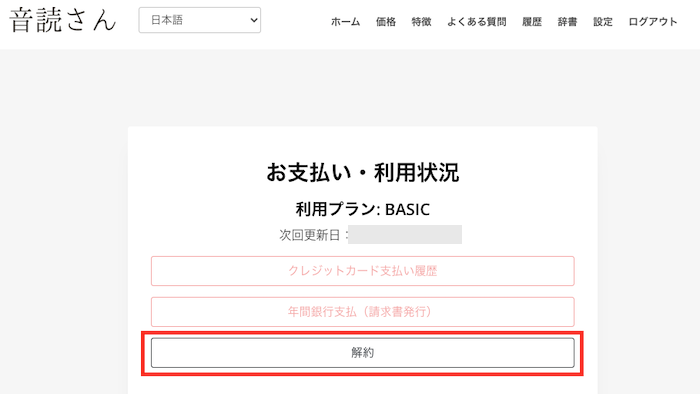
3. To cancel, please enter the reason for cancellation and click "Submit".
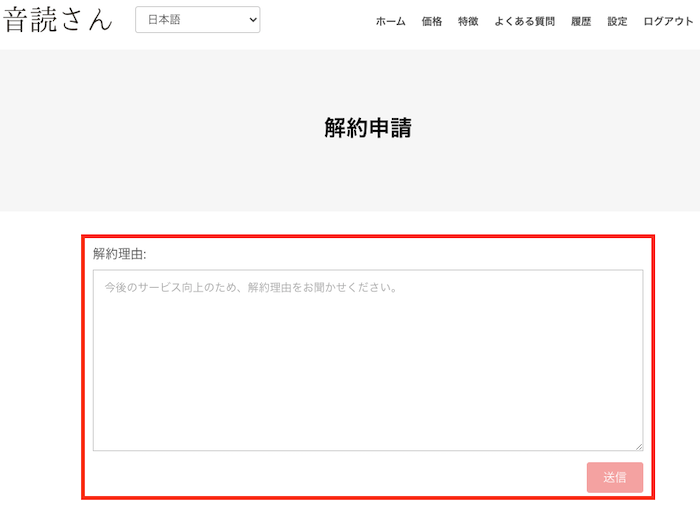
After clicking submit, the cancellation will be complete.
Thank you for using Ondoku's paid plan.
After cancellation,
A cancellation completion email will be sent to the email address used as your OndokuID.

If you have not received this email, the cancellation may not have been completed.
Please be sure to check.

I thought I had canceled, but it wasn't canceled (I didn't check that I hadn't received the cancellation completion email). Please refund me.
We are sorry. We cannot issue refunds for errors in the customer's procedure.
On the settings screen, after cancellation,

Current Plan: Free
will be displayed. Rest assured that the cancellation is complete and there will be no further charges.
The current character count will be maintained until the next renewal date, but once that date arrives, it will be updated to the free plan character count (5,000 characters).
After canceling your paid plan, you will be able to proceed with the process to withdraw from Ondoku.
You can still withdraw or delete your account even if you have characters remaining, but you will not be able to use the remaining characters.
After withdrawal, the account cannot be restored.
Please be aware of this in advance.
If you have any other questions, please contact Ondoku customer support.
— Ondoku Inquiry —
Log in to Ondoku
■ AI voice synthesis software "Ondoku"
"Ondoku" is an online text-to-speech tool that can be used with no initial costs.
- Supports 81 languages and regions, including Japanese, English, Chinese, Korean, Spanish, French, and German
- Available from both PC and smartphone
- Suitable for business, education, entertainment, etc.
- No installation required, can be used immediately from your browser
- Supports reading from images
To use it, simply enter text or upload a file on the site. A natural-sounding audio file will be generated within seconds. You can use voice synthesis up to 5,000 characters for free, so please give it a try.

Text-to-speech software "Ondoku" can read out 5000 characters every month with AI voice for free.
You can easily download MP3s and commercial use is also possible.
If you sign up for free, you can convert up to 5,000 characters per month for free from text to speech.
Try Ondoku now.
HP:
ondoku3.com
Email: ondoku3.com@gmail.com
Email: ondoku3.com@gmail.com
Related posts
"Ondoku" is a Text-to-Speech service that anyone can use for free without installation. If you register for free, you can get up to 5000 characters for free each month. Register now for free
- What is Ondoku
- Start text-to-speech conversion
- Free registration
- Pricing
- Posts
- Try other free services














