Best Text-to-Speech Software: 7 Free & Paid Tools for Commercial Use
How to Enjoy Free Audio Novels: AI Reading Apps are Recommended
Sept. 9, 2026

Is there a free app for listening to novels? I want to read books by listening on my smartphone!

In this article, we will explain how anyone can easily enjoy audio novels on their smartphone.
In fact, the reading method of "listening to books" has been spreading recently.
With audio novels, you can enjoy reading on your smartphone even while commuting or doing housework.
However, the types of audiobooks available for listening are limited, and you often cannot find the content you like.
That is why we recommend AI text-to-speech apps that require no installation and are easy to use.
By utilizing an AI text-to-speech web app that can be used from a smartphone browser, you can create audiobooks of your favorite content and enjoy listening to novels.
Why not use this article as a reference to utilize free text-to-speech services and start listening to books on your smartphone?
[Free] Recommended AI Text-to-Speech Apps for Audio Novels & Listening to Books

If you want to enjoy audio novels and listening to books even more, we recommend the AI text-to-speech app Ondoku!
Ondoku is an AI text-to-speech app that allows you to easily create audiobooks with the latest AI.
Since it is a no-installation-required web app, you can open it in Safari on iPhone or Chrome on Android and use it immediately.
With a variety of voices including women, men, and children, you can create the perfect audio to match the type of book or novel.
Furthermore, you can use AI to read up to 5,000 characters for free, so you can start listening to books on your smartphone right away.
If you want to listen to books on your smartphone, we recommend creating audiobooks with Ondoku.
Why not try using Ondoku, which is available for free, for your audio novels and reading enjoyment?
What are Audio Novels? Enjoying Reading by Listening with Free Apps

Audio novels refer to a reading method where you enjoy novels through audio.
Instead of following text with your eyes like with paper books or e-books, you enjoy the story by listening to the audio.
First, let's briefly explain audio novels and listening as a form of reading.
What are Audio Novels and Listening as Reading? A New Way to Read by Listening to Books
- I want to read books but don't have time.
- My eyes get tired, making long reading sessions difficult.
Many people have these concerns.
In such cases, listening to books on a smartphone is recommended.
In fact, the number of people incorporating audio novels and listening-based reading into their lives is increasing.
"Audiobooks" on cassette tapes and CDs have been sold for a long time, but with the spread of smartphones, it has become much easier to listen to books than ever before.
The method of listening to books is very simple.
Just put the audio files on your smartphone and play them with an app.
By listening to books on your smartphone, you can enrich your daily life even more.
What are the Merits of Listening to Books on a Smartphone? Reading Anytime, Anywhere with Apps
The greatest advantage of listening to books on a smartphone is that you can read anytime, anywhere.
As long as you have a smartphone, you can enjoy audio novels and listening-based reading both at home and on the go.
Paper books keep both hands busy, and e-books require you to keep looking at the screen.
But with listening-based reading on a smartphone, you can read while keeping both your hands and eyes free.
It's fine while commuting, exercising, or doing housework.
In this way, listening to books on a smartphone is the ideal reading method for the busy lives of modern people.
If you haven't been able to read books lately because of a lack of time...
That's exactly when we recommend starting listening-based reading.
Audio Novels and Listening-Based Reading Made More Accessible with the Latest AI Apps
Audio novels and listening-based reading have become more accessible due to advancements in AI technology.
With AI text-to-speech apps, any book can be easily converted into an audio file.
Previously, audiobooks were limited in variety because they required recording by professional narrators or voice actors.
But it's different now.
Using the latest AI text-to-speech apps, you can turn novels, business books, technical books, or any content into audio files.
Furthermore, the latest AI text-to-speech apps can be used for free.
Even if you use a paid plan, the cost is very low, so you can convert books and novels into audio data and enjoy audio novels and listening-based reading to your heart's content.
What are the Key Points for Preparing Audio Files for Novels? Easy Production with Free AI Apps

Next, we will explain the points to consider when preparing audio files for audio novels.
Latest AI text-to-speech apps can read with high sound quality, allowing you to listen to books comfortably on your smartphone.
[Free] Creating Audio Files with the Latest AI Apps is Recommended for Audio Novels!
There are two main ways to enjoy audio novels.
- Create audio files with an AI text-to-speech app (Available for free)
- Purchase audiobooks
If you are starting to listen to books on your smartphone now, we recommend creating your own audio files.
With an AI text-to-speech app, anyone can start easily for free.
The biggest advantage of creating your own audio data for audio novels is that you can freely choose your favorite works.
You can choose the novel you want to read yourself and turn it into audio.
Commercially available audiobooks are inevitably limited in the number of titles.
But if you make them yourself, the choices are infinite.
High-Quality Audio Files Can Be Created with Free AI Apps
What's important for audio novels is preparing audio data with clear and easy-to-hear sound quality.
To comfortably enjoy listening to books on your smartphone, the quality of the audio is very important.
To create high-quality audio files, we recommend using a text-to-speech app that adopts the latest AI.
AI technology is constantly progressing, so the newer the app's AI, the higher the quality of the audio you can create.
Unlike older text-to-speech apps, the latest AI apps allow for natural reading similar to professional narrators or voice actors.
Particularly recommended are AI web apps that can be used without installation from Safari on iPhone or Chrome on Android.
No-installation web apps perform text-to-speech processing on the internet.
Unlike apps that you install and use, you can always use the latest AI speech synthesis engines, allowing you to create clearer and easier-to-hear audio files.
Ondoku is Recommended for Enjoying Audio Novels for Free!
Ondoku is a text-to-speech app that can create audio files for audio novels using the latest AI.
When listening to books on a smartphone, it is important to create high-quality audio files that are easy to hear.
Because Ondoku adopts the latest AI speech synthesis engine, natural reading like that of a narrator or voice actor is possible.
Anyone can easily create high-quality audiobooks.
Since you can select from many reading voices including women, men, and children, you can read using the perfect voice according to the content of the book.
Moreover, Ondoku is free!
You can read up to 5,000 characters, so you can actually create audio files for audio novels right now.
If you want to listen to books, Ondoku is recommended.
When you want to start listening to books on your smartphone, why not try the AI text-to-speech web app Ondoku for free?
[Free] How to Create Audiobooks for Listening-Based Reading with Ondoku?

I want to try making audio files for listening-based reading on my smartphone!
Now, let's explain how to actually create audiobooks for audio novels and listening-based reading with the AI text-to-speech web app Ondoku!
1. Prepare the text for the audio novel
First, prepare the text to be read by Ondoku.
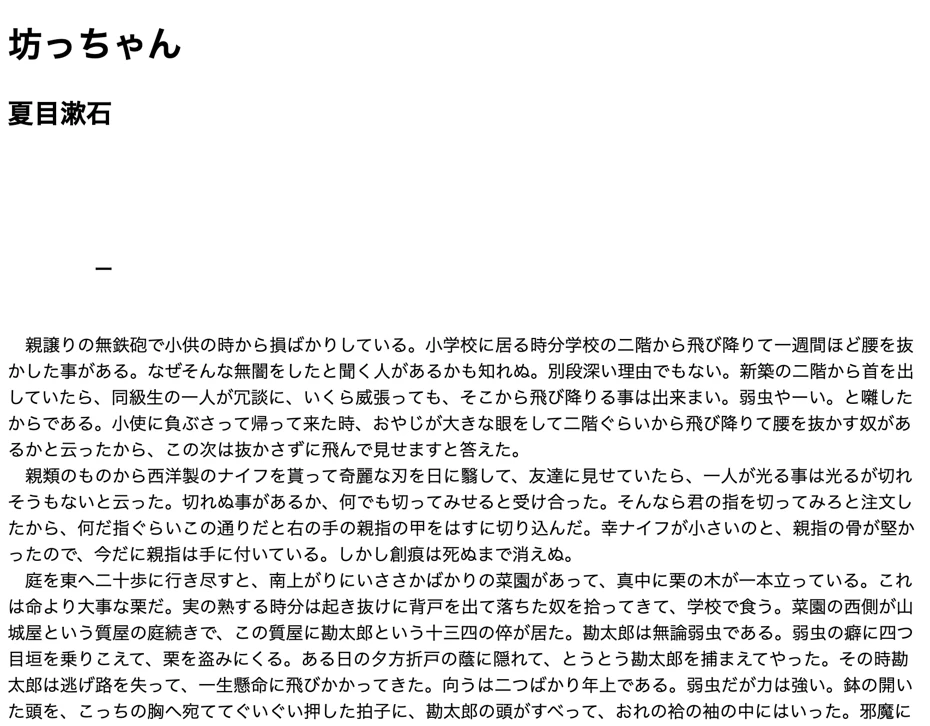
As an example, we will explain using data from "Aozora Bunko", a site that publishes copyright-free Japanese text.

*Aozora Bunko text data contains rubies (furigana). When reading with Ondoku, it is recommended to delete the rubies in advance. How to delete rubies is explained here.
2. [Free] Open the Ondoku page and create audio files for listening-based reading
Once the text is ready, create the audio file on the Ondoku page.
First, open the Ondoku top page on your smartphone or PC.
Paste the text into the text box.

Choose the language and voice type.

For Japanese, you can choose voice types from female, male, and child.
You can listen to samples in this article, so please take a look.

Listen to 16 types of voices from the text-to-speech software Ondoku for free. Change impressions with pitch variations.
Ondoku has 16 types of Japanese voices. Of course, both male and female voices are available. We have made it possible to listen to 8 commonly used Japanese voices, as well as voices with adjusted pitch for each.
In Ondoku, you can also adjust the reading speed and voice pitch, but it's fine to leave them at the default settings when using it for the first time.
Preparation is now complete.

Press "Read Aloud" to start creating the audio file.
The process completes quickly with the latest AI speech synthesis engine.
When the AI reading process is finished, the display will change and the audio player will appear.

Listen to it, and if there are no problems, press "Download" to save the audio file (MP3 file).
In addition to downloading from this screen,
- Creating the audio file on a PC
- Opening the Ondoku history page on a smartphone and downloading it
is also possible.
With this, you have successfully created an audio file for listening to books on your smartphone for free using the AI text-to-speech web app Ondoku.
3. Play audio files with apps on iPhone or Android smartphones

Once the audio file is complete, save it to your smartphone and play it.
Since Ondoku allows you to download audio files in MP3 format, you can play them directly with the music player app standardly installed on iPhone or Android smartphones.
The flow of creating audio files for audio novels and listening-based reading with Ondoku is now complete.
Since it's free and easy to use, why don't you try making audio files for listening to books with the AI text-to-speech web app Ondoku?
How to remove rubies (furigana) from Aozora Bunko
Aozora Bunko text contains rubies (furigana).
For example, parts like "親譲(おやゆず)りの無鉄砲(むてっぽう)" in Natsume Soseki's "Botchan" shown in this image.

If you paste it into Ondoku as is, it will be read as "Oyayuzu-Oyayuzuri no Muteppo-Muteppo," making it very difficult to listen to.
Therefore, we recommend using a convenient tool that removes rubies from Aozora Bunko.
There are two tools for removing rubies:
As an example, we will show how to use the "Aozora Bunko Ruby Removal Tool: Long Text Version."
Open the page and paste the URL of the Aozora Bunko page.

When you press "Send," the text with only the ruby parts removed will be displayed like this.
You have now successfully removed rubies from the Aozora Bunko text.
When reading Aozora Bunko text with Ondoku, it is recommended to utilize a convenient ruby removal tool.
What Situations are Recommended for Listening-Based Reading & Audio Novels?

By listening to books on a smartphone, you will be able to enjoy reading in various situations.
You will be able to use time that was previously unavailable for reading—such as while commuting or exercising—meaningfully.
Make Commute Time Meaningful with Listening-Based Reading and Audio Novels
Listening-based reading and audio novels are most useful during commute time.
Even when it's difficult to read a book on a crowded train, you can enjoy reading by listening to the book.
If you commute by driving a car, listening-based reading on a smartphone is also recommended.
Turning car commute time into reading time is unique to the listening-to-books style.
By utilizing listening-based reading, you can also turn your daily commute time into time for qualification exams or studying for entrance exams.
Enjoying Audio Novels While Doing Housework
Smartphone reading is also recommended for housework time, such as when cooking, folding laundry, or cleaning.
What used to be just "time for work" changes into "time to enjoy reading."
By listening to books, housework time becomes much more enjoyable than before.
Listening to Books on a Smartphone While Exercising
Listening to books on a smartphone while exercising is also recommended.
By listening to books during walking, jogging, or gym training, you can nourish both your body and mind at the same time.
Listening to Language Books is Also Recommended. Study English with Listening-Based Reading
Turning English and other language books into audiobooks for listening is also recommended.
Since the AI text-to-speech app Ondoku supports multiple languages in 81 languages and regions, you can turn text in English and various other foreign languages into audio files with native pronunciation.
![[Ondoku] Listen to voice types and sample audio for supported languages](https://storage.googleapis.com/ondoku3/image/%E5%A4%9A%E6%A7%98%E6%80%A7_930.webp)
[Ondoku] Listen to voice types and sample audio for supported languages
Here we introduce Ondoku's supported languages and sample audio.
- Study listening while commuting or going out
- Study shadowing by speaking out loud after returning home
In this way, by turning language books into audio files, you can utilize them for various study methods.
![[Complete Guide] How to do English shadowing? Explanation of how to create free materials!](https://storage.googleapis.com/ondoku3/image/20250522_shadowing_tmb_02_930.webp)
[Complete Guide] How to do English shadowing? Explanation of how to create free materials!
Efficiently improve your English skills with shadowing! Explaining the learning method that simultaneously improves listening, pronunciation, and speaking for beginners. We also introduce how to create materials with free AI voices.
Utilize AI for Reading Picture Books to Children
AI text-to-speech apps are also recommended for reading picture books to children.
Using Ondoku is perfectly fine when you are too busy with housework to read to your child or when your throat is not in good condition and reading is difficult.
Reading picture books aloud is very important for children to learn words.
Since Ondoku can read not only in female and male voices but also in children's voices, you can create reading audio for picture books using voices that are familiar to children.
In this way, by creating audio files with an AI text-to-speech app, you can listen to books in many situations.
The AI text-to-speech app Ondoku can easily create audio files, so why don't you start listening to books on your smartphone?
Why Not Start Listening to Books on Your Smartphone with the Latest AI App?
As described above, with the new reading method "listening-based reading," you will be able to read books even in situations where reading was previously difficult.
By using the free latest AI text-to-speech app, you can enjoy books that previously didn't have audiobooks as audio novels.
If you want to listen to books, we recommend creating audio files with the AI text-to-speech web app Ondoku.
Why not create high-quality audio files with Ondoku and start listening to books on your smartphone?
■ AI voice synthesis software "Ondoku"
"Ondoku" is an online text-to-speech tool that can be used with no initial costs.
- Supports 81 languages and regions, including Japanese, English, Chinese, Korean, Spanish, French, and German
- Available from both PC and smartphone
- Suitable for business, education, entertainment, etc.
- No installation required, can be used immediately from your browser
- Supports reading from images
To use it, simply enter text or upload a file on the site. A natural-sounding audio file will be generated within seconds. You can use voice synthesis up to 5,000 characters for free, so please give it a try.

Text-to-speech software "Ondoku" can read out 5000 characters every month with AI voice for free.
You can easily download MP3s and commercial use is also possible.
If you sign up for free, you can convert up to 5,000 characters per month for free from text to speech.
Try Ondoku now.
HP:
ondoku3.com
Email: ondoku3.com@gmail.com
Email: ondoku3.com@gmail.com
Related posts
"Ondoku" is a Text-to-Speech service that anyone can use for free without installation. If you register for free, you can get up to 5000 characters for free each month. Register now for free
- What is Ondoku
- Start text-to-speech conversion
- Free registration
- Pricing
- Posts
- Try other free services














