
Recommended Text-to-Speech Software Summary: 7 Selections for Commercial Use [Free and Paid]
[Latest for 2026] How to use Ondoku's multilingual reading more conveniently with SSML tags! Support for English and foreign language listening audio
April 1, 2026
![[Latest for 2026] How to use Ondoku's multilingual reading more conveniently with SSML tags! Support for English and foreign language listening audio](https://storage.googleapis.com/ondoku3/image/multilingual_ssml_tmb_930.webp)
I want to know how to read multilingual text effectively!

Ondoku's multilingual reading (multilingual text-to-speech), are you having trouble because the language cannot be identified correctly?
- When English words are mixed into Japanese sentences, the pronunciation somehow becomes like Katakana English.
- Even though it's a Japanese sentence, it becomes unnatural due to being influenced by English pronunciation.
- The language cannot be identified in sentences that use three or more languages.
In such cases, you can just use "SSML tags"!
In this article, we will explain in detail how to use SSML tags with Ondoku's multilingual reading and recommended use cases, such as listening audio for English or foreign languages and announcements for inbound tourists.
[Listening Material Support] How to Read Multilingual Text Effectively?

The multilingual feature allows you to conveniently read aloud text that uses multiple languages, such as Japanese and English, or English and Spanish.
Unlike reading them separately, you can read them with the same voice (speaker), so the voice does not change depending on the language, allowing for a natural reading experience.
However, depending on the content of the multilingual text, it may not be read correctly.
First, we will explain the features of Ondoku's multilingual function and the scenarios it struggles with.
What is the Multilingual (Multilingual Reading) Feature?
By using Ondoku's multilingual feature, you can read aloud multiple languages with a single type of voice (speaker).
Previously, when reading in multiple languages, it was normal for the voice (speaker) to change whenever the language changed.
For example,
- The Japanese part is read by "Person A, who is Japanese"
- The English part is read by "Person B, who is American"
It was like that. This created a "patchwork" feel when the audio parts were connected.
But with Ondoku's multilingual feature, it's okay!
The multilingual feature can read multiple languages such as Japanese, English, French, and Chinese with a single voice.
Since the languages switch smoothly without the voice quality or atmosphere changing, you can create audio with a sense of unity.
What Scenarios Does Ondoku's Multilingual Feature Struggle With?
However, the multilingual feature also has scenarios it struggles with.
Ondoku's multilingual feature analyzes the input text using AI and automatically determines whether "this is Japanese" or "this is English" to read it aloud.
Since it is analyzed by the latest high-performance AI, there are basically no problems with multilingual reading, but there are limits to automatic identification.
It particularly struggles with short words or sentences where the language switches frequently.
For example, when creating listening audio for English.
This sentence contains the word "Apple" in alphabetical characters within a Japanese sentence.
りんごは英語で「 Apple」 です。
Even if you want to read this part with English pronunciation, the AI determines it is Japanese from the surrounding context and reads it with Japanese Katakana pronunciation like "Appuru" instead of native pronunciation.
This cannot be used as teaching material for English listening or pronunciation.
Also, sentences that use many languages, such as "Japanese, English, French, Spanish, and German," may not be read correctly because the AI cannot distinguish the languages.
For example, this text is a sentence where it is difficult for the AI to identify the languages.
ありがとうは、英語で Thank you 、フランス語で Merci 、スペイン語で Gracias 、ドイツ語で Danke といいます。
"SSML": The Solution When Multilingual Reading of English or Foreign Languages Doesn't Work Well
In such cases, there is a solution!
If the AI gets confused, a human can clearly specify, "please read this part in English."
The tool for that is "SSML tags."
By using SSML tags, even if the AI cannot automatically identify languages correctly in multilingual reading, you can create a reading voice perfectly as intended in the desired language.
How to Specify Languages with SSML Tags? [English and Foreign Language Support]
![How to specify languages with SSML tags? [English and foreign language support]](https://storage.googleapis.com/ondoku3/image/multilingual_ssml_002_930.webp)

I want to know how to use SSML tags!
Now, we will specifically explain how to use SSML tags with Ondoku's multilingual feature (multilingual reading feature).
By using SSML tags, you can easily create listening audio for English and foreign languages!
Simple Way to Write SSML Tags for Multilingual Reading
When using SSML tags with Ondoku's multilingual feature, you use two types of tags.
- <speak>
- <lang>
.
1. Wrap the entire text in <speak> tags
First, wrap the entire sentence to be read in <speak> tags.
りんごは英語で「Apple」です。
ありがとうは、英語で Thank you 、フランス語で Merci 、スペイン語で Gracias 、ドイツ語で Danke といいます。
2. Wrap each language in <lang> tags
Next, wrap the text for each language in <lang> tags.
When writing the <lang> tag, you specify the "language code" within the tag.
For example, when reading "Apple" with American English pronunciation:
Apple
Write it like this.
The "en-US" part is the language code.
List of Major Language Codes
| Language | Language Code |
|---|---|
| Japanese | ja-JP |
| English (United States) | en-US |
| English (United Kingdom) | en-GB |
| French | fr-FR |
| German | de-DE |
| Spanish | es-ES |
| Italian | it-IT |
| Russian | ru-RU |
| Chinese (Simplified) | zh-CN |
| Korean | ko-KR |
Just Copy and Paste! List of <lang> Tags for Major Languages
However, it's hard to write tags and language codes yourself, right?
Therefore, we have prepared a list of <lang> tags for major languages.
Just copy and paste, and replace the "Text here" part.
| Language | SSML Tag for Copying |
|---|---|
| Japanese | |
| English (United States) | |
| English (United Kingdom) | |
| French | |
| German | |
| Spanish | |
| Italian | |
| Russian | |
| Chinese (Simplified) | |
| Korean |
Adding SSML Tags Using Generative AI Services Is Also Recommended!
Actually, there is an even easier way to add SSML tags!
That is using generative AI services such as ChatGPT, Gemini, or Claude.
Please add SSML lang tags for each language.
(The text you want to read aloud here)
By simply giving an instruction like this, you can easily add SSML tags.
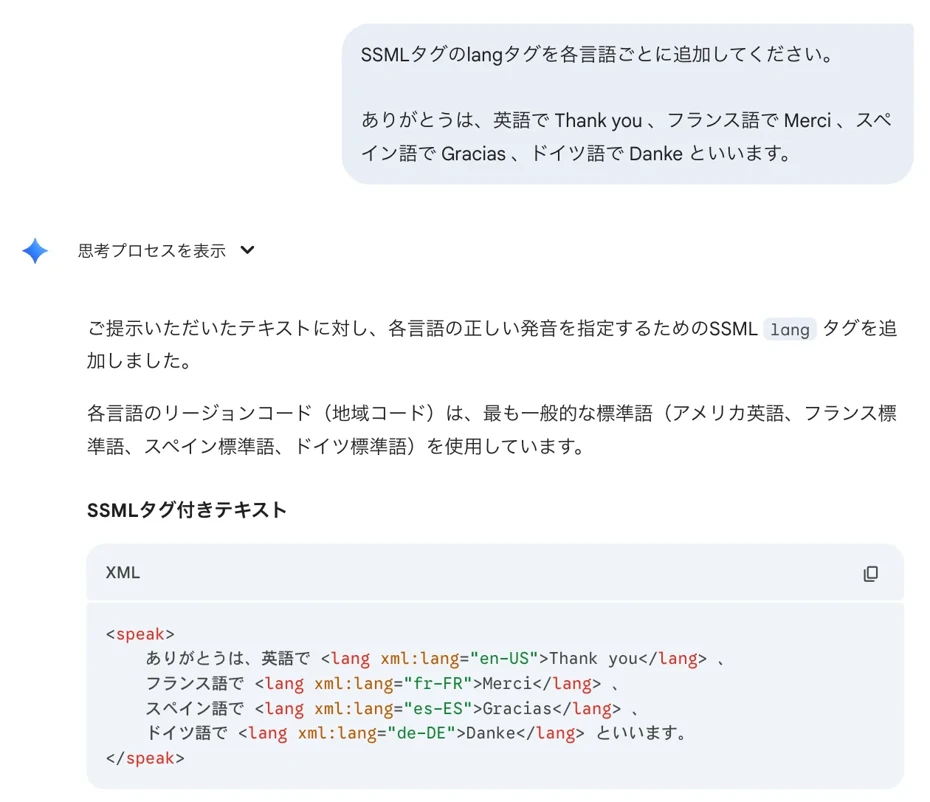
ChatGPT and Gemini can be used for free, so this is a recommended method when you want to easily add SSML tags.
3. Read Multilingual Text Using SSML Tags with Ondoku
Adding <speak> and <lang> tags to the text looks like this:
りんごは英語で「Apple 」です。
ありがとうは、英語でThank you 、
フランス語でMerci 、
スペイン語でGracias 、
ドイツ語でDanke といいます。
Now, just paste this text onto the Ondoku homepage and read it aloud!
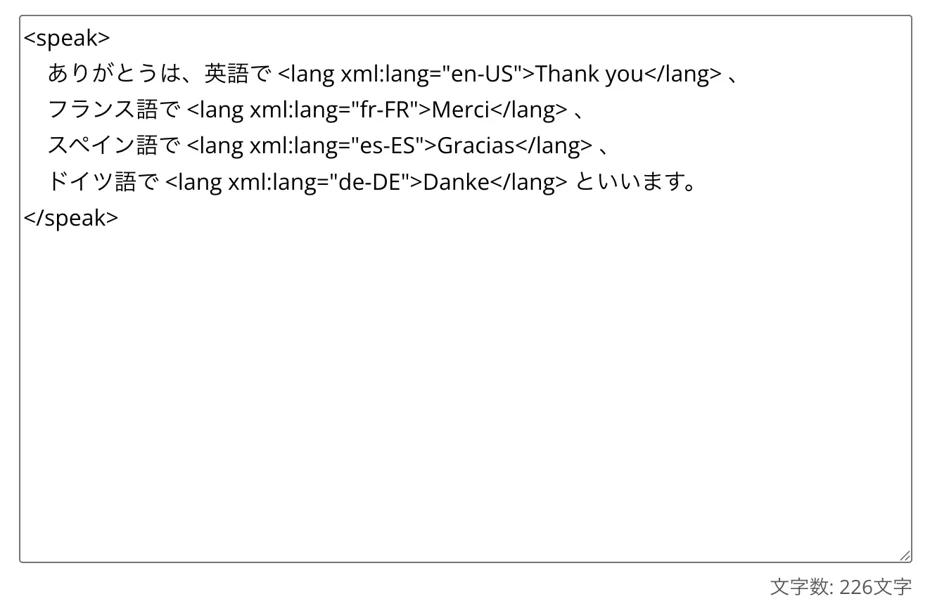
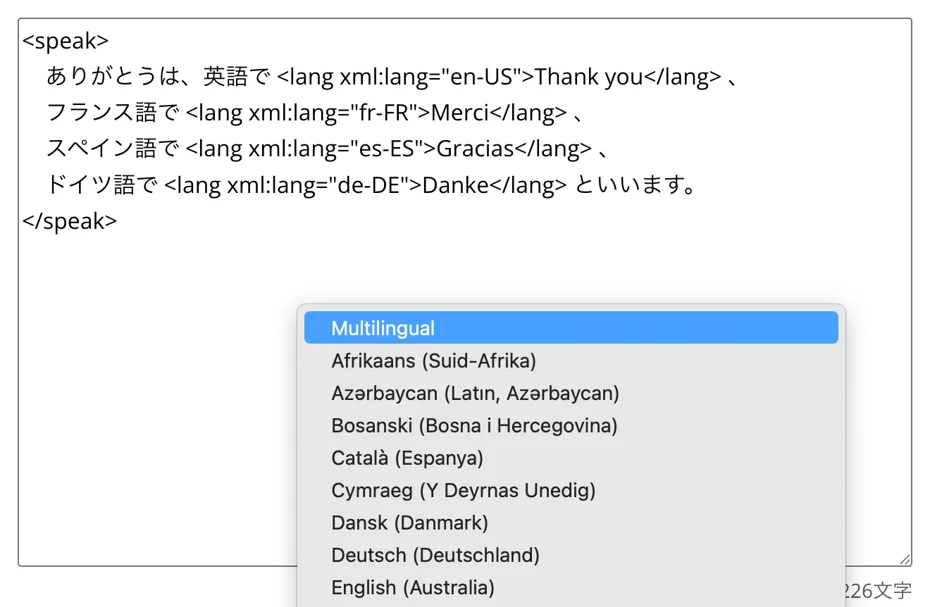
Select "Multilingual" for the language.
Select a voice (speaker).
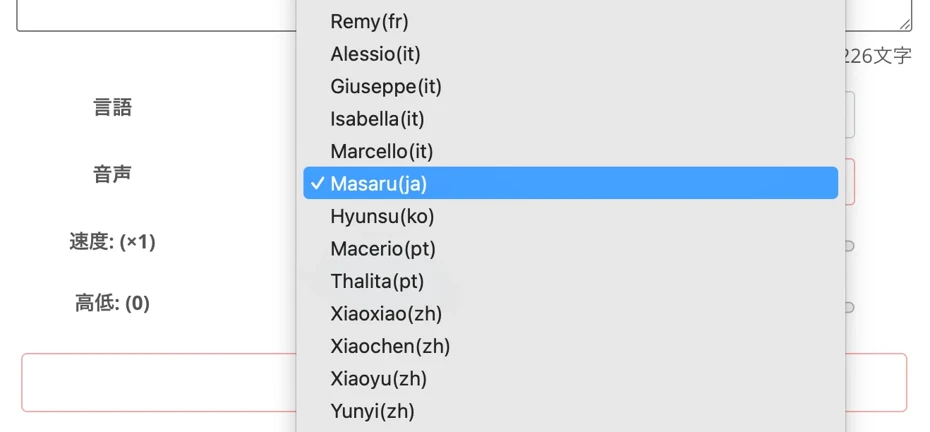
You can choose from many types, such as voices that can read multiple languages based on Japanese or voices that can read multiple languages based on English.
You can listen to sample voices for the multilingual feature in this article. Please take a look.
Preparation is complete.

Press "Read aloud" to read the multilingual text.
When you actually read it aloud, you can generate audio like this.
りんごは英語で「Apple 」です。
ありがとうは、英語でThank you 、
フランス語でMerci 、
スペイン語でGracias 、
ドイツ語でDanke といいます。
In this way, the languages used in the text were identified and read aloud with correct pronunciation.
As you can see, by using SSML tags, you can further utilize Ondoku's multilingual feature!
Why don't you try reading multilingual text more conveniently with Ondoku?
Related Articles on How to Read Multilingual Text Using SSML Tags
This article explains in more detail how to use SSML tags with Ondoku's multilingual feature.
Please take a look at it as well.

What Are the Recommended Ways to Use Multilingual Reading & SSML Tags? [Easily Create Listening Audio!]
By using SSML tags, you can read aloud even more conveniently with Ondoku!
I want to know the recommended ways to use it!
From here, we will introduce recommended scenarios where you can utilize SSML tags with Ondoku's multilingual feature!
Create Listening Audio or Vocabulary Books for English and Foreign Languages

SSML tags are perfect for listening material audio for English and foreign languages.
For example,
次の対話を聞いて、質問に答えてください。
Excuse me, how much is this blue sweater? I'd like to buy it if you have it in size medium.
You can easily create audio like this, where English or foreign language text is read following a Japanese narration, as a single file.
Also, you can easily create teaching materials for learning English or foreign language vocabulary.
Even when having Japanese and English read alternately for vocabulary pronunciation listening materials, such as "Apple Apple," "Banana Banana," or "Orange Orange," if you specify the languages with SSML tags, the pronunciations will not get mixed up.
If you are creating listening audio for English or foreign languages, it is recommended to utilize SSML tags!
Utilize SSML Tags for In-store Announcements for Inbound Tourists from Abroad

SSML tags are also ideal for announcement broadcasts in stores and facilities!
When you want to follow up a Japanese "Irasshaimase" with "Welcome" or "Nǐ hǎo" for inbound tourists from abroad, using SSML tags allows you to read each naturally in its respective language.
Unlike reading and editing separate audio files, you can read all languages with the same voice (speaker), so you can play announcements with a consistent atmosphere.
Broadcasting for inbound tourists is explained in detail in this article.
Please take a look.
![[Tourist facilities, stores, transportation] How to create guidance broadcast audio for inbound tourists! What are the effective recommended multilingual guide methods? | Ondoku](https://storage.googleapis.com/ondoku3/image/20240926_inbound_guide_announcement_010_930.webp)
Why Not Try Creating Listening Audio or Announcements from Multilingual Text Using SSML Tags?
Ondoku's multilingual feature is very convenient.
But when you want to "be more particular" or "have it read more accurately," using SSML tags allows for even more convenient multilingual reading!
Even if there were parts where you felt "automatic identification doesn't work well," SSML tags will do the trick!
Even in sentences where multiple languages coexist, you can read them aloud with fluent pronunciation that rivals a native speaker.
Why not utilize multilingual reading with SSML tags for making listening materials or creating announcements?
We sincerely hope that you can create your desired audio with Ondoku's SSML feature.
■ AI voice synthesis software "Ondoku"
"Ondoku" is an online text-to-speech tool that can be used with no initial costs.
- Supports approximately 50 languages, including Japanese, English, Chinese, Korean, Spanish, French, and German
- Available from both PC and smartphone
- Suitable for business, education, entertainment, etc.
- No installation required, can be used immediately from your browser
- Supports reading from images
To use it, simply enter text or upload a file on the site. A natural-sounding audio file will be generated within seconds. You can use voice synthesis up to 5,000 characters for free, so please give it a try.

Text-to-speech software "Ondoku" can read out 5000 characters every month with AI voice for free.
You can easily download MP3s and commercial use is also possible.
If you sign up for free, you can convert up to 5,000 characters per month for free from text to speech.
Try Ondoku now.
HP:
ondoku3.com
Email: ondoku3.com@gmail.com
Email: ondoku3.com@gmail.com
Related posts
"Ondoku" is a Text-to-Speech service that anyone can use for free without installation. If you register for free, you can get up to 5000 characters for free each month. Register now for free
- What is Ondoku
- Start text-to-speech conversion
- Free registration
- Pricing
- Posts
- Try other free services
![[Latest for 2026] How to use Ondoku's multilingual reading more conveniently with SSML tags! Support for English and foreign language listening audio](https://storage.googleapis.com/ondoku3/image/recommend-site-for-studying-spanish_tmb_140.webp)
![[Latest for 2026] How to use Ondoku's multilingual reading more conveniently with SSML tags! Support for English and foreign language listening audio](https://storage.googleapis.com/ondoku3/image/recommend-site-for-studying-german_tmb_140.webp)
![[Latest for 2026] How to use Ondoku's multilingual reading more conveniently with SSML tags! Support for English and foreign language listening audio](https://storage.googleapis.com/ondoku3/image/recommend-site-for-studying-french_tmb_140.webp)
![[Latest for 2026] How to use Ondoku's multilingual reading more conveniently with SSML tags! Support for English and foreign language listening audio](https://storage.googleapis.com/ondoku3/image/recommend-site-for-studying-italian_tmb_140.webp)
![[Latest for 2026] How to use Ondoku's multilingual reading more conveniently with SSML tags! Support for English and foreign language listening audio](https://storage.googleapis.com/ondoku3/image/recommend-site-for-studying-korean_tmb_140.webp)









