Best Text-to-Speech Software: 7 Free & Paid Tools for Commercial Use
[2026] Professional Voicemail Greeting Samples | Create AI Voice with Ondoku
July 22, 2026
![[2026] Professional Voicemail Greeting Samples | Create AI Voice with Ondoku](https://storage.googleapis.com/ondoku3/image/answering_machine_message_sample_tmb_930.webp)
I want to change my answering machine's outgoing message! I want to see some samples and examples!

“We are currently unable to take your call. After the beep...”
Are you still using generic audio found on the internet or the mechanical response message that comes pre-installed on your phone for your company's answering machine?
Actually, it is recommended to include your company or store name in your answering machine message.
If the company or store name is not included, it can make customers feel uneasy, wondering, "Did I really call the right number?"
Therefore, in this article, we will introduce carefully selected answering machine message examples (samples) that can be used immediately in business situations, categorized by scenario!
Furthermore, we will explain how to use the samples to create and download original audio containing your company name or specific dates immediately using an AI text-to-speech service.
Why not introduce high-quality answering machine messages with your company or store name to your business?
[Commercial Use OK] Recommended AI Text-to-Speech Web App for Creating Answering Machine Messages

If you want to create an answering machine message, Ondoku is highly recommended!
Ondoku is an AI text-to-speech app that is OK for commercial use.
With the latest AI, you can create easy-to-understand answering machine messages that sound like they were recorded by a professional narrator.
As a web app used via a browser, it has the advantage of being accessible in any environment, including PC, iPhone (iOS), and Android smartphones.
It is easy to use: just enter the text on the top page and press the "Read" button!
Why not try creating your company or store's original answering machine message with Ondoku?
Why Is It Recommended to Include Your Company Name in Your Answering Machine Message? (Comparing Audio Samples)
The reason why it is recommended to include your company or store name in your answering machine message is that it provides customers with a sense of security that they have definitely reached your business.
Let's compare the contents of the following two audio samples.
Example A: Common Generic Message
Thank you for calling. We are closed for the day. Please call back during our business hours.
Example B: Original Message with Company Name
Thank you for calling. This is [Company Name]. We are closed for the day. Please call back between 9:00 AM and 6:00 PM on weekdays.
What do you think?
Example A leaves the caller feeling uncertain about which company they reached, but Example B provides a sense of security that they have connected correctly.
In this way, by including the company or store name in the answering machine message, you can provide more attentive service to your customers.
All the samples introduced in this article can be customized with your company or store name and read/downloaded using Ondoku!
Why not try making your original answering machine message using the samples in this article?
[Basic] Answering Machine Message Examples for After Hours and Regular Holidays
Now, let's look at specific answering machine message samples!
First are the most frequently used samples for after-hours and regular holidays.
Please try using them by changing the company or store name section.
1. After Hours (Standard/Polite) Answering Machine Message Sample
A simple and polite standard answering machine message example for companies and stores.
Thank you for calling. This is [Company Name].
We are very sorry, but our business for today has ended.
Our business hours are from 9:00 AM to 6:00 PM on weekdays.
We kindly ask you to call back during our business hours.
2. After Hours (With Recording Function) Answering Machine Message Sample
If you don't want to miss a customer's business, it is recommended to use a message that encourages recording.
Thank you for calling. This is [Company Name].
We are currently outside of business hours.
Please leave your name and a message after the beep.
A representative will call you back later.
3. Lunch Break/Temporary Absence Answering Machine Message Sample
Recommended for small offices or stores when no one can answer the phone temporarily.
Thank you for calling. This is [Company Name].
We are currently on our lunch break. We will resume business at 1:00 PM.
We apologize for the inconvenience and ask that you call back after 1:00 PM.
[Seasonal/Long Holidays] Answering Machine Message Examples for New Year, GW, and Obon
The most important part of a message for long holidays is to communicate:
- From when to when you will be closed
- When business will resume
by giving specific dates.
By using an AI text-to-speech service, you don't need to re-record with your own voice every year as the dates change.
You can create an answering machine message with the same clear voice quality simply by rewriting the date portion of the text.
4. Year-End and New Year Holiday Answering Machine Message Sample
Thank you for calling. This is [Company Name].
Please be advised that we will be closed for the New Year holiday from December 29th to January 3rd.
We will resume normal business operations at 9:00 AM on January 4th.
We apologize for any inconvenience and appreciate your understanding.
5. Golden Week (GW) Answering Machine Message Sample
Thank you for calling. This is [Company Name].
Please be advised that we will be closed for the Golden Week holidays from May 3rd to May 5th.
We apologize for the inconvenience and appreciate your understanding.
6. Generic Sample for Summer Holidays, etc.
Thank you for calling. This is [Company Name].
Please be advised that we will be closed for summer holidays from August 13th to August 16th.
We apologize for the inconvenience and appreciate your understanding.
[By Industry] Answering Machine Message Examples for Clinics, Restaurants, and Real Estate
Depending on the industry, there is specific information you may want to emphasize to your customers.
Next are samples for:
- Clinics, Hospitals, and Dental Clinics
- Restaurants, Eateries, and Salons
- Real Estate Management Companies (Emergency Response)
7. Clinic, Hospital, and Dental Clinic Answering Machine Message Sample
First is a sample for industries related to medical care, such as clinics and hospitals.
The key is to include not only consultation hours but also closing days and guidance to web reservations.
Thank you for calling. This is [Clinic Name].
Consultations for today have ended.
Our hours are from 9:00 AM to 6:00 PM on weekdays, excluding Thursdays.
Reservations for new patients are also accepted via our website.
Thank you for calling.
8. Restaurant and Salon Answering Machine Message Sample
A sample for industries where reservation calls are critical, such as restaurants and salons.
The key is to guide callers to online reservations to prevent missing booking opportunities.
Thank you for calling. This is [Restaurant Name].
We apologize, but we are currently unable to take your call as we are serving customers.
For reservations, we are available 24 hours a day on our website or reservation portal.
We look forward to seeing you soon.
9. Real Estate Management Company (Emergency Response) Answering Machine Message Sample
A sample for real estate management companies.
This example provides information on an emergency contact for residents.
Thank you for calling. This is [Real Estate Management Name].
Our business for today has ended.
For residents with urgent matters such as water leaks or lost keys,
please contact the 24-hour support center at 03-1234-5678.
*In this audio, "SSML tags" are used for reading the phone number. How to read phone numbers is explained later in this article here.
[Emergencies/Troubles] Answering Machine Message Examples for Temporary Closures and Disasters
Here are examples for when you cannot go to the office due to typhoons, disasters, or sudden infection control measures.
With an AI text-to-speech service, you can create answering machine messages immediately, even in an emergency.
10. Temporary Closure (Typhoon, Disaster, etc.) Answering Machine Message Sample
Thank you for calling. This is [Company Name].
Due to the effects of the typhoon, we are closed today.
We apologize for the inconvenience and appreciate your understanding.
11. Remote Work (Representative Absent) Answering Machine Message Sample
Thank you for calling. This is [Company Name].
Currently, our company is working remotely, and our phone response is reduced.
Please contact the representative directly or use the inquiry form on our website.
[Multilingual/Inbound Support] English Answering Machine Message Examples
Answering machine message examples for stores with inbound demand or companies with overseas transactions.
Foreign language audio, which can be expensive to commission from professionals, can be easily created with native pronunciation at no additional cost using an AI text-to-speech service.
12. English - After Hours Answering Machine Message Sample
Thank you for calling ABC Corporation.
Our office is currently closed.
Our business hours are from 9 am to 6 pm, Monday through Friday.
Please call back during our business hours. Thank you.Translation
Thank you for calling. This is ABC Corporation. The office is currently closed (business for today has ended). Business hours are Monday through Friday, 9:00 AM to 6:00 PM. Please call back during business hours.
Process of Creating Answering Machine Messages with an AI Speech App

I want to try making an answering machine message using the sample sentences!
Now, let's look at how to actually create an answering machine message using the examples introduced.
Ondoku can be used easily right now in any environment, including PC, iPhone (iOS), and Android smartphones.
Simply by replacing the placeholder company name in the sample sentences with your own, you can easily create an original message!
How to Create Answering Machine Messages with Ondoku
To make an answering machine message, first, open the Ondoku website.
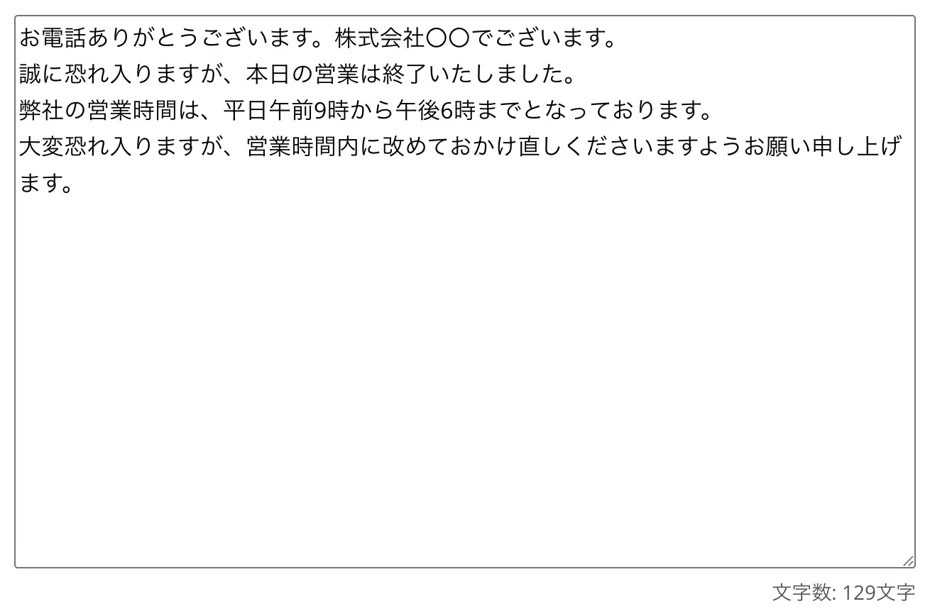
Enter the example sentence introduced in this article into the Ondoku page.
We will use the after-hours sample sentence for this explanation.
Thank you for calling. This is [Company Name].
We are very sorry, but our business for today has ended.
Our business hours are from 9:00 AM to 6:00 PM on weekdays.
We kindly ask you to call back during our business hours.
*Please replace "[Company Name]" with the name of your company or store.
Enter the text by pasting the sample sentence like this.
[Commercial Use] Precautions When Creating Answering Machine Messages
When using Ondoku for free, please provide credit notation.
Since credit notation is not possible for answering machine messages, please subscribe to a paid plan during the period you are using that audio.
For more details about credit notation and commercial (business) use of Ondoku, please refer to this article.
Please take a look.

What you can do with Ondoku. About commercial (business) use and prohibited acts.
Commercial use is possible with Ondoku. Any use for the purpose of obtaining direct or indirect profit, regardless of whether you are an individual or a corporation, is considered commercial use. However, please note that there are prohibited acts. This time, we will cover what you can and cannot do with Ondoku...
Set Language and Voice to Start Reading
If the language is set to something else, select the appropriate language from the "Language" menu to match your text.
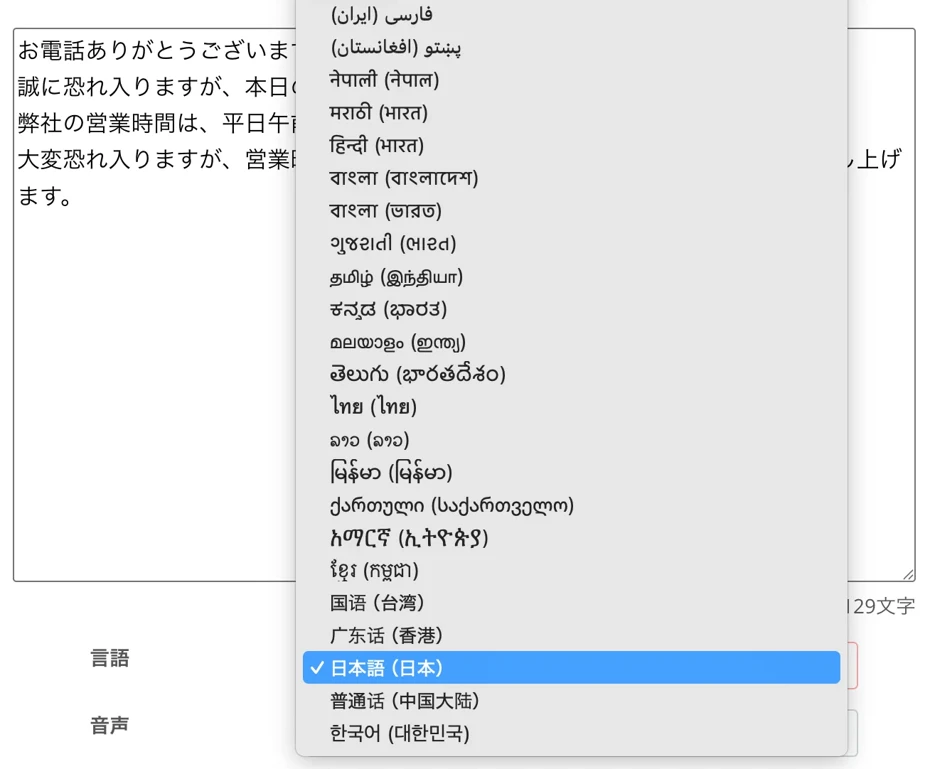
Reading in foreign languages, such as for inbound tourists, is also possible!
Select the voice.
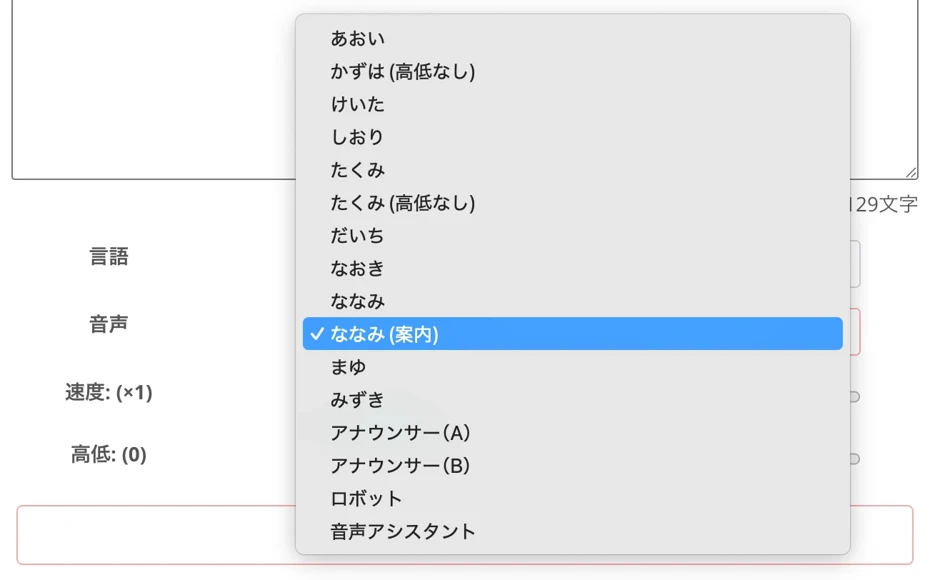
For Japanese, you can choose from over 16 different voices.
You can listen to Japanese voice samples here.

Try listening to 16 types of Japanese voices from the text-to-speech software Ondoku for free. Change the impression by adjusting pitch.
Ondoku has 16 types of Japanese voices. Of course, both male and female voices are available. We have made it possible to listen to 8 commonly used Japanese voices and how they sound when their pitch is adjusted.
Now you are ready!
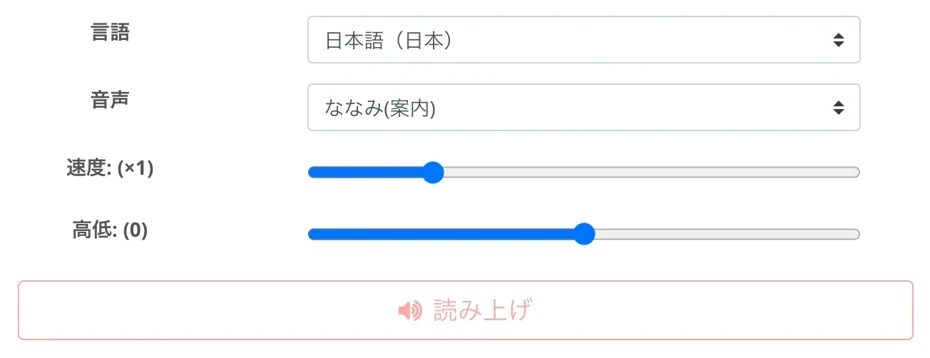
Press "Read" to start generating the audio.
The speech synthesis will be completed shortly.
The screen will switch, and the audio player will be displayed.
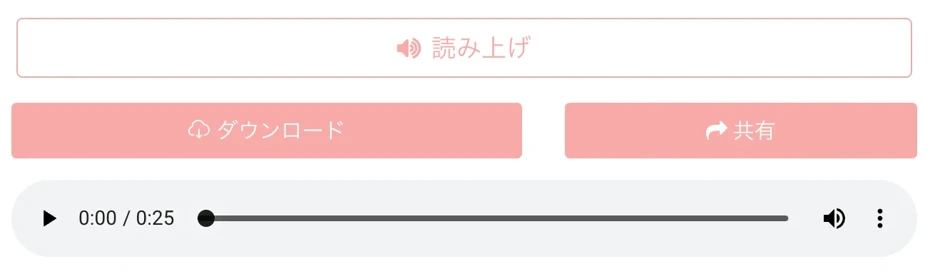
The audio will play, so listen and check it.
If there are no issues, press "Download" to save the audio file in MP3 format.
*Saving in WAV format is also possible from the "History" page.
Now, you have created an original answering machine message with your company or store name!
As you can hear in this sample, it is read in a very natural voice.
Thank you for calling. This is [Company Name].
We are very sorry, but our business for today has ended.
Our business hours are from 9:00 AM to 6:00 PM on weekdays.
We kindly ask you to call back during our business hours.
Just Change Your Answering Machine's Outgoing Message and You're Done!
All that's left is to load the created audio file into your phone, business phone, or Cloud PBX.
To change the audio on a business phone, either upload it through the management screen or connect your computer to the audio input terminal with a cable and record directly.
When changing the audio using a Cloud PBX, it can be easily set by simply uploading the file to the management screen in your browser.
In this way, using the AI text-to-speech service Ondoku, you can very easily create and change your original answering machine message!
Why don't you try creating your original audio using Ondoku's AI speech?
4 Tips for Creating Easy-to-Understand Answering Machine Messages with an AI App
So far, we have introduced recommended answering machine message samples and how to create them.
While you can easily create high-quality messages using an AI speech app, depending on the industry or content, we recommend adding a little extra effort when reading the text!
Here are tips for creating speech that is more natural and easy for customers to understand from their perspective using an AI app.
1. Adjust and Change Speed Settings for Older Customers
Basically, Ondoku's voice can be read at the default speed (1.0x) without changing settings.
However, for clinics, nursing care facilities, and other industries where many calls come from elderly customers, it is recommended to intentionally slow down the speaking speed slightly.
When adjusting, try testing with the speed setting set to around 0.8 first.
This allows you to provide kind and polite guidance over the phone for those who are hard of hearing or prefer a slower conversation.
2. How to Adjust and Set "Pauses" in Speech with SSML Tags?
When reading phone numbers or dates in an answering machine message, it is recommended to intentionally create moments of silence so the caller can take notes.
In Ondoku, you can use a feature called SSML tags to insert pauses of your desired length into the text.
It's very easy to use.
Just write a short tag where you want to insert a pause.
SSML Tag for a 1-Second Pause:
To insert a 1-second pause,
Insert this tag.
By changing the "1s" part to other numbers, you can adjust the length freely.
For example, writing
Besides seconds (s), you can also specify in milliseconds (ms).
For example,
For more details on how to insert pauses into Ondoku speech, please refer to this article.
Please take a look.
![How to adjust pauses and blank time in Ondoku's reading [2 types]](https://storage.googleapis.com/ondoku3/image/Line_930.webp)
How to adjust pauses and blank time in Ondoku's reading [2 types]
A common need for Ondoku users is to "open up the interval a bit more." If it's an adjustment of "interval" to open it up slightly, there are two types of adjustment methods: 1. Punctuation and 2. SSML.
3. How to Read Phone Numbers with Ondoku?
When creating an answering machine message, you may want to read out a phone number in the audio.
In this sample, we are reading out the phone number in this example sentence.
Thank you for calling. This is [Real Estate Management Name].
Our business for today has ended.
For residents with urgent matters such as water leaks or lost keys,
please contact the 24-hour support center at 03-1234-5678.
When reading phone numbers with Ondoku, it is recommended to use these 4 types of voices.
- Announcer (A)
- Announcer (B)
- Robot
- Voice Assistant
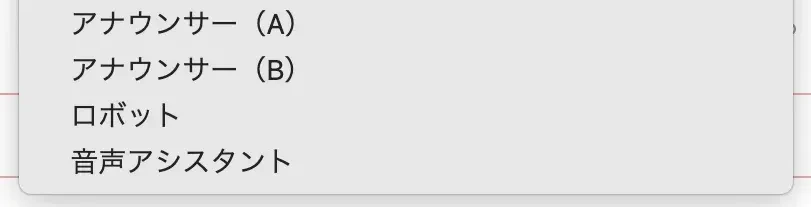
If you insert a pause like
If you use these 4 types of voices, you can read the "1234" part of a phone number as "one-two-three-four" instead of "one thousand two hundred thirty-four."
4. Adjusting Voice Type and Pitch to Match Your Industry
Ondoku provides multiple voices (speakers).
The impression of your answering machine message changes significantly depending on which voice you choose.
For general companies or clinics, calm female voices or lower male voices that convey a sense of trust are ideal.
For industries such as hair salons, apparel, or children's classes, choosing a bright, energetic, higher-toned voice is recommended.
Also, when reading apology messages for temporary closures or trouble, choosing a lower, more suppressed tone than usual can express deeper sincerity and regret.
Ondoku allows you to adjust the pitch of the voice, so we recommend actually generating audio with different heights to find the best fit.
Why Not Create Your Custom Answering Machine Message with an AI App Right Now?
Answering machines are an important point of contact between customers and companies.
Because it's a phone call where faces cannot be seen, using clear audio that includes the company name is a shortcut to gaining customer trust.
With the AI speech web app Ondoku, you can easily create professional-quality audio announcements by simply copying the samples introduced here and rewriting the company name section.
Why not try creating audio with your company name right now with Ondoku?
■ AI voice synthesis software "Ondoku"
"Ondoku" is an online text-to-speech tool that can be used with no initial costs.
- Supports 81 languages and regions, including Japanese, English, Chinese, Korean, Spanish, French, and German
- Available from both PC and smartphone
- Suitable for business, education, entertainment, etc.
- No installation required, can be used immediately from your browser
- Supports reading from images
To use it, simply enter text or upload a file on the site. A natural-sounding audio file will be generated within seconds. You can use voice synthesis up to 5,000 characters for free, so please give it a try.

Text-to-speech software "Ondoku" can read out 5000 characters every month with AI voice for free.
You can easily download MP3s and commercial use is also possible.
If you sign up for free, you can convert up to 5,000 characters per month for free from text to speech.
Try Ondoku now.
HP:
ondoku3.com
Email: ondoku3.com@gmail.com
Email: ondoku3.com@gmail.com
Related posts
"Ondoku" is a Text-to-Speech service that anyone can use for free without installation. If you register for free, you can get up to 5000 characters for free each month. Register now for free
- What is Ondoku
- Start text-to-speech conversion
- Free registration
- Pricing
- Posts
- Try other free services
![[2026] Professional Voicemail Greeting Samples | Create AI Voice with Ondoku](https://storage.googleapis.com/ondoku3/image/irodori-tts_tmb_140.webp)
![[2026] Professional Voicemail Greeting Samples | Create AI Voice with Ondoku](https://storage.googleapis.com/ondoku3/image/tategaki-image-yomiage_howto_tmb_140.webp)
![[2026] Professional Voicemail Greeting Samples | Create AI Voice with Ondoku](https://storage.googleapis.com/ondoku3/image/iphone-video-narration_tmb_140.webp)
![[2026] Professional Voicemail Greeting Samples | Create AI Voice with Ondoku](https://storage.googleapis.com/ondoku3/image/chrome-reading-mode-pc_tmb_140.webp)
![[2026] Professional Voicemail Greeting Samples | Create AI Voice with Ondoku](https://storage.googleapis.com/ondoku3/image/pdf-to-mp3-howto_tmb_140.webp)









