Sites that read English slowly with native pronunciation 【Free / MP3 download available】
The Ultimate Site to Read Aloud and Download Pinyin Pronunciation [A Must-See for Chinese Learners]
Jan. 26, 2026
![The Ultimate Site to Read Aloud and Download Pinyin Pronunciation [A Must-See for Chinese Learners]](https://storage.googleapis.com/ondoku3/image/superb-site-for-pinyin-speech_930.webp)
One of the hurdles in learning Chinese is the pronunciation of "Pinyin".
Pinyin pronunciation is a different phonological system compared to other languages, so people studying it often find it difficult.

I wish I could listen to Pinyin audio easily. I wish I could listen to it repeatedly on my smartphone.
We will introduce a recommended site that can make those wishes come true.
How to pronounce Pinyin notation
- Chinese pronunciation
- Pinyin pronunciation
- Take a photo of a Chinese textbook, upload the photo, and have it pronounced
There is a site that can do all that.
A site that can read aloud and download both Chinese characters and Pinyin notation
That is Ondoku!
With Ondoku, you can easily read aloud and download Chinese.
Using a smartphone, you can also have Chinese pronounced from a photo taken on the spot.
The "read from image" function is highly recommended because you can immediately understand the Chinese pronunciation even for textbooks or texts that do not have audio.
With Ondoku, you can easily read aloud both Pinyin notation and Chinese characters with just one click. Downloading is also easy with one click.

If you are studying Chinese, this is a useful site you must know about.
How to use Ondoku
First, we will introduce how to convert Chinese or Pinyin notation text into audio.
1. Access the Ondoku website

Japanese Text-to-Speech Software|Ondoku
Text-to-speech software Ondoku can read up to 5,000 characters of text for free. In addition, paid plans allow you to read up to 1 million characters per month. Texts read with high-quality audio can be downloaded as audio files (.mp3) and used for commercial purposes.
You can access it freely from any device connected to the internet, such as a computer, smartphone, or tablet.

2. Input text
Enter the sentence you want to read aloud into the text box.
You can enter text in various languages such as Chinese, Pinyin, Japanese, English, and more.
3. Set language and other options
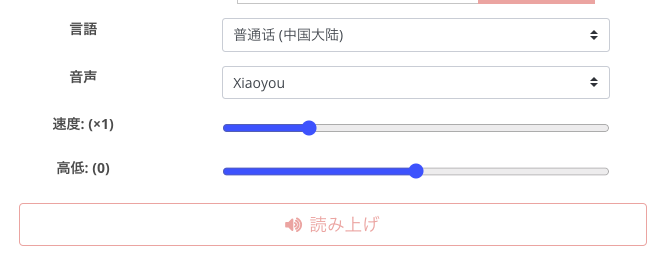
Select the language to be read aloud in the language selection field.
Select "Mandarin (Mainland China)" here.
"Voice" can be selected from many types, such as female and male. Since pronunciations can have individual characteristics, please find your favorite voice.
Voices that are good at reading Pinyin notation are:
- Xiaoxiao
- Xiaoyou
- Yunyang
In Chinese character notation, all voices seem to pronounce very well.
Speed settings are also possible, so if it feels too fast, you can adjust it to be slower.
You can listen to Chinese read-aloud audio samples for free in this article! Please take a look.

For pronunciation check and listening in Chinese learning! Listen to native pronunciation by 41 speakers (trial) female, male, and girl voices|Text-to-speech software Ondoku
Here, you can listen to Ondoku's Chinese audio samples. Chinese audio can be selected from Mandarin (Mainland China), Cantonese (Hong Kong), and Taiwanese Mandarin. Voices include female, male, girl, and boy voices.
4. Click the "Read aloud" button
Once settings are complete, click the "Read aloud" button. Then, the entered text will be read aloud in a few seconds.
5. Download audio
You can download the audio that was read aloud.
Clicking the download button will download the audio file, allowing you to play it later or move it to another device.
How to pronounce from an image
Next, we will introduce how to pronounce Chinese from a photo taken on the spot, such as a textbook, via video.
* The video below is auto-play, so if you want to watch from the beginning, please return the playback bar to the start.
1. Open Ondoku on your smartphone
Access Ondoku on a device that can take photos on the spot, such as a smartphone or tablet.
Japanese Text-to-Speech Software|Ondoku
Text-to-speech software Ondoku can read up to 5,000 characters of text for free. In addition, paid plans allow you to read up to 1 million characters per month. Texts read with high-quality audio can be downloaded as audio files (.mp3) and used for commercial purposes.
2. Click the Image tab
Click the Image tab on the TOP page.
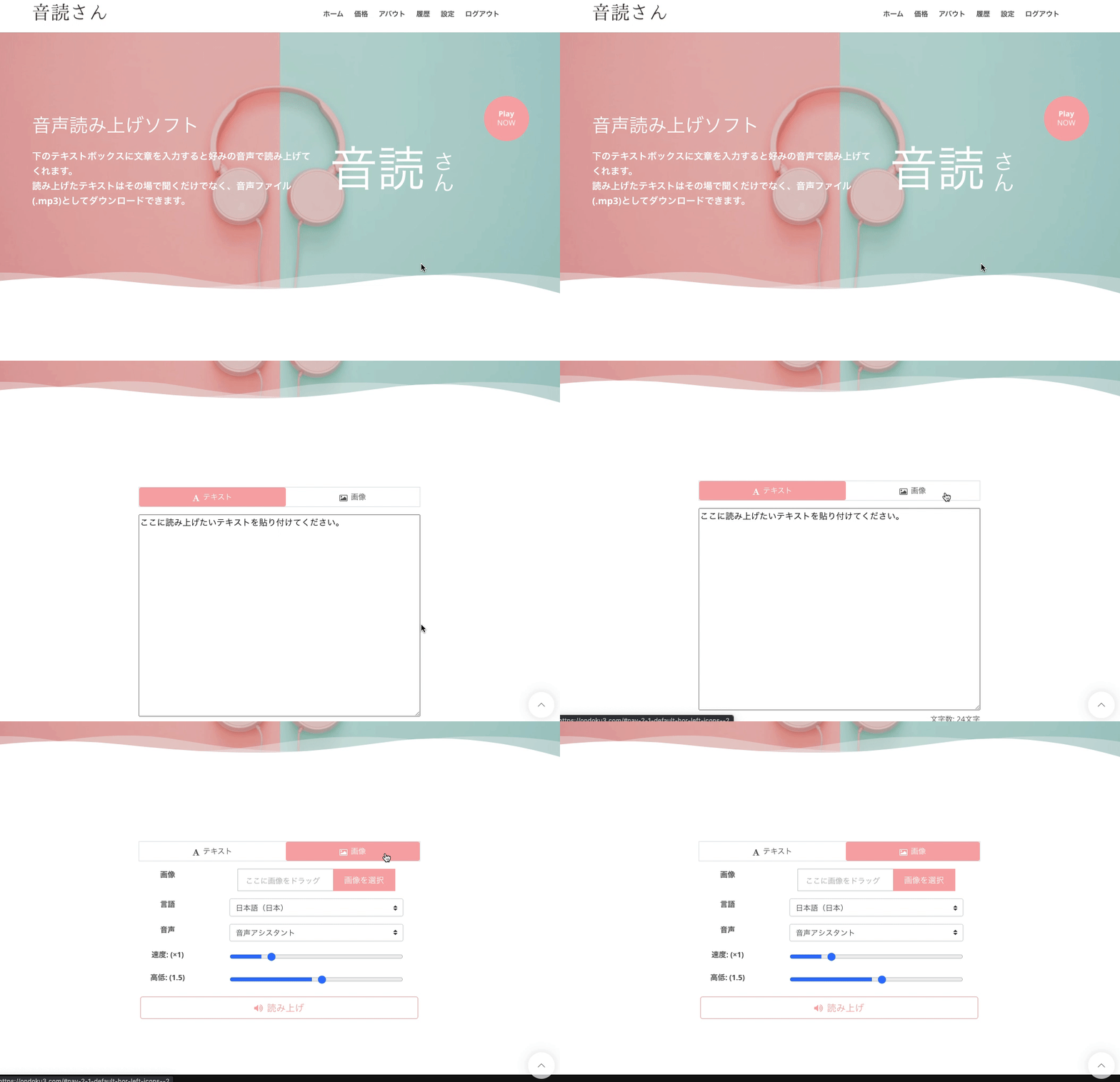
3. Take a photo or select an image containing the text you want to read
Click "Select Image" and either:
- Take a photo on the spot
- Select the necessary photo from your photo folder
Choose the photo you want to turn into audio.
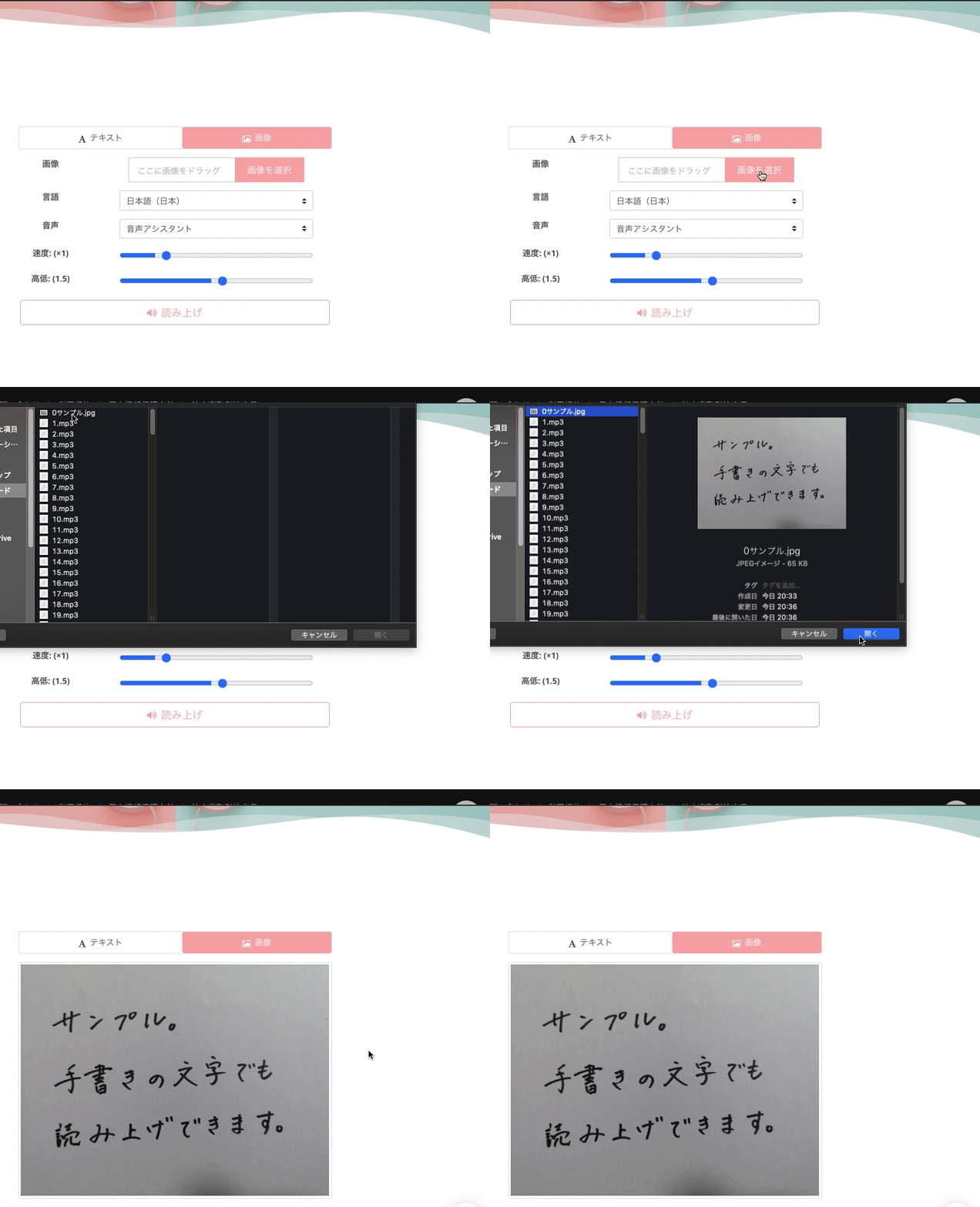
4. Set language and other options
Select the language to be read aloud in the language selection field.
Select "Mandarin (Mainland China)" here.
"Voice" can be selected from many types, such as female and male. Since pronunciations can have individual characteristics, please find your favorite voice.
In Chinese character notation, all voices seem to pronounce very well.
Speed settings are also possible, so if it feels too fast, you can adjust it to be slower.
5. Click the "Read aloud" button
Once settings are complete, click the "Read aloud" button. Then, the entered text will be read aloud in a few seconds.
6. Download audio
You can download the audio that was read aloud.
Clicking the download button will download the audio file, allowing you to play it later or move it to another device.
Ondoku is perfect for Chinese learning
Ondoku is a strong, strong ally for those studying Chinese.
The fact that Ondoku can be used for up to 5,000 characters per month for free is also attractive.
Of course, if you want to study more, you can purchase a capacity of 200,000 characters for 980 yen per month to have even more text pronounced.
Recommended features
The "read from image" function is particularly recommended.
By using the function to turn images into audio, you can easily have Chinese pronounced without having to write it yourself.
It is perfect for when:
You don't know the Chinese pronunciation in a textbook
You understand the meaning when it's read to you, but don't understand it when it's written
Images can be photos or screenshots.
Supported file formats are JPEG and PNG.
PDF format is not supported, so if you want to have a PDF pronounced, please take a screenshot before uploading.
This article explains the image reading function in detail!

【Turn images into audio for free】How to use the function to read text from images and read audio aloud 【Image reading】|Text-to-speech software Ondoku
We will introduce Ondoku's new feature, the "function to read text from images and read audio aloud," in detail and explain how to use it. This feature can be used from both PCs and smartphones. Of course, it can also be used for free.
Also recommended for Chinese speaking practice!
Ondoku is also recommended for Chinese speaking practice!
In this article, we explain Chinese example sentences and recommended practice methods, so please take a look at those as well!

【2025 Edition】Chinese Reading Aloud Study Method! Thorough explanation of recommended sites, apps, example texts, and usage|Text-to-speech software Ondoku
I can read Kanji but can't pronounce them... Solve that problem! Introducing carefully selected sites and apps recommended for reading Chinese aloud. Learn how to use the free "Ondoku," tips for acquiring native-level pronunciation, and example texts.

Chinese daily conversation scene examples ready to use · How to create original audio teaching materials 【with pronunciation audio】|Text-to-speech software Ondoku
We introduce daily Chinese conversations with audio materials. Furthermore, we will also introduce how to make original audio materials, so please use them for your learning.
Pronounce & download Pinyin to listen repeatedly
Audio created with Ondoku can be downloaded.
What is very important in studying foreign language pronunciation is to listen repeatedly, practice pronouncing the same way, or write down sentences by listening to the sound.
Make effective use of files downloaded with Ondoku to help you with your Chinese studies.
■ AI voice synthesis software "Ondoku"
"Ondoku" is an online text-to-speech tool that can be used with no initial costs.
- Supports approximately 50 languages, including Japanese, English, Chinese, Korean, Spanish, French, and German
- Available from both PC and smartphone
- Suitable for business, education, entertainment, etc.
- No installation required, can be used immediately from your browser
- Supports reading from images
To use it, simply enter text or upload a file on the site. A natural-sounding audio file will be generated within seconds. You can use voice synthesis up to 5,000 characters for free, so please give it a try.

Text-to-speech software "Ondoku" can read out 5000 characters every month with AI voice for free.
You can easily download MP3s and commercial use is also possible.
If you sign up for free, you can convert up to 5,000 characters per month for free from text to speech.
Try Ondoku now.
HP:
ondoku3.com
Email: ondoku3.com@gmail.com
Email: ondoku3.com@gmail.com
Related posts
"Ondoku" is a Text-to-Speech service that anyone can use for free without installation. If you register for free, you can get up to 5000 characters for free each month. Register now for free
- What is Ondoku
- Start text-to-speech conversion
- Free registration
- Pricing
- Posts
- Try other free services
![The Ultimate Site to Read Aloud and Download Pinyin Pronunciation [A Must-See for Chinese Learners]](https://storage.googleapis.com/ondoku3/image/recommend-site-for-studying-spanish_tmb_140.webp)
![The Ultimate Site to Read Aloud and Download Pinyin Pronunciation [A Must-See for Chinese Learners]](https://storage.googleapis.com/ondoku3/image/recommend-site-for-studying-german_tmb_140.webp)
![The Ultimate Site to Read Aloud and Download Pinyin Pronunciation [A Must-See for Chinese Learners]](https://storage.googleapis.com/ondoku3/image/recommend-site-for-studying-french_tmb_140.webp)
![The Ultimate Site to Read Aloud and Download Pinyin Pronunciation [A Must-See for Chinese Learners]](https://storage.googleapis.com/ondoku3/image/recommend-site-for-studying-italian_tmb_140.webp)
![The Ultimate Site to Read Aloud and Download Pinyin Pronunciation [A Must-See for Chinese Learners]](https://storage.googleapis.com/ondoku3/image/recommend-site-for-studying-korean_tmb_140.webp)









