How to stop the delivery of Ondoku character count renewal emails
Collection of Prompts for Writing Business Emails Efficiently with ChatGPT
Jan. 26, 2026

AI technology has advanced to the point where it can handle a wide variety of tasks!
Business emails can also be created easily and efficiently by utilizing AI. In fact, it is a waste not to use it.

We will explain how to use ChatGPT to write business emails.
How to Write Business Emails with ChatGPT
- Log in to ChatGPT
- Enter the business email prompt in the message input field and send it
- ChatGPT automatically generates the business email
What is a Prompt?
Prompts are important for writing business emails with ChatGPT.
A prompt is a keyword or phrase used to instruct ChatGPT to generate text.
By using prompts (keywords or phrases) and providing detailed information about what you want it to write, ChatGPT can generate more accurate text.
Try to write your prompt as specifically as possible, including who you want to contact, what you want to say, and how you want to convey it.
Examples of ChatGPT Prompts for Business Emails
[Prompt for a mail requesting the sending of an invoice]
Subject: "Request for sending invoice"
Reason for invoice request: "Request an invoice for service usage fees"
Confirmation of destination information: "Confirm the destination for the invoice"
Specify the deadline: "Set a deadline for sending the invoice"
Closing words: "Thank you in advance"
Write the reason for the request specifically and give instructions as clearly as possible, such as setting the deadline date to "September 15, 2023."

[Prompt for a mail notifying the sending of materials]
Subject: "Notice of sending materials"
Overview of materials: "Explain the content of the materials to be sent"
Attachment method: "Information about attached files or links"
Purpose of using materials: "Suggest how to utilize the materials"
Contact information: "Contact details for questions or concerns"
By telling ChatGPT specifically what the content of the materials is, the result will be a much clearer business email.

[Prompt for a follow-up email to be sent when there is no reply to a previous email]
Subject: "Regarding the previous email (Follow-up)"
Date the previous email was sent: "Month Day, Year"
Summary of the previous email: "Reconfirm the main points of the previous email"
Consideration: "Express concern regarding the lack of a reply"
Resetting the deadline: "Setting or reconfirming the response deadline"
Closing words: "Thank you for your confirmation"
[Prompt for a reply email to a request for a quote]
Subject: "Reply to request for quote"
Greeting: "Words of gratitude to the customer"
Quote details: "Presentation of quote content and amount"
Validity of the quote: "Specify the deadline for the quote"
Contact information: "Contact details for questions or concerns"
Closing words: "Thank you for your consideration"
[Prompt for a reply email to an email sending a quote]
Subject: "Reply regarding the quote"
Greeting: "Polite greeting to the other party"
Receipt of quote: "Convey that the quote has been received"
Impressions of the quote content: "Impressions or questions regarding the quote content"
Questions or concerns: "Describe any questions or concerns regarding the quote"
Meeting proposal: "Proposal for a meeting or schedule adjustment as necessary"
Reply deadline: "Clearly state the deadline if a reply is required"
Contact information: "Contact details for questions or concerns"
Closing words: "Polite closing words"
This is a prompt for when you want to move forward with the discussion after receiving a quote. Arrange the necessary items such as dates to use it.
[Prompt for an apology email for a misdirected email]
Subject: "Apology for misdirected email"
Apology text: "Apology for sending the email in error"
Explanation of the cause: "Briefly explain the cause of the misdirection"
Future measures: "Explain measures to prevent future misdirection"
Contact information: "Contact details for questions or concerns"
Closing words: "Words of apology once again and a request for understanding"
By entering prevention measures specifically, it will create a wonderful apology email. Highly recommended for people who are not good at apologizing!

Actual Output Email Text from ChatGPT Prompts
These are the texts generated by ChatGPT when using the prompts above.
The model used is ChatGPT-4. This is a model currently available for a fee.
There are various versions of ChatGPT, but at this time, ChatGPT-4 is the top-tier model and provides the best results.
Email Requesting the Sending of an Invoice
Subject: Request for sending invoice
Dear Mr./Ms. 〇〇,
I hope this email finds you well. This is □□ from △△ Co., Ltd. We are very grateful for the opportunity to use your company's services. Could you please issue an invoice for the service usage fees?
The billing information is as follows. We apologize for the inconvenience, but could you please confirm and send the invoice?
- Postal Code: 123-4567
- 5F 〇〇 Building, 1-2-3 〇〇, Minato-ku, Tokyo
- △△ Co., Ltd.
- Attn: □□
Also, we would appreciate it if you could send the invoice by [Year/Month/Day].
If you have any questions, please feel free to contact us.
Thank you for your cooperation.
Sincerely,
Email Notifying the Sending of Materials
Subject: Notice of sending materials
Dear Mr./Ms. 〇〇,
I hope this email finds you well. This is □□ from △△ Co., Ltd. I have attached the materials we discussed during our meeting the other day to this email.
An overview of the materials is as follows:
- Product Features and Benefits
- Market Research Results
- Case Studies
The materials are attached as a PDF file. They are also available for download from the link below.
[Material Download Link]
We hope you find these materials useful for deepening your understanding of our products and for your future projects and sales activities.
If you have any questions or concerns, please feel free to contact us by phone (03-1234-5678) or email (example@example.com).
Best regards,
Sincerely,
Reply Email to a Quote Submission (Positive Response)
Subject: Reply regarding the quote
Dear Mr./Ms. 〇〇,
I hope this email finds you well. This is □□ from △△ Co., Ltd. I am writing to inform you that we have successfully received the quote you sent the other day. Thank you very much.
We have reviewed the content of the quote, and we feel that it is overall satisfactory and very clearly summarized. However, we have a few questions and concerns regarding some items.
Specifically, regarding the project delivery date, we would like to confirm if it has been set according to our preferences. Additionally, since the breakdown of outsourcing costs is not listed, we would appreciate it if you could provide the details.
If it is convenient for you, would it be possible to set up a meeting to discuss the above questions and concerns in detail? We are available this Thursday or Friday afternoon, so please let us know a schedule that works for you.
We apologize for the trouble, but it would be helpful if you could reply within this week. If you have any questions or concerns, please feel free to contact us by phone (03-1234-5678) or email (example@example.com).
Thank you for your consideration.
Sincerely,
Follow-up Email to be Sent When There is No Reply
Subject: Regarding the previous email (Follow-up)
Dear Mr./Ms. 〇〇,
I hope this email finds you well. This is □□ from △△ Co., Ltd. I sent you an email on April 13, 2023, but since I have not received a reply, I am following up with this message.
In the previous email, I inquired about the following points:
- Pressure setting range for the hydraulic unit
- Points to note during maintenance
I am concerned that you may not have received the message. If the email did not reach you or if anything is unclear, please let me know.
We apologize for the inconvenience, but it would be helpful if you could provide a response by next Tuesday (April 18). If you have any questions or concerns, please feel free to contact us by phone (03-1234-5678) or email (example@example.com).
Thank you for your confirmation.
Sincerely,
Apology Email for Misdirected Email
Subject: Apology for misdirected email
Dear Mr./Ms. 〇〇,
I hope this email finds you well. This is □□ from △△ Co., Ltd. It has come to my attention that the email I sent the other day was sent in error. I sincerely apologize for the mistake.
The cause was that I specified the wrong address when entering the recipient. Since the email was intended for someone else, please feel free to ignore its content.
To prevent such misdirected emails from occurring in the future, we will thoroughly check recipients and handle matters with greater care.
If you have any questions or concerns, please feel free to contact us by phone (03-1234-5678) or email (example@example.com).
We sincerely apologize for any inconvenience caused. We look forward to your continued support.
Sincerely,
If You Don't Know the Prompt, Just Ask ChatGPT

But I don't know how to write a prompt for a special case like this...
In such cases, if you ask ChatGPT, it will provide examples of how to write prompts.
Please tell me a prompt for an email to Mr. Yamada asking about hydraulic unit settings.
Something like that is perfectly fine.
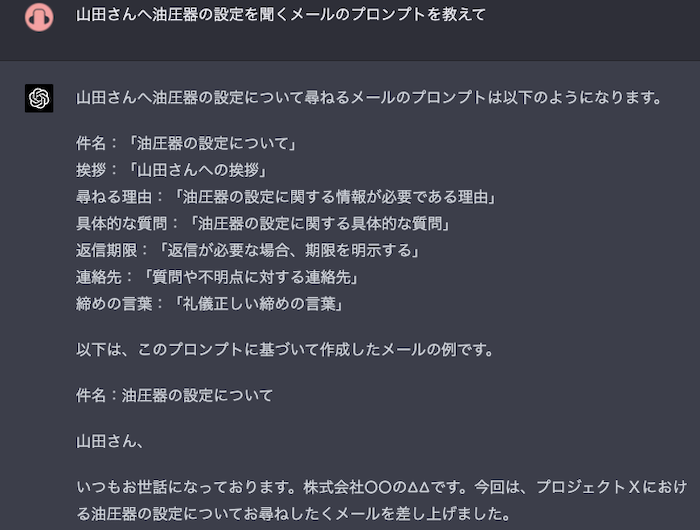
Yes, like this, it wrote not just the prompt but the actual email too.
If you don't know something, try asking ChatGPT anything. If you are not satisfied with the generated text, try changing the way you give instructions.

It's such a hassle to read...
If you feel that way, you can use the AI voice tool Ondoku to have the content read aloud.
It Takes Time Both to Read and Write Emails
According to the Business Email Reality Survey 2022:
- Daily average: Sent "16.27" Received "66.87"
- Average time to read one email: 1 minute 24 seconds
- Average time to write one email: 6 minutes 5 seconds
In other words, on average:
Just reading emails takes 1 hour and 10 minutes a day.
Just writing emails takes 1 hour and 40 minutes a day.
It can be seen that the time related to emails is about 3 hours per day.
This means some people spend almost half a day just on emails.
What a waste! Let's utilize AI so you can make things easier for yourself!
By mastering the method of writing business emails efficiently with ChatGPT, you can proceed with your daily work smoothly.
Also, the burden of reading time can be significantly reduced by having them read aloud.
Please make use of Ondoku for reading aloud!
Improve Efficiency by Listening with Audio
Listening to emails via audio is one way to make reading and writing business emails more efficient.
Time Saving
Listening to emails can be faster than reading them with your eyes, and the content can be easier to understand.
Possibility of Multitasking
By listening to emails, you can engage in "parallel work" such as starting to write a reply while listening to the content of the email.
Reduction of Eye Strain
Staring at a screen all day can tire your eyes. However, listening to emails via audio can reduce eye strain.
Prevention of Misreading and Oversights
Listening to emails makes misreading and oversights less likely to occur. This helps prevent mistakes.
To listen to emails via audio, you can use the voice assistants built into smartphones and computers, or use dedicated tools like Ondoku to listen easily.
Why don't you try checking business emails comfortably with Ondoku?
Ondoku can read up to 5,000 characters per month for free. The reading style is close to human and very easy to listen to. You can choose from female voices, male voices, girl's voices, etc., and if it reads in your favorite voice, even difficult email content becomes much more mild.
Utilize Ondoku to streamline your business email reading and writing.
■ AI voice synthesis software "Ondoku"
"Ondoku" is an online text-to-speech tool that can be used with no initial costs.
- Supports approximately 50 languages, including Japanese, English, Chinese, Korean, Spanish, French, and German
- Available from both PC and smartphone
- Suitable for business, education, entertainment, etc.
- No installation required, can be used immediately from your browser
- Supports reading from images
To use it, simply enter text or upload a file on the site. A natural-sounding audio file will be generated within seconds. You can use voice synthesis up to 5,000 characters for free, so please give it a try.

Text-to-speech software "Ondoku" can read out 5000 characters every month with AI voice for free.
You can easily download MP3s and commercial use is also possible.
If you sign up for free, you can convert up to 5,000 characters per month for free from text to speech.
Try Ondoku now.
HP:
ondoku3.com
Email: ondoku3.com@gmail.com
Email: ondoku3.com@gmail.com
Related posts
"Ondoku" is a Text-to-Speech service that anyone can use for free without installation. If you register for free, you can get up to 5000 characters for free each month. Register now for free
- What is Ondoku
- Start text-to-speech conversion
- Free registration
- Pricing
- Posts
- Try other free services














