Best Text-to-Speech Software: 7 Free & Paid Tools for Commercial Use
[2026 Latest] How to Add English Narration to YouTube: Easy AI Voiceover Production
Sept. 9, 2026
![[2026 Latest] How to Add English Narration to YouTube: Easy AI Voiceover Production](https://storage.googleapis.com/ondoku3/image/youtube_english_narration_tmb_930.webp)
I want to add English narration to my YouTube videos!

When creating videos for overseas audiences on YouTube or SNS, narration is essential.
By adding narration in foreign languages such as English, you can more effectively increase your international viewership.
However, producing English narration might seem difficult.
Hiring a professional narrator can be expensive, and recording foreign languages yourself is a lot of work.
In such cases, we recommend utilizing the latest AI text-to-speech services!
In fact, by using an AI text-to-speech service, anyone can easily produce high-quality English narration.
Furthermore, compared to traditional methods, it is possible to produce narration in a short time at an overwhelmingly low cost.
In this article, we will explain in detail how to add effective English and foreign language narration to YouTube videos and Shorts.
- I want to reach overseas viewers on YouTube, Instagram, and TikTok.
- I want to promote corporate products in foreign languages.
- I want to create videos for inbound tourists.
If any of these apply to you, why not use this article as a reference to create narration for your YouTube videos?
[Free] Recommended AI Text-to-Speech Services for YouTube English Narration

If you want to add English narration to your YouTube videos or Shorts, Ondoku is recommended!
Ondoku is a text-to-speech service that allows anyone to easily generate English audio using the latest AI.
Simply by entering text, you can produce English narration with native pronunciation in as little as 10 seconds.
In addition to English, it supports 81 languages and regions, including Chinese, Korean, French, Spanish, and German.
You can promote your YouTube channel to the entire world.
It is also perfect for corporate product promotion videos and videos aimed at inbound tourists.
Furthermore, Ondoku is free!
It can be used without registration or login, so why not try producing actual English narration using Ondoku first?
Why is English/Foreign Language Narration Recommended for YouTube Videos?

If you want to increase the number of views and subscribers for your YouTube channel, adding English or other foreign language narration is recommended!
By including narration in English or other foreign languages, you can promote your YouTube channel to billions of viewers worldwide.
Moreover, you can now easily produce realistic narration that rivals professional narrators using AI text-to-speech services.
What are the Effects of English/Foreign Language Narration in YouTube Videos?
What kind of effects can you expect by posting videos with English narration to your YouTube channel?
The most significant effect is the ability to reach overseas viewers who could not be approached before.
By simply adding English narration to your YouTube videos, you can approach not only viewers in English-speaking countries but also people all over the world who use English as a second language.
When viewers cannot find a video in their native language, they are more likely to open an English video from the search results.
By creating YouTube videos with English narration, you can increase views and channel subscriptions from English speakers and non-English speaking regions alike.
Also, the effect on high rankings in search engines cannot be ignored.
In Google searches, the likelihood of appearing in video search results for English keywords increases.
In this way, English narration is highly effective for increasing YouTube views and subscribers.
From business purposes such as product promotion and branding to hobby video channels operated by individuals, why not try making videos with English narration using AI text-to-speech services?
Original English/Foreign Language Narration is Recommended Over Automatic Dubbing
As of 2026, YouTube's official features allow for the insertion of automatic dubbing narration in English and other foreign languages.
However, as before, to better promote your videos to overseas viewers, it is recommended to create original English/foreign language narration.
This is because YouTube's official automatic dubbing feature has low accuracy in automatically recognizing the original audio, leading to many mistranslations.
Furthermore, YouTube's official audio often tends to give an inorganic and low-quality impression.
By creating and editing original English/foreign language narration, you can create higher-quality videos combined with background music.
What Types of YouTube Videos are Particularly Recommended for English/Foreign Language Narration?
You might wonder, "In what situations is English narration necessary?"
Here, we introduce the types of YouTube videos where English/foreign language narration is particularly effective.
English Narration is Especially Recommended for Corporate Product Promotion Videos

First, corporate product promotion videos.
When you want to convey the appeal of a product to overseas viewers, English narration is an essential element of the video.
Particularly in overseas promotion and branding via YouTube videos, high-quality English narration influences marketing results.
Furthermore, since overseas promotion needs to be conducted on a country-by-country basis, narration in foreign languages other than English is also very important.
You might be thinking, "Our company isn't that big, so it might not be relevant..."
That is not the case!
Recently, overseas promotion utilizing AI narration has become common even for small and medium-sized enterprises.
It is recommended to add English/foreign language narration to YouTube videos using the methods introduced in this article.
![[2026 Latest] How to Succeed in Overseas Product Promotion | Increase Sales with YouTube Videos and AI Voice](https://storage.googleapis.com/ondoku3/image/overseas-promotion-tmb_930.webp)
[2026 Latest] How to Succeed in Overseas Product Promotion | Increase Sales with YouTube Videos and AI Voice
Explaining how to succeed in overseas product promotion. We introduce in detail everything from multi-language video production procedures using YouTube videos and AI text-to-speech to effective overseas marketing strategies.
English Narration is Also Recommended for YouTube Videos for Inbound Tourists

The increase in inbound tourists has also heightened the importance of English narration in YouTube videos.
At tourist attractions and cultural facilities, audio guide videos in foreign languages have become a standard service.
By producing videos that introduce art museums, museums, and tourist spots, it is possible to appeal to inbound tourists and increase the number of visitors.
For individual video creators, videos introducing tourist spots are a staple content with high view counts.
By creating videos for inbound tourists with English and other foreign language narration, you can drastically increase views and subscribers.

Supporting Inbound Tourists! Latest Methods and Benefits of Creating Multi-language Audio Guides for Free
A must-see for cultural facilities struggling with inbound support! A complete manual for creating multi-language audio guides with the latest AI. Thorough explanation from Korean/Chinese support methods that can be started for free to tips for preventing trouble.
English/Foreign Language Narration is Ideal for Educational Videos

English/foreign language narration is also useful in the educational field.
e-Learning content and language learning materials require narration audio with native pronunciation.
However, depending on the language, it can be difficult to find native narrators.
In such cases, you can easily create video narration by using an AI text-to-speech service.
Language learning content tends to get more views, so it is also recommended for individual video creators.
In online training and corporate education, the demand for content with foreign language narration for global human resource development is increasing.
It is recommended to utilize AI text-to-speech services not only for YouTube videos but also when producing internal video materials for companies.
![[A Must-See for Teachers] Create English Listening Questions for Free! Detailed Explanation of the No-Recording Method.](https://storage.googleapis.com/ondoku3/image/girl-read-book_930.webp)
[A Must-See for Teachers] Create English Listening Questions for Free! Detailed Explanation of the No-Recording Method.
For teachers struggling with listening tests, there is a very easy way to create audio for listening tests that you should try. No recording, microphones, or tedious sessions are required. It can be tried easily for free, so please utilize it! We introduce it in detail.
Recommended Methods for English Narration Production [Narrators vs. AI Voice Synthesis]

There are two main ways to produce English narration.
Depending on which method you choose, the production cost, duration, and final video quality will change significantly.
Outsourcing English/Foreign Language Narration to Narrators
The traditional method was to outsource English narration to professional narrators.
You request recording from narrators specializing in English or other foreign languages through narrator agencies or production companies.
Professional narrators deeply understand the content of the script and provide readings with appropriate emotion.
Direction at the recording site is also possible, allowing for fine adjustments and corrections on the spot.
However, this method also has several major issues.
First, production costs are very high.
The market rate for professional narrators is around 50,000 to 80,000 yen per hour, and it becomes even more expensive when studio fees and editing costs are included.
Production periods also tend to be long, as it takes time to coordinate the narrator's schedule and secure recording dates.
If corrections become necessary, additional recording fees will also be incurred.
Producing English/Foreign Language Narration with AI Text-to-Speech Services [Recommended]
Another method is to produce English/foreign language narration using AI text-to-speech services.
This is a recommended method that solves previous challenges all at once!
You might worry, "Won't AI sound like a mechanical voice?" but don't worry!
Using the latest AI text-to-speech services, you can generate natural English narration indistinguishable from native speakers.
Using an AI text-to-speech service allows you to create narration at a much lower cost than hiring a narrator!
Since it can also be used for free, you can add English narration to your YouTube videos at zero cost.
Moreover, since production and corrections can be done 24 hours a day, it can accommodate urgent video creation!
AI Text-to-Speech Services Also Support Foreign Language Narration Other Than English
Multi-language support is also a major advantage of AI text-to-speech services.
When requesting recording from a narrator, for languages other than those with many speakers like English or Chinese, it can be difficult to find native speaker narrators in the first place.
Depending on the language, narrator fees can become very expensive...
In such cases, you can just use an AI text-to-speech service!
Since you can produce narration for various foreign languages such as French, German, Spanish, Chinese, and Korean in addition to English within a single service, you can expand your YouTube videos into many languages at once.
![[Ondoku] Listen to Voice Types and Sample Audio for Supported Languages](https://storage.googleapis.com/ondoku3/image/%E5%A4%9A%E6%A7%98%E6%80%A7_930.webp)
[Ondoku] Listen to Voice Types and Sample Audio for Supported Languages
Here we introduce the supported languages and sample voices of Ondoku.
Thus, if you want to add English/foreign language narration to YouTube videos, AI text-to-speech services are recommended.
From individually operated YouTube channels to business uses like product promotion and branding, why not try producing narration using an AI text-to-speech service?
3 Recommended Services for English Narration Production [Free Options Included]

So, what kind of service should I use to create English narration?
Here, we introduce recommended services for English narration production!
We will introduce characteristics from AI text-to-speech services to narrator outsourcing services, so please find the perfect service for you.
1. Ondoku | Multi-language Support for English and Foreign Languages! Recommended AI Text-to-Speech Service
Ondoku is the ideal AI text-to-speech service for YouTube video English narration.
If you are looking for a method to produce English or foreign language narration audio, we recommend choosing Ondoku first.
Multi-language Support for English and Languages Worldwide!
The greatest feature of Ondoku is that it supports an overwhelmingly large number of languages.
Ondoku supports 81 languages and regions worldwide, including English, Chinese, Korean, French, Spanish, and German.
Furthermore, you can select regional pronunciations such as American English, British English, Australian English, and Indian English.
Since you can produce YouTube videos targeting specific regions, it is also ideal for business use such as product promotion.
Create Natural Narration Audio with Native Pronunciation
The ability to synthesize natural and clear audio with native pronunciation is also a feature of Ondoku.
With cutting-edge AI reading technology, you can produce English narration so natural that you won't know the difference even compared to a native speaker.
You can listen to English audio samples on this page, so please check it out!

For English Learning Listening! Listen to Native Pronunciation, 92 Speakers (Trial Listening). Voices of Women, Men, Girls, and Boys!
Ondoku is a text-to-speech service that can pronounce words from all over the world. You can listen to 92 types of English audio from Ondoku.
Commercial Use is OK, so Monetization and Business Use are Safe
Ondoku allows commercial use.
Even when using it for free, you can use it commercially just by displaying credit.
It is safe for when you want to monetize an individually operated channel or for business use in companies such as product promotion.
*Commercial use of Ondoku is explained on this page. Please take a look.

What You Can Do with Ondoku. About Commercial Use (Business Use) and Prohibited Items.
Commercial use (business use) is possible with Ondoku. Regardless of whether it is an individual or a corporation, use for the purpose of obtaining direct or indirect profit such as money is commercial use. However, please note that prohibited acts are established in Ondoku. This time, we introduce what you can and cannot do with Ondoku...
Produce YouTube Video Narration Right Now with the Free Version of Ondoku!
Ondoku is a web service that can be used without installation.
You can create high-quality English narration simply by accessing Ondoku from your browser and entering text.
It can be easily used from any environment: Windows, Mac, or smartphone!
Moreover, Ondoku is free!
Just by registering an account, you can read up to 5,000 characters, so for short YouTube videos, you can complete English narration production completely free of charge!
Audio files can be downloaded in MP3 format, so they can be used with any video editing software.
The AI text-to-speech service Ondoku is recommended for producing narration in English and other foreign languages.
Why don't you also use Ondoku to add English/foreign language narration to your YouTube videos?
2. Editage | Narration Production Service Supporting Specialized Uses such as Academia

Editage is a production service where you can request English narration recording from native narrators.
As a service from a company that provides professional English proofreading and academic translation, it is possible to produce narration with high expertise for academic conferences, lectures, and seminars.
The supported language is only English, but you can choose between American English and British English.
On the premise of use in videos, an optional service for recording according to the timecodes within the video is also available.
The price is determined per word count.
A quote is required before actual use regarding pricing.
This service is recommended when you want to request highly specialized English narration from a narrator.
3. Voicemart | A Service Where You Can Outsource Recording to Narrators in Two Ways

Voicemart is a service where you can outsource English and other foreign language narration to narrators.
It supports narration recording in more than 15 languages, including American English, British English, Australian English, Chinese, and Korean.
The feature of Voicemart is that it offers two types of recording methods.
In addition to standard studio recording, a plan for recording at the narrator's home (home recording) is set up.
The home recording plan allows for requesting narrators at relatively reasonable prices.
This service is recommended when you want to request English, Chinese, or Korean narration recording from a narrator.
Basic Workflow of English Narration Production Using Ondoku
For those wondering, "I want to use Ondoku, but how do I use it?", we will explain the specific production procedure in detail!
By using Ondoku, anyone can easily produce videos with professional-level English narration!
1. Producing an English Narration Script by Translating with AI Services

The first step in English narration production is to prepare a high-quality script.
When making an English narration script, translating it using AI services is recommended.
Even if you are confident in your English skills, it is very difficult to master expressions unique to native speakers that are preferred in YouTube videos.
By translating using AI services, you can create a script that does not sound like a literal translation and feels natural to native speakers.
Currently, the most accurate services for English translation are generative AI services such as ChatGPT, Claude, and Gemini.
This script is a video script for ○○ (e.g., product promotion, introducing tourist spots to tourists). Please translate this script from Japanese to American English.
By instructing in this way, it will produce a script with the perfect tone according to the content of the script.
Be sure to check translation results with back-translation.
At this time, using translation-specialized services such as DeepL or Google Translate is recommended.
By using different services for translation and back-translation, you can more reliably discover translation errors.
Points to Note in YouTube English Narration Script Production
What is important in script creation is being conscious of the balance between video length and character count.
In the case of English, 100 words per minute is considered a guideline.
For the source script, if it is in Japanese for example, 300 characters per minute is just the right amount.
In the case of YouTube videos, to keep the viewer's attention, it is also a point to use a structure that conveys important content in the first 15 seconds.
2. Producing English Narration Audio with Ondoku
Once the script is ready, it's finally time to generate English narration with Ondoku!
First, access the official Ondoku website in your browser.
Paste the translated English script into the text box on the top page.

Next, select "English" in the language settings.

In Ondoku, you can select:
- American English
- British English
- Australian English
- Indian English
So you can have it read with the optimal pronunciation according to the video's target region.
If you are unsure, American English is the most versatile and recommended.
Next, select the voice.
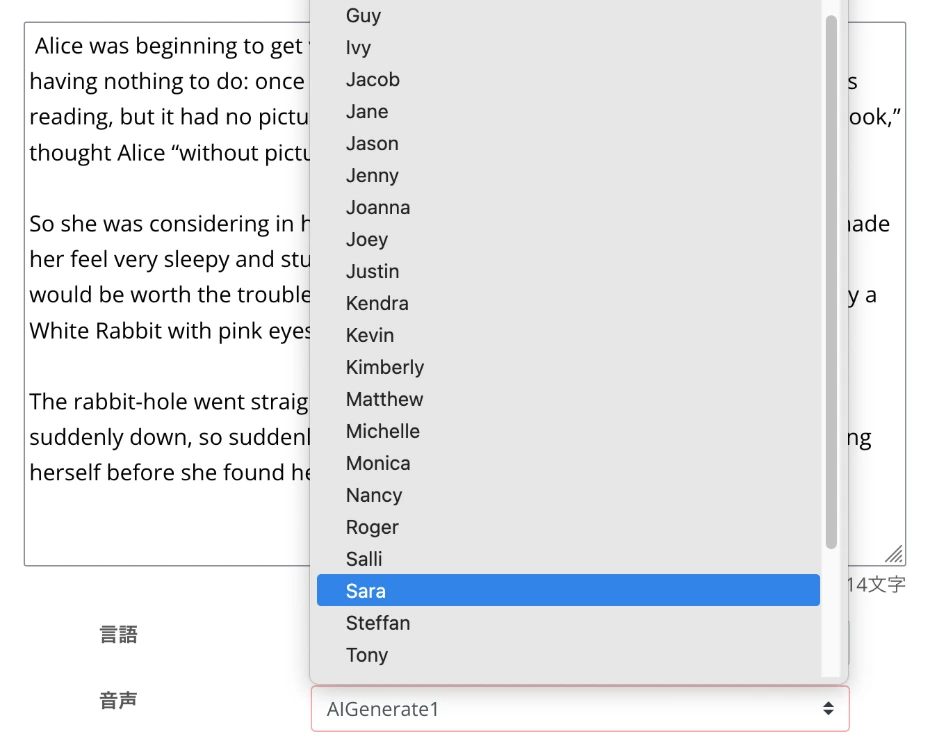
Ondoku has many voices available, including female and male voices.
Choose according to the video content, such as a friendly female voice for product introduction videos or a trustworthy male voice for company introduction videos.
For details, please also see the voice samples on this page.
For English Learning Listening! Listen to Native Pronunciation, 92 Speakers (Trial Listening). Voices of Women, Men, Girls, and Boys!
Ondoku is a text-to-speech service that can pronounce words from all over the world. You can listen to 92 types of English audio from Ondoku.
Ondoku can also adjust playback speed and pitch.
Usually, the standard settings are fine, but it is also recommended to set it slightly slower for parts where you want to emphasize important points.
Once the settings are complete, click the "Read" button to start generating English narration.
The audio generation will be completed in a few seconds.

When generation is finished, the screen display will switch and an audio player will appear.
The audio will automatically start playing, so check the content and, if there are no issues, download it as an MP3 file.
Now you have prepared English narration audio using Ondoku.
3. Editing the English Video with Video Editing Software
After downloading the English narration file generated with Ondoku, edit it in combination with video materials.
Standard video editing software includes:
- Adobe Premiere: Widely used professional-grade editing software. Requires a subscription.
- DaVinci Resolve: Professional-grade editing software that can be used for free. Developed by a video equipment manufacturer.
The audio files from Ondoku are in MP3 format, so they can be imported into either without issues.
In editing videos with English narration, timing adjustments between audio and video are very important.
Adjust the timing of cuts so that the narration content matches the information displayed on the screen.
Once editing is complete, export the video in a format suitable for YouTube.
4. Uploading the Video with English Narration to YouTube

Once the video is finished, upload the video to your YouTube channel.
The key when uploading the video is to input the title and description in English expressions suitable for native speakers.
These can also be generated with generative AI services such as ChatGPT, Claude, and Gemini.
Specifically, you just need to have the generative AI service read the English narration script file and instruct it as follows:
Based on this script, please think of a title and description for uploading the video to YouTube.
Also, setting subtitles for the YouTube video is a point.
By setting English subtitles, they can also be used as the source for automatic translation into other foreign languages.
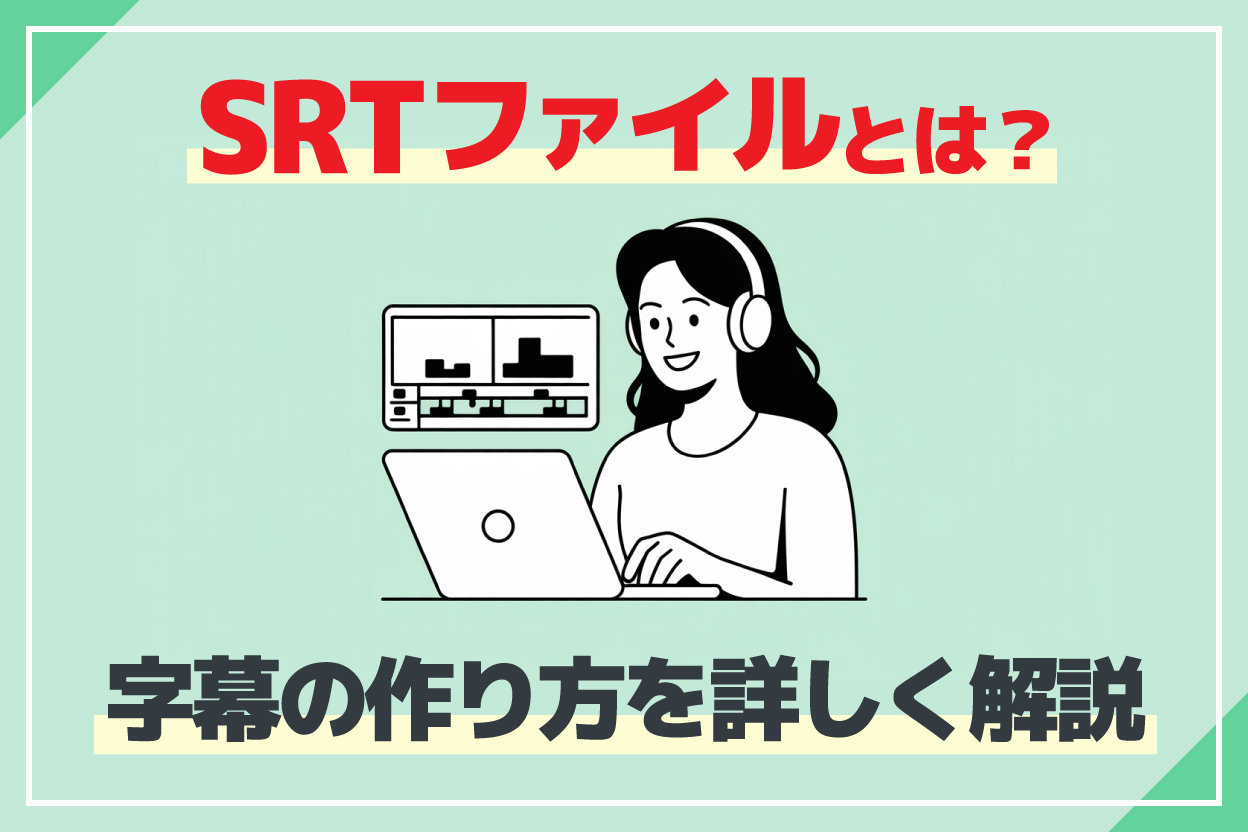
You can input subtitles yourself, but if you use the AI transcription service Mojiokoshi-san, you can easily create subtitle files (SRT files) from audio files.
We explain how to make subtitles in detail in this article, so please take a look!
This completes the flow of creating a video with English narration using the AI text-to-speech service Ondoku.
Of course, the flow is the same when making videos in other foreign languages such as Chinese, Korean, French, Spanish, and German.
With Ondoku, anyone can easily produce English/foreign language narration.
Why don't you try creating Ondoku's AI voices for yourself first?
Why Not Try Producing English/Foreign Language Narration Using the Latest AI?
English narration is indispensable for overseas expansion of YouTube videos and foreign language content production.
In the past, English narration required hiring a narrator, which necessitated high costs and long production periods.
However, with progress in AI reading technology, anyone can now easily produce English/foreign language narration.
For overseas expansion of YouTube videos and foreign language content production, we recommend trying to create English narration for free with Ondoku first!
Why don't you also experience the future of English/foreign language narration production?
■ AI voice synthesis software "Ondoku"
"Ondoku" is an online text-to-speech tool that can be used with no initial costs.
- Supports 81 languages and regions, including Japanese, English, Chinese, Korean, Spanish, French, and German
- Available from both PC and smartphone
- Suitable for business, education, entertainment, etc.
- No installation required, can be used immediately from your browser
- Supports reading from images
To use it, simply enter text or upload a file on the site. A natural-sounding audio file will be generated within seconds. You can use voice synthesis up to 5,000 characters for free, so please give it a try.

Text-to-speech software "Ondoku" can read out 5000 characters every month with AI voice for free.
You can easily download MP3s and commercial use is also possible.
If you sign up for free, you can convert up to 5,000 characters per month for free from text to speech.
Try Ondoku now.
HP:
ondoku3.com
Email: ondoku3.com@gmail.com
Email: ondoku3.com@gmail.com
Related posts
"Ondoku" is a Text-to-Speech service that anyone can use for free without installation. If you register for free, you can get up to 5000 characters for free each month. Register now for free
- What is Ondoku
- Start text-to-speech conversion
- Free registration
- Pricing
- Posts
- Try other free services
![[2026 Latest] How to Add English Narration to YouTube: Easy AI Voiceover Production](https://storage.googleapis.com/ondoku3/image/irodori-tts_tmb_140.webp)
![[2026 Latest] How to Add English Narration to YouTube: Easy AI Voiceover Production](https://storage.googleapis.com/ondoku3/image/tategaki-image-yomiage_howto_tmb_140.webp)
![[2026 Latest] How to Add English Narration to YouTube: Easy AI Voiceover Production](https://storage.googleapis.com/ondoku3/image/iphone-video-narration_tmb_140.webp)
![[2026 Latest] How to Add English Narration to YouTube: Easy AI Voiceover Production](https://storage.googleapis.com/ondoku3/image/chrome-reading-mode-pc_tmb_140.webp)
![[2026 Latest] How to Add English Narration to YouTube: Easy AI Voiceover Production](https://storage.googleapis.com/ondoku3/image/pdf-to-mp3-howto_tmb_140.webp)









