5 Best English Text-to-Speech Software: Free, Paid, & Commercial Use
[Free] 5 Best Free Text-to-Speech Software for Mac
Sept. 27, 2026
![[Free] 5 Best Free Text-to-Speech Software for Mac](https://storage.googleapis.com/ondoku3/image/Mac%E5%AF%BE%E5%BF%9C%E3%81%AE%E7%84%A1%E6%96%99%E9%9F%B3%E5%A3%B0%E8%AA%AD%E3%81%BF%E4%B8%8A%E3%81%91%E3%82%BD%E3%83%95%E3%83%885%E7%A8%AE%E9%A1%9E_930.webp)
Hello, thank you for always using Ondoku.

Text-to-speech software is so convenient, I want to use it!
But when that happens, it is a daunting task for Mac users to find software.
In fact, compared to Windows, the number of text-to-speech software compatible with Mac is very small.
This time, we will introduce text-to-speech software and websites that even such Mac users can use.
Free text-to-speech software available on Mac

Mainly these five free text-to-speech software (sites) can be used on Mac.
Ondoku

Ondoku has a wide range of free usage, and the sound quality is quite clear and easy to listen to.
Since it can be used on the website, there is no need to install it on a computer or smartphone. You can use it easily anywhere.
It also supports a wide range of foreign languages, covering 81 languages and regions.
The created audio can be downloaded immediately in MP3 format.
Commercial use is also possible.
If you are unsure about text-to-speech methods, why not try Ondoku first?
Mac standard OS software
On Mac, since OS X Yosemite (10.10), it has been possible to create synthetic voice narrations using only standard OS software.
As for the types of voices, you can choose:
- A Japanese female voice named "Kyoko"
- A Japanese male voice named "Otoya"
The setup method can be configured at:
[System Preferences] → [Accessibility] → [Speech]
You can try it on your Mac right now, so please give it a try.
Please note that if you are considering commercial use, you need to check Apple's terms of use.
Can't I use Siri?
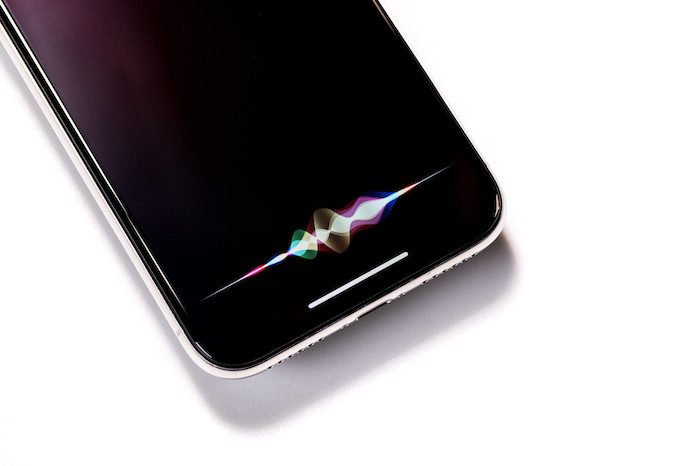
Many people want to use the voice of Siri, the AI assistant available on Mac OS.
In conclusion, although it takes some effort, it is not impossible to use.
[How to use]
- Enter the text you want to be read into a text memo
- Start Siri
- Instruct Siri to "read the memo"
However, this method depends on your Mac's environment.
Depending on Siri's state, it might read it for you, or it might not.
It really depends on Siri's mood.
It is not guaranteed to work stably, so I do not recommend it.
VOICEVOX
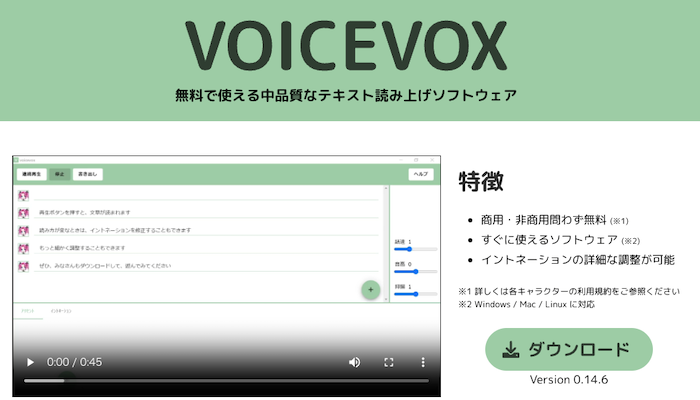
This software provides the voice of "Zundamon," famous on YouTube and other platforms.
The point is that it can also be used commercially for free.
However, since the terms of use for commercial purposes differ depending on the character used, it is recommended to check each character thoroughly before using them.
Some characters are quite relaxed, while others require prior permission from a separate office.
VOICEVOX was developed by Hiho, an engineer at "Dwango Media Village."
It is a wonderful text-to-speech software that can be used for free.

Complete Guide on How to Use VOICEVOX! Detailed Explanation from Features of Free AI Speech Synthesis Software to Commercial Use
Detailed explanation from VOICEVOX features to usage and points to note during commercial use. A complete guide to the free AI speech synthesis software that can read aloud in the voices of popular characters like Zundamon.
Yukumo!
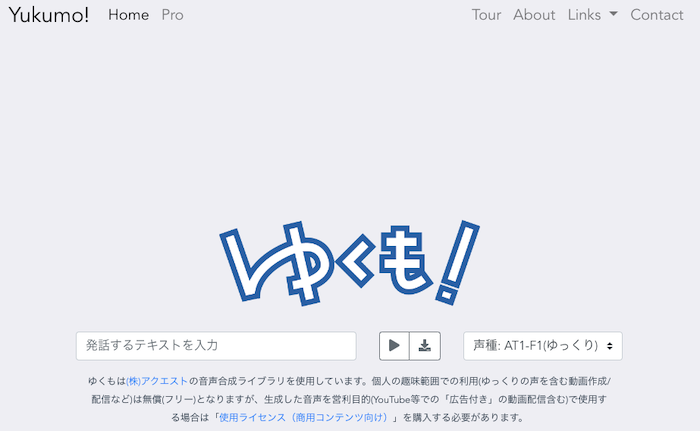
Yukumo! is a web service that can read text aloud from a browser.
Since it can be operated on the web, it can be used without worrying about the OS.
It is a free text-to-speech software made using the speech synthesis library "AquesTalk" developed and sold by Aquest Corp.
Use within the scope of personal hobbies (such as creating/distributing videos including "Yukkuri" voices) is free, but if you use the generated audio for profit-making purposes (including distribution of videos with "advertisements" on YouTube etc.), you need to purchase a "Usage License (for commercial content)".
Text-to-Speech Reader
- Mac standard OS software, "Kyoko"
- Android reading voice
is a text-to-speech site that can read aloud with these.
Since there is no mention of commercial use, it seems necessary to inquire whether it is available.
Let's try text-to-speech software
All five text-to-speech software introduced this time can be used for free.
*For personal use. Commercial use varies depending on the software/site, so please check each one.
If it's something that can be used on a website, you can use it right now just by accessing it.
The quality of Mac's standard OS software is also not to be underestimated.
For Mac users, searching for compatible software is quite an effort.
Even if you think "This software is good!" and try to use it, you cannot use it if the OS is not supported.
However, the number of text-to-speech software compatible with Mac and those that can be used on websites has increased.
It may still be difficult to make it very rich in emotion, like a human reading aloud.
Also, since Japanese has various types of character notation like Kanji, Hiragana, and Katakana, there are parts that are more difficult to read aloud than other languages.
Therefore, older text-to-speech software sometimes made reading mistakes.
However, compared to five years ago, the way of reading aloud has become much more human-like now.

As long as text-to-speech software continues to be developed, the quality of text-to-speech will continue to improve.
We are now in the future that someone dreamed of.
I, Ondoku, will also do my best to continue reading aloud wonderful voices.
Please actually try using Ondoku as well.
Well then, I look forward to meeting you.
■ AI voice synthesis software "Ondoku"
"Ondoku" is an online text-to-speech tool that can be used with no initial costs.
- Supports 81 languages and regions, including Japanese, English, Chinese, Korean, Spanish, French, and German
- Available from both PC and smartphone
- Suitable for business, education, entertainment, etc.
- No installation required, can be used immediately from your browser
- Supports reading from images
To use it, simply enter text or upload a file on the site. A natural-sounding audio file will be generated within seconds. You can use voice synthesis up to 5,000 characters for free, so please give it a try.

Text-to-speech software "Ondoku" can read out 5000 characters every month with AI voice for free.
You can easily download MP3s and commercial use is also possible.
If you sign up for free, you can convert up to 5,000 characters per month for free from text to speech.
Try Ondoku now.
HP:
ondoku3.com
Email: ondoku3.com@gmail.com
Email: ondoku3.com@gmail.com
Related posts
"Ondoku" is a Text-to-Speech service that anyone can use for free without installation. If you register for free, you can get up to 5000 characters for free each month. Register now for free
- What is Ondoku
- Start text-to-speech conversion
- Free registration
- Pricing
- Posts
- Try other free services
![[Free] 5 Best Free Text-to-Speech Software for Mac](https://storage.googleapis.com/ondoku3/image/irodori-tts_tmb_140.webp)
![[Free] 5 Best Free Text-to-Speech Software for Mac](https://storage.googleapis.com/ondoku3/image/tategaki-image-yomiage_howto_tmb_140.webp)
![[Free] 5 Best Free Text-to-Speech Software for Mac](https://storage.googleapis.com/ondoku3/image/iphone-video-narration_tmb_140.webp)
![[Free] 5 Best Free Text-to-Speech Software for Mac](https://storage.googleapis.com/ondoku3/image/chrome-reading-mode-pc_tmb_140.webp)
![[Free] 5 Best Free Text-to-Speech Software for Mac](https://storage.googleapis.com/ondoku3/image/pdf-to-mp3-howto_tmb_140.webp)









