Storage period, deletion, and precautions for text read aloud and generated audio data on Ondoku
How to use and precautions for Ondoku's delete function and bulk delete function. Deleting text and data from history and servers.
Jan. 26, 2026

In this article, we will explain how to use the function to delete text and created data from the Ondoku server.
There are two types of deletion functions.
- Delete function
- Bulk delete function
We will introduce how to use them and points to note.
How to use the Delete function and Bulk delete function
How to use the Delete function
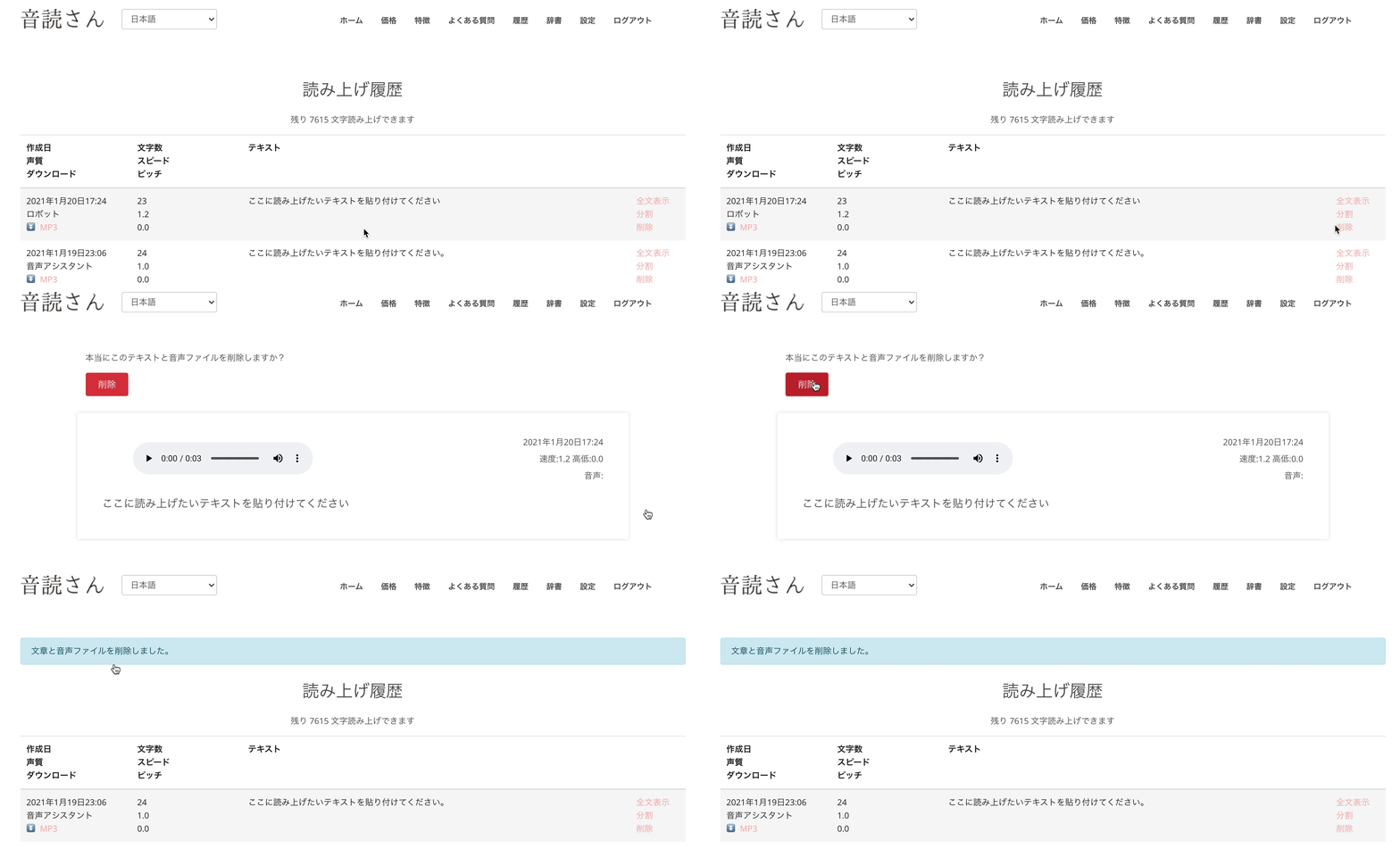
The Ondoku delete function can be used from the History.
If you look at the History, on the right side of the read-out text, there are
- Show full text
- Split
- Delete
three items.
Show full text: Displays all of the read-out text that was omitted and not visible because it was long.
Split: You can use the function to split the audio at specific intervals.
Delete: Deletes this text and the created audio data from the history and the server.
Click Delete
"Do you really want to delete this text and audio file?" will be displayed, and
click the red "Delete" button.
With this, you have successfully deleted this text and the created audio data from the history and the server.
Deletion is displayed for all texts, and each can be deleted individually.
How to use the Bulk delete function

If you want to delete all sentences at once, please use the bulk delete function.
The bulk delete function is available from the red button at the bottom of the history page
Delete all text and audio files from history
to perform a bulk deletion.
Just like the standard delete function, all used text and created audio data will be deleted from the history and the server.
When deleting data that read text from an image
If you were reading text from an image,
- The uploaded image
- The detected text
- The generated audio data
will all be deleted.
4 points to note about the Delete function
There are four points to note regarding the deletion function.
- No impact on the number of characters available for reading.
- If used for sharing, links will be broken.
- Character count will be applied again even for the same audio data.
- Since all data is deleted from the server, it cannot be restored.
1. No impact on the number of characters available for reading
Even if you use the delete function to remove previous text from your history, the number of characters available for reading will not be added back (restored).
Example:
Available characters for reading: 4,000 characters
Delete 1,000 characters from history
→ Available characters for reading remains 4,000 characters
2. If used for sharing, links will be broken
If you were using audio data with the sharing function, the links will be broken.
Also, if a player was displayed, it will no longer be playable.
3. Character count will be applied again even for the same audio data
In Ondoku, when reading a text that has been read in the past, if the settings are exactly the same, the previous data was pulled from the server and played, so the character count was not applied again.
However, if you delete it with the delete function, the past data will disappear from the server.
Therefore, even if it is a text that has been read in the past, the data cannot be referenced from the server, so it will be converted to audio while consuming character counts.
Since the read-out data is deleted, the character count will be applied again even for data that has been read at least once before.
4. Since all data is deleted from the server, it cannot be restored
Even if you have deleted it by mistake, the text and audio data have disappeared from the server.
Therefore, it is not possible to restore the deleted data.
For security measures
In this service, all pages are encrypted with SSL/TLS, so third parties cannot check the contents.
In addition, the read-out text and audio are stored on a server equipped with a strong security system and can only be viewed by the logged-in user.
However, for those who want to be as thorough as possible or those who are concerned about security, please make use of the delete function.
■ AI voice synthesis software "Ondoku"
"Ondoku" is an online text-to-speech tool that can be used with no initial costs.
- Supports 81 languages and regions, including Japanese, English, Chinese, Korean, Spanish, French, and German
- Available from both PC and smartphone
- Suitable for business, education, entertainment, etc.
- No installation required, can be used immediately from your browser
- Supports reading from images
To use it, simply enter text or upload a file on the site. A natural-sounding audio file will be generated within seconds. You can use voice synthesis up to 5,000 characters for free, so please give it a try.

Text-to-speech software "Ondoku" can read out 5000 characters every month with AI voice for free.
You can easily download MP3s and commercial use is also possible.
If you sign up for free, you can convert up to 5,000 characters per month for free from text to speech.
Try Ondoku now.
HP:
ondoku3.com
Email: ondoku3.com@gmail.com
Email: ondoku3.com@gmail.com
Related posts
"Ondoku" is a Text-to-Speech service that anyone can use for free without installation. If you register for free, you can get up to 5000 characters for free each month. Register now for free
- What is Ondoku
- Start text-to-speech conversion
- Free registration
- Pricing
- Posts
- Try other free services