How to adjust pauses and blank time in Ondoku narration [2 methods]
3 Methods to Make AI Voice "Ondoku" Pronounce Romaji Correctly
April 1, 2026

When you have AI voices read Romaji, they often don't pronounce it the way you expect.
In this article, we will explain in detail what to do in such cases to get the pronunciation you want.
There are three ways to make Romaji or coined English words be pronounced correctly.
- Use multilingual voices
- Use Japanese voices
- Use Phonics
1. Use multilingual voices
Ondoku has "multilingual" voices that are capable of speaking multiple languages.
- Language: Japanese Speaker: Jenny (Multilingual)
- Language: English (USA) Speaker: Jenny Multilingual V2, etc.
By using these voices, you can make Romaji reading smoother.
For example, prepare a sentence containing both English and Japanese like this.
how do you say thank you in Japanese? Well, the most common and standard way to say it is ありがとう.
*Please write the parts you want read as Romaji in Japanese.
When you listen to the actual audio, you can hear that both the English and Japanese are read with native pronunciation.
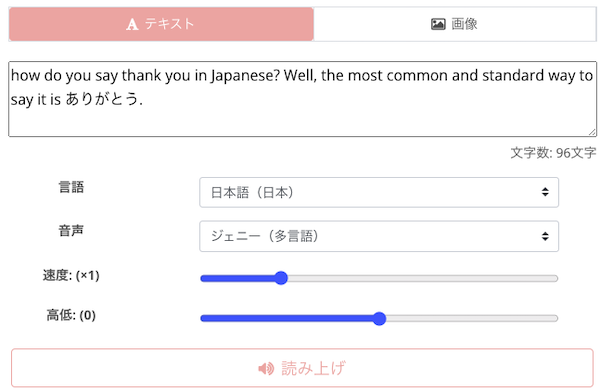
Multilingual voices support various languages, not just English and Japanese.
When you use a multilingual voice, even if you input text in multiple languages, it will read it out with the native pronunciation of each language.
Example:
"Thank you" in English
Thank you
"Thank you" in Chinese
谢谢(xièxie)
"Thank you" in Spanish
Gracias
"Thank you" in French
Merci
"Thank you" in German
Danke schön
"Thank you" in Italian
Grazie
"Thank you" in Russian
спасибо
"Thank you" in Arabic
شُكْرًا
For more details on multilingual voices, please refer to this article.

2. Use Japanese voices
Unfortunately, when English is selected as the language, there is no function to make the AI read specific strings within an English sentence as "Romaji" or "coined words" exactly as you wish.
Therefore, there is a simpler way.
That is to use a Japanese voice.
When you select the language "Japanese" and choose:
- Robot
- Voice Assistant
- Announcer A
- Announcer B
The AI will read Romaji found within English text as "Romaji."
In this case, please input English text instead of Japanese text.
Then, simply click the read aloud button, and the Romaji text you entered will be read by the specified voice.
In this way, you can easily have Romaji read aloud simply by entering Romaji text with an Ondoku Japanese voice.
However, the downside is that the English text will be pronounced with "Japanese English" (Katakana English) pronunciation.
You can listen to Japanese voices for free in this article. Please take a look.

3. Use Phonics
Another method is to use "Phonics." Phonics is a method for understanding English pronunciation and accurately memorizing spelling.
It is used by children in countries like the US and UK to learn the relationship between phonemes and the alphabet to acquire reading and writing skills.
By using Phonics, it is possible to bring Japanese sounds closer to English alphabetical notation.
Let's look at some examples.
Example: Wanting to pronounce Nagano as "Nagano" (Japanese pronunciation)
"Nagano": In this case, the Romaji notation is "Nagano".
Audio when reading the Romaji "Nagano":
Using Phonics, you can write it as "Nah-gah-no". This allows you to generate English audio in a form close to the Japanese pronunciation.
Audio when reading the Phonics "Nah-gah-no":
Example: Wanting to pronounce Shinjuku as "Shinjuku"
"Shinjuku": The Romaji notation for this is "Shinjuku".
Audio when reading the Romaji "Shinjuku":
Using Phonics, you can write it as "Sheen-joo-koo". This allows you to generate English audio in a form close to the Japanese pronunciation.
Audio when reading the Phonics "Sheen-joo-koo":
Example: Wanting to pronounce Tottori as "Tottori"
"Tottori": In this case, the Romaji notation is "Tottori".
Audio when reading the Romaji "Tottori":
Using Phonics, you can write it as "Toh-toh-ri". This allows you to generate English audio in a form close to the Japanese pronunciation.
Audio when reading the Phonics "Toh-toh-ri":
While this can be successfully applied in some cases like these examples, it cannot be applied to all cases.
However, understanding Phonics is very helpful when using the English voice system to pronounce Japanese words.
Using AI services like ChatGPT for Phonics conversion

But I don't really understand Phonics... I don't know how to write this Romaji in Phonics by myself.
That's exactly when you should use AI! It's easy and convenient if you ask ChatGPT!

People who are proficient in English might be able to convert the words they want to pronounce into Phonics notation themselves.
However, in many cases, most people "cannot write in Phonics notation."
In fact, the same goes for me.
For those people, I recommend using AI.
By using AI services like ChatGPT, you can easily convert specific Romaji into Phonics notation.
Example of a prompt for ChatGPT
Role:
You are a "Romaji to Phonics" converter.Example 1:
- Input: Nagano
- Output: Nah-gah-no
Example 2:
- Input: Shinjuku
- Output: Sheen-joo-koo
Input:
◯◯
Example:
I want the Romaji "Neko" to be pronounced as "neko". Let's use ChatGPT to get the Phonics notation.


Then, it will provide you with the Phonics notation like this.
Audio when reading the Romaji "Neko":
Audio when reading the Phonics "neh-koh":
With Romaji notation, it was pronounced like "Nee-koh", but with Phonics, it becomes the pronunciation "Neh-koh".
By making small adjustments yourself, such as removing the "h" or replacing "koh" with "co", you can get even closer to the pronunciation you desire.
Pronounce Romaji with a little bit of ingenuity
Romaji is unique to Japanese.
It takes quite a bit of effort to get people in English-speaking countries to read it as Romaji.
The same applies to AI voices. Therefore, by humans getting a little closer to the AI and being creative, you can obtain the desired results.
With the two methods introduced today:
- Use Japanese voices
- Use Phonics
Please try to get the pronunciation you want in Ondoku using these methods!
■ AI voice synthesis software "Ondoku"
"Ondoku" is an online text-to-speech tool that can be used with no initial costs.
- Supports approximately 50 languages, including Japanese, English, Chinese, Korean, Spanish, French, and German
- Available from both PC and smartphone
- Suitable for business, education, entertainment, etc.
- No installation required, can be used immediately from your browser
- Supports reading from images
To use it, simply enter text or upload a file on the site. A natural-sounding audio file will be generated within seconds. You can use voice synthesis up to 5,000 characters for free, so please give it a try.

Text-to-speech software "Ondoku" can read out 5000 characters every month with AI voice for free.
You can easily download MP3s and commercial use is also possible.
If you sign up for free, you can convert up to 5,000 characters per month for free from text to speech.
Try Ondoku now.
HP:
ondoku3.com
Email: ondoku3.com@gmail.com
Email: ondoku3.com@gmail.com
Related posts
"Ondoku" is a Text-to-Speech service that anyone can use for free without installation. If you register for free, you can get up to 5000 characters for free each month. Register now for free
- What is Ondoku
- Start text-to-speech conversion
- Free registration
- Pricing
- Posts
- Try other free services














