How to Set Up Text-to-Speech on iPhone & Android [2026 Guide]
【Ondoku】What is sharing? What are visibility settings? What happens when you use embed tags?
Jan. 26, 2026

Ondoku has many features you might not know about yet! Why not master them to make using Ondoku even more comfortable and enjoyable?
In this article, we will introduce Ondoku's features:
- Share
- Public Settings
- Embed Tags
about these topics.
[Ondoku] What is Share?
Ondoku has a feature that allows you to share the Ondoku audio you have created.
Location of the Share Button
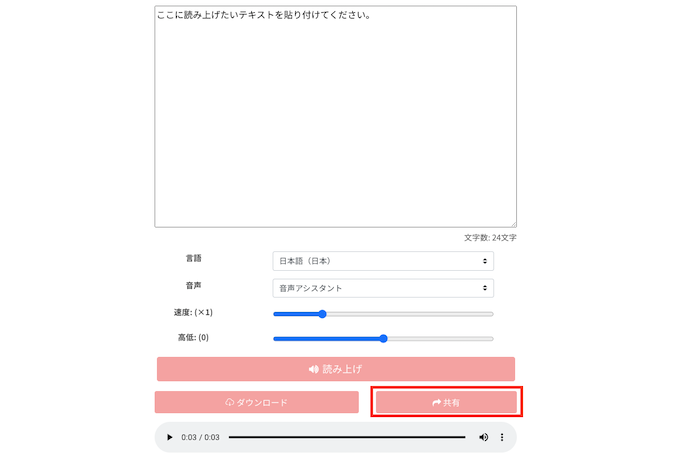
The Share button is located at the bottom of the text box, to the right of the Download button.
The button appears as soon as the audio is created after clicking the Read Aloud button.
How to Share
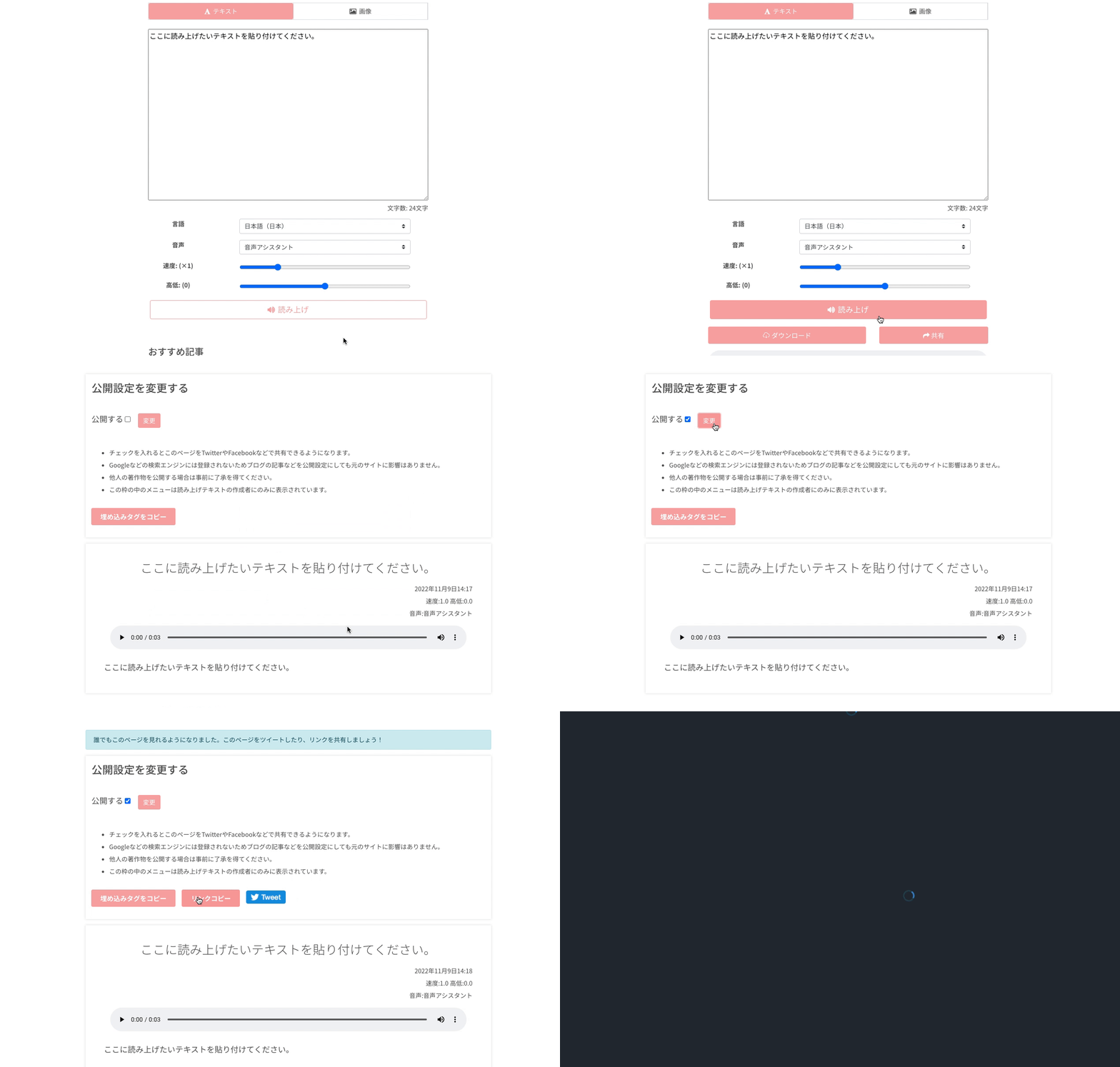
- Read aloud the text
- Click Share (also possible by showing the full text of any reading in History)
- Check "Make Public"
- Click "Update"
- Share by clicking the "Copy Link" or "Twitter" button
[Ondoku] What are Public Settings?
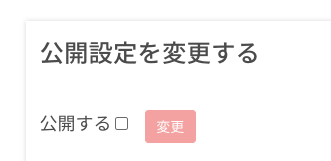
By making it public, you will be able to share it on Twitter (X), Facebook, and other platforms.
If "Make Public" is not checked, you will not be able to share it.
Clicking the URL will display the Ondoku history page.
By making it public and sharing the URL, anyone can listen to the audio created with Ondoku and view the text that was read aloud.
I want to see something that has actually been made public
Example: You can view items that have actually been made public by searching for terms like "listen to this ondoku3.com" on Twitter (X).
Is SEO okay if I make it public?
Even if it is made public, this page is set so that it is not indexed by Google.
Some people worry that if they have a blog post read aloud and then make it public, "the published text will be duplicated and affect the original site," but these public settings have no impact on search engines.
[Ondoku] What are Embed Tags?
By clicking the Embed Tag button, you can copy source code like the following with one click.
When you paste this source code into a blog or similar site, a playback bar like this will be displayed.
This tag is very convenient when you want to paste audio into a blog.
Please make use of it.
Is "Public" also required to use Embed Tags?
"Public" is not required to use Embed Tags.
You can use it simply by clicking the Copy Embed Tag button and copying the tag.
Notes when using Share, Public, and Embed Tags

If you are a free member and plan to use it for a long period, we recommend downloading the MP3 file yourself before embedding it.
If you are considering moving from a paid membership to a free membership, downloading is also recommended.
For free use, the audio storage period on Ondoku's server is 30 days. After 30 days, it will be deleted and you will no longer be able to listen to it.
If you subscribe to a paid plan (from 200,000 characters / 980 yen), the audio will be stored until the user deletes it during the subscription period.
*If you cancel, you will become a free member and the storage period will be 30 days, regardless of when it was created.
It would be a waste and a shame if you could no longer listen to the audio you worked hard to create.
Please understand the specifications and make good use of the features to enjoy using Ondoku.
■ AI voice synthesis software "Ondoku"
"Ondoku" is an online text-to-speech tool that can be used with no initial costs.
- Supports 81 languages and regions, including Japanese, English, Chinese, Korean, Spanish, French, and German
- Available from both PC and smartphone
- Suitable for business, education, entertainment, etc.
- No installation required, can be used immediately from your browser
- Supports reading from images
To use it, simply enter text or upload a file on the site. A natural-sounding audio file will be generated within seconds. You can use voice synthesis up to 5,000 characters for free, so please give it a try.

Text-to-speech software "Ondoku" can read out 5000 characters every month with AI voice for free.
You can easily download MP3s and commercial use is also possible.
If you sign up for free, you can convert up to 5,000 characters per month for free from text to speech.
Try Ondoku now.
HP:
ondoku3.com
Email: ondoku3.com@gmail.com
Email: ondoku3.com@gmail.com
Related posts
"Ondoku" is a Text-to-Speech service that anyone can use for free without installation. If you register for free, you can get up to 5000 characters for free each month. Register now for free
- What is Ondoku
- Start text-to-speech conversion
- Free registration
- Pricing
- Posts
- Try other free services














