Recommended Text-to-Speech Software Summary: 7 Selections for Commercial Use [Free and Paid]
Let's Create Inbound Videos! A Detailed Guide on How to Make Them, From Translation to Audio Creation
April 1, 2026

How can I appeal to inbound tourists with videos?

If you want to appeal to inbound tourists about your shop, facility, or local sightseeing spots, video production is recommended.
But are you unsure how to make videos for foreigners who don't speak Japanese?
In such cases, translation and audio creation using the latest AI is ideal!
With AI translation services and AI reading services, anyone can easily create foreign language text and audio for free!
Why not try producing videos for inbound tourists by referring to the creation methods explained in this article?
Recommended reading services for inbound video production
There is a reading service recommended for producing videos for inbound tourists.
That is 『Ondoku』.
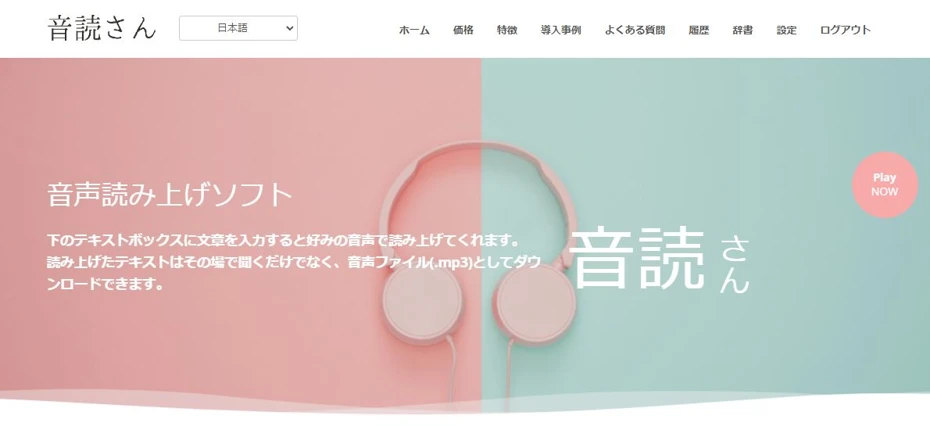
『Ondoku』 is a web service that allows anyone to easily create reading audio using the latest AI.
It can read in languages of countries and regions with many inbound tourists, such as English, Korean, and Chinese.
What's more, 『Ondoku』 is free!
- Without registration: 1,000 characters
- With registration: 5,000 characters
Since you can read for free up to these limits, you can create audio for videos promoting shops, facilities, and local tourist spots for free.
If you want to make inbound videos, why not try reading foreign languages for free using 『Ondoku』?
Let's make an inbound video!

I want to increase inbound customers!
Many of you may be thinking about promoting shops or facilities or attracting more inbound tourists to your local area.
Actually, making videos for inbound tourists is very easy!
Inbound tourists are steadily increasing

Don't many of you feel that you see more foreign tourists than before while walking around town?
Actually, inbound tourists to Japan are increasing steadily.
For example, according to the JTB Tourism Research & Consulting Co., the number of foreign visitors to Japan in July 2024 was about 3.29 million, the highest ever for a single month!
In addition to famous tourist spots like Tokyo, Kyoto, and Osaka, inbound tourists visiting regional areas are also on the rise.
We recommend appealing in the native language of inbound tourists

But inbound customers aren't coming at all~
Just because the number of foreign tourists visiting Japan has increased doesn't mean that the number of customers at all shops and facilities will increase.
What's important is to appeal using foreign languages.
Just as most Japanese traveling abroad cannot speak English, inbound tourists visiting Japan do not understand Japanese.
Therefore, it is necessary to promote shops, facilities, and local tourist spots using the native languages of inbound tourists, such as English, Korean, and Chinese.
Appeal to inbound tourists using videos!

Using videos and SNS is recommended for appealing to inbound tourists!
Just as Japanese people watch sites like YouTube, Instagram, and TikTok, inbound tourists also watch video sites and SNS in their own languages.
By producing and posting videos in English, Korean, Chinese, etc., you can generate interest among inbound tourists visiting Japan!
Making videos in foreign languages might seem difficult, but actually, you can easily produce them using AI!
Since this article explains how to make them in detail, why not try producing an inbound video?
Inbound videos are also recommended for counteracting overtourism
Video production is also recommended for those who already have many inbound tourists and are troubled by overtourism.
When producing a video to introduce shops, facilities, or local tourist spots, also introduce the rules and manners you want them to follow.
By doing so, you can naturally convey rules and manners to interested inbound tourists.
![[Archive Edition] Solve Inbound x Overtourism issues! Multilingual guidance methods using the latest AI tools | Text-to-speech software Ondoku](https://storage.googleapis.com/ondoku3/image/20241215_inbound_overtourism_tmb_930.webp)
How to make inbound videos

Tell me how to make inbound videos!
For producing videos for inbound audiences, using AI is recommended!
By using the latest AI services, you can translate Japanese to produce subtitles and scripts, and create video audio with native pronunciation!
- Recommended languages for inbound videos
- How to make a script
- Translation method
- How to create foreign language audio
- Points when posting a video
I will explain these in detail!
Recommended languages for inbound videos
Which languages should I use for inbound videos?

What is important in producing videos for inbound tourists is which language to choose.
According to the JTB Tourism Research & Consulting Co. website, the TOP 5 inbound tourists in July 2024 are:
- China (approx. 780,000)
- South Korea (approx. 760,000)
- Taiwan (approx. 570,000)
- Hong Kong (approx. 280,000)
- USA (approx. 250,000)
in that order.
As you can see from this data, many inbound tourists come to Japan from Chinese-speaking regions and South Korea.
Also, of course, support for English, which is used in many countries besides the United States, is essential.
Therefore, it is recommended to produce videos in:
Chinese language videos can also appeal to inbound tourists from Singapore and Malaysia!
How to make inbound videos: Script edition
When making a video for inbound tourists, first try making a script.
By creating a script in text format, you can use it to AI-translate and create foreign language subtitles and foreign language scripts for your inbound video.
We also recommend transcribing audio recorded on a smartphone to create a script

If you have written text to introduce your shop, facility, or local tourist spot yourself, you can use that.
If writing a script is difficult, we recommend speaking while recording with your smartphone about the points you want to appeal.
Audio recorded on a smartphone can be converted to text (transcribed) using AI.
Transcription of recorded audio is also possible for free!
If you are unsure about the transcription method, the AI transcription service 『Mojiokoshi-san』 is recommended.
When writing text is difficult, this creation method is recommended:
- Record the appeal points on your smartphone
- Convert to text with an AI transcription service (such as 『Mojiokoshi-san』)
- Edit unnecessary parts
How to make inbound videos: Translation edition

Once the script is ready, next translate it into English, Chinese, and Korean.
When translating scripts and subtitles for video production, we recommend using AI translation services.
I will explain how to create foreign language scripts using AI translation for each language!
Recommended translation method for English
When translating English, we recommend using the classic AI translation service, DeepL.

As it is the most famous service among AI translation services, the accuracy of English translation is very good.
However, since there are cases where the translation is paraphrased or content is omitted without permission:
- Try translating the translated English text back into Japanese
- If it doesn't work well, try breaking the sentences into smaller pieces
Let's try creating a translation script through this flow.
For other languages as well, it is recommended to re-translate into Japanese and check!
Recommended translation method for Chinese
Chinese can be translated with DeepL, but in DeepL:
Japanese → English → Chinese
Since the processing is done by sandwiching English in between (relay translation), the accuracy is not very high compared to English.
Therefore, we recommend the Chinese translation service, Baidu Translate (百度翻译).
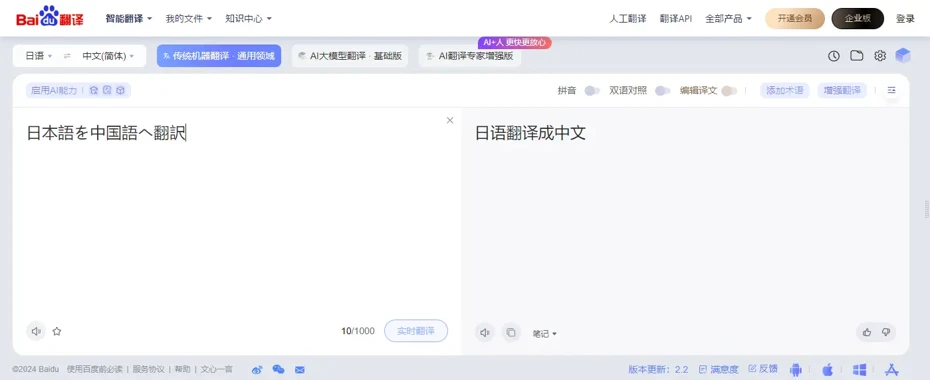
Baidu Translate is a service operated by the developer of "Baidu", the largest search engine in China, and can translate with very high accuracy using AI.
It supports translation not only into Simplified Chinese used in mainland China, but also into Traditional Chinese used in Taiwan and Hong Kong.
![[2025 Latest] 12 free Chinese translation and text-to-speech services | Text-to-speech software Ondoku](https://storage.googleapis.com/ondoku3/image/chinese-translate-tts-2025-tmb_930.webp)
Recommended translation method for Korean
For the same reason as Chinese, it is recommended to use a Korean-born translation service for Korean translation rather than DeepL.
For Korean translation, the AI translation service provided by Naver, Papago, is convenient.

Naver is a major Korean IT company also known as the developer of LINE.
Since Korean grammar is very similar to Japanese, it is possible to translate with very high accuracy.
How to make inbound videos: Reading edition
Once the foreign language script is ready, create audio using an AI reading service.
I will explain how to create foreign language audio using the AI reading service 『Ondoku』.
1. Open the Ondoku top page
First, open the top page of 『Ondoku』 from here.
『Ondoku』 is a web service, so no installation is required; you can read just by entering text on the top page.
2. Enter text

Paste the script text into the text box.
3. Select language
Select the language.
For English, you can choose:
- American English
- British English
- Australian English
- Indian English
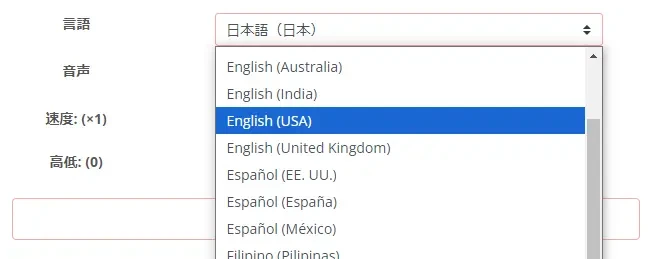
For Chinese, you can choose:
- Mandarin (Mainland China standard)
- Guoyu (Taiwan standard)
- Cantonese

For Korean, you can choose the standard language used in the Republic of Korea.

4. Select voice
Select the voice to use for reading.

For every language, you can select various voices such as male, female, and child.
5. Start audio generation
Press the "Read" button to start audio generation.

For audio long enough for one video, generation is completed in just a few seconds.
6. Audio generation complete
When reading is complete, an audio player will be displayed on the screen, and you can check the reading result.

By pressing the "Download" button, you can save the audio file in MP3 format.
Now, you have created foreign language audio for video production.
7. Video production using audio files
After that, you just need to produce the video using the created audio files.
If you find editing difficult, it is fine to just layer the audio file over a video you filmed of the shop, facility, or tourist spot you want to promote.
We recommend starting by producing videos with simple creation methods!
As you can see, creating foreign language audio is very easy, so why not try making an inbound video using 『Ondoku』 while referring to the explained creation method?
Points when posting a video

I will briefly explain points when posting the produced video to YouTube.
1. Enter the video title and description in a foreign language
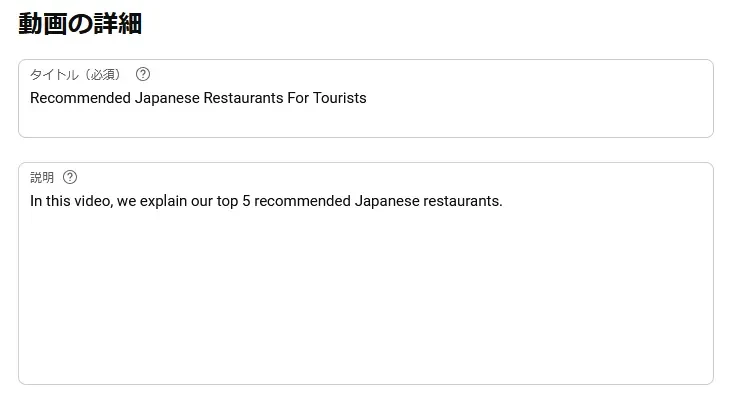
By entering the video title and description in a foreign language, you can get more users to watch your video.
Just as when you made the script, we recommend using AI translation services.
2. Set the language of the video
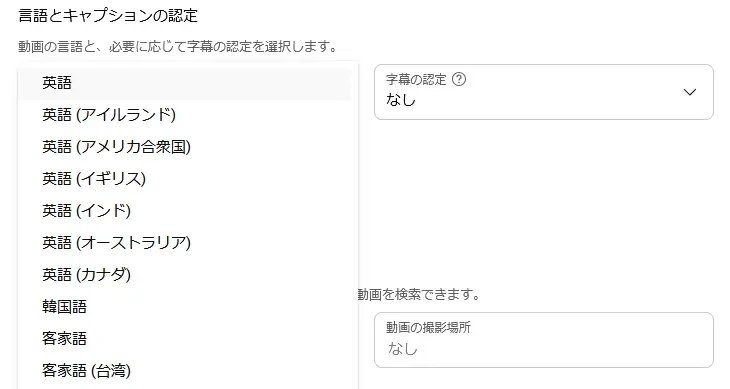
When posting a video to YouTube, it is also important to set the language in the settings screen.
By setting the language of the video, it becomes easier for the video to be suggested to users of that language.
Also, setting the language allows YouTube's automatic subtitle function to be used, which improves accessibility and allows more users to watch.
3. We recommend setting the language and foreign language titles even for Japanese videos

Finally, if you have already posted Japanese videos, we recommend setting:
- Video language
- Foreign language video title and description
for those videos as well.
By setting the language for a YouTube video, you can use not only automatic subtitles but also the automatic translation function, increasing the possibility that foreign users will watch with automatic subtitles.
Also, in addition to the main language, you can set foreign language titles and descriptions for YouTube videos.
Foreign language titles and descriptions can be added from the video menu via:
Subtitles → Add language → Title and description
How to set foreign language titles and descriptions
Select "Subtitles" from the menu.
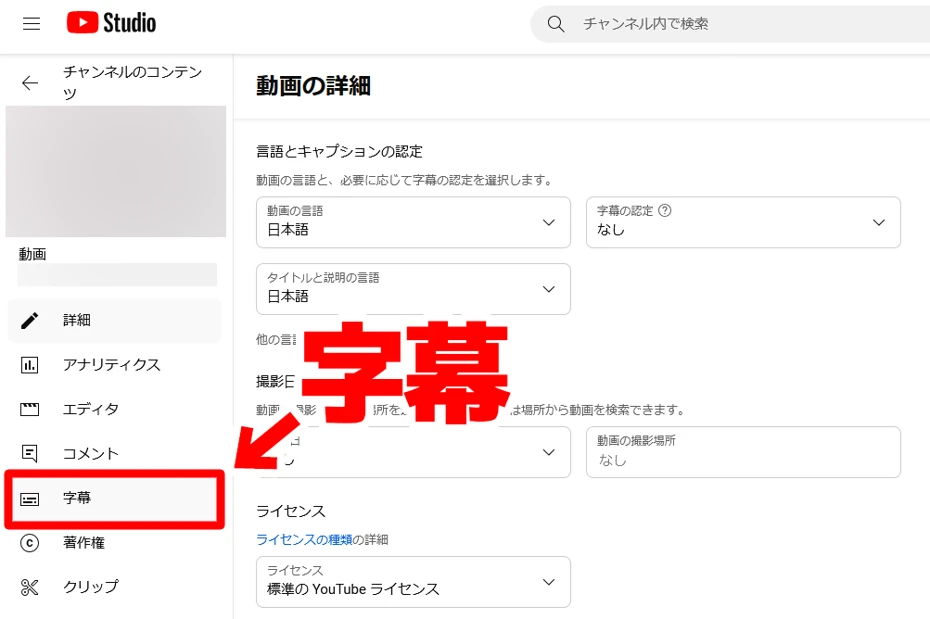
Then, the subtitle list screen opens.
In this example, Japanese subtitles automatically generated by YouTube are displayed.

Press "Add language" and choose the language you want to add.

Language has been added.
Hover the mouse cursor over "Title and description" on the right side of the menu and select "Add".

The editing screen for the foreign language title and description opens.

Enter the content and press "Publish".
Now the setting of the foreign language title and description is complete.
In this way, if you want to appeal to inbound tourists, we recommend setting titles and descriptions in English, Chinese, and Korean even for Japanese videos.
■ AI voice synthesis software "Ondoku"
"Ondoku" is an online text-to-speech tool that can be used with no initial costs.
- Supports approximately 50 languages, including Japanese, English, Chinese, Korean, Spanish, French, and German
- Available from both PC and smartphone
- Suitable for business, education, entertainment, etc.
- No installation required, can be used immediately from your browser
- Supports reading from images
To use it, simply enter text or upload a file on the site. A natural-sounding audio file will be generated within seconds. You can use voice synthesis up to 5,000 characters for free, so please give it a try.

Text-to-speech software "Ondoku" can read out 5000 characters every month with AI voice for free.
You can easily download MP3s and commercial use is also possible.
If you sign up for free, you can convert up to 5,000 characters per month for free from text to speech.
Try Ondoku now.
HP:
ondoku3.com
Email: ondoku3.com@gmail.com
Email: ondoku3.com@gmail.com
Related posts
"Ondoku" is a Text-to-Speech service that anyone can use for free without installation. If you register for free, you can get up to 5000 characters for free each month. Register now for free
- What is Ondoku
- Start text-to-speech conversion
- Free registration
- Pricing
- Posts
- Try other free services














