Best Text-to-Speech Software: 7 Free & Paid Tools for Commercial Use
Filipino (Tagalog, Visayan, Cebuano) Pronunciation & Listening: 6 Native Speakers
Aug. 30, 2026

- I want a narration in Tagalog.
- Is there something that can read words and sentences aloud for studying Visayan?
For those of you who feel this way, we recommend Ondoku.
Here, you can listen to audio samples (trial listening) of Philippine languages (Tagalog, Visayan, and Cebuano) on Ondoku.

Please find the voice that suits your preference.
If you want to listen to the audio right away, please check out "Listen to Philippine Language Audio (Tagalog, Visayan, Cebuano)".
Types of Philippine Language Voices on Ondoku
The voices include both female and male options.
- Filipino (Philippines): 6 types
Male: 3 types
Female: 3 types
The six speakers each have their own unique pronunciation, allowing you to hear realistic Philippine language audio.
- Speed: A function to make the speech faster or slower.
- Pitch: A function to make the voice higher or lower.
These functions are also available. Changing the settings can alter the impression and make the audio easier to understand.
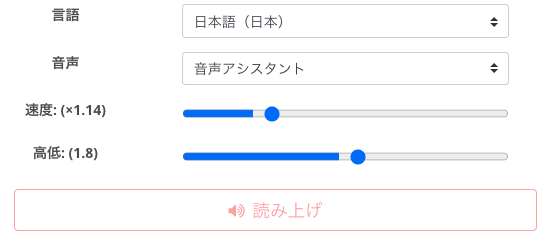
Please find the voice and settings that are easiest for you to listen to.

Listen to Philippine Language Audio Samples (Tagalog, Visayan, Cebuano) on Ondoku

This is the text that was read aloud.
Tagalog

Visayan (Cebuano)

The settings are Speed: 1, Pitch: 0. The audio is so realistic you can almost hear the breathing, so please give it a listen.
To me, it feels like not only Tagalog but also Visayan (Cebuano) are pronounced natively, so I am introducing it here as capable of reading Visayan as well. If this information is incorrect, please let us know via the contact form to help us provide better audio.
Filipino (Philippines): 6 types
Speaker Name
Tagalog
Visayan (Cebuano)
Angelo: Male
Blessica: Female
fil-PH-A: Female
fil-PH-B: Female
fil-PH-C: Male
fil-PH-D: Male
Utilize AI Voice for Work and Study
"I can't believe AI voice can pronounce things this well!"
The level of perfection is surprising. It's as if someone is actually reading to you.
On Ondoku, you can do more than just read Philippine language text aloud; we also offer a "Conversation Function" that allows you to create audio files perfect for listening and shadowing, such as:
- Conversations between men and women
- Alternating between Tagalog and English

How to use Ondoku's conversation/dialogue function. Make listening materials and long text creation even more convenient with speech synthesis!
How to use Ondoku's conversation function! Explaining how to use the conversation function with images. Introducing specific examples of what the conversation function can be used for.
![[Complete Guide] What is the English shadowing method? Explaining how to create materials for free!](https://storage.googleapis.com/ondoku3/image/20250522_shadowing_tmb_02_930.webp)
[Complete Guide] What is the English shadowing method? Explaining how to create materials for free!
Efficiently improve your English skills with shadowing! Explaining a learning method for beginners that improves listening, pronunciation, and speaking at the same time. Also introduces how to create materials with free AI voices.
When asking someone to read for pronunciation practice, you might feel awkward or hesitant asking them to repeat it many times.
However, because it's AI, no matter how many times it reads or how much it repeats, it won't get grumpy or troubled, and you don't need to worry about being a burden.
With AI voice precision reaching this level, I feel that Ondoku's audio can be useful in various situations.
- Dialogue between characters
- Challenging new ideas
- Creating YouTube videos in Philippine languages
- Listening practice for Philippine language tests and exams
Various uses like these are expected.
How will you use this voice?
An increasing number of people are using it for work presentations, narrations, and training materials.
Even though it is AI voice, it is very close to native pronunciation. By listening to native-like pronunciation, you can acquire correct pronunciation.
By using Ondoku's voices, it becomes a very useful teaching material for learners of Philippine languages.
Please use it to check pronunciation and improve your listening skills.
First, try out the samples and find the voice that you like.
■ AI voice synthesis software "Ondoku"
"Ondoku" is an online text-to-speech tool that can be used with no initial costs.
- Supports 81 languages and regions, including Japanese, English, Chinese, Korean, Spanish, French, and German
- Available from both PC and smartphone
- Suitable for business, education, entertainment, etc.
- No installation required, can be used immediately from your browser
- Supports reading from images
To use it, simply enter text or upload a file on the site. A natural-sounding audio file will be generated within seconds. You can use voice synthesis up to 5,000 characters for free, so please give it a try.

Text-to-speech software "Ondoku" can read out 5000 characters every month with AI voice for free.
You can easily download MP3s and commercial use is also possible.
If you sign up for free, you can convert up to 5,000 characters per month for free from text to speech.
Try Ondoku now.
HP:
ondoku3.com
Email: ondoku3.com@gmail.com
Email: ondoku3.com@gmail.com
Related posts
"Ondoku" is a Text-to-Speech service that anyone can use for free without installation. If you register for free, you can get up to 5000 characters for free each month. Register now for free
- What is Ondoku
- Start text-to-speech conversion
- Free registration
- Pricing
- Posts
- Try other free services














