How to cancel the Ondoku paid plan
How to purchase Ondoku paid plans (Basic, Value, Premium, Business).
April 1, 2026

Ondoku offers both free and paid plans.
We recommend subscribing to a plan that suits your usage and purpose.
In this article, we will explain how to purchase a paid Ondoku plan with images.
Ondoku Free Plans
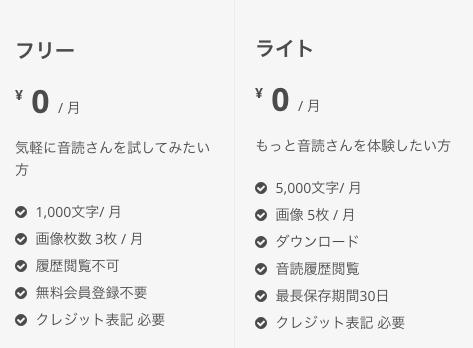
- Free Plan (No registration required)
- Light Plan (Free member)
Ondoku Paid Plans
- Basic Plan
- Value Plan
- Premium Plan
- Business Plan (Basic)
- Business Plan (Value)
- Business Plan (Premium)
You can find information about each Ondoku plan and its features on this page.
How to purchase an Ondoku paid plan
There are two main ways to purchase Ondoku.
- Credit card / Debit card payment (via Stripe)
- Direct bank transfer via invoice (Annual payment only)
Precautions for bank transfers
For annual contracts via bank transfer with an invoice, automatic renewal is not performed.
If you wish to renew, please issue an invoice again and make the transfer.
In case of Credit card / Debit card payment (via Stripe)
1. Access the Pricing page
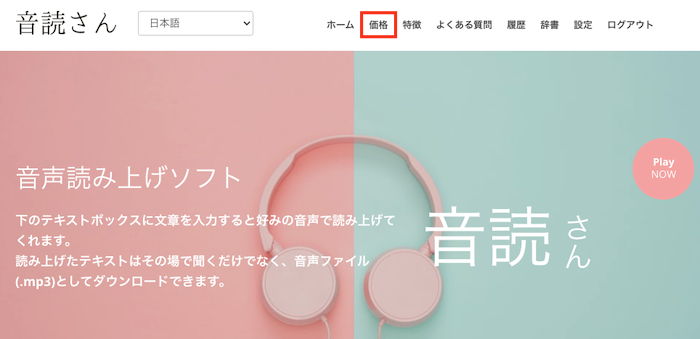
Ondoku: Click here for the pricing page
2. Click "Purchase" for the plan you wish to buy
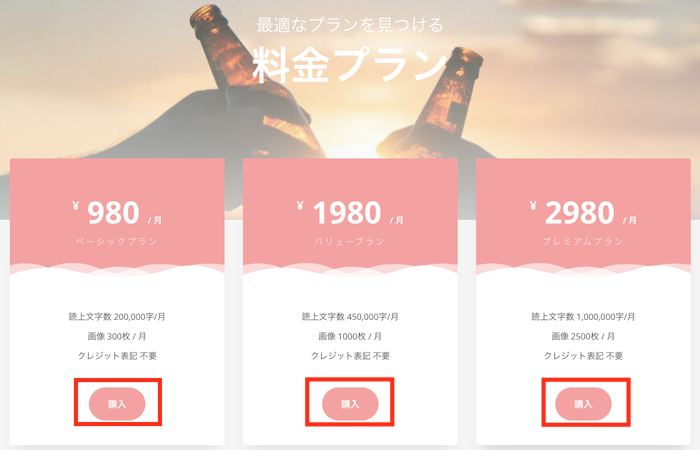
3. Enter the required information
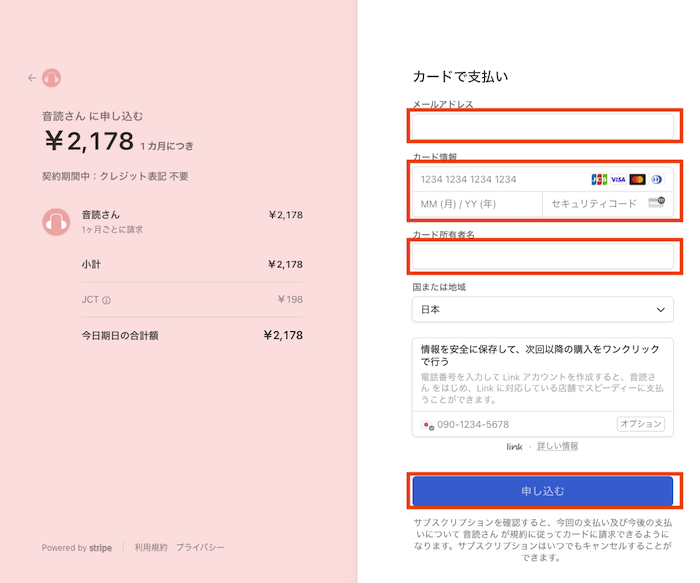
Enter the required information in order.
- Enter your preferred email address
- Enter card information
Please fill in all the blanks. - Enter the cardholder's name
- Set the country or region
Please select your country. - Save information for secure one-click checkout
Purchase is possible without checking this box.
If you need it, check the box and enter your phone number. - Click "Subscribe"
Once the required information is entered, the subscribe button will become clickable.
Confirm the details, and if there are no errors, click to complete the purchase.
*After pressing the "Subscribe" button, you will be automatically redirected. Please do not close the window or press the back button.
This completes the purchase of each plan.
Post-purchase flow
After the purchase is complete, you will receive an email from Ondoku (domain: @ondoku3.com) with the subject "Thank you for your subscription."
The number of characters available for text-to-speech is usually reflected within 1 to 3 minutes.
If the character count is not reflected even after more than 5 minutes, please contact us through the inquiry form.
You can check if the character count has been updated in your "History."
You can check if the plan has been applied under "Usage Plan" in "Settings."
About Qualified Invoices and Receipts
For those who wish to receive a receipt,
- Receipt email
- Usage Statement and Receipt issued by Ondoku
will serve as your receipt.
Please check here for detailed instructions on how to issue them.
Direct bank transfer via invoice (Annual payment only)
Ondoku offers payment via direct bank transfer for annual contracts for cases where:
- You want to make a direct bank transfer as a corporation
- You are unable to pay by credit card
- Stripe payments are not suitable
Detailed issuance methods and precautions are introduced in the article below.
We apologize for the inconvenience, but please check here.

Other precautions for paid plans
About Automatic Renewal
Monthly plans are recurring payments with automatic renewal.
Also, if you pay for a Business Plan using Stripe (credit card, debit card, LINK, etc.), it will be a recurring payment with automatic renewal.
You cannot turn off only the automatic renewal. If you do not wish to continue, please complete the cancellation procedure.
Please check this article for payment timing and how to change plans.

Expiration date for characters and images
There is an expiration date for the purchased number of characters and images.
Any unused characters or images remaining on the next renewal date will be reset every month and will not be carried over to the next month.

Isn't the automatic renewal of the paid plan exactly every 30 days?
When spanning months that have 28 or 31 days, payments may not occur exactly every 30 days. It might be processed on the 29th day or the 31st day.
Please check the exact next payment date in the email sent from Stripe at the time of purchase.
Please check the exact next payment date in the email sent from Stripe at the time of purchase.

If you want to "use it for only one month" or "don't want to renew on the next renewal date but want to use it until the last minute," please cancel early. You can continue to use your current plan until the next renewal date even after cancellation.
If you have any other questions, please feel free to contact us.
Thank you for your continued support.
■ AI voice synthesis software "Ondoku"
"Ondoku" is an online text-to-speech tool that can be used with no initial costs.
- Supports approximately 50 languages, including Japanese, English, Chinese, Korean, Spanish, French, and German
- Available from both PC and smartphone
- Suitable for business, education, entertainment, etc.
- No installation required, can be used immediately from your browser
- Supports reading from images
To use it, simply enter text or upload a file on the site. A natural-sounding audio file will be generated within seconds. You can use voice synthesis up to 5,000 characters for free, so please give it a try.

Text-to-speech software "Ondoku" can read out 5000 characters every month with AI voice for free.
You can easily download MP3s and commercial use is also possible.
If you sign up for free, you can convert up to 5,000 characters per month for free from text to speech.
Try Ondoku now.
HP:
ondoku3.com
Email: ondoku3.com@gmail.com
Email: ondoku3.com@gmail.com
Related posts
"Ondoku" is a Text-to-Speech service that anyone can use for free without installation. If you register for free, you can get up to 5000 characters for free each month. Register now for free
- What is Ondoku
- Start text-to-speech conversion
- Free registration
- Pricing
- Posts
- Try other free services














