Ondoku payment methods (credit cards, debit cards, bank transfers) and receipts
Ondoku | How to Pay for a Paid Plan by Bank Transfer: Quotes, Invoices, and Receipts
Nov. 11, 2026

With Ondoku,
- those who cannot pay by credit or debit card
can pay by direct bank transfer under an annual contract.
You can easily issue an invoice or quote for an annual bank transfer from the settings page in Ondoku.
All Ondoku invoices and receipts comply with the invoice system (qualified invoice issuer registration number).

Important Notes About Ondoku Annual Contracts
- Your plan will be activated within 24 hours after payment is confirmed.
- If your username and the name of the remitter differ, your plan will not be activated unless you contact us.
- Ondoku accepts bank transfers for annual payments only.
- There is no discount for annual payments.
- We cannot issue refunds for cancellations made during the contract period.
- We cannot accommodate plan changes during the contract period.
- Quotes and invoices with no payment or contact for over three months will be deleted as expired.
- Bank transfers are not automatically renewed.
If you wish to continue from the second year onward, please have an invoice issued again and make the payment.
In this case, too, your plan will be activated within 24 hours after payment is confirmed. Please note that this does not renew from the expiration date.
If you would like your renewal to take effect on the expiration date, please contact us in advance.
How to Issue a Quote or Invoice in Ondoku
- Sign up for a free Ondoku account
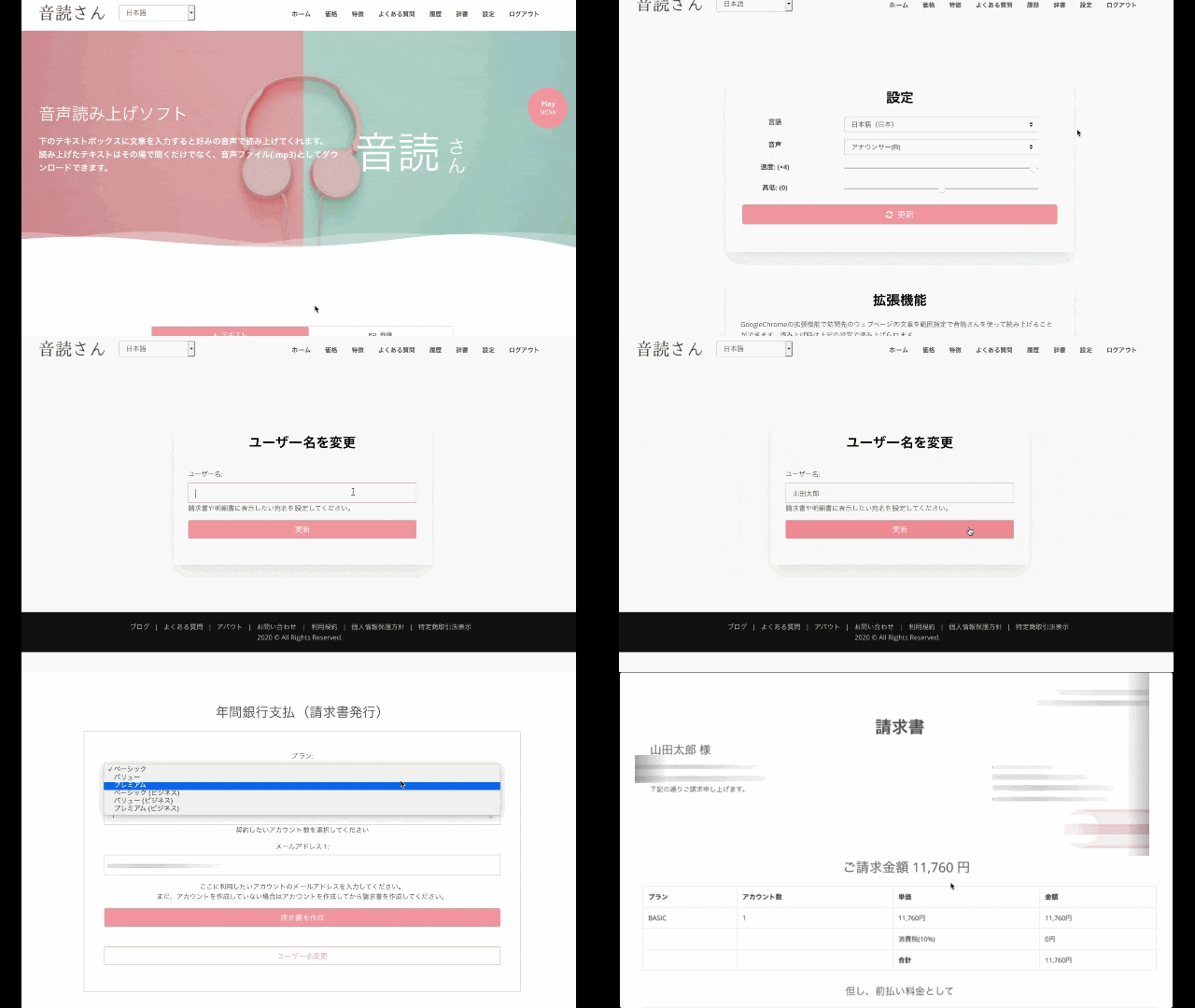
- From Ondoku settings, select “Payments → Annual bank transfer” to issue a quote or invoice.
(The quote and invoice are issued at the same time.) - Review the invoice details and transfer the invoiced amount to the designated account.
※ Invoices can only be issued when the display language is set to Japanese.
※ The customer is responsible for transfer fees.
※ If you have a monthly subscription, cancel it before making the transfer.
Otherwise, you will be charged twice.
Once your transfer has been confirmed, your plan will generally be activated within 24 hours.
If your username and the name of the remitter differ, we cannot confirm your payment. Be sure to notify us through the contact form.
Quotes and invoices with no payment or contact for over three months will be deleted as expired.
※ If you are in a hurry, you can have your plan activated before the payment arrives by telling us the approximate payment date.
In that case, please issue an invoice and then contact us through the contact form.
Please note that if we cannot confirm your payment within three days of the date you provide, your account will be suspended.
※ If your requested start date is after the payment date, please notify us by email at least three business days in advance. We cannot accommodate requests if your message and payment arrive in a different order.
(Example) Payment on March 20 → Requested service start date: April 1
Please notify us by email three business days before March 20.
We cannot accommodate requests sent by email on March 20 itself.
Template for Contacting Us About Your “Requested Service Start Date”
Subject: Requested Start Date for Annual Contract
I am contacting you to let you know my requested start date for my Ondoku annual contract.
Invoice number:
Requested service start date: YYYY/MM/DD
Expected payment date: YYYY/MM/DD
※ Normally, your plan starts after payment. However, if you provide your expected payment date, you can start using the plan before payment on your requested date.
※ If your requested start date is after the payment date, please notify us by email at least three business days in advance. We cannot accommodate requests if your message and payment arrive in a different order.
Annual Contract Pricing
[Standard Paid Plan Pricing]
- Basic plan: ¥980 × 12 months = ¥11,760 (+ tax)
Annual character limit: 2.4 million characters - Value plan: ¥1,980 × 12 months = ¥23,760 (+ tax)
Annual character limit: 5.4 million characters - Premium plan: ¥2,980 × 12 months = ¥35,760 (+ tax)
Annual character limit: 12 million characters
For more information about annual contracts, see here.

[Business Plan Pricing]
License valid for one year
Per account
- Basic: 2.4 million characters → ¥120,000 (+ tax)
- Value: 5.4 million characters → ¥240,000 (+ tax)
- Premium: 12 million characters → ¥360,000 (+ tax)
See here for details about the business plan.

Your Username Is the Invoice Recipient
Your username will appear as the recipient on your invoice.
If you entered your username incorrectly, you can change it by:
- Clicking “Change username”
- Entering your preferred username
- Clicking “Register”
Your username will then be changed.
A quote is issued at the same time as the invoice, so you can easily download one if you need it for an internal approval process.
If your username and the name of the remitter differ, we cannot confirm your payment. Be sure to notify us through the contact form.
If You Accidentally Create Multiple Invoices
Creating an invoice is easy and only takes one click.
Because of this, you may accidentally create an invoice you don’t need.
You cannot delete or cancel invoices yourself.
If you accidentally create multiple invoices, please contact us through the contact form to request that they be deleted.
Quotes and invoices with no payment or contact for over three months will be deleted as expired.
If You Make a Payment While Multiple Invoices Exist
If we receive a payment while multiple invoices exist and no invoice number is provided, we will activate the plan on the most recent invoice for the relevant plan.
Designated Bank Account
The designated bank for transfers is Sumitomo Mitsui Banking Corporation.
Other accounts are currently being prepared.
You can transfer from other banks using the branch name and account number. Transfers between Sumitomo Mitsui Banking Corporation accounts are also easy.
Other than Sumitomo Mitsui Banking Corporation, we currently have a Docomo SMTB Net Bank account. If you would like to use it, please contact us.
When Your Plan Takes Effect
Once your transfer has been confirmed, your plan will generally be activated within 24 hours.
If your username and the name of the remitter differ, we cannot confirm your payment. Be sure to notify us through the contact form.
※ If you are in a hurry, you can have your plan activated by telling us the approximate payment date, even before the payment arrives.
In that case, please issue an invoice and then contact us through the contact form.
Please note that if we cannot confirm your payment within three days of the date you provide, your account will be suspended.
For annual plans paid by direct bank transfer, the system will display your plan as a “Free Plan.”
This is because annual plans do not have a payment ID, such as the one generated by credit card payments, which the system requires.
Rest assured that your plan is active once you receive the plan activation email.
What Do the Statuses Mean?
The status indicates whether payment has been made after an invoice is issued.
- Awaiting payment: An invoice has been issued, but payment has not been made
- Unpaid: You have provided the expected payment date and your plan has been activated, but payment has not yet been made
- Paid: Payment has been confirmed and your plan is active
Once the status changes to Paid, you can download your receipt.
About Receipts
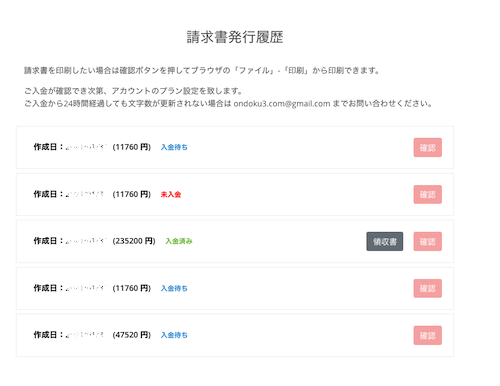
After your plan is activated, the status will change to “Paid,” and you can download your receipt from Invoice Issuance History.
All Ondoku invoices and receipts comply with the invoice system (qualified invoice issuer registration number).
Important Notes About Annual Contracts
Please note that there are several important points regarding the operation of payments by bank transfer to Ondoku.
- Ondoku accepts bank transfers for annual payments only.
- There is no discount for annual payments.
- We cannot issue refunds for cancellations made during the contract period.
- We cannot accommodate plan changes during the contract period.
Before signing up, please carefully consider which plan or business plan is right for you.
Updates to Make Ondoku Even More Convenient!
You can now view all your quotes, invoices, and receipts on your settings page, saving you the trouble of contacting us by email each time.
Our direct bank transfer payment option has been well received by many companies, organizations, and schools. We also received many inquiries by email about annual contracts.
However, when you have to request an invoice by email, you inevitably have to wait for a reply.
When you’re busy working every day, this waiting time can be frustrating because you can’t move forward with your work right away.
“I need to get this approved as soon as possible!”
This update makes it possible to solve that problem.
This saves a great deal of time for people who use Ondoku.
Ondoku continues to receive various updates like this every day.
We’re proud to be the text-to-speech service that’s easiest for you to use.
We hope you’ll continue to make great use of Ondoku!
■ AI voice synthesis software "Ondoku"
"Ondoku" is an online text-to-speech tool that can be used with no initial costs.
- Supports 81 languages and regions, including Japanese, English, Chinese, Korean, Spanish, French, and German
- Available from both PC and smartphone
- Suitable for business, education, entertainment, etc.
- No installation required, can be used immediately from your browser
- Supports reading from images
To use it, simply enter text or upload a file on the site. A natural-sounding audio file will be generated within seconds. You can use voice synthesis up to 5,000 characters for free, so please give it a try.

Text-to-speech software "Ondoku" can read out 5000 characters every month with AI voice for free.
You can easily download MP3s and commercial use is also possible.
If you sign up for free, you can convert up to 5,000 characters per month for free from text to speech.
Try Ondoku now.
HP:
ondoku3.com
Email: ondoku3.com@gmail.com
Email: ondoku3.com@gmail.com
Related posts
"Ondoku" is a Text-to-Speech service that anyone can use for free without installation. If you register for free, you can get up to 5000 characters for free each month. Register now for free