Best Text-to-Speech Software: 7 Free & Paid Tools for Commercial Use
2026 Guide to Chinese Text-to-Speech: From Pronunciation to Inbound Business
Sept. 9, 2026

How can I read aloud Chinese text and create an audio file?

In this article, we will explain the recommended methods for reading Chinese sentences aloud with audio!
Listening to native read-aloud audio and memorizing pronunciation is essential for studying Chinese.
By using the latest AI read-aloud services, you can study Chinese with audio for any content you like.
Furthermore, it can be widely used beyond studying, such as adding Chinese audio to videos or creating audio for inbound tourists.
Creating Chinese audio with AI read-aloud services is very easy.
Why not use this article as a reference to utilize Chinese read-aloud audio for your studies, hobbies, or work?
Recommended AI Services for Reading Chinese Text Aloud

The recommended service for reading Chinese audio aloud is Ondoku.
Ondoku is an AI read-aloud service that uses the latest AI engines to generate realistic and easy-to-understand audio.
Since it can read aloud with native pronunciation, it is perfect for studying pronunciation, which is the most important part of learning Chinese.
Beyond studying, it can be used for a wide range of purposes such as video production and tourist guides for inbound visitors.
Moreover, Ondoku can be used for free!
Even without registration or login, you can read up to 1,000 characters, and by registering as a free member, you can perform free read-alouds for up to 5,000 characters. This allows you to generate many example sentences for free to memorize pronunciation and conversational expressions.
If you want to read Chinese text aloud, why not start by using Ondoku?
[Pronunciation/Conversation] Text-to-Speech Services are Recommended for Studying Chinese

My Chinese just isn't getting better no matter how much time passes...
In such cases, we recommend utilizing a text-to-speech service!
When studying Chinese, the most important thing is pronunciation.
Chinese pronunciation is extremely difficult for non-native speakers to master, and studying on your own can sometimes lead to developing incorrect habits...
That's why we recommend using a text-to-speech service to memorize native pronunciation.
Chinese "Tones" are Difficult
In Chinese, the meaning of a word changes depending on the change in pitch.
These changes in Chinese sound are called "tones," and there are the following four types:
- 1st tone: A high and level sound
- 2nd tone: A sound that rises from low to high
- 3rd tone: A sound that starts low, dips, and then rises slightly
- 4th tone: A sound that falls from high to low
For example, even with the same sound "ma":
- 1st tone (mā): 妈 (Mother)
- 2nd tone (má): 麻 (Numb)
- 3rd tone (mǎ): 马 (Horse)
- 4th tone (mà): 骂 (Scold)
As shown above, the meaning changes completely when the tone changes.
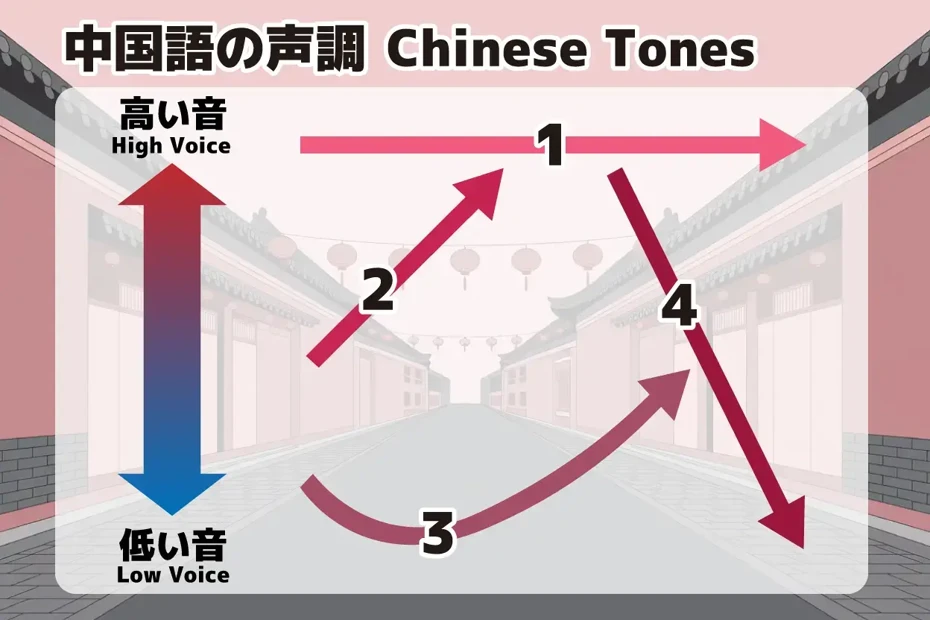
These tones are the most difficult point to learn for non-native Chinese speakers.
Since tones can change when pronounced in succession, it is necessary to actually speak and memorize the pronunciation as audio, rather than just memorizing them on paper.
Pronunciations Unique to Chinese are Also Difficult
Additionally, pronunciations unique to Chinese other than tones are also very difficult points.
For example, the retroflex sounds "zh," "ch," "sh," and "r" are sounds that are particularly difficult for foreigners to pronounce.
It is very common for the "rì" in Japanese person (rìběn rén) to be mispronounced and heard as "lì" (stand) by native speakers.
Also, for many learners, the "zhōng" in China (zhōng guó) is difficult to pronounce, and it often happens that even though someone is studying Chinese, they cannot properly pronounce "Japan" or "China."
In this way, Chinese is a language with very difficult pronunciation.
But it's okay.
By utilizing AI read-aloud services, you can master Chinese pronunciation!
Reading Aloud is the Shortcut to Chinese Pronunciation

As mentioned, Chinese has particularly difficult pronunciation among foreign languages.
The shortcut to acquiring Chinese pronunciation is to imitate native pronunciation and speak.
By actually pronouncing it, you can memorize Chinese pronunciation with your body rather than just your head.
However, native audio on video sites is often too fast or has an accent, making it unsuitable for imitation in many cases.
That is why we recommend creating native-pronunciation read-aloud audio with an AI service.
With an AI read-aloud service, it is possible to read entered Chinese text in very clean Putonghua (Standard Mandarin) pronunciation.
When foreigners learn Chinese, the basic step is to first learn standard Mandarin Putonghua.
By using an AI read-aloud service, you can learn clean Putonghua with native pronunciation and no local accent.
Also Recommended for Increasing Conversation Variations

AI read-aloud services are also recommended for increasing your variations in Chinese conversation.
To become able to converse in a foreign language, the shortcut is to increase the repertoire of sentences you use in conversation.
However, with only introductory Chinese books or phrase collections, there is inevitably a limit to conversation variations.
Depending on the introductory book, expressions that natives rarely use, such as "请多关照," might be included.
By reading Chinese text aloud with an AI service, you can obtain an infinite amount of practical teaching materials with native pronunciation for free.
By reading aloud while listening to the audio, you will become able to speak practical phrases fluently.
Ondoku is Recommended for Studying Chinese
Ondoku is the recommended AI service for reading Chinese aloud.
It is a web service used from a browser, and you can use it immediately by opening the page from here.
A feature of Ondoku is that it can read aloud with native pronunciation!
Since it can read Chinese text with clear pronunciation comparable to announcers or actors, it is perfect for studying pronunciation and conversation.
Moreover,
- Putonghua (Standard Mandarin of the People's Republic of China)
- Taiwanese Mandarin (Standard Mandarin used in Taiwan)
- Cantonese (Language used in Hong Kong, Macau, etc.)
are supported, so it can be used even if you want to memorize Taiwanese pronunciation or learn Cantonese (Cantonese is explained in detail in this article).
Furthermore, Ondoku is free!
By registering as a free member, you can read up to 5,000 characters for free every month, allowing you to obtain over 100 conversational teaching materials at once.
Why not try creating Chinese read-aloud audio with the free-to-use Ondoku?
Beyond Studying! Ways to Utilize Chinese AI Text-to-Speech
Audio generated by AI read-aloud services can be widely utilized beyond studying Chinese, such as for video narration and tourist guides for inbound visitors.
Publishing Chinese Videos on Video Sites

For those who produce videos, we recommend generating Chinese audio with an AI service to create Chinese-language videos.
For example, if you upload a Chinese video to YouTube, it can be viewed by Chinese-speaking people living in Taiwan, Hong Kong, Malaysia, Singapore, and all over the world.
Posting to domestic services in the People's Republic of China, such as the video site bilibili, short video apps like Xiaohongshu, or Douyin (the Chinese version of TikTok), is also recommended.
In addition to hobby video production, by utilizing Chinese read-aloud audio for corporate promotional videos, you can aim to appeal to the Chinese-speaking world.
Creating Inbound Guidance Audio with AI

Inbound tourists are steadily increasing.
China (People's Republic of China) is one of the countries with a particularly large number of inbound tourists.
In addition, many inbound tourists visit from countries and regions where Chinese is used, such as Taiwan, Hong Kong, Malaysia, and Singapore.
To prevent over-tourism resulting from the increase in inbound tourists, we recommend creating guidance audio with an AI service.
By creating guidance audio for shops, public facilities, stations, etc., in Chinese, you can accurately guide inbound tourists.
By promoting souvenirs, services, and activities in Chinese, you can also increase the revenue of shops and facilities!
Since it can reduce the staff's workload for handling inbound tourists, it is also recommended for improving the workplace environment.
What is the Process for Reading Chinese Audio Aloud? How to Use for Materials, Video Narration, and Inbound Tourism

I want to know how to read Chinese audio aloud with AI!
From here, we will clearly explain the process of reading Chinese aloud and creating audio using the AI service Ondoku!
1. Prepare Chinese Sentences
First, prepare the Chinese text to be read aloud.
For Pronunciation/Conversation Study

For studying Chinese pronunciation and conversation, it is recommended to use Chinese text from a field you are interested in.
For example, if you are a fan of celebrities or artists from the Chinese-speaking world, try using text from Chinese interview articles.
If you are doing business with a Chinese company, it is also good to use text from Chinese news sites.
For Video Narration
Prepare the script for the video you want to add narration to and translate it into Chinese.
If you don't have a script and are basing it on a video where someone is speaking in another language like Japanese, you can prepare the text quickly by transcribing the video (turning it into text) with an AI transcription service.
For video transcription, the AI transcription service Mojiokoshi-san is recommended.
This article explains how to create subtitles from videos using Mojiokoshi-san.

For Inbound Audio Guidance
When creating audio guidance for inbound tourists, prepare the script text and translate it.
- Our store is a duty-free shop. Please feel free to ask our staff about how to purchase products.
- This ticket gate is exclusively for the subway. For trains going to Tokyo Station, please use the ticket gate further ahead on the right.
Prepare text for inbound tourists according to the situation.
![[Tourist Facilities, Shops, Transportation] How to Create Inbound Guidance Broadcast Audio! What are the effective recommended multilingual guide methods?](https://storage.googleapis.com/ondoku3/image/20240926_inbound_guide_announcement_010_930.webp)
[Tourist Facilities, Shops, Transportation] How to Create Inbound Guidance Broadcast Audio! What are the effective recommended multilingual guide methods?
Cost reduction for inbound support! Easily create multilingual guidance broadcasts with AI audio for free. Ondoku supports 81 languages and regions, making it ideal for tourist facilities, shops, and transportation. Streamline guidance tasks and improve customer satisfaction! Click here for details.
How to Translate Text into Chinese
If the original text is in a language other than Chinese, translate it into Chinese using a translation service or a generative AI service.
If you use a translation service, Baidu Translate (百度翻译), operated by China's "Baidu," is a standard choice.

In mainland China, Youdao Translate (有道翻译) seems to be more widely used, but for Chinese learners, Baidu Translate gives the impression of being more flexible.
Also, it is recommended to ask generative AI services like ChatGPT, Gemini, or Claude to "Please translate the following text. Please explain the translated Chinese sentences."

You can create text that is even more natural than a translation service, which wouldn't feel out of place even to a native speaker.
Chinese translation is explained in this article.
![12 Services to Check Chinese Translation Results with Audio [2026 Edition, Free Options Available]](https://storage.googleapis.com/ondoku3/image/chinese-translate-tts-2025-tmb_930.webp)
12 Services to Check Chinese Translation Results with Audio [2026 Edition, Free Options Available]
Explaining how to listen to Chinese translation results with audio to check pronunciation and tones. Comparing 5 translation services and 7 read-aloud services, introducing the steps to translate, copy, and play Japanese text. Note that the purpose differs from real-time translation of voice input.
2. Read Aloud with Ondoku
Read the Chinese text aloud with Ondoku.
First, open the Ondoku top page from here.
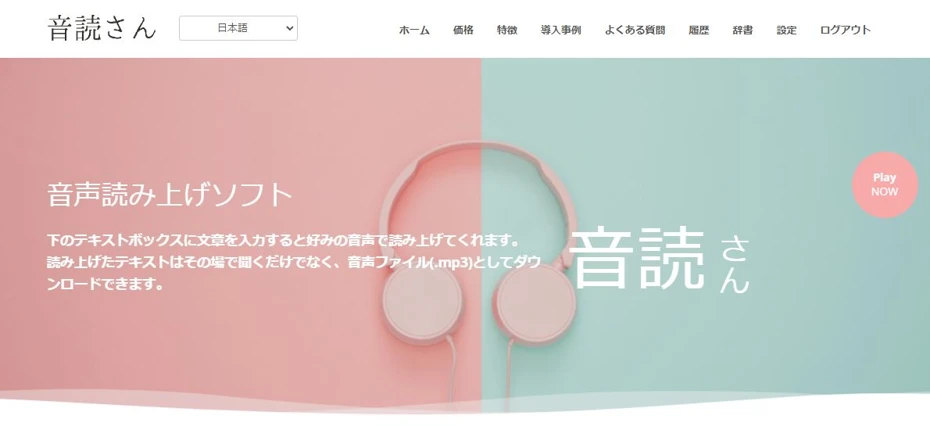
Paste the Chinese text you want to read aloud into the text box.

Select Language
Ondoku supports:
- Putonghua (Standard Mandarin)
- Taiwanese Mandarin
- Cantonese
Choose from the languages according to your purpose.

Select Voice Type
Choose the type of voice.

*Samples of Chinese voices can be listened to in this article.
Select Speed
Ondoku also allows you to choose the reading speed.
When using it for studying Chinese pronunciation or conversation, it is recommended to change the speed according to your learning level.
Start Reading Aloud

Once settings are complete, press the "Read Aloud" button to start.
3. Text-to-Speech Completed
Ondoku's read-aloud processing is completed immediately.
When the processing is finished, the screen switches and an audio player is displayed.

Listen to the audio, and if there are no problems, press the "Download" button to download the MP3 file.
This completes the flow of reading Chinese text aloud with Ondoku!
Since it is very easy to read aloud, why not utilize Ondoku for Chinese study, video production, or inbound support?
Ondoku also supports Chinese dialects!
In addition to Putonghua, Taiwanese Mandarin, and Cantonese, Ondoku supports dialects from various regions!
It's easy to use.
Just select "Putonghua" and then choose a dialect from the "Voice" options.

Yunxi (Sichuan dialect): Boy
Yunxiang (Shandong dialect): Male
Xiaobei (Liaoning dialect): Female
Xiaoni (Shaanxi dialect): Female
You can select these.
It's interesting just to compare the same sentences, so it is recommended for those studying Chinese!
■ AI voice synthesis software "Ondoku"
"Ondoku" is an online text-to-speech tool that can be used with no initial costs.
- Supports 81 languages and regions, including Japanese, English, Chinese, Korean, Spanish, French, and German
- Available from both PC and smartphone
- Suitable for business, education, entertainment, etc.
- No installation required, can be used immediately from your browser
- Supports reading from images
To use it, simply enter text or upload a file on the site. A natural-sounding audio file will be generated within seconds. You can use voice synthesis up to 5,000 characters for free, so please give it a try.

Text-to-speech software "Ondoku" can read out 5000 characters every month with AI voice for free.
You can easily download MP3s and commercial use is also possible.
If you sign up for free, you can convert up to 5,000 characters per month for free from text to speech.
Try Ondoku now.
HP:
ondoku3.com
Email: ondoku3.com@gmail.com
Email: ondoku3.com@gmail.com
Related posts
"Ondoku" is a Text-to-Speech service that anyone can use for free without installation. If you register for free, you can get up to 5000 characters for free each month. Register now for free
- What is Ondoku
- Start text-to-speech conversion
- Free registration
- Pricing
- Posts
- Try other free services














