Best Text-to-Speech Software: 7 Free & Paid Tools for Commercial Use
[Free] 8 Best English Text-to-Speech Sites Compared! Effective Learning Methods
Aug. 30, 2026
![[Free] 8 Best English Text-to-Speech Sites Compared! Effective Learning Methods](https://storage.googleapis.com/ondoku3/image/20250609_english-text-to-speech_tmb_930.webp)

How should I go about reading English aloud? I want to know about services and sites!
In this article, I will explain recommended English reading methods just for you!
Until now, learning correct English pronunciation was very difficult.
You had to be taught directly by a native teacher, or buy expensive teaching materials...
From now on, you don't have to put in that kind of effort!
With free English reading services, anyone can easily study English!
In this article, I will explain these free English reading services in an easy-to-understand way.
- What kind of services are available?
- How can I use them effectively?
- Will my pronunciation really become like a native speaker's?
I will answer those questions clearly for you.
You can also solve challenges that English learners often face, such as "I can't catch the listening," "I don't know the correct pronunciation," and "I don't have confidence in my speaking"!
[Free] Recommended English Learning Reading Site "Ondoku"

Ondoku is the ideal AI reading service for English learning.
As a web service used from a website, you can use it easily right now without installation, registration, or login!
Furthermore, Ondoku is free!
Since it can read aloud with native pronunciation, why not start by making English learning materials with Ondoku?
What is an English Reading Service? Thorough Explanation of Basic Knowledge
For those of you who want to make your English studies more effective, free English reading services (reading sites) are highly recommended.
First, I will briefly explain what English reading services are.
Explaining the Basics of English Reading Services. What are the Features of Reading Using AI?

An English reading service is a tool that reads out written English text in audio format.
It can read aloud textbooks, website articles, and English emails with a realistic voice that sounds just like a real human.
English reading services use an AI technology called Text-to-Speech (TTS), which converts text into audio.
Old reading software sometimes had choppy voices that sounded robotic or unnatural intonation.
But today's latest services are different!
By learning from vast amounts of English audio data, recent AI reading services have become able to reproduce natural inflections, rhythms, and even pauses, just like a human speaking.
It has become possible to have surprisingly smooth reading that even seems to contain emotion.
Thanks to this evolution in AI voice technology, it has become very easy to utilize realistic English audio for learning.
Learning Effects and Benefits of Reading Services in English Learning
Specifically, what are the good things about using an English reading service?
First and foremost is the improvement of listening skills—the ability to hear and understand English.
By listening to English repeatedly with correct pronunciation and intonation, your ears become accustomed to the sounds of English.
Next, it leads to the improvement of pronunciation.
By listening to AI voices with native pronunciation, you can input many examples of "this is how this word is pronounced" or "this is how you apply intonation."
By mimicking that audio and reading aloud, you can effectively acquire English with more natural and correct pronunciation.
It can also be utilized for Shadowing, which is effective for studying pronunciation and speaking.
![[Complete Guide] What is the Method for English Shadowing? Also Explaining How to Create Materials for Free!](https://storage.googleapis.com/ondoku3/image/20250522_shadowing_tmb_02_930.webp)
[Complete Guide] What is the Method for English Shadowing? Also Explaining How to Create Materials for Free!
Efficiently boost your English skills with Shadowing! Explaining the learning method that simultaneously improves listening, pronunciation, and speaking for beginners. We also introduce how to create materials with free AI voices.
Furthermore, it is useful for boosting vocabulary.
By following the text with your eyes while listening to the audio with your ears, it becomes easier to remember the word, its meaning, and the correct pronunciation as a set.
Especially when you encounter a new word, developing the habit of checking the pronunciation with a reading service will significantly increase your retention rate.
Of course, it is also effective for improving reading.
Practicing by following the text with your eyes in time with the audio naturally fosters the ability to understand English in its original word order.
In this way, English reading services are very convenient tools that support various aspects of English learning, such as listening, speaking, reading, and memorizing.
Latest for 2026! Thorough Comparison of 8 Free English Reading Services
Which English reading service should I choose? Tell me your recommendations!

Many people may be wondering, "Which one should I choose?" from the many English reading services (reading sites) available.
Therefore, we have picked 8 particularly recommended free English reading services as of 2026 and will introduce the features of each in detail!
1. Ondoku: Multifunctional AI English Reading Service from Japan [Free]
Ondoku is a free AI service recommended for reading English aloud.
Ondoku is a reading service developed in Japan.
The operation is simple and very easy to understand; you can generate audio immediately just by opening the page, pasting your English text into the text box, and pressing the button.
A major feature of Ondoku is that you can easily use extremely natural and high-quality AI voices.
With very realistic native pronunciation, anyone can create English sentences immediately.
You can read English aloud in a variety of voices, including American English, British English, and even Australian and Indian English.
When you actually use it, you will be surprised by the realistic audio that sounds as if a human is really speaking.
Types of English Voices that can be Read Aloud with "Ondoku"
Now, let's actually listen to the English audio read aloud by Ondoku.
The English sentence being read is:
Hello, I'm Ondoku. Let's enjoy studying English together.
.
Sample Listening Audio for American English
Speaker
Audio
AIGenerate1: Male
AIGenerate2: Male
Amber: Female
Ana: Girl
Aria: Female
Ashley: Female
Blue: Genderless
Brandon: Male
Christopher: Male
Cora: Female
Davis: Male
Elizabeth: Female
Eric: Male
Guy: Male
Ivy: Girl
Jacob: Male
Jane: Female
Jason: Male
Jenny: Female
Joanna: Female
Joey: Male
Justin: Boy
Kendra: Female
Kimberly: Female
Kevin: Boy
Matthew: Male
Michelle: Female
Monica: Female
Nancy: Female
Roger: Male
Salli: Female
Sara: Female
Steffan: Male
Tony: Male
en-US-A2: Male
en-US-B: Male
en-US-C: Female
en-US-D: Male
en-US-E: Female
en-US-F: Female
As you can see,
it's so realistic and easy-to-hear audio that you might wonder,
"Is this really generated audio? Isn't someone speaking?"
You can listen to sample audio for other accents (British, Australian, Indian) from this page.

For English Listening Study! Native Pronunciation: Listen to 92 Speakers (Samples) Including Female, Male, Girl, and Boy Voices!
Ondoku is a text-to-speech service that can pronounce languages from all over the world. You can listen to samples of Ondoku's 92 types of English voices.
Speed Adjustment is also Possible. The Perfect AI Reading Service for English Learning
Ondoku is equipped with functions useful for English reading.
Particularly useful is the speed change function.

When studying English by reading aloud, you often want to slow down the speed of the teaching material's audio.
Ondoku allows you to reduce the playback speed to as low as 0.3x, so you can lower the speed and check the pronunciation thoroughly.
Compared to other text-to-speech services, the adjustment functions are particularly substantial, making it ideal for studying pronunciation!
With Ondoku, you can easily read English aloud for free
Moreover, Ondoku can be used for free!
Registration and login are not required (creating an account increases the number of characters you can read aloud!).
It is also possible to download the generated audio as MP3 files for free.
You can put the English audio materials on your smartphone or other devices to carry around and practice listening anywhere and anytime.
Ondoku is the perfect AI reading service for those who want to get English learning audio for free.
Why not try making your own English audio for free using Ondoku?
What is an English Reading Service? Thorough Explanation of Basic Knowledge
For those of you who want to make your English studies more effective, free English reading services (reading sites) are highly recommended.
First, I will briefly explain what English reading services are.
2. Natural Reader: A Long-established Site with Native Voice Support
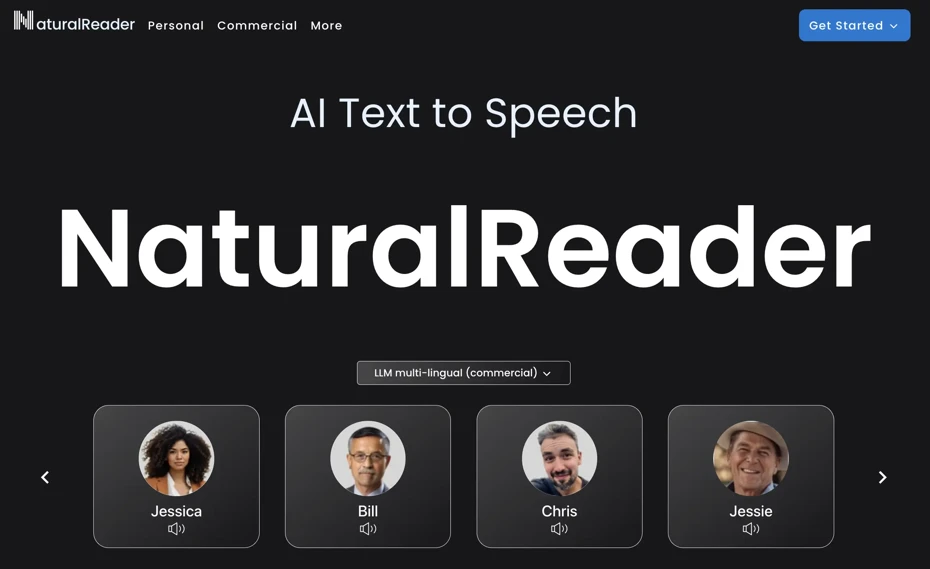
Natural Reader is an AI reading service that supports English.
Even with the free plan, it is possible to read aloud with natural English voices.
Various voices with realistic pronunciation are available, so it can be utilized for studying English pronunciation.
However, the free version has limits on the number of characters that can be read aloud, and you cannot save them as MP3s.
Paid plans are also available, and by upgrading, you can read aloud a larger number of characters.
Paid plans are available for both individuals and businesses.
As an English reading service, it has existed for a long time, and it is recommended as one of the options when you want to create English audio for study materials or hobby videos.
3. TTSReader: A Simple English Reading Site
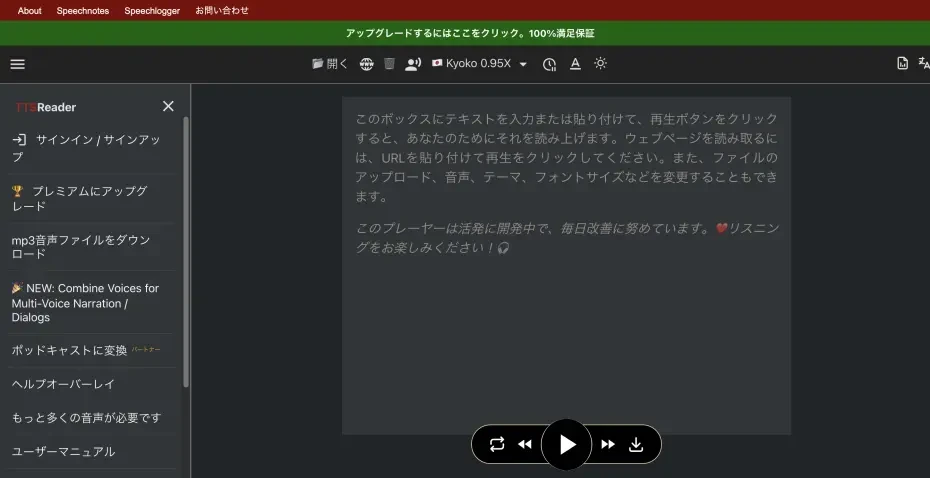
TTSReader is, as the name suggests, a simple English reading tool specialized in Text to Speech (TTS).
The operation is simple; you can read English aloud just by opening the page and pasting the text.
It can be used for free, and account registration is generally unnecessary.
Regarding voice types, it supports various languages and pronunciations, including English (American, British, etc.), and you can choose from multiple voices such as female and male.
Even among the voices that can be used for free, the impression is that many are relatively natural and easy to hear.
The functions are very simple, but if you "just want to read English aloud easily using only a browser," TTSReader is one of the perfect choices.
It is useful for those who are not good at complex settings or in scenes where you want to quickly check a short English text with audio.
4. Read Aloud: Chrome Extension-type Reading Service

For those who want to add an English reading function to their computer's web browser, Read Aloud is recommended.
Read Aloud is a Google Chrome extension that easily reads aloud text on the web page you are viewing.
Once installed, an icon is displayed in the browser's toolbar. By simply clicking that icon while the web page you want to read is open, it will automatically recognize and start reading the English text on the page.
It can be used for free and is easy to set up (additional fees or API key registration are required when using higher-quality cloud voices).
Several types of voices can be selected, and it supports many languages besides English.
However, since Read Aloud is strictly a browser extension, it cannot read aloud text files offline.
If you want to save and use the reading audio, Ondoku is recommended.
It is a recommended tool when you want to input and learn interesting English information through your "ears" while browsing the internet.
5. ttsMP3.com: A Free English Reading Site with Simple Operation

ttsMP3.com is a free English reading service that can be used from a browser.
Complex settings are unnecessary; when you want to try reading English aloud, you can generate audio immediately just by entering the text.
As the name suggests, the reading audio can be downloaded in MP3 format.
The operation is simple: just paste the English text into the input area and press the read button.
Since it can read aloud with natural English pronunciation utilizing AI technology, it can be used when studying English by reading aloud.
It should be a useful site for those who have just started learning English or in situations where you want to easily create English audio.
6. TTSMaker: A Multifunctional Free Reading Service Supporting Multiple Languages
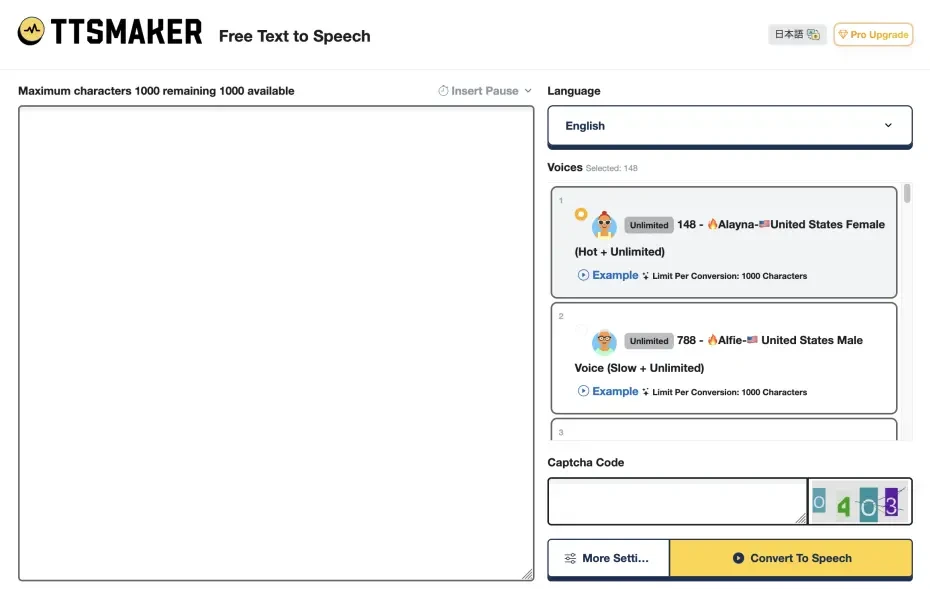
TTSMaker is a free reading service that supports multiple languages, including English.
High-quality English audio generation is possible through AI technology, and it can read aloud with natural pronunciation close to a native speaker.
Additionally, it is equipped with a voice speed adjustment function.
You can read aloud at the optimal reading speed for your English learning level.
The generated audio is downloadable, so you can use it for English learning even in offline environments.
Furthermore, the site supports Japanese display.
It is a convenient English reading service for intermediate or advanced English learners looking for a high-quality free reading service.
7. Narakeet: An Innovative Reading Service with Video Production Functions

Narakeet is an AI-powered reading service that supports English.
It is a web service used from a website.
However, it can only be used for free up to a total of 20 times, after which it becomes a paid service.
Utilizing AI technology, it can read aloud in very natural native-voice English.
Its biggest feature is the function to create videos by combining audio generated from text with images and videos.
However, if you are looking only for simple text reading for English learning, you might feel that it has too many functions.
It is a recommended AI English reading service when you want to try out various functions anyway.
8. Google Translate: Recommended for Short Sentences and Word Checks

The last one I will introduce is Google Translate, which most people have used at least once.
It is famous as a translation tool, but it actually also has a function to read aloud the entered text, which can be used for English learning.
The advantage of Google Translate's English reading function is its ease of use.
When you enter or copy-paste an English sentence you want to translate, a speaker icon is displayed along with the translation result.
By tapping (clicking) it, you can hear the entered English audio.
Being an American service, Google's English pronunciation is clear and easy to hear, similar to a native speaker's.
The range of free use is wide, and the character limit is relatively lenient, so for reading aloud short sentences, this is often sufficient.
However, since Google Translate is primarily a translation service, it does not have a function to choose the type of voice.
If you play a long sentence and don't catch it well, you have to listen again from the beginning.
The reading speed can be chosen from three levels—"Normal, Slow, and Slower"—but it cannot be adjusted more finely than that.
Ultimately, it is convenient to use as an auxiliary tool for checking the reading of short sentences or words.
When you want to create full-scale English audio, it is recommended to read the translated sentence with Ondoku.
[Free and Easy] How to Read English Aloud with "Ondoku"
What should I do to read English aloud with Ondoku?
From here, I will explain how to read English aloud using Ondoku.
With simple operations, anyone can create English teaching materials immediately.
1. Enter English on the "Ondoku" page
First, open the Ondoku top page from here.
In the text box on the top page, enter the English sentence you want to read aloud.

2. Settings for English Reading (Voice Type, Speed, Pitch)
Configure the settings for English reading.
If the language is set to something other than English, select English.

In Ondoku, you can choose from:
- American English
- British English
- Australian English
- Indian English
.
Next, choose the voice to be used for reading.
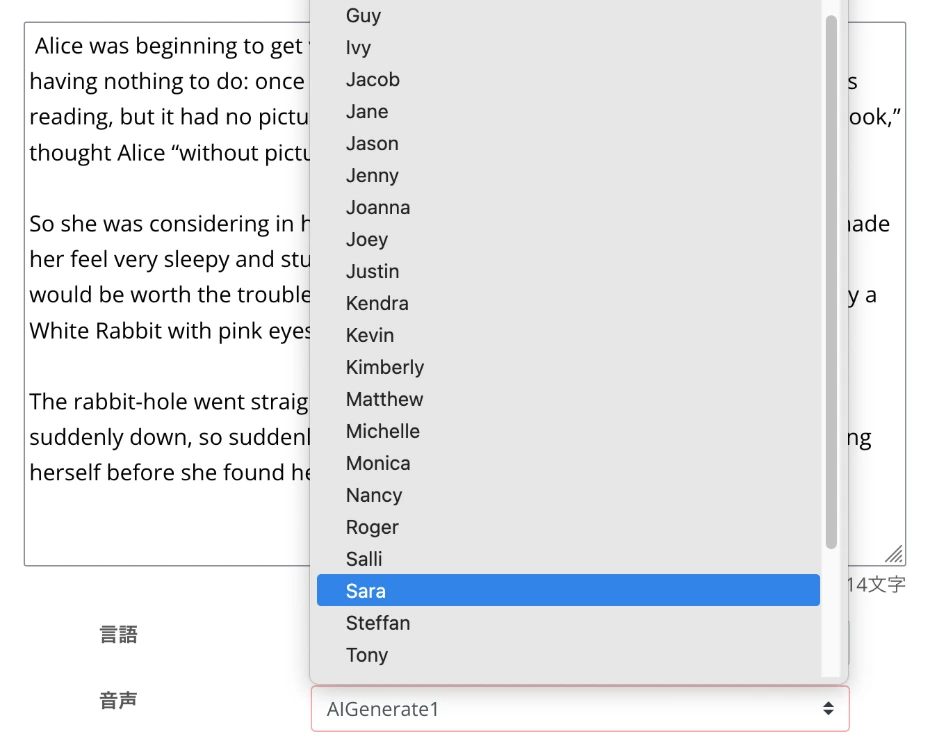
You can choose from many types of English reading voices, such as female, male, child, and genderless!
We introduce the voices in detail in this article, so please take a look.
For English Listening Study! Native Pronunciation: Listen to 92 Speakers (Samples) Including Female, Male, Girl, and Boy Voices!
Ondoku is a text-to-speech service that can pronounce languages from all over the world. You can listen to samples of Ondoku's 92 types of English voices.
In Ondoku, reading speed and voice pitch can also be adjusted.
Since the speed can be lowered to 0.3x, it is very convenient for studying English.
Preparation is now complete!
3. Read English Audio for Free
When ready, press "Read aloud" to start generating audio.
The reading process will be completed immediately, and the English audio will be played.

You can check the English audio with the audio player displayed on the screen.
The audio file can be downloaded in MP3 format (by registering an account, you can also save in the higher quality WAV format).
This completes the flow of reading English aloud with Ondoku!
Since you can easily read English aloud for free in this way, why not try making your own English learning materials with Ondoku?
What are the Points for Studying English with AI Reading Services and Sites?

To study English more effectively, the way you use AI reading services (reading sites) is very important.
From here, I will explain points for studying English more effectively with AI reading services.
Tips for Choosing English Reading Voices and Setting Points
If you are making teaching materials using an AI English reading service (reading site), you probably want to choose native audio that matches your learning goals as much as possible.
In AI reading services, you can select the English accent and voice type.
First, I will introduce tips for choosing audio and setting tricks for more effective learning.
Select the English Pronunciation You Want to Study (American, British, etc.)
First is the selection of the English accent.
Even though we say "English" in one word, there are characteristic pronunciations and intonations depending on the region, such as American English, British English, and Australian English.
The accent you should choose changes depending on which region's English you mainly want to learn or get used to hearing.
For example, if you want to become familiar with the English used in Hollywood movies and American dramas, choose "US English".
If you like BBC news or British movies, try choosing "UK English".
If you don't have a particular preference, it is generally recommended to try American English, which is often used in learning materials.
Ondoku can read American, British, Australian, and Indian English aloud for free!
Types of English Reading Voices (Female, Male, Child)
Next, choosing the type of voice is also important.
In AI reading services (reading sites), you can choose from various reading voices, such as female voices, male voices, and children's voices.
When using it for English learning, you can choose the voice based on ease of hearing or preference.
It is recommended to try various voices and find the one you can concentrate on hearing the most or that you find pleasant.
When in doubt, try choosing a voice close to the pitch of your own voice, such as a female voice for women and a male voice for men.
Even with the same text, the impression changes when the speaker changes, so you can also expect it to prevent your study from becoming repetitive.
[Most Important] Adjustment of Reading Speed
And the most important thing is the adjustment of the "reading speed."
At first, start with a slightly slower speed that allows you to understand the content thoroughly.
Ondoku is ideal for English learning because the speed can be set from 0.3x!

Don't rush; be conscious of grasping the pronunciation of each word and the flow of the entire sentence.
Once you get used to it, gradually increase the speed, aiming finally for the speed at which a native speaker talks naturally.
In this way, the secret to making the most of AI English reading services is to try various settings and find the "this is it!" combination that is optimal for you.
Ondoku allows you to change settings such as voice type, speed, and pitch for free, so it is possible to significantly enhance the effectiveness of your English learning!
What are the Practical Learning Methods Using English Reading Services and Sites?

Specifically, how should you incorporate English reading services (sites) into your daily English studies?
From here, I will introduce effective utilization methods step-by-step, from beginners to those aiming for further level-ups.
Please find a way that suits you and try it out.
Basic English Listening Practice for Beginners Using Free Reading Services and Sites
For beginners who have just started learning English, start by getting used to the sounds of English.
A recommended practice method is to play very short, simple English sentences with a reading service and listen to them repeatedly.
For example,
- Greeting phrases
- Self-introduction sentences
- Short questions and answers often used in daily life
are ideal materials.
First, try entering short sentences into Ondoku to make audio materials for free.
When practicing English listening, it is recommended to be conscious of three points.
1. Listen while looking at the text
At first, listen to the audio while following the English characters being read with your eyes.
By being conscious of the connection between spelling and sound, your word recognition ability will improve.
2. Listen while thinking about the meaning
Instead of just letting the sound pass through, it is important to listen while thinking, "What are they saying now?"
If there are words you don't know, try looking them up in a dictionary.
3. Listen repeatedly
It's okay if you can't understand perfectly after hearing it just once.
By listening over and over again, your ears will gradually become accustomed to the rhythm and intonation of English sounds.
Tips for Creating Listening Practice Audio
When making an audio file for English listening practice, it is recommended to set the reading speed to "Slow" at first.
Start practicing at a speed where you can hear clearly, and as you get used to it, gradually bring it closer to normal speed.
Ideal materials include simple picture books for children or short example sentences found on English learning sites for beginners.
Starting with short articles or blogs in a field you are interested in is also recommended.
By continuing basic listening practice, the resistance to English sounds will disappear, and you can feel the number of words and phrases you can catch gradually increasing.
The secret to longevity is to work on it while enjoying it, without rushing.
From Short Sentences to Long Sentences. Gradually Leveling Up English Study in Stages
Once you get used to English sounds a little, as the next step, try gradually extending the length of the sentences you handle.
It is easy to get discouraged if you suddenly challenge difficult long sentences, but by starting with short sentences and stepping up bit by bit, you can improve your listening and reading comprehension skills without strain.
Specifically, it is recommended to extend the length of the English in four steps.
Step 1: Understanding Short Paragraphs
First, choose a short paragraph of about 3 to 5 sentences.
Content such as topics you are interested in or easy news articles is recommended.
While listening to the audio with a free English reading service, practice grasping the general meaning of the whole paragraph.
Foster the ability to guess words you don't understand.
Step 2: Short Articles Consisting of Multiple Paragraphs
Next, challenge short articles of about 300 to 500 words composed of several paragraphs.
Here too, utilize a reading service and be conscious of grasping the entire flow and main points.
Practice listening while following the connections between paragraphs and the development of the story.
The reading speed can still be a little slow.
Step 3: Slightly Longer Articles or Parts of Stories
Once you get used to it, try challenging longer articles of about 1000 words or a chapter of a story.
At this level, concentration also becomes necessary.
Aim to catch even detailed information while listening to the audio with a reading service.
If necessary, it is also effective to pause in the middle to check the meaning or listen repeatedly.
Step 4: Full-scale Long Sentences (Essays, News Features, etc.)
Finally, aim to be able to challenge full-scale long sentences reaching several thousand words.
At this level, advanced listening and reading comprehension skills are required to understand logical structures and grasp the author's claims.
Bring the speed of the reading service closer to the natural speed of a native speaker.
What is important in each step is "not to overdo it" and "to continue."
If you feel it is a little difficult, it is okay to go back to the previous step.
Increasing the opportunities to encounter long English sentences at your own pace while enjoying it will lead to steady improvement.
Effective English Learning Methods for Acquiring Native Pronunciation
Finally, I will explain practice methods for acquiring natural pronunciation like a native speaker using an English reading service.
1. Shadowing
Shadowing is a practice method where you pronounce exactly what you hear while listening to the audio, with just a slight delay (1 to 2 words).
Play native audio with an English reading service and follow it like a shadow while being conscious of intonation, rhythm, accent, and the connection of words (liaison).
The point is to do it while looking at the text at first, and once you get used to it, try doing it relying only on the audio without looking at the text.
When making audio with Ondoku, it is effective to start with slow audio and gradually speed up.
[Complete Guide] What is the Method for English Shadowing? Also Explaining How to Create Materials for Free!
Efficiently boost your English skills with Shadowing! Explaining the learning method that simultaneously improves listening, pronunciation, and speaking for beginners. We also introduce how to create materials with free AI voices.
2. Repeating
Repeating is a practice method where you stop the audio for each sentence or phrase and pronounce the content you heard exactly as it was.
Compared to shadowing, it requires more ability to accurately remember and reproduce each sentence.
It is also recommended to record your own pronunciation and compare it with the model audio.
By being conscious of where the differences are and how you can get closer, your pronunciation issues will become apparent.
3. Dictation
Dictation is the practice of transcribing the English audio you hear into text.
Play short sentences with an English reading service, catch them, and write them down.
By checking spelling mistakes or parts you couldn't catch, you can clarify your weaknesses.
After transcribing, reading aloud while matching with the model audio again is effective for both listening and speaking.
4. Reading Aloud
This is practice where you listen to the model audio with an English reading service and then try to read the same text yourself out loud.
It's important not just to read, but to be conscious of reproducing the intonation and rhythm of the model native audio as faithfully as possible.
By recording and listening back to your own voice, you can objectively check your pronunciation.
By continuing these practices, your mouth muscles will remember the movements necessary for English pronunciation, and you will be able to speak smoother and more natural English.
Using Ondoku, you can perform any of these practices for free.
Why don't you also effectively enhance your English skills using Ondoku?
Summary: Opening a New Era of English Learning with English Reading Services
In this article, I have explained English reading methods in detail, from the basics to recommended services/sites and specific utilization methods.
By utilizing AI reading services, it has become possible to easily obtain English audio with native pronunciation for free.
Improving listening skills, correcting pronunciation, strengthening vocabulary, and challenging long sentence reading.
English reading services (reading sites) support your learning in every aspect.
Why don't you also utilize AI reading services and start a new way of learning English for the future?
■ AI voice synthesis software "Ondoku"
"Ondoku" is an online text-to-speech tool that can be used with no initial costs.
- Supports 81 languages and regions, including Japanese, English, Chinese, Korean, Spanish, French, and German
- Available from both PC and smartphone
- Suitable for business, education, entertainment, etc.
- No installation required, can be used immediately from your browser
- Supports reading from images
To use it, simply enter text or upload a file on the site. A natural-sounding audio file will be generated within seconds. You can use voice synthesis up to 5,000 characters for free, so please give it a try.

Text-to-speech software "Ondoku" can read out 5000 characters every month with AI voice for free.
You can easily download MP3s and commercial use is also possible.
If you sign up for free, you can convert up to 5,000 characters per month for free from text to speech.
Try Ondoku now.
HP:
ondoku3.com
Email: ondoku3.com@gmail.com
Email: ondoku3.com@gmail.com
Related posts
"Ondoku" is a Text-to-Speech service that anyone can use for free without installation. If you register for free, you can get up to 5000 characters for free each month. Register now for free
- What is Ondoku
- Start text-to-speech conversion
- Free registration
- Pricing
- Posts
- Try other free services
![[Free] 8 Best English Text-to-Speech Sites Compared! Effective Learning Methods](https://storage.googleapis.com/ondoku3/image/irodori-tts_tmb_140.webp)
![[Free] 8 Best English Text-to-Speech Sites Compared! Effective Learning Methods](https://storage.googleapis.com/ondoku3/image/tategaki-image-yomiage_howto_tmb_140.webp)
![[Free] 8 Best English Text-to-Speech Sites Compared! Effective Learning Methods](https://storage.googleapis.com/ondoku3/image/iphone-video-narration_tmb_140.webp)
![[Free] 8 Best English Text-to-Speech Sites Compared! Effective Learning Methods](https://storage.googleapis.com/ondoku3/image/chrome-reading-mode-pc_tmb_140.webp)
![[Free] 8 Best English Text-to-Speech Sites Compared! Effective Learning Methods](https://storage.googleapis.com/ondoku3/image/pdf-to-mp3-howto_tmb_140.webp)









