Best Text-to-Speech Software: 7 Free & Paid Tools for Commercial Use
Improve Spanish by Reading Aloud! Create Shadowing Materials with Ondoku AI
July 22, 2026

I want to know the recommended reading methods for reading Spanish aloud!

If you want to study Spanish effectively, reading aloud is recommended.
By using AI text-to-speech apps/sites, anyone can easily create audio materials for pronunciation study and shadowing.
Unlike audio bundled with textbooks or audio from video sites, you can listen to slow-paced audio with natural pronunciation.
In this article, we will introduce shadowing methods useful for studying Spanish pronunciation, as well as recommended apps (sites).
We will also explain how to utilize AI apps (sites) that can read Spanish aloud, so why not conveniently use Spanish AI text-to-speech audio for your studies, hobbies, or work?
[Free App] Recommended AI Text-to-Speech Site for Spanish Reading Materials

If you want to read Spanish aloud, Ondoku is recommended!
Ondoku is an AI text-to-speech site that can be used for free.
Since it is a web app used through a browser, it can be used from any environment such as iPhone, Android, or PC.
With a wide range of realistic and easy-to-hear voices ranging from women and men to children, you can create audio materials for reading Spanish aloud.

For pronunciation confirmation and listening in Spanish study! Listen to native pronunciation from 45 speakers: female, male, and children's voices
Here, you can listen to Ondoku's Spanish audio samples. The voices include female, male, and children's voices. Please use them for narration, work training, presentations, learning, and more.
Since you can also adjust the speed, it is possible to create slow audio materials suited to your level of study.
Moreover, Ondoku is free!
Since you can read up to 5,000 characters for free, you can create plenty of audio materials for reading aloud at no cost.
Why not use Ondoku for your Spanish pronunciation study and shadowing?
What is Spanish Reading Aloud? Recommended Study Methods Possible with Free Text-to-Speech Sites/Apps

They say Spanish pronunciation is easy, but I'm not improving even though I study~
Pronunciation and conversation are difficult to master in any language.
For those who want to be able to speak Spanish, reading sentences aloud is recommended.
First, we will explain the points for studying Spanish through reading aloud.
Why is Reading Aloud Recommended for Studying Spanish?

A study method that you should definitely incorporate when studying Spanish is reading sentences aloud.
It is sometimes said that Spanish is easy to speak because you just need to pronounce it as it is written in the alphabet.
However, learning correct pronunciation is just as difficult as with other languages.
Even if you know each individual word, the level of difficulty rises significantly when you try to speak fluently in full sentences.

I want to level up my Spanish pronunciation and conversation!
In such cases, it is recommended to read Spanish aloud while listening to audio materials to study pronunciation and conversation.
In particular, by incorporating "shadowing," where you read aloud at the same speed while following the audio material, you can rapidly improve your Spanish proficiency.
Why it's Recommended to Create Materials with AI Text-to-Speech Sites (Apps) for Spanish Reading Aloud

When studying Spanish by reading aloud, AI text-to-speech sites (apps) that can turn text into audio with the latest AI are recommended.
Until now, audio bundled with textbooks or audio from video sites was used to study Spanish by reading aloud.
However, audio from textbooks or video sites sometimes:
- Is too fast to shadow
- Suffers from poor sound quality when played slowly
- Textbook audio is, conversely, too slow
- Lacks audio for fields of interest
In this way, they were sometimes difficult to use for beginner and intermediate Spanish learners.
That is why we recommend utilizing AI text-to-speech sites (apps).
Easy Spanish Reading Aloud with AI Text-to-Speech Sites
AI text-to-speech sites (apps) are services that can automatically read aloud the text you input.
By simply entering Spanish text, anyone can easily create materials for reading aloud.
The biggest point is the ability to change the reading speed to create audio for reading aloud slowly.
Since sound quality does not deteriorate even if you lower the speed, it is ideal for starting reading aloud from a slow pace.
In addition to standard materials such as daily conversation and travel conversation, you can also easily create audio materials using technical terms useful for business.
Since there are AI text-to-speech sites (apps) like Ondoku that can be used for free, it is recommended to first actually experience reading aloud and shadowing with AI text-to-speech audio!
Reading Aloud is Also Recommended for Improving Listening Skills

Reading Spanish aloud is recommended not only for speaking skills such as pronunciation and conversation but also for improving listening skills.
There is an important point common to studying any foreign language.
That is, what you can speak, you can hear.
Words you can speak can be heard, and sentences you can speak can also be heard.
By using AI text-to-speech sites (apps) like Ondoku to read aloud and shadow Spanish, you can increase your repertoire of sentences you can speak.
The more you increase your speaking repertoire, the more your repertoire of sentences you can hear will grow.
By training your pronunciation and conversation, you can also boost your listening skills.
If You Study Spanish by Reading Aloud, Shadowing is Recommended
So, what is the best method if you are studying Spanish by reading aloud?
The recommendation is "shadowing"!
With the standard language study method "shadowing," you can effectively acquire Spanish pronunciation and conversation skills.
What is Shadowing? Points of the Recommended Study Method

Shadowing is a very effective, standard study method when studying foreign languages by reading aloud.
The method of shadowing is very simple.
- Play the Spanish audio material
- Read aloud following the audio material
That's it.
However, there are points where it differs from normal reading aloud.
Read Aloud as if Chasing the Audio Material
In normal reading aloud, you often read aloud after finishing listening to one sentence.
In shadowing, you don't do that; instead, you start reading aloud immediately after the audio material begins playing, as if chasing it.
Specifically, it is recommended to read aloud about 1 to 2 words behind the audio material.
Read Aloud Exactly What You Hear
In shadowing, you read aloud exactly what you hear through your ears.
In normal reading aloud, you read aloud while looking at the text with your eyes.
In shadowing, you read aloud by chasing only the audio heard through your ears.
If Shadowing is Difficult, Play the Audio Material Slowly

However, when you have just started studying Spanish, even if you try to shadow, there must be many times when the audio is too fast for your reading to keep up.
In such cases, play the audio slowly.
It is not embarrassing to start shadowing from a slow speed.
Rather, reading aloud slowly is necessary for studying pronunciation and conversation.
Once you become able to read aloud well at a slow speed, it is recommended to gradually increase the speed.
AI Text-to-Speech Apps (Sites) are Recommended for Reading Aloud Slowly
When shadowing at a slow speed, utilizing AI text-to-speech apps (sites) is best!
When you want to read aloud slowly, lowering the playback speed in an audio player app will cause the sound quality to deteriorate.
In pronunciation and conversation study, there are many cases where you lower the playback speed to about half.
However, lowering the playback speed of normal audio that far makes it difficult to understand subtle pronunciations and intonations.
With AI text-to-speech apps (sites), you can easily set the speed for reading the text aloud.
By setting it to a slow speed such as 0.5x or 0.3x, you can create audio materials perfect for shadowing that are slow yet easy to hear.
Shadowing is also explained in this article. Please take a look.
![[Complete Guide] What is English Shadowing? Explanation of How to Create Materials for Free!](https://storage.googleapis.com/ondoku3/image/20250522_shadowing_tmb_02_930.webp)
[Complete Guide] What is English Shadowing? Explanation of How to Create Materials for Free!
Efficiently improve your English skills with shadowing! An explanation for beginners on a learning method that simultaneously improves listening, pronunciation, and speaking. We also introduce how to create materials with free AI audio.
[Free App] Ondoku: Recommended AI Text-to-Speech Site for Spanish Study and Shadowing
If you study Spanish pronunciation and conversation, Ondoku is recommended!
Ondoku is an AI text-to-speech site that can create Spanish audio with easy-to-hear and clear sound quality using the latest AI.
With native pronunciation unique to the latest AI, you can effectively study Spanish.
As it is a web app, another point is that it can be used from any environment just by opening the page from here.
Create Audio Materials Perfect for Shadowing
Ondoku is also perfect for Spanish shadowing!
Since you can change the reading speed, you can easily create slow-speed audio.
You can choose from 19 types of reading voices, including men, women, and children.
You can create audio materials tailored to each individual studying Spanish.
Read Spanish Aloud for Free!
Moreover, Ondoku can be used for free!
- Without registration: 1,000 characters
- With registration: 5,000 characters
You can use free reading aloud for this amount, so you can start studying pronunciation and conversation with AI audio materials right away.
The key to pronunciation study is to repeat it every day.
Why not utilize Ondoku and start your pronunciation and conversation studies today?
[Free] Flow of Studying Spanish with Ondoku
It seems like I can improve my Spanish with Ondoku!
From here, we will briefly explain the flow of creating Spanish audio materials on the text-to-speech site (app) Ondoku.
We will also introduce how to create slow audio for shadowing, so why not study Spanish with Ondoku?
1. Open the Ondoku Site
First, open the Ondoku site from here.
Ondoku is a web app used from a browser.
It can be used from any environment—PC, smartphone, or tablet.
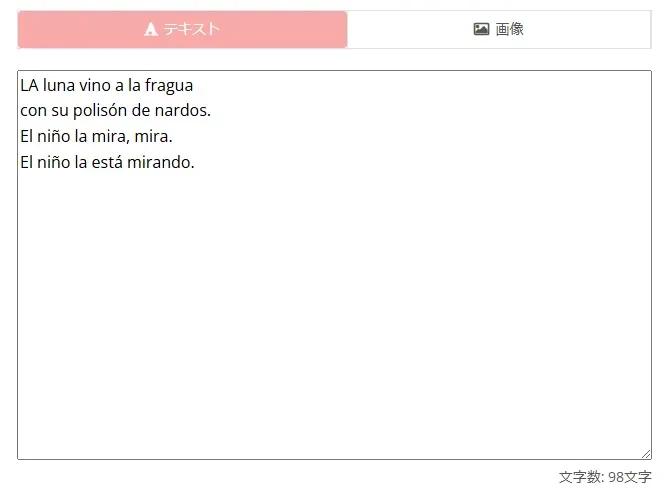
2. Enter the Text for Materials
Paste the text for your materials onto the Ondoku top page.
3. Select Spanish
Select Spanish from the list of languages.
On the Ondoku site, they are listed in alphabetical order by their names in each language.
Spanish is "Español," so it is located under the "E" section.
For pronunciation in Spain, select "Español(España)".

Pronunciation for Mexico and the USA is also selectable
In Ondoku, in addition to Spanish from Spain, you can also select pronunciation for Mexico and the United States.
You can select from:
- Español(México): Spanish for Mexico
- Español(EE. UU.): Hispanic Spanish for the United States
respectively.
This can be utilized not only for language study but also for video production aimed at Mexico or Hispanic people in the US.
4. Choose the Voice
Choose the voice to be used for reading aloud.
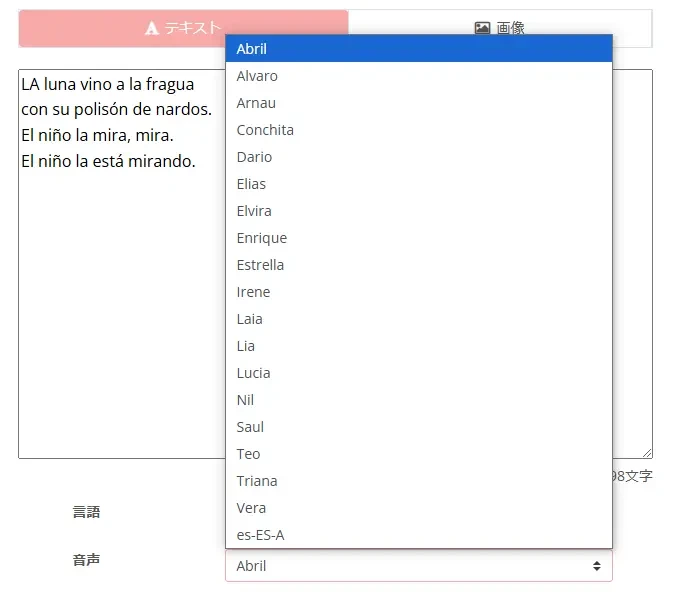
Voices can be selected from male, female, and children.
*You can listen to audio samples in this article. Please take a look.
For pronunciation confirmation and listening in Spanish study! Listen to native pronunciation from 45 speakers: female, male, and children's voices
Here, you can listen to Ondoku's Spanish audio samples. The voices include female, male, and children's voices. Please use them for narration, work training, presentations, learning, and more.
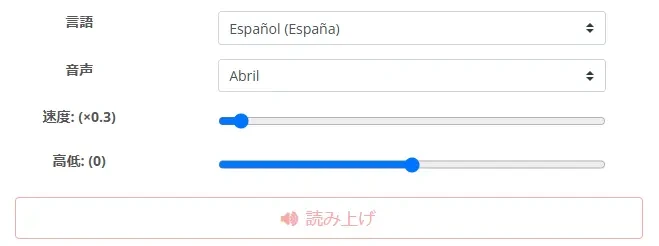
5. Set Playback Speed
Set the playback speed of the audio.
The playback speed can be changed by moving the slider left and right.

Moving the slider to the left allows for slower reading.
When using it for shadowing, it is recommended to first lower the speed and create materials from slow audio.
6. Start Reading Aloud
Once the settings are complete, press the "Read" button to start reading aloud.
Reading aloud will be completed shortly, so wait a moment with the page open.
7. Reading Completed
Even for long texts, reading will be completed in about 10 seconds.
When the reading is finished, the display will switch and an audio player will be displayed.

Listen to the audio, and if there are no problems, press the "Download" button to download the MP3 file.
Then, just play the MP3 file on your PC or smartphone and read the Spanish aloud!
As you can see, creating Spanish audio materials with Ondoku is very easy.
Why don't you also try reading aloud and shadowing Spanish with Ondoku?
■ AI voice synthesis software "Ondoku"
"Ondoku" is an online text-to-speech tool that can be used with no initial costs.
- Supports 81 languages and regions, including Japanese, English, Chinese, Korean, Spanish, French, and German
- Available from both PC and smartphone
- Suitable for business, education, entertainment, etc.
- No installation required, can be used immediately from your browser
- Supports reading from images
To use it, simply enter text or upload a file on the site. A natural-sounding audio file will be generated within seconds. You can use voice synthesis up to 5,000 characters for free, so please give it a try.

Text-to-speech software "Ondoku" can read out 5000 characters every month with AI voice for free.
You can easily download MP3s and commercial use is also possible.
If you sign up for free, you can convert up to 5,000 characters per month for free from text to speech.
Try Ondoku now.
HP:
ondoku3.com
Email: ondoku3.com@gmail.com
Email: ondoku3.com@gmail.com
Related posts
"Ondoku" is a Text-to-Speech service that anyone can use for free without installation. If you register for free, you can get up to 5000 characters for free each month. Register now for free
- What is Ondoku
- Start text-to-speech conversion
- Free registration
- Pricing
- Posts
- Try other free services














