Best Text-to-Speech Software: 7 Free & Paid Tools for Commercial Use
[Event Management] AI Voice for Guidance & Announcements Solves Staff Shortages!
July 22, 2026
![[Event Management] AI Voice for Guidance & Announcements Solves Staff Shortages!](https://storage.googleapis.com/ondoku3/image/event_guide_voice_tmb_930.webp)

Event guidance and shouting aren't going well... and it's also hard to find part-time staff!
For event management coordinators of **live music, sports matches, exhibitions, lectures**, etc., the **guidance** task of organizing the flow of people is a very difficult problem, isn't it?
Until now, it was common practice to station part-time staff with megaphones at various locations and have them give directions in a loud voice.
However, that method places a heavy burden on the staff, and it is also difficult to gather enough part-time workers just for guidance.
In this article, we will introduce **tips for reducing the burden of event guidance and shouting to operate the venue smoothly with fewer people**!
The biggest tip is to utilize a **text-to-speech service**.
Since you can provide guidance not only in Japanese but also in English and other foreign languages, it is ideal for managing international events.
We will also **introduce specific guidance and shouting methods using AI text-to-speech services**, so why not use this article as a reference to solve your event management problems?
Recommended AI Text-to-Speech Service for Event Guidance and Shouting Announcements

For future **event guidance and shouting**, we **recommend utilizing an AI text-to-speech service!**
The AI text-to-speech service **"Ondoku"** is an AI service that allows you to **create easy-to-hear announcement audio** using the **latest AI**.
Anyone can easily create audio files from text simply by opening the **Ondoku** page from here.
Furthermore, **Ondoku** is **free!**
**Commercial use is also OK**, making it perfect for creating announcement audio for events such as live music, sports matches, exhibitions, and lectures (Click here for more details on commercial use).
AI audio is highly recommended for future event guidance and shouting.
**Why don't you try creating event guidance and shouting announcement audio for free with Ondoku?**
What Are the 3 Reasons Why Event Guidance and Shouting Announcements are Difficult?

When managing an event, guiding participants and shouting out directions is a very difficult issue.
Not only does it prevent participants from comfortably attending the event, but if guidance and shouting are not handled appropriately, safety-related troubles can also occur...
There are three main reasons why guidance and shouting are difficult in event management.
1. It is difficult to share tips for guidance and shouting with part-time staff
**The biggest problem with event guidance and shouting** is that **it is difficult to share tips and know-how with part-time staff**.
For events such as live music, sports matches, exhibitions, and lectures, most guidance and shouting staff are part-time or dispatched workers.
Veteran staff can provide smooth guidance by choosing the right words while observing the situation. However, in event management, the majority of staff often consists of part-time workers who are entering the site for the very first time that day.
Furthermore, because they are often day laborers hired for a single day, it is often difficult for them to achieve easy-to-hear vocalization or a tone of voice that does not make customers feel uncomfortable.
Additionally, the fact that the **content of announcements changes slightly depending on the person** is also a major problem.
The larger the scale of the event, the more staff and part-time workers are involved, making it difficult to share guidance tips with everyone.
2. Long hours of guidance and shouting are a heavy burden on part-time staff
**The heavy burden on part-time staff** is another reason why event guidance and shouting are difficult.
Events such as live music, sports matches, exhibitions, and lectures can range from those that end in a few hours to those that last all day from morning till night.
During that time, guidance staff must stand continuously and **repeatedly shout the same announcement content**.
It is not uncommon for staff to lose their voices by the afternoon, causing essential guidance announcements to no longer reach the customers.
From the perspective of staff health management, there is a limit to conducting event guidance solely through the voices of part-time staff.
3. Staff shouting and announcements don't reach people due to venue noise
Event venues are basically always overflowing with various sounds, such as BGM and talking.
In such an environment, even if part-time staff try to provide guidance with their natural voices, **their voices often do not reach the participants**.
When **important precautions or guidance announcements are not conveyed**, troubles can occur, such as lines forming in unexpected places or people entering restricted areas.
While the situation can be improved to some extent if part-time staff use megaphones, the sound often cracks and becomes hard to hear, or adjustment is difficult.
Furthermore, **purchasing equipment is necessary to prepare megaphones**.
To ensure information is delivered and smooth guidance is achieved, it is necessary to use a means that can reliably deliver clear audio.
Solve Event Guidance and Shouting Problems with AI Text-to-Speech Services!

As described, there are several difficult-to-solve problems regarding participant guidance and shouting at events.
Therefore, we recommend **introducing the latest AI services for event guidance and shouting**.
You can solve problems related to event guidance, shouting, and announcements all at once, from the management on the day of the event to the recruitment of part-time staff.
Achieve Effective Event Guidance and Shouting with AI Text-to-Speech Services
**To conduct event guidance and shouting more effectively and efficiently, using an AI text-to-speech service is recommended**.
With an AI text-to-speech service, you can create and save audio files perfect for event guidance and shouting that are as easy to hear as announcements recorded by professional narrators!
The biggest merit of using an AI text-to-speech service is that **you can completely unify the quality of event guidance and shouting**.
Until now, there was inevitably a difference in volume and clarity of guidance and shouting between veteran and new part-time staff.
But with AI audio, announcements are possible with **constant volume and clarity**, using **clear vocalization like a professional narrator**.
Voices do not get quieter from fatigue, and you can continue guidance and shouting with audio that is always easy to hear and polite.
Furthermore, since **the content of guidance and shouting can be managed as text**, you can **prevent troubles such as staff saying different things before they happen**.
Solve Problems with Part-time Staff Recruitment for Guidance and Shouting!
Using an AI text-to-speech service can also **solve problems with the recruitment of part-time staff for event guidance and shouting**.
When managing an event, it is very difficult to gather part-time staff for guidance.
As the **labor shortage becomes more serious**, recruiting one-time part-time staff, which used to be easy, is becoming more difficult every year.
Risks such as last-minute cancellations or tardiness by part-time staff are also always present.
For those involved in event management, many have likely had the experience of struggling with staff placement on the day because the required number of people did not gather.
In such cases, **utilizing an AI text-to-speech service** allows you to **reduce the number of part-time staff required for event guidance and shouting.**
You can simply replace locations where staff used to stand and give vocal guidance with speakers playing audio created with an AI text-to-speech service.
What staff will do is only respond to emergencies or answer individual questions.
Since you can reduce part-time staff management tasks, you will be able to **operate events more efficiently**.
Of course, by reducing the number of part-time staff hired, you can **operate events at a lower cost by suppressing personnel expenses**.
Ondoku is Recommended for Creating Event Guidance and Shouting Announcement Audio
**To create announcement audio for event guidance and shouting, the AI text-to-speech service Ondoku is the best choice!**
**Ondoku** is an AI service that allows you to easily create audio files simply by entering text on the website.
When creating audio for events, one thing to be concerned about is whether **commercial use** is allowed, right?
In that regard, **Ondoku allows commercial use**, so you can use it with peace of mind to create announcement audio for event guidance and shouting for everything from live music and sports matches to exhibitions and lectures.
*A paid plan contract is required for use without credit. Please see this article for more details on commercial use.
With **Ondoku**, you can create easy-to-hear audio perfect for event guidance and shouting using the latest AI.
You can **create and download audio files** that are **easy to hear even in event venues, just like announcements by professional narrators**.
When you are troubled by event guidance or shouting announcements, why not try using **Ondoku**?
Detailed Explanation of the Flow for Creating Event Guidance & Shouting Announcement Audio
I want to try making audio for event guidance and shouting!

From here, we will introduce the method for actually creating announcement audio for event guidance and shouting with the AI text-to-speech service **Ondoku**!
How to Create Event Guidance and Shouting Announcement Audio?
The method for creating event guidance and shouting announcement audio with the AI text-to-speech service **Ondoku** is very simple.
First, open the top page of **Ondoku** from here on your computer or smartphone.
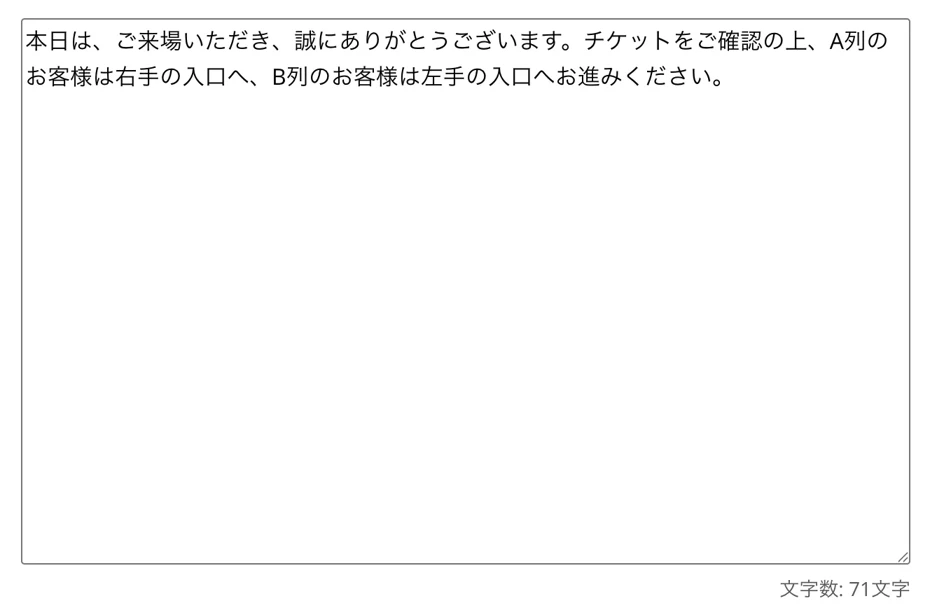
Enter the text you want to convey for guiding event participants or shouting out instructions into the text box.
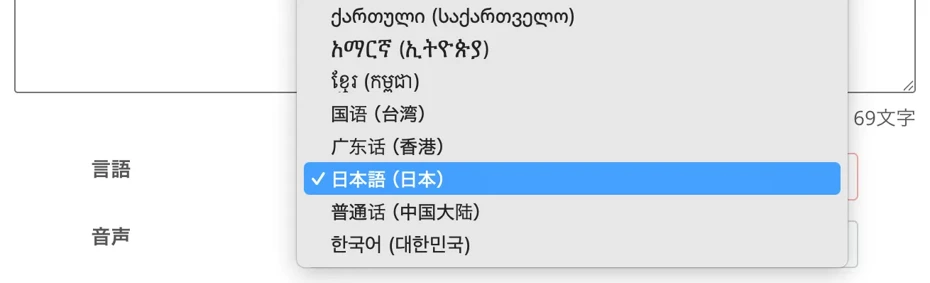
Select the language, such as Japanese or English.
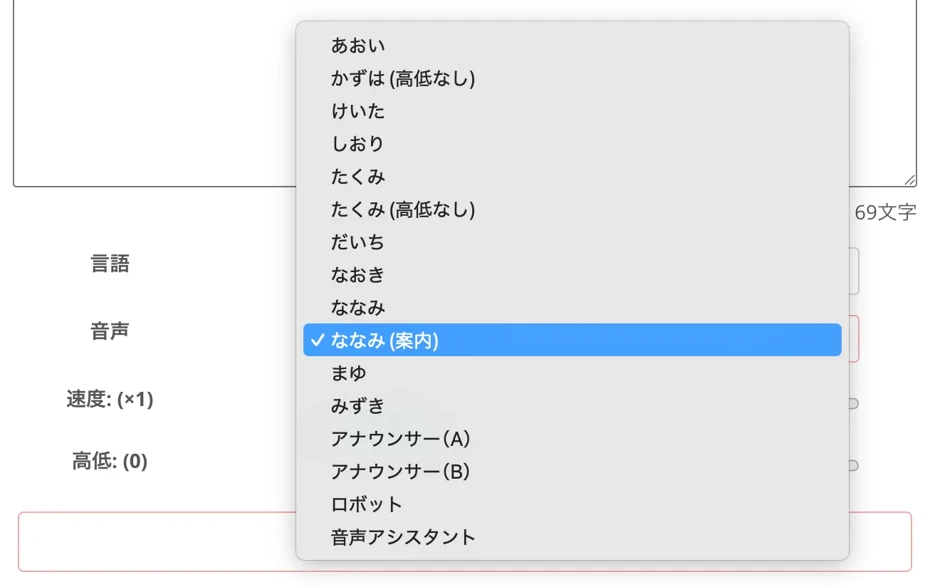
Select the type of voice, such as female or male.
You can listen to samples of Japanese text-to-speech voices in this article, so please take a look!

Listen to 16 types of Ondoku voices for free. Change the impression with pitch adjustments.
Ondoku has 16 types of Japanese voices. Of course, both male and female voices are available. We have made it possible to listen to 8 commonly used Japanese voices, as well as the voices when the pitch of each is adjusted.
Preparation is now complete.
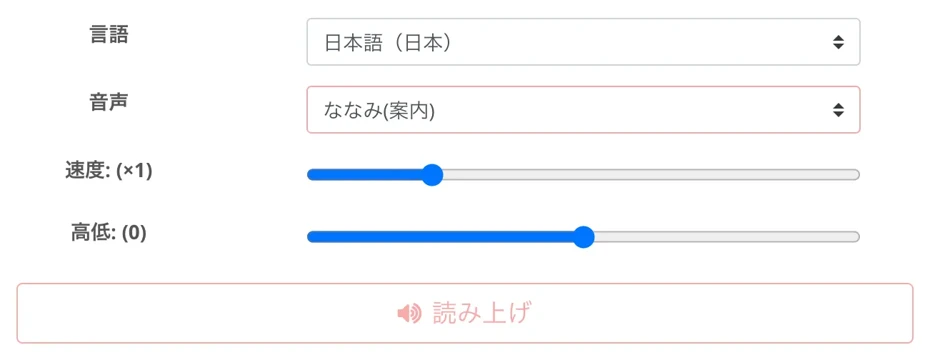
Press the "Read" button to start generating the audio.
Audio generation is completed in **just a few seconds**.
Once generation is finished, the screen will change, and you can listen to the generation result using the audio player.
By reading the current text, you can generate audio like this.
Audio sample Voice used: "Nanami (Guidance)"
If there are no problems after listening, **press the "Download" button to save the audio**.
Previously created audio can be checked from the history page.
Now you have successfully created event guidance and shouting audio using the AI text-to-speech service **Ondoku**!
**All that's left is to play the MP3 file on the audio playback equipment at the event venue.**
Since you can create audio files very easily, even **if the need to suddenly change the announcement content arises at the event site**, you can **create new audio on the spot from your smartphone**.
First, why don't you actually try creating guidance and shouting audio with **Ondoku**?
What are the Tips for Creating Event Guidance and Shouting Audio with AI Services?
When using an AI text-to-speech service to create event guidance and shouting audio, we recommend keeping a few tips in mind.
**A tip for more effectively conveying information to participants** is to be **conscious of "pauses" in the sentences**.
Before conveying something important, you usually pause for a moment or take a breath, right?
When creating event guidance and shouting audio with AI, it is important to create audio with an easy-to-hear rhythm by adding more commas and periods, or by using "SSML tags" to adjust the audio.
The tips for taking "pauses" in audio with the AI text-to-speech service **Ondoku** are introduced in this article, so please take a look!
![How to adjust pauses and blank times in Ondoku reading [2 types]](https://storage.googleapis.com/ondoku3/image/Line_930.webp)
How to adjust pauses and blank times in Ondoku reading [2 types]
Among the needs of those who use Ondoku is "I want to open up the timing a bit more." If it's an adjustment of "timing" where you want to leave a little gap, there are two types of adjustment methods: 1. Punctuation marks and 2. SSML.
**Choosing a voice that matches the atmosphere of the event** is also a tip for creating easy-to-hear guidance and shouting audio.
For a fun festival, we recommend a bright and energetic voice; for a calm exhibition or a solemn ceremony, a lower, calm voice is recommended.
By using a voice that matches the scene, you can convey information to event participants more smoothly.
Additionally, **not starting the speech suddenly, but putting a chime sound at the beginning** is another tip.
In this way, just by being conscious of a few tips, you can more effectively shout out to and guide event participants with AI audio.
With **Ondoku**, you can **easily create audio files over and over while listening to them**, so we also recommend making several audio files while imagining how they will sound actually playing at the site and then choosing the best one.
English and Foreign Language Guidance and Shouting are Also Important in Event Management

In future event management, **guidance and shouting in foreign languages, starting with English, are also important**.
We recommend utilizing AI text-to-speech services to produce English and foreign language announcement audio as well.
Guiding and Shouting at Event Participants in English or Foreign Languages is Very Difficult
As globalization progresses, **the number of overseas participants at events such as live music, sports matches, exhibitions, and lectures is increasing.**
However, until now, providing guidance and shouting to overseas event participants in foreign languages such as English was very difficult.
It was difficult to find part-time staff with language skills such as English, and when hiring human resources with language skills, high personnel costs were necessary.
For this reason, guidance and shouting announcements could previously only be conducted in Japanese, leading to cases where foreign participants got lost or troubles occurred because they could not understand the rules.
Solve English Event Guidance and Shouting with AI Text-to-Speech Services
**But don't worry!**
**Guidance and shouting for overseas event participants can also be easily solved by utilizing AI text-to-speech services**.
**Simply by entering English text created with a translation tool into the reading service**, you can **create easy-to-hear audio with native pronunciation**.
Since AI-generated audio is much easier to hear than English pronounced by Japanese staff, foreign participants will be able to attend events more comfortably.
Guidance and Shouting Announcement Audio Can be Created in Foreign Languages Other Than English
Furthermore, by using an AI text-to-speech service, you can **create guidance and shouting announcement audio in foreign languages other than English**.
**Ondoku** supports
- French
- Spanish
- German
- Korean
- Chinese
- Indonesian
- Thai
and many other languages from around the world.
You can easily create announcements aimed at participants from all over the world.
Multilingual audio samples of **Ondoku** can be heard in this article.
Please take a look.
![[Ondoku] Listen to supported language voice types and sample audio](https://storage.googleapis.com/ondoku3/image/%E5%A4%9A%E6%A7%98%E6%80%A7_930.webp)
[Ondoku] Listen to supported language voice types and sample audio
Here we introduce Ondoku's supported languages and sample audio.
What are the Tips for Multilingual Guidance and Shouting to Event Participants?
There are tips for effectively playing guidance and shouting audio for overseas event participants at the venue.
The method is very simple.
**Create audio data that connects multiple languages, such as an English announcement following a Japanese announcement, followed by a Chinese announcement**.
Then, **all you have to do is repeatedly play that audio from the speakers**.
However, if you make separate audio files for each language, such as Japanese and English, it will take effort to edit them later.
That is where you should utilize **Ondoku's "SSML tag" function.**
In **Ondoku**, by using "SSML tags," you can read text that contains a mixture of multiple languages, such as Japanese and English.
The method for multilingual reading with SSML tags is explained in this article, so please take a look!
How to use SSML tags in Ondoku multilingual reading? How to use the <lang> tag for multilingual audio
Explains how to use SSML tags with Ondoku's multilingual reading function. Includes templates that can be used by copying and pasting. Ideal for YouTube videos and language teaching material production!
The tip for smoothly shouting to and guiding overseas event participants is to use an AI text-to-speech service.
Why don't you also utilize the latest AI to create guidance and shouting announcement audio in English and other foreign languages?
What are the Tips for Effective Event Guidance & Shouting?

Finally, we will introduce tips for more effectively conducting event guidance and shouting!
Tips for Differentiating Between AI Voice Announcements and Part-time Staff Shouting
**The biggest tip for smoothly guiding and shouting to event participants** is to **properly use AI voice announcements and part-time staff shouting in the right places**.
For example, for **fixed guidance that does not change regardless of the person**, such as calls for ticket checks at the entrance, toilet location guidance, or smoking prohibition reminders, it is **best to leave it to audio created with an AI text-to-speech service**.
Conversely, for **scenes requiring situational judgment**, such as individual responses to troubled participants, occurrences of sudden illness, or unexpected crowd control, **response by part-time staff is necessary**.
By leaving simple guidance and shouting to audio created with an AI text-to-speech service, part-time staff will be able to concentrate on tasks that only humans can do.
In this way, by clearly dividing roles between guidance audio created with an AI text-to-speech service and shouting by part-time staff, high-quality event management becomes possible even with a small number of people.
Prompting Participant Preparation with Advance Announcements is Also an Important Tip
Another important tip for making guidance smooth is to **shout out one step before the participants take action**.
For example, instead of shouting "Please prepare your tickets" right in front of the entrance gate, play an announcement asking for ticket preparation in the corridor several dozen meters before the gate.
By doing so, participants will be able to get ready while walking, allowing them to pass through the gate smoothly.
Playing AI text-to-speech audio through speakers is very effective for these advance shouting announcements.
**"It's not worth placing a staff member there, but it would be kind to have guidance."**
**By playing shouting announcements at such points**, you can guide event participants much more smoothly.
The Latest AI is Recommended for Event Guidance and Shouting!
Event guidance and shouting are essential tasks for ensuring the safety and satisfaction of participants.
However, **as labor shortages become more serious, it is becoming increasingly difficult to operate events with part-time staff alone.**
As introduced in this article, AI text-to-speech services are ideal for fixed guidance announcements and repetitive shouting.
With the AI text-to-speech service **Ondoku**, **anyone can easily create high-quality announcements** just by **entering text**.
We recommend utilizing AI text-to-speech services for future event management.
**When you are having trouble with the management of events such as live music, sports matches, exhibitions, or lectures, why not utilize AI text-to-speech audio for participant guidance and shouting?**
We sincerely hope that you can solve the difficult problems of event management, such as participant guidance and shouting.
■ AI voice synthesis software "Ondoku"
"Ondoku" is an online text-to-speech tool that can be used with no initial costs.
- Supports 81 languages and regions, including Japanese, English, Chinese, Korean, Spanish, French, and German
- Available from both PC and smartphone
- Suitable for business, education, entertainment, etc.
- No installation required, can be used immediately from your browser
- Supports reading from images
To use it, simply enter text or upload a file on the site. A natural-sounding audio file will be generated within seconds. You can use voice synthesis up to 5,000 characters for free, so please give it a try.

Text-to-speech software "Ondoku" can read out 5000 characters every month with AI voice for free.
You can easily download MP3s and commercial use is also possible.
If you sign up for free, you can convert up to 5,000 characters per month for free from text to speech.
Try Ondoku now.
HP:
ondoku3.com
Email: ondoku3.com@gmail.com
Email: ondoku3.com@gmail.com
Related posts
"Ondoku" is a Text-to-Speech service that anyone can use for free without installation. If you register for free, you can get up to 5000 characters for free each month. Register now for free
- What is Ondoku
- Start text-to-speech conversion
- Free registration
- Pricing
- Posts
- Try other free services
![[Event Management] AI Voice for Guidance & Announcements Solves Staff Shortages!](https://storage.googleapis.com/ondoku3/image/irodori-tts_tmb_140.webp)
![[Event Management] AI Voice for Guidance & Announcements Solves Staff Shortages!](https://storage.googleapis.com/ondoku3/image/tategaki-image-yomiage_howto_tmb_140.webp)
![[Event Management] AI Voice for Guidance & Announcements Solves Staff Shortages!](https://storage.googleapis.com/ondoku3/image/iphone-video-narration_tmb_140.webp)
![[Event Management] AI Voice for Guidance & Announcements Solves Staff Shortages!](https://storage.googleapis.com/ondoku3/image/chrome-reading-mode-pc_tmb_140.webp)
![[Event Management] AI Voice for Guidance & Announcements Solves Staff Shortages!](https://storage.googleapis.com/ondoku3/image/pdf-to-mp3-howto_tmb_140.webp)









