Learn Chinese & Check Pronunciation! How to Use Free Text-to-Speech Ondoku
English Learning & Pronunciation: How to Use Ondoku for US and UK English
Sept. 4, 2026

When studying English,
Huh? How do I read this word again?

have you ever encountered words you don't know?
Even for words you've studied once, you might forget them after some time has passed or if you don't use them frequently.
When studying English, you often find yourself re-checking the pronunciation of words you've forgotten, don't you?
Also, to read sentences smoothly, it is important to know not only the pronunciation of individual words but also the pronunciation of the sentences.
What method do you use when checking the pronunciation of English words and sentences?
- I want to check the pronunciation of words
- I want to check the pronunciation of sentences
- Support for American English, British English, etc.
There is an attractive text-to-speech site that meets your needs for studying English, like these!
In this article, I will introduce Ondoku, a very convenient text-to-speech service for checking English pronunciation.
Ondoku: A service for easily reading English aloud

Ondoku is a text-to-speech site with simple and easy-to-understand operations.
The text you enter is immediately converted into audio, and you can also download it as an MP3.
Ondoku is also perfect for checking pronunciation for those studying English!
Accents support not only American English but also British English.
Multiple speakers, such as women and men, are available, so you can choose your preferred voice.
Types of voices include:
- Male
- Female
- Girl
- Boy
- Genderless
In addition to these, many other languages are supported.
As a unique feature, it can even read aloud in Indian English or Australian English.

For English learning listening! Sample (listen to) native pronunciation from 92 speakers! Voices of women, men, girls, and boys too!
Ondoku is a text-to-speech service that can pronounce words from around the world. You can sample (listen to) 92 types of English voices on Ondoku.
Ondoku is basically free to use.
Paid plans are also available if you want to increase the number of characters read aloud.
However, if you are just checking English pronunciation, the free range of use is more than enough!
How to use Ondoku

The way to use Ondoku for free is very simple.
There is no need to download apps or software. A convenient point is that everything can be operated in a web browser.
Usage:
- Access the Ondoku site
- Enter the text you want read aloud in the text box (copy and paste is also OK)
- Adjust settings to your preference, such as voice type and speed
- Click Read Aloud
That's all there is to it.
The Ondoku website is in Japanese, so operation is very easy!
With foreign sites, you might feel hesitant until you understand how to use them, but with a Japanese site, you can feel at ease!
Using Ondoku in English
If you want to use an English site for the sake of studying English, you can also set the Ondoku site to English!

Displaying the site in English is also very easy on Ondoku.
Next to the word "Ondoku" at the very top of the site, there is a pull-down menu that says "Japanese" (日本語).
Click this and switch it to "English."
The site will then be displayed in English.
If you prefer the English display for your English studies, please give it a try!
Textbooks and handouts can also be read aloud
Ondoku also has a convenient feature: "read aloud by uploading an image."
This is a feature that can read aloud images taken with a smartphone or similar device as audio.
You can take photos of picture books, books, textbooks, etc., and have them read aloud by Ondoku.
This feature instantly solves the "I don't know how to read this" problem when teaching English to children at home or reading English textbooks.
Moreover, it's very convenient because you don't have to enter each word one by one.
[How to use the Image-to-Text-to-Speech function]
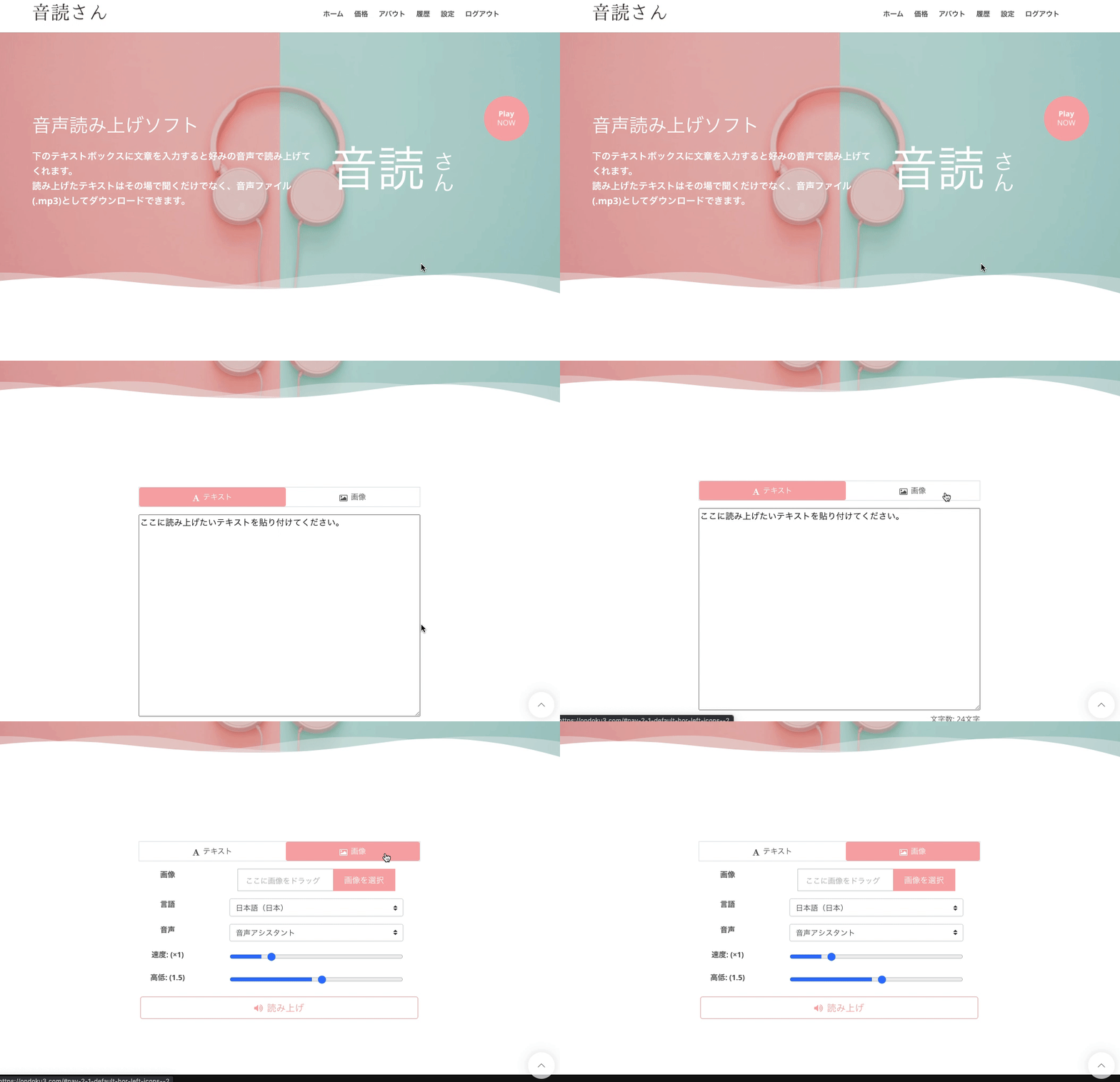
- Access the Ondoku top page
- There are "Text" and "Image" tabs above the text box
- Click the "Image" tab
- Click Upload Image and choose the image you like
*On a smartphone, you can also start the camera and take a photo directly here. - Once you have selected the image, adjust the speed and pitch of the reading.
- Click the Read Aloud button
Then, the image is analyzed in a few seconds, and it can be read aloud.
After reading the image, the recognized characters are displayed in the text box.
If there are recognition errors and you want to correct the reading, you can edit it here.
Detailed usage instructions are introduced here.

How to use image reading | How to perform free OCR on text in photos and turn it into audio
Explains the Ondoku feature that can read (OCR) text from images and photos and read it aloud. It can be used for free. Whether on a PC or smartphone, the reading is completed in just a few seconds simply by uploading an image.
Ondoku is perfect for English learning
Checking English pronunciation, reading English sentences aloud. Furthermore, it can even recognize text from images and read English aloud...!
It's so convenient that Ondoku can be used for free despite having so many features available.
Since it's free to use, you can try it right now!
May the excellent Ondoku, which reads aloud in English, be of help to you as you work hard on your English studies.
Please give it a try.
■ AI voice synthesis software "Ondoku"
"Ondoku" is an online text-to-speech tool that can be used with no initial costs.
- Supports 81 languages and regions, including Japanese, English, Chinese, Korean, Spanish, French, and German
- Available from both PC and smartphone
- Suitable for business, education, entertainment, etc.
- No installation required, can be used immediately from your browser
- Supports reading from images
To use it, simply enter text or upload a file on the site. A natural-sounding audio file will be generated within seconds. You can use voice synthesis up to 5,000 characters for free, so please give it a try.

Text-to-speech software "Ondoku" can read out 5000 characters every month with AI voice for free.
You can easily download MP3s and commercial use is also possible.
If you sign up for free, you can convert up to 5,000 characters per month for free from text to speech.
Try Ondoku now.
HP:
ondoku3.com
Email: ondoku3.com@gmail.com
Email: ondoku3.com@gmail.com
Related posts
"Ondoku" is a Text-to-Speech service that anyone can use for free without installation. If you register for free, you can get up to 5000 characters for free each month. Register now for free
- What is Ondoku
- Start text-to-speech conversion
- Free registration
- Pricing
- Posts
- Try other free services