What is Speech Synthesis Markup Language (SSML)? How to use it with text-to-speech software and a l…
Ondokutext-to-speech: List of Supported Languages for Reading Aloud
April 1, 2026

Currently, there are **80 languages and dialects** available for reading aloud on Ondoku, including English, Chinese, French, Italian, and Japanese.
In terms of the number of speakers, the total exceeds 650.
Here, we introduce a list of languages that can be read aloud with Ondoku.
The "Language" dropdown on the Ondoku top page displays names in the local language. In this article, each **language notation is provided in its native language**.

"I want to create training materials for foreign employees, but which one is [Language Name]?"
If you are worried about this, this article can help you solve it!

List of Languages Supported for Reading Aloud in Ondoku
If you have trouble finding the language you are looking for, please use the in-page search.
How to search within the page
- For Windows: Control+F
- For Mac: command(⌘)+F
Display the search box and perform your search.
| Display Name | Language Notation |
.png) |
Afrikaans (South Africa) |
.png) |
Azerbaijani (Latin, Azerbaijan) |
.png) |
Bosnian (Bosnia and Herzegovina) |
.png) |
Catalan (Spain) |
.png) |
Welsh (United Kingdom) |
.png) |
Danish (Denmark) |
.png) |
German (Germany) |
.png) |
English (Australia) |
.png) |
English (India) |
.png) |
English (USA) |
.png) |
English (United Kingdom) |
.png) |
Spanish (USA) |
.png) |
Spanish (Spain) |
.png) |
Spanish (Mexico) |
.png) |
Filipino (Philippines) |
.png) |
French (Canada) |
.png) |
French (France) |
.png) |
Irish (Ireland) |
 |
Galician |
.png) |
Croatian (Croatia) |
.png) |
Indonesian (Indonesia) |
.png) |
Italian (Italy) |
.png) |
Javanese (Latin, Indonesia) |
.png) |
Latvian (Latvia) |
.png) |
Lithuanian (Lithuania) |
.png) |
Hungarian (Hungary) |
.png) |
Maltese (Malta) |
.png) |
Malay (Malaysia) |
.png) |
Dutch (Netherlands) |
.png) |
Norwegian (Norway) |
.png) |
Polish (Poland) |
.png) |
Portuguese (Brazil) |
.png) |
Portuguese (Portugal) |
.png) |
Romanian (Romania) |
.png) |
Slovak (Slovakia) |
.png) |
Slovenian (Slovenia) |
.png) |
Somali (Somalia) |
.png) |
Finnish (Finland) |
.png) |
Swedish (Sweden) |
.png) |
Turkish (Turkey) |
.png) |
Urdu (India) |
.png) |
Urdu (Pakistan) |
.png) |
Uzbek (Latin, Uzbekistan) |
.png) |
Vietnamese (Vietnam) |
.png) |
Icelandic (Iceland) |
.png) |
Czech (Czech Republic) |
.png) |
Greek (Greece) |
.png) |
Bulgarian (Bulgaria) |
.png) |
Macedonian (North Macedonia) |
.png) |
Mongolian (Mongolia) |
.png) |
Russian (Russia) |
.png) |
Ukrainian (Ukraine) |
.png) |
Kazakh (Kazakhstan) |
.png) |
Armenian (Armenia) |
.png) |
Hebrew (Israel) |
.png) |
Arabic (Saudi Arabia) |
.png) |
Arabic (Egypt) |
 |
Arabic |
.png) |
Persian (Iran) |
.png) |
Pashto (Afghanistan) |
.png) |
Nepali (Nepal) |
.png) |
Marathi (India) |
.png) |
Hindi (India) |
.png) |
Bengali (Bangladesh) |
.png) |
Bengali (India) |
.png) |
Gujarati (India) |
.png) |
Tamil (India) |
.png) |
Kannada (India) |
.png) |
Malayalam (India) |
 |
Telugu (India) |
.png) |
Thai (Thailand) |
.png) |
Lao (Laos) |
.png) |
Burmese (Myanmar) |
.png) |
Georgian (Georgia) |
.png) |
Amharic (Ethiopia) |
.png) |
Khmer (Cambodia) |
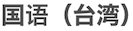 |
Chinese (Taiwan) |
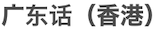 |
Cantonese (Hong Kong) |
 |
Japanese (Japan) |
 |
Mandarin (Mainland China) |
.png) |
Korean (South Korea) |
As of 2023/07/31
In Ondoku, you can convert characters entered into the text box into speech and have them read aloud.
Moreover, **Ondoku supports reading aloud in languages from countries all over the world**.
How to Change the Reading Language
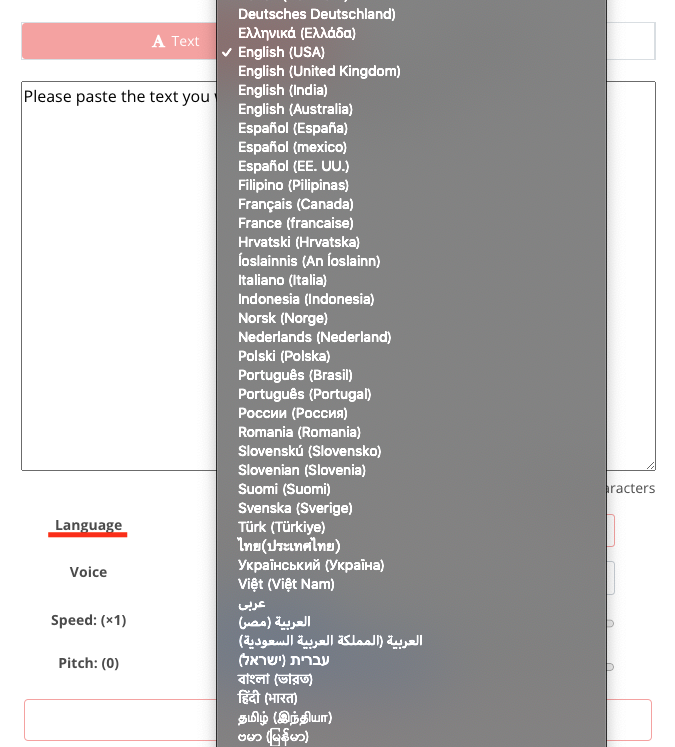
To change the reading language:
- Below the text box on the TOP page,
- Click the "Language" dropdown.
The languages will then be displayed, allowing you to change them.
Since you can find speakers you like in the language you want to be read aloud, or have words pronounced that you cannot pronounce yourself, it can be utilized in various situations such as:
- Listening materials
- Training materials for foreign employees
By using multiple languages and voices to read sentences in order, there is also a function to read as if having a conversation (Conversation Function), which can be used in various scenarios.

In addition, audio preview pages are available for some languages. Please make use of them.
- Sample voices for Multilingual (46 types)
- Sample voices for Japanese (16 types)
- Sample voices for English (67 types)
- Sample voices for French (45 types)
- Sample voices for German (24 types)
- Sample voices for Ukrainian (3 types)
- Sample voices for Italian (22 types)
- Sample voices for Spanish (45 types)
- Sample voices for Portuguese (28 types)
- Sample voices for Russian (10 types)
- Sample voices for Chinese (41 types)
- Sample voices for Korean (14 types)
- Sample voices for Indonesian (8 types)
- Sample voices for Malaysian/Malay (2 types)
- Sample voices for Thai (4 types)
- Sample voices for Vietnamese (6 types)
- Sample voices for Filipino (Tagalog, Visayan, Cebuano) (6 types)
Ondoku will continue to update languages and speakers. Please look forward to it!
■ AI voice synthesis software "Ondoku"
"Ondoku" is an online text-to-speech tool that can be used with no initial costs.
- Supports approximately 50 languages, including Japanese, English, Chinese, Korean, Spanish, French, and German
- Available from both PC and smartphone
- Suitable for business, education, entertainment, etc.
- No installation required, can be used immediately from your browser
- Supports reading from images
To use it, simply enter text or upload a file on the site. A natural-sounding audio file will be generated within seconds. You can use voice synthesis up to 5,000 characters for free, so please give it a try.

Text-to-speech software "Ondoku" can read out 5000 characters every month with AI voice for free.
You can easily download MP3s and commercial use is also possible.
If you sign up for free, you can convert up to 5,000 characters per month for free from text to speech.
Try Ondoku now.
HP:
ondoku3.com
Email: ondoku3.com@gmail.com
Email: ondoku3.com@gmail.com
Related posts
"Ondoku" is a Text-to-Speech service that anyone can use for free without installation. If you register for free, you can get up to 5000 characters for free each month. Register now for free
- What is Ondoku
- Start text-to-speech conversion
- Free registration
- Pricing
- Posts
- Try other free services














