Best Text-to-Speech Software: 7 Free & Paid Tools for Commercial Use
[Free] AI Apps for Phone Guidance: Tips for Call Center Efficiency
Sept. 9, 2026
![[Free] AI Apps for Phone Guidance: Tips for Call Center Efficiency](https://storage.googleapis.com/ondoku3/image/telephone_guidance_tmb_930.webp)
How can I implement telephone voice guidance for free?

When you call a telephone support desk or call center, voice guidance often plays, doesn't it?
By using voice guidance, you can improve the efficiency of operations at call centers, companies, and stores.
In fact, by using the latest AI, anyone can easily create automated voices for voice guidance!
While automated voices for voice guidance used to cost hundreds of thousands of yen, you can now create them for free using the latest AI reading software and apps.
In this article, we will explain in detail how to implement telephone voice guidance, from specific procedures to points of caution.
We will also introduce free AI software/apps and IVR systems (Automated Voice Response Systems).
Whether you want to implement new telephone voice guidance or reduce the operating costs of your call center, why not use this article as a reference to create your own voice guidance?
[Free] Recommended AI Reading Apps for Implementing Telephone Voice Guidance

If you want to implement telephone voice guidance in a call center, Ondoku is recommended!
Ondoku is an AI app that can create automated voices for voice guidance using the latest AI.
Anyone can easily synthesize easy-to-hear voices, just like a professional narrator.
Since the voice is synthesized by AI, you can create voice guidance 24 hours a day.
Furthermore, Ondoku is free!
Commercial use is OK, so you can feel secure when creating voice guidance for companies or organizations (click here for details on commercial use).
If you want to implement telephone voice guidance in a call center, why not start by experiencing the AI reading service Ondoku for free?
Create Telephone Voice Guidance for Free! The Flow of Creating Automated Voice with Ondoku

I want to make telephone voice guidance for free!
Now, let's introduce the flow of creating automated voices for telephone voice guidance for free!
Please use this as a reference when implementing telephone voice guidance.
1. Create a script for the telephone voice guidance

First, create the script text.
The key point when writing a script for telephone voice guidance is to provide easy-to-understand options so that customers do not get lost.
It is recommended to limit the options to about 3 or 4.
If there are too many options, there is a higher possibility that customers will hang up before listening to the end.
Example script for call center telephone voice guidance
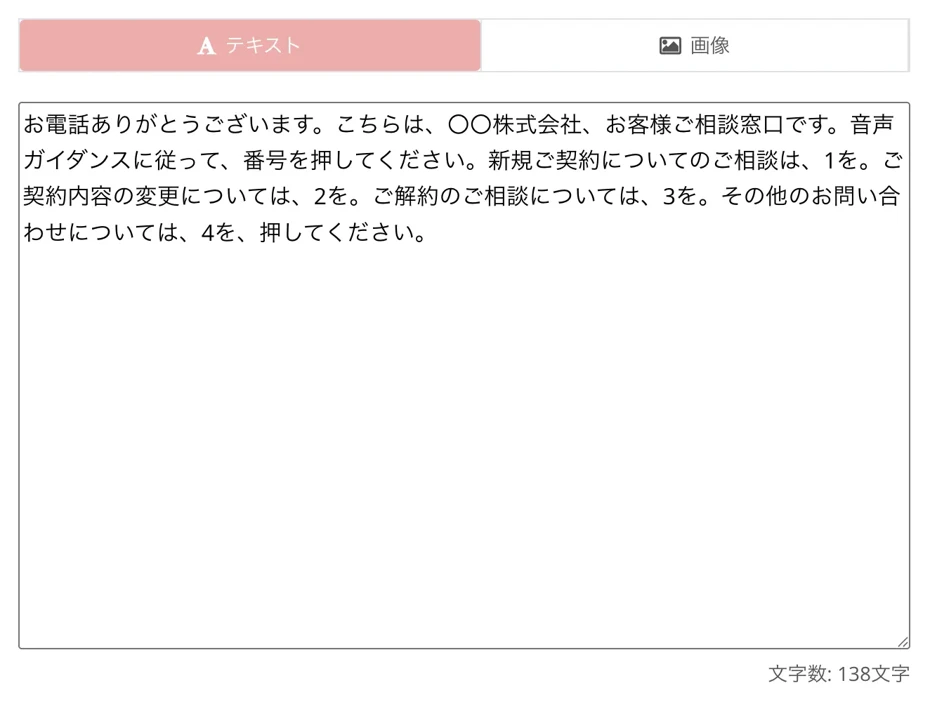
Thank you for calling. This is the Customer Consultation Desk of XX Co., Ltd. Please press a number according to the voice guidance. For inquiries regarding new contracts, press 1. For changes to contract details, press 2. For inquiries regarding cancellations, press 3. For all other inquiries, press 4.
It is recommended to use a simple structure like this.
Example script for recording calls at a call center
When recording calls with call center operators, it is recommended to inform them about the recording via voice guidance.
For example,
Please note that this call is being recorded to improve our customer service quality.
By providing guidance like this, you can give customers a sense of security and prevent troubles before they occur.
2. Create automated voice for telephone voice guidance with Ondoku
Once the script text for the telephone voice guidance is complete, read it aloud with Ondoku.
Open the Ondoku top page.
Paste the script into the text box on the top page.
When reading out the content of telephone voice guidance, it is recommended to paste and read it for each individual guidance segment.
In this example, we will read out the announcement that plays first when a customer calls.
Select the language and voice type.
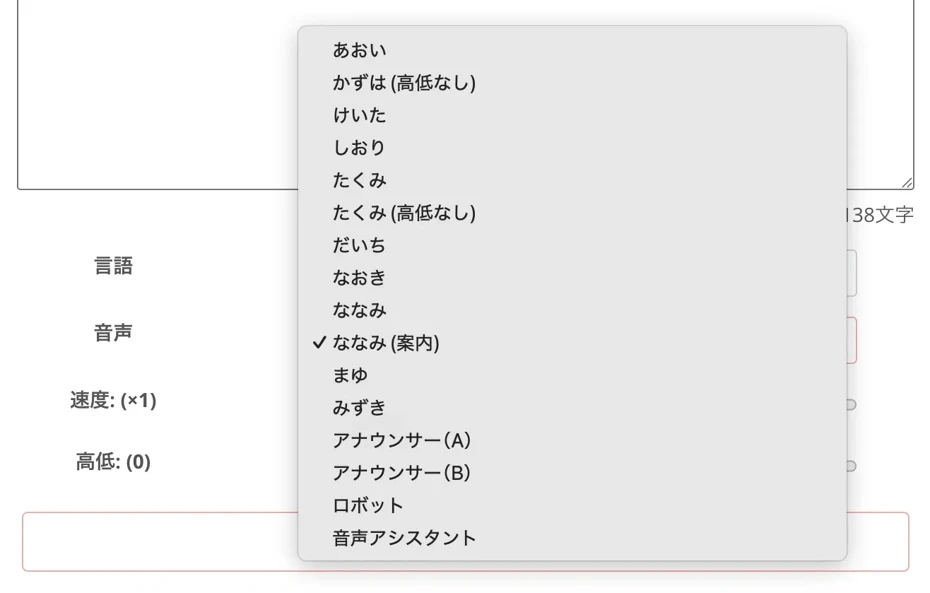
Ondoku supports multilingual support for 81 languages and regions.
For example, in the case of Japanese, you can choose from 16 types of voices, including female, male, and child.
You can listen to voice samples in this article.

Try listening to 16 types of Ondoku text-to-speech voices for free. Change impressions by adjusting pitch
Ondoku has 16 types of Japanese voices. Of course, both male and female voices are available. We have made it possible to listen to 8 commonly used Japanese voices and the voices when the pitch of each is adjusted.
In Ondoku, the voice pitch and reading speed can also be adjusted.
*When reading the content of telephone voice guidance, the default settings are usually fine.
Now the preparation is complete.
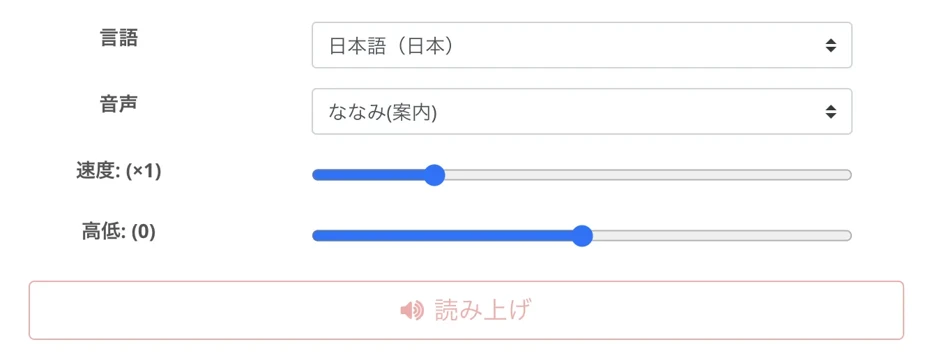
Press "Read" to start creating the voice.
The reading is completed in just a few seconds.
The screen will change and the audio will play.

Listen to the content, and if there are no problems, press "Download" to save the file.
Now you have successfully read the telephone voice guidance content using Ondoku.
3. Implement the reading file into the voice guidance
Once the audio file is complete, import the audio file into your IVR system (Automated Voice Response System).
When you save the file from the "Download" button on the Ondoku top page, an MP3 file is downloaded.
Additionally, by opening the Ondoku "History" page, it is also possible to download WAV files.

Since many IVR systems (Automated Voice Response Systems) support loading MP3 or WAV files, you can use the files saved from Ondoku exactly as they are.
This completes the flow of reading telephone voice guidance content with the AI reading app Ondoku.
In this way, you can easily create reading files for voice guidance for free, so why not use Ondoku's AI voice when implementing voice guidance?
What are the features and benefits of implementing telephone voice guidance?

Telephone voice guidance has many benefits.
From here, we will explain the basic characteristics of voice guidance and the benefits of implementing it.
What is telephone voice guidance? Recommended for help desks and call centers
Telephone voice guidance refers to a system that automatically provides voice guidance for incoming calls to the telephone desks or call centers of companies and organizations.
It is also called an IVR system (Automated Voice Response System) and is widely used in call centers and corporate reception desks.
When telephone voice guidance is implemented, an automated voice announcement plays first when a customer calls.
When the customer presses a button on the phone according to the voice guidance, the call is transferred to the person in charge or the department.
Furthermore, systems have appeared that allow procedures such as:
- Store or facility reservations
- Requests for parcel redelivery
just through phone button operations.
As the shortage of call center operators becomes more serious, it is attracting more attention than ever as a system that can more efficiently respond to calls from customers.
Benefits of implementing telephone voice guidance
The biggest benefit of implementing telephone voice guidance is that the operational efficiency of the call center can be significantly improved.
By automating basic guidance and procedures with voice guidance, you can reduce the number of times call center operators need to respond.
Since call center operators can focus only on complex inquiries, you can improve response quality and increase customer satisfaction.
Another point is the reduction of labor costs.
Since it eliminates the need to hire call center operators solely for phone support, labor costs can be greatly reduced.
Also, the ability to automatically respond to calls outside of business hours or on holidays is a major advantage.
By utilizing AI text-to-speech software/apps, you can implement voice guidance for free.
For future telephone voice guidance implementation, the AI reading app Ondoku is recommended.
Why free AI apps are recommended for implementing telephone voice guidance

When implementing telephone voice guidance, using free AI reading apps/software is recommended.
With the AI reading app Ondoku, you can easily create reading voices for free.
Reading voice is important in implementing telephone voice guidance
Until now, when creating voices for voice guidance, recording was requested from professional narrators.
Requesting recording from a narrator incurs high costs for voice production.
Moreover, every time business hours changed or service content was updated, additional recording costs were required.
But with AI text-to-speech software/apps, there's no need for such worries!
If you use a free AI text-to-speech app, anyone can generate natural speech just by entering text.
Since you can create natural voices like a professional narrator for free, all you have to do is import the audio file into the IVR system (Automated Voice Response System).
Because there is no cost and voices can be created immediately without waiting, the hurdle for implementing telephone voice guidance has been greatly lowered.
Moreover, since free AI text-to-speech apps can be used 24 hours a day, you can respond even if sudden corrections occur in the content of the telephone voice guidance.
Easily implement voice guidance with cloud-based IVR services
Recently, with the spread of cloud-based IVR services, there is no longer a need to purchase dedicated telephone equipment.
Since there is no need to implement telephone equipment at a high cost and voice guidance can be created purely in the cloud, initial costs are almost zero.
With cloud-based IVR services, importing MP3 or WAV files is easy, so you can immediately implement audio files created with AI text-to-speech software/apps.
Implementation of telephone voice guidance possible even for small businesses and sole proprietors
By using AI reading voices and IVR services, telephone voice guidance can be implemented for free or at low cost.
Voice guidance, which previously could only be realized in call centers of large corporations, can now be implemented by small businesses and sole proprietors.
By using free AI text-to-speech apps/software, you can create audio files for voice guidance just by entering text.
To implement telephone voice guidance easily, AI text-to-speech apps/software are recommended.
Points to check for the reading voice of telephone voice guidance

When you have created a reading voice for telephone voice guidance, it is recommended to actually listen to and check the voice on the IVR system (Automated Voice Response System).
We will explain the points for checking reading voices for call centers and telephone desks.
Check the tempo and pauses of the telephone voice guidance
When you actually play the audio file on an IVR system (Automated Voice Response System), the impression of the tempo and the way pauses are taken may change from when you listened to the audio file on a PC.
- I want more space between sentences
- I want to increase the pause before the selection numbers
In such cases, just correct the script text and regenerate the voice with the AI reading app.
Since Ondoku can synthesize voice in just a few seconds, you can immediately correct the content of the voice guidance.
How to correct the pauses in the voice with Ondoku is explained in this article.
Please take a look.
![How to adjust pause and blank time in Ondoku reading [2 types]](https://storage.googleapis.com/ondoku3/image/Line_930.webp)
How to adjust pause and blank time in Ondoku reading [2 types]
Among the needs of Ondoku users is "I want to open up the interval a bit more." If it's an adjustment of "timing" where you want to open up a little space, there are two types of adjustment methods: 1. Punctuation 2. SSML.
Confirm if the options in the telephone voice guidance are easy to understand
Whether the explanation of the options is easy to understand is also an important point.
The clarity may change significantly between checking the script as text and actually listening to it as audio.
It is recommended to have multiple people actually call the IVR system to check if they can operate it without hesitation.
Check if the IVR system (Automated Voice Response System) settings are correct
Also check if the action when a button is pressed on the phone is correct.
- Is the wrong audio file set by mistake?
- Is it transferred to the call center operator without issue?
- Is the call transferred to the correct destination?
Confirm that the settings of the IVR system (Automated Voice Response System) are correct.
It is also a key point to have call center operators test it in advance to check for any issues.
In this way, when implementing telephone voice guidance, it is recommended to test and check the reading voice and IVR system (Automated Voice Response System) beforehand.
Any problems found during the implementation test should be corrected before starting operation.
With the free text-to-speech app Ondoku, new voices can be generated immediately, so you can easily correct the content of the telephone voice guidance.
Even when adding new content to already implemented telephone voice guidance, free reading with Ondoku is recommended.
Why not implement more user-friendly telephone voice guidance with the free reading app Ondoku?
[Free] The Best AI Service for Implementing Telephone Voice Guidance: Ondoku
If you are creating reading voices for voice guidance for call centers or telephone desks, the AI reading app Ondoku is recommended!
Ondoku is an AI text-to-speech app that can be used for free.
You can easily create high-quality AI reading voices for free.
Create high-quality AI reading voices for free
The greatest feature of Ondoku is that you can create high-quality AI voices for free!
Since it can be used commercially even on the free plan, it is ideal for call centers and corporate telephone desks (click here for details on commercial use).
Another point is the ability to create easy-to-hear voices unique to the latest speech synthesis AI.
Rather than the unnatural mechanical voices of the past, you can read aloud with a natural, easy-to-hear voice like a professional narrator.
Because the sound quality is clear and easy to hear even over the phone, you can implement user-friendly telephone voice guidance.
Select the optimal voice for telephone voice guidance
With Ondoku, you can choose from a wealth of AI reading voices, including female and male!
In the case of Japanese, you can select from over 16 types of voices.
You can listen to the voices in this article, so please take a look.
Try listening to 16 types of Ondoku text-to-speech voices for free. Change impressions by adjusting pitch
Ondoku has 16 types of Japanese voices. Of course, both male and female voices are available. We have made it possible to listen to 8 commonly used Japanese voices and the voices when the pitch of each is adjusted.
Adjusting the voice speed and pitch is also possible, so you can create voices that are even easier for customers to hear.
Multilingual support allows creation of voice guidance for foreigners
Ondoku has multilingual support for 81 languages and regions, including English, Chinese, Korean, Spanish, and French.
- Product repair and consultation call centers for foreigners
- Reservation systems for inbound tourists in the tourism industry and lodging facilities
- Call centers for local governments with many foreign residents
You can easily create voice guidance for foreign customers, such as those above.
You can listen to foreign language voice samples in this article, so please take a look.
![[Ondoku] Preview voice types and sample audio for supported languages](https://storage.googleapis.com/ondoku3/image/%E5%A4%9A%E6%A7%98%E6%80%A7_930.webp)
[Ondoku] Preview voice types and sample audio for supported languages
Here we will introduce the supported languages and sample voices of Ondoku.
Why not implement telephone voice guidance with Ondoku?
In this way, with the AI reading app Ondoku, you can easily produce AI reading voices that are perfect for telephone voice guidance!
If you want to implement telephone voice guidance, it is recommended to first experience Ondoku's AI reading voices for free.
Why not create easy-to-hear telephone voice guidance with the latest AI reading app Ondoku?
Common failures and measures in implementing telephone voice guidance

We will explain common failures and countermeasures when implementing voice guidance in call centers and telephone desks.
Customers get confused because there are too many options in the voice guidance
A common failure in telephone voice guidance is setting too many options.
1 for products, 2 for repairs, 3 for delivery, 4 for returns, 5 for cancellations, 6 for other inquiries
If you list many options like this, it becomes difficult to know which one to choose.
Also, if the customer does not have an unlimited call plan or is using Navi-dial, call charges will apply, so listening to long voice guidance can be a major stressor.
To prevent this, it is recommended to limit the options for the first response voice to only 3 or 4.
If you absolutely must have many options, narrowing them down step-by-step is also recommended.
First, sort by broad categories, then present more detailed options.
However, even in that case, care must be taken not to make the layers too deep.
When creating audio with free text-to-speech software/apps, it is recommended to pay attention to the number and content of options, and the depth of the layers.
The voice is difficult to hear and the customer hangs up
If the sound quality or speed of the voice guidance is not appropriate, customers may hang up mid-way.
The key to creating easy-to-hear voice guidance is to use the latest AI services that can read aloud with high-quality audio.
With the free AI reading service Ondoku, you can read aloud with an easy-to-hear voice like a professional narrator.
The settings of the text-to-speech app are also important.
If the voice speed is too fast, the customer will move to the next guidance before they can understand the content.
Conversely, if it is too slow, it will cause stress to the customer.
When making voices with Ondoku, the default settings are fine, but if you feel the voice is too fast, it is also possible to lower the reading speed.
Content becomes outdated because it's not updated after implementation
When implementing telephone voice guidance, post-implementation updates are also important.
For example, if business hours have changed but the voice guidance content remains old, incorrect information will be conveyed to the customer.
When the department in charge or service content changes, corrections to the voice guidance are also necessary.
To easily update telephone voice guidance, AI reading apps/software are recommended.
Since it's as simple as correcting the script text and reading it aloud, you can respond immediately when corrections are needed.
AI reading apps/software are also recommended for updating content that has become outdated in already implemented telephone voice guidance.
Free AI reading apps are recommended for telephone voice guidance
With the evolution of AI speech synthesis technology, anyone can now easily implement telephone voice guidance.
By utilizing AI text-to-speech software, you can create high-quality audio for voice guidance for free.
Small businesses and sole proprietors can also implement user-friendly telephone voice guidance.
If you are implementing telephone voice guidance, it is recommended to create audio files with the AI reading app Ondoku.
Why don't you start by experiencing Ondoku's free reading?
■ AI voice synthesis software "Ondoku"
"Ondoku" is an online text-to-speech tool that can be used with no initial costs.
- Supports 81 languages and regions, including Japanese, English, Chinese, Korean, Spanish, French, and German
- Available from both PC and smartphone
- Suitable for business, education, entertainment, etc.
- No installation required, can be used immediately from your browser
- Supports reading from images
To use it, simply enter text or upload a file on the site. A natural-sounding audio file will be generated within seconds. You can use voice synthesis up to 5,000 characters for free, so please give it a try.

Text-to-speech software "Ondoku" can read out 5000 characters every month with AI voice for free.
You can easily download MP3s and commercial use is also possible.
If you sign up for free, you can convert up to 5,000 characters per month for free from text to speech.
Try Ondoku now.
HP:
ondoku3.com
Email: ondoku3.com@gmail.com
Email: ondoku3.com@gmail.com
Related posts
"Ondoku" is a Text-to-Speech service that anyone can use for free without installation. If you register for free, you can get up to 5000 characters for free each month. Register now for free
- What is Ondoku
- Start text-to-speech conversion
- Free registration
- Pricing
- Posts
- Try other free services
![[Free] AI Apps for Phone Guidance: Tips for Call Center Efficiency](https://storage.googleapis.com/ondoku3/image/irodori-tts_tmb_140.webp)
![[Free] AI Apps for Phone Guidance: Tips for Call Center Efficiency](https://storage.googleapis.com/ondoku3/image/tategaki-image-yomiage_howto_tmb_140.webp)
![[Free] AI Apps for Phone Guidance: Tips for Call Center Efficiency](https://storage.googleapis.com/ondoku3/image/iphone-video-narration_tmb_140.webp)
![[Free] AI Apps for Phone Guidance: Tips for Call Center Efficiency](https://storage.googleapis.com/ondoku3/image/chrome-reading-mode-pc_tmb_140.webp)
![[Free] AI Apps for Phone Guidance: Tips for Call Center Efficiency](https://storage.googleapis.com/ondoku3/image/pdf-to-mp3-howto_tmb_140.webp)









