How to Add Audio Files to Slides and Presentations like PowerPoint: Recommended Software and Instru…
【Presbyopia, eye strain, blurred vision, etc.】A new proposal for those who want to maintain eye health. Text-to-speech software
April 1, 2026

Hello, thank you for always using Ondoku.
- As you get older, it has become harder to see nearby text due to presbyopia.
- Worried about whether your eyesight will deteriorate from looking at PC or smartphone screens too much.
- By the evening, your eyes are tired and blurry, making it painful to look at small text.
There are many people who think, "I want to maintain my eye health" in such situations.
However,
- It is necessary to read a lot of text every day
- It is necessary to use a PC for work
For reasons such as these, it is common to find it difficult to rest your eyes.
To those who want to maintain their eye health, or find it difficult to read text due to eyestrain, blurred vision, or presbyopia, the solution we would like to propose is "using text-to-speech software."
Text-to-speech software is recommended for maintaining eye health

By simply having "someone else read aloud for you" the small text you encounter daily, such as PC text, smartphones, newspapers, and documents, you can significantly reduce the burden on your eyes.
Even if you feel, "I feel bad about bothering others...", it's okay!
By using text-to-speech software, you can have text read aloud to you without bothering anyone.
Text-to-speech software refers to software or services that convert characters, text, and documents into audio and read them aloud.
The function of reading text on your behalf is more convenient than you might think.
Not only does it rest your eyes, but it also has the effect of increasing the brain's comprehension.
Combining with silent reading is also recommended
When reading text, instead of just reading silently with your eyes, you can understand the content more deeply by following the text with your eyes while listening to the audio being read aloud.
This is known as an effective study method, and it is said that using both eyes and ears increases comprehension and memory compared to using only one.
Effective for foreign language learning! What are the methods and tips for continuing Sodoku with AI? | Text-to-speech software Ondoku
A complete explanation of the methods and effects of Sodoku. You can do it alone with the AI text-to-speech service "Ondoku" even without a teacher! Introducing an effective learning method that activates the brain and cultivation through reading aloud, from classics to foreign languages.
It is difficult to ask others to read aloud, but by using text-to-speech software, you can have text read aloud without bothering anyone.
Why not use text-to-speech software to read books and documents more effectively?
[Free] Ondoku, a text-to-speech service you can use casually

A recommended text-to-speech service that can be used for free is Ondoku.
Ondoku is a text-to-speech service with a reputation for realistic, easy-to-hear voices that are close to human speech.
Ondoku is a high-performance, high-precision text-to-speech service that utilizes the latest AI, and unlike text-to-speech software of the past, it is characterized by being simple and easy to operate.
It is used for reading text in various situations, and is used not only by individuals but also by many corporations.
- Narration for YouTube, etc.
- Creation of teaching materials for schools and cram schools
- Utilization for in-house training
It also supports commercial use.
Of course, it is ideal not only for these uses, but also for those who:
- Want to maintain eye health
- Find it difficult to read text due to eyestrain, blurred vision, or presbyopia
Japanese audio variations are rich, including women, men, and children.

It also supports English and other foreign languages, so it can be used for reading languages other than Japanese.
It can be used basically for free, so why don't you experience Ondoku for yourself first?
[Free] How to use Ondoku

The method for using Ondoku for free is very simple.
There is no need to download apps or software. One of its charms is that everything can be done in a web browser.
How to use:
- Access the Ondoku site
- Enter the text you want to read aloud in the text box (copy and paste is also OK)
- Adjust to your preferred settings, such as voice type and speed
- Click Read Aloud
That's all it takes.
The audio can also be downloaded in MP3 format.
Textbooks and printouts can also be read aloud
Ondoku also has a convenient function called "Upload image and read aloud."
This is a function that can read aloud text from images taken with a smartphone or similar device.
You can take pictures of picture books, books, textbooks, etc., and have them read aloud by Ondoku.
It is very convenient and hassle-free because you don't have to enter the text one by one.
[How to use the Image → Text-to-Speech function]
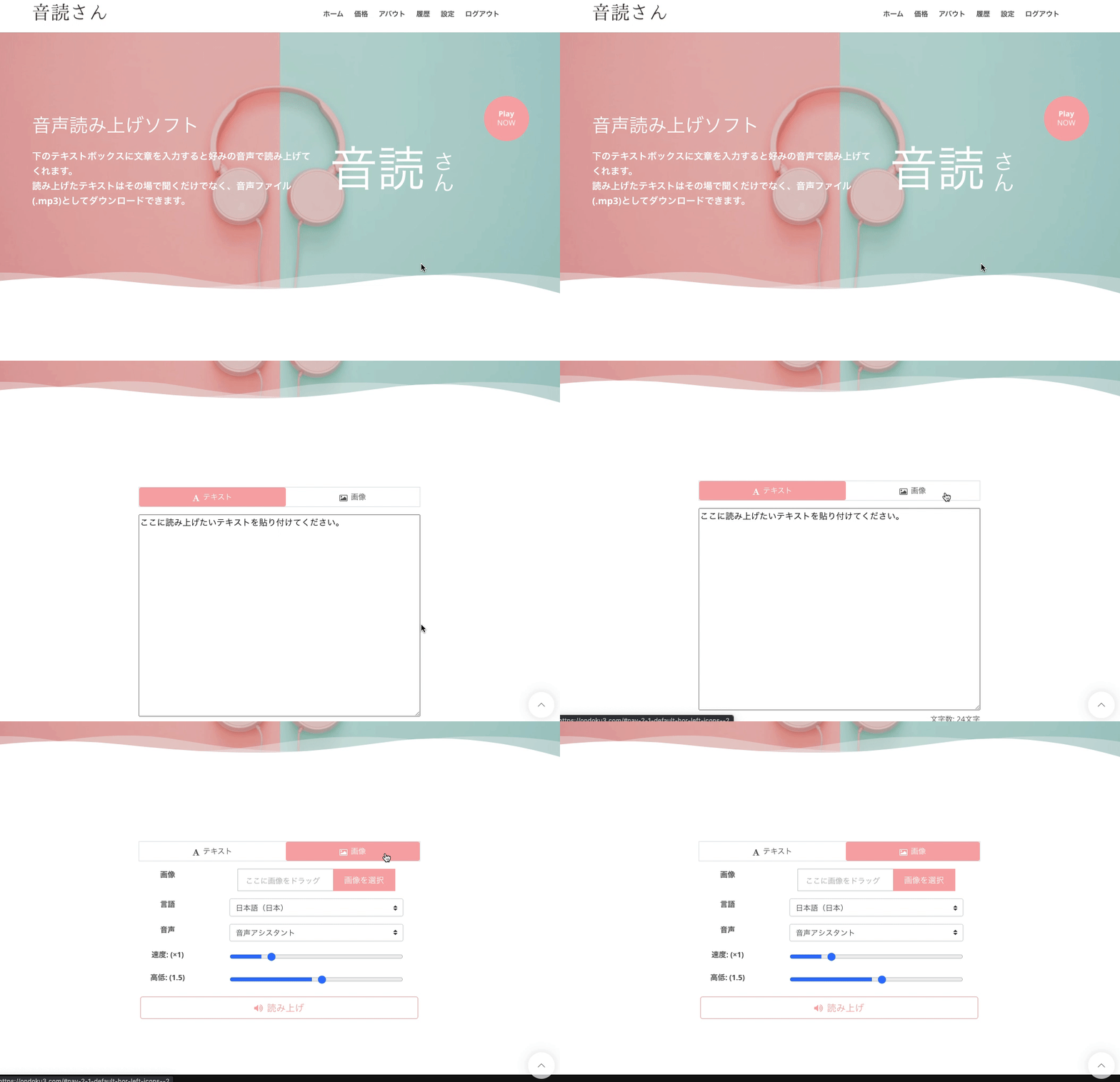
- Access the Ondoku top page
- Find the "Text" and "Image" tabs above the text box
- Click the "Image" tab
- Click "Upload Image" and select the image you like
*In the case of a smartphone, you can also start the camera here and take a photo directly. - After selecting the image, adjust the speed and pitch of the reading.
- Click the "Read Aloud" button
Then, the image can be analyzed in just a few seconds, and the audio can be read aloud immediately.
After loading the image, the recognized text is displayed in the text box.
If there is a recognition error and you want to correct the content being read, you can edit it here.
Detailed instructions on how to use the image reading function are introduced here.
![[Turn images into audio for free] How to use the function to read text from images and read audio aloud [Image Reading] | Text-to-speech software Ondoku](https://storage.googleapis.com/ondoku3/image/%E9%9F%B3%E5%A3%B0%E8%AA%AD%E3%81%BF%E4%B8%8A%E3%81%91%E3%82%BD%E3%83%95%E3%83%88%E3%82%92%E4%BD%BF%E3%81%86%E4%BA%BA_930.webp)
■ AI voice synthesis software "Ondoku"
"Ondoku" is an online text-to-speech tool that can be used with no initial costs.
- Supports approximately 50 languages, including Japanese, English, Chinese, Korean, Spanish, French, and German
- Available from both PC and smartphone
- Suitable for business, education, entertainment, etc.
- No installation required, can be used immediately from your browser
- Supports reading from images
To use it, simply enter text or upload a file on the site. A natural-sounding audio file will be generated within seconds. You can use voice synthesis up to 5,000 characters for free, so please give it a try.

Text-to-speech software "Ondoku" can read out 5000 characters every month with AI voice for free.
You can easily download MP3s and commercial use is also possible.
If you sign up for free, you can convert up to 5,000 characters per month for free from text to speech.
Try Ondoku now.
HP:
ondoku3.com
Email: ondoku3.com@gmail.com
Email: ondoku3.com@gmail.com
Related posts
"Ondoku" is a Text-to-Speech service that anyone can use for free without installation. If you register for free, you can get up to 5000 characters for free each month. Register now for free
- What is Ondoku
- Start text-to-speech conversion
- Free registration
- Pricing
- Posts
- Try other free services














