Best Text-to-Speech Software: 7 Free & Paid Tools for Commercial Use
Can't Use VOICEVOX on Mobile? Best Text-to-Speech Alternatives [iPhone/Android]
July 23, 2026
![Can't Use VOICEVOX on Mobile? Best Text-to-Speech Alternatives [iPhone/Android]](https://storage.googleapis.com/ondoku3/image/voicevox_alternative_tmb_930.webp)
Can't I use VOICEVOX on my smartphone? I want to know an alternative method!

Are you having trouble because you can't use VOICEVOX on your smartphone?
In this article, for those of you in that situation, we will introduce alternative solutions in an easy-to-understand way for when VOICEVOX is unavailable on iPhone (iOS) or Android smartphones!
High-performance speech synthesis software that can be used for free, VOICEVOX is very popular, isn't it?
Many people who are thinking about starting video production might want to use VOICEVOX on their own smartphones.
However, VOICEVOX is software exclusively for PCs, and there is no official smartphone app.
Therefore, it is not possible to run the original VOICEVOX on an iPhone (iOS) or Android smartphone alone.
So this time, for those who were thinking about using VOICEVOX on a smartphone, we will introduce the best alternative methods!
In this article, we will thoroughly explain:
- Reasons why VOICEVOX cannot be used on iPhone/Android smartphones
- Recommended alternative options for text-to-speech on smartphones
- How to use installation-free alternative apps (Text-to-speech method)
Using this article as a reference, why not try making videos on your iPhone (iOS) or Android smartphone?
Can VOICEVOX be used on iPhone or Android smartphones? Alternative apps explained

First, we will explain the reasons why the official VOICEVOX app cannot be used on iPhone (iOS) or Android smartphones, as well as alternative methods.
Conclusion: There is no official VOICEVOX smartphone app
In conclusion, you cannot download an official VOICEVOX app even if you search for "VOICEVOX" or "Zundamon" on the iPhone (iOS) App Store or Android Google Play.
This is because VOICEVOX is software developed for PCs such as Windows, Mac, and Linux.
While VOICEVOX is an app that can synthesize easy-to-hear audio, it requires a certain level of hardware specs.
Furthermore, the adjustment functions for reading text are also designed based on the premise of PC operation.
Thus, to use the voices of Zundamon, Shikoku Metan, or Kasukabe Tsumugi for text-to-speech in VOICEVOX, a PC is required.
I don't have a PC...


But a smartphone would be more convenient for posting to TikTok.
However, there are many cases where you want to create audio on an iPhone or Android smartphone instead of a PC.
Don't worry!
In such cases, there is a recommended alternative method that requires no installation and allows you to easily synthesize audio using only your smartphone.
Ondoku is recommended as a VOICEVOX alternative! [Free / No Installation Required]
We highly recommend trying a text-to-speech app that can serve as a substitute for VOICEVOX.
Our recommendation is the AI text-to-speech app "Ondoku"!
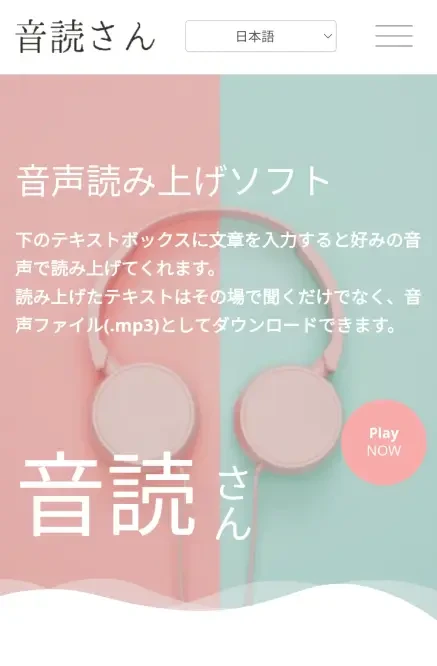
Ondoku is a web app that can be used from a browser.
No smartphone app installation is required; you can easily read text and download audio simply by accessing the website from your browser.
Furthermore, it supports long-form text-to-speech, and you can read up to 5,000 characters for free!
Using high-quality AI voices, you can create attractive videos using only your smartphone.
If you want to post videos to YouTube or TikTok using only a smartphone, why not start by using the free, no-installation-required Ondoku?
Alternative methods for VOICEVOX on iPhone and Android smartphones

There is no official VOICEVOX app for iPhone or Android. If you are creating audio using only a smartphone, your options change depending on whether you need VOICEVOX character voices.
Ondoku, which can be used in a browser, is recommended for iPhone and Android smartphones
If you are not particular about character voices and want to create narration using only an iPhone or Android smartphone, Ondoku, which can be used in a browser, is recommended as an alternative.
It can be accessed via Safari on iPhone or Chrome on Android. You can create audio without installing an app.
Since the created audio can be downloaded as an MP3, it can also be used for video editing for YouTube Shorts, TikTok, and more.
While you cannot use VOICEVOX character voices or detailed adjustment functions, you can create easy-to-hear audio files using only your smartphone.
Check the license when using character voices
There are unofficial apps like "Zunda Voice" for iPhone, but "Zunda Voice" does not have an Android version.
On iPhone and Android browsers, there is also a method of using unofficial web versions released by volunteers.
Neither of these is an official VOICEVOX smartphone app or an official web version.
There are limitations on the number of characters, available voices, saving methods, and long-form text-to-speech.
Services published by individuals may also be discontinued without notice.
Before use, it is recommended to check the provider's information and the terms of use for VOICEVOX itself and each character.
Next, we will explain the steps for using Ondoku on both iPhone and Android, as well as precautions for unofficial apps and tools.
[iPhone / Android Smartphone] Steps and Usage for Creating Audio with Ondoku
I want to try using Ondoku on my smartphone!

Now, let's explain the steps to create and download audio using Ondoku on an iPhone or Android smartphone!
Usage is very simple.
You can create audio right now as an alternative to VOICEVOX.
1. Access Ondoku via a browser on your iPhone or Android smartphone
First, open the Ondoku page in your smartphone's browser (Safari, Chrome, etc.).
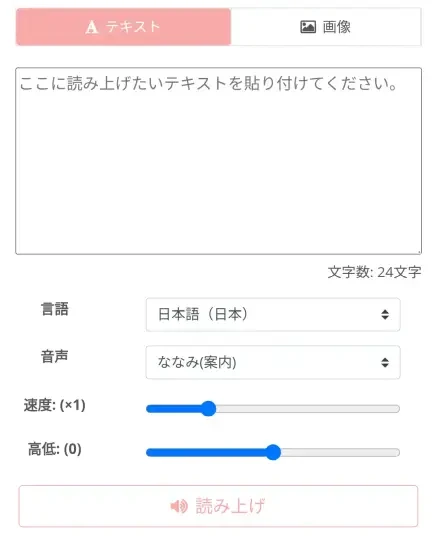
Once you open the site, a text input box is displayed immediately.
You can enter text and start reading it aloud right away.
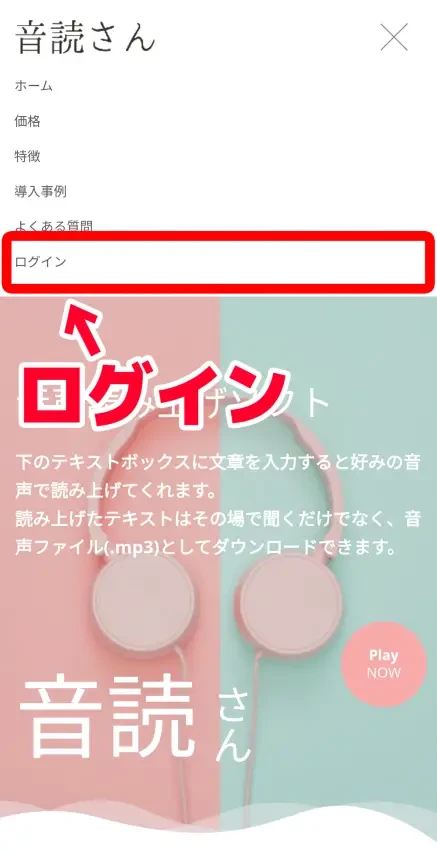
Register as a free member to read up to 5,000 characters!
To use Ondoku even more conveniently, free registration is recommended!
Even if you are not registered or logged in, you can read up to 1,000 characters, but by registering an account, you will be able to read up to 5,000 characters for free.
To register, tap "Login" in the menu.
Tap "Free Registration" on the login screen.
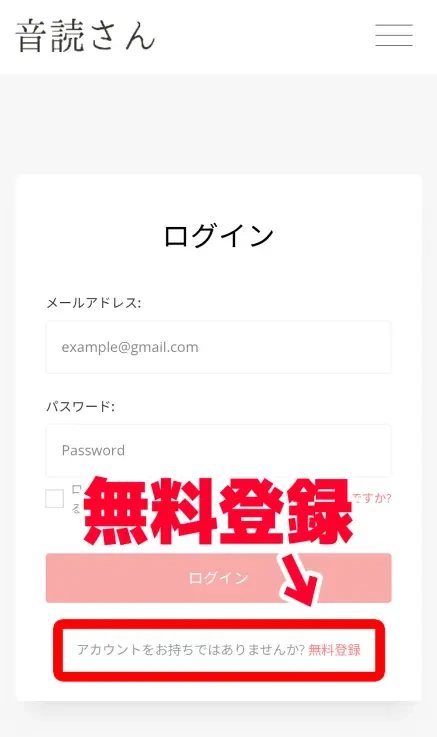
Then, just enter your email address and password to register your account!
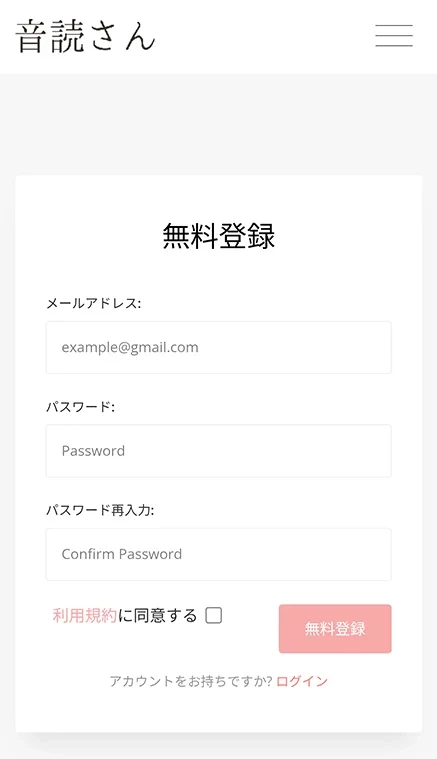
No tedious input of personal information is required.
With this, you have increased the free text-to-speech character limit to 5,000 characters!
2. Enter text and start AI text-to-speech
Enter the content you want to read aloud in the browser's text box.
After entering the text, select the language and the type of voice (speaker).
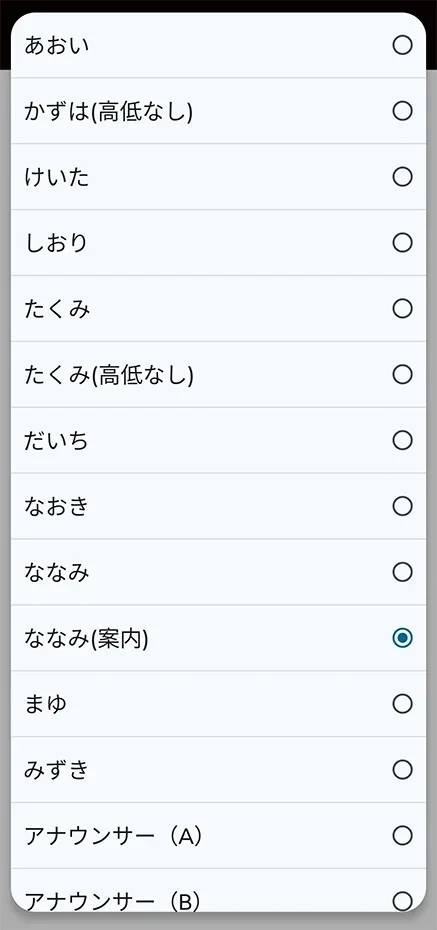
You can listen to samples of Ondoku's Japanese voices on this page, so please take a look.

Listen to 16 types of Japanese voices for Ondoku for free. Change impressions with pitch variations.
Ondoku has 16 types of Japanese voices. Both male and female voices are available. We have made it possible to listen to 8 commonly used Japanese voices and their variations when the pitch is adjusted.
Preparation is now complete.
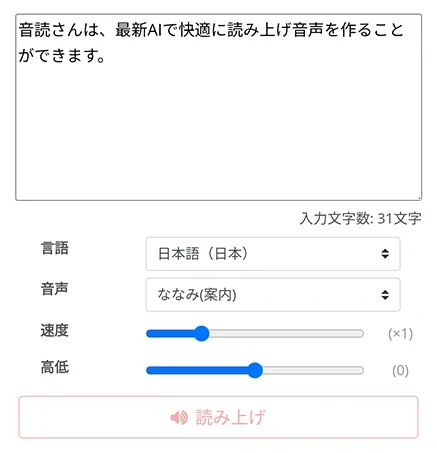
Press "Read Aloud" to start speech synthesis.
3. Reading complete! Download the file
Text-to-speech is completed quickly.
The screen will change, and an audio player will be displayed.
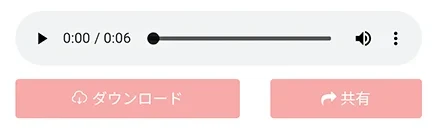
The audio will play, so listen to it and check if everything is okay.
If it's fine, press "Download" to download the MP3 file.
Audio files created with Ondoku are in the lightweight MP3 format, so they can be downloaded quickly even when using a mobile network outdoors.
*If you have registered an account, you can also download WAV files from the history page.
With this, you have successfully performed text-to-speech using only an iPhone (iOS) or Android smartphone as an alternative to VOICEVOX!
If you log in to the Ondoku page from another smartphone or PC browser, you can also download the results to other devices.
As you can see, Ondoku is recommended if you want to create audio on an iPhone or Android smartphone instead of VOICEVOX!
Anytime, anywhere, you can create audio narration as a VOICEVOX alternative!
Why not try using Ondoku for free first?
There are also unofficial apps and tools compatible with iPhone and Android smartphones
So far, we have introduced recommended VOICEVOX alternative tools and how to use them.
Additionally, there are unofficial tools and apps available that allow text-to-speech using the voices of Zundamon, Shikoku Metan, or Kasukabe Tsumugi from an iPhone (iOS) or Android smartphone.
Zunda Voice: Smartphone app for iPhone (With limitations)
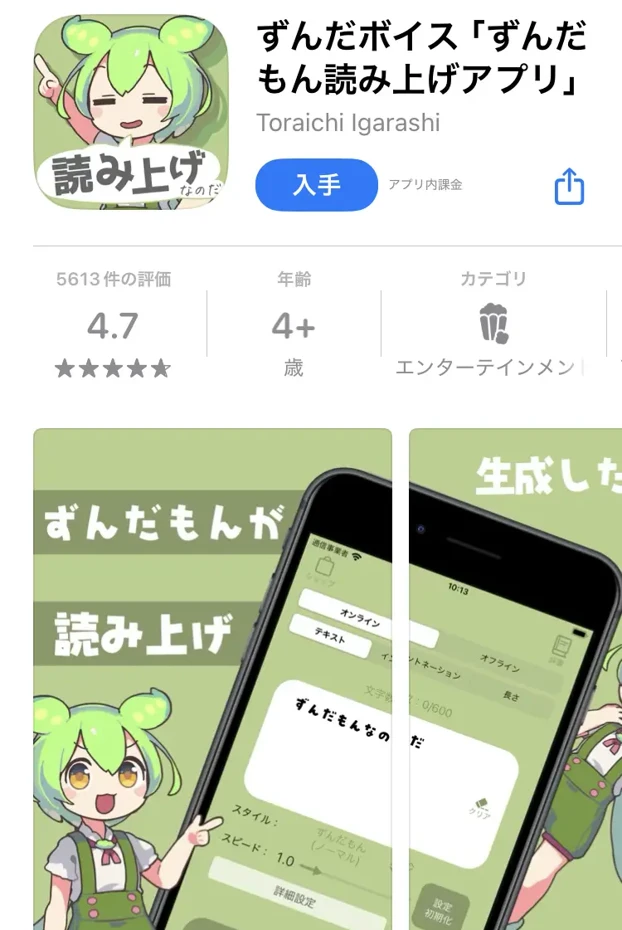
Zunda Voice is a text-to-speech app installed and used on iPhone (there is no Android version).
It can be installed for free, but you can also pay for the paid version to use it more conveniently.
While it is possible to read text with voices used in VOICEVOX like Zundamon, there are many limitations since it is a smartphone app.
- Character Limit: Up to 200 characters at a time for the free version, and up to 600 characters at a time for the paid version.
- Free version requires the "Gacha" function to increase voice types (all types unlocked in the paid version).
As it is a smartphone app for iPhone, its functionality is limited compared to the official VOICEVOX for PC.
Also, for commercial use, you must follow the terms of use for characters such as Zundamon, Shikoku Metan, and Kasukabe Tsumugi.
WEB Version VOICEVOX: Text-to-speech from browser (With limitations)
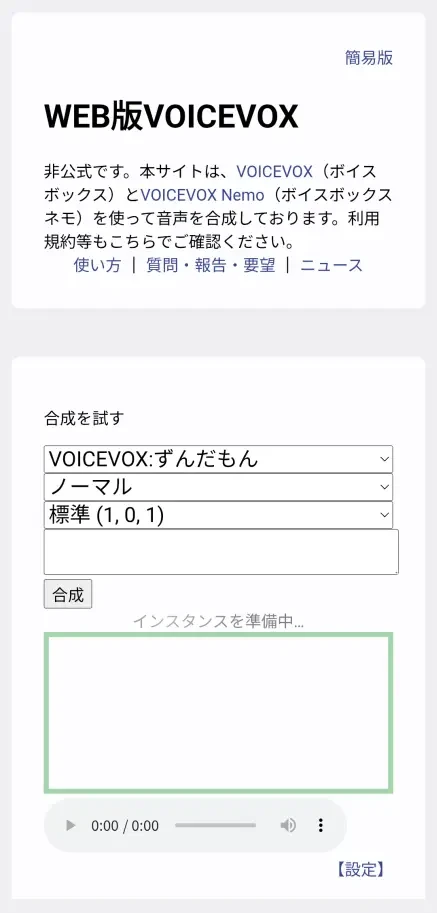
The WEB version of VOICEVOX is a web app used in a browser, created unofficially by volunteers.
It is a tool that reads text by using VOICEVOX running on a computer provided by an individual through a website, and the created audio can be downloaded.
It can be used as an alternative from an iPhone or Android smartphone browser.
However, there are limitations on reading long-form text required for video creation.
Furthermore, to save the state during creation, you need to save a "Project Key" in the browser, and there are many difficult parts for advanced users.
Since it is a simple tool developed by an individual, there is also the disadvantage of not knowing when it might become unavailable.
Also, when using it, you must follow the terms of use for VOICEVOX itself and the characters such as Zundamon, Shikoku Metan, and Kasukabe Tsumugi.
For the features of VOICEVOX itself, how to use the PC version, and precautions for commercial use, please see the comprehensive guide article summarizing VOICEVOX usage and commercial use.
Alternative apps and tools for VOICEVOX have many limitations
As described, alternative apps and software for using VOICEVOX on iPhone (iOS) or Android smartphones have functional limitations.
For convenient text-to-speech on iPhone (iOS) or Android smartphones with simple operations, the AI text-to-speech service Ondoku is recommended.
[Free] Recommended text-to-speech apps to replace VOICEVOX
For text-to-speech on iPhone (iOS) or Android smartphones, "Ondoku" is recommended!
Ondoku is a web app that allows smooth reading and downloading with the latest AI speech synthesis engine.
No installation is required, and it can be easily used just by opening it in a browser like Safari on iPhone (iOS) or Chrome on Android smartphones!
Moreover, Ondoku is free!
By registering and logging in, you can read up to 5,000 characters, allowing you to create video narration smoothly.
When looking for a VOICEVOX alternative for iPhone or Android smartphones, why not try Ondoku first?
Ondoku is the best alternative to VOICEVOX for iPhone and Android smartphones!
This time, for those thinking about using VOICEVOX on iPhone (iOS) or Android smartphones, we have explained alternative methods in detail.
The conclusion is that Ondoku is recommended as a VOICEVOX alternative!
Since VOICEVOX does not have an official app for iPhone or Android smartphones, it cannot be used on a smartphone alone.
While there are alternative apps and browser-based services created by volunteers, there are limitations on the text-to-speech functionality.
But don't worry.
By using Ondoku, which requires no installation, anyone can easily create high-quality narration audio simply by accessing it from a browser.
If you are making videos for TikTok, YouTube Shorts, or Instagram, using Ondoku instead of VOICEVOX is ideal.
Why not open Ondoku in your iPhone or Android smartphone browser and experience speech synthesis for yourself?
■ AI voice synthesis software "Ondoku"
"Ondoku" is an online text-to-speech tool that can be used with no initial costs.
- Supports 81 languages and regions, including Japanese, English, Chinese, Korean, Spanish, French, and German
- Available from both PC and smartphone
- Suitable for business, education, entertainment, etc.
- No installation required, can be used immediately from your browser
- Supports reading from images
To use it, simply enter text or upload a file on the site. A natural-sounding audio file will be generated within seconds. You can use voice synthesis up to 5,000 characters for free, so please give it a try.

Text-to-speech software "Ondoku" can read out 5000 characters every month with AI voice for free.
You can easily download MP3s and commercial use is also possible.
If you sign up for free, you can convert up to 5,000 characters per month for free from text to speech.
Try Ondoku now.
HP:
ondoku3.com
Email: ondoku3.com@gmail.com
Email: ondoku3.com@gmail.com
Related posts
"Ondoku" is a Text-to-Speech service that anyone can use for free without installation. If you register for free, you can get up to 5000 characters for free each month. Register now for free
- What is Ondoku
- Start text-to-speech conversion
- Free registration
- Pricing
- Posts
- Try other free services
![Can't Use VOICEVOX on Mobile? Best Text-to-Speech Alternatives [iPhone/Android]](https://storage.googleapis.com/ondoku3/image/irodori-tts_tmb_140.webp)
![Can't Use VOICEVOX on Mobile? Best Text-to-Speech Alternatives [iPhone/Android]](https://storage.googleapis.com/ondoku3/image/tategaki-image-yomiage_howto_tmb_140.webp)
![Can't Use VOICEVOX on Mobile? Best Text-to-Speech Alternatives [iPhone/Android]](https://storage.googleapis.com/ondoku3/image/iphone-video-narration_tmb_140.webp)
![Can't Use VOICEVOX on Mobile? Best Text-to-Speech Alternatives [iPhone/Android]](https://storage.googleapis.com/ondoku3/image/chrome-reading-mode-pc_tmb_140.webp)
![Can't Use VOICEVOX on Mobile? Best Text-to-Speech Alternatives [iPhone/Android]](https://storage.googleapis.com/ondoku3/image/pdf-to-mp3-howto_tmb_140.webp)









