How to use the text-to-speech software Ondoku, registration method, and useful features
5 Little-Known Useful Features to Make Ondoku Even More Convenient!
Jan. 26, 2026

Hello to all Ondoku users!
While using Ondoku, have you ever thought...
I wish it were a bit more like this…
It would be so much easier to use this way!
Actually, Ondoku has many convenient hidden features that are not well known.
This time, we will introduce some of these lesser-known useful features of Ondoku.
- Changing the size of the text box
- Using the dictionary function to fix pronunciation
- What to do when "は" (ha) is read as "わ" (wa) no matter what
- Deleting history using the bulk delete function
- How to stay updated with the latest Ondoku information
Changing the size of the text box
Did you know that you can change the size of Ondoku's text box?
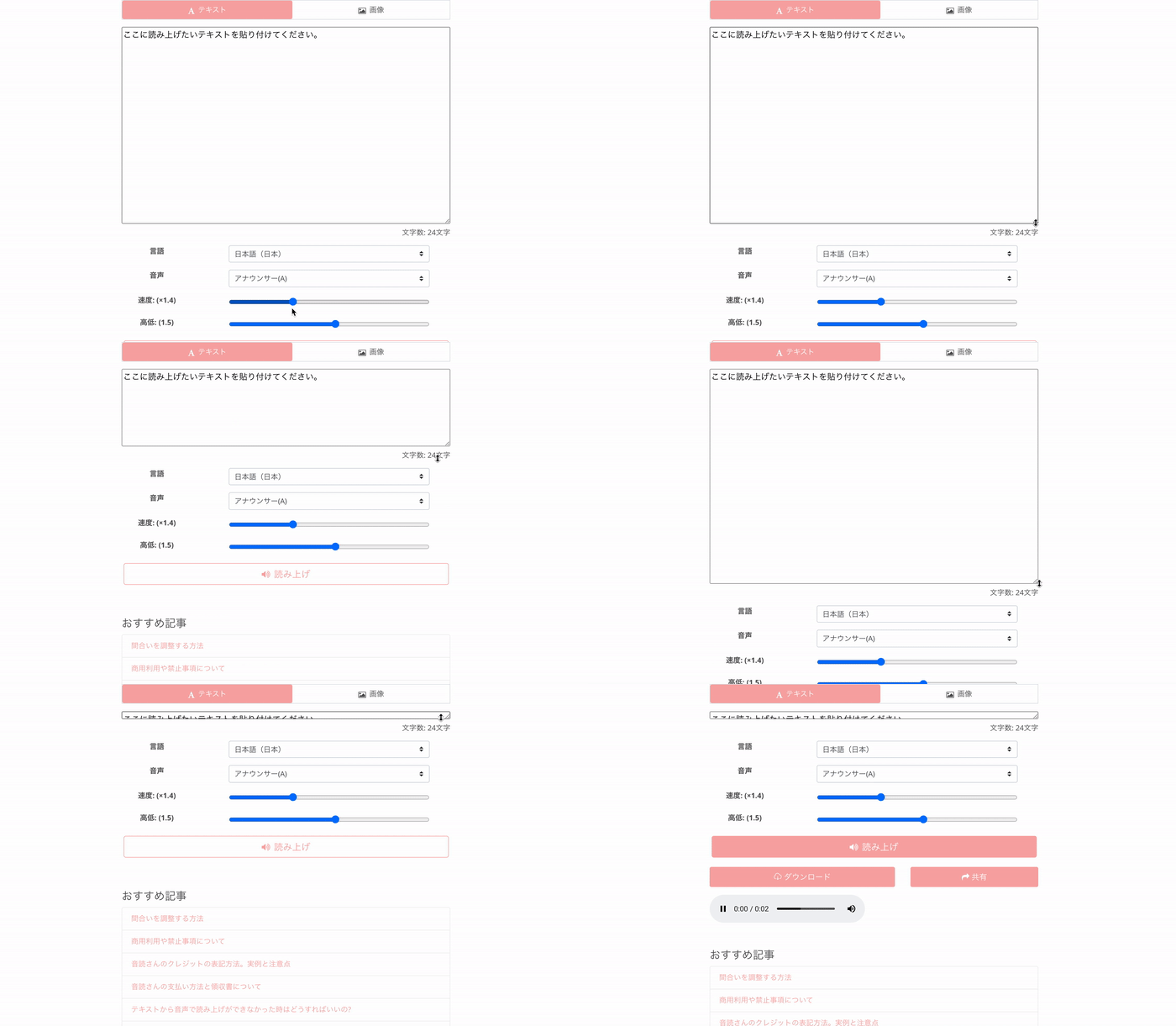
The method to change the size is very simple!
- Grab the bottom right corner of the text box
- Adjust it to your preferred size
You can make it smaller or larger.
This feature can be used on PC screens, smartphone screens, and tablet screens alike.
The text box is too large, and I have to scroll to press the read aloud button.
We have received comments like this before.
However, you can actually make the text box smaller.
By shrinking the text box, it becomes possible to press the read aloud button without having to scroll every single time.
If you also find scrolling to be a hassle, please give it a try.
Using the dictionary function to fix pronunciation
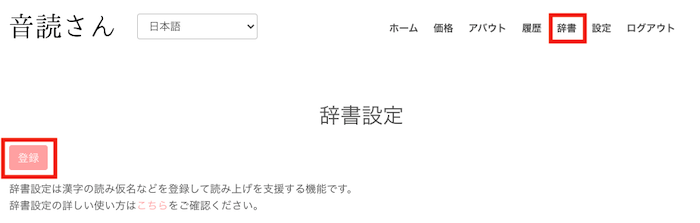
Ondoku has a dictionary function.
By using the dictionary function, you can change kanji that are not read correctly to your desired pronunciation.
The dictionary function can be accessed from "Dictionary" in the menu bar.
Click here for detailed usage instructions.

How to use Ondoku's dictionary function and precautions. Register adjusted intonation for more convenience | Text-to-speech software Ondoku
Ondoku has a "Dictionary" function. We will introduce how to use the dictionary function and its details. We will also share tips for registering adjusted intonation for more convenient use.
What to do when "は" (ha) is read as "わ" (wa) no matter what
Have you ever had trouble with the pronunciation of "は" (ha) becoming "わ" (wa) no matter what you do?
Especially with the kanji "派" (ha - meaning sect/group).
Which side are you on? (あなたはどっち派?)
In sentences like this, the reading becomes:
Anata wa dotchi wa?
Japanese, as an ideographic language, contains many sentences that are difficult for Ondoku.
As a workaround, when "は" becomes "わ" like this, you can solve it by using alphabet notation.
あなたはどっちha?
By doing this, it can be read aloud correctly.
Alphabet combinations can be used in other situations as well, so please give it a try.
Deleting history using the bulk delete function

In Ondoku's history, you can check previously read sentences and download audio files.
Additionally, if you use the exact same sentence settings as a previous reading in your history, no characters will be consumed even if you read it again.
However, some users concerned about information leaks or data breaches have requested that their read content be deleted from the server.
For those users, please use the bulk delete history function.
Clicking the red "Bulk Delete History" button at the bottom of the history page will delete all history.
It will be deleted from the server at the same time, so you can use the service with peace of mind.
Click here for details and precautions.

How to use Ondoku's delete and bulk delete functions and precautions. Deleting text and data from history and the server | Text-to-speech software Ondoku
With the newly introduced "Delete" function, you can now easily delete your previously read data yourself! We will introduce how to use the delete and bulk delete functions along with precautions.
How to stay updated with the latest Ondoku information

Ondoku undergoes various updates every day.
Do you know where to get such latest information?
It is the blog.
At the very bottom of the Ondoku page, within the black background, there is an item labeled Blog.
In the blog, in addition to the latest Ondoku information, we also introduce many convenient ways to use the service.
Please take a look!
Click here for the Ondoku blog post list
This is a list page for articles related to text-to-speech software. We also introduce ways to utilize text-to-speech software, so please take a look. Ondoku allows you to read up to 5,000 characters for free. Additionally, paid plans allow for reading up to 1 million characters per month.
We are happy to continue being the best text-to-speech software for you.
If you have requests like "I want this feature" or "It would be more convenient if it were like this," please feel free to send them via the contact form!
■ AI voice synthesis software "Ondoku"
"Ondoku" is an online text-to-speech tool that can be used with no initial costs.
- Supports approximately 50 languages, including Japanese, English, Chinese, Korean, Spanish, French, and German
- Available from both PC and smartphone
- Suitable for business, education, entertainment, etc.
- No installation required, can be used immediately from your browser
- Supports reading from images
To use it, simply enter text or upload a file on the site. A natural-sounding audio file will be generated within seconds. You can use voice synthesis up to 5,000 characters for free, so please give it a try.

Text-to-speech software "Ondoku" can read out 5000 characters every month with AI voice for free.
You can easily download MP3s and commercial use is also possible.
If you sign up for free, you can convert up to 5,000 characters per month for free from text to speech.
Try Ondoku now.
HP:
ondoku3.com
Email: ondoku3.com@gmail.com
Email: ondoku3.com@gmail.com
Related posts
Make it more convenient with the text-to-speech software 【Ondoku】 Google Chrome extension! How to s…
How to use Ondoku's dictionary function and points to note. Make it more convenient by registering …
How to use the Conversation and Dialogue function of Ondoku. Making listening materials and long te…
"Ondoku" is a Text-to-Speech service that anyone can use for free without installation. If you register for free, you can get up to 5000 characters for free each month. Register now for free
- What is Ondoku
- Start text-to-speech conversion
- Free registration
- Pricing
- Posts
- Try other free services














