How to use the text-to-speech software Ondoku, registration method, and useful features
How to Use Ondoku’s Dictionary Feature: Usage, Tips, and Intonation
Aug. 7, 2026

Hello, thank you for always using Ondoku.
In this article, we will introduce how to use the "Dictionary" feature.
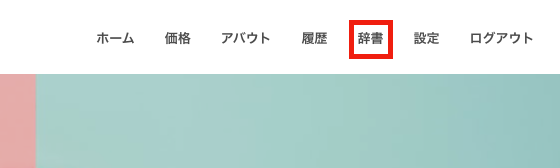
The dictionary feature is located in the menu bar. Clicking "Dictionary" in the menu bar will link you to the dictionary page.
The dictionary feature is only displayed when you are logged in.
Only registered members can use this feature.
How to Use the Ondoku Dictionary
Using the dictionary is very simple.
However, this feature is only available to registered members.
Please make sure to use it while logged in.
Registering a New Word
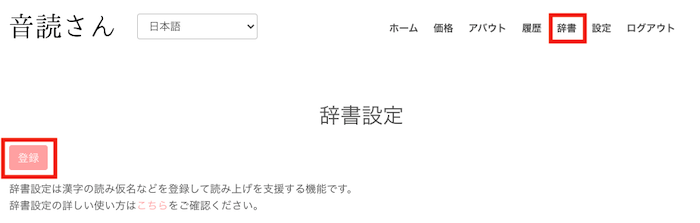
- Click "Dictionary" in the menu bar.
- Click the registration button on the Dictionary page.
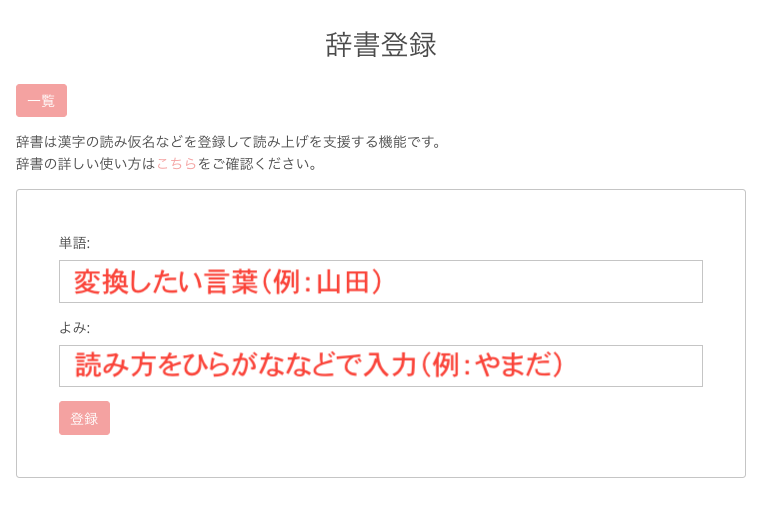
- Enter the word you want to convert in the Word field.
- Enter the reading of the word you want to convert in hiragana or katakana in the Reading field.
- Once entered, click Register.
This completes the new dictionary registration.
Editing the Dictionary
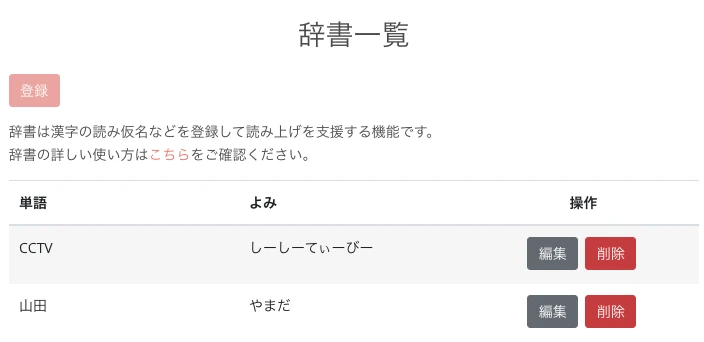
- Click "Dictionary" in the menu bar.
- Click "Edit" for the word you wish to edit.
- Correct the parts you wish to edit.
- Click Register.
This completes the dictionary editing.
Precautions When Using the Ondoku Dictionary Feature
There are a few points to keep in mind when using the dictionary feature.
- Languages supported by the dictionary feature: Supported languages are only for Japanese text-to-speech. Registration in the dictionary for other languages will be invalid.
- Errors when registering symbols in the dictionary: Registering symbols used in SSML (Speech Synthesis Markup Language) such as <, >, and = may cause errors and prevent the text from being read aloud. Please do not register symbols in the dictionary.
- Reading aloud immediately after dictionary registration: When reading exactly the same text after registering it in the dictionary, please delete the previous history. Detailed explanation follows below.
Precautions for Reading Aloud Immediately After Dictionary Registration

"I registered it in the dictionary, but the pronunciation hasn't been corrected!"
Has this happened to you?
Actually, Ondoku uses a unique system that allows you to recall audio from your past reading history if it is something you have "read before (settings and text)."
Therefore, character counts are not consumed for anything you have "read before (settings and text)."
This feature is designed to prevent the unnecessary consumption of character counts.
However, even after registering a word in the dictionary, if it is something you have "read before (settings and text)," the audio will be called from your past reading history.
In other words, the audio from before the dictionary registration will be played again, leading to the situation where "the pronunciation hasn't been corrected despite dictionary registration!"
- Change the text to be read aloud even by a single character (such as adding an extra punctuation mark)
- Delete past reading data from the history
By doing this, new audio data will be created, and you will be able to experience the reading with the dictionary feature enabled.
The User Dictionary Feature is Essential for Reading Japanese Text

Let's talk a bit about the technical side.
In Japanese, Kanji are ideograms. Japanese Hiragana and Katakana are phonograms.
Japanese is one of the rare languages where phonograms and ideograms are mixed.
First,
What are ideograms?
A classification of characters. Characters where each individual character has a specific meaning. Such as Kanji or ancient Egyptian hieroglyphs. Also called logograms.
Source: goo Dictionary (Web Archive)
Therefore, even for the same Kanji, the reading often differs depending on the flow of the sentence or the phrase.
Example:
The readings for "生" are as follows:
On-yomi: "sei", "shou"
Kun-yomi: "ikiru", "ikasu", "ikeru", "umareru", "umu", "ou", "haeru", "hayasu", "ki", "nama"The readings for "下" are as follows:
On-yomi: "ka", "ge"
Kun-yomi: "shita", "shimo", "moto", "sageru", "sagaru", "kudaru", "kudasu", "kudasaru", "orosu", "oriru"
Source: Kanji Dictionary
This is a very difficult task for text-to-speech software.
While software uses algorithms to predict and convert text to speech to some extent, it is not perfect and can make mistakes.
In contrast, alphabets used in English and other languages are phonograms, not ideograms.
What are phonograms?
A classification of characters. Characters where each individual character does not have a meaning but represents only a sound. Such as Kana, Roman letters, Sanskrit characters, etc. Includes syllabaries and alphabets. Also called phonetic characters.
Source: goo Dictionary
In the case of phonograms, text-to-speech software only needs to read them as they are, so there is less trouble compared to Japanese.
Since it just needs to be read as written, there are almost no situations where a dictionary is necessary.
In a sense, Japanese is a language that is a nightmare for text-to-speech software developers.
However, with the newly added dictionary feature, you can solve mispronunciations and inconveniences all at once!
Please try using this convenient dictionary feature!
You can listen to Japanese audio samples here.
Please take a look at them as well.

Listen to 16 types of voices from the text-to-speech software Ondoku for free. Change impressions with pitch variations.
Ondoku has 16 types of Japanese voices. Both male and female voices are available. We have made it possible to listen to 8 commonly used Japanese voices, as well as the voices when the pitch of each voice is adjusted.
This dictionary feature is currently only for Japanese. It cannot be used with other languages.
If you switch the display language of the site, the word "Dictionary" will no longer appear in the menu bar.
We will continue to make improvements so that Ondoku remains the best text-to-speech software for you.
Thank you for your continued support of Ondoku.
■ AI voice synthesis software "Ondoku"
"Ondoku" is an online text-to-speech tool that can be used with no initial costs.
- Supports 81 languages and regions, including Japanese, English, Chinese, Korean, Spanish, French, and German
- Available from both PC and smartphone
- Suitable for business, education, entertainment, etc.
- No installation required, can be used immediately from your browser
- Supports reading from images
To use it, simply enter text or upload a file on the site. A natural-sounding audio file will be generated within seconds. You can use voice synthesis up to 5,000 characters for free, so please give it a try.

Text-to-speech software "Ondoku" can read out 5000 characters every month with AI voice for free.
You can easily download MP3s and commercial use is also possible.
If you sign up for free, you can convert up to 5,000 characters per month for free from text to speech.
Try Ondoku now.
HP:
ondoku3.com
Email: ondoku3.com@gmail.com
Email: ondoku3.com@gmail.com
Related posts
How to use and precautions for Ondoku's delete function and bulk delete function. Deleting text and…
Make it more convenient with the text-to-speech software 【Ondoku】 Google Chrome extension! How to s…
"Ondoku" is a Text-to-Speech service that anyone can use for free without installation. If you register for free, you can get up to 5000 characters for free each month. Register now for free
- What is Ondoku
- Start text-to-speech conversion
- Free registration
- Pricing
- Posts
- Try other free services














