Recommended Text-to-Speech Software Summary: 7 Selections for Commercial Use [Free and Paid]
[Free] Create Audiobooks with Speech Synthesis! A Summary of DIY Methods Using Reading Services
Jan. 26, 2026
![[Free] Create Audiobooks with Speech Synthesis! A Summary of DIY Methods Using Reading Services](https://storage.googleapis.com/ondoku3/image/20240815-audiobook06_930.webp)

I want to make my own audiobooks using speech synthesis!
An audiobook reads the content of a book aloud using audio.
While audiobooks are distributed for a fee, you can actually create them yourself easily and for free using speech synthesis.
To make an audiobook yourself, we recommend using a free AI text-to-speech service.
In this article, for those who want to create their own audiobooks, we will explain the workflow of speech synthesis using a free AI text-to-speech service.
Recommended text-to-speech services for those who want to synthesize audiobooks
There is a recommended service for those who want to synthesize speech and create audiobooks themselves.
It is the latest AI text-to-speech service, "Ondoku".

"Ondoku" is a web service that allows anyone to easily read text aloud.
Simply open the page from here and paste your text, and you can read the text aloud for free immediately.
Since it is a web service used from a browser, no installation is required.
You can synthesize audiobooks with clear and easy-to-understand audio unique to the latest AI.
If you want to create an audiobook, why not start by using Ondoku from here?
Original audiobooks created with speech synthesis
An audiobook is a book that you "read by listening."
Actually, anyone can easily create an audiobook by using AI speech synthesis.
Features of audiobooks
An audiobook is a book read with your ears, where the content of the book is read aloud and made playable as an audio file.
They have been sold in formats like cassette tapes and CDs for a long time, but they have become much more accessible, especially since the appearance of smartphones.
While many audiobooks are sold as audio files playable on smartphones, there are still fewer varieties compared to paper books or e-books.
In such cases, making your own audiobook (self-digitizing) is recommended.
In fact, anyone can easily create an audiobook by using AI speech synthesis.
Scenes where audiobooks are useful
Aren't paper books or e-books enough?

Actually, audiobooks have several scenes where they excel specifically as books "read with the ears."
1. While exercising

Being able to listen to a book while exercising, such as running, walking, or training at the gym, is a major advantage of audiobooks.
By synthesizing an original audiobook, you can turn exercise time into study time.
In fact, the activity of listening to audio while doing things like exercise is attracting attention as "Mimikatsu" (audio-based learning).
It is a way to utilize audiobooks that you should definitely incorporate into your life.
2. While driving a car

Listening to a book while driving a car is another unique way to use audiobooks.
People commuting by train can read during their commute, but normally you cannot read a book when commuting by car.
With an audiobook, it is possible to read your favorite book with your ears during your commute.
3. Reading for the visually impaired

Braille books and audiobooks have long been created for the visually impaired.
Until now, it was necessary for professional narrators or voice actors to read them, so the variety of audiobooks was limited.
By using AI speech synthesis, it is possible to instantly increase the options of audiobooks for the visually impaired.
5 Recommended speech synthesis services and software for audiobooks

If I'm making an audiobook, what method should I use for speech synthesis?
Here are the recommended speech synthesis services and software for making audiobooks!
1. Ondoku
"Ondoku" is an AI speech synthesis service recommended for audiobook creation.
Since it is a web service used from a browser, it can be used immediately without installation.
Furthermore, "Ondoku" allows speech synthesis for free!
You can experience realistic and easy-to-understand reading voices unique to the latest AI for free right now.
Easy and user-friendly reading interface
Using "Ondoku" is very easy.
Just open the top page, paste your text into the text box, and press the "Read Aloud" button.
The speech synthesis is completed immediately, and you can download the MP3 file.
16 types of Japanese voices
With Ondoku, it is possible to read Japanese in 16 types of voices.
Because many of the voices are natural without being too character-driven, you can focus on the content of the book without distraction.
You can synthesize speech with the perfect voice to match the author or the content of the book.
Foreign language speech synthesis is also possible
Ondoku supports speech synthesis for over 48 languages, including Japanese and English!

You can also use it for listening practice by having foreign language books read aloud.
![[Ondoku] Preview voice types and sample audio for supported languages | Text-to-Speech Software Ondoku](https://storage.googleapis.com/ondoku3/image/%E5%A4%9A%E6%A7%98%E6%80%A7_930.webp)
[Ondoku] Preview voice types and sample audio for supported languages | Text-to-Speech Software Ondoku
Here we introduce the supported languages and sample voices of Ondoku.
Speech synthesis service available for free
Moreover, Ondoku can be used for free!
You can synthesize 1,000 characters without logging in, and 5,000 characters for free when you log in, so you can easily check right away what kind of voice can be used for reading.
If you are looking for a speech synthesis method for audiobooks, why not experience "Ondoku" for free first?
2. CeVIO

CeVIO is AI speech synthesis software compatible with Windows.
It uses a unique AI developed by a venture company from the Nagoya Institute of Technology, and among paid software, it allows for particularly natural and easy-to-understand speech synthesis.
Both package and download versions are available.
Since it excels at emotionally rich reading, it is recommended for those who want to synthesize novels into audiobooks.
3. VOICEVOX

VOICEVOX is speech synthesis software compatible with Windows, Mac, and Linux.
It is used by downloading it from the official website.
It is famous as software that can read in the voices of characters such as Zundamon, Kasukabe Tsumugi, and Shikoku Metan, but it can also be used for audiobook speech synthesis.
For neutral voices suitable for audiobooks, we recommend:
- Shikoku Metan
- Meimei Himari

4. AquesTalkPlayer
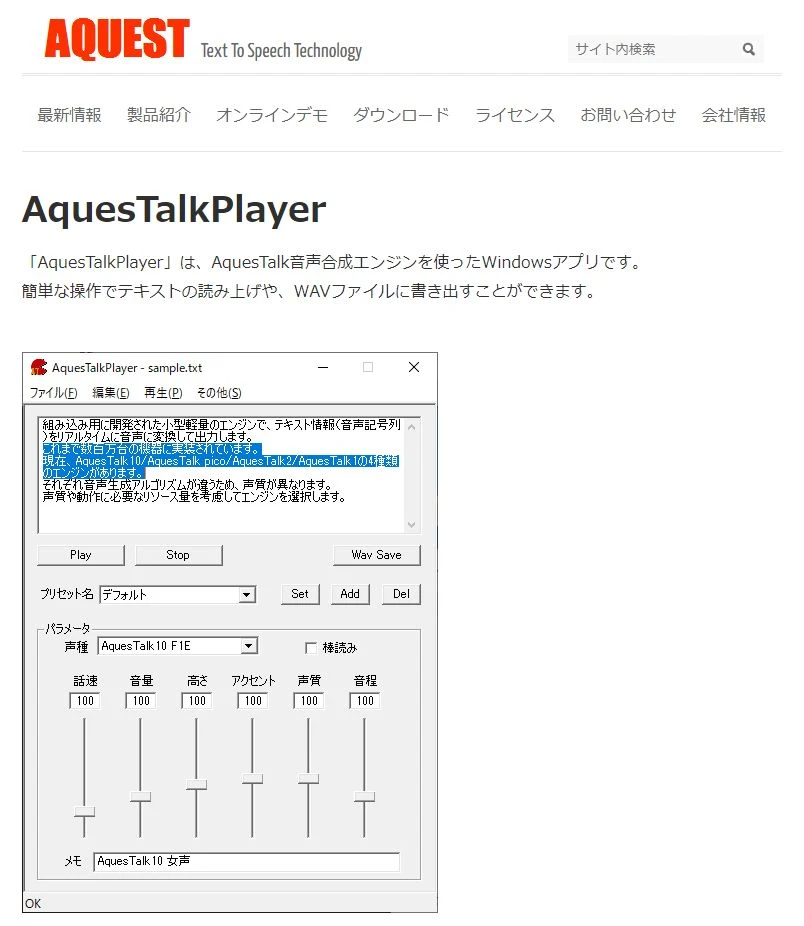
AquesTalkPlayer is speech synthesis software for Windows provided by Aquest Co., Ltd., which is also known as the developer of the so-called "Yukkuri Voice."
Many voices other than Yukkuri Voice can be used, and it can read in voices that are easy to use for audiobooks and do not have a very strong character personality.
While it is not as realistic compared to the latest AI speech synthesis, its lightweight operation is also a key point.
This speech synthesis software is recommended if you don't place much importance on realism and just want the content of the book to be read aloud.
![[2025 Latest] 5 Recommended Yukkuri Voice and Robovoice Software | Complete comparison of PC and smartphone apps | Text-to-Speech Software Ondoku](https://storage.googleapis.com/ondoku3/image/20250507yukkuri_bouyomi_software_tmb_930.webp)
5. A.I.VOICE

A.I.VOICE is paid speech synthesis software capable of reading with realistic and easy-to-understand character voices.
It supports Windows and Mac, and package and download versions are available.
Characters that were also featured in the "VOICEROID" series, such as Yuzuki Yukari, Kizuna Akari, and Kotonoha Akane/Aoi, are in the lineup.
It is also possible to read in voices that do not express too much character personality, making them easy to use for audiobook reading.
How to synthesize audiobooks with a reading service
How do you make an audiobook?

We will explain the flow of creating an audiobook for free using the reading service "Ondoku"!
1. Prepare the source text
First, prepare the text that will be the basis of the audiobook.
As an example, we will use text from "Aozora Bunko", a website that publishes copyright-free writing.

(Explained here is how to remove ruby characters from Aozora Bunko text)
2. Open the "Ondoku" page
Open the Ondoku top page from here.
3. Paste the text
Paste the text into the text box.

4. Set the voice type and speed

Adjust the voice type and reading speed.
5. Press the "Read Aloud" button to start speech synthesis
When preparation is complete, press the "Read Aloud" button.

"Reading..." will be displayed, and speech synthesis will begin.

6. Speech synthesis complete
Speech synthesis in Ondoku is completed quickly.
When speech synthesis is finished, the screen automatically switches and the audio is played in the browser.

Example: The time required to read 1,000 characters is only a few seconds.
7. Download the file
When speech synthesis is complete, a "Download" button is displayed.
When you press the "Download" button, the synthesized speech file is downloaded in MP3 format.
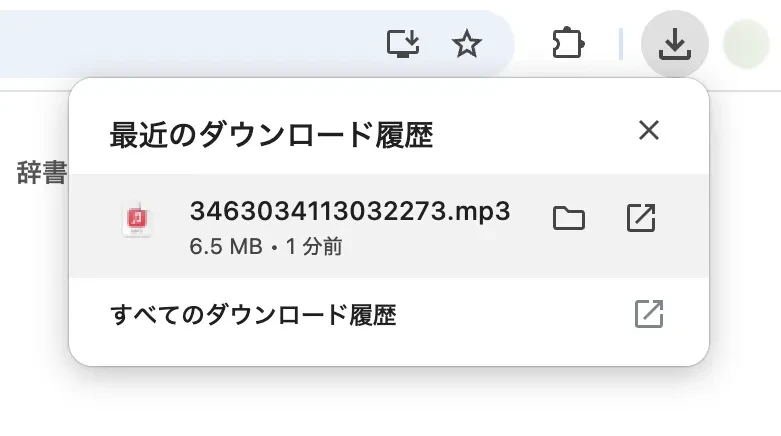
This completes the flow of synthesizing an audiobook yourself using Ondoku.
Tips for creating audiobooks with speech synthesis
Here is information helpful for self-digitizing audiobooks with speech synthesis.
Be careful about copyright
When making an audiobook with speech synthesis, care about copyright is necessary.
There is no problem if you listen to the synthesized audio personally, but you cannot sell it or distribute it for free.
Be especially careful when basing it on text that has not expired copyright, such as books converted to text by OCR.
In cases where the original is copyright-free text like "Aozora Bunko," you can create an audiobook without copyright issues.
How to remove ruby characters from Aozora Bunko text?
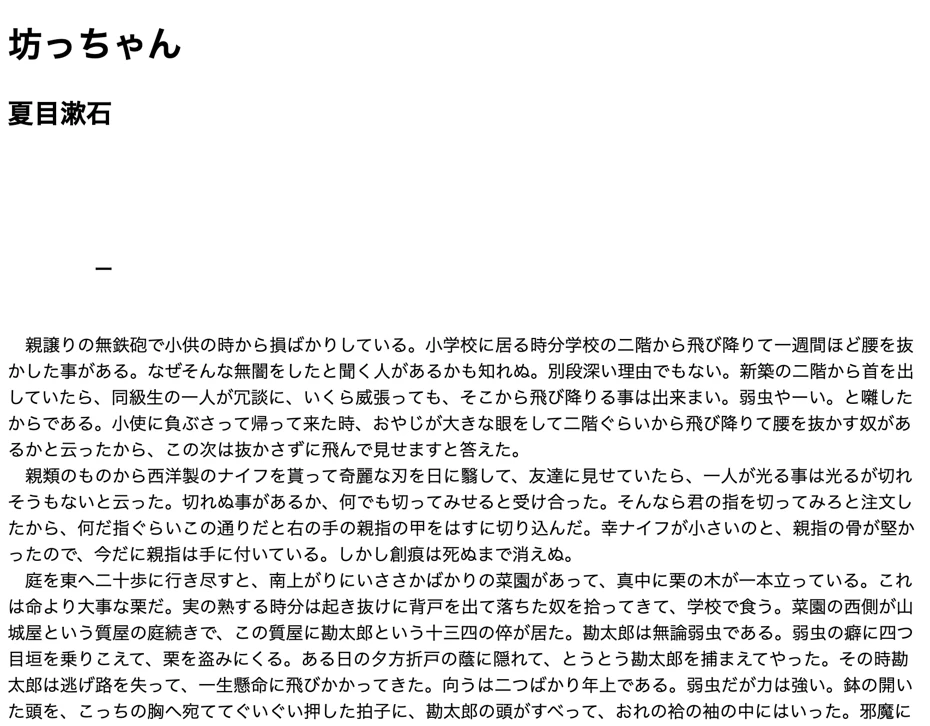
Text in Aozora Bunko contains ruby characters (reading aids), as shown in this image (Natsume Soseki's "Botchan").

If there are ruby characters, they will be read aloud along with the main text, so when making an audiobook from Aozora Bunko, it is recommended to remove the ruby characters in advance using a tool.
Tools for removing ruby characters
Example of removing ruby characters
When using the "Aozora Bunko Ruby Character Removal Tool: Long Text Version," paste the URL and press "Submit."

Then, the reading aid portions are removed like this, and it becomes a correct text.
Guide for character count to create an audiobook

The number of characters that can be synthesized for free with "Ondoku" is:
- Without login: 1,000 characters
- With login: 5,000 characters
In the case of paperbacks or new books, the number of characters per page is around 600 characters.
With Ondoku, you can synthesize and read aloud about 8 to 9 pages of content for free.
The total number of characters per book is often about 80,000 to 120,000 characters for paperbacks or new books, so if you want to synthesize an entire book and create an audiobook, we recommend subscribing to a paid plan.
The paid plans for Ondoku are as follows.
| Plan | Amount | Characters that can be read aloud |
|---|---|---|
| Basic Plan | 980 yen | 200,000 characters/month |
| Value Plan | 1,980 yen | 450,000 characters/month |
| Premium Plan | 2,980 yen | 1,000,000 characters/month |
With the Value Plan, you can make 4 original audiobooks every month, and with the Premium Plan, you can even make 10 every month!
It is possible to read aloud much more affordably than purchasing paid software, so if you're undecided on a speech synthesis method for audiobooks, "Ondoku" is recommended.
■ AI voice synthesis software "Ondoku"
"Ondoku" is an online text-to-speech tool that can be used with no initial costs.
- Supports approximately 50 languages, including Japanese, English, Chinese, Korean, Spanish, French, and German
- Available from both PC and smartphone
- Suitable for business, education, entertainment, etc.
- No installation required, can be used immediately from your browser
- Supports reading from images
To use it, simply enter text or upload a file on the site. A natural-sounding audio file will be generated within seconds. You can use voice synthesis up to 5,000 characters for free, so please give it a try.

Text-to-speech software "Ondoku" can read out 5000 characters every month with AI voice for free.
You can easily download MP3s and commercial use is also possible.
If you sign up for free, you can convert up to 5,000 characters per month for free from text to speech.
Try Ondoku now.
HP:
ondoku3.com
Email: ondoku3.com@gmail.com
Email: ondoku3.com@gmail.com
Related posts
"Ondoku" is a Text-to-Speech service that anyone can use for free without installation. If you register for free, you can get up to 5000 characters for free each month. Register now for free
- What is Ondoku
- Start text-to-speech conversion
- Free registration
- Pricing
- Posts
- Try other free services
![[Free] Create Audiobooks with Speech Synthesis! A Summary of DIY Methods Using Reading Services](https://storage.googleapis.com/ondoku3/image/recommend-site-for-studying-spanish_tmb_140.webp)
![[Free] Create Audiobooks with Speech Synthesis! A Summary of DIY Methods Using Reading Services](https://storage.googleapis.com/ondoku3/image/recommend-site-for-studying-german_tmb_140.webp)
![[Free] Create Audiobooks with Speech Synthesis! A Summary of DIY Methods Using Reading Services](https://storage.googleapis.com/ondoku3/image/recommend-site-for-studying-french_tmb_140.webp)
![[Free] Create Audiobooks with Speech Synthesis! A Summary of DIY Methods Using Reading Services](https://storage.googleapis.com/ondoku3/image/recommend-site-for-studying-italian_tmb_140.webp)
![[Free] Create Audiobooks with Speech Synthesis! A Summary of DIY Methods Using Reading Services](https://storage.googleapis.com/ondoku3/image/recommend-site-for-studying-korean_tmb_140.webp)









