3 suggestions for making effective use of commuting time. Study efficiently using text-to-speech so…
Ondoku payment methods (credit cards, debit cards, bank transfers) and receipts
July 1, 2025
Hello, thank you for using Ondoku.
In this article, we will explain Ondoku's payment methods and receipts.
All Ondoku invoices and receipts are compatible with the invoice system (Qualified Invoice Issuer Registration Number) (please also see the related article).
[Table of Contents]
- Credit Card / Debit Card (Stripe)
- Bank transfer by issuing an estimate/invoice (Annual contract only)
- If you are unsure about which plan to use
- About the Business Plan
- About receipts for various payment methods
Payment methods available at Ondoku
- Credit card payment
- Debit card payment
- Bank transfer by issuing an estimate/invoice (Annual contract only)
Credit Card / Debit Card (Stripe)
Payment methods for Ondoku's monthly plans are supported via:
- Credit Card
- Debit Card
Click here to purchase an Ondoku monthly plan
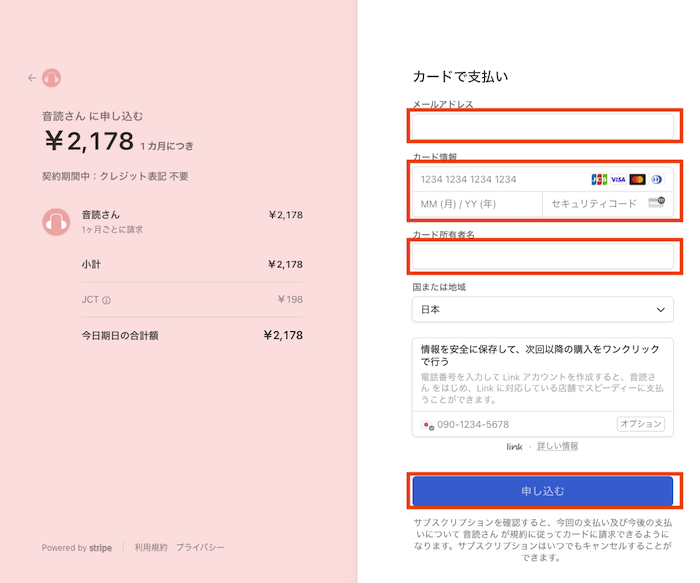
If you wish to make an annual contract with credit/debit card payment, you can purchase it from the link below.
Card payment: Ondoku Annual Contract

About Receipts
If you would like a receipt for credit card/debit card (Stripe) payments:
- Receipt email
- Usage Statement and Receipt issued by Ondoku
will serve as the receipt.
Receipt email

When the purchase is completed at Ondoku, a receipt email like the one above will be sent to the specified email address.
(Just in case, please authorize the domain "stripe.com" from which the receipt will be sent.)
Similarly, an email from which you can download the invoice and receipt will be sent from Stripe. When you download the invoice, it will be displayed like this.
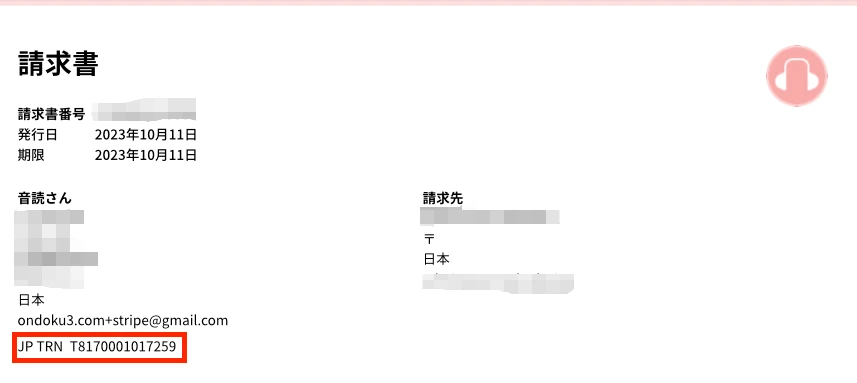
Invoices and receipts are compatible with the invoice system.
Information such as the name and address on the receipt reflects the content at the time of payment.
Due to the specifications of the payment service "Stripe," even if you change this information later, you cannot download an invoice or receipt with the updated information.
From the next payment onwards, you can download invoices and receipts with the reflected content.
The display of the registration number on invoices and receipts downloadable from the Stripe email will be as shown in the red box.
- The item starting with JP TRN corresponds to the "Registration Number."
This number depends on Stripe's settings and cannot be changed.
If you need a receipt with the item labeled "Registration Number," please log in to Ondoku and download it from the Card Usage Statement and Receipt.
Usage Statement and Receipt issued by Ondoku
Receipts issued by Ondoku can be easily obtained by logging into Ondoku and going to Settings → Card Usage Statement and Receipt.
- Log in to Ondoku
- Access Settings
- Click Card Usage Statement and Receipt
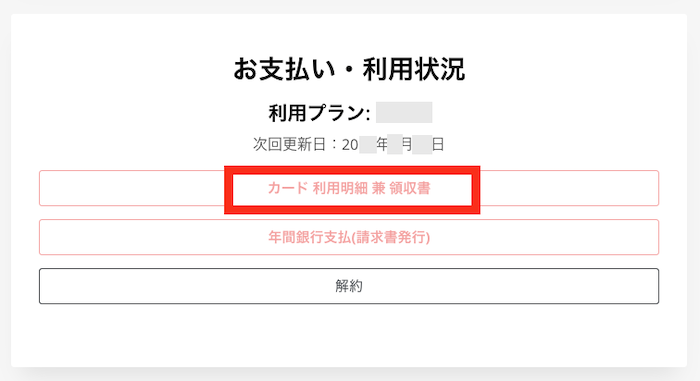
- Click "Confirm" for the desired date from the history
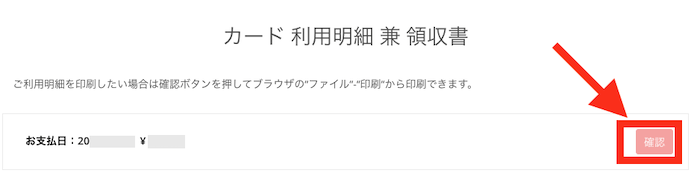
- Download or print the PDF of the Usage Statement and Receipt
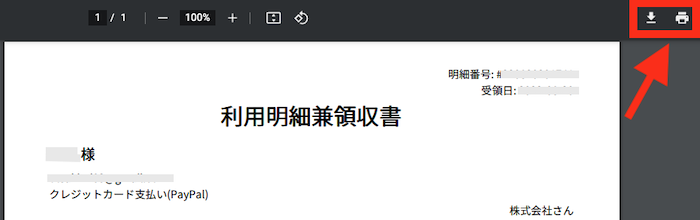
It can be obtained easily like this. It's very convenient, so please use it.
For more details, please check this article.
![[Ondoku] How to issue and print receipts for Credit/Debit Cards (Stripe) | Text-to-speech software Ondoku](https://storage.googleapis.com/ondoku3/image/ondoku_invoice_930.webp)
Bank transfer by issuing an estimate/invoice (Annual contract only)

If it is difficult to use Ondoku because "you do not have a credit card in the name of a company, school, or organization, or you cannot prepare a debit card," we recommend:
- Bank transfer via invoice
Bank transfer can be used by anyone, regardless of whether they are an individual, corporation, or school.
Please note that there are several precautions for paying Ondoku via bank transfer.
- The plan will be activated within 24 hours after payment confirmation.
- If the username and the sender's name are different, the plan will not be activated unless we are contacted.
- Ondoku bank transfers are only available for annual payments.
- There are no specific discounts for annual payments.
- Refunds for mid-term cancellations cannot be provided.
- We cannot accept plan changes during the term.
- Estimates and invoices without payment or contact for more than 3 months will be deleted as expired.
- Bank transfer is not an automatic renewal.
If you wish to continue for the second year and beyond, please issue an invoice again and make the payment.
In that case as well, the plan will be activated within 24 hours after payment confirmation. Please note that it is not an expiration date renewal.
If you wish to renew on the expiration date, please contact us in advance via inquiry.
Please consider carefully which plan or business plan you will choose before using the service.

I'm wondering which plan I should use...
If you are unsure about which plan to use >> Inquire about the best plan and usage method


I want to share and use it with multiple people within the company...
Please check this blog to see if sharing among multiple people is possible for use in corporations, schools, etc.
Related Article >> When using Ondoku in a corporation, is it okay for multiple employees to share a single company account?
About character refill for annual contracts
For annual contracts, the readable character count for 12 months will be refilled all at once.
(In the case of the Premium Plan, you can use 12 million characters for one year.)
If the account runs out of readable characters, you can use 12 million characters for one year from the date of payment by paying for a new year.
The fees per year are as follows.
[Price]
- Basic Plan: 980 yen x 12 months = 11,760 yen + tax
Annual characters: 2.4 million characters - Value Plan: 1,980 yen x 12 months = 23,760 yen + tax
Annual characters: 5.4 million characters - Premium Plan: 2,980 yen x 12 months = 35,760 yen + tax
Annual characters: 12 million characters
If you wish to make an annual contract with credit/debit card payment, you can purchase it from this link.
Card payment: Ondoku Annual Contract
*In the case of credit/debit card payments, the plan and readable character count will be reflected in about 1 to 3 minutes.
*Credit/debit card payments are set to automatic renewal for annual recurring payments. If you do not wish to renew automatically, please cancel after payment.
Annual contract procedure via bank transfer
If you wish to make an annual contract via bank transfer, please contact us following these steps.
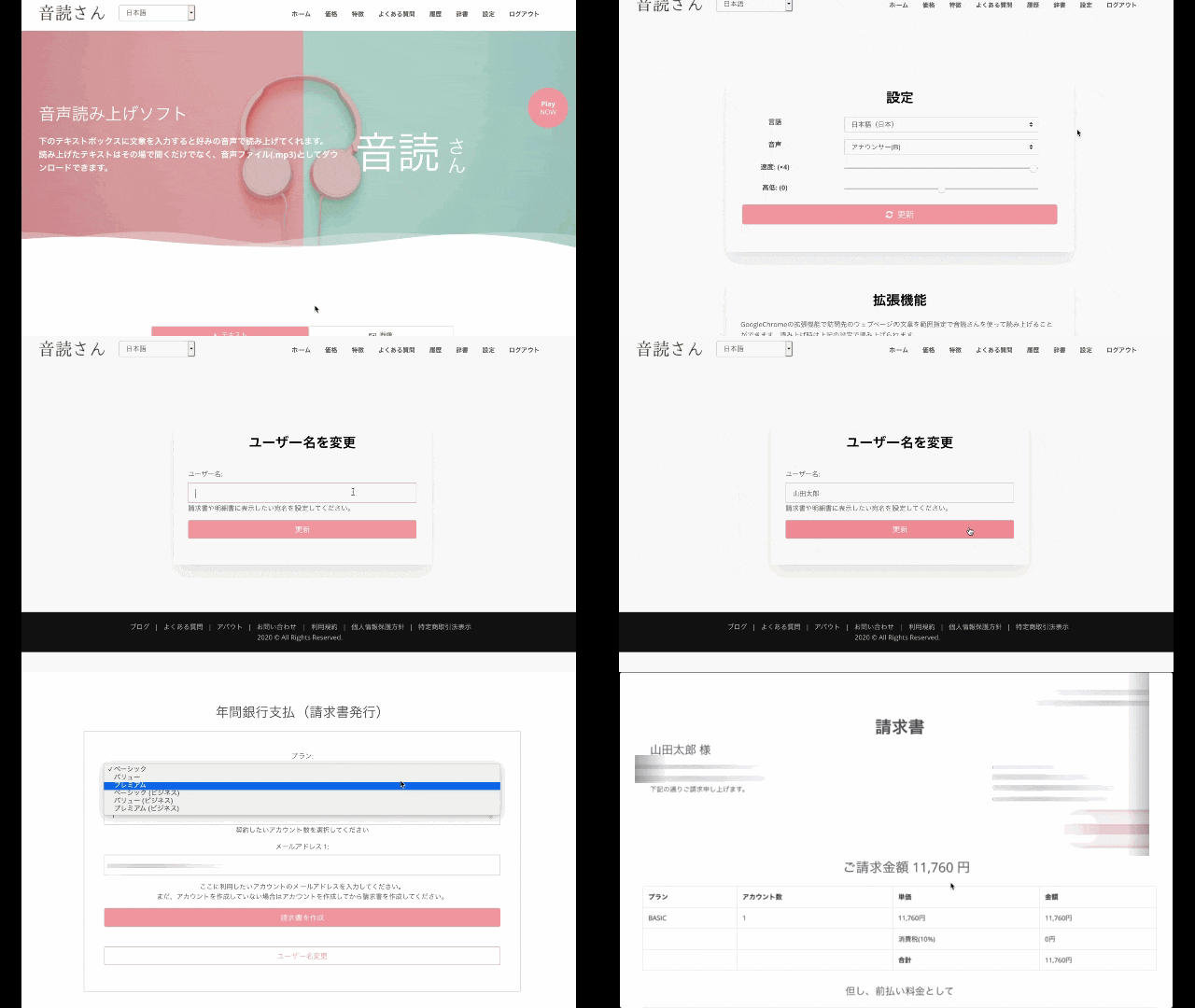
- Free membership registration on Ondoku
- You can issue an invoice from Ondoku's Settings via "Payment → Annual Bank Payment."
- Please check the contents of the invoice and transfer the requested amount to the designated account.
* Invoice issuance is only possible when the language is set to Japanese.
* Transfer fees are to be borne by the customer.
* If you already have a monthly contract, please cancel the monthly contract before making the transfer.
If you remain contracted, double payment will occur.
The plan will be activated within 24 hours in principle after the transfer is confirmed.
If the username and the sender's name are different, we cannot confirm the payment. Please be sure to let us know via inquiry.
*In case of urgency, we can handle the plan activation if you inform us of the approximate payment date even before the funds arrive.
In that case, please contact us via inquiry after issuing the invoice.
Furthermore, if we cannot confirm the payment even after 3 days have passed since the notified payment date, we will suspend the account.
*If the desired start date is after the payment date, please notify us by email at least 3 business days in advance. If the contact and the payment are reversed, we cannot accommodate the request.
(Example) Payment on March 20th → Desired start date is April 1st
Please notify us by email 3 business days before March 20th.
We cannot accommodate the request even if you notify us by email on the day of March 20th.
For more details on issuing invoices, please see here.

Template for inquiring about "Desired usage start date"
Subject: Desired start date for annual contract
I am contacting you regarding the desired start date for Ondoku's annual contract.
Invoice number:
Desired usage start date: Year/Month/Day
Scheduled payment date: Year/Month/Day
*Normally, the plan starts after payment, but by informing us of the scheduled payment date, it is possible to use the service in advance on the desired date before payment.
*If the desired start date is after the payment date, please notify us by email at least 3 business days in advance. If the contact and the payment are reversed, we cannot accommodate the request.
About Receipts
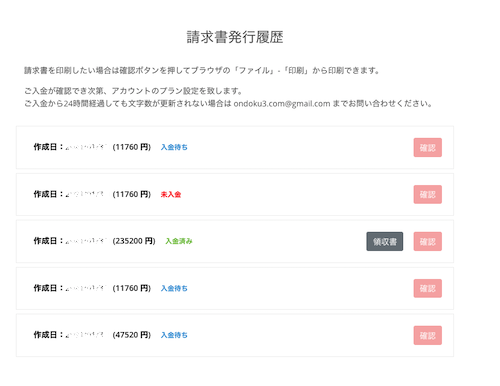
After the plan is activated, you can download the receipt from the Invoice Issuance History.
About the Business Plan
Ondoku offers business plans to cater to various use cases.
What is the Business Plan?
By using the Business Plan:
- You will be able to create and provide audio on behalf of third parties.
- You can continue to use the audio as is without credit notation even after the contract ends.
The Business Plan is for sole proprietors and corporations.
It is recommended if you do not want to include credit or if you want to keep using the audio.
The overview of the Business Plan is as follows.
Overview of the Business Plan
- 1-year valid license
- Available for outsourced/contracted work
- Available for use in broadcast media
- Available for use in teaching materials using Ondoku audio, etc.
- Use of audio for products or goods for sale, lease, or commercial use
- Audio created during the term can continue to be used without credit notation even after the license period ends
For more details, please see this article.

Business Plan Pricing
- Annual 2.4 million characters → 120,000 yen + tax
- Annual 5.4 million characters → 240,000 yen + tax
- Annual 12 million characters → 360,000 yen + tax
Purchase with credit/debit card payment here → https://ondoku3.com/pricing/business/
*In the case of credit/debit card payments, the plan and readable character count will be reflected in about 1 to 3 minutes.
*Credit/debit card payments are set to automatic renewal for annual recurring payments. If you do not wish to renew automatically, please cancel after payment.
Annual contract procedure via bank transfer
If you wish to make an annual contract via bank transfer, please contact us following these steps.
- Free membership registration on Ondoku
- You can issue an invoice from Ondoku's Settings via "Payment → Annual Bank Payment."
- Please check the contents of the invoice and transfer the requested amount to the designated account.
* Invoice issuance is only possible when the language is set to Japanese.
* Transfer fees are to be borne by the customer.
* If you have a monthly contract, please cancel the monthly contract in advance before making the transfer.
If you remain contracted, double payment will occur.
The plan will be activated within 24 hours in principle after the transfer is confirmed.
If the username and the sender's name are different, we cannot confirm the payment. Please be sure to let us know via inquiry.
Estimates and invoices without payment or contact for more than 3 months will be deleted as expired.
*In case of urgency, we can handle the plan activation if you inform us of the approximate payment date even before the funds arrive.
In that case, please contact us via inquiry after issuing the invoice.
Furthermore, if we cannot confirm the payment even after 3 days have passed since the notified payment date, we will suspend the account.
*If the desired start date is after the payment date, please notify us by email at least 3 business days in advance. If the contact and the payment are reversed, we cannot accommodate the request.
(Example) Payment on March 20th → Desired start date is April 1st
Please notify us by email 3 business days before March 20th.
We cannot accommodate the request even if you notify us by email on the day of March 20th.
For more details on issuing invoices, please see here.
Template for inquiring about "Desired usage start date"
Subject: Desired start date for annual contract
I am contacting you regarding the desired start date for Ondoku's annual contract.
Invoice number:
Desired usage start date: Year/Month/Day
Scheduled payment date: Year/Month/Day
*Normally, the plan starts after payment, but by informing us of the scheduled payment date, it is possible to use the service in advance on the desired date before payment.
*If the desired start date is after the payment date, please notify us by email at least 3 business days in advance. If the contact and the payment are reversed, we cannot accommodate the request.
About Receipts
After the plan is activated, you can download the receipt from the Invoice Issuance History.
About receipts for various payment methods of Ondoku
Credit Card / Debit Card
For those who wish for a receipt:
- Usage Statement and Receipt issued by Ondoku
- Receipt email (please authorize the domain "stripe.com" from which the receipt email will be sent)
will serve as the receipt.
For more details, please check this article.
[Ondoku] How to issue and print receipts for Credit/Debit Cards (Stripe) | Text-to-speech software Ondoku
We will guide you on how to issue a receipt when paying with a credit or debit card. For those who wish for a receipt, the Receipt Email and the Usage Statement and Receipt issued by Ondoku will serve as the receipt.
Bank Transfer
After the payment confirmation is complete and the plan is activated, you can download the receipt from the Invoice Issuance History.
If you have any other questions, please feel free to contact us.
Thank you for your continued support of Ondoku.
■ AI voice synthesis software "Ondoku"
"Ondoku" is an online text-to-speech tool that can be used with no initial costs.
- Supports approximately 50 languages, including Japanese, English, Chinese, Korean, Spanish, French, and German
- Available from both PC and smartphone
- Suitable for business, education, entertainment, etc.
- No installation required, can be used immediately from your browser
- Supports reading from images
To use it, simply enter text or upload a file on the site. A natural-sounding audio file will be generated within seconds. You can use voice synthesis up to 5,000 characters for free, so please give it a try.

Text-to-speech software "Ondoku" can read out 5000 characters every month with AI voice for free.
You can easily download MP3s and commercial use is also possible.
If you sign up for free, you can convert up to 5,000 characters per month for free from text to speech.
Try Ondoku now.
HP:
ondoku3.com
Email: ondoku3.com@gmail.com
Email: ondoku3.com@gmail.com
Related posts
"Ondoku" is a Text-to-Speech service that anyone can use for free without installation. If you register for free, you can get up to 5000 characters for free each month. Register now for free