Best Text-to-Speech Software: 7 Free & Paid Tools for Commercial Use
[2026 Latest] AI Voice Synthesis for Video Narration: Free YouTube Tools & Usage
Sept. 9, 2026
![[2026 Latest] AI Voice Synthesis for Video Narration: Free YouTube Tools & Usage](https://storage.googleapis.com/ondoku3/image/video-narration-ai_tmb_930.webp)

I want to post videos on YouTube, but I'm a bit hesitant about using my own voice...
Even if you want to be active as a video creator on YouTube, you might find it difficult to create good narration.
In this article, we will explain how to create video narration specifically for you!
Actually, by utilizing the latest speech synthesis AI, anyone can easily produce high-quality videos with narration.
What's more, production is possible in a short time at an overwhelmingly lower cost compared to conventional methods!
Even without paid software like VOICEROID, you can generate YouTube video narration via AI for free.
- I want to monetize YouTube videos without showing my face or using my voice.
- I want to effectively promote corporate products and services.
- I want to easily create educational content or explanatory videos.
In such cases, why not try video production utilizing video narration AI by referring to this article?
[Free] Recommended AI Reading Services for YouTube Video Narration

Ondoku is recommended for adding narration to your YouTube videos!
Ondoku is a reading service that uses the latest AI speech synthesis engine, allowing anyone to easily generate voice.
You can create narration audio with natural pronunciation simply by entering text.
Furthermore, Ondoku is available for free!
Since it is OK for commercial use, you can monetize your YouTube channel with peace of mind.
It can be used without registration or login, so why not start by using Ondoku to create video narration for free?
How to Create YouTube Video Narration with the Latest AI? Basic Knowledge Explained
I want to upload videos to YouTube, but doing the narration myself is a lot of work...

For those of you feeling that way, we will first briefly explain the basic knowledge of video narration using the latest AI.
How to Utilize AI for Narration in YouTube Video Production?

AI technology is advancing rapidly.
In the field of video production, speech synthesis AI that generates natural voice from text is attracting attention.
Many video creators on YouTube are already using AI narration.
Previous reading software and services could only read in unnatural, robotic voices.
But today's speech synthesis AI is different.
AI models trained on massive amounts of voice and text data understand the content and read it with realistic intonation and pacing, just as if a real narrator were reading it.
Because it is now possible to read with natural-sounding voices, synthesized narration is being widely used outside of specific genres like "Yukkuri" commentary.
Create YouTube Videos Easily with AI Reading Services
In conventional narration production, it was necessary to hire professional narrators or record it yourself.
With AI technology, you can create natural narration audio—as if a human were reading it—simply by entering the script text.
Since it eliminates the cost of hiring a narrator and the effort of recording yourself, utilizing the latest AI makes it much easier than ever to create the YouTube videos you want.
The emergence of AI reading services has significantly lowered the barrier to video production, allowing anyone to easily add narration to YouTube videos.
What are the Benefits of Using AI Reading Services for YouTube Video Narration?

- I want to make a video, but I'm hesitant to use my own voice
- Hiring a professional is difficult due to the cost...
In such cases, creating narration with an AI reading service is recommended.
We will explain the benefits of using AI to create narration.
Produce Videos Without Showing Your Face or Using Your Voice!
The biggest advantage when producing videos individually is that you can add narration without using your own voice.
When uploading to sites like YouTube, you often don't want to reveal private information such as age or gender.
In these instances, adding narration via the latest AI is recommended.
Using an AI reading service, you can easily produce narration just by entering text.
With a wide variety of voice types, including female, male, and even children's voices, you can add narration in your ideal voice.
Produce Narration at a Lower Cost Than Hiring a Narrator
AI narration is also recommended when creating videos for YouTube for business, such as for companies or public institutions.
The biggest benefit of using AI narration for work is that you can add high-quality narration at a low cost.
For videos on corporate official channels, such as product promotion videos, you want professional, high-quality narration.
However, hiring a professional narrator costs tens of thousands of yen at minimum.
Spending tens of thousands of yen every time you upload a new video to a YouTube channel is a heavy burden.
That's when we recommend using an AI reading service!
AI reading services are available for only 1,000 to 3,000 yen per month.
Some services are even free, allowing you to upload official videos to YouTube without worrying about the cost.
Many paid reading software programs have licenses that are difficult for corporate use, but the AI reading service Ondoku is OK for commercial use, making it ideal for business applications.
Produce Video Narration 24/7
Another benefit of AI reading services is the ability to produce high-quality narration that rivals professional narrators at any time.
Hiring a narrator requires recording studio availability and schedule coordination, but with AI technology, you can produce it as soon as you have the idea.
I'm producing videos individually, but I live in a rental, so I can't make noise at night.

For those of you in that situation, we recommend creating narration with an AI reading service.
From independent YouTubers to those making official corporate videos, anyone can create video narration very conveniently using an AI reading service.
No Audio Editing Required! Significantly Shortens Video Editing Time
Anyone who has actually produced a video will definitely agree with this benefit.
If you create narration with an AI reading service, no audio editing is required, and you can use it as is!
If you record the narration yourself,
- Mistakes
- Silent gaps
- Parts with poor pacing
require editing to be cut out.
Actually, this work is very difficult.
It's common to spend over an hour creating just 5 minutes of audio.
In contrast, an AI reading service allows you to create audio that can be played as is, with no editing required, in just a few seconds.
Since it drastically reduces the effort of video editing, you can easily post videos to YouTube.
3 Recommended AI Services and Tools for Video Narration [Free Options Included]

I want to make videos using AI narration!
From here, we will introduce recommended services and tools for producing narration with AI.
1. Ondoku: The Recommended Free AI Reading Service Ideal for YouTube Video Narration
If you are creating YouTube video narration audio, we recommend starting with Ondoku.
The biggest feature of Ondoku is that anyone can easily produce high-quality video narration.
Just enter text into the Ondoku page to create video narration that sounds like a real narrator.
As a web app used through a browser, it can be used on Windows, Mac, Linux, and smartphones.
Ondoku is OK for commercial use, so YouTube monetization and corporate use are secure (Click here for details on commercial use).
It supports 81 languages and regions including Japanese, English, Chinese, and Korean, allowing you to increase YouTube views and subscribers by creating foreign language videos.
![[Ondoku] Listen to voice types and sample audio for supported languages](https://storage.googleapis.com/ondoku3/image/%E5%A4%9A%E6%A7%98%E6%80%A7_930.webp)
[Ondoku] Listen to voice types and sample audio for supported languages
Here we introduce the supported languages and sample audio for Ondoku.
What's more, Ondoku can be used for free!
Just by registering an account, you can read up to 5,000 characters, allowing you to complete narration production for short YouTube videos completely for free.
Audio files can be downloaded in MP3 format, so they can be used with any video editing software.
For creating video narration with AI, Ondoku is recommended.
Why not start by using Ondoku for free to create video narration for YouTube?
2. Kantan! AITalk: Paid Software for Easily Creating AI Narration
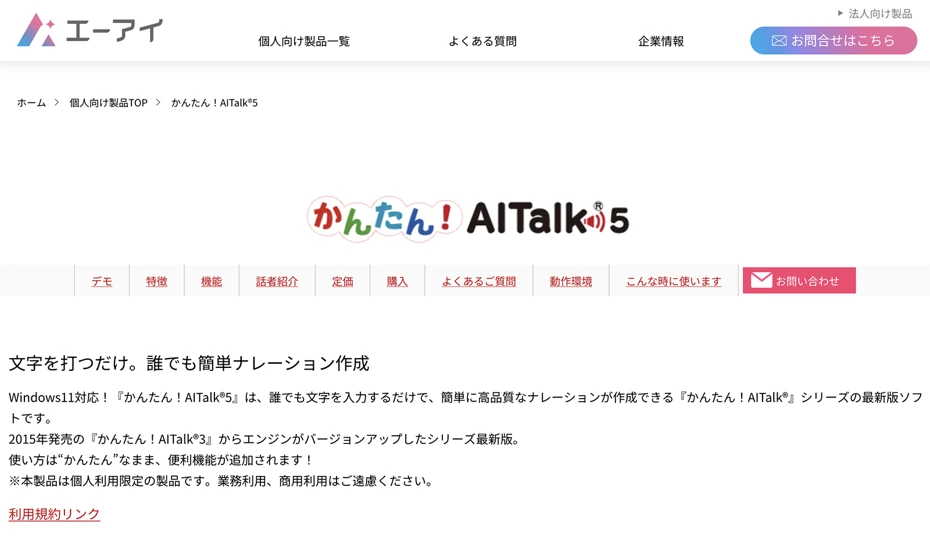
Kantan! AITalk is an AI voice software developed by AI Inc.
It is software installed on a PC, enabling high-quality speech synthesis with the "AITalk" engine.
It supports Windows only.
YouTube monetization is possible for individual use.
While there are many types of software using AITalk, the feature of Kantan! AITalk is, as the name suggests, its particularly easy operation.
Since many voices are orthodox and usable in any situation, it is recommended if you find other paid reading software too anime-like or game-like.
Kantan! AITalk is paid software, with "Kantan! AITalk 5" compatible with Windows 11 sold for 16,500 yen.
However, Kantan! AITalk is strictly for individual use and cannot be used by companies or corporations.
To use AITalk for business, you must request a quote from AI Inc.'s corporate page.
AI Inc. also offers the "A.I.VOICE" series with rich character personality.
Please refer to this page for an explanation of the A.I.VOICE series.
A.I.VOICE 2 Complete Guide! Detailed explanation of features, installation, and usage of the successor to VOICEROID
Explaining the features and usage of A.I.VOICE 2, which includes Kotonoha Akane/Aoi and Yuzuki Yukari, familiar from VOICEROID videos. Detailed introduction from installation to audio export.
3. CeVIO AI: Paid AI Reading Software Capable of Rich Emotional Expression

CeVIO AI is reading software that can synthesize rich character voices using the latest AI technology.
It is software installed on a PC and supports Windows only.
While there are several types of reading software with character settings, CeVIO AI's specialty is its emotional expression.
It is widely used on YouTube and Nico Nico Douga for everything from explanatory videos to game commentary.
Another feature is the inclusion of a singing synthesis function.
By purchasing "Song Voice" synthesis software in addition to the "Talk Voice" reading software, you can have the same voice sing songs in your YouTube videos.
Individual monetization on YouTube is possible.
However, registration of usage status may be required for other individual purposes.
Also, commercial use by corporations requires requesting an individual quote from the distributor.
CeVIO AI is paid software, with the "Talk Voice Starter" sold for approximately 17,000 yen for first-time buyers.
It is recommended for those who want to create YouTube narration with character voices.

What is CeVIO AI? Detailed explanation of speech synthesis software features, usage, and commercial use
A complete guide to the AI singing synthesis software CeVIO AI. Explaining the features of popular characters like Sato Sasara and Suzuki Tsudumi, how to purchase, and precautions for commercial use for beginners.
[Free] How to Create YouTube Video Narration Using Ondoku? Method Explained
I want to know how to make a video with AI narration!

Next, we will explain how to create YouTube video narration for free using the AI reading service Ondoku!
We'll also cover tips for video editing, so please use this as a reference for your video production.
1. Create a Script for the YouTube Video

First, create a script for your YouTube video.
- Explanatory videos
- Game commentary
- News videos
- Company introductions
- Product introductions
Write a script according to the content of your video.
However, it's often difficult to write a good script.
In such cases, we recommend utilizing generative AI services!
First, write freely as you think, without worrying about style or tone.
You don't need to worry about the phrasing at this stage.
Try writing exactly as you normally speak.
It's also recommended to use voice input on your smartphone or PC to speak and enter text.
Next, load the script file into a generative AI service like ChatGPT, Claude, or Google Gemini and provide instructions like this:
This is a draft for a YouTube video script. Based on this draft, create a script for a video (e.g., product introduction). Use a tone that fits the content.
The AI will rewrite it into a tone (style) that perfectly suits the video content.
Finally, check the file created by the AI for any errors.
Now your script for the YouTube video narration is ready.
Generative AI services like ChatGPT, Claude, and Google Gemini are free to use, so we highly recommend using them actively when making YouTube videos.
2. [Free] Generate AI Narration with Ondoku
Once the script is ready, generate AI voice with Ondoku.
First, open the official Ondoku website in your browser.
Paste the created script into the text box on the top page.
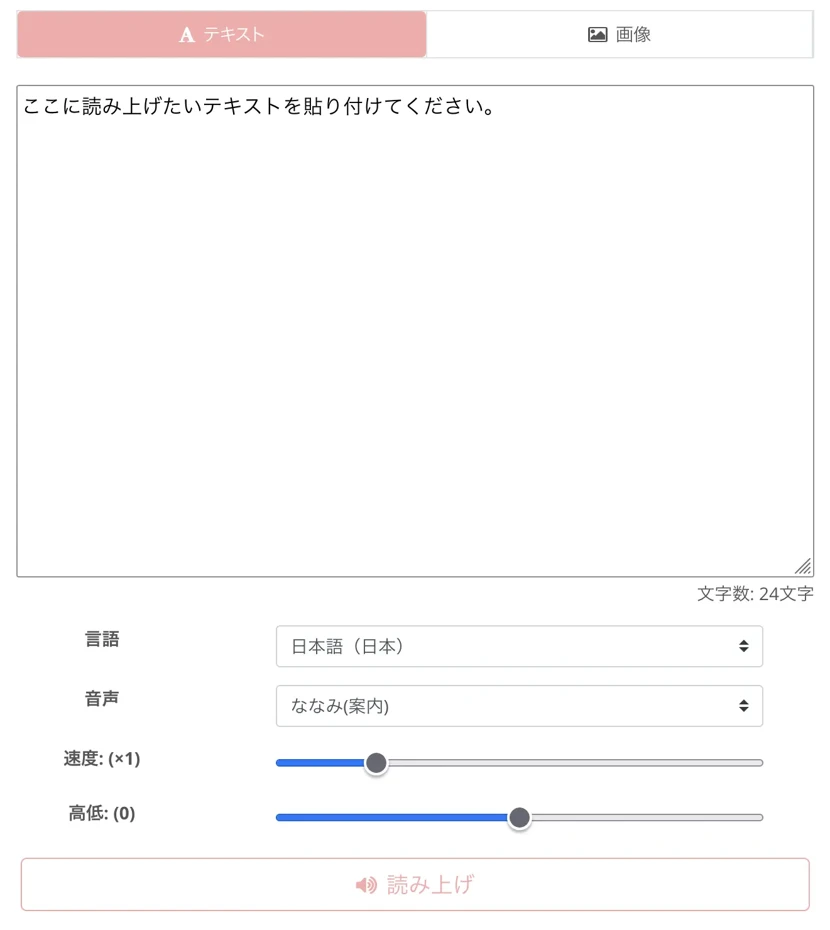
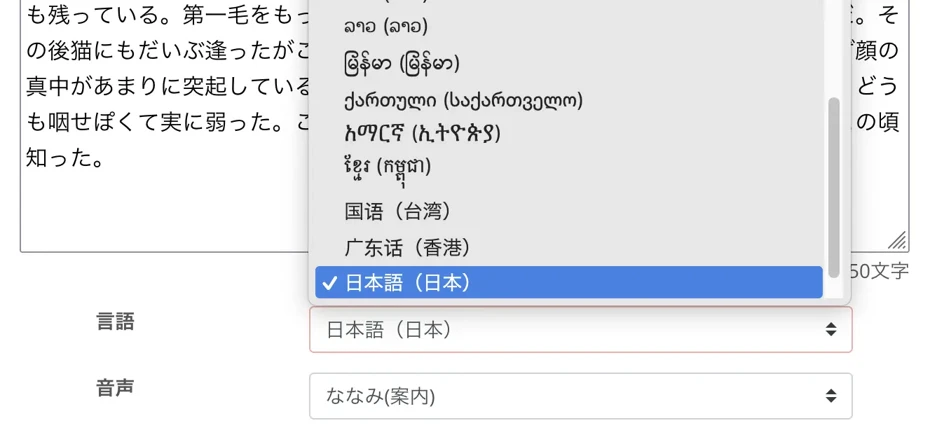
If the language is set to something other than Japanese, select Japanese.
Select a voice.
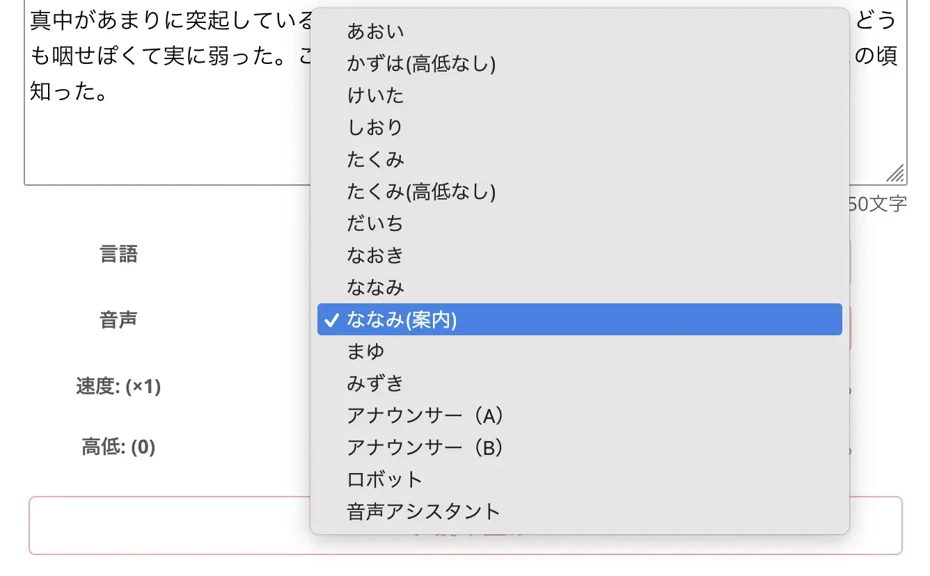
Ondoku allows reading in many voices, such as female or male.
Choose according to the video content, like a friendly female voice for a product introduction or a reliable male voice for a corporate video.
You can listen to Ondoku's Japanese voices on this page.

Listen to 16 types of Japanese voices from the reading software Ondoku for free. Change the impression with pitch adjustment.
Ondoku has 16 types of Japanese voices, including both male and female. We've made it possible to listen to 8 commonly used Japanese voices and how they sound when the pitch is adjusted.
Once settings are complete, press the "Read" button to start voice generation.

YouTube voices are generated instantly.
After generation, the screen changes and an audio player appears.

Since the audio starts playing automatically, check the content and download the MP3 file if there are no issues.
You've now generated the narration for your YouTube video!
Ondoku is available for free.
- Without registration: 1,000 characters
- With registration: 5,000 characters
We recommend starting by experiencing the creation of video narration for yourself.
3. Edit YouTube Videos with Video Editing Software

Once the narration audio file is downloaded, edit it in combination with your video materials.
Adobe Premiere and DaVinci Resolve are standard video editing software.
Adobe Premiere's strength is its orthodox operation typical of Adobe.
DaVinci Resolve's benefits are that it's free and has a UI that allows smoother operation as you become more skilled.
Ondoku's audio files are in MP3 format, so they can be loaded into either without any problems.
4. Upload the Completed Video to Your YouTube Channel
Once the video is complete, upload it to your YouTube channel.
When uploading, the key is to enter a clear title and description.
To get more attention, load the script file into a generative AI service like ChatGPT, Claude, or Google Gemini and give instructions like:
Based on this script, please think of a title and description for the YouTube video.
Also, setting subtitles for your YouTube video is key to increasing views and subscribers.
Subtitles allow you to convey content to more viewers.
Since subtitles can be auto-translated for international viewers, you can further increase views and get subscribers from all over the world.
To create subtitles, we recommend using AI to automatically generate an SRT file from the video narration audio.
We explain how to create SRT subtitle files using the AI transcription service Mojiokoshi-san in this article, so please take a look.
This completes the process of making a YouTube video using the AI reading service Ondoku.
Ondoku allows anyone to easily produce video narration.
Why not try creating narration audio for your videos using Ondoku?
Tips for Using AI-Generated Narration More Effectively in YouTube Videos

Finally, we will introduce tips for using AI-generated narration more effectively.
By grabbing a few small tips for video editing, you can create attractive videos like popular YouTubers.
Boldly Cut Unnecessary Parts of the Narration
A recommendation for individual video creators is to cut unnecessary parts of the narration.
Looking at videos from major YouTubers, they often speak quickly and with great tempo.
This isn't actually how they speak from the start.
They edit the audio to remove unnecessary parts, creating audio with a better tempo than in reality.
If you read the script and feel the phrasing is too redundant, we recommend bold cutting.
The impression of text can change significantly between reading it on paper and hearing it as audio.
Parts that feel unnecessary as audio should be cut for a much more watchable video.
Conversely, for corporate or official videos, it might be better to have slightly more information.
By not cutting out information, you can enhance the reliability required for official information.
Pay Attention to the Volume Balance Between Narration and BGM
BGM is essential for YouTube videos.
When adding BGM, pay attention to the volume balance with the narration.
BGM files are produced at a volume meant for listening to music alone.
When inserting BGM into a video, you need to lower the volume significantly.
For example, when editing in Adobe Premiere, lowering the BGM volume to around "-30db" usually results in an appropriate level.
Why Not Create YouTube Video Narration for Free with an AI Reading Service?
With advancements in AI technology, anyone can now easily create YouTube video narration for free.
AI reading services are also recommended for those hesitant to show their face or use their voice.
From individual video creators to those making videos for companies and organizations, anyone can easily create high-quality narration.
Why not start by using Ondoku to create narration for your YouTube videos for free?
■ AI voice synthesis software "Ondoku"
"Ondoku" is an online text-to-speech tool that can be used with no initial costs.
- Supports 81 languages and regions, including Japanese, English, Chinese, Korean, Spanish, French, and German
- Available from both PC and smartphone
- Suitable for business, education, entertainment, etc.
- No installation required, can be used immediately from your browser
- Supports reading from images
To use it, simply enter text or upload a file on the site. A natural-sounding audio file will be generated within seconds. You can use voice synthesis up to 5,000 characters for free, so please give it a try.

Text-to-speech software "Ondoku" can read out 5000 characters every month with AI voice for free.
You can easily download MP3s and commercial use is also possible.
If you sign up for free, you can convert up to 5,000 characters per month for free from text to speech.
Try Ondoku now.
HP:
ondoku3.com
Email: ondoku3.com@gmail.com
Email: ondoku3.com@gmail.com
Related posts
"Ondoku" is a Text-to-Speech service that anyone can use for free without installation. If you register for free, you can get up to 5000 characters for free each month. Register now for free
- What is Ondoku
- Start text-to-speech conversion
- Free registration
- Pricing
- Posts
- Try other free services
![[2026 Latest] AI Voice Synthesis for Video Narration: Free YouTube Tools & Usage](https://storage.googleapis.com/ondoku3/image/irodori-tts_tmb_140.webp)
![[2026 Latest] AI Voice Synthesis for Video Narration: Free YouTube Tools & Usage](https://storage.googleapis.com/ondoku3/image/tategaki-image-yomiage_howto_tmb_140.webp)
![[2026 Latest] AI Voice Synthesis for Video Narration: Free YouTube Tools & Usage](https://storage.googleapis.com/ondoku3/image/iphone-video-narration_tmb_140.webp)
![[2026 Latest] AI Voice Synthesis for Video Narration: Free YouTube Tools & Usage](https://storage.googleapis.com/ondoku3/image/chrome-reading-mode-pc_tmb_140.webp)
![[2026 Latest] AI Voice Synthesis for Video Narration: Free YouTube Tools & Usage](https://storage.googleapis.com/ondoku3/image/pdf-to-mp3-howto_tmb_140.webp)









