

Best Text-to-Speech Software: 7 Free & Paid Tools for Commercial Use
How to Turn Your Blog into Audio for Free | Using MP3 Embed Tags
Aug. 7, 2026


I want to turn my blog into audio so people can listen to it!
*This article was published on April 19, 2026.
Are you looking for ways to make your blog or note more attractive and get more people to access it?
In that case, we recommend turning your blog into audio!
Adding audio to your blog allows for "listening while multitasking" during housework or driving, which can encourage visitors to stay on your blog for a longer time.
Therefore, in this article, we will introduce how to convert blog articles into MP3 audio and embed them.
What you will learn in this article:
- Recommended methods for turning a blog into audio
- Recommended steps for audio conversion & blog embedding
- Situations where blog audio conversion is useful
What are the recommended methods for turning a blog into audio?

There are two main methods for turning a blog into audio.
- Convert the blog into audio using a text-to-speech site and embed it
- Use a text-to-speech plugin for WordPress
Both methods can be done for free!
The AI text-to-speech site Ondoku has an embed tag function, so you can easily embed the created MP3 files into your blog and post them.
For services like note that do not allow the embedding of HTML tags, there is also a method to download the MP3 file and embed it.
Also, if you are using WordPress for your blog, the official Ondoku WordPress plugin is recommended.
By using the WordPress plugin, you don't need to create MP3s yourself every time you post a new article, and you can easily include audio.
In this article, we will first introduce how to create MP3 files from blog articles using the text-to-speech site Ondoku and embed them into your articles.
By using Ondoku's embed tag function, even beginners can easily post audio to their blogs.
How to convert blog articles into audio and embed them in posts
1. Create MP3 audio on the Ondoku site
First, open the Ondoku top page.

Copy the body of the blog article you want to turn into audio and paste it into the input field.
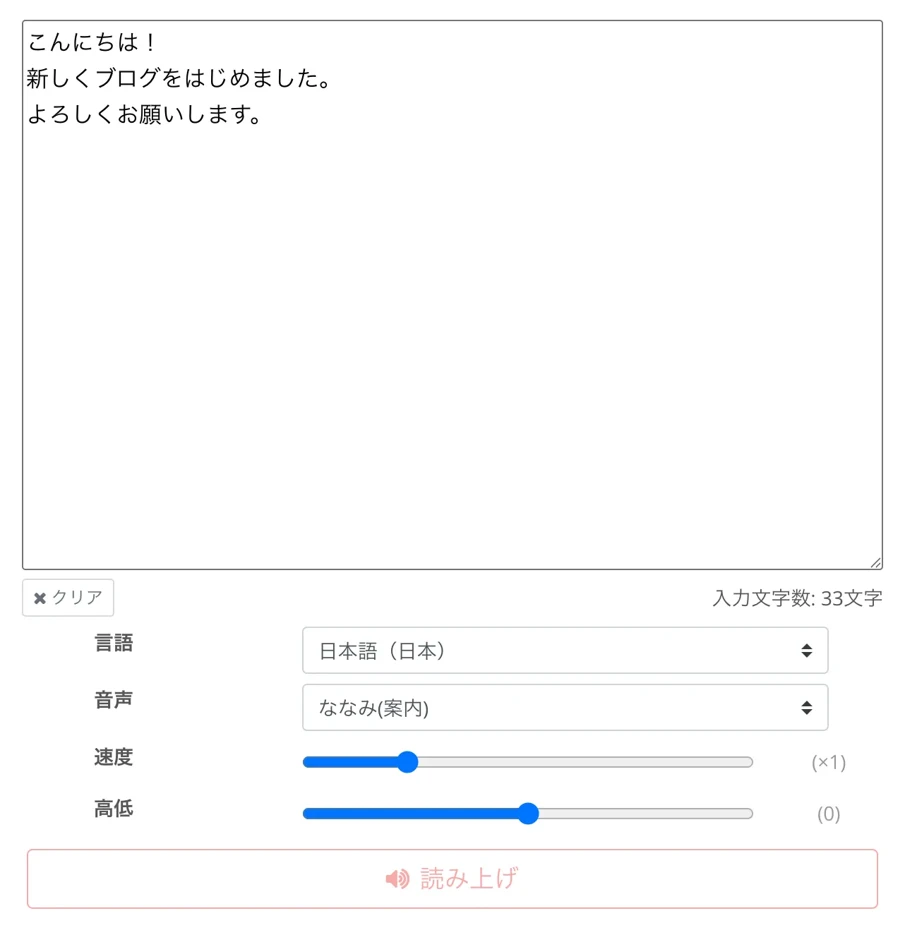
The key here is to delete unnecessary parts other than the article body before pasting.
- Author name
- Posting date
- Sidebar
- Related articles
- Alt attributes of images
By ensuring these are not included, you can create a natural and easy-to-listen-to audio.
Pasting a long article as is can result in a very long audio, so it is also recommended to split it into parts like "first half and second half" or "by chapter" instead of reading everything at once.
Then, just select the voice and press the "Read" button.
With the latest AI, the read-aloud audio is completed in just about one minute!
Once the reading process is finished, the screen will switch and the audio will play.
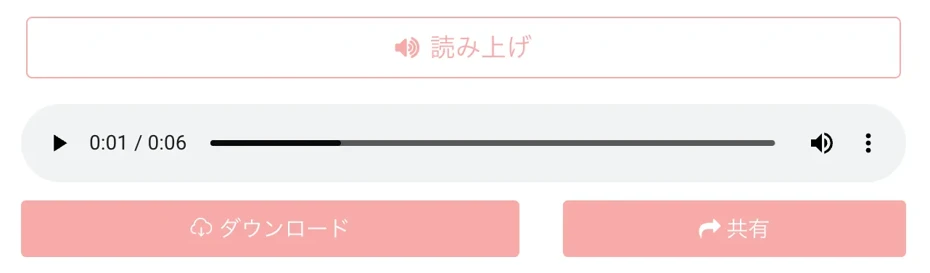
For example, in this case, we were able to create a read-aloud audio like this.
Audio Sample:
2. Copy the embed tag on the Ondoku site
Once you have converted the blog content into audio, next, copy the embed tag.
To copy the embed tag, first click the "Share" button.
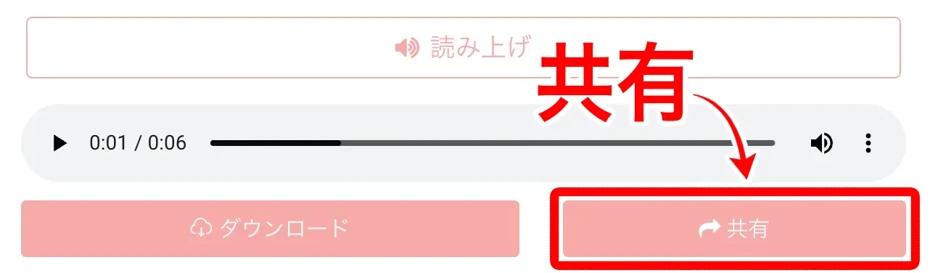
Then, the audio detail page will open.
In the "Publish Settings", check "Publish" and click "Change".
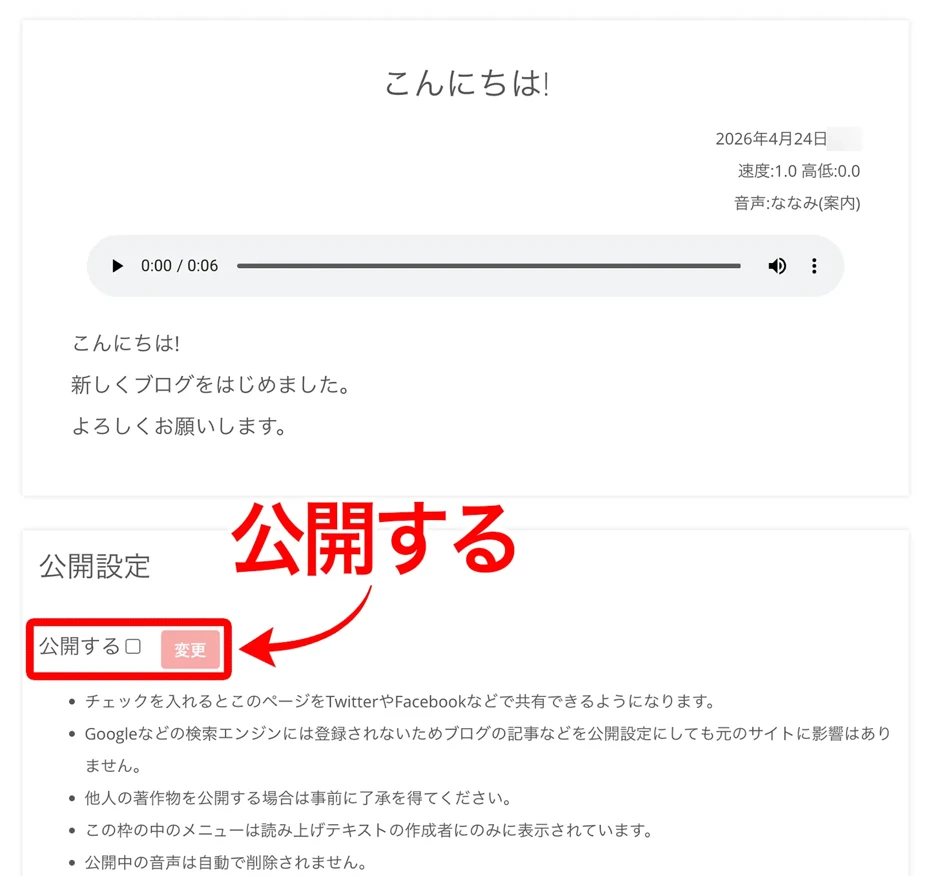
The created audio file is now in a public state.
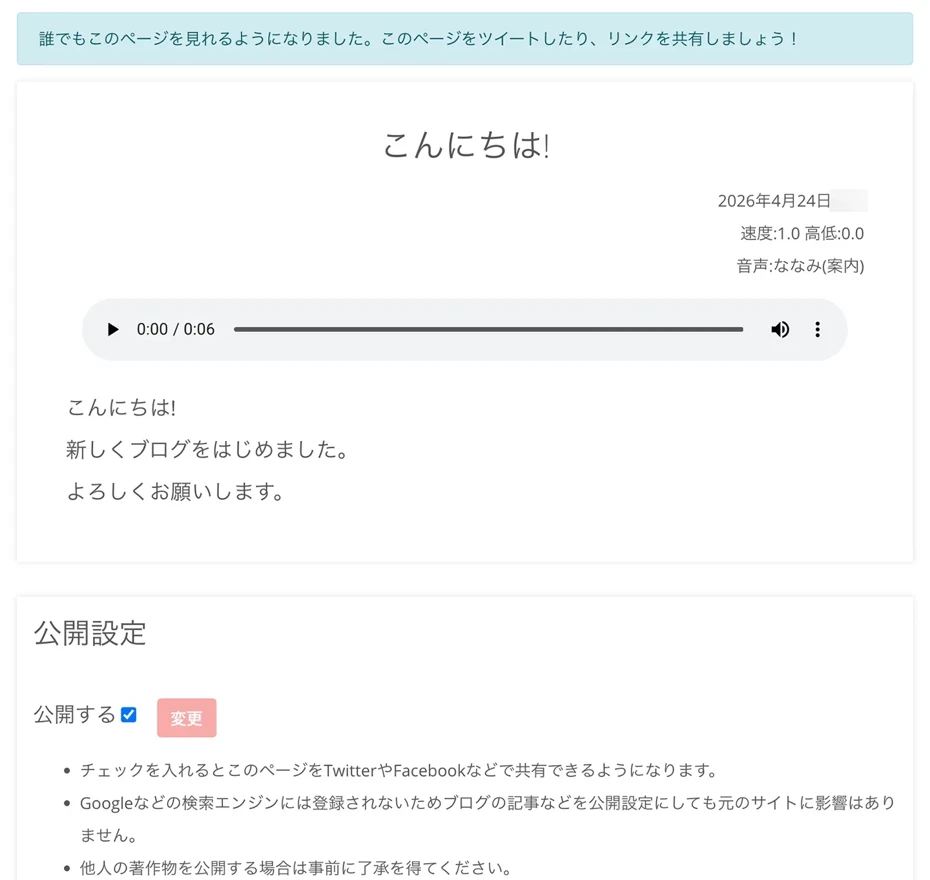
Scroll down and click "Copy embed tag".
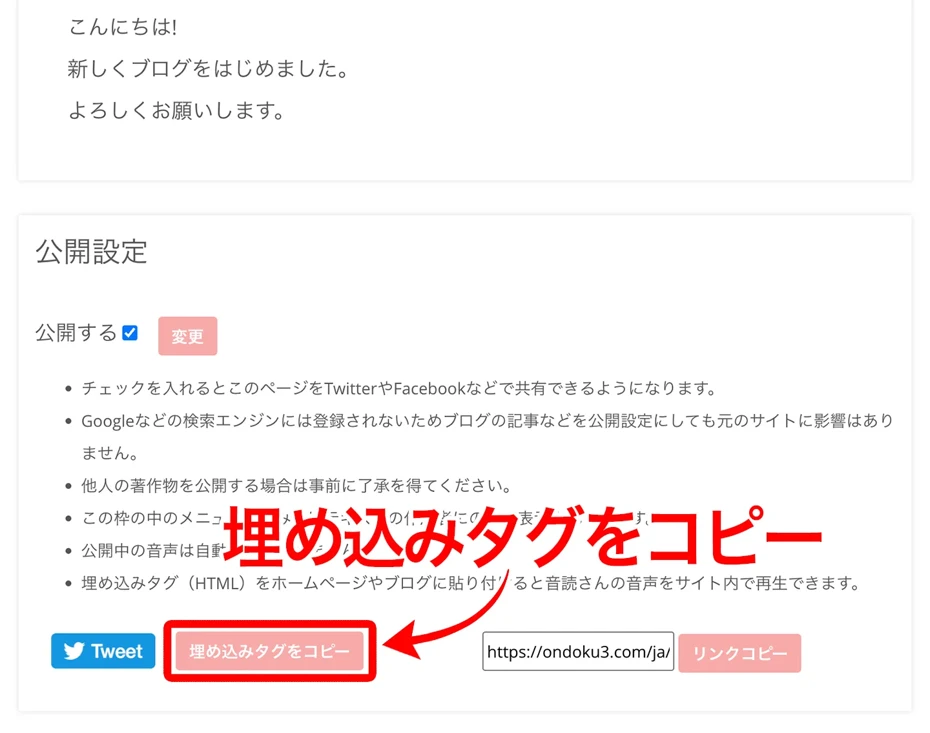
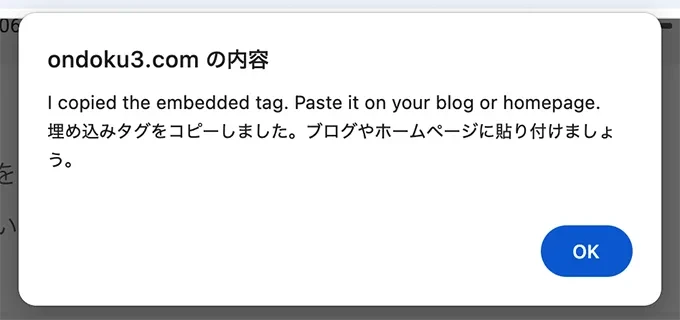
You can then copy the embed tag (HTML tag).
3. Paste the embed tag into the blog article and post
Paste the copied embed tag into your blog article.
In this example, we will embed audio into a Hatena Blog article.
Open the Hatena Blog edit page and switch to HTML editing.
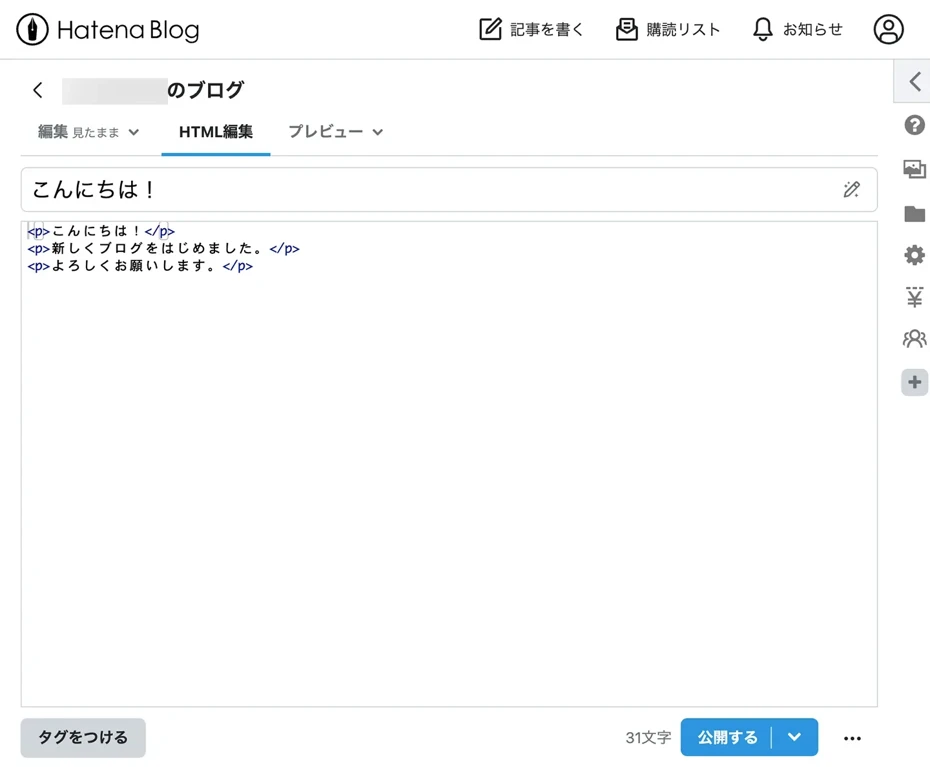
Paste the copied embed tag.
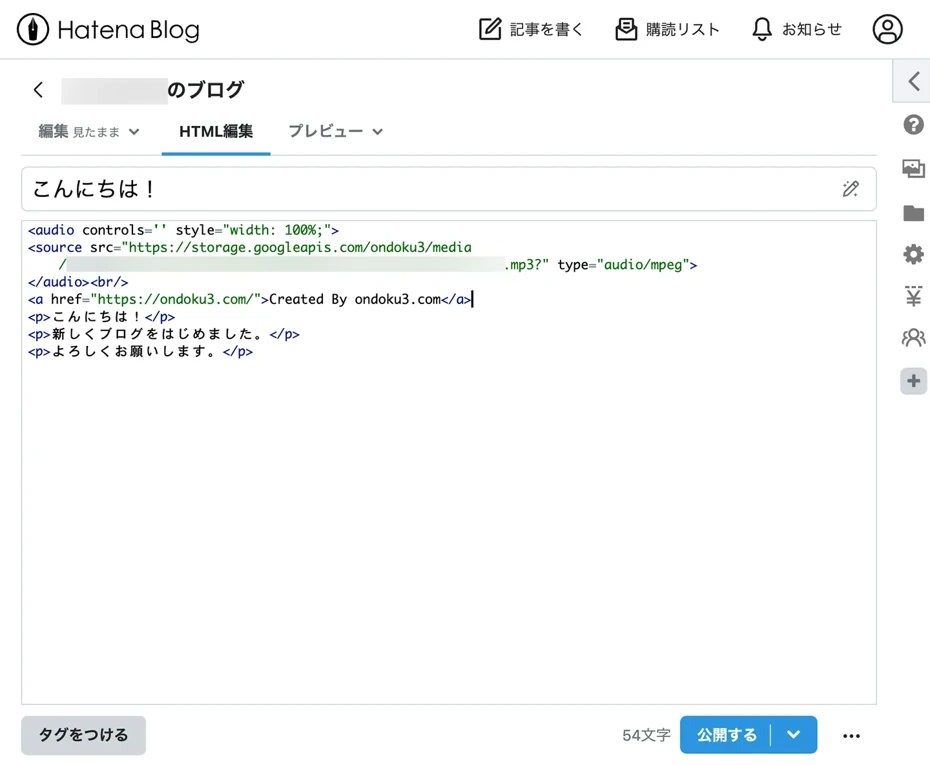
Finally, just post and publish the blog article.
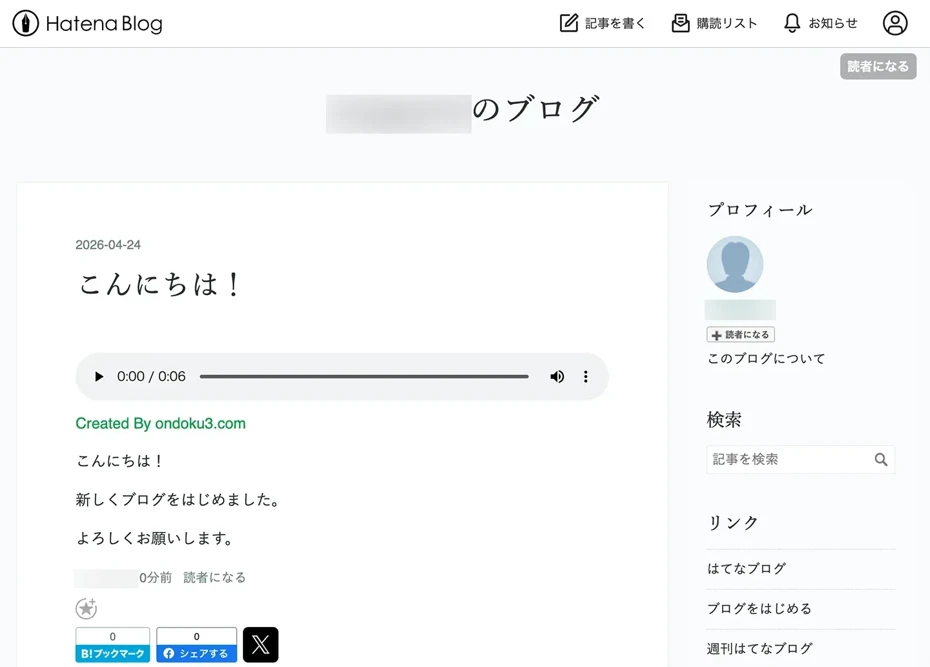
You have now successfully converted the blog article to audio and embedded the MP3 file.
As you can see, converting blog articles to audio with Ondoku is very easy.
Why don't you try embedding audio created with Ondoku into your blog?
How to download and post MP3 files
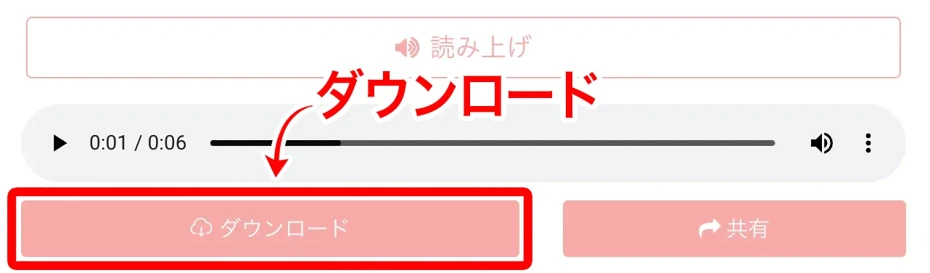
You can also download the MP3 files of the audio read by Ondoku and embed them into your blog or note.
To save the MP3 file, click the "Download" button.
How to embed audio in a Hatena Blog article
For Hatena Blog, upload the MP3 file to Google Drive or a similar service and embed the audio.
This article explains in detail how to embed MP3 files from Google Drive into Hatena Blog, so please take a look.
How to embed audio in Hatena Blog | Steps to paste MP3 from Google Drive
We explain how to embed audio files (MP3) in Hatena Blog with images. Introduction to the steps for uploading audio files to Google Drive, obtaining a shared link, and pasting it into an article using an iframe tag. You can start for free.
How to embed audio files in a note article
Since embed tags cannot be used in note articles, use the audio embed function to post MP3 files.
To embed an audio file, first click the "+" on the note posting/editing screen.

Click "Audio" from the options.

Select the file.

In the screen that opens after selecting the file, enter the audio file's:
- Cover image
- Title (Required)
- Author (Required)
Input these details.

Then, just publish the article.
The note article has now been converted to audio and embedded.

Utilizing MP3 files on Podcasts or YouTube is also recommended
Audio files converted to MP3 can be used conveniently for purposes other than embedding in blog articles.
For example, if you upload the MP3 to a podcast distribution service like Spotify or Apple Podcasts, you can distribute the content of your blog articles via audio.
In the case of YouTube, you can post the content as a video simply by combining the MP3 with a still image, allowing you to expand the same content across three platforms: Blog, Podcast, and YouTube.
The process of turning blog articles into audio and how to create audiobooks is also introduced in this article.
Please take a look.
![[Free] Let's make an audiobook with speech synthesis! Summary of self-publishing methods using read-aloud services | Text-to-speech software Ondoku](https://storage.googleapis.com/ondoku3/image/20240815-audiobook06_930.webp)
As described above, you can easily turn blog and note articles into audio using Ondoku.
With Ondoku, you can read up to 5,000 characters per month just by registering as a free member!
By simply crediting Ondoku for its use, you can post audio on your blog for free.
*Credit is not required if you subscribe to a paid plan. Details are explained here.
It supports multiple languages including English as well as Japanese, so it is also recommended for those who operate English blogs or want to translate and distribute articles in English!
First, why don't you actually try converting a blog article into audio on the Ondoku site?
Plugins are recommended if you want to turn WordPress blog posts into audio

If you are using WordPress for your blog, you can automatically post audio by using a text-to-speech plugin.
How to use the official Ondoku WordPress plugin "Ondoku" is explained in more detail in this article.
Please take a look.
![[Text-to-Speech Plugin] Ondoku: A plugin that automatically reads your WordPress articles aloud](https://storage.googleapis.com/ondoku3/image/plugin_930.webp)
[Text-to-Speech Plugin] Ondoku: A plugin that automatically reads your WordPress articles aloud
The one introduced here is a text-to-speech plugin that converts the articles you write into audio and reads them aloud. We will introduce how to install and use this convenient and interesting text-to-speech plugin.
5 reasons why turning blog articles into audio is recommended

So far, we have explained how to turn blog articles into audio.
Next, we will briefly explain the reasons why turning your blog into audio is recommended and the situations where it is useful.
1. People can listen while commuting or doing housework
When you turn your blog into audio, there is no need to read the text, so people can listen to the content in their free time.
- On trains or buses
- While driving
- While doing housework such as cooking or cleaning
- While walking or running
In this way, people can enjoy the content of your blog even when it is difficult to read text.
2. Information can be delivered to people who are not good at reading long texts
Another big advantage of turning a blog into audio is that information can be delivered to people who are not good at reading long printed texts and who usually do not read written articles or books.
You can also get people who are better at understanding by listening to access your blog.
For those whose eyes are tired from working on a computer or looking at a smartphone screen for a long time, turning your blog into audio allows them to listen until the end while resting their eyes.
3. Improved accessibility for visually impaired readers
By turning your blog into audio, you can also improve accessibility for readers with visual impairments or readers who find it difficult to read small characters due to aging.
Turning the entire blog into audio is particularly recommended for official corporate blogs and official websites of public institutions.
Being mindful of accessibility also leads to increased trust in the blog as a whole.
4. Audio can also be posted as Podcasts or videos
By creating MP3s with a text-to-speech service, you will also be able to distribute them on Spotify or Apple Podcasts, or post them as YouTube videos by combining them with still images or images with simple movement.
Using the blog as a base, you can expand to new readers coming from Podcasts and YouTube, allowing you to steadily increase your traffic.
5. You can increase the time readers stay on your site
When you embed audio in a blog article, visitors who would only read the article change into visitors who "also listen to the audio before leaving."
Therefore, the staying time per article naturally becomes longer, which improves evaluation from search engines.
Of course, there is also a great advantage in conveying the content of the blog to the readers.
Unlike when written articles are skimmed, listening by ear allows for a deeper understanding of the entire content of the article, making it easier for the writer's style and thoughts to reach the reader.
As you can see, there are many benefits to turning your blog into audio.
Why don't you try further enhancing the appeal of your blog or note using the methods introduced in this article?
Frequently Asked Questions about Blog Audio Conversion and Embedding

Q. Can Ondoku be used on commercial blogs or blogs with ads?
Audio created with Ondoku, whether on a free or paid plan, can be used for personal use as well as on commercial blogs or blogs with ads.
However, when using the free plan for commercial purposes, credit attribution is required so that anyone can clearly see that "this was created by Ondoku."
Examples of credit attribution
- Example 1: The audio in this video uses Ondoku.
- Example 2: Narration by Ondoku
- Example 3: ©Ondoku
- Example 4: Voice: Ondoku
- Example 5: ©ondoku3.com
- Example 6: Created By ondoku3.com
- Example 7: Voice By ondoku3.com
With a paid plan, it can be used without credit attribution.
For more details about credit attribution for Ondoku, please see this article.
Q. What kind of voices can be used for reading?
With Ondoku, you can choose from many voices such as women, men, and children.
We recommend using them differently for each article to match the blog's theme, such as having an explanatory article read in a calm male voice or a column article read in a bright female voice.
Since you can also combine multiple voices to create audio in a dialogue format, it is well-suited for interview or discussion articles.
You can listen to Ondoku audio samples in this article.
Please take a look.
Q. Can articles in English or foreign languages also be turned into audio?
Ondoku can turn articles in English or foreign languages into audio as they are.
On the Ondoku top page, you can read aloud in multiple languages by selecting the language according to the content of the text.
Even when developing a blog in a foreign language such as English, turning your blog into audio with Ondoku is recommended.
Q. Can I turn a blog into audio and post it from a smartphone?
Even without a computer, if you open the Ondoku site in a smartphone browser, you can turn it into audio right there.
If you often write articles on the go, it is helpful to try out the operation from your smartphone in advance.
Why don't you try turning your blog articles into audio?
Today, we introduced how to turn blog articles into audio.
With the AI text-to-speech site Ondoku, you can easily turn blog articles into audio and attract more readers.
First, why don't you pick one popular article or one that gets a lot of reaction and experience the method of audio conversion?
■ AI voice synthesis software "Ondoku"
"Ondoku" is an online text-to-speech tool that can be used with no initial costs.
- Supports 81 languages and regions, including Japanese, English, Chinese, Korean, Spanish, French, and German
- Available from both PC and smartphone
- Suitable for business, education, entertainment, etc.
- No installation required, can be used immediately from your browser
- Supports reading from images
To use it, simply enter text or upload a file on the site. A natural-sounding audio file will be generated within seconds. You can use voice synthesis up to 5,000 characters for free, so please give it a try.

Text-to-speech software "Ondoku" can read out 5000 characters every month with AI voice for free.
You can easily download MP3s and commercial use is also possible.
If you sign up for free, you can convert up to 5,000 characters per month for free from text to speech.
Try Ondoku now.
HP:
ondoku3.com
Email: ondoku3.com@gmail.com
Email: ondoku3.com@gmail.com
Related posts
"Ondoku" is a Text-to-Speech service that anyone can use for free without installation. If you register for free, you can get up to 5000 characters for free each month. Register now for free
- What is Ondoku
- Start text-to-speech conversion
- Free registration
- Pricing
- Posts
- Try other free services