Best Text-to-Speech Software: 7 Free & Paid Tools for Commercial Use
What is COEIROINK? Features, Usage, and Commercial Use Explained
July 22, 2026

What kind of text-to-speech software is COEIROINK?

COEIROINK is a speech synthesis software that can read text aloud in the voices of unique characters.
It is gaining attention among video creators and content creators.
In this article, we will explain in detail the information needed for those who want to use COEIROINK, such as its features, installation method, usage, and recommended text-to-speech methods.
If you are thinking about using COEIROINK or are looking for a text-to-speech method, please use this article as a reference to find the speech synthesis software or reading method that is perfect for you.
[Free / Commercial Use OK] Recommended Latest AI Text-to-Speech Service

There is a recommended free reading service for those who want to create read-aloud audio.
That is the latest AI service, "Ondoku".
"Ondoku" is an AI reading service that can be used for free.
It can be used in any environment, including Windows, Mac, and Linux, as well as iPhone and Android smartphones.
It is very easy to use—just enter your text!
It can be used immediately without installation and allows for comfortable reading regardless of PC specs.
Furthermore, "Ondoku" is free for commercial use.
It is also ideal for YouTube monetization.
Why not try making a video for free using the easy-to-listen and realistic voices of "Ondoku"?
What is COEIROINK? Explaining the Features of the Speech Synthesis Software
First, we will briefly explain what kind of speech synthesis software COEIROINK is.
What kind of speech synthesis software is COEIROINK?

COEIROINK is a speech synthesis software developed individually by Shirowani.
It was released in 2021 and has undergone repeated updates since then.
A feature of COEIROINK is that it was developed primarily for personal creative use.
Since development began with the motivation of "wanting to give a voice to my own creative characters," it can be used for the purpose of giving voices to original characters.
In some cases, software that can read aloud with character voices may not allow use for other characters.
In contrast, with COEIROINK, you can easily use it for personal creations such as doujin audio works, voice dramas, and voice plays.
What are the features of COEIROINK?
COEIROINK is a speech synthesis software closely related to the open-source reading software "VOICEVOX."

VOICEVOX Usage Guide! Detailed explanation from AI free speech synthesis software features to commercial use
Detailed explanation from VOICEVOX features to usage and points to note for commercial use. A complete guide to the free AI speech synthesis software that can read aloud in the voices of popular characters like Zundamon.
While it uses its own AI speech synthesis engine, Version 1 utilized the UI of VOICEVOX.
However, from Version 2, which appeared in 2023, it has its own UI and a different operation method from VOICEVOX.
When comparing COEIROINK to other speech synthesis software, its characteristic feature is that it is good at emotional expression.
As it is intended primarily for creative use, various voices specialized in expressions—from basic to niche—are provided.
However, because advanced expression is possible, the file download size is relatively large.
MYCOEIROINK function for creating original voices
The MYCOEIROINK function is also one of its major features.
By using this function, users can create their own original voice models.
MYCOEIROINK models created by users are published on the official website and can be downloaded and used.
However, when using user-created voices, the terms of use differ for each, so be sure to check them before use.
Credit is mandatory when using COEIROINK
When using COEIROINK, pay attention to the terms of use.
It is necessary to provide credit notation within the content (such as videos) or in the description section.
The credit notation must clearly state both:
- The use of "COEIROINK"
- The name of the character used
For example, if you use the voice of Tsukuyomi-chan, you would write it as "COEIROINK:Tsukuyomi-chan".
Points to note when using COEIROINK for commercial purposes
Additionally, of course, you must follow other terms of use.
Although COEIROINK was created primarily for creative activities, commercial use is also possible.
However, for commercial use, you must also follow the terms of use for the character voice.
Some voices prohibit commercial use, so caution is required.
Specific points to watch out for in the COEIROINK Terms of Use

Furthermore, when using COEIROINK, expressions that criticize or attack people, or expressions calling for agreement with specific politics, religions, or ideologies, are prohibited.
Also, when using highly stimulating expressions, appropriate zoning is required.
In this way, when using COEIROINK, it is necessary to comply with all terms of use for both the software itself and each character.
While it is a reading software that can be conveniently used for video production and creative activities, please be careful to use it without violating the terms of use.
Installed software compatible with Windows, Mac, and Linux
COEIROINK is compatible with three OS: Windows, Mac, and Linux.
For Windows and Linux, both CPU and GPU versions are available.
GPU is only supported for NVIDIA products.
Also, the GPU's graphic memory requires 3GB or more.
To achieve high-quality speech synthesis, COEIROINK has a relatively large file size.
Please ensure you have sufficient free space.
Since it is necessary to save files of several hundred MBs, downloading may take a long time depending on the internet connection you are using.
Also, note that it may not operate comfortably depending on your PC's specs.
[Free] Recommended Text-to-Speech Software with No Installation Required
"Ondoku" is a recommended reading software that requires no installation and can be used comfortably regardless of PC specs.
Since it is a web app used from a browser, you can start reading right now without downloading or installing.
Even on PCs without a GPU, you can smoothly synthesize speech from text.
Moreover, Ondoku is free!
It can be used without registration or login, so why not try using "Ondoku" for free for your YouTube videos or audio works?
COEIROINK Official Characters and Certified Characters
Many characters are provided in COEIROINK.
Here, we will introduce the official characters and certified characters.
The difference between Official Characters and Certified Characters
COEIROINK characters are divided into two categories.
Official Characters are characters created and provided by the COEIROINK developer.
- Reco / Nako
- Kanata
These are provided.
Since they do not have a specific voice, they can be used for dubbing with any voice you like.
On the other hand, Certified Characters are characters created by external creators that are available for use in COEIROINK.
For these, both illustrations and voices are provided for each character.
The only initially installed character is "Tsukuyomi-chan (Reisei/Calm)," and other characters can be downloaded within the software.
Since both types of characters have their own unique terms of use, confirmation is required before use.
We will briefly introduce some of the characters.
Nako & Reco | Twin girl characters whose voices can be freely dubbed


Nako & Reco are official characters of COEIROINK.
They are twin girls and are also used in the main visual of the COEIROINK official website.
They are provided as "official characters without a voice," allowing you to freely set your preferred synthesized voice.
Kanata | A male character whose voice can be freely dubbed

Kanata is also an official character of COEIROINK.
This is a male character, and no specific voice is set.
Just like Nako & Reco, he is provided as an "official character without a voice," and you can freely set your favorite synthesized voice.
Tsukuyomi-chan | An easy-to-use female character voice

Tsukuyomi-chan is the certified character that is initially installed when you start using COEIROINK.
She is widely used as a free material character and features a bright, friendly female voice.
COEIROINK was developed because of the "Tsukuyomi-chan Talk Software," making her a character with special meaning for COEIROINK.
She is frequently seen on video posting sites like YouTube and Nico Nico Douga.
Tsukuyomi-chan has styles such as "Reisei (Calm)," "Oshitoyaka (Elegant)," and "Genki (Energetic)," which can be used according to the content.
MANA & KANA | Character voices based on VTuber voices


MANA and KANA are character voices created based on the voices of VTubers.
MANA is created based on the voice of VTuber Mana Shikanama, and KANA is based on the voice of VTuber Kana Manaka.
MANA can read aloud with a high, bright voice, while KANA uses a lower, calm voice.
MANA especially has many types of styles available.
Dia & Alma | Female character voices themed after angels and demons

Dia and Alma are certified characters themed after angels and demons.
They are provided by "Lusty*Kiss Production," which produces virtual idols and creates doujin works such as voice dramas and videos.
They are a pair consisting of Dia with a bright voice and Alma with a calm voice, allowing for emotionally rich expression.
Many other characters are also available
Many other diverse characters exist in COEIROINK.
Because many characters are voiced by professional voice actors, you can use a wide variety of voices perfect for your creations.
Of course, besides those, it is also possible to add user-created voices from MYCOEIROINK.
How to Install COEIROINK [Explained with Windows 11]
To use COEIROINK, you need to download and install the software from the official website.
From here, we will briefly explain how to install COEIROINK.
Detailed Download Procedures
First, access the COEIROINK official website and download the installation file.
Click "Download" from the menu.

The download screen has opened.
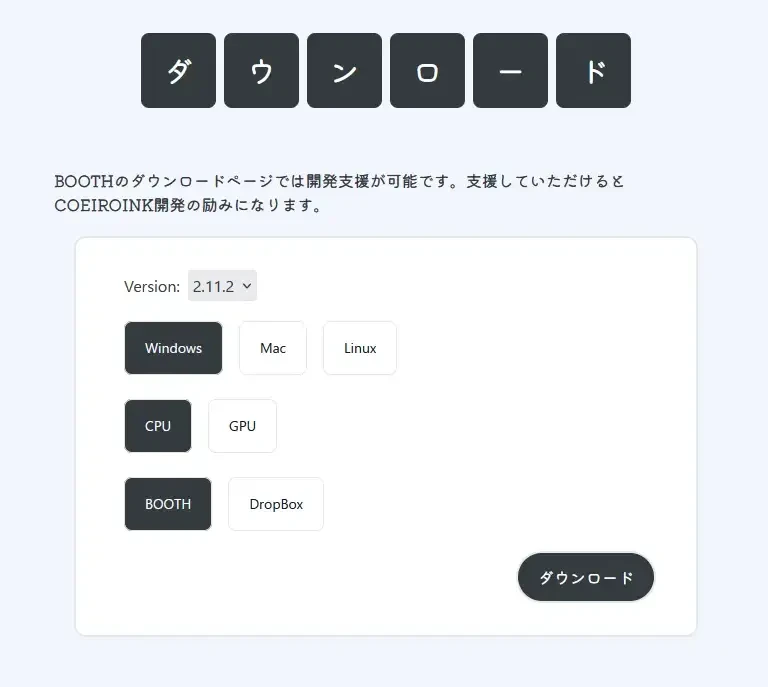
- Windows (CPU version)
- Windows (GPU version)
- Mac
- Linux
Choose the one that fits the PC you are using.
*If selecting the GPU version, your PC must be CUDA compatible. GPU is only supported for NVIDIA.
Downloads are possible from two locations:
- BOOTH (creative work publishing service)
- DropBox (cloud storage)
After selecting the download destination and pressing "Download," the page to download the file will open.
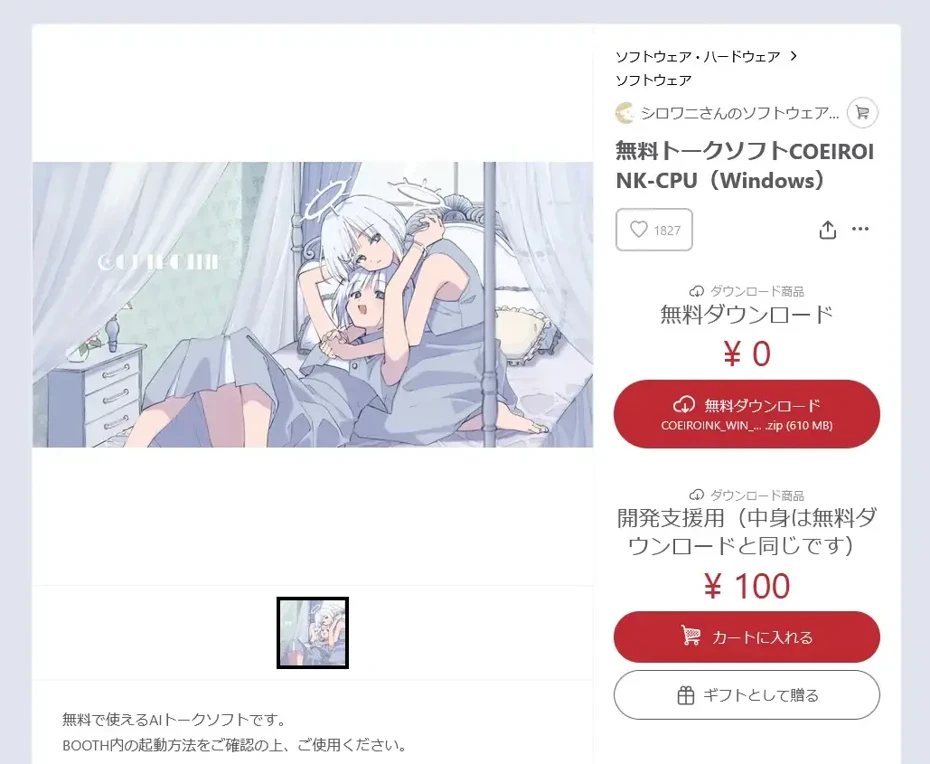
Since COEIROINK has a large download size (approx. 600MB), using a stable internet connection is recommended.
COEIROINK Installation (Extraction) Procedures
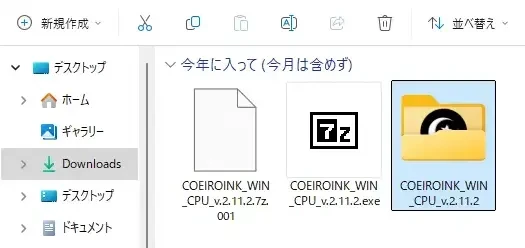
COEIROINK works just by extracting the downloaded file.
However, the file is doubly compressed, so after extracting the ZIP file, you need to perform a further extraction process.
Once the COEIROINK download is complete, extract the ZIP file.
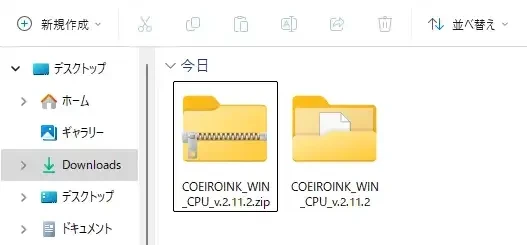
Run the exe file located inside the extracted folder.
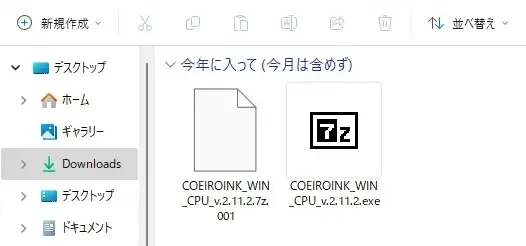
Then, a black window (terminal, console) will open, and further extraction will take place.

When the process finishes, a further new folder will be created.
You can launch COEIROINK by double-clicking "COEIROINKv2.exe" inside it.
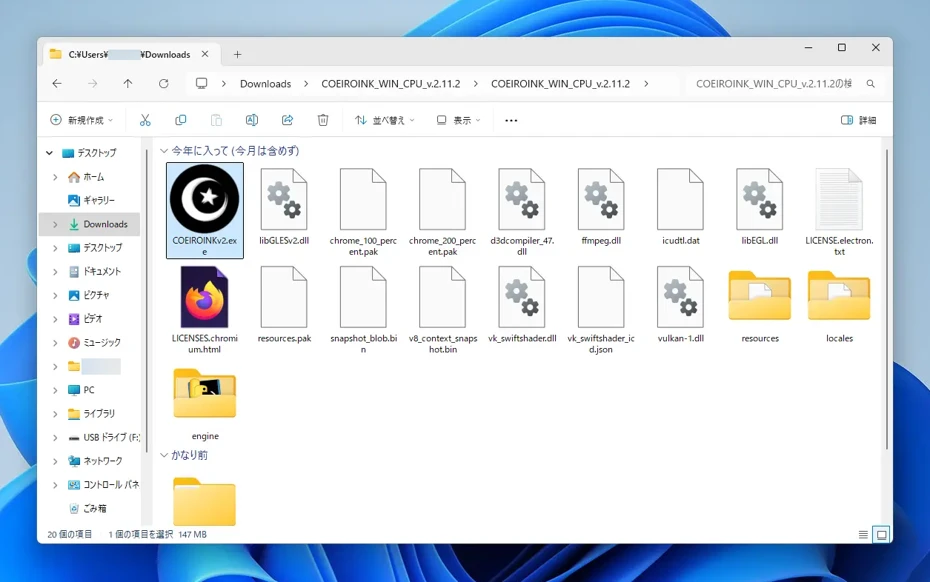
The folder containing the program can be moved to another location if necessary without any issues.
On the first launch, you must agree to the terms of use.
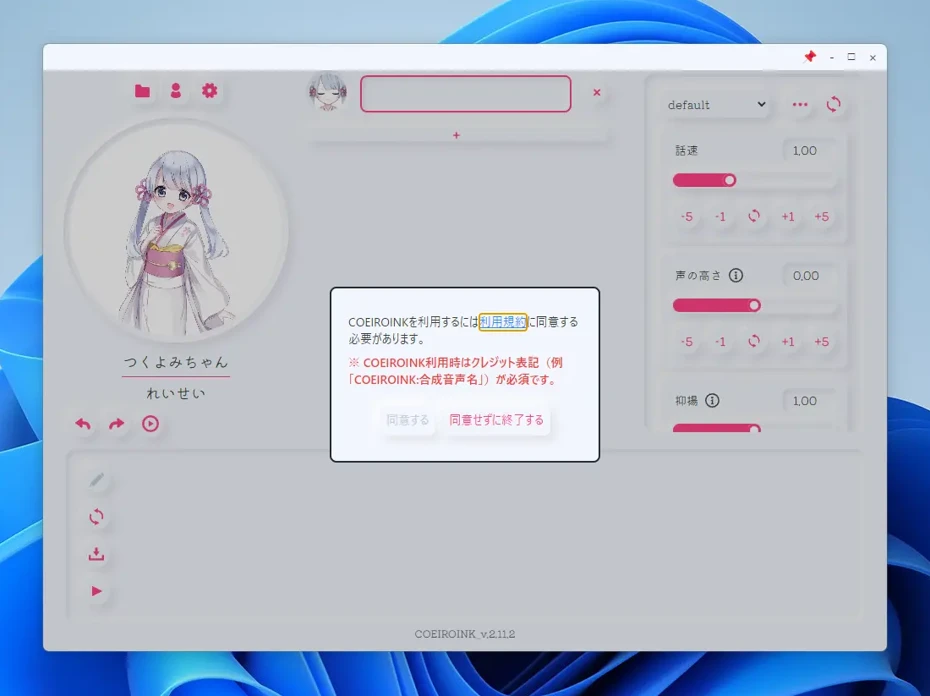
Clicking "Terms of Use" in the window will open the terms of use page in your browser.
After reading the terms and returning to the COEIROINK screen, you will be able to press the "Agree" button.
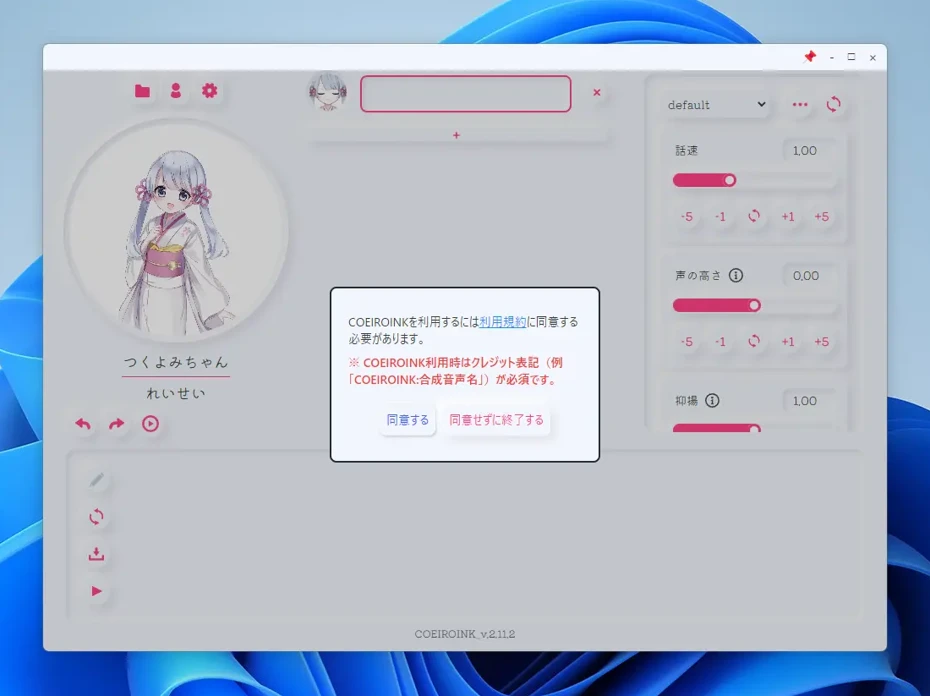
Pressing "Agree" will allow you to operate the COEIROINK editing screen.
Explaining Basic Usage of COEIROINK
Next, we will explain the basic operation methods of COEIROINK in detail.
Basic Text-to-Speech Method in COEIROINK
Character icons and a text input field are displayed on the COEIROINK editing screen.
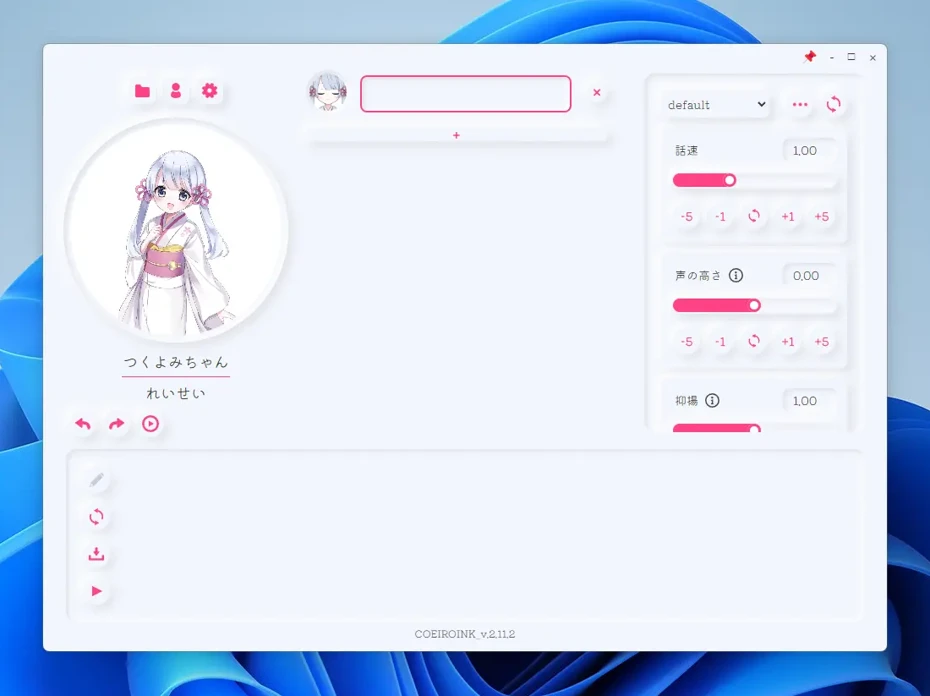
Immediately after installation, only Tsukuyomi-chan (Reisei) is installed.
Input Content to be Read Aloud
Enter the content to be read aloud in the text box next to the small character icon.
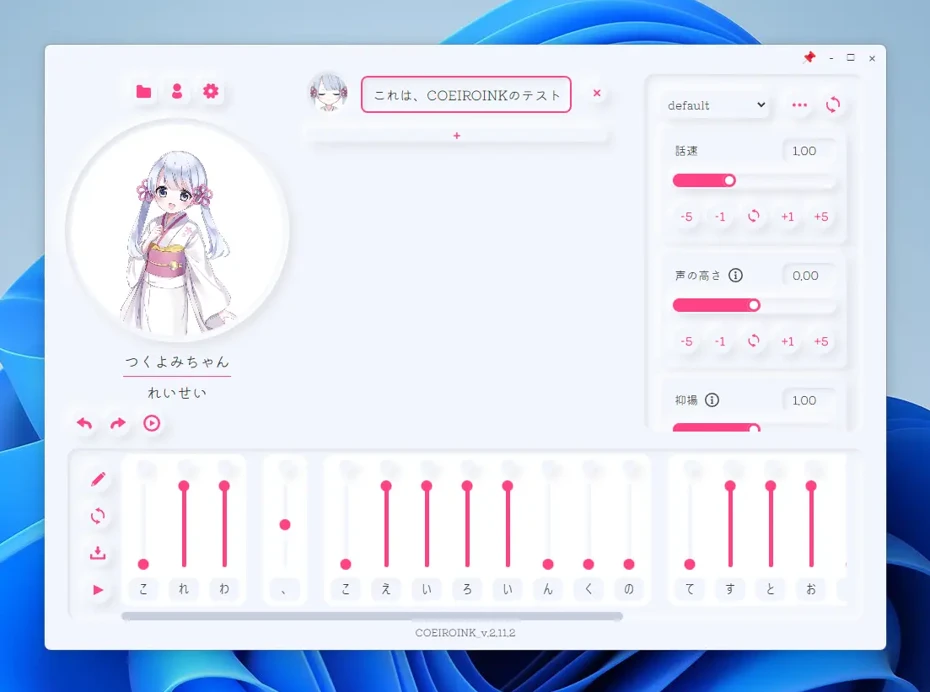
Once entered, the reading intonation will be displayed at the bottom of the screen.
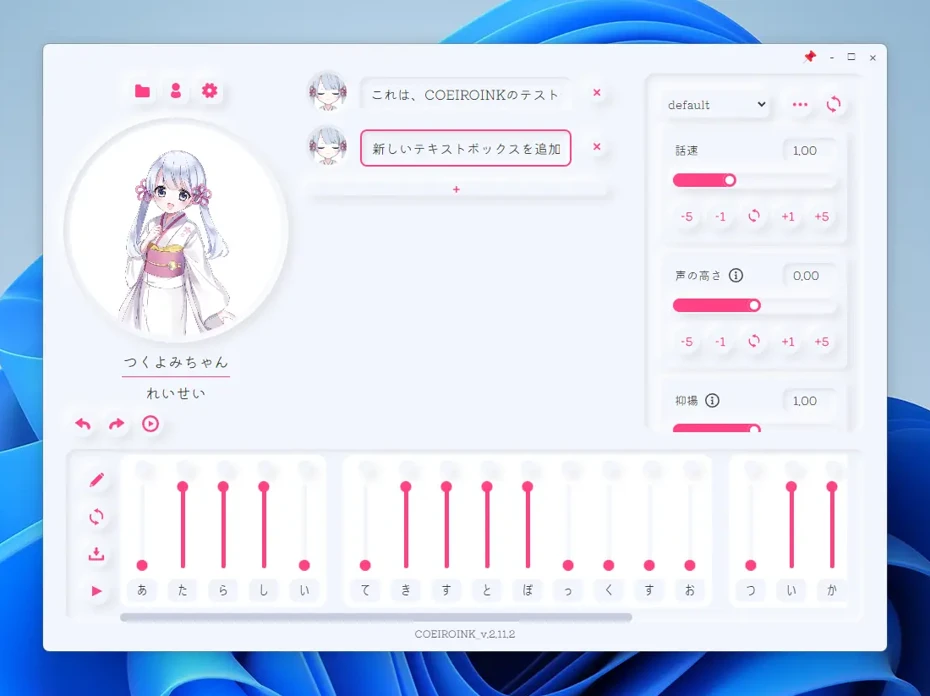
Clicking the "+" allows you to add a new text input field.
Check by Actually Reading the Audio Aloud
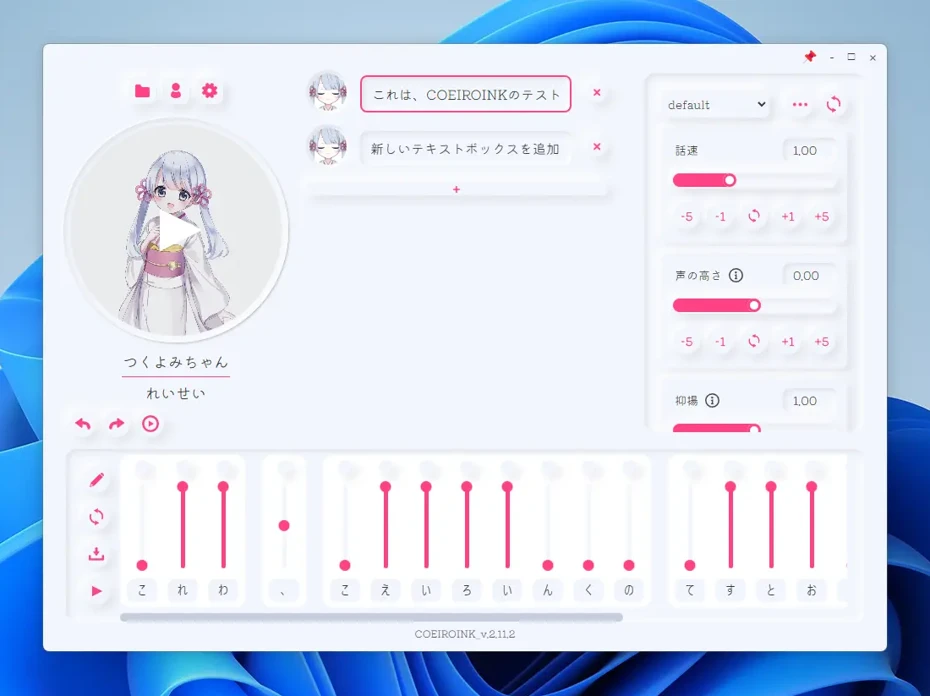
Clicking the large character icon or the small triangular play button below it allows you to actually read the audio aloud for confirmation.
At this time:
- Character icon: Only the selected text box is played.
- Small triangular play button: Everything from the selected text box onward is played.
This is how it works.
Adding Characters (Voices) to COEIROINK
To add a character (voice), first click the person-shaped icon above the large character icon.

A menu will open; click "Character Download."
The character download screen will open.
At this time, it will take a little while to retrieve character information.
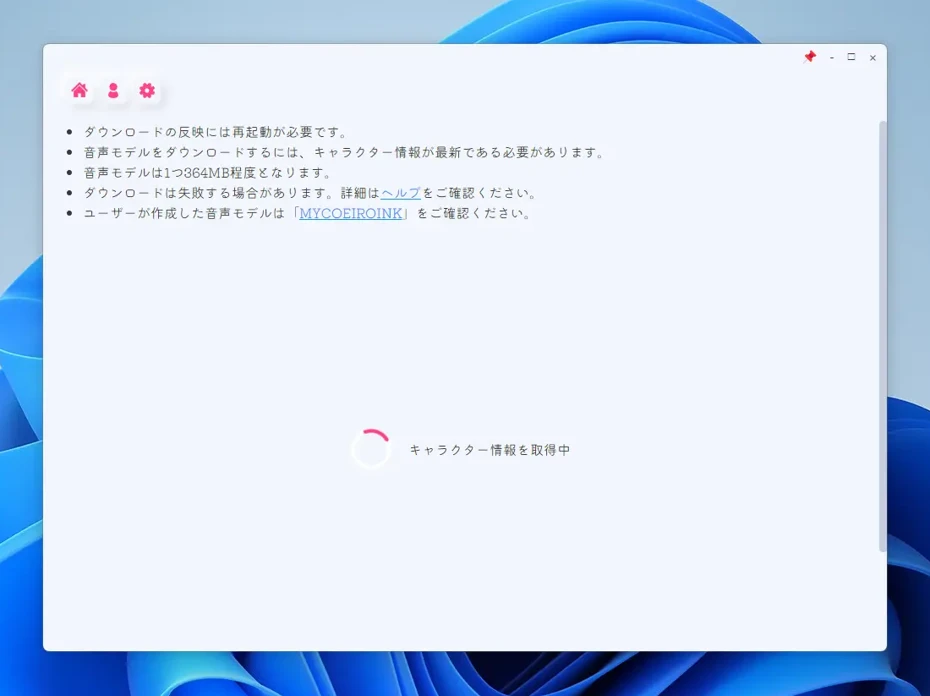
Once the character information is retrieved, a list of characters will be displayed.

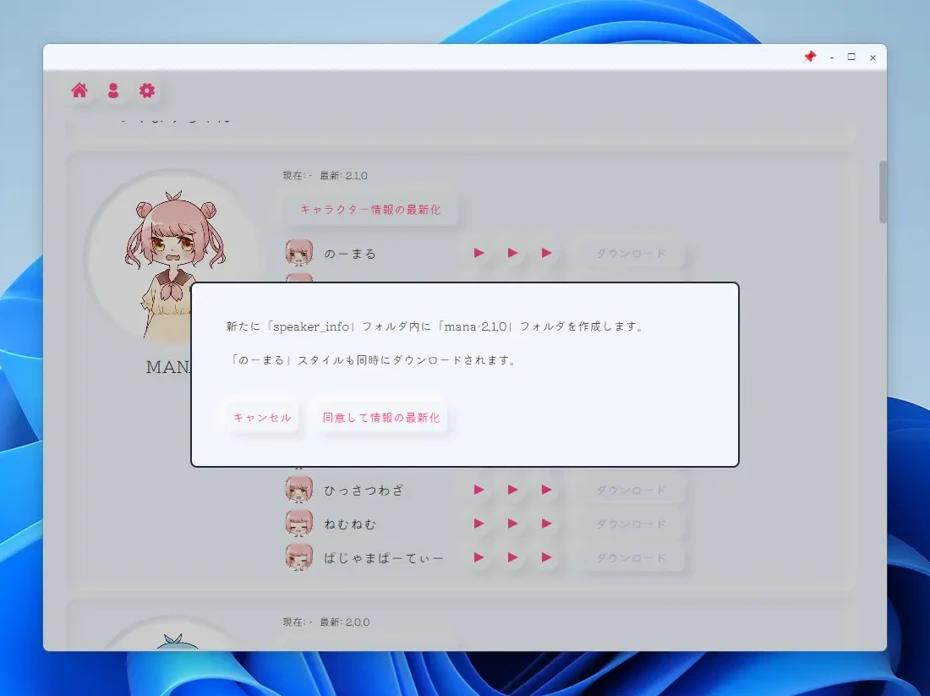
When the character list appears, click "Update character information" for the character you wish to install.
As an example, we will add the MANA voice.

A confirmation screen will open; click "Agree and update information."
The character information update process will begin.
The process takes a little time.
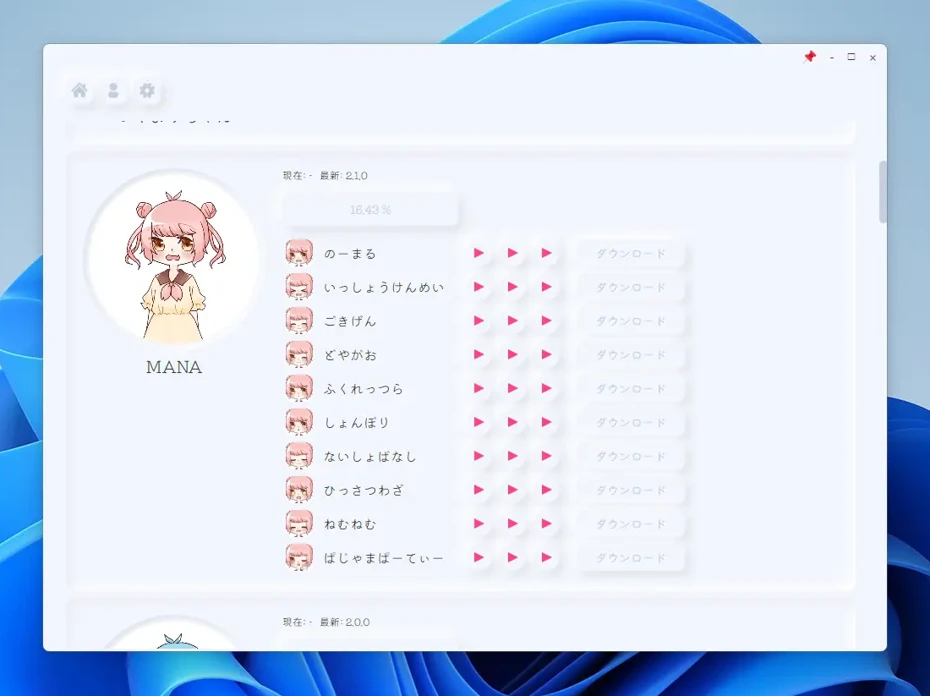
Since file downloads also occur at this time, performing this on a stable internet connection is recommended.
The process is complete.
"MANA (Normal)" will be automatically installed.
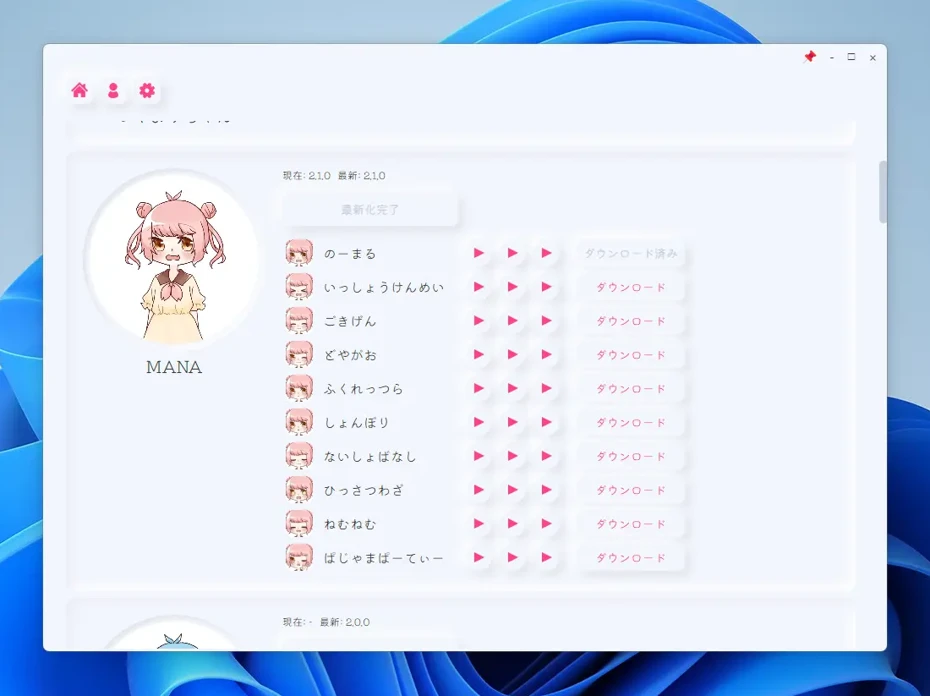
To add other styles, click "Download" next to the voice style.
For example, clicking "MANA (Isshoukenmei/Effortful)" will perform the download and add the voice.

After adding a voice, you must close COEIROINK and relaunch it.
Switching Characters
After adding a character, you can switch characters by clicking the small icon next to the text box.
As shown, "MANA," which we just added, has increased in the options.
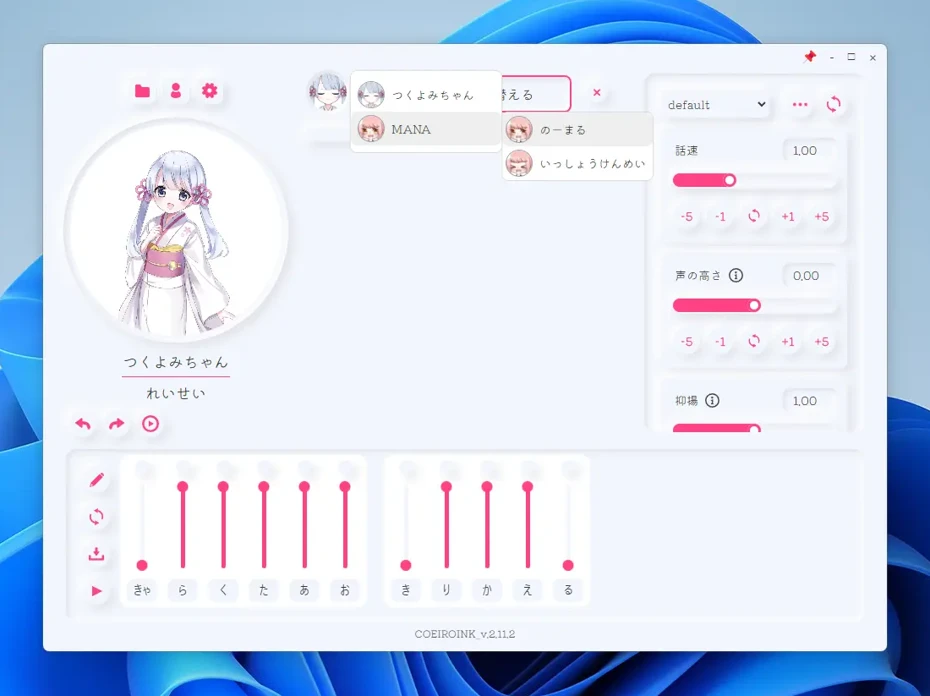
By selecting a character and style, you can switch the character (voice) like this.
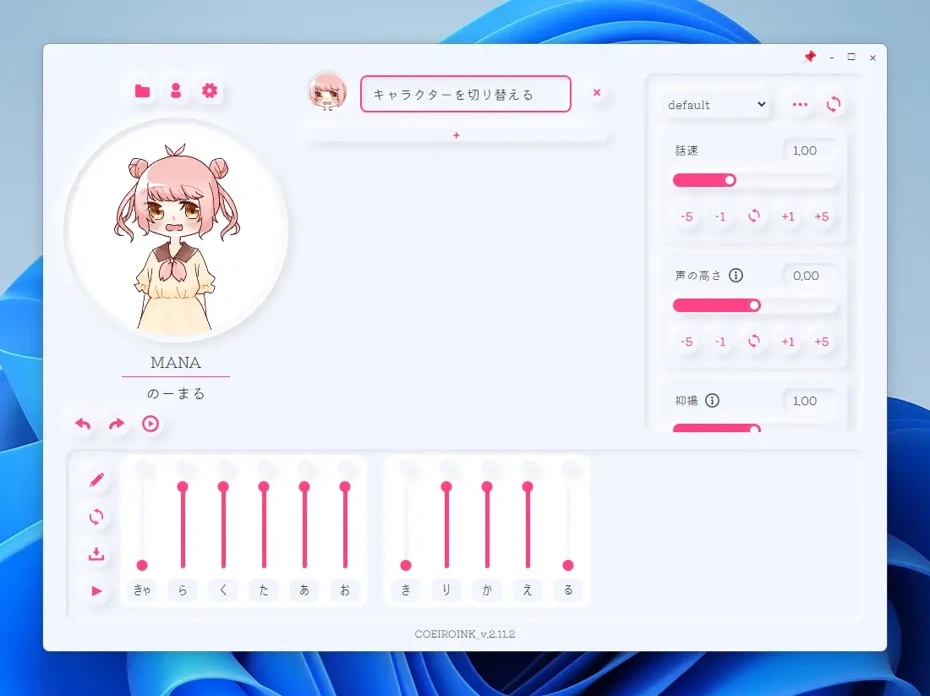
Since characters and styles can be switched for each text box:
- Reading with multiple characters
- Reading with multiple styles of the same character
Usage like this is possible.
How to Export Reading Audio in COEIROINK
To export audio, click the folder icon above the large character icon.
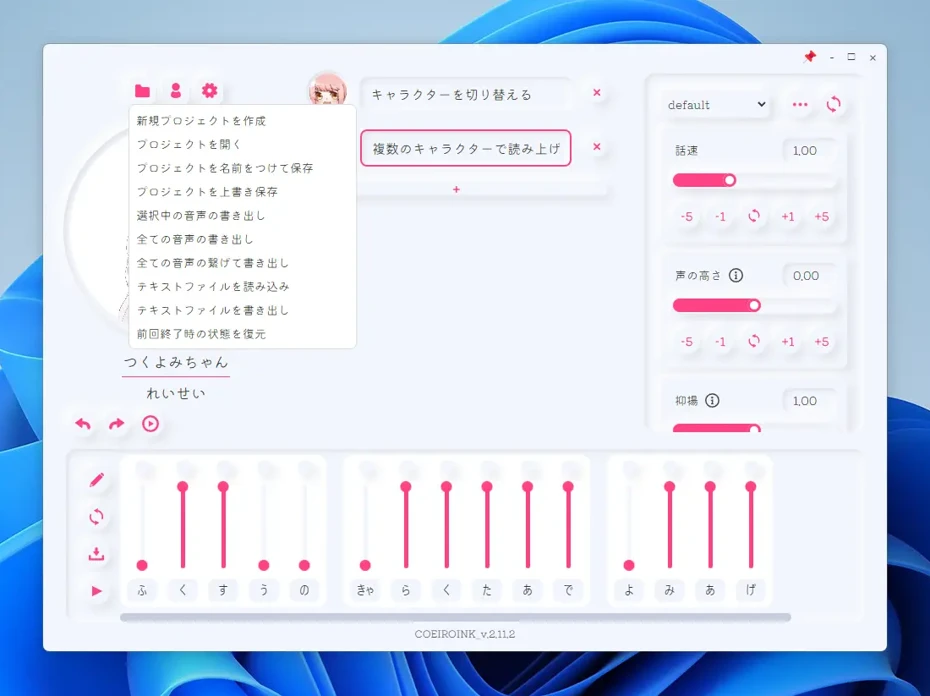
Select the export method from the opened menu.
In COEIROINK:
- Export selected audio
- Export all audio
- Connect and export all audio
These are possible.
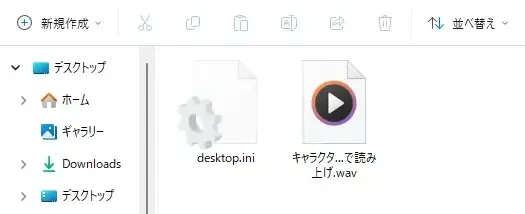
In "Export all audio," the audio is exported as separate WAV files for each text box.
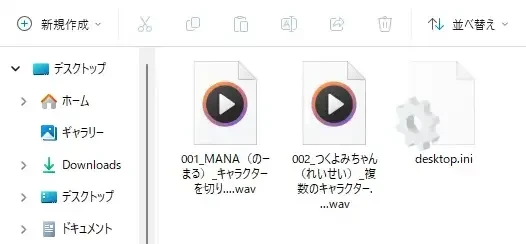
In "Connect and export all audio," the entire edited content is exported as a single WAV file in a connected state.
How to Save COEIROINK Projects
The edited content in COEIROINK can be saved as a project.
To save, click the folder icon and select from the menu:
- Save Project As
- Overwrite Save Project
Choose one.

In this way, COEIROINK allows you to create audio for videos and creative activities using various character voices.
However, note that downloading the software itself and the voices takes quite a long time.
Recommended Speech Synthesis Software [No Installation Required]
COEIROINK is a very attractive speech synthesis software.
However, large file downloads and installation are required before use.
Also, it may not operate comfortably if PC specs are low.
In such cases, speech synthesis services that can be used without installation are recommended!
[Free] Easy-to-Use Speech Synthesis Service with No Installation Required
"Ondoku" is a speech synthesis service that can be used right now without installation.
Its feature is that anyone can easily use it for free!
As it employs the latest AI speech synthesis engine, you can read aloud with realistic and easy-to-hear audio perfect for videos and creative works.
Since complex settings and installation work are unnecessary, "Ondoku" is also ideal for beginners.
You can comfortably synthesize speech without worrying about PC specs, capacity, or connection speed.
Realistic and Diverse Voices such as Female, Male, and Children
There are 16 types of voices available for Japanese reading in "Ondoku".
A variety of voices corresponding to various purposes, such as female, male, and children's voices, are available.
You can synthesize realistic and easy-to-hear audio as if recorded by professional voice actors or narrators.
Since "Ondoku"'s voices are created by AI and are not based on specific individuals, they are also ideal for character dubbing purposes.

Try listening to 16 types of voices from the reading software Ondoku for free. Change impressions by adjusting pitch
Ondoku has 16 types of Japanese voices. Of course, both male and female voices are available. We have made it possible to listen to 8 commonly used Japanese voices and the sounds when the pitch of each voice is adjusted.
Foreign Languages Supported. Monetize Globally on YouTube
Furthermore, "Ondoku" supports foreign languages, including English, Chinese, and Korean!
The reading of foreign languages is also very natural, making it useful for producing multilingual content on YouTube.
As global expansion is possible with multilingual support, you can produce content targeting the world and monetize it.
![[Ondoku] Listen to voice types and sample audio for supported languages](https://storage.googleapis.com/ondoku3/image/%E5%A4%9A%E6%A7%98%E6%80%A7_930.webp)
[Ondoku] Listen to voice types and sample audio for supported languages
Here, we introduce the supported languages and sample audio for Ondoku.
Easy Commercial Use with Clear Terms of Use
Commercial use of "Ondoku" is very easy.
If using it for free, it is fine just to provide credit.
If you use a paid plan, credit notation becomes unnecessary.
Complex license confirmations are unnecessary, allowing you to use it commercially with peace of mind.
It can be freely utilized for various commercial purposes, such as use in companies, product sales, and YouTube monetization.
For more details on commercial use, please also see this page!

Things you can do with Ondoku. Commercial use (business use) and prohibited acts.
Commercial use (business use) is possible with Ondoku. Use for the purpose of obtaining direct or indirect profit, such as money, regardless of whether you are an individual or a corporation, is commercial use. However, please note that prohibited acts are established in Ondoku. This time, we explain what you can and cannot do with Ondoku...
Why not experience "Ondoku" for free?
In this way, with the AI reading service "Ondoku", anyone can easily synthesize speech without installation.
It can be used for free without registration or login, so why not experience "Ondoku" for yourself first?
Why not create the work you imagine with AI reading software?
In this article, we explained the features, installation method, and usage of COEIROINK in detail.
COEIROINK is an excellent speech synthesis software that allows you to create videos using attractive characters.
By using the MYCOEIROINK function, it is also possible to create original models using your own voice, and an active community has formed.
However, there are aspects that may be difficult for beginners, such as the need to download large files and the requirement for certain PC specs.
When you want to start speech synthesis easily, "Ondoku", which can be used immediately without installation, is also recommended.
Why not use the latest AI reading software to create your ideal creative works and videos?
■ AI voice synthesis software "Ondoku"
"Ondoku" is an online text-to-speech tool that can be used with no initial costs.
- Supports 81 languages and regions, including Japanese, English, Chinese, Korean, Spanish, French, and German
- Available from both PC and smartphone
- Suitable for business, education, entertainment, etc.
- No installation required, can be used immediately from your browser
- Supports reading from images
To use it, simply enter text or upload a file on the site. A natural-sounding audio file will be generated within seconds. You can use voice synthesis up to 5,000 characters for free, so please give it a try.

Text-to-speech software "Ondoku" can read out 5000 characters every month with AI voice for free.
You can easily download MP3s and commercial use is also possible.
If you sign up for free, you can convert up to 5,000 characters per month for free from text to speech.
Try Ondoku now.
HP:
ondoku3.com
Email: ondoku3.com@gmail.com
Email: ondoku3.com@gmail.com
Related posts
"Ondoku" is a Text-to-Speech service that anyone can use for free without installation. If you register for free, you can get up to 5000 characters for free each month. Register now for free
- What is Ondoku
- Start text-to-speech conversion
- Free registration
- Pricing
- Posts
- Try other free services














