Best Text-to-Speech Software: 7 Free & Paid Tools for Commercial Use
【2026 Guide】English Text-to-Speech: How to Use & Samples. Ondoku's Free AI for Native Pronunciation
Sept. 9, 2026


How do I use the English text-to-speech feature? I want to know about websites and apps!
Have you ever thought, "I want to turn English sentences into audio"?
The English text-to-speech feature is very convenient when you want to create listening materials for English learning or narration for YouTube videos.
In this article,
- How should I use the English text-to-speech feature?
- Can I use the English text-to-speech feature on iPhone iOS or Android smartphones?
- Are there websites or apps where I can use the English text-to-speech feature for free?
For those who have these questions, we will explain everything in detail, from basic knowledge to specific usage!
We will introduce methods that can be used from any device, including iPhone iOS, Android smartphones, tablets, and computers, so please take a look.
For a free English text-to-speech feature, "Ondoku" is recommended! [Compatible with iPhone, Android, and PC]

When you want to use an English text-to-speech feature, "Ondoku" is recommended!
"Ondoku" is an AI text-to-speech app that can be used for free.
Since it is a web app that reads text aloud on a website through a browser, it works in any environment, including iPhone (iOS), Android smartphones, and computers!
It can be used easily right now without any installation.
Its greatest feature is that it allows for free text-to-speech with native pronunciation!
It is possible to synthesize speech from English text using over 92 types of native voices, including women, men, and children.
Furthermore, it supports a wide range of pronunciations, including American English, British English, Australian English, and even Indian English.
If you are creating English narration for YouTube videos or audio for English learning materials, "Ondoku" is recommended!
Since it's free to use, why not experience the "Ondoku" English text-to-speech feature for yourself?
[Compatible with iPhone, Android, and PC] How to use the free English text-to-speech feature of "Ondoku"
Please tell me how to use the English text-to-speech feature!

Now, let's explain how to use the English text-to-speech feature of "Ondoku".
1. Open the "Ondoku" site and paste the English text
"Ondoku" is a web app that can be used for free.
To use the English text-to-speech feature, first open the "Ondoku" site in your smartphone or computer browser.
- Safari, standard on iPhone iOS and macOS
- Google Chrome, standard on Android smartphones
- Edge, Google Chrome, and Firefox on Windows computers
Any browser is fine.
Paste the English text onto the homepage of the "Ondoku" site.

2. Configure the English text-to-speech settings on the "Ondoku" site
Configure the text-to-speech settings on the "Ondoku" site.
First, set the language to English.
- English (Australia): Australian-accented English
- English (India): Indian-accented English
- English (USA): American-accented English
- English (United Kingdom): British-accented English
These can be selected (in the order they appear on the "Ondoku" site).
This time, we selected "English (USA)" (American English).

Select the type of voice used for reading.
With the English text-to-speech feature on the "Ondoku" site,
- Female
- Male
- Genderless
- Girl
- Boy
can be selected.
This time, we chose the female voice "Sara".
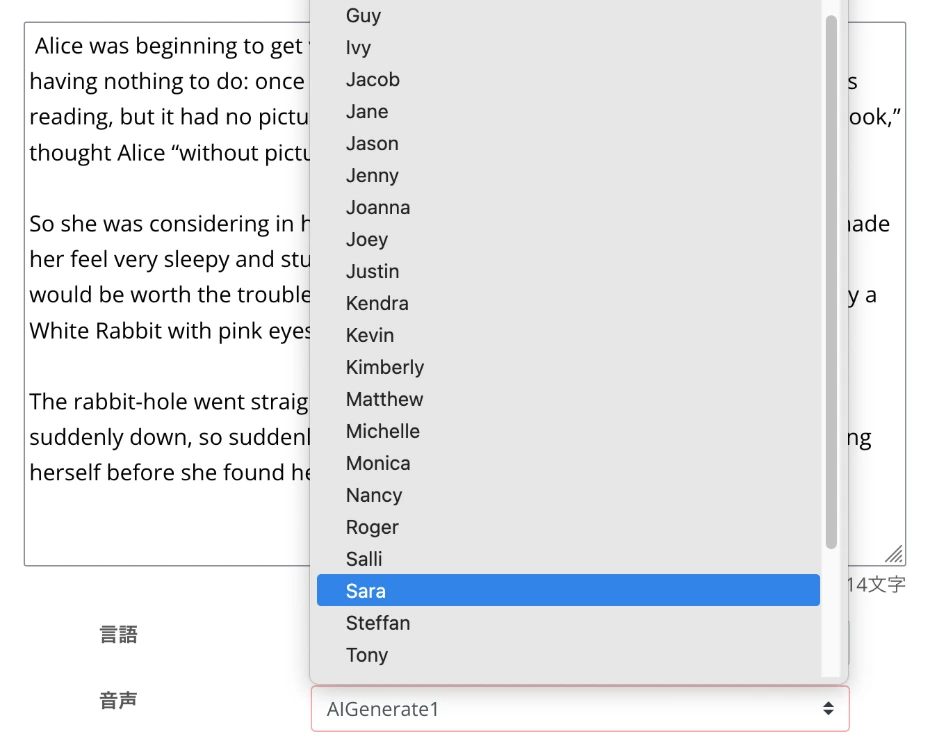
You can listen to voice samples by scrolling down this article, so please take a look.
With the "Ondoku" text-to-speech feature, you can also adjust the pitch and speed of the voice, but the default settings are fine for the first time.
This time, we will also read aloud using the default settings.

The text-to-speech settings are now complete.
3. Read the English audio aloud and check the content
After finishing the settings, press "Read aloud" to start the speech synthesis.
Processing is completed in just a few seconds.
When the reading is complete, the screen switches and an audio player is displayed.

For example, when reading this text, we were able to create audio like this.
Now, you have successfully read English text on the "Ondoku" site and created an audio file.
If you want to check your English pronunciation, just play and listen on this page.
When using it for YouTube video narration, you can press "Download" to save it as an MP3 file.
By opening the history page from the menu, downloading as a WAV file is also possible.
In this way, the English text-to-speech feature of "Ondoku" is very easy to use!
Since you can synthesize speech for free, why not try the "Ondoku" text-to-speech feature for yourself?
Listen to English audio samples from the AI text-to-speech site "Ondoku"
What kind of voices can "Ondoku" use to read English aloud?

With the English text-to-speech feature of the AI reading site "Ondoku",
- American English
- British English
- Australian English
- Indian English
you can choose from as many as 92 types of voices!
For those who want to know what kind of voices can be used, we will introduce audio samples.
(You can listen to them in any environment, including iPhone iOS, Android smartphones, and computers)
There are 92 types of English voices for the "Ondoku" text-to-speech feature

For "Ondoku" English audio, you can synthesize speech using many voices (speakers) like this.
- United States (American English): 40 speakers
17 males
18 females
1 genderless
2 boys (children)
2 girls (children) - United Kingdom (British): 24 speakers
11 males
11 females
2 girls (children) - Australia (Aussie English): 20 speakers
8 males
9 females
2 girls (children)
1 boy (child) - India (Indian English): 8 speakers
3 males
5 females
From YouTube video narration to English listening and pronunciation learning materials, you can create the exact reading audio you want.
Now, we will introduce audio samples for the English voices (speakers) available with the "Ondoku" text-to-speech feature.
The example sentence for the audio samples is
Hello, I'm Ondoku. Let's enjoy studying English together.
.
American English Audio Samples
Speaker
Audio
AIGenerate1: Male
AIGenerate2: Male
Amber: Female
Ana: Girl
Aria: Female
Ashley: Female
Blue: Genderless
Brandon: Male
Christopher: Male
Cora: Female
Davis: Male
Elizabeth: Female
Eric: Male
Guy: Male
Ivy: Girl
Jacob: Male
Jane: Female
Jason: Male
Jenny: Female
Joanna: Female
Joey: Male
Justin: Boy
Kendra: Female
Kimberly: Female
Kevin: Boy
Matthew: Male
Michelle: Female
Monica: Female
Nancy: Female
Roger: Male
Salli: Female
Sara: Female
Steffan: Male
Tony: Male
en-US-A2: Male
en-US-B: Male
en-US-C: Female
en-US-D: Male
en-US-E: Female
en-US-F: Female
British English Audio Samples
Abbi: Female
Alfie: Male
Amy: Female
Bella: Female
Brian: Male
Elliot: Male
Emma: Girl
Ethan: Male
Geraint: Male
Hollie: Female
Libby: Female
Maisie: Girl
Mia: Female
Noah: Male
Oliver: Male
Olivia: Female
Ryan: Male
Sonia: Female
Thomas: Male
en-GB-A2: Female
en-GB-B: Male
en-GB-C2: Female
en-GB-D: Male
en-GB-F: Female
Australian English Audio Samples
Annette: Female
Carly: Girl
Darren: Male
Duncan: Male
Elsie: Female
Freya: Female
Joanne: Female
Ken: Male
Kim: Female
Natasha: Female
Neil: Male
Nicole: Boy
Olivia: Girl
Russell: Male
Tim: Male
Tina: Female
William: Male
en-AU-A2: Female
en-AU-B: Male
en-AU-C2: Female
Indian English Audio Samples
Aditi: Female
Neerja: Female
Prabhat: Male
Raveena: Female
en-IN-A: Female
en-IN-B: Male
en-IN-C: Male
en-IN-D: Female
In this way, with the AI reading site "Ondoku", you can read English text aloud with native pronunciation!
For YouTube video narration or English learning materials, why not try the "Ondoku" English text-to-speech feature for free?
What is an English text-to-speech feature? Explaining convenient free sites and apps you can use right now

By utilizing the English text-to-speech feature, you can easily convert English text into audio just by typing it.
With the appearance of free AI text-to-speech sites and apps, anyone can now easily create English audio.
We will explain the features and basic mechanism of the English text-to-speech feature available on AI reading sites.
Turn English sentences into audio for free! How do AI reading sites work?
If you want to create audio for YouTube video narration or English learning materials, using an English text-to-speech feature is recommended.
The English text-to-speech feature can be used on AI reading sites that utilize the latest AI.
AI reading sites use a technology called text-to-speech (TTS) to turn text into audio.
With text-to-speech technology, the AI analyzes the entered English sentences and converts them into natural speech.
Previously, text-to-speech features could only read aloud with unnatural, robot-like voices.
But today's AI reading sites are different!
With the advancement of AI technology, it is now possible to create natural English audio that is indistinguishable from that of a native speaker.
AI reading sites work in any environment, including iPhone, Android, and PC!
If you want to read English text aloud with an AI reading feature, web app-based AI reading sites are recommended.
Web app-based AI reading sites can be used from the browsers of iPhone (iOS), Android smartphones, and computers, so there is no need to install an app.
From any device—iPhone (iOS), Android smartphone, or computer—you can use it immediately as long as you are connected to the internet.
With an AI reading site, you can create YouTube video narrations and English learning materials anytime, anywhere.
Furthermore, the latest AI reading sites support not only English but also various other languages such as Chinese, Korean, French, German, and Spanish.
You can use them to create YouTube videos that appeal to viewers worldwide, learn languages other than English, and more.
[Free] For English text-to-speech on iPhone, Android, or PC, "Ondoku" is recommended!
If you want to use an English text-to-speech feature, "Ondoku" is recommended!
"Ondoku" is a convenient reading site that can be used from any device, including iPhone (iOS), Android smartphones, and computers.
Since it is free to use, you can create English audio right away.
"Ondoku" English text-to-speech feature can create audio with native pronunciation
The feature of "Ondoku" is its ability to create high-quality audio with native pronunciation.
By utilizing the latest AI, it can generate natural English audio that sounds just like a real native speaker is talking.
It can realistically reproduce everything from intonation to rhythm, making it useful in a wide range of scenarios, from YouTube video narration to English learning materials.
Furthermore, "Ondoku" supports:
- American English
- British English
- Australian English
- Indian English
.
You can create audio that matches the region where your YouTube viewers live or the English accent you want to learn.
Another feature of "Ondoku" is the ability to choose from a wide variety of voices, including female, male, and children's voices.
You can also listen to English audio samples in the first half of this article, so why not find the perfect English voice for your needs?
The AI web app "Ondoku" is perfect for reading English audio aloud!
"Ondoku" is a web app-based reading service that can be used from a web browser.
The biggest advantage of a web app is that you don't need to install an app.
- Safari on iPhone (iOS) and macOS
- Chrome on Android smartphones
- Edge, Chrome, and Firefox on Windows computers
You can use it in any environment simply by accessing it through your browser.
Since no installation is required, you don't need to worry about the storage capacity of your iPhone or Android smartphone.
Unlike installed apps, another benefit of a web app is that you can always use the latest AI text-to-speech engine.
- You can create audio on your iPhone or Android smartphone while on the go and then edit it on your computer when you get home.
- You can create audio on your computer at home and then listen to it on your iPhone or Android smartphone while out.
Such usage is also possible.
You can read English aloud for free with "Ondoku"!
Moreover, "Ondoku" can be used for free!
Many English text-to-speech sites have limited functionality in their free versions.
However, with "Ondoku", you can read as many as 5,000 characters for free!
Even quite long English texts can be turned into audio, making it ideal for creating YouTube English video narrations.
Of course, no matter which device you use—iPhone iOS, Android smartphone, or computer—you can read up to 5,000 characters for free in the same way.
Commercial use is also allowed, providing peace of mind when using it for a company or organization (click here for more details on commercial use).
If you want to use an English text-to-speech feature, "Ondoku" is recommended.
Why not use "Ondoku" for free to create your YouTube video narrations and English learning materials?
[Free] How to utilize AI reading sites? Practical ways to use the English text-to-speech feature

English reading sites can be used in various situations, including YouTube video narration and English learning.
We will introduce specific utilization scenes and tips on how to use the English text-to-speech feature on iPhone iOS, Android smartphones, and computers.
Create YouTube video narration for free with the English text-to-speech feature
A recommended way to use an AI reading site is creating narration for YouTube videos and shorts.
If you want to increase the number of subscribers and viewers for your YouTube channel, we recommend making videos with English narration.
However, for non-native English speakers, creating YouTube narration audio in English is very difficult.
Hiring a professional narrator for YouTube English narration can be very expensive.
That's where utilizing an AI reading site comes in!
By using the English text-to-speech feature of an AI reading site, you can produce high-quality narration for free!
Unlike hiring a narrator, the narration audio is completed in just a few seconds after entering the script text, so you can create English videos very smoothly.
It's also possible to add English narration to video materials shot on an iPhone, iPad, or Android smartphone afterward, so it's recommended when posting videos to short video apps like TikTok from your smartphone.
When editing YouTube videos on a computer, using an AI reading site to create English narration is ideal.
![[2026 Latest] How to add English narration to YouTube videos? Easy production with AI speech synthesis](https://storage.googleapis.com/ondoku3/image/youtube_english_narration_tmb_930.webp)
[2026 Latest] How to add English narration to YouTube videos? Easy production with AI speech synthesis
A thorough explanation of how to add English narration to YouTube videos. Easily produce high-quality foreign language narration with the free AI reading service "Ondoku." We introduce video production techniques effective for gaining overseas viewers.
The AI text-to-speech feature is recommended for creating English learning materials for free
You can also use AI reading sites and apps for English learning and study.
Create original English listening materials for free
The most recommended use is creating original listening materials for free.
Commercially available listening materials often don't match your English level or cover topics you're not interested in.
In such cases, by using the reading feature of an AI reading site or app, you can create materials with the English sentences you want to read.
- A passage from a favorite novel
- A news article you are interested in
- Technical terms used at work
Any English text is fine!
By using materials that suit you, you can increase your motivation for English learning.
Turn textbooks and reference books into audio for learning
It is also recommended to turn text from English textbooks and reference books into audio and learn while commuting to work or school.
With the AI reading site "Ondoku", you can easily turn content from English textbooks and reference books into audio.
By saving the created audio to your iPhone or Android smartphone, you can effectively use your travel time to study English.
Create shadowing materials for free to improve English proficiency
AI reading sites are also recommended for "shadowing," an especially effective English learning method!
Using the reading feature of the AI reading web app "Ondoku", you can easily create shadowing materials!
Shadowing is an English learning method where you listen to audio and try to pronounce it in the same way with a slight delay.
It allows you to train your listening, speaking, and pronunciation at the same time.
However, finding shadowing materials is surprisingly difficult.
Finding audio materials that match your level and interests is very hard.
That's where English reading sites and apps utilizing the latest AI come in.
By using an AI reading site, you can freely create materials that match your level.
- Simple everyday conversational English
- News articles
- Technical English papers
You can use content that suits you to create shadowing materials.
Moreover, with the AI reading web app "Ondoku", you can create material audio tailored to your English level using the speed adjustment feature.
The reading feature of "Ondoku" can reduce the speed down to 0.3x.
Even if you have just started learning English, you can lower the reading speed and start shadowing practice without overstretching.
By gradually increasing the speed, you can smoothly acquire English pronunciation and rhythm.
By creating materials on a computer and saving the audio to an iPhone, iPad, or Android smartphone, you can practice shadowing anytime, anywhere.
Of course, you can also open the "Ondoku" site from the browser of your iPhone, iPad, or Android smartphone and create materials on the spot.
For more details on English shadowing, please read this article.
![[Complete Guide] How to do English shadowing? Also explaining how to create materials for free!](https://storage.googleapis.com/ondoku3/image/20250522_shadowing_tmb_02_930.webp)
[Complete Guide] How to do English shadowing? Also explaining how to create materials for free!
Efficiently improve your English skills with shadowing! We explain a learning method for beginners that simultaneously improves listening, pronunciation, and speaking. We also introduce how to create materials with free AI audio.
In this way, to learn English more effectively, the AI reading web app "Ondoku" is recommended.
Utilize the English text-to-speech feature in corporate business settings
Of course, you can also utilize the English text-to-speech feature of AI reading sites in corporate and organizational business settings.
For example, when creating audio teaching materials for corporate training, the English text-to-speech feature is ideal.
The content of English training materials needs to be tailor-made for each company or organization.
With a web app-based reading site, you can create original training materials with native pronunciation, allowing for effective training based on actual business operations.
Furthermore, if you are operating a store or facility, the reading feature of an AI reading web app is recommended.
You can easily create guidance audio for the increasing number of inbound tourists with the AI reading web app "Ondoku".
Moreover, with "Ondoku", you can create guidance broadcasts in multiple languages, such as Chinese and Korean, in addition to English.
![[Tourist Facilities, Stores, Transportation] How to create guidance broadcast audio for inbound tourists! What are effective recommended multilingual guide methods?](https://storage.googleapis.com/ondoku3/image/20240926_inbound_guide_announcement_010_930.webp)
[Tourist Facilities, Stores, Transportation] How to create guidance broadcast audio for inbound tourists! What are effective recommended multilingual guide methods?
Cost reduction for inbound tourist support! Easily create multilingual guidance broadcasts for free with AI audio. Ondoku supports 81 languages and regions, making it ideal for tourist facilities, stores, and transportation. Streamline guidance operations and improve customer satisfaction! Click here for more details.
Of course, when creating YouTube videos or shorts on official corporate or organizational channels, it is also recommended to create narration with the "Ondoku" English text-to-speech feature.
In this way, AI reading sites can be conveniently utilized in corporate and organizational business settings.
From training to in-store broadcasts, why not create English audio with the AI reading web app "Ondoku"?
Why not try the "Ondoku" English text-to-speech feature for free?
As described above, the English text-to-speech feature can be used in a wide range of situations, from YouTube video and short narration to English learning materials and corporate/organizational business use.
With the AI reading web app "Ondoku", you can generate native-pronunciation English audio, including American English, British English, Australian English, and Indian English.
Furthermore, "Ondoku" allows you to use the English text-to-speech feature for free!
Why not create English audio yourself with the AI reading web app "Ondoku"?
■ AI voice synthesis software "Ondoku"
"Ondoku" is an online text-to-speech tool that can be used with no initial costs.
- Supports 81 languages and regions, including Japanese, English, Chinese, Korean, Spanish, French, and German
- Available from both PC and smartphone
- Suitable for business, education, entertainment, etc.
- No installation required, can be used immediately from your browser
- Supports reading from images
To use it, simply enter text or upload a file on the site. A natural-sounding audio file will be generated within seconds. You can use voice synthesis up to 5,000 characters for free, so please give it a try.

Text-to-speech software "Ondoku" can read out 5000 characters every month with AI voice for free.
You can easily download MP3s and commercial use is also possible.
If you sign up for free, you can convert up to 5,000 characters per month for free from text to speech.
Try Ondoku now.
HP:
ondoku3.com
Email: ondoku3.com@gmail.com
Email: ondoku3.com@gmail.com
Related posts
"Ondoku" is a Text-to-Speech service that anyone can use for free without installation. If you register for free, you can get up to 5000 characters for free each month. Register now for free
- What is Ondoku
- Start text-to-speech conversion
- Free registration
- Pricing
- Posts
- Try other free services














