What is Speech Synthesis Markup Language (SSML)? How to use it with text-to-speech software and a l…
Common Errors and Workarounds When Using Speech Synthesis Markup Language (SSML)
July 22, 2026
In Ondoku, you can use Speech Synthesis Markup Language (SSML) to adjust pauses and change the way text is read.
SSML is a very useful feature that many people use because it allows you to adjust pauses exactly as you wish.
For more details about SSML, please click here.

Common Errors When Using SSML
When using SSML, you may encounter errors.
The most common errors are:
- Unable to read due to an SSML input error, resulting in "There is a problem with the entered text."
- Tags not functioning and being read aloud, such as "greater-than less-than break time."
This is caused by SSML input errors, so please check that the SSML is correct.
Common SSML Input Errors
Double quotation marks (") are full-width or a similar but different character.
Example:
“3s”/>
Specified numbers or symbols are full-width.
3s"/>
Extra symbols are included.
Example:
>>
Necessary slashes or spaces are missing.
<breaktime="3s">
SSML is delicate, and even a single character error in the code will make it impossible to read aloud.
SSML errors are not covered by support.
- Skipping text.
- Pitch errors after break time codes.
The causes of these errors are currently being investigated.
The maximum pause/blank space that can be specified in SSML is 10 seconds.
Also, when specifying a pause or blank space using SSML tags, the upper limit is 10 seconds.
If a duration longer than that is specified, it will be rounded to 10 seconds for the reading.
For example:
If a time longer than 10 seconds is specified as shown above, it will be read as a 10-second pause/blank space.
Causes of SSML Errors and Workarounds
The currently known causes are:
- Browser is in a non-recommended environment such as Internet Explorer or Microsoft Edge.
- Character count exceeding 3,000 characters.
- Using symbols while using SSML.
Example: & 「
There are three ways to avoid these errors.
- Use Google Chrome, which is the recommended environment.
- Read in small character counts and combine them.
- Do not use symbols.
1. Use Google Chrome, which is the recommended environment.
The recommended environment for Ondoku is Google Chrome.
While it can be used with other browsers, errors may occur more easily.
2. Read in small character counts and combine them.
You can avoid errors by reading aloud in small character counts.
If short MP3 files are not useful, join the MP3 files later.
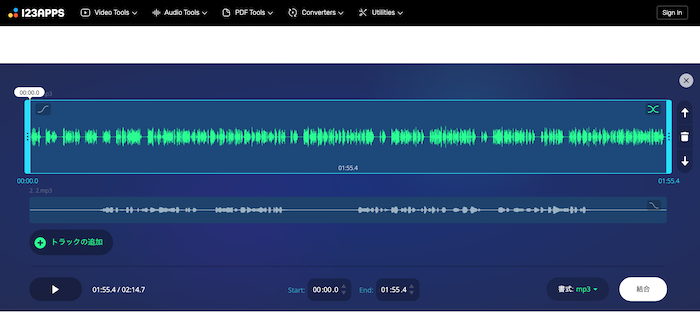
Although it is an external site, you can easily combine MP3 files on this site.
External site: 123APPS
- Access 123APPS
- Click "Add tracks"
- Insert the MP3 files you want to combine
- Click "Join"
- Save the resulting file
3. Do not use symbols

When using SSML, symbols can take on other meanings.
Because of this, they may interfere with the SSML and prevent reading from working properly.
If symbols cannot be used, reading is not possible.
No, that is not the case.
By replacing symbols with Hiragana, Katakana, or the alphabet, you can achieve the reading as intended.
For example:
& can be written as "and".
Instead of using "「", you can replace it with punctuation like "、" (commas).
Other workarounds will be posted as they become available.
Also, we will report the causes of errors on this page as soon as they are identified.
We also look forward to reports on workarounds you have found or causes of errors.
We will continue to update this article.
■ AI voice synthesis software "Ondoku"
"Ondoku" is an online text-to-speech tool that can be used with no initial costs.
- Supports 81 languages and regions, including Japanese, English, Chinese, Korean, Spanish, French, and German
- Available from both PC and smartphone
- Suitable for business, education, entertainment, etc.
- No installation required, can be used immediately from your browser
- Supports reading from images
To use it, simply enter text or upload a file on the site. A natural-sounding audio file will be generated within seconds. You can use voice synthesis up to 5,000 characters for free, so please give it a try.

Text-to-speech software "Ondoku" can read out 5000 characters every month with AI voice for free.
You can easily download MP3s and commercial use is also possible.
If you sign up for free, you can convert up to 5,000 characters per month for free from text to speech.
Try Ondoku now.
HP:
ondoku3.com
Email: ondoku3.com@gmail.com
Email: ondoku3.com@gmail.com
Related posts
"Ondoku" is a Text-to-Speech service that anyone can use for free without installation. If you register for free, you can get up to 5000 characters for free each month. Register now for free
- What is Ondoku
- Start text-to-speech conversion
- Free registration
- Pricing
- Posts
- Try other free services