Perfect for English Pronunciation! Effective Ways to Use Free Text-to-Speech
Learn Japanese for Free! How to Use YouTube and Text-to-Speech Software
Aug. 7, 2026

Is your Japanese language study progressing smoothly?
In this article, we will explain how to use AI text-to-speech software for those studying Japanese, such as foreigners!
"Ondoku," a Recommended Text-to-Speech Site for Studying Japanese

If you are studying Japanese, "Ondoku" is recommended!
"Ondoku" is a text-to-speech site that can be used for free.
Anyone can easily create teaching materials for studying Japanese.
Why don't you start studying Japanese with "Ondoku" as well?
What is the Recommended Method for Studying Japanese?
Japanese is often said to be one of the most difficult languages to learn among many languages.
There are several reasons for this.
- The large number of writing characters
- The high amount of Keigo (honorific language)
- The existence of adverbs, etc.
Especially, many people struggle with writing characters.
Unlike Western languages such as English, French, and Spanish, Japanese has
- Hiragana
- Katakana
- Kanji
There are many such characters, and remembering them is very difficult.
There are many cases where you can understand it when you hear the sound, but you don't understand it when it comes to characters.
When you go to a bookstore to study Japanese, there are many textbooks.
It is very difficult to determine which textbook is good or which one is right for you.
After purchasing, if you find that:
- It does not suit your study method
- It does not suit your level
It would be a waste of money.
If you are planning to study Japanese from now on, the first thing recommended when studying Japanese is to first memorize the sounds.
By learning from pronunciation, you can start studying Japanese very smoothly.
Moreover, you can start studying for free.
Since there is no need to buy textbooks, you can start studying Japanese without waste.
Let's Learn Japanese by Listening to Audio
There are several ways to learn Japanese through sound.
- Study Japanese on YouTube
- Create original audio with text-to-speech software
Study Japanese on YouTube
The easiest way is to utilize YouTube.
When you search for "learn japanese conversation" on YouTube, many channels for learning Japanese will appear in the search results.
There are many types of videos, such as those that teach Japanese from your native language or those that teach Japanese from English.
It has truly become a convenient era.
Create original audio with text-to-speech software
What is recommended is creating your own text with text-to-speech software.
While there are many videos on YouTube that read out words or example sentences repeatedly, it is quite difficult to find the listening materials that you truly want.
- I want it to read out only the words I haven't memorized yet.
- I want it to read out the example sentences I need right now.
Many of you might feel this way.
However, until now, in order to create listening materials yourself, you had to have a native Japanese speaker record the materials.
Requesting a professional required high costs, and requesting someone who is not an expert could result in listening materials that were not what you expected.
In this way, it used to be very difficult to create your own dedicated listening materials.
But now, there is a way to create audio for listening that is easier, more cost-effective, and immediate.
Its name is Ondoku.
With Ondoku, you can customize a wide variety of things by yourself, such as:
- Favorite words
- Favorite example sentences
- Female voices
- Male voices

Try listening to 16 types of Japanese voices for text-to-speech software Ondoku for free. Change the impression with pitch adjustments.
Ondoku has 16 types of Japanese voices. Of course, both male and female voices are available. We have made it possible to listen to 8 commonly used Japanese voices, along with the voices when the pitch of each is adjusted.
Furthermore, the created audio can be easily downloaded as an MP3 on the spot.
How to Use Ondoku
Using Ondoku is very simple.
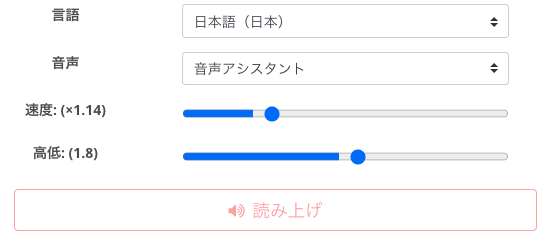
- Access the Ondoku site
- Enter the text you want read out in the text box
- Set the language, voice type, speaking speed, and pitch to your preference
- Press the read button
- If you like it, download the audio from the "Download" button
That is all you need to do.
Ondoku's operation is very simple.
Anyone can use it easily.
Furthermore, Ondoku has a function that reads out text from photos.
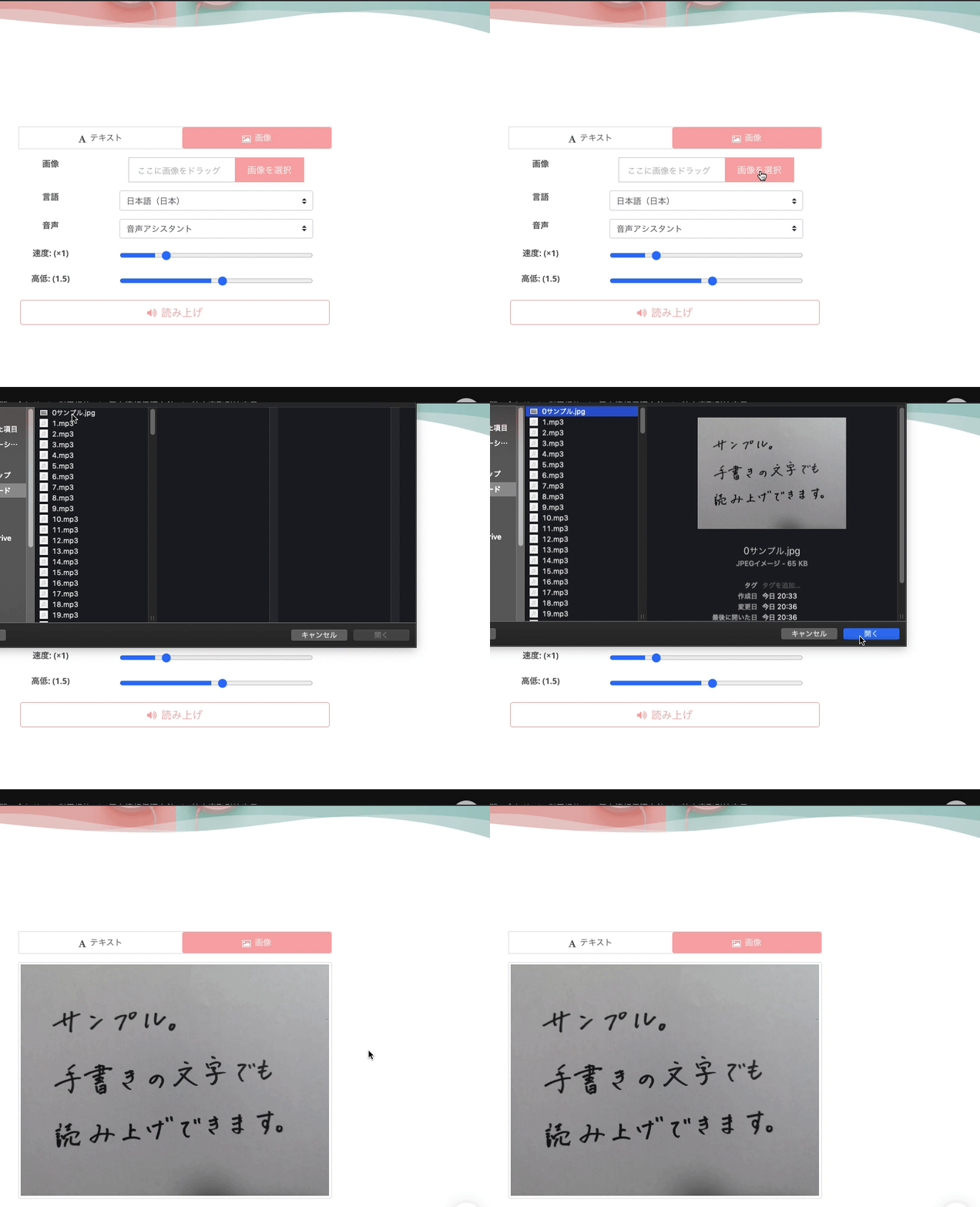
- Click on the image tab
- Click "Select Image"
- Select the photo you want read out from your folder
- Set the language, voice type, speaking speed, and pitch to your preference
- Press the read button
- If you like it, download the audio from the "Download" button
.
Of course, handwritten characters are also fine.
If there is an error in image recognition, you can correct it within the text box.
Please also see this article for the function to read from images.

How to Use Image Reading | Method to convert photo text to audio with free OCR
Explaining the features of "Ondoku," which can read text from images and photos (OCR) and read it aloud with audio. It can be used for free. Whether on PC or smartphone, reading is completed in just a few seconds simply by uploading an image.
In this way, Ondoku is the perfect site when you want to create your very own original Japanese listening materials!
Why don't you try creating original materials with Ondoku?
Japanese is a Communication Tool

Whether it is Japanese, English, or Chinese, language remains a tool for communication.
Trying to learn from characters can make it feel difficult and lead to frustration.
When starting study from scratch, it often feels easier to get used to the pronunciation first.
For example, rather than writing the word "Arigato," it is easier to pronounce "Arigato" or understand it by hearing it, right?
When learning Japanese, it is recommended to start by listening to sounds.
For an introduction to Japanese for foreigners, why not try using Ondoku to create original learning materials?
■ AI voice synthesis software "Ondoku"
"Ondoku" is an online text-to-speech tool that can be used with no initial costs.
- Supports 81 languages and regions, including Japanese, English, Chinese, Korean, Spanish, French, and German
- Available from both PC and smartphone
- Suitable for business, education, entertainment, etc.
- No installation required, can be used immediately from your browser
- Supports reading from images
To use it, simply enter text or upload a file on the site. A natural-sounding audio file will be generated within seconds. You can use voice synthesis up to 5,000 characters for free, so please give it a try.

Text-to-speech software "Ondoku" can read out 5000 characters every month with AI voice for free.
You can easily download MP3s and commercial use is also possible.
If you sign up for free, you can convert up to 5,000 characters per month for free from text to speech.
Try Ondoku now.
HP:
ondoku3.com
Email: ondoku3.com@gmail.com
Email: ondoku3.com@gmail.com
Related posts
"Ondoku" is a Text-to-Speech service that anyone can use for free without installation. If you register for free, you can get up to 5000 characters for free each month. Register now for free
- What is Ondoku
- Start text-to-speech conversion
- Free registration
- Pricing
- Posts
- Try other free services














