Best Text-to-Speech Software: 7 Free & Paid Tools for Commercial Use
[2026 Latest] 10 Best Free Text-to-Speech Sites for Beginners
Sept. 27, 2026
![[2026 Latest] 10 Best Free Text-to-Speech Sites for Beginners](https://storage.googleapis.com/ondoku3/image/20250510_free-voice-website_tmb_930.webp)

I want to turn text into speech, but it's hard because I don't have specialized knowledge~
In this article, we will introduce free text-to-speech sites recommended for people like you!
There are various free text-to-speech sites on the internet.
These services that convert text to speech can be useful for many purposes, such as video production, language learning, and improving accessibility.
In this article, we carefully select and introduce 10 free and high-quality text-to-speech sites available as of 2026.
Focusing on free services that are easy to use from a browser with no installation required, including Ondoku which is also recommended for beginners, we will explain their features.
Now, let's take a look at the features and how to choose recommended free text-to-speech sites.
For free text-to-speech sites, Ondoku is recommended!

Ondoku is a free text-to-speech site using the latest AI technology.
It is a free text-to-speech service that can be used immediately without registration, featuring a simple interface that is easy for beginners to use.
You can read up to 5,000 characters even with the free plan, and download in MP3 format.
The ease of use from smartphones and tablets is also an attraction of Ondoku.
Commercial use is also possible, so it can be utilized for a wide range of purposes, such as YouTube video narration.
Furthermore, Ondoku supports 81 languages and regions, including Japanese and English.
It is also useful for language learning and creating foreign language videos!
It is also possible to generate speech in a conversation format using multiple voices, providing a full range of features useful for video production.
When turning text into speech, why not try using the free text-to-speech site Ondoku first?
Basic knowledge of text-to-speech. What are the features of sites that can be used for free?

First, we will briefly explain text-to-speech technology.
What is free text-to-speech? Easy-to-understand explanation for beginners
Text-to-speech is a technology that automatically converts text (characters) into audio.
In English, it is a technology called Text to Speech (TTS), where a computer analyzes character information to generate speech similar to a human voice.
Previous text-to-speech sites had noticeable unnatural pronunciation and intonation, but due to the development of AI technology in recent years, it has become possible to generate natural audio as if a human were speaking.
High-quality audio output is possible even with free text-to-speech sites provided for free.
Main usage scenarios for text-to-speech include:
- Creating YouTube and other video narrations
- Pronunciation check for language learning
- Accessibility tools for the visually impaired
- Audiobook creation
- Automatic announcements in companies or stores
By using free text-to-speech sites, it has become easy to access these applications.
How free AI text-to-speech sites work
Modern high-quality text-to-speech sites utilize the latest AI technology.
Deep Learning, a machine learning technology, has brought significant evolution to text-to-speech in particular.
In conventional speech synthesis, the mainstream method was to combine fragments of pre-recorded speech, but in the latest AI text-to-speech sites, an AI trained on a large amount of speech data generates new speech from scratch.
As a result, intonation, inflection, and pausing have become natural, making it possible to achieve natural audio that sounds like a human speaking even on free sites.
Many free text-to-speech sites adopt engines utilizing this AI technology.
For example, latest services such as Ondoku achieve very high-quality audio output while being free by adopting cutting-edge AI speech synthesis engines.
Types of text-to-speech sites and services (Web browser type and Desktop type)

Text-to-speech services come in two types: those used via a web browser and desktop types that are installed on a PC.
The biggest attraction of web browser-type free text-to-speech sites is that they require no installation and can be used immediately from any device.
Browser-based services, including Ondoku, also have the major benefit of being able to utilize the latest AI speech technology regardless of PC specifications.
On the other hand, the desktop type has disadvantages such as requiring installation effort and depending on the PC's specifications.
Attempting to use the latest AI technology by installing it on a PC often requires a high-performance computer.
When you want to use it easily and for free, web browser-type text-to-speech sites that require no installation are recommended.
Brief explanation of the history of text-to-speech
The history of speech synthesis technology is surprisingly old, with research beginning in the 1960s.
Initial text-to-speech technology was very mechanical and unnatural, but it has gradually evolved.
Entering the 2010s, the naturalness of speech improved dramatically due to the development of machine learning, and in the 2020s, the latest AI technology has made it possible to generate surprisingly natural speech even on free text-to-speech sites.
Many of today's free text-to-speech services provide for free a quality that previously could only be achieved with expensive specialized software.
Latest services such as Ondoku can generate high-quality audio for free, as if it were read by a professional narrator or voice actor.
It can be said that thanks to AI technology, an era has arrived where anyone can easily create high-quality audio content.
2026 Edition! 10 Selected Free Text-to-Speech Sites You Can Use in a Browser
I want to know more about free text-to-speech sites that can be used for free!

From here, we will introduce in detail the free text-to-speech sites that can be used in a browser!
Why not create your perfect audio using these free sites?
1. Ondoku: A free Japanese site capable of natural reading with the latest AI
For those looking for text-to-speech services, Ondoku is recommended.
Ondoku is a free text-to-speech site from Japan, featuring natural speech synthesis utilizing the latest AI technology.
As it is a web service that can be used from a browser, anyone can use it easily without installation.
For Japanese, you can select from as many as 16 types of rich voices, and the ability to read in various voices such as men, women, and children is a big attraction.
Since you can read up to 1,000 characters without registration and 5,000 characters if you register an email address for free, it can be used for free for most purposes!
Commercial use is also possible for free, and if you provide credit notation, it can be used for business purposes such as video production and in-store announcements (Click here for details on commercial use).
Ondoku also allows reading in conversation format using multiple voices.
Since dialogue scenes between multiple characters can be easily created, it is very convenient for creating video content such as YouTube.
Furthermore, in addition to Japanese, it supports 81 languages and regions including English, so it can be utilized for foreign language content production and language learning.
![[Ondoku] Listen to the types of voices and sample audio for supported languages](https://storage.googleapis.com/ondoku3/image/%E5%A4%9A%E6%A7%98%E6%80%A7_930.webp)
[Ondoku] Listen to the types of voices and sample audio for supported languages
Here, we introduce the supported languages and sample voices of Ondoku.
Ondoku is a versatile free text-to-speech site.
When you are looking for a free reading method, why not try using Ondoku first?
2. Yukumo!: A text-to-speech site specialized in robotic voice (Yukkuri voice)

Yukumo! is a browser-based free service that allows reading with a characteristic voice known as "Yukkuri voice."
It uses Aquest Co., Ltd.'s speech synthesis library "AquesTalk," allowing you to easily generate the robotic voice familiar from videos on the internet.
As it can be used from a browser, no software installation is required, making it attractive to start using immediately.
It is free for personal non-commercial use, but for commercial use, purchase of an AquesTalk commercial license is required.
It is a recommended text-to-speech site when seeking a Yukkuri voice with its unique flavor or when creating "Yukkuri commentary" style videos.
3. Text to voice: A simple and easy-to-use multilingual text-to-speech site
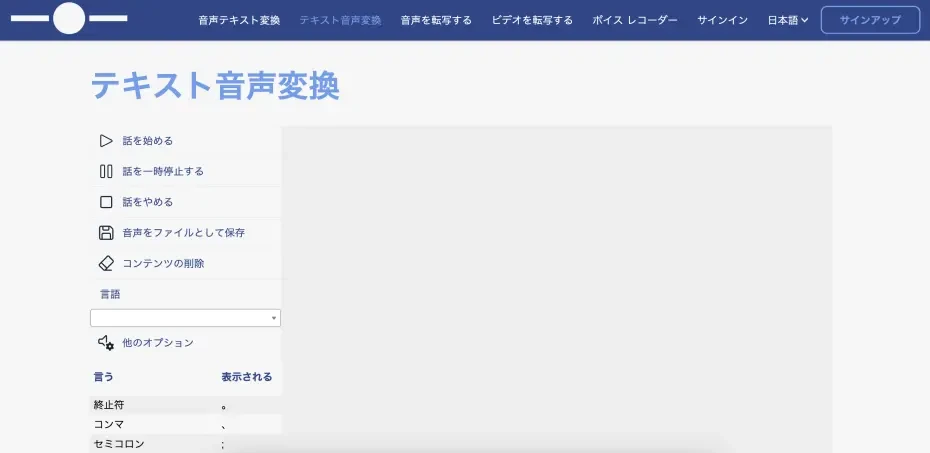
Text to voice is a free text-to-speech site featuring simple operability.
As it can be used from a browser, it can be started immediately without installation.
Since it uses Microsoft's speech synthesis engine for Japanese reading, it can generate standard-quality audio.
It also supports foreign language reading and features an intuitive interface for operation.
Although it is a free text-to-speech site, the operator's identity is not clearly displayed, so if you prioritize security or are considering commercial use, we recommend choosing a service with a clear operator such as Ondoku.
For those who only need basic reading functions, its simplicity makes it an attractive option.
4. TTSReader: A free multilingual site usable on a browser
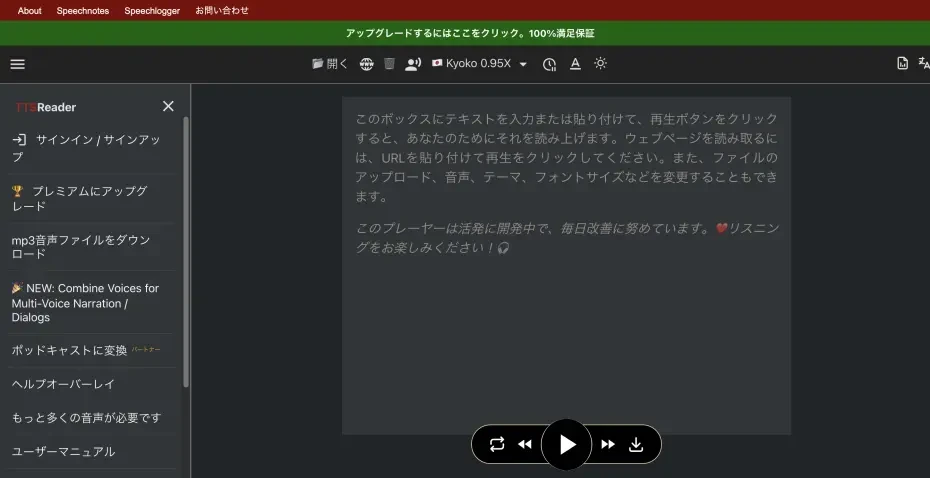
TTSReader is a free text-to-speech player that can be used directly from a browser without installation.
It provides over 30 types of AI-generated male and female voices in more than 15 languages, making it adaptable to various purposes.
It also features a "speech tracking word" function that highlights words during reading.
It is a free service that meets diverse needs such as foreign language pronunciation check and listening to long texts, helping in language learning and improving reading comprehension.
It is a text-to-speech site that can be used even by beginners, with simple operability and high-quality speech synthesis.
5. SPEECHMA: A free site where you can use over 400 AI voices
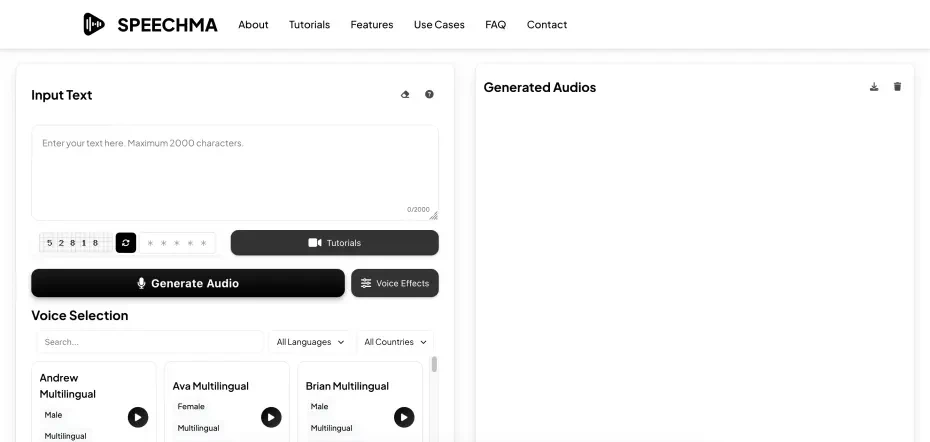
SPEECHMA is a free text-to-speech service supporting over 40 languages, where you can use more than 400 types of AI voices without limit.
It supports multiple languages including English, Spanish, French, German, Chinese, and Japanese, enabling global content production.
Commercial use is also possible, and it can be utilized for various business purposes such as YouTube and TikTok video narrations and presentation audio.
Since it operates on a browser basis, it can be used immediately without installation.
It is a free text-to-speech service useful when you want to generate foreign language audio for free.
6. TTSFree: A text-to-speech site with simple operation and MP3 download possible
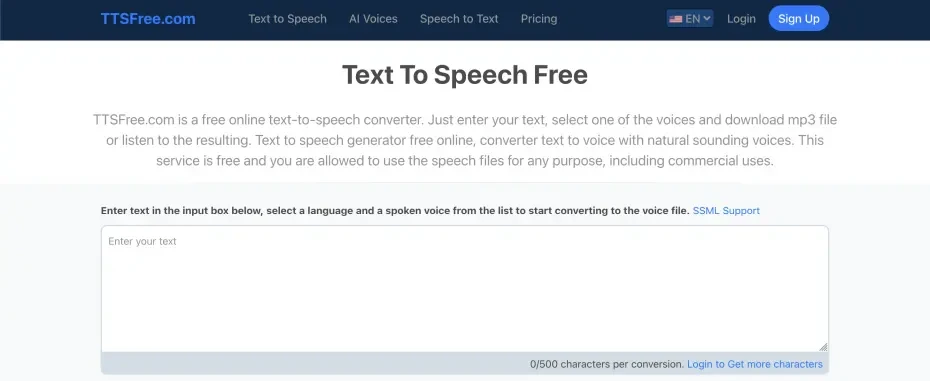
TTSFree is a free service that can perform AI reading in over 50 languages.
Since it operates on a browser basis, it can be used immediately without installation.
It features simple operation, where reading can be started immediately just by entering text and selecting a voice.
Generated audio is downloadable in MP3 format, allowing it to be utilized for various purposes such as video editing and presentations.
Although it is a free service, it also supports SSML, a markup language for adjusting speech, which is attractive for advanced users as it allows customization of the audio.
7. ttsMP3.com: A text-to-speech site supporting over 50 languages and accents

ttsMP3.com is a free text-to-speech site where you can convert text into over 50 languages and accents, including Japanese, and play them online or download them as MP3.
Fine adjustments such as audio intonation, pitch, and speed are also possible, allowing the generation of optimal audio for your purpose.
Although the free plan has character limits, basic functions are available.
Since the interface is simple, even beginners can easily generate high-quality audio.
The ease of being able to start using it immediately without installation, as it operates on a browser basis, is also an attraction.
It is useful for language learning and international content production.
8. TTSMaker: A global free text-to-speech site with multilingual support
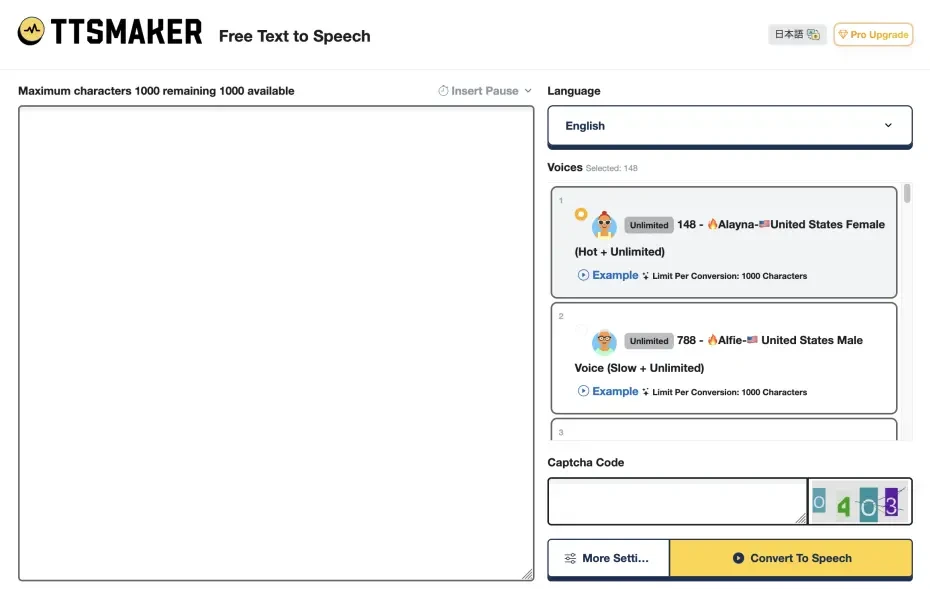
TTSMaker is a free text-to-speech tool supporting over 100 languages and 600 AI voices.
It is a free service ideal for global content production.
Not only can it read aloud as a text reader, but generated audio can be downloaded and saved as audio files.
As it is a text-to-speech site usable on a browser, it is available from various devices without installation.
The free version provides sufficient functionality and can be utilized for various purposes such as video narrations and podcast production.
With a wide variety of voices, you can choose the optimal voice according to the atmosphere of the content and the target audience.
9. FineVoice: A free text-to-speech site capable of emotional expression

FineVoice is a free text-to-speech service that can generate realistic audio.
It is a free service that adopts AI speech synthesis technology capable of emotional expression, enabling the creation of audio with more natural and rich expressions.
As it operates on a browser basis, the ease of starting use immediately without installation is attractive.
Basic functions are available for free, making it a recommended text-to-speech site when you want to create high-quality audio for free.
10. Narakeet: A free text-to-speech site capable of various expressions

Narakeet is a free text-to-speech service that can convert text to speech in multiple languages.
It provides a wide range of voice qualities, including anime-style voices and male/female voices.
It is ideal for content production with varied expressions, including YouTube and Instagram videos.
It also supports reading from text files, Word files, and video subtitle files, allowing various formats of content to be converted to speech.
As it can be used from a browser, high-quality audio can be easily generated without installation.
Installation and setting methods for free text-to-speech sites. What are the free reading methods?
If you are looking for a text-to-speech site, we first recommend trying Ondoku!
We will explain how to read audio using Ondoku, which anyone can use easily.
[Free] How to get started with Ondoku (Super easy 3 steps)
Ondoku is a free text-to-speech site that even beginners can use immediately.
Usage is very easy.
First, access the Ondoku site in a web browser.
Once the site opens, enter or paste the text you want to read in the text box.
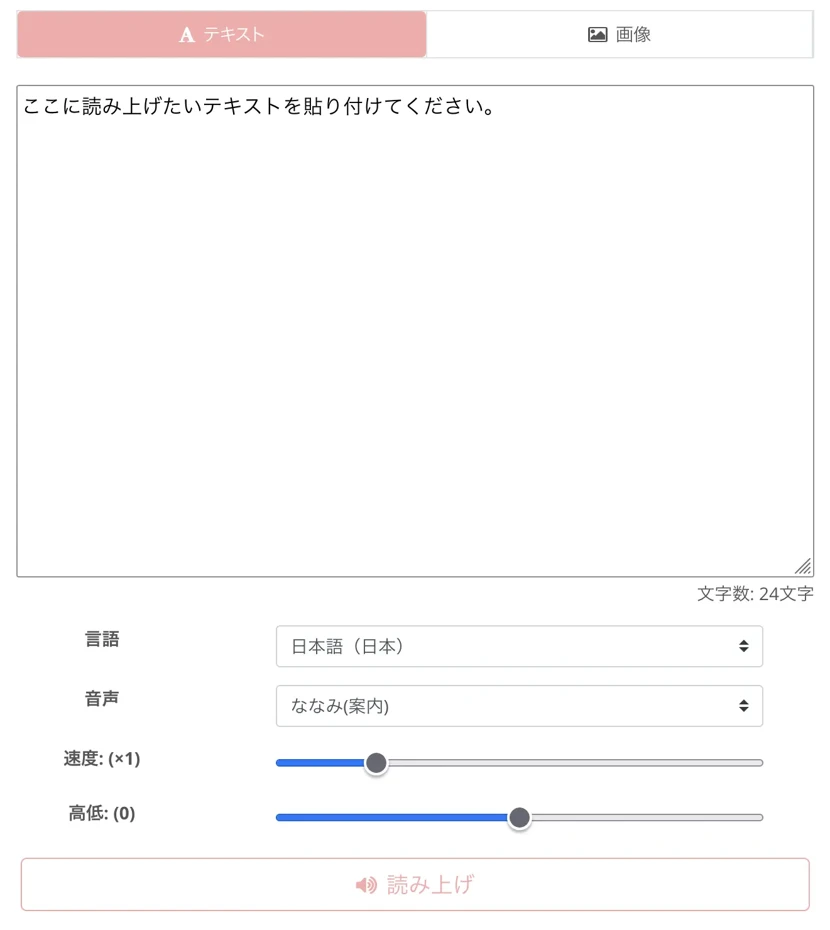
Next, select your preferred voice from "Voice."
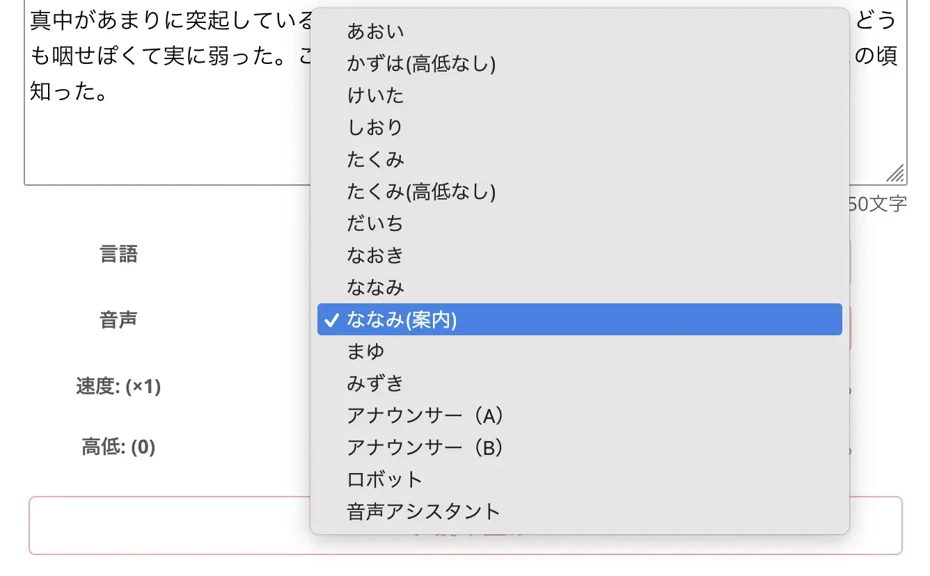
For Japanese, you can choose from 16 types of varied voices, so select the most suitable voice for your purpose.

Try listening to 16 types of Ondoku text-to-speech voices for free. Change impressions with pitch changes
Ondoku has 16 types of Japanese voices. Of course, male and female voices are both available. We've made it possible to trial 8 commonly used Japanese voices and hear how they sound when their pitch is adjusted.
Finally, click the "Read Aloud" button.

The entered text will immediately be read in the selected voice.

The read audio is downloadable in MP3 format.
With just these 3 steps, anyone can easily utilize high-quality text-to-speech.
Although it is available for free up to 1,000 characters without registration, registering an email address expands the free quota to 5,000 characters, so registration is recommended for reading long texts.
Since Ondoku is particularly easy to operate among free text-to-speech sites, even beginners can use it with confidence.
Why don't you try using Ondoku too?
How to customize audio
One of the attractions of text-to-speech sites is the ability to customize audio.
With the free service Ondoku, you can of course customize the audio to your liking.
First is the selection of voice type.
As introduced in the usage explanation, Ondoku allows you to choose from a wide range of voices such as female and male in any language.
For example, in Japanese, you can choose from 16 types of voices, allowing you to read in the optimal voice for your purpose, such as a calm voice for narration or a bright voice suitable for children's content.
Reading speed can also be adjusted.

You can set the appropriate speed for your application, such as video production or foreign language study.
Voice pitch is also adjustable.
You can create a more natural voice or an audio with the same pitch as your own voice.
Methods you should try when you want to adjust intonation/inflection in Ondoku
If you want to adjust intonation even slightly in Ondoku, you can manage to adjust intonation and inflection to some extent by utilizing Hiragana, Katakana, Kanji, alphabet, and punctuation marks.
How to set up on smartphones and tablets
A major advantage of browser-based text-to-speech sites is that they can be easily used from iPhone, Android smartphones, and tablets.
The free text-to-speech site Ondoku allows you to use functions just like on a PC simply by accessing it from a mobile browser.
The usage on iPhone and Android smartphones is the same as on a PC; just enter text, choose a voice type, and press the read button.
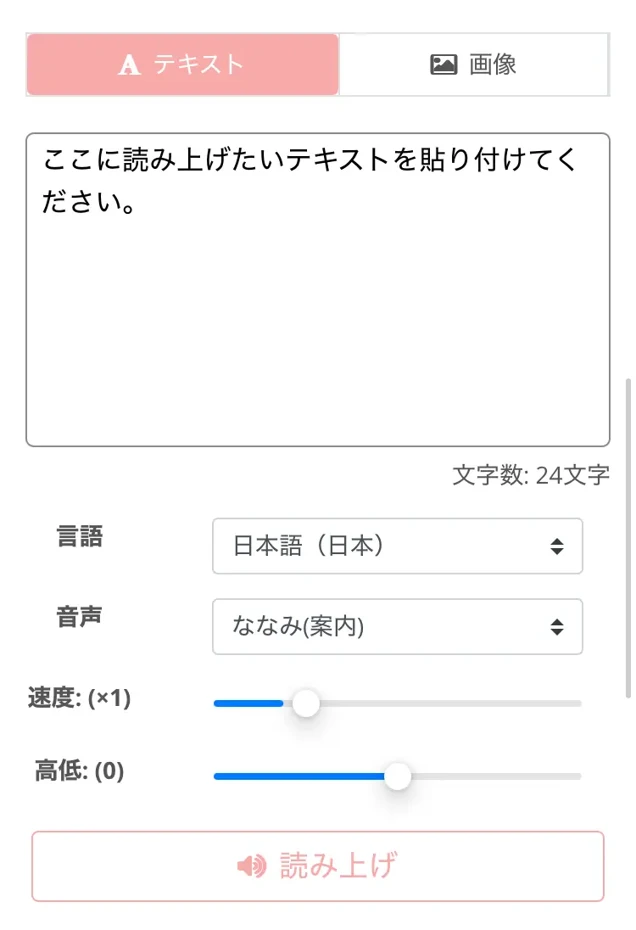
Similarly, on tablets, you can access and use it via a browser app.
Even when using a smartphone or tablet, Ondoku allows you to download reading audio as MP3 files for free.
Why don't you try creating reading audio with Ondoku, which can be conveniently used with its versatile functions?
How to choose a text-to-speech site for beginners. To avoid failure in choosing a free service

7 important points when choosing a text-to-speech service
There are several important points when choosing a text-to-speech site.
First and most important is "Voice Quality."
Even among free text-to-speech sites, those adopting the latest AI technology achieve natural pronunciation and intonation.
"Ease of Use" is also important.
Beginners in particular should choose a service with an interface that can be operated intuitively.
"Richness of Supported Languages" is also a key point.
Services that support not only Japanese but also foreign languages expand the range of utilization.
"Audio Customizability" is an important aspect, as free services that allow adjustments to voice type, speed, and pitch can be adjusted according to the application.
Regarding "Free Usage Limits," it is necessary to check conditions such as the possibility of commercial use, as they vary by site.
The level of "Accessibility" features is also a particularly important point for visually impaired people and the elderly.
Finally, checking "Update Frequency" is also good.
Services that are regularly updated are highly likely to have continuous improvements in voice quality and functions.
It is recommended to choose the optimal service with these important points in mind.
By Application: Recommended functions of free text-to-speech sites
How to choose a text-to-speech site also changes depending on the purpose of use.
If the purpose is Language Learning, a service with accurate pronunciation and speed adjustment functions is ideal.
Like Ondoku, some free services are equipped with multilingual support and speed adjustment functions, making them suitable for learning foreign languages.
For Business Use, it is important to choose a free site with professional voice quality and a license that allows commercial use.
For creative uses, especially video production, features that can express emotions or read in conversation format by combining multiple voices are convenient.
For the purpose of Improving Accessibility, free services that allow text highlighting and integration with screen readers are recommended.
In any application, the premise is that basic reading quality is high, so it is best to choose a latest text-to-speech site utilizing AI.
Which is recommended, browser-type or installation-type?
Browser-based text-to-speech sites and installation-type software each have their own characteristics.
The greatest merit of browser-based services is "immediate usability."
With free browser-type services like Ondoku, you can utilize high-quality text-to-speech simply by accessing the website.
Furthermore, the ability to utilize the latest AI technology regardless of PC specifications is a major benefit.
Since processing is done on the cloud, the strength of free reading sites is that they can be used comfortably even on old PCs or low-spec smartphones.
Additionally, multi-platform support that doesn't restrict devices is attractive, allowing the same service to be used from various environments such as Windows, Mac, iPhone, and Android.
On the other hand, while the installation-type allows for fine adjustments and advanced editing, it requires installation work and environmental settings, and operations can become slow depending on PC specifications.
For beginners or those who want to use it easily, browser-based free reading sites such as Ondoku are recommended.
What is the difference between free and paid versions? Free services are recommended
Many reading services provide free and paid versions.
While many services have sufficient functionality even in the free version, they generally may have character limits, restrictions on audio customization options, or commercial use restrictions.
Since there are services like Ondoku where commercial use is permitted even when used for free, when you want to use it for work, we recommend choosing a service with no restrictions on commercial use.
Paid versions often provide benefits such as higher character limits, advanced customization options, and commercial use without credit notation requirements.
A good choice is to try the free version first and then consider upgrading to a paid version if necessary.
What are usage examples for free text-to-speech sites? Introducing application methods for free services

Utilizing free text-to-speech sites to improve business efficiency for free
Free reading sites greatly contribute to efficiency in business scenes.
For example, by having long emails or reports read by free services such as Ondoku, you can take in information while resting your eyes.
If you convert meeting materials or presentation scripts into audio, you can check the content by ear during commute time or breaks, leading to effective use of time.
For modern business people required to multitask, processing efficiency can be improved by utilizing not only sight but also hearing.
Also, converting internal manuals or training materials to audio can help promote diversity by improving accessibility for employees with visual impairments.
By utilizing commercial-use-possible free reading sites like Ondoku, you can achieve these business efficiencies without incurring costs.
Free reading sites can also be utilized to create announcement audio in stores and facilities.
Since the effort of re-recording many times can be saved, business efficiency can be improved.
How to use free text-to-speech sites in learning and education?
In the fields of education and learning, free-to-use reading sites are also very active.
Language learning is particularly convenient.
Using multilingual services like Ondoku, you can listen to the accurate pronunciation of foreign language texts.
Ondoku is particularly a free service supporting 81 languages and regions, making it useful for various language learning.
It is also perfect for "shadowing," a learning method highly effective for pronunciation and listening.
![[Complete Guide] What is the English Shadowing method? Explaining how to create free educational materials!](https://storage.googleapis.com/ondoku3/image/20250522_shadowing_tmb_02_930.webp)
[Complete Guide] What is the English Shadowing method? Explaining how to create free educational materials!
Efficiently boost your English skills with shadowing! A learning method that simultaneously improves listening, pronunciation, and speaking explained for beginners. Also introduces how to create materials with free AI audio.
Additionally, by converting learning materials to audio, multimodal learning taking in information from both sight and hearing becomes possible, which can increase memory retention rates.
For children who are not good at reading or students with learning disabilities, converting text to audio can be expected to lower the hurdle for learning.
From a teacher's perspective, creating audio versions of class materials or assignments with free reading sites enables the provision of inclusive education corresponding to various learning styles.
In research at higher education institutions, it is also possible to efficiently collect information by converting a large amount of papers and documents to audio and listening to them during commute time.
In this way, free text-to-speech sites serve as powerful tools to diversify education and learning environments and support more effective learning.
How to use free text-to-speech sites in creative production
Text-to-speech sites are also powerful tools in creative content production.
For example, creating narrations for video content such as YouTube, Instagram, and TikTok is recommended.
By utilizing free services like Ondoku, you can create videos with a professional impression without the effort or embarrassment of recording your own voice.
Furthermore, using free services like Ondoku that allow reading in conversation format using multiple voices, commentary videos with multiple characters can be easily created.
Text-to-speech sites can also be utilized for podcast production and audiobook creation.
The attraction is that as long as you have text, you can create audio content even without professional recording equipment.
It is also useful for checking scenarios and scripts, and by actually converting them to audio, you can objectively check the naturalness and rhythm of the dialogue.
Free reading sites can also be widely utilized for creative purposes such as audio guides for art pieces and installations.
By choosing a commercial-use-possible free service, creators aiming for monetization can use it with confidence.
Tips for video narration production are introduced in this article, so please take a look!

How to quickly create narrations for videos like YouTube with text-to-speech software. Tips and points
Explains how to quickly create YouTube video narrations with Ondoku. Easy-to-understand explanation covering script creation, how to use Ondoku, natural intonation adjustment, and tips for editing in video editing software. A must-see for those who want to streamline video production with text-to-speech software!
Utilizing free tools for accessibility for the visually impaired
Text-to-speech sites serve as very important accessibility tools for people with visual impairments.
Free reading services that can be used for free greatly expand the means for visually impaired people to access information.
Also, for elderly people and others for whom reading small letters is difficult, services that convert text to audio are useful.
Audio files for those caring for family members or for recreational activities at nursing care facilities can also be created for free.
By incorporating audio created with free text-to-speech services such as Ondoku into the websites of public facilities and companies, information accessibility can be significantly improved.
By using free reading sites, barrier-free information can be promoted, realizing a society where more people can access information equally.
Why not try using a free text-to-speech site that is perfect for you?
In this way, text-to-speech sites are useful tools that convert text to audio in many situations.
Especially for beginners, we recommend starting with browser-based services that are easy to use and have a simple interface like Ondoku.
Free services including Ondoku that can be used for free make it possible to produce audio for a wide range of purposes, from personal use to commercial use.
Why not find a reading site that fits your purpose and preference and use AI reading audio conveniently?
■ AI voice synthesis software "Ondoku"
"Ondoku" is an online text-to-speech tool that can be used with no initial costs.
- Supports 81 languages and regions, including Japanese, English, Chinese, Korean, Spanish, French, and German
- Available from both PC and smartphone
- Suitable for business, education, entertainment, etc.
- No installation required, can be used immediately from your browser
- Supports reading from images
To use it, simply enter text or upload a file on the site. A natural-sounding audio file will be generated within seconds. You can use voice synthesis up to 5,000 characters for free, so please give it a try.

Text-to-speech software "Ondoku" can read out 5000 characters every month with AI voice for free.
You can easily download MP3s and commercial use is also possible.
If you sign up for free, you can convert up to 5,000 characters per month for free from text to speech.
Try Ondoku now.
HP:
ondoku3.com
Email: ondoku3.com@gmail.com
Email: ondoku3.com@gmail.com
Related posts
"Ondoku" is a Text-to-Speech service that anyone can use for free without installation. If you register for free, you can get up to 5000 characters for free each month. Register now for free
- What is Ondoku
- Start text-to-speech conversion
- Free registration
- Pricing
- Posts
- Try other free services
![[2026 Latest] 10 Best Free Text-to-Speech Sites for Beginners](https://storage.googleapis.com/ondoku3/image/irodori-tts_tmb_140.webp)
![[2026 Latest] 10 Best Free Text-to-Speech Sites for Beginners](https://storage.googleapis.com/ondoku3/image/tategaki-image-yomiage_howto_tmb_140.webp)
![[2026 Latest] 10 Best Free Text-to-Speech Sites for Beginners](https://storage.googleapis.com/ondoku3/image/iphone-video-narration_tmb_140.webp)
![[2026 Latest] 10 Best Free Text-to-Speech Sites for Beginners](https://storage.googleapis.com/ondoku3/image/chrome-reading-mode-pc_tmb_140.webp)
![[2026 Latest] 10 Best Free Text-to-Speech Sites for Beginners](https://storage.googleapis.com/ondoku3/image/pdf-to-mp3-howto_tmb_140.webp)









