How to stop the delivery of Ondoku character count renewal emails
When Ondoku character counts are updated and how to check the remaining character count
Aug. 28, 2026

Hello, this is Ondoku.
Ondoku has a fixed number of characters that can be used each month.
For Free Plans
- Without free membership registration: 1,000 characters
- With free membership registration: 5,000 characters
For Paid Plans
- Basic: 200,000 characters
- Value: 450,000 characters
- Premium: 1,000,000 characters
This character count is updated every month.
Remaining characters do not carry over to the next month. They are reset every month. Please be aware.

Do you know at what timing they are updated?
Also, do you know where you can check your remaining characters?
Knowing this properly will allow you to make even better use of Ondoku.
- Is it at the beginning of the month?
- Or is it from when you started using it?
- And how do you check the remaining characters?
We will explain these in detail.
Timing of character count updates
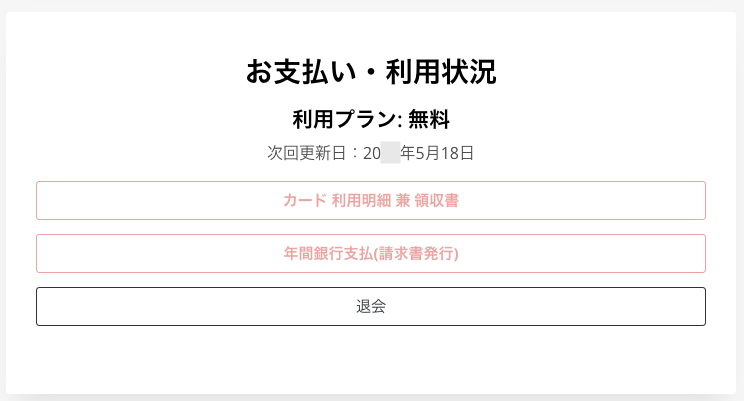
Ondoku character counts are updated approximately 30 days after the day you started using it.
For example, if you registered as a member, the character count will be updated approximately 30 days after the date of registration.
To balance the load on the server, the update time is not at a fixed time, such as midnight.
You can check the next update date under Settings after logging in.

You can use it efficiently at your own pace without worrying about the beginning or end of the month!
It's also great to be able to use it for free every month!

If you want to use even more characters, paid plans are available.
The number of available characters increases significantly, allowing you to use the service without worrying about limits.
The update timing for paid plans is approximately 30 days after payment.
The next update date can be confirmed under Settings after logging in.
Under Settings, you can also check your current plan and receipts.
Please see this article for more details regarding payment timing.

About the payment timing of Ondoku's paid plans, how to change plans, and points to note | Text-to-speech software Ondoku
Ondoku can be used for free, but if you want to use it extensively, a paid plan contract is required. We will explain the payment timing of paid plans, how to change plans, and points to note.
How to check the remaining usable character count

Only registered users can check the remaining number of usable characters.
Confirmation method
- Log in to Ondoku
- Click History in the menu bar
- You can check the remaining character count below the text "History".
It should be easy to find, so please try checking it once.
At Ondoku, we build our site with the goal of providing a simple, easy-to-understand, and user-friendly design.
If you have any requests, such as "I want it to be like this," please feel free to let us know via the inquiry form.
The voices of those who use our service are the most helpful to us.
We will continue to do our best so that you can keep using Ondoku.
■ AI voice synthesis software "Ondoku"
"Ondoku" is an online text-to-speech tool that can be used with no initial costs.
- Supports 81 languages and regions, including Japanese, English, Chinese, Korean, Spanish, French, and German
- Available from both PC and smartphone
- Suitable for business, education, entertainment, etc.
- No installation required, can be used immediately from your browser
- Supports reading from images
To use it, simply enter text or upload a file on the site. A natural-sounding audio file will be generated within seconds. You can use voice synthesis up to 5,000 characters for free, so please give it a try.

Text-to-speech software "Ondoku" can read out 5000 characters every month with AI voice for free.
You can easily download MP3s and commercial use is also possible.
If you sign up for free, you can convert up to 5,000 characters per month for free from text to speech.
Try Ondoku now.
HP:
ondoku3.com
Email: ondoku3.com@gmail.com
Email: ondoku3.com@gmail.com
Related posts
"Ondoku" is a Text-to-Speech service that anyone can use for free without installation. If you register for free, you can get up to 5000 characters for free each month. Register now for free
- What is Ondoku
- Start text-to-speech conversion
- Free registration
- Pricing
- Posts
- Try other free services