Best Text-to-Speech Software: 7 Free & Paid Tools for Commercial Use
How to Create Inbound Videos: From Translation to AI Voice Creation
Aug. 7, 2026

How can I appeal to inbound tourists with videos?

If you want to appeal to inbound tourists regarding your shop, facility, or local sightseeing spots, video production is highly recommended.
However, many people might be wondering how to create videos for foreigners who do not speak Japanese.
In such cases, translation and voice creation using the latest AI is ideal!
With AI translation services and AI text-to-speech services, anyone can easily create foreign language text and audio for free!
Why don't you try producing videos for inbound tourists by referring to the creation methods explained in this article?
Recommended text-to-speech services for inbound video production
There is a recommended text-to-speech service for producing videos for inbound tourists.
That is 『Ondoku』.
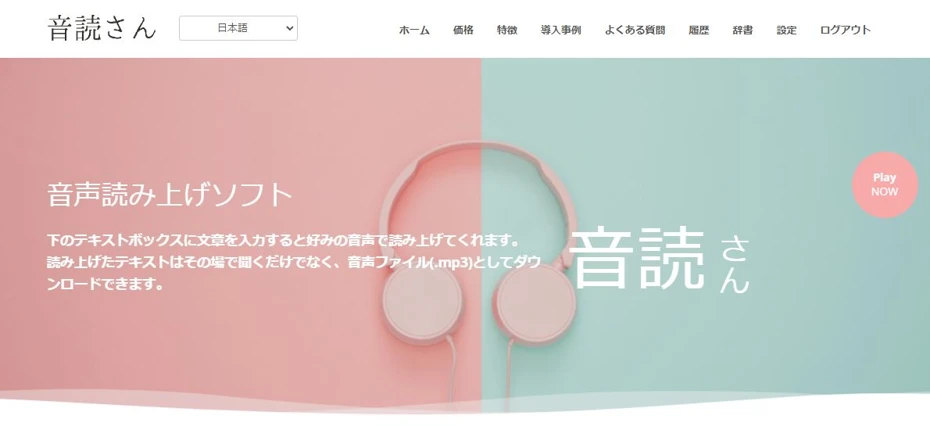
『Ondoku』 is a web service that allows anyone to easily create read-aloud audio using the latest AI.
It can read text in languages of countries and regions with many inbound tourists, such as English, Korean, and Chinese.
What's more, 『Ondoku』 is free!
- Without registration: 1,000 characters
- With registration: 5,000 characters
Since you can read up to these limits for free, you can create audio for videos to promote your shop, facility, or local sightseeing spots for free.
If you want to make inbound videos, why not try reading foreign languages for free using 『Ondoku』?
Let's make an inbound video!

I want to increase the number of inbound customers!
Many people may want to promote their shops or facilities, or attract more inbound tourists to their local areas.
In fact, the process of making videos for inbound tourists is very simple!
Inbound tourists are steadily increasing

Have you noticed more foreign tourists in the streets than before?
Actually, the number of inbound tourists to Japan is indeed steadily increasing.
For example, according to the JTB Tourism Research & Consulting Co., the number of foreign visitors to Japan in July 2024 was approximately 3.29 million, which is the highest ever for a single month!
Not only famous tourist spots like Tokyo, Kyoto, and Osaka, but also the number of inbound tourists visiting regional areas is increasing.
Appealing in the inbound tourists' native language is recommended

But inbound customers aren't really coming...
Just because the number of foreign tourists visiting Japan has increased doesn't mean all shops and facilities will see more customers.
What is important is to appeal using foreign languages.
Just as most Japanese people traveling abroad cannot speak the local language, inbound tourists visiting Japan do not understand Japanese.
Therefore, it is necessary to promote shops, facilities, and local tourist spots using the native languages of inbound tourists, such as English, Korean, and Chinese.
Appeal to inbound tourists using videos!

To appeal to inbound tourists, using videos and social media (SNS) is highly recommended!
Just as Japanese people watch sites like YouTube, Instagram, and TikTok, inbound tourists also watch video sites and SNS in their own languages.
By producing and posting videos in English, Korean, Chinese, etc., you can capture the interest of inbound tourists coming to Japan!
While making videos in foreign languages might seem difficult, it can actually be easily done using AI!
This article explains the creation method in detail, so why not try producing an inbound video by referring to it?
Inbound videos are also recommended for overtourism countermeasures
For those who already have many inbound tourists and are troubled by overtourism, video production is also recommended.
When producing videos that introduce shops, facilities, or local tourist spots, also introduce the rules and manners you want them to follow.
By doing so, you can naturally communicate rules and manners to interested inbound tourists.

【Must-read】 Solving the Inbound x Overtourism Issue! How to Create Multilingual Guidance with the Latest AI Tools
Are you troubled by overtourism due to the increase in inbound tourists? This article thoroughly explains how to create free multilingual guidance using AI technology and specific countermeasure methods at tourist spots. We introduce a practical guide that you can start right away.
How to make an inbound video

Please tell me how to make an inbound video!
For producing inbound-oriented videos, utilizing AI is recommended!
By using the latest AI services, you can translate Japanese to create subtitles and scripts, or generate video audio with native pronunciation!
- Recommended languages for inbound videos
- How to create a script
- Translation methods
- How to create foreign language audio
- Points when posting videos
We will explain these in detail!
Recommended languages for inbound videos
Which languages should I use for inbound videos?

What is important in video production for inbound tourists is which language to choose.
According to the JTB Tourism Research & Consulting Co. website, the TOP 5 sources of inbound tourists in July 2024 were:
- China (approx. 780,000)
- South Korea (approx. 760,000)
- Taiwan (approx. 570,000)
- Hong Kong (approx. 280,000)
- USA (approx. 250,000)
As you can see from this data, many inbound tourists come from Chinese-speaking regions and South Korea.
And of course, supporting English, which is used in many countries besides the United States, is essential.
Therefore, it is recommended to produce videos in:
Chinese videos can also appeal to inbound tourists from Singapore and Malaysia!
How to make an inbound video: Script edition
When making a video for inbound tourists, first, try making a script.
By creating a script in text format, you can use it as a basis for AI translation to create foreign language subtitles and foreign language scripts for your inbound video.
Transcribing audio recorded on a smartphone to create a script is also recommended

If you have already written text to introduce your shop, facility, or local tourist spot, you can use that.
If writing a script is difficult, it is recommended to try speaking into your smartphone while recording the points you want to promote.
Audio recorded on a smartphone can be converted into text (transcribed) using AI.
Transcription of recorded audio is also possible for free!
If you are unsure about transcription methods, the AI transcription service 『Mojiokoshi-san』 is recommended.
When writing text is difficult, the following creation method is recommended:
- Record the appeal points on your smartphone
- Convert to text with an AI transcription service (such as 『Mojiokoshi-san』)
- Edit out unnecessary parts
This is a recommended approach.
How to make an inbound video: Translation edition

Once the script is ready, next, translate it into English, Chinese, and Korean.
When translating scripts and subtitles for video production, using an AI translation service is recommended.
We will explain how to create foreign language scripts using AI translation for each language!
Recommended translation method for English
When translating English, it is recommended to use the standard AI translation service, DeepL.

As it is the most famous among AI translation services, the accuracy of English translation is very good.
However, since there are cases where it may use free translations or omit content on its own:
- Try translating the translated English back into Japanese
- Try breaking the sentences into smaller segments if it doesn't go well
Follow this flow to create your translation script.
For other languages too, it is recommended to re-translate into Japanese to check!
Recommended translation method for Chinese
Chinese can also be translated with DeepL, but in DeepL:
Japanese → English → Chinese
Since translation is processed with English in the middle (relay translation), the accuracy is not very high compared to English.
Therefore, the recommended service is the Chinese translation service, Baidu Translate (百度翻译).
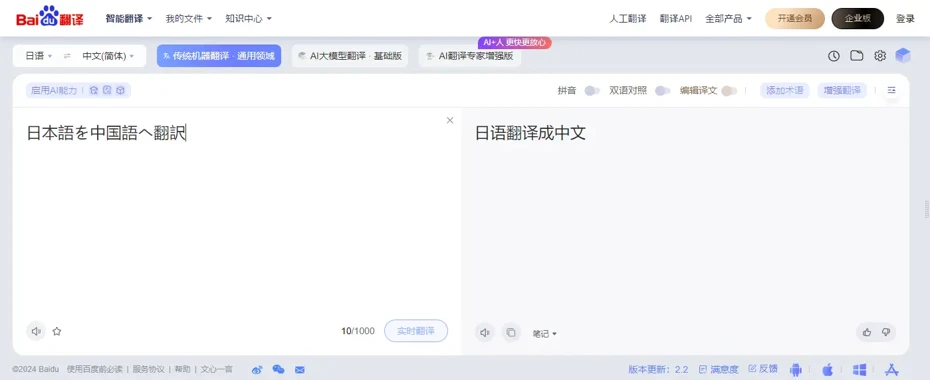
Baidu Translate is operated by the developer of China's largest search engine "Baidu," and can translate with very high accuracy using AI.
It supports translation not only into Simplified Chinese used in mainland China, but also into Traditional Chinese used in Taiwan and Hong Kong.

12 Recommended Services to Check Chinese Translation Results via Audio 【2026 Edition / Free Available】
Explaining how to check Chinese translation results by listening to the audio and confirming pronunciation and tones. Comparing 5 translation services and 7 text-to-speech services, we introduce steps to translate, copy, and play Japanese text. This is different from real-time translation for voice input.
Recommended translation method for Korean
For the same reason as Chinese, it is recommended to use a Korean translation service rather than DeepL for Korean translation.
For Korean translation, the AI translation service provided by Naver, Papago, is convenient.

Naver is a major Korean IT company also known as the developer of LINE.
Since Korean grammar is very similar to Japanese, it is possible to translate with extremely high accuracy.
How to make an inbound video: Text-to-speech edition
Once the foreign language script is ready, produce the audio using an AI text-to-speech service.
We will explain how to create foreign language audio using the AI text-to-speech service 『Ondoku』.
1. Open the 『Ondoku』 top page
First, open the top page of 『Ondoku』 from here.
『Ondoku』 is a web service, so no installation is required, and you can read aloud just by entering text on the top page.
2. Enter text

Paste the script text into the text box.
3. Select language
Select the language.
For English, it is possible to choose:
- American English
- British English
- Australian English
- Indian English
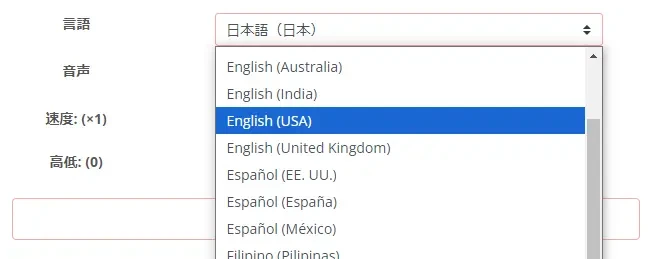
For Chinese, you can choose:
- Mandarin (Standard language of mainland China)
- Guoyu (Standard language used in Taiwan)
- Cantonese

For Korean, you can select the standard language used in the Republic of Korea.

4. Select voice
Select the voice to use for reading.

For every language, you can select from a variety of voices, including male, female, and child voices.
5. Start audio generation
Click the "Read aloud" button to start generating audio.

Audio for about one video can be generated in just a few seconds.
6. Audio generation complete
When the reading is complete, an audio player will be displayed on the screen so you can check the results.

Click the "Download" button to save the audio file in MP3 format.
Now, you have created foreign language audio for your video production.
7. Produce video using audio files
Now, all you have to do is produce the video using the created audio files.
If you find editing difficult, simply layering the audio files over a video of the shop, facility, or tourist spot you want to promote is also fine.
We recommend starting with videos made with simple methods first!
As described, creating foreign language audio is very easy, so why not try making an inbound video using 『Ondoku』 while referring to the explained methods?
Points when posting videos

We will briefly explain the points when posting produced videos to YouTube.
1. Enter video title and description in foreign languages
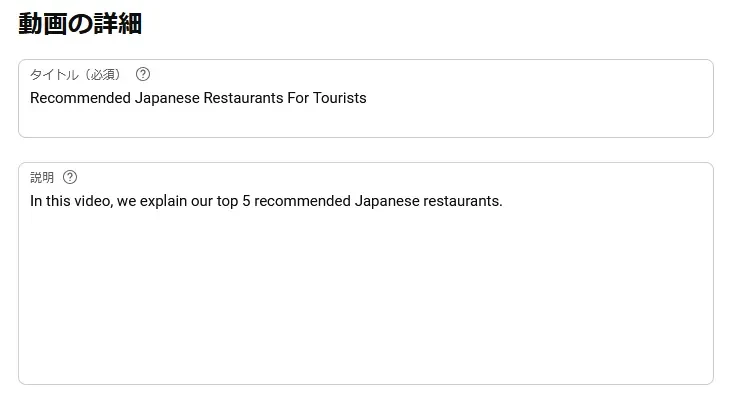
By entering the video title and description in foreign languages, you can reach more users.
Just as when making the script, using an AI translation service is recommended.
2. Set the video language
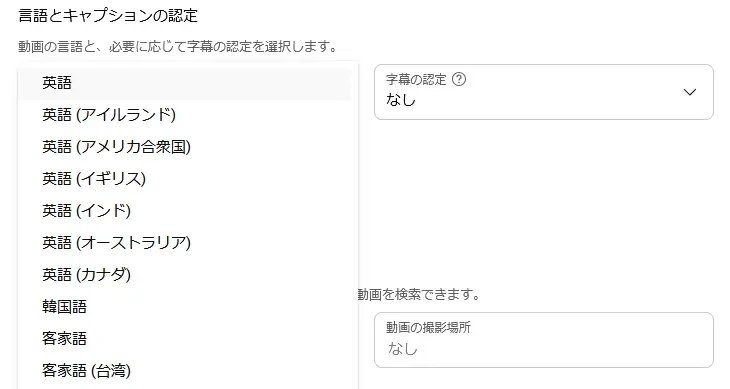
When posting a video to YouTube, it is also important to set the language in the settings screen.
By setting the video language, it becomes easier for the video to be suggested to users of that language.
Also, setting the language makes YouTube's automatic subtitle function available, improving accessibility and allowing more users to watch.
3. Recommended to set language and foreign language titles even for Japanese videos

Finally, if you have already posted Japanese videos, it is recommended to set:
- Video language
- Foreign language video title and description
for those videos as well.
When you set a language for a YouTube video, not only automatic subtitles but also the automatic translation function becomes available, increasing the likelihood that foreign users can watch with automatic subtitles.
Furthermore, on YouTube, you can set foreign language titles and descriptions in addition to the main language.
Foreign language titles and descriptions can be added from:
Subtitles → Add Language → Title and description
in the video menu.
How to set foreign language titles and descriptions
Select "Subtitles" from the menu.
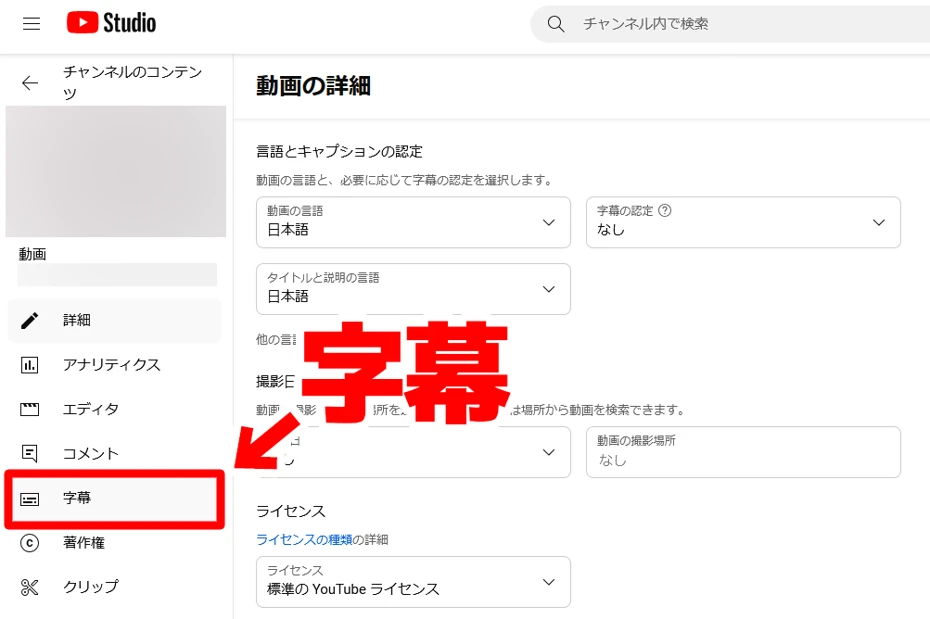
Then, the subtitle list screen opens.
In this example, Japanese subtitles automatically generated by YouTube are displayed.

Click "Add Language" and choose the language you want to add.

The language has been added.
Hover over "Title and description" on the right side of the menu and select "Add".

The editing screen for foreign language title and description will open.

Enter the content and click "Publish".
Setting foreign language titles and descriptions is now complete.
In this way, to appeal to inbound tourists, it is recommended to set titles and descriptions in English, Chinese, and Korean even for Japanese videos.
■ AI voice synthesis software "Ondoku"
"Ondoku" is an online text-to-speech tool that can be used with no initial costs.
- Supports 81 languages and regions, including Japanese, English, Chinese, Korean, Spanish, French, and German
- Available from both PC and smartphone
- Suitable for business, education, entertainment, etc.
- No installation required, can be used immediately from your browser
- Supports reading from images
To use it, simply enter text or upload a file on the site. A natural-sounding audio file will be generated within seconds. You can use voice synthesis up to 5,000 characters for free, so please give it a try.

Text-to-speech software "Ondoku" can read out 5000 characters every month with AI voice for free.
You can easily download MP3s and commercial use is also possible.
If you sign up for free, you can convert up to 5,000 characters per month for free from text to speech.
Try Ondoku now.
HP:
ondoku3.com
Email: ondoku3.com@gmail.com
Email: ondoku3.com@gmail.com
Related posts
"Ondoku" is a Text-to-Speech service that anyone can use for free without installation. If you register for free, you can get up to 5000 characters for free each month. Register now for free
- What is Ondoku
- Start text-to-speech conversion
- Free registration
- Pricing
- Posts
- Try other free services














