Best Text-to-Speech Software: 7 Free & Paid Tools for Commercial Use
Top 5 Text-to-Speech Sites with Download Support! Best Ondoku Services
Sept. 27, 2026


I want to know about text-to-speech sites where I can download the audio!
In this article, we will introduce sites where you can read text aloud and download the audio!
With the advancement of AI, text-to-speech has become very accessible.
However, software that you install and use on a PC is very troublesome to set up.
PC specs are also necessary to use AI reading comfortably.
In that regard, text-to-speech sites that can be used online can be used easily without installation!
Of course, downloading is also possible!
We will also introduce text-to-speech sites that can be used for free, so why not use this article as a reference to have AI read your text?
[Free/Downloadable] Recommended text-to-speech sites
There is a recommended text-to-speech site where you can download the read-aloud audio for free.
That is 『Ondoku』.

『Ondoku』 is a text-to-speech site that can be used from a browser.
You can use it immediately by opening the page from here.
Moreover, 『Ondoku』 is free!
Of course, downloading audio files is also free.
If you are looking for a way to read text aloud, why not try using 『Ondoku』 from here?
How to use downloadable text-to-speech sites?
We will explain the features of text-to-speech sites and points you should check before using them.
What is a text-to-speech site?

A text-to-speech site is a site that reads out entered sentences (text) as an audio file.
Services that read text as audio have existed for a long time, but with the spread of AI, more services have appeared than ever before.
Text-to-speech sites using the latest AI can generate realistic and easy-to-hear audio files that sound like a real human is speaking.
However, it is necessary to note that service content varies greatly from site to site for text-to-speech sites.
Advantages of text-to-speech sites
Text-to-speech sites have several advantages compared to reading software that you install on a PC.
1. No installation required and ready to use immediately

The biggest advantage of a text-to-speech site is that there is no need to install anything.
Text-to-speech software that you install on a PC takes time and effort to install and perform initial settings.
In that respect, with a text-to-speech site, no software installation work is required at all.
You can open the website when you want to use it and read text aloud immediately.
2. Slow connection speeds are OK

The fact that no large downloads are required is also a convenient point of text-to-speech sites.
Software that requires installation has a large download capacity, and depending on the connection status, downloading before installation can take time.
In particular, because the latest AI reading software has a large AI voice synthesis engine capacity, it is normal for the download size to be 1GB or more.
In contrast, text-to-speech sites can be used without problems even if the connection speed is not fast.
The download size of the audio file is much smaller than the capacity of AI reading software, so it is possible to download without problems even if you are concerned about connection speed.
For example, the MP3 file capacity when reading 500 characters with 『Ondoku』 is about 600KB!

However, depending on the text-to-speech site, the capacity of the top page itself may be large, and loading may take time.
In such cases, it is recommended to try other services like 『Ondoku』 where the page loading is lightweight.
3. No impact from PC specs

Text-to-speech sites can be used comfortably without being affected by PC specs.
Text-to-speech using AI is very high-performance, but instead, high PC specs are required if you install and use it.
With text-to-speech sites used from a browser, the actual processing is performed by high-performance computers (servers) at the other end of the internet, so you can comfortably read text with AI regardless of the specs of the PC at hand.
- The specs of the PC provided by the company are low
- Using an old PC
In such cases, text-to-speech sites used from a browser are recommended over reading software that you install and use.
Things to keep in mind when choosing a text-to-speech site

There are things to keep in mind when choosing a text-to-speech site.
That is,
- Whether files can be downloaded even when using it for free
This is the point.
Among text-to-speech sites, there are services like 『Ondoku』 that can be used for free.
When you log in to 『Ondoku』, you can read aloud and download 5,000 characters for free!
However, depending on the service:
- You can read aloud for free and listen on the website
- Downloading is paid
There are such cases.
If you are choosing a text-to-speech site from now on, it is recommended to check in advance whether files can be downloaded even when using it for free.
5 Selected downloadable text-to-speech sites
Tell me about reading sites where I can download!

We will introduce recommended downloadable text-to-speech sites!
1. Ondoku
『Ondoku』 is a text-to-speech site capable of reading text aloud and downloading using the latest AI.
The greatest feature is that it can be used for free!
- Without registration: 1,000 characters
- With registration: 5,000 characters
This much can be read aloud for free!
Moreover, with 『Ondoku』, you can use many convenient functions for free.
17 types of Japanese voices
In the Japanese reading of 『Ondoku』, 17 types of voices (tones) including male/female/child can be used!

Listen to 16 types of voices from the text-to-speech software Ondoku for free. Change impressions with pitch variations
Ondoku has 16 types of Japanese voices. Of course, male and female voices are available. We have made it possible to listen to 8 types of commonly used Japanese voices and the voices when the pitch of each voice is adjusted.
Because it reads using the latest AI, it can generate easy-to-hear and realistic audio files as if read by a professional narrator or announcer.
Furthermore, you can generate and download audio like a conversation by using multiple voices simultaneously.
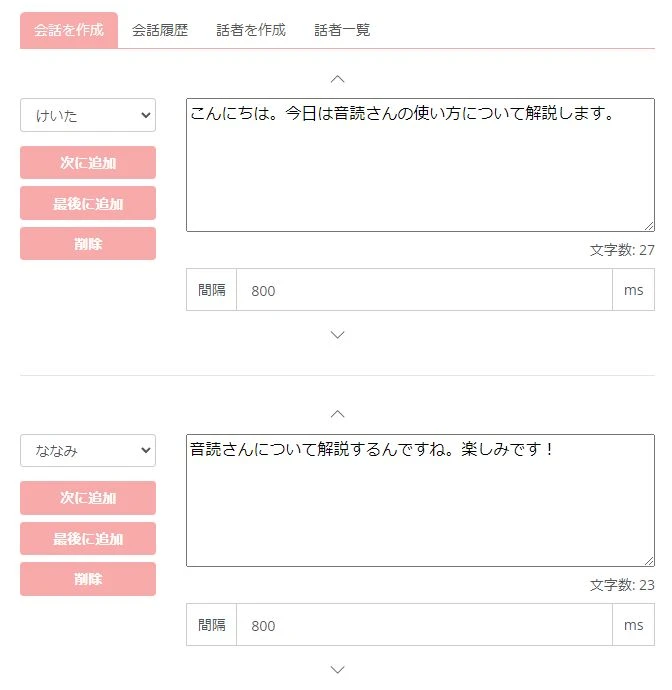
It is also recommended for those who want to create conversation-style videos.
Supports foreign languages
『Ondoku』 supports 81 languages and regions including English, Chinese, and Korean!
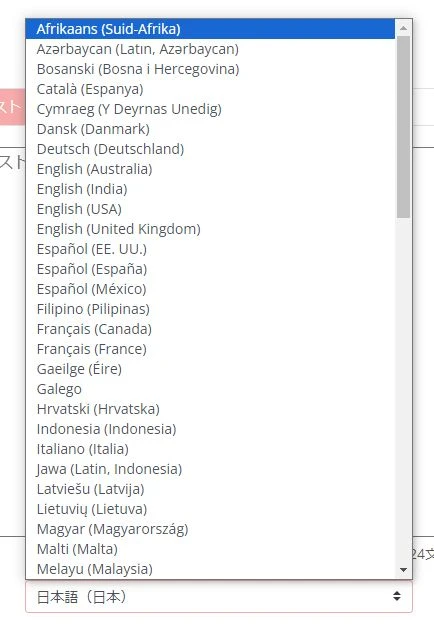
Of course, any language can be used for free.
![[Ondoku] Listen to voice types and sample audio for supported languages](https://storage.googleapis.com/ondoku3/image/%E5%A4%9A%E6%A7%98%E6%80%A7_930.webp)
[Ondoku] Listen to voice types and sample audio for supported languages
Here we introduce the supported languages and sample voices of Ondoku.
- I want to add foreign language narration to a video
- I want to play foreign language broadcasts for inbound customers
In such cases, why not try using 『Ondoku』?
Commercial use OK for free!
『Ondoku』 can be used for commercial purposes for free!
Since some other sites/software require additional fees for commercial use, you can feel safe choosing 『Ondoku』 when you want to monetize videos or use audio files for work.
*Credit notation is required when using it for free. Credit notation becomes unnecessary in paid plans. Detailed explanation is provided here.

How to write credit notation for Ondoku. Actual examples and points to note.
Ondoku is very welcome to be used for free. However, if used for free, credit notation is mandatory. We also received the question, "Specifically, how should I write the notation?" This time, we will explain how to write credit notation for free use of Ondoku...
Of course, free audio download is possible!
Audio files read aloud with 『Ondoku』 can be downloaded in MP3 format and WAV format!
![[Update] How to download Ondoku audio files in WAV format](https://storage.googleapis.com/ondoku3/image/%E3%82%AB%E3%82%BB%E3%83%83%E3%83%88%E3%83%86%E3%83%BC%E3%83%95_930.webp)
[Update] How to download Ondoku audio files in WAV format
It is now possible to download Ondoku audio in WAV format! However, you cannot download in WAV format just by downloading normally. We will introduce how to download in WAV format and how to utilize WAV format.
Since you can of course download even when using it for free, you can use it with peace of mind.
When you want to read text aloud and download, why not try using 『Ondoku』 from here?
2. Yukumo!

Yukumo! is a text-to-speech site capable of speech synthesis and downloading using the speech synthesis engine "AquesTalk".
The biggest feature is that it can read aloud with the so-called "Yukkuri voice" (monotone voice).
In addition, various speech synthesis libraries from the "AquesTalk" series can be used.
The read-aloud audio can be downloaded in MP3 format by pressing the save button.
Be careful with licenses when using commercially
However, caution is required regarding licenses.
Personal use is free, but when using commercially, you need to purchase a commercial license for "AquesTalk".
A commercial license is valid for one year and costs 6,380 yen.
Videos and streams with ads on YouTube also fall under commercial use, so be especially careful when using it for video production.
3. WEB version VOICEVOX

WEB version VOICEVOX is a reading site using VOICEVOX, a speech synthesis library famous for voices such as "Zundamon" and "Kasukabe Tsumugi".
This is not an official VOICEVOX service, but a website created by an individual using VOICEVOX.
Using the voices of each VOICEVOX character, reading aloud and downloading are possible.
Audio files can be downloaded from the menu that opens when you click the "..." next to the audio player.
It is also recommended for those who are already using VOICEVOX to check tones they might want to download newly from now on.
Be careful with voice/character licenses when using commercially
Here too, caution is required regarding licenses if you want to use it commercially.
In addition to the license of the VOICEVOX main body, you also need to follow the terms of use for each character such as "Zundamon".
Also, when using character stand-up illustrations in videos, etc., it is necessary to check the terms set by the illustrator who created the illustrations.
4. Text to voice

Text to voice is a reading site that can read text aloud using Microsoft's speech synthesis engine.
The read content can be downloaded from "Save audio as file".
It also supports reading aloud in foreign languages.
It is a very simple service, but since there is no detailed description of the operator, it is recommended to utilize it within the scope of personal use.
5. TTSReader
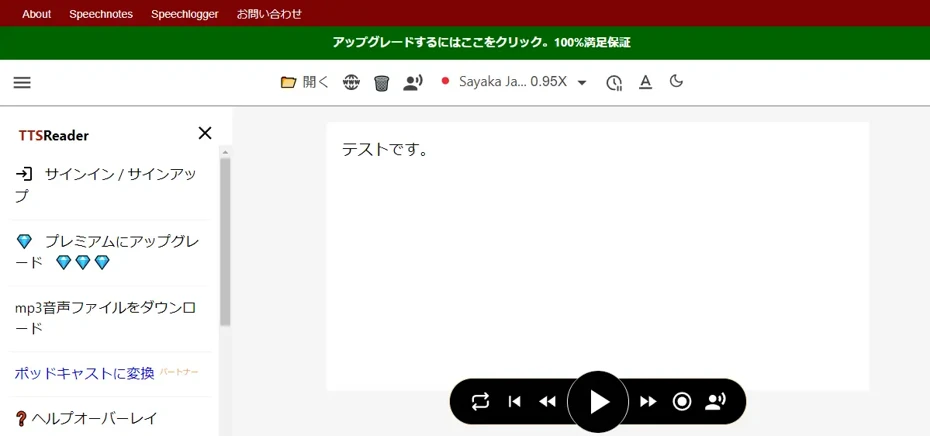
TTSReader is a reading site operated by WellSource Ltd.
There are free plans and paid plans, and subscribing to a paid plan makes it possible to download audio files.
It supports various languages, and Japanese text-to-speech is also possible.
As a related product, the app "SpeechNinja", which reads aloud entered content in order in real-time for those with speech impairments, is also provided.
■ AI voice synthesis software "Ondoku"
"Ondoku" is an online text-to-speech tool that can be used with no initial costs.
- Supports 81 languages and regions, including Japanese, English, Chinese, Korean, Spanish, French, and German
- Available from both PC and smartphone
- Suitable for business, education, entertainment, etc.
- No installation required, can be used immediately from your browser
- Supports reading from images
To use it, simply enter text or upload a file on the site. A natural-sounding audio file will be generated within seconds. You can use voice synthesis up to 5,000 characters for free, so please give it a try.

Text-to-speech software "Ondoku" can read out 5000 characters every month with AI voice for free.
You can easily download MP3s and commercial use is also possible.
If you sign up for free, you can convert up to 5,000 characters per month for free from text to speech.
Try Ondoku now.
HP:
ondoku3.com
Email: ondoku3.com@gmail.com
Email: ondoku3.com@gmail.com
Related posts
"Ondoku" is a Text-to-Speech service that anyone can use for free without installation. If you register for free, you can get up to 5000 characters for free each month. Register now for free
- What is Ondoku
- Start text-to-speech conversion
- Free registration
- Pricing
- Posts
- Try other free services














