Best Text-to-Speech Software: 7 Free & Paid Tools for Commercial Use
AI Voice Synthesis for Telephone IVR: How to Create and Benefits
Sept. 9, 2026

I want to know how to create IVR audio!
When calling a company's telephone desk or a call center, you may hear an automated voice saying, "Please select a number according to the content of your inquiry."
The system that plays this audio is called "IVR" (Interactive Voice Response).
In fact, an increasing number of companies have recently been creating IVR audio using AI speech synthesis.
By utilizing free text-to-speech software and apps, you can introduce IVR with a simple creation method.
In this article, we will explain in detail what IVR and Interactive Voice Response systems are, how they work, and how to create IVR audio using speech synthesis services.
From those considering introducing IVR to a call center to those developing IVR systems, why not refer to this article and try creating read-aloud audio with the latest AI?
[Free / Commercial Use OK] Recommended AI Speech Synthesis Services for IVR Systems

"Ondoku" is a recommended AI service for IVR (Interactive Voice Response systems).
Its key feature is the latest speech synthesis AI, which can generate realistic and easy-to-hear audio.
By choosing voices such as female or male voices according to the purpose of the IVR, you can create clear IVR audio just like a professional narrator.
Since speech synthesis is available 24 hours a day, 365 days a year, another point is that you can update the IVR content at any time.
"Ondoku" is, of course, OK for commercial use! (Click here for details on commercial use)
Since it can be used for free, we recommend first experiencing AI speech synthesis with "Ondoku" for yourself.
It can be used as audio for IVR systems starting from 1,000 yen per month, making it possible to introduce at a low cost.
Why not use the AI speech synthesis service "Ondoku" for introducing IVR or developing Interactive Voice Response systems?
[Free] How to make an IVR system! Easy production with the AI speech synthesis service "Ondoku"
I want to know how to create audio for IVR right now!

Now, let's explain how to create IVR (Interactive Voice Response) audio using the AI speech synthesis service "Ondoku".
1. Write the script text for IVR audio (example included)

First, write the script text for the audio to be played via IVR (Interactive Voice Response).
Any software that can write text, such as Notepad or Word, is fine for writing the script.
For example, in the case of a call center's automated voice response, a script like this is recommended.
Thank you for calling. This is the Customer Consultation Desk of XX Co., Ltd. Please press a number according to the voice guidance. Press 1 for consultations regarding new contracts, 2 for changes to contract details, 3 for consultations regarding cancellations, and 4 for other inquiries.
We will connect you to an operator.
The lines are very busy at the moment. We apologize for the inconvenience, but please wait as you are or call back after a while.
2. Read the script text aloud on the "Ondoku" website
Once the script is ready, read it aloud on the "Ondoku" website.
Once you open the "Ondoku" top page, paste the script text into the text box.
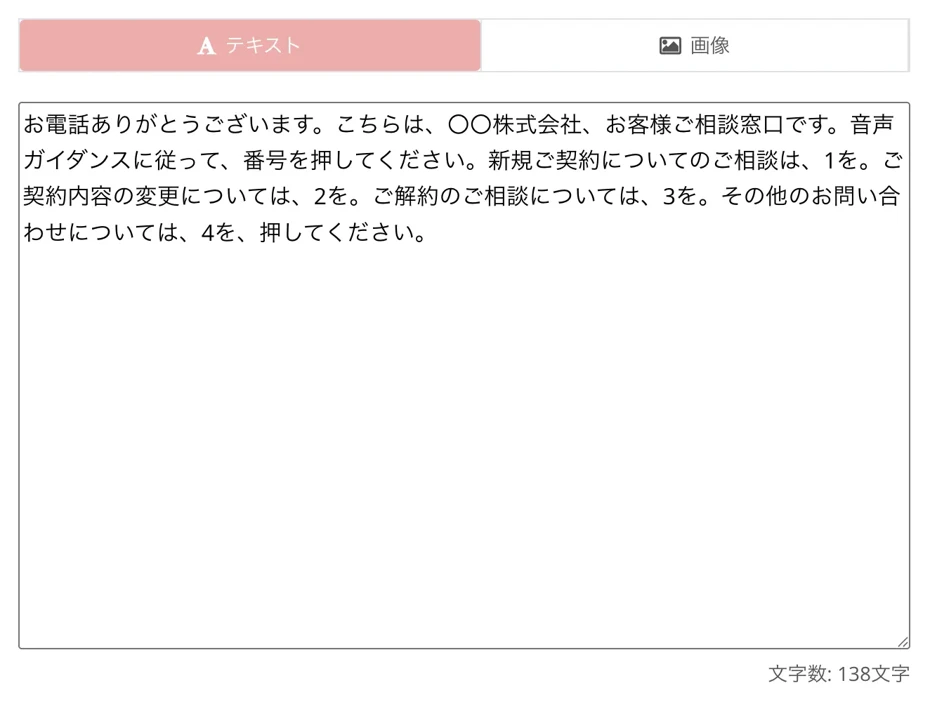
At this time, it is recommended to enter the text for each segment of audio, such as "When the call first comes in" or "When connecting to an operator."
After entering the script, select the language and voice type.
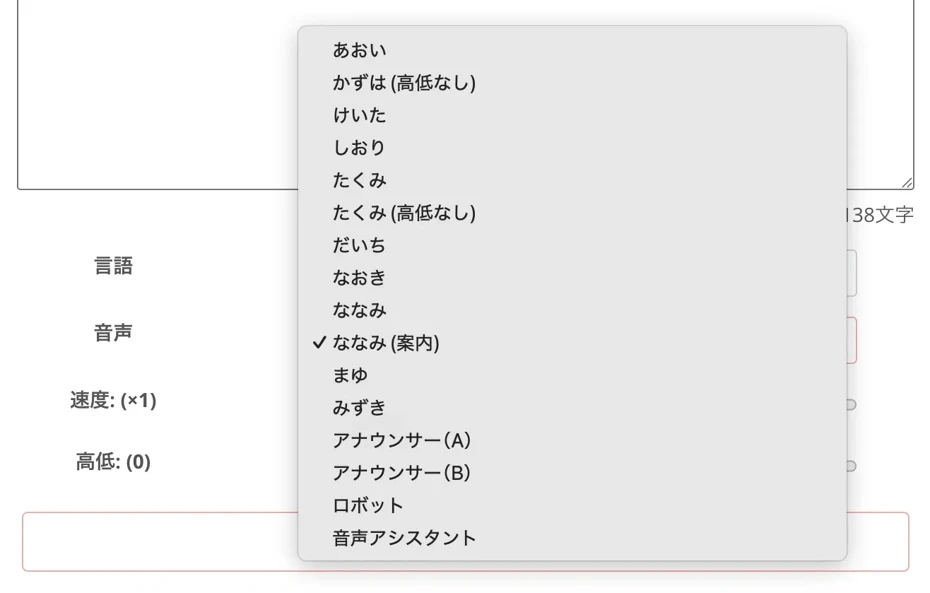
On "Ondoku", in the case of Japanese, you can read aloud with more than 16 types of voices, including female, male, and children!

Try listening to 16 types of voices from the text-to-speech software Ondoku for free. Change impressions by adjusting pitch.
Ondoku has 16 types of Japanese voices. Of course, male and female voices are available. We have made it possible for you to listen to 8 commonly used Japanese voices and their adjusted pitches.
As an example, we will use the female voice "Nanami (Guidance)," which is perfect for IVR automated voice response.
On Ondoku, you can also adjust the reading speed and pitch, but for IVR use, the default settings are fine.
The speech synthesis is now ready.
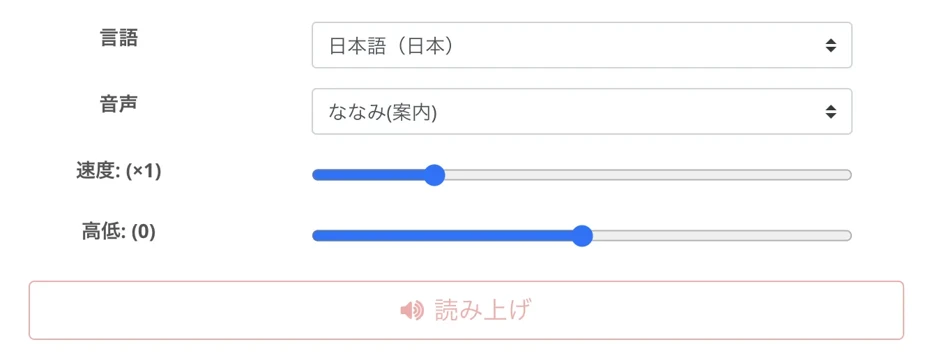
Press the "Read Aloud" button to start speech synthesis.
Speech synthesis is completed in just a few seconds, and the screen will switch.

An audio player will appear and the audio will start playing; if there are no problems after listening, save the file.
For example, with this script text, you can synthesize audio like this.
Follow the same process to create other audio files for use in the IVR.
In this way, the flow of AI speech synthesis with "Ondoku" is very simple.
Why not try using "Ondoku" for free to create IVR audio for your call center?
How to adjust pauses in IVR audio
When reading script text aloud, you may want to have longer intervals between sounds.
For example, in the generated example, you might feel like taking a pause after the part where the number is given, such as "Press 1 for consultations regarding new contracts, 2 for changes to contract details."
In such cases, "Ondoku" allows you to add pauses in two ways.
Insert a "。" where you want to pause the audio
「新規ご契約についてのご相談は1を。ご契約内容の変更については2を。」
By inserting a "。" (full stop) where you want to add a pause, as shown above, you can read it aloud with pauses.
Also, by inserting a "、" (comma), you can take a shorter pause.
Script with "。" and "、" inserted:
Thank you for calling. This is the Customer Consultation Desk of XX Co., Ltd. Please press a number according to the voice guidance. For consultations regarding new contracts, 1. For changes to contract details, 2. For consultations regarding cancellations, 3. For other inquiries, press 4.
When you read this aloud, you can synthesize audio like this.
Use Speech Synthesis Markup Language (SSML)
In "Ondoku", you can use Speech Synthesis Markup Language (SSML) to add pauses.
For example,
By writing this, it is possible to take a pause of exactly 1000 milliseconds = 1 second.
When using SSML, you need to write "
For example, if you want to take a longer pause after "This is the Customer Consultation Desk" in this script:
Thank you for calling. This is the Customer Consultation Desk of XX Co., Ltd. Please press a number according to the voice guidance. For consultations regarding new contracts, 1. For changes to contract details, 2. For consultations regarding cancellations, 3. For other inquiries, press 4.
By entering it like this, you can take a long pause of exactly one second.
When actually read aloud, it sounds like this.
To make a call center's automated voice response system more comfortable to use, it is important to finely adjust the timing of pauses in the audio.
The usage of Speech Synthesis Markup Language (SSML) is explained in this article, so please take a look!

What is Speech Synthesis Markup Language (SSML)? Usage in text-to-speech software and a list of main codes.
SSML stands for Speech Synthesis Markup Language. By writing SSML code, you can further control Ondoku's speech. We will introduce how to use SSML in Ondoku and the codes in detail.
3. Implement the created audio into the IVR (Interactive Voice Response system)

All that's left is to implement the audio created with "Ondoku" into your IVR (Interactive Voice Response system)!
Audio created with "Ondoku" can be downloaded in MP3 format, so it can be easily loaded into an IVR system.
*Download in WAV format is also supported from the history page.
In this way, with "Ondoku", anyone can easily perform speech synthesis for automated voice responses!
Since IVR can be introduced to a call center for free or at a low cost, why not try using "Ondoku" yourself?
What is IVR (Interactive Voice Response system)? Explanation of mechanisms and features
How does IVR work? How is the automated voice played?

From here, we will explain the basic mechanisms and features of IVR (Interactive Voice Response system).
What is the basic mechanism of IVR? Responding to customer calls with automated voice response

IVR (Interactive Voice Response) is a system that responds to calls coming into a call center by playing audio.
By having users operate phone buttons according to automated voice instructions, calls can be distributed to representatives or departments.
IVR is an abbreviation for "Interactive Voice Response," and in Japanese, it is called "Jidou Onsei Outou System" (Automated Voice Response System).
The mechanism of IVR is very simple.
When a customer calls a company's phone number, the IVR (Interactive Voice Response system) first responds automatically.
Thank you for calling. This is XX Co., Ltd.
Please press a number according to the voice guidance. Press 1 for consultations regarding usage, 2 for repairs or replacements, and 3 for other consultations.
Automated voice guidance like this is played.
When the customer presses a button on the phone, the IVR system recognizes the number input and transfers the call to the appropriate department or call center operator.
The number of companies introducing IVR is steadily increasing. Features and benefits of automated voice response.
Recently, the number of companies introducing IVR has been steadily increasing.
The biggest reason is to solve the problem of labor shortages.
Call center operators are chronically in short supply, and recruitment continues to be difficult.
By introducing IVR, all calls can be handled with automated voice response, allowing for efficient call handling with limited personnel.
Another reason is the ability to improve services for customers.
Customers expect to be able to inquire with companies 24 hours a day.
Since IVR can handle calls even outside of business hours with automated voice response, it is possible to respond to customers more carefully.
IVR becomes more accessible with AI speech synthesis technology
Another reason why IVR is becoming more widespread is that AI speech synthesis technology has evolved significantly.
Previous automated voice responses could only be read in unnatural, robot-like voices, but the latest speech synthesis software enables natural, human-like reading.
With the emergence of read-aloud apps and software that can be used for free or at low cost, it has become much easier to introduce IVR and Interactive Voice Response systems than ever before.
If you are going to introduce IVR from now on, it is recommended to create read-aloud audio with the latest AI speech synthesis apps and software.
Referring to the creation method explained in this article, why not try building a call center automated voice response system with "Ondoku" yourself?
Introducing IVR (Interactive Voice Response system) applications and usage scenarios

IVR (Interactive Voice Response system) is utilized in various situations.
Specific applications and usage scenarios are introduced below.
Introducing IVR to corporate call centers and customer telephone consultation desks
The most common use of IVR is in corporate call centers and customer consultation desks.
When you call customer support for a major company, in most cases, a read-aloud voice created by speech synthesis software responds first.
By introducing IVR to corporate call centers and customer consultation desks, phone inquiries can be pre-sorted.
As a result, calls can be connected to operators with specialized knowledge for each inquiry content, which reduces customer waiting times.
Also, when call center lines are busy, it is possible to play guidance such as "The lines are currently busy."
While the number of cases an operator can handle is limited, by utilizing AI speech synthesis software and automated voice response systems, any number of calls can be received simultaneously.
By utilizing free AI speech synthesis software and apps, it has become possible to create automated voices for call centers more easily and at much lower cost than before.
Since small companies, offices, and organizations can also introduce IVR, it is recommended to use AI speech synthesis software and apps for future automated voice response systems.
Automated voice response systems are also recommended for reservation systems
IVR can also be utilized for reservation systems in hospitals, accommodation facilities, restaurants, beauty salons, etc.
By creating read-aloud audio with AI speech synthesis apps and introducing IVR, 24 hours a day, you can accept reservations with automated voice response.
By following the automated voice response guidance and having customers enter dates and times using phone buttons, information can be automatically registered in a database to accept reservations.
In a time where labor shortages are an issue, handling telephone reservations is a significant burden for staff.
By creating read-aloud audio for automated voice response with AI speech synthesis software and apps, it is possible to improve the working environment for staff and increase customer satisfaction.
Utilizing IVR for local government inquiry desks, administrative services, and disaster information
IVR (Interactive Voice Response systems) are also widely used by local governments such as city and ward offices.
Calls made to local government desks can be automatically transferred to the appropriate department using IVR.
Also, routine procedures such as bulky waste collection reservations or checking the application status of various certificates can be automated with automated voice response.
In times of disaster, IVR automated voice response can be used to provide information on evacuation centers, water supply locations, and safety information.
Particularly in situations where rapid response is required, such as disasters, AI speech synthesis software and apps that can create audio immediately are very useful.
The ability to respond when many residents call simultaneously is also a reason why IVR is suitable as a means of providing information in emergencies.
Parcel delivery redelivery requests are a common use for IVR automated voice response
Parcel delivery redelivery request call centers are also a representative scenario where IVR utilizing automated voice response is used.
When you call a delivery company, an automated voice plays via IVR.
Recently, customers can complete redelivery procedures simply by entering the number written on the slip using their phone.
Since IVR eliminates the need for call center operators to respond, it also helps solve the problem of labor shortages for delivery companies.
On the customer side, unlike before, there is no longer a need to wait until connected to a call center operator, making it easier to request redelivery at any time, 24 hours a day.
Recently, with the increase in mail-order demand from overseas, there has been a succession of new entries into parcel delivery.
If you are building a new redelivery reception system, it is recommended to introduce an automated voice response system utilizing AI speech synthesis services.
What are the benefits for companies to introduce IVR (Interactive Voice Response systems)?

IVR (Interactive Voice Response systems) provide significant benefits to both companies and customers.
First, we will explain the benefits for companies, organizations, and groups to introduce IVR.
Efficiency in call center operations with IVR (Interactive Voice Response)
The biggest benefit of introducing IVR (Interactive Voice Response) is the ability to improve the efficiency of operations such as call centers.
By introducing IVR, it becomes unnecessary to respond to every single call.
Simple inquiries and information provision can be completed solely with the automated voice response system, allowing call center operators to focus only on responding to complex inquiries.
Therefore, even with the same number of operators, it becomes possible to handle more calls.
Reduction of labor costs is also a benefit of IVR (Interactive Voice Response)
Reducing labor costs is another benefit of introducing IVR (Interactive Voice Response).
Since it eliminates the need to hire a large number of call center operators solely for telephone response, labor costs can be significantly reduced.
The effect is particularly high for telephone responses at night and on holidays.
By creating read-aloud audio with AI speech synthesis software and introducing IVR, 24-hour telephone response becomes possible with no additional cost.
Improving customer satisfaction by preventing calls from being disconnected
Preventing the loss of calls is also a major benefit.
Since the number of call center operators is limited, there were cases where calls could not be connected during busy times.
By introducing IVR, any number of calls can be received simultaneously, making it possible to respond to all customers.
Efficient placement of call center operators
By introducing IVR, it becomes possible to place call center operators according to their skills.
By distributing where calls are connected according to the inquiry content using the automated voice response system, it is possible to have new operators handle simple inquiries and veteran operators handle complex inquiries.
In this way, by introducing IVR (Interactive Voice Response systems), it is possible to efficiently operate telephone desks for companies, organizations, and groups.
The read-aloud audio used in IVR needs to be custom-made for each company, organization, or group.
If you are going to create audio for IVR from now on, the AI speech synthesis service "Ondoku" is recommended.
Since it can be used for free, why not actually experience speech synthesis with "Ondoku" first?
Benefits for customers and users of IVR (Interactive Voice Response systems)

IVR (Interactive Voice Response systems), of course, have many benefits for customers and users as well.
By introducing IVR using AI speech synthesis services, you can significantly increase customer satisfaction.
Shortening call center telephone waiting times with IVR
The biggest benefit of IVR for customers is that call center telephone waiting times can be significantly shortened.
By having IVR automatically distribute inquiry content, calls can be smoothly connected to the person in charge.
Since the need to redial due to a busy signal is eliminated, customer stress is significantly reduced.
Another major benefit is the elimination of waiting time when a call is made to the wrong department and needs to be transferred.
Inquiries and telephone reception possible 24 hours a day with automated voice response
Being able to inquire 24 hours a day is another major benefit of IVR.
By introducing an automated voice response system, customers can call at their convenience without worrying about business hours.
Even if a call is made late at night or early in the morning, it is possible to obtain basic information such as business hours and regular holidays through automated voice response.
Even in cases of sudden temporary closures, you can create audio with AI speech synthesis software and inform customers of the closure with automated voice response.
IVR also has benefits for privacy protection
IVR also has benefits in terms of privacy protection.
When an automated voice response system is introduced, personal information and confidential information can be entered using phone buttons and processed on the system.
Since it eliminates the need to convey information verbally to a telephone operator, the possibility of privacy information leakage is significantly reduced.
Information that people do not want to be heard, such as credit card numbers and PINs, can be entered with peace of mind.
Preventing mistakes by telephone operators with IVR
IVR also helps prevent mishearings and input errors by call center operators.
Humans can mishear things when they are tired or lacking concentration.
No matter how skilled a telephone operator is, the possibility of a mistake is not zero.
By creating read-aloud audio with AI speech synthesis software and introducing IVR, information entered by the customer can be accurately recognized, allowing for the prevention of mistakes in advance.
In this way, IVR (Interactive Voice Response systems) have significant benefits for customers as well.
To increase customer satisfaction, why not try creating read-aloud audio for IVR with the AI speech synthesis service "Ondoku"?
What are the benefits of creating IVR audio with AI speech synthesis apps and software?

If you are going to create read-aloud audio for IVR, AI speech synthesis software and read-aloud apps are recommended!
We will briefly explain why AI speech synthesis software and apps are recommended when introducing IVR.
"Ondoku" is recommended for introducing IVR
If you are going to introduce IVR, "Ondoku", which can be used for free, is recommended.
You can easily create easy-to-hear audio, just like a professional narrator, which is perfect for automated voice response systems.
"Ondoku", which allows for speech synthesis with AI, offers these benefits.
Read-aloud audio for IVR can be created at low cost
By using AI speech synthesis software and apps, read-aloud audio for IVR can be created at low cost.
When requesting a professional narrator, it is not uncommon for the production of IVR audio to cost hundreds of thousands of yen.
However, with the creation method utilizing AI speech synthesis software and read-aloud apps, costs can be kept low.
The AI speech synthesis service "Ondoku" is free to use, so it is possible to introduce IVR with zero initial cost.
Modifications and content additions are easy with AI speech synthesis software and apps
If you request a professional narrator to record audio, additional costs are incurred every time the content of the automated voice response is changed.
With AI speech synthesis software and apps, no additional costs are incurred no matter how many times you recreate the content of the automated voice response.
It can handle cases where it is necessary to frequently update automated voice response content, such as changes in service content or business hours.
To introduce and operate automated voice response at low production cost, AI speech synthesis software and apps are recommended.
Immediate response to corrections and changes in content
With AI speech synthesis software and apps, you can rest assured even when sudden changes are necessary.
There are many opportunities to update IVR audio, such as the start of new services, changes in business hours, and organizational restructuring.
If you are requesting recording from a professional narrator, you need to adjust the recording schedule and wait from several days to several weeks every time the content of the automated voice response is changed.
With the method of creating IVR audio using AI speech synthesis software and apps, such trouble is unnecessary.
You can create new IVR audio immediately on the day the change becomes necessary.
With the AI speech synthesis service "Ondoku", you can create AI audio in just a few seconds after entering the text.
You can flexibly respond to sudden changes.
Create IVR audio in foreign languages with AI speech synthesis software and apps
The ability to create IVR audio in foreign languages is another useful point of AI speech synthesis software and apps.
In the tourism industry where there are many inbound tourists from abroad or in local government facilities where there are many foreign residents, information can be accurately conveyed by creating IVR audio with AI speech synthesis software and apps.
The AI speech synthesis service "Ondoku" supports 81 languages and regions.
Since it can synthesize speech in various languages, it can handle a wide range of needs from the tourism industry to resident services for foreigners.
![[Definitive Edition] Solving the Inbound x Overtourism Problem! How to create multilingual guidance with the latest AI tools](https://storage.googleapis.com/ondoku3/image/20241215_inbound_overtourism_tmb_930.webp)
[Definitive Edition] Solving the Inbound x Overtourism Problem! How to create multilingual guidance with the latest AI tools
Are you troubled by overtourism due to the increase in inbound tourists? This article provides a thorough explanation of how to create free multilingual guidance utilizing AI technology and specific measures to take at tourist spots. We introduce a practical guide that can be started immediately.
Possible to create and test multiple automated voice responses
Using AI speech synthesis software and apps, it is also possible to create and try multiple versions of audio.
For example,
- Please press 1 for inquiries regarding products
- Those who want to know about products, please press 1
As shown above, you can easily conduct AB tests by changing the detailed expressions of the automated voice response to see which one has higher customer satisfaction.
Since AI speech synthesis software and apps allow for easy creation of automated voice responses, it is also possible to change the content according to seasons and campaigns.
- Year-end and New Year business guidance
- Notice of summer closure
- Campaign guidance for new products
In this way, information can be provided to customers carefully.
As such, AI speech synthesis software and apps are recommended for future IVR introduction.
Why not try creating IVR audio with the AI speech synthesis service "Ondoku" yourself?
Why not effectively introduce IVR (Interactive Voice Response systems) with AI speech synthesis services?
IVR is a very powerful tool that can improve the efficiency of telephone response for companies, organizations, and groups, and increase customer satisfaction.
Not only can it handle calls 24 hours a day with automated voice response, but it can also reduce the burden on call center operators and reduce labor costs.
By utilizing the latest AI speech synthesis software and read-aloud apps, you can create high-quality audio for automated voice response while significantly reducing costs.
With the AI speech synthesis service "Ondoku", natural IVR audio can be generated simply by entering text.
Since it can be used for free, why not try creating read-aloud audio for IVR with "Ondoku" first?
■ AI voice synthesis software "Ondoku"
"Ondoku" is an online text-to-speech tool that can be used with no initial costs.
- Supports 81 languages and regions, including Japanese, English, Chinese, Korean, Spanish, French, and German
- Available from both PC and smartphone
- Suitable for business, education, entertainment, etc.
- No installation required, can be used immediately from your browser
- Supports reading from images
To use it, simply enter text or upload a file on the site. A natural-sounding audio file will be generated within seconds. You can use voice synthesis up to 5,000 characters for free, so please give it a try.

Text-to-speech software "Ondoku" can read out 5000 characters every month with AI voice for free.
You can easily download MP3s and commercial use is also possible.
If you sign up for free, you can convert up to 5,000 characters per month for free from text to speech.
Try Ondoku now.
HP:
ondoku3.com
Email: ondoku3.com@gmail.com
Email: ondoku3.com@gmail.com
Related posts
"Ondoku" is a Text-to-Speech service that anyone can use for free without installation. If you register for free, you can get up to 5000 characters for free each month. Register now for free
- What is Ondoku
- Start text-to-speech conversion
- Free registration
- Pricing
- Posts
- Try other free services














